Install • Usage • Features • Compare • FAQ • Contributing
**Your AI coding tools will never tell you if switching between them actually saved money. teamspend does, in one command.** 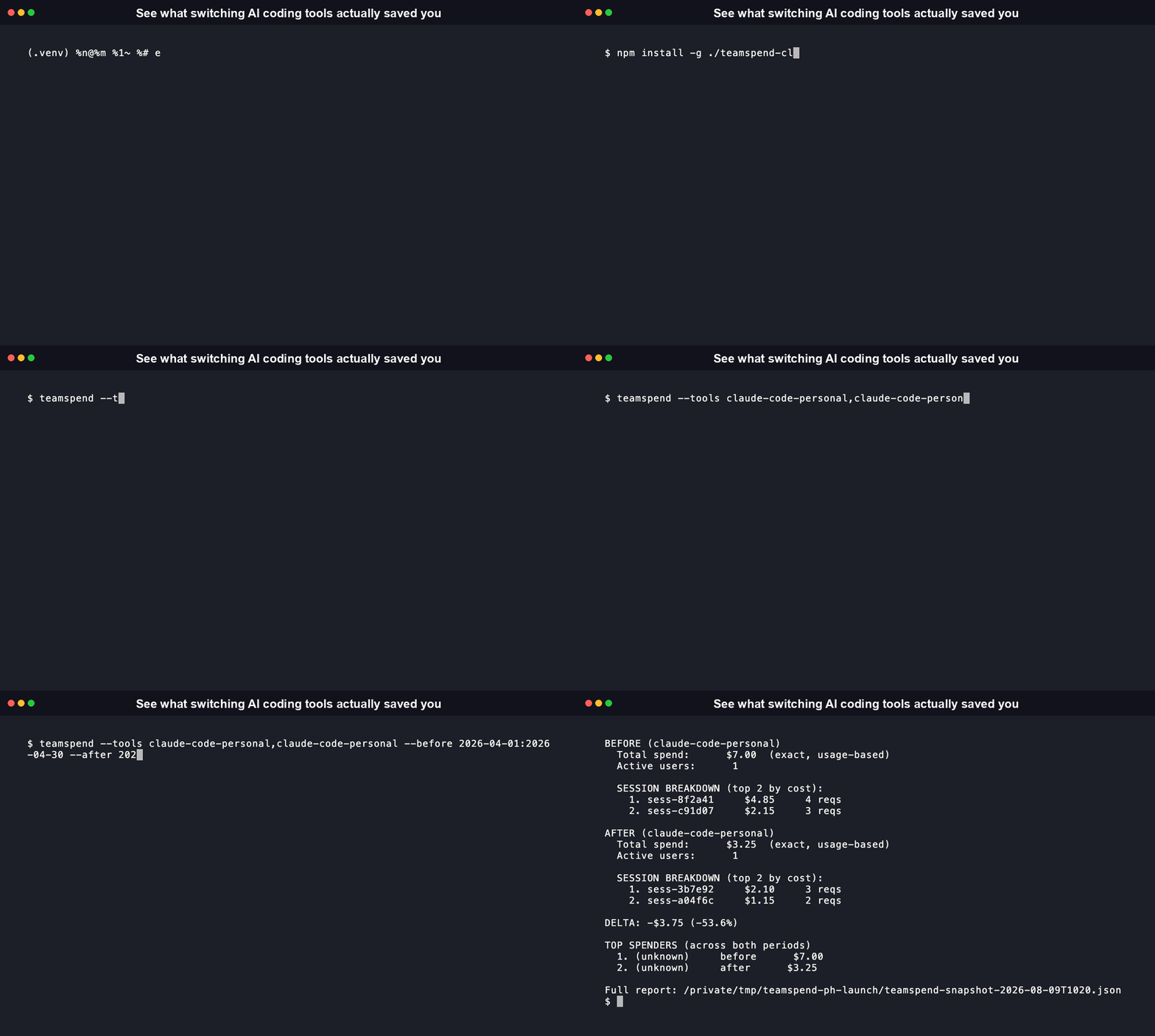 The recording above uses `claude-code-personal` (credential-free, reads local session logs) so the install-to-first-run flow plays end to end with no admin API keys required; the [live output shape](#see-it-in-action) is identical whichever adapter you point it at. ```bash npx teamspend-cli --tools cursor,claude-code --before 2026-04-01:2026-04-30 --after 2026-06-01:2026-06-30 ``` Six tools now, not two: Cursor, Claude Code, GitHub Copilot, OpenCode, and Codex CLI, plus a credential-free personal mode for anyone without admin access. More teams are running more than one AI coding tool at once, or moving between them, than ever before. Every one of those tools has a dashboard that's perfectly accurate about itself and structurally incapable of showing you anything else. teamspend is the missing piece: one real number, pulled straight from both tools' own APIs, showing exactly what changed. ## Table of contents - [See it in action](#see-it-in-action) - [What it actually does](#what-it-actually-does) - [Get started in under a minute](#get-started-in-under-a-minute) - [Built to be trusted, not just used](#built-to-be-trusted-not-just-used) - [CSV import, for the history a live API can't reach](#csv-import-for-the-history-a-live-api-cant-reach) - [GitHub Copilot support](#github-copilot-support) - [OpenCode: local-only, no API key needed](#opencode-local-only-no-api-key-needed) - [Codex CLI: local-only, no API key needed](#codex-cli-local-only-no-api-key-needed) - [Personal usage mode, for when you don't have admin access](#personal-usage-mode-for-when-you-dont-have-admin-access) - [Session-level cost breakdown](#session-level-cost-breakdown) - [Commands](#commands) - [Library API reference](#library-api-reference) - [MCP Server](#mcp-server) - [Roadmap](#roadmap) - [Good to know before you run it](#good-to-know-before-you-run-it) - [What is teamspend, and why does it exist](#what-is-teamspend-and-why-does-it-exist) - [How teamspend compares](#how-teamspend-compares) - [FAQ](#faq) - [Contributing](#contributing) - [Success stories](#success-stories) - [License](#license) ## See it in action npx teamspend-cli --tools cursor,claude-code --before 2026-04-01:2026-04-30 --after 2026-06-01:2026-06-30 Example output (shape shown below; your real numbers come from your own org's API data): teamspend snapshot -- migration cost comparison Tools: cursor -> claude-code BEFORE (cursor) Total spend: $2,140.00 (exact, usage-based) Active users: 14 AFTER (claude-code) Total spend: $1,860.00 (exact, usage-based) Active users: 14 DELTA: -$280.00 (-13.1%) Full report: ./teamspend-snapshot-2026-07-11T142842.json That's the whole product. One command, one honest number, zero spreadsheets. ## What it actually does - **Pulls real numbers, not scrapes or estimates.** Talks directly to Cursor's Admin API and Anthropic's Claude Enterprise Analytics API. What you see is what the vendor itself reports. - **Compares across tools, which no single vendor dashboard will ever do.** Cursor's dashboard shows Cursor. Claude Code's dashboard shows Claude Code. teamspend puts both numbers in the same sentence. - **Fills historical gaps with CSV import.** If your comparison window reaches back further than a tool's API history, hand it a CSV in the same shape and it folds those rows into the same report, no separate merge step. - **Never fails silently.** If one side of the comparison can't be fetched, you get a clear "data unavailable" and a reason, never a wrong number presented as a right one. - **Retries the way a production client should.** Rate limits, timeouts, and transient errors get exponential backoff automatically, capped and bounded, so a flaky API call doesn't mean a flaky result. - **Flags suspicious zeros instead of trusting them.** Flat-seat billing tiers on both Cursor and Claude Code can report an exact-looking `$0` for a user with real token activity. teamspend detects that pattern and marks the number estimated rather than showing a misleading zero. - **Ships with zero runtime dependencies.** No supply chain to audit but our own code. Native `fetch`, native argument parsing, native file I/O. ## Get started in under a minute teamspend ships two independent, equally first-class packages -- pick whichever fits your toolchain, or install both. They talk to the same six data sources and compute the same before/after delta. ```bash # npm -- JavaScript/TypeScript CLI + library npm install -g teamspend-cli # PyPI -- Python CLI + library (genuine port, not a wrapper around the Node binary) pip install teamspend-cli ``` Both packages are named `teamspend-cli` (the older plain `teamspend` name was renamed to match this project's other packages, then fully unpublished from both registries as of 2026-08-03 -- same maintainer, same repo, but no longer installable under any version). Either way, the installed command is `teamspend`. Give it the two API keys for the tools you're comparing: ```bash export TEAMSPEND_CURSOR_TOKEN=