[English](./README.md) | 中文
# vue-condition-watcher  [](https://circleci.com/gh/runkids/vue-condition-watcher) [](https://vuejs.org/) [](https://composition-api.vuejs.org/) [](https://www.npmjs.com/package/vue-condition-watcher) [](https://www.npmjs.com/package/vue-condition-watcher) [](https://bundlephobia.com/result?p=vue-condition-watcher) [](https://github.com/runkids/vue-condition-watcher/blob/master/LICENSE)
## 介紹
`vue-condition-watcher` 是 Vue 組合 API,以 `conditions` 為核心,可用在請求資料情境,還能簡單地使用 `conditions` 參數來自動獲取資料
> Node.js 需大於或等於 12.0.0 版本
## 功能
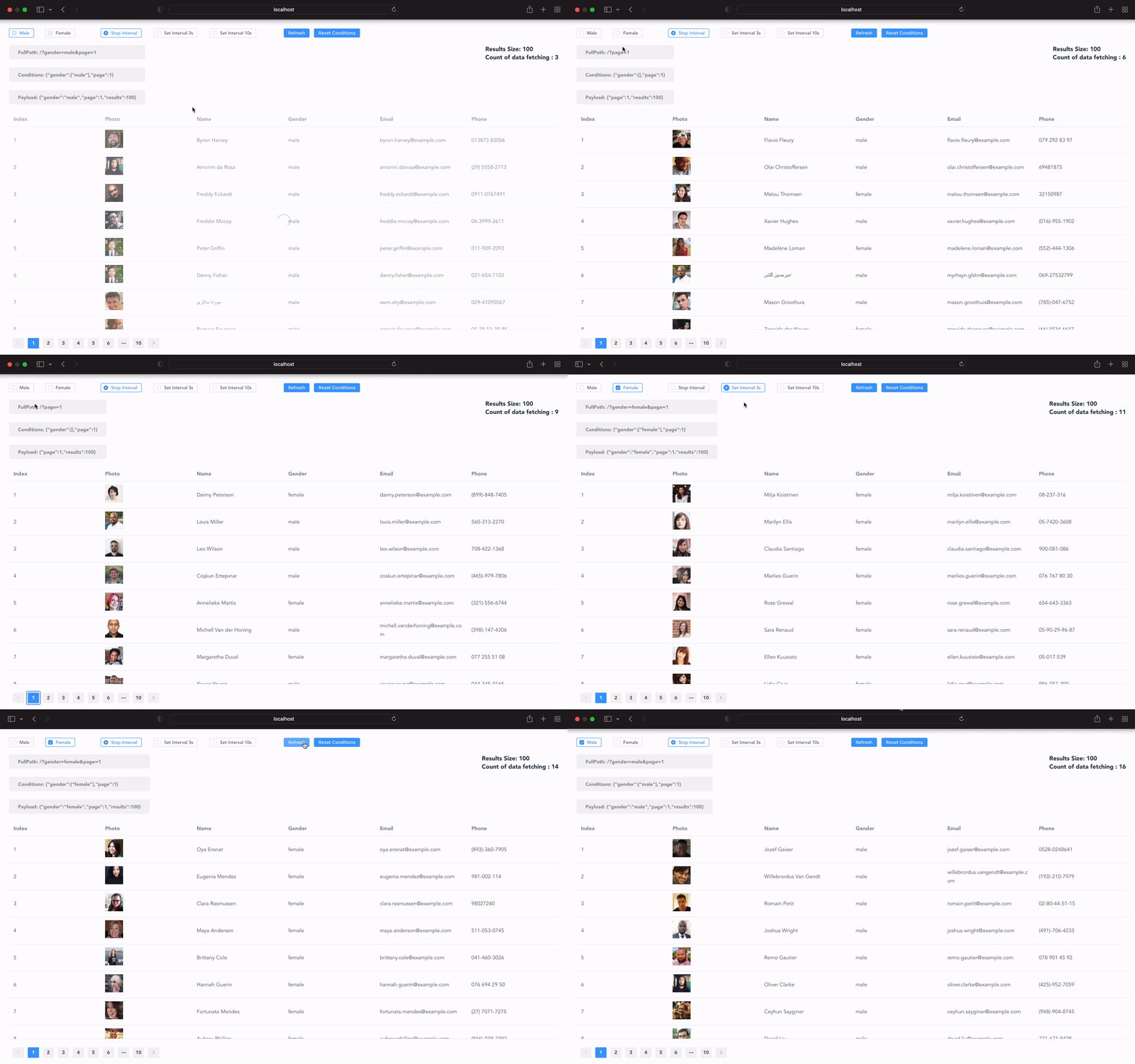
✔ 每當 `conditions` 變動,會自動獲取數據
[](https://circleci.com/gh/runkids/vue-condition-watcher) [](https://vuejs.org/) [](https://composition-api.vuejs.org/) [](https://www.npmjs.com/package/vue-condition-watcher) [](https://www.npmjs.com/package/vue-condition-watcher) [](https://bundlephobia.com/result?p=vue-condition-watcher) [](https://github.com/runkids/vue-condition-watcher/blob/master/LICENSE)
## 介紹
`vue-condition-watcher` 是 Vue 組合 API,以 `conditions` 為核心,可用在請求資料情境,還能簡單地使用 `conditions` 參數來自動獲取資料
> Node.js 需大於或等於 12.0.0 版本
## 功能
✔ 每當 `conditions` 變動,會自動獲取數據
✔ 送出請求前會自動過濾掉 `null` `undefined` `[]` `''`
✔ 重新整理網頁會自動依照 URL 的 query string 初始化 `conditions`,且會自動對應型別 ( string, number, array, date )
✔ 每當 `conditions` 變動,會自動同步 URL query string,並且讓上一頁下一頁都可以正常運作
✔ 避免 `race condition`,確保請求先進先出,也可以避免重複請求
✔ 在更新 `data` 前,可做到依賴請求 ( Dependent Request )
✔ 輕鬆處理分頁的需求,簡單客製自己的分頁邏輯
✔ 當網頁重新聚焦或是網絡斷線恢復自動重新請求資料
✔ 支援輪詢,可動態調整輪詢週期
✔ 緩存機制讓資料可以更快呈現,不用再等待 loading 動畫
✔ 不需要等待回傳結果,可手動改變 `data` 讓使用者體驗更好
✔ 支援 TypeScript
✔ 支援 Vue 2 & 3,感謝 [vue-demi](https://github.com/vueuse/vue-demi)
 ## Navigation
- [安裝](#installation)
- [快速開始](#快速開始)
- [Configs](#configs)
- [Return Values](#return-values)
- [執行請求](#執行請求)
- [阻止預請求](#阻止預請求)
- [手動觸發請求](#手動觸發請求)
- [攔截請求](#攔截請求)
- [變異資料](#變異資料)
- [Conditions 改變事件](#conditions-改變事件)
- [請求事件](#請求事件)
- [輪詢](#輪詢)
- [緩存](#緩存)
- [History 模式](#history-模式)
- [生命週期](#生命週期)
- [分頁處理](#分頁處理)
- [Changelog](https://github.com/runkids/vue-condition-watcher/blob/master/CHANGELOG.md)
## Demo
[👉 (推薦) 這邊下載 Vue3 版本範例](https://github.com/runkids/vue-condition-watcher/tree/master/examples/vue3) (使用 [Vite](https://github.com/vuejs/vite))
```bash
cd examples/vue3
yarn
yarn serve
````
[👉 這邊下載 Vue2 @vue/composition-api 版本範例](https://github.com/runkids/vue-condition-watcher/tree/master/examples/vue2)
```bash
cd examples/vue2
yarn
yarn serve
````
### 👉 線上 Demo
- [Demo with Vue 3 on StackBlitz](https://stackblitz.com/edit/vitejs-vite-tsvfqu?devtoolsheight=33&embed=1&file=src/views/Home.vue)
## 入門
### 安裝
在你的專案執行 yarn
```bash
yarn add vue-condition-watcher
```
或是使用 NPM
```bash
npm install vue-condition-watcher
```
CDN
```javascript
https://unpkg.com/vue-condition-watcher/dist/index.js
```
### 快速開始
這是一個使用 `vue-next` 和 `vue-router-next` 的簡單範例。
首先建立一個 `fetcher` function, 你可以用原生的 `fetch` 或是 `Axios` 這類的套件。接著 import `useConditionWatcher` 並開始使用它。
```javascript
createApp({
template: `
## Navigation
- [安裝](#installation)
- [快速開始](#快速開始)
- [Configs](#configs)
- [Return Values](#return-values)
- [執行請求](#執行請求)
- [阻止預請求](#阻止預請求)
- [手動觸發請求](#手動觸發請求)
- [攔截請求](#攔截請求)
- [變異資料](#變異資料)
- [Conditions 改變事件](#conditions-改變事件)
- [請求事件](#請求事件)
- [輪詢](#輪詢)
- [緩存](#緩存)
- [History 模式](#history-模式)
- [生命週期](#生命週期)
- [分頁處理](#分頁處理)
- [Changelog](https://github.com/runkids/vue-condition-watcher/blob/master/CHANGELOG.md)
## Demo
[👉 (推薦) 這邊下載 Vue3 版本範例](https://github.com/runkids/vue-condition-watcher/tree/master/examples/vue3) (使用 [Vite](https://github.com/vuejs/vite))
```bash
cd examples/vue3
yarn
yarn serve
````
[👉 這邊下載 Vue2 @vue/composition-api 版本範例](https://github.com/runkids/vue-condition-watcher/tree/master/examples/vue2)
```bash
cd examples/vue2
yarn
yarn serve
````
### 👉 線上 Demo
- [Demo with Vue 3 on StackBlitz](https://stackblitz.com/edit/vitejs-vite-tsvfqu?devtoolsheight=33&embed=1&file=src/views/Home.vue)
## 入門
### 安裝
在你的專案執行 yarn
```bash
yarn add vue-condition-watcher
```
或是使用 NPM
```bash
npm install vue-condition-watcher
```
CDN
```javascript
https://unpkg.com/vue-condition-watcher/dist/index.js
```
### 快速開始
這是一個使用 `vue-next` 和 `vue-router-next` 的簡單範例。
首先建立一個 `fetcher` function, 你可以用原生的 `fetch` 或是 `Axios` 這類的套件。接著 import `useConditionWatcher` 並開始使用它。
```javascript
createApp({
template: `
{{ !loading ? data : 'Loading...' }}
{{ error }}
`,
setup() {
const fetcher = params => axios.get('/user/', {params})
const router = useRouter()
const { conditions, data, loading, error } = useConditionWatcher(
{
fetcher,
conditions: {
name: ''
},
history: {
sync: router
}
}
)
return { conditions, data, loading, error }
},
})
.use(router)
.mount(document.createElement('div'))
```
您可以使用 `data`、`error` 和 `loading` 的值來確定請求的當前狀態。
當 `conditions.name` 值改變,將會觸發 [生命週期](#lifecycle) 重新發送請求.
你可以在 `config.history` 設定 sync 為 `sync: router`。 這將會同步 `conditions` 的變化到 URL 的 query string。
### 基礎用法
```js
const { conditions, data, error, loading, execute, resetConditions, onConditionsChange } = useConditionWatcher(config)
```
### Configs
- `fetcher`: (⚠️ 必要) 請求資料的 promise function。
- `conditions`: (⚠️ 必要) `conditions` 預設值。
- `defaultParams`: 每次請求預設會帶上的參數,不可修改。
- `initialData`: `data` 預設回傳 null,如果想定義初始的資料可以使用這個參數設定。
- `immediate`: 如果不想一開始自動請求資料,可以將此參數設定為 `false`,直到 `conditions` 改變或是執行 `execute` 才會執行請求。
- `manual`: 改為手動執行 `execute` 以觸發請求,就算 `conditions` 改變也不會自動請求。
- `history`: 基於 vue-router (v3 & v4),啟用同步 `conditions` 到 URL 的 Query String。當網頁重新整理後會同步 Query String 至 `conditions`
- `pollingInterval`: 啟用輪詢,以毫秒為單位可以是 `number` 或是 `ref(number)`
- `pollingWhenHidden`: 每當離開聚焦畫面繼續輪詢,預設是關閉的
- `pollingWhenOffline`: 每當網路斷線繼續輪詢,預設是關閉的
- `revalidateOnFocus`: 重新聚焦畫面後,重新請求一次,預設是關閉的
- `cacheProvider`: `vue-condition-watch` 背後會緩存資料,可傳入此參數自訂 `cacheProvider`
- `beforeFetch`: 你可以在請求前最後修改 `conditions`,也可以在此階段終止請求。
- `afterFetch`: 你可以在 `data` 更新前調整 `data` 的結果
- `onFetchError`: 當請求發生錯誤觸發,可以在`data` 和 `error` 更新前調整 `error`& `data`
### Return Values
- `conditions`:
Type: `reactive`
reactive 型態的物件 (基於 config 的 conditions),是 `vue-conditions-watcher`主要核心,每當 `conditions` 改變都會觸發[生命週期](#lifecycle)。
- `data`:
Type: `👁🗨 readonly & ⚠️ ref`
Default Value: `undefined`
`config.fetcher` 的回傳結果
- `error`:
Type: `👁🗨 readonly & ⚠️ ref`
Default Value: `undefined`
`config.fetcher` 錯誤返回結果
- `isFetching`:
Type: `👁🗨 readonly & ⚠️ ref`
Default Value: `false`
請求正在處理中的狀態
- `loading`: 當 `!data.value & !error.value` 就會是 `true`
- `execute`: 基於目前的 `conditions` 和 `defaultParams` 再次觸發請求。
- `mutate`: 可以使用此方法修改 `data`
**🔒 ( `data`預設是唯獨不可修改的 )**
- `resetConditions`: 重置 `conditions` 回初始值
- `onConditionsChange`: 在 `conditions` 發生變化時觸發,回傳新值以及舊值
- `onFetchSuccess`: 請求成功觸發,回傳原始的請求結果
- `onFetchError`: 請求失敗觸發,回傳原始的請求失敗結果
- `onFetchFinally`: 請求結束時觸發
### 執行請求
`conditions` 是響應式的, 每當 `conditions` 變化將自動觸發請求
```js
const { conditions } = useConditionWatcher({
fetcher,
conditions: {
page: 0
},
defaultParams: {
opt_expand: 'date'
}
})
conditions.page = 1 // fetch data with payload { page: 1, opt_expand: 'date' }
conditions.page = 2 // fetch data with payload { page: 2, opt_expand: 'date' }
```
如果有需要你可以執行 `execute` 這個 function 再次發送請求
```js
const { conditions, execute: refetch } = useConditionWatcher({
fetcher,
conditions: {
page: 0
},
defaultParams: {
opt_expand: 'date'
}
})
refetch() // fetch data with payload { page: 0, opt_expand: 'date' }
```
一次完整更新 `conditions`,**只會觸發一次請求**
```js
const { conditions, resetConditions } = useConditionWatcher({
fetcher,
immediate: false,
conditions: {
page: 0,
name: '',
date: []
},
})
// 初始化 conditions 將會觸發 `onConditionsChange` 事件
resetConditions({
name: 'runkids',
date: ['2022-01-01', '2022-01-02']
})
// 重置 conditions
function reset () {
// 直接用 `resetConditions` function 來重置初始值.
resetConditions()
}
```
### 阻止預請求
`vue-conditions-watcher` 會在一開始先請求一次,如果不想這樣做可以設定 `immediate` 為 `false`,將不會一開始就發送請求直到你呼叫 `execute` function 或是改變 `conditions`
```js
const { execute } = useConditionWatcher({
fetcher,
conditions,
immediate: false,
})
execute()
```
### 手動觸發請求
`vue-condition-watcher` 會自動觸發請求. 但是你可以設定 `manual` 為 `true` 來關閉這個功能。接著可以使用 `execute()` 在你想要的時機觸發請求。
```js
const { execute } = useConditionWatcher({
fetcher,
conditions,
manual: true,
})
execute()
```
### 攔截請求
`beforeFetch` 可以讓你在請求之前再次修改 `conditions`。
- 第一個參數回傳一個深拷貝的 `conditions`,你可以任意的修改它且不會影響原本 `conditions`,你可以在這邊調整要給後端的 API 格式。
- 第二個參數回傳一個 function,執行它將會終止這次請求。這在某些情況會很有用的。
- `beforeFetch` 可以處理同步與非同步行為。
- 必須返回修改後的 `conditions`
```js
useConditionWatcher({
fetcher,
conditions: {
date: ['2022/01/01', '2022/01/02']
},
initialData: [],
async beforeFetch(conditions, cancel) {
// 請求之前先檢查 token
await checkToken ()
// conditions 是一個深拷貝 `config.conditions` 的物件
const {date, ...baseConditions} = conditions
const [after, before] = date
baseConditions.created_at_after = after
baseConditions.created_at_before = before
// 返回修改後的 `conditions`
return baseConditions
}
})
```
`afterFetch` 可以在更新 `data` 前攔截請求,這時候的 `loading` 狀態還是 `true`。
- 你可以在這邊做依賴請求 🎭,或是處理其他同步與非同步行為
- 可以在這邊最後修改 `data`,返回的值將會是 `data` 的值
```js
const { data } = useConditionWatcher({
fetcher,
conditions,
async afterFetch(response) {
//response.data = {id: 1, name: 'runkids'}
if(response.data === null) {
return []
}
// 依賴其他請求
// `loading` 還是 `true` 直到 `onFetchFinally`
const finalResponse = await otherAPIById(response.data.id)
return finalResponse // [{message: 'Hello', sender: 'runkids'}]
}
})
console.log(data) //[{message: 'Hello', sender: 'runkids'}]
```
`onFetchError` 可以攔截錯誤,可以在 `data` 和 `error` 更新前調整 `error` & `data`,這時候的 `loading` 狀態還是 `true`。
- `onFetchError` 可以處理同步與非同步行為。
- 最後返回格式必須為
```js
{
data: ... ,
error: ...
}
```
```js
const { data, error } = useConditionWatcher({
fetcher,
conditions,
async onFetchError({data, error}) {
if(error.code === 401) {
await doSomething()
}
return {
data: [],
error: 'Error Message'
}
}
})
console.log(data) //[]
console.log(error) //'Error Message'
```
### 變異資料
在一些情況下, mutations `data` 是提升用戶體驗的好方法,因為不需要等待 API 回傳結果。
使用 `mutate` function, 你可以修改 `data`。 當 `onFetchSuccess` 觸發時會再改變 `data`。
有兩種方式使用 `mutate` function:
- 第一種:完整修改 data.
```js
mutate(newData)
```
- 第二種:使用 callback function,會接受一個深拷貝的 `data` 資料,修改完後再返回結果
```js
const finalData = mutate((draft) => {
draft[0].name = 'runkids'
return draft
})
console.log(finalData[0]name === data.value[0].name) //true
```
#### 🏄♂️ 範例:依據目前的資料來修改部分資料
POST API 會返回更新後的結果,我們不需要重新執行 `execute` 更新結果。我們可以用 `mutate` 的第二種方式來修改部分改動。
```js
const { conditions, data, mutate } = useConditionWatcher({
fetcher: api.userInfo,
conditions,
initialData: []
})
async function updateUserName (userId, newName, rowIndex = 0) {
console.log(data.value) //before: [{ id: 1, name: 'runkids' }, { id: 2, name: 'vuejs' }]
const response = await api.updateUer(userId, newName)
// 🚫 `data.value[0] = response.data`
// 沒作用! 因為 `data` 是唯讀不可修改的.
// Easy to use function will receive deep clone data, and return updated data.
mutate(draft => {
draft[rowIndex] = response.data
return draft
})
console.log(data.value) //after: [{ id: 1, name: 'mutate name' }, { id: 2, name: 'vuejs' }]
}
```
### Conditions 改變事件
`onConditionsChange` 可以幫助你處理 `conditions` 的變化。會回傳新值和舊值
```js
const { conditions, onConditionsChange } = useConditionWatcher({
fetcher,
conditions: {
page: 0
},
})
conditions.page = 1
onConditionsChange((conditions, preConditions)=> {
console.log(conditions) // { page: 1}
console.log(preConditions) // { page: 0}
})
```
### 請求事件
`onFetchResponse`, `onFetchError` 和 `onFetchFinally` 會在請求期間觸發。
```ts
const { onFetchResponse, onFetchError, onFetchFinally } = useConditionWatcher(config)
onFetchResponse((response) => {
console.log(response)
})
onFetchError((error) => {
console.error(error)
})
onFetchFinally(() => {
//todo
})
```
## 輪詢
你可以透過設定 `pollingInterval` 啟用輪詢功能(當為 0 時會關閉此功能)
```js
useConditionWatcher({
fetcher,
conditions,
pollingInterval: 1000
})
```
你還可以使用 `ref` 動態響應輪詢週期。
```js
const pollingInterval = ref(0)
useConditionWatcher({
fetcher,
conditions,
pollingInterval: pollingInterval
})
function startPolling () {
pollingInterval.value = 1000
}
onMounted(startPolling)
```
`vue-condition-watcher` 預設會在你離開畫面聚焦或是網路斷線時停用輪詢,直到畫面重新聚焦或是網路連線上了才會啟用輪詢。
你可以透過設定關閉預設行為:
- `pollingWhenHidden=true` 離開聚焦後繼續輪詢
- `pollingWhenOffline=true` 網路斷線還是會繼續輪詢
你也可以啟用聚焦畫面後重打請求,確保資料是最新狀態。
- `revalidateOnFocus=true`
```js
useConditionWatcher({
fetcher,
conditions,
pollingInterval: 1000,
pollingWhenHidden: true, // pollingWhenHidden default is false
pollingWhenOffline: true, // pollingWhenOffline default is false
revalidateOnFocus: true // revalidateOnFocus default is false
})
```
## 緩存
`vue-condition-watcher` 預設會在當前組件緩存你的第一次數據。接著後面的請求會先使用緩存數據,背後默默請求新資料,等待最新回傳結果並比對緩存資料是否相同,達到類似預加載的效果。
你也可以設定 `cacheProvider` 全局共用或是緩存資料在 `localStorage`,搭配輪詢可以達到分頁同步資料的效果。
###### Global Based
```js
// App.vue
```
###### [LocalStorage Based](https://swr.vercel.app/docs/advanced/cache#localstorage-based-persistent-cache)
```js
function localStorageProvider() {
const map = new Map(JSON.parse(localStorage.getItem('your-cache-key') || '[]'))
window.addEventListener('beforeunload', () => {
const appCache = JSON.stringify(Array.from(map.entries()))
localStorage.setItem('your-cache-key', appCache)
})
return map
}
useConditionWatcher({
fetcher,
conditions,
cacheProvider: localStorageProvider
})
```
## History 模式
你可以設定 `config.history` 啟用 History 模式,是基於 vue-router 的,支援 v3 和 v4 版本
```js
const router = useRouter()
useConditionWatcher({
fetcher,
conditions,
history: {
sync: router
}
})
```
你還可以設定 `history.ignore` 排除 `conditions` 部分的 `key&value` 不要同步到 URL query string.
```js
const router = useRouter()
useConditionWatcher({
fetcher,
conditions: {
users: ['runkids', 'hello']
limit: 20,
offset: 0
},
history: {
sync: router,
ignore: ['limit']
}
})
// the query string will be ?offset=0&users=runkids,hello
```
History mode 會轉換 `conditions`預設值的對應型別到 query string 而且會過濾掉 `undefined`, `null`, `''`, `[]` 這些類型的值.
```js
conditions: {
users: ['runkids', 'hello']
company: ''
limit: 20,
offset: 0
}
// the query string will be ?offset=0&limit=20&users=runkids,hello
```
每當你重新整理網頁還會自動同步 query string 到 `conditions`
```
URL query string: ?offset=0&limit=10&users=runkids,hello&company=vue
```
`conditions` 將變成
```js
{
users: ['runkids', 'hello']
company: 'vue'
limit: 10,
offset: 0
}
```
使用 `navigation` 可以 push 或是 replace 當前的位置. 預設值為 'push'
```js
useConditionWatcher({
fetcher,
conditions: {
limit: 20,
offset: 0
},
history: {
sync: router,
navigation: 'replace'
}
})
```
## 生命週期
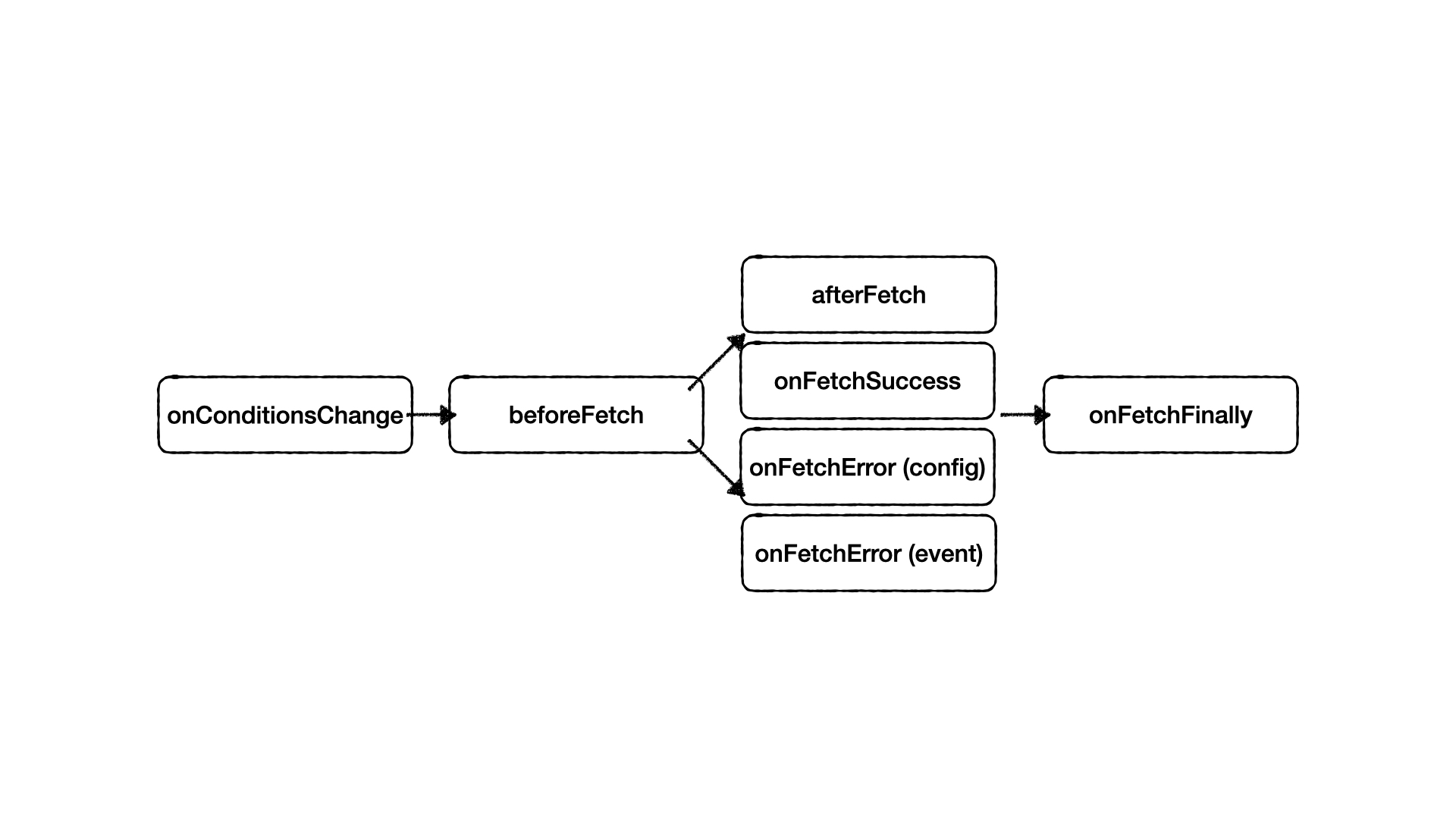 - ##### `onConditionsChange`
`conditions` 變更時觸發,會返回新舊值。
```js
onConditionsChange((cond, preCond)=> {
console.log(cond)
console.log(preCond)
})
```
- ##### `beforeFetch`
可以讓你在請求之前再次修改 `conditions`,也可以在這個階段終止請求。
```js
const { conditions } = useConditionWatcher({
fetcher,
conditions,
beforeFetch
})
async function beforeFetch(cond, cancel){
if(!cond.token) {
// stop fetch
cancel()
// will fire onConditionsChange again
conditions.token = await fetchToken()
}
return cond
})
```
- ##### `afterFetch` & `onFetchSuccess`
`afterFetch` 會在 `onFetchSuccess` 前觸發
- ##### `onConditionsChange`
`conditions` 變更時觸發,會返回新舊值。
```js
onConditionsChange((cond, preCond)=> {
console.log(cond)
console.log(preCond)
})
```
- ##### `beforeFetch`
可以讓你在請求之前再次修改 `conditions`,也可以在這個階段終止請求。
```js
const { conditions } = useConditionWatcher({
fetcher,
conditions,
beforeFetch
})
async function beforeFetch(cond, cancel){
if(!cond.token) {
// stop fetch
cancel()
// will fire onConditionsChange again
conditions.token = await fetchToken()
}
return cond
})
```
- ##### `afterFetch` & `onFetchSuccess`
`afterFetch` 會在 `onFetchSuccess` 前觸發
`afterFetch` 可以在`data` 更新前修改 `data`
||Type|Modify data before update| Dependent request |
|-----|--------|------|------|
|afterFetch| config | ⭕️ | ⭕️ |
|onFetchSuccess | event | ❌ | ❌ |
```html
{{ data?.detail }}
```
```js
const { data, onFetchSuccess } = useConditionWatcher({
fetcher,
conditions,
async afterFetch(response){
//response = { id: 1 }
const detail = await fetchDataById(response.id)
return detail // { id: 1, detail: 'xxx' }
})
})
onFetchSuccess((response)=> {
console.log(response) // { id: 1, detail: 'xxx' }
})
```
- ##### `onFetchError(config)` & `onFetchError(event)`
`config.onFetchError` 會在 `event.onFetchError` 前觸發
`config.onFetchError` 可以攔截錯誤,可以在 `data` 和 `error` 更新前調整 `error` & `data`。
||Type|Modify data before update|Modify error before update|
|-----|--------|------|------|
|onFetchError| config | ⭕️ | ⭕️ |
|onFetchError | event | ❌ | ❌ |
```js
const { onFetchError } = useConditionWatcher({
fetcher,
conditions,
onFetchError(ctx){
return {
data: [],
error: 'Error message.'
}
})
})
onFetchError((error)=> {
console.log(error) // origin error data
})
```
- ##### `onFetchFinally`
請求結束時觸發
```js
onFetchFinally(async ()=> {
//do something
})
```
## 重複使用
建立 `vue-condition-watcher` 的可重用的 hook 非常容易。
```js
function useUserExpensesHistory (id) {
const { conditions, data, error, loading } = useConditionWatcher({
fetcher: params => api.user(id, { params }),
defaultParams: {
opt_expand: 'amount,place'
},
conditions: {
daterange: []
}
immediate: false,
initialData: [],
beforeFetch(cond, cancel) {
if(!id) {
cancel()
}
const { daterange, ...baseCond } = cond
if(daterange.length) {
[baseCond.created_at_after, baseCond.created_at_before] = [
daterange[0],
daterange[1]
]
}
return baseCond
}
})
return {
histories: data,
isFetching: loading,
isError: error,
daterange: conditions.daterange
}
}
```
接著在 components 使用:
```js
```
```html
{{ `${history.created_at}: ${history.amount}` }}
```
恭喜你! 🥳 你已經學會再次包裝 `vue-condition-watcher`.
現在我們來用 `vue-condition-watcher` 做分頁的處理.
## 分頁處理
這個範例適用 Django the limit and offset functions 和 Element UI.
建立 `usePagination`
```js
function usePagination () {
let cancelFlag = false // check this to cancel fetch
const { startLoading, stopLoading } = useLoading()
const { conditions, data, execute, resetConditions, onConditionsChange, onFetchFinally } = useConditionWatcher(
{
fetcher: api.list,
conditions: {
daterange: [],
limit: 20,
offset: 0
}
immediate: true,
initialData: [],
history: {
sync: 'router',
// You can ignore the key of URL query string, prevent users from entering unreasonable numbers by themselves.
// The URL will look like ?offset=0 not show `limit`
ignore: ['limit']
},
beforeFetch
},
)
// use on pagination component
const currentPage = computed({
get: () => conditions.offset / conditions.limit + 1,
set: (page) => {
conditions.offset = (page - 1) * conditions.limit
}
})
// onConditionsChange -> beforeFetch -> onFetchFinally
onConditionsChange((newCond, oldCond) => {
// When conditions changed, reset offset to 0 and then will fire beforeEach again.
if (newCond.offset !== 0 && newCond.offset === oldCond.offset) {
cancelFlag = true
conditions.offset = 0
}
})
async function beforeFetch(cond, cancel) {
if (cancelFlag) {
// cancel fetch when cancelFlag be true
cancel()
cancelFlag = false // reset cancelFlag
return cond
}
// start loading
await nextTick()
startLoading()
const { daterange, ...baseCond } = cond
if(daterange.length) {
[baseCond.created_at_after, baseCond.created_at_before] = [
daterange[0],
daterange[1]
]
}
return baseCond
}
onFetchFinally(async () => {
await nextTick()
// stop loading
stopLoading()
window.scrollTo(0, 0)
})
return {
data,
conditions,
currentPage,
resetConditions,
refetch: execute
}
}
```
接著在 components 使用:
```js
```
```html
Refetch Data
Reset Offset
{{ info }}
```
當 daterange or limit 改變時, 會將 offset 設置為 0,接著才會重新觸發請求。
## TDOD List
- [ ] Error Retry
- [ ] Nuxt SSR SSG Support
## Thanks
This project is heavily inspired by the following awesome projects.
- [vercel/swr](https://github.com/vercel/swr)
## 📄 License
[MIT License](https://github.com/runkids/vue-condition-watcher/blob/master/LICENSE) © 2020-PRESENT [Runkids](https://github.com/runkids)