
RunMat
MATLAB-compatible runtime for fast GPU-accelerated math.




Download RunMat
|
Docs
|
Changelog
|
Benchmarks
RunMat is an open-source, high-performance runtime designed for numerical computing using MATLAB-style syntax. It is built in Rust and provides a multi-tiered execution model that targets both CPU and GPU hardware without requiring manual management of tensor allocations and movement.
The system is designed to be a drop-in runtime for .m files, offering automatic operation fusion, a high performance compiler, and a cross-platform GPU backend powered by wgpu.
Key Capabilities:
- MATLAB Compatibility: Supports standard .m file syntax, including arrays, complex control flow, and over 400 built-in functions
- Automatic Fusion: Builds an internal graph of array operations to fuse elementwise math and reductions into optimized kernels
- Tiered Execution: Combines a fast-startup VM interpreter with a JIT (based on Cranelift) for hot code paths
- Cross-Platform GPU: Transparently offloads workloads to Metal, DirectX 12, Vulkan, or WebGPU
- Strong Static Analysis: Type/shape inference, definite assignment, and other static analysis passes are run before execution to optimize the execution plan.
- Async Runtime: Built on Rust futures, allowing non-blocking execution in web environments, CLI tools and headless pipelines
- Integrated Plotting: Features an interactive GPU-accelerated 2D/3D plotting engine supporting 30+ plot types
> [!NOTE]
> RunMat is pre-1.0 software. The core runtime, CLI, GPU engine, and TypeScript bindings are usable today, but compatibility coverage is still expanding.
## Quick Start
The quickest way to get started with RunMat is to download the [RunMat Desktop](https://runmat.com/download) application.
Alternatively, you can install the CLI:
```bash
# Linux/macOS
curl -fsSL https://runmat.com/install.sh | sh
# Windows PowerShell
iwr https://runmat.com/install.ps1 | iex
```
Create a script `hello.m`:
```matlab
disp("Hello, World!");
A = magic(3);
disp(sum(A));
```
Run the script:
```bash
runmat hello.m
```
See [Hello World](/docs/getting-started/hello-world.md) for more examples, and the [Command Line Interface](/docs/getting-started/cli.md) for the full command surface.
## Other Installation Options
```bash
# Homebrew (macOS/Linux)
brew install runmat-org/tap/runmat
# Cargo (Rust)
cargo install runmat --features gui
# Build from source
git clone https://github.com/runmat-org/runmat.git && cd runmat
cargo build -p runmat --release --features gui
```
## CLI
The CLI can run local scripts or named project entrypoints - on local or remote projects.
```bash
runmat analysis.m
# which is shorthand for:
runmat run analysis.m
```
Projects can define named entrypoints in `runmat.toml`:
```toml
[package]
name = "demo"
[entrypoints.main]
path = "src/main.m"
```
Run the entrypoint:
```bash
runmat run main
```
To run a script in a remote project backend, ensure you are authenticated and have selected a project:
```bash
runmat login
# or explicitly specify the server URL
runmat login --server https://api.runmat.com
runmat project select
```
And then run the script:
```bash
runmat remote run /scripts/analysis.m
```
The script is executed locally with the remote filesystem provider mounted into the runtime's filesystem abstraction. This means that mutations to the filesystem are persisted to the remote project, but the script runs locally.
For the full command surface, see [Command Line Interface](docs/getting-started/cli.md).
## TypeScript And WebAssembly
The `runmat` npm package embeds the runtime in browser, worker, Electron, and Node-based hosts.
```bash
npm install runmat
```
```ts
import { initRunMat } from "runmat";
const session = await initRunMat();
const result = await session.executeRequest({
source: {
kind: "text",
name: "",
text: "A = magic(3); disp(A)"
}
});
console.log(result.stdout);
console.log(result.workspace.values);
session.dispose();
```
The TypeScript API includes session execution, workspace snapshots, lazy variable materialization, filesystem providers, plotting surfaces, stdout subscriptions, runtime diagnostics, and GPU status reporting.
See [bindings/ts/README.md](bindings/ts/README.md) and [WASM & TypeScript/JavaScript](docs/wasm/index.md).
## What Is In This Repository
| Area | Crates and paths |
| --- | --- |
| Language frontend | `runmat-lexer`, `runmat-parser`, `runmat-hir`, `runmat-mir`, `runmat-static-analysis` |
| Execution | `runmat-core`, `runmat-vm`, `runmat-runtime`, `runmat-builtins` |
| JIT | `runmat-turbine` |
| GPU acceleration | `runmat-accelerate`, `runmat-accelerate-api` |
| Memory management | `runmat-gc`, `runmat-gc-api` |
| Plotting | `runmat-plot` |
| Filesystem and config | `runmat-filesystem`, `runmat-config` |
| CLI and remote services | `runmat-cli`, `runmat-server-client` |
| Browser bindings | `runmat-wasm`, `bindings/ts` |
| Tooling | `runmat-lsp`, `runmat-snapshot`, `runmat-telemetry`, `runmat-logging` |
The runtime is host-neutral. The CLI, WASM bindings, LSP, and future application hosts all submit source through the same session/execution boundary and consume structured results.
## Runtime Highlights
- MATLAB-style source execution for scripts, functions, packages, imports, `classdef`, indexing, cells, structs, exceptions, and common language constructs.
- A large builtin library covering array operations, math, statistics, signal processing, image I/O, file I/O, tables, plotting, strings, dates, optimization, ODEs, and control-system basics.
- A bytecode VM for predictable startup and a Cranelift JIT for hot execution paths.
- GPU acceleration through fusion, auto-offload decisions, and `wgpu` backends for Metal, Vulkan, DirectX 12, and WebGPU.
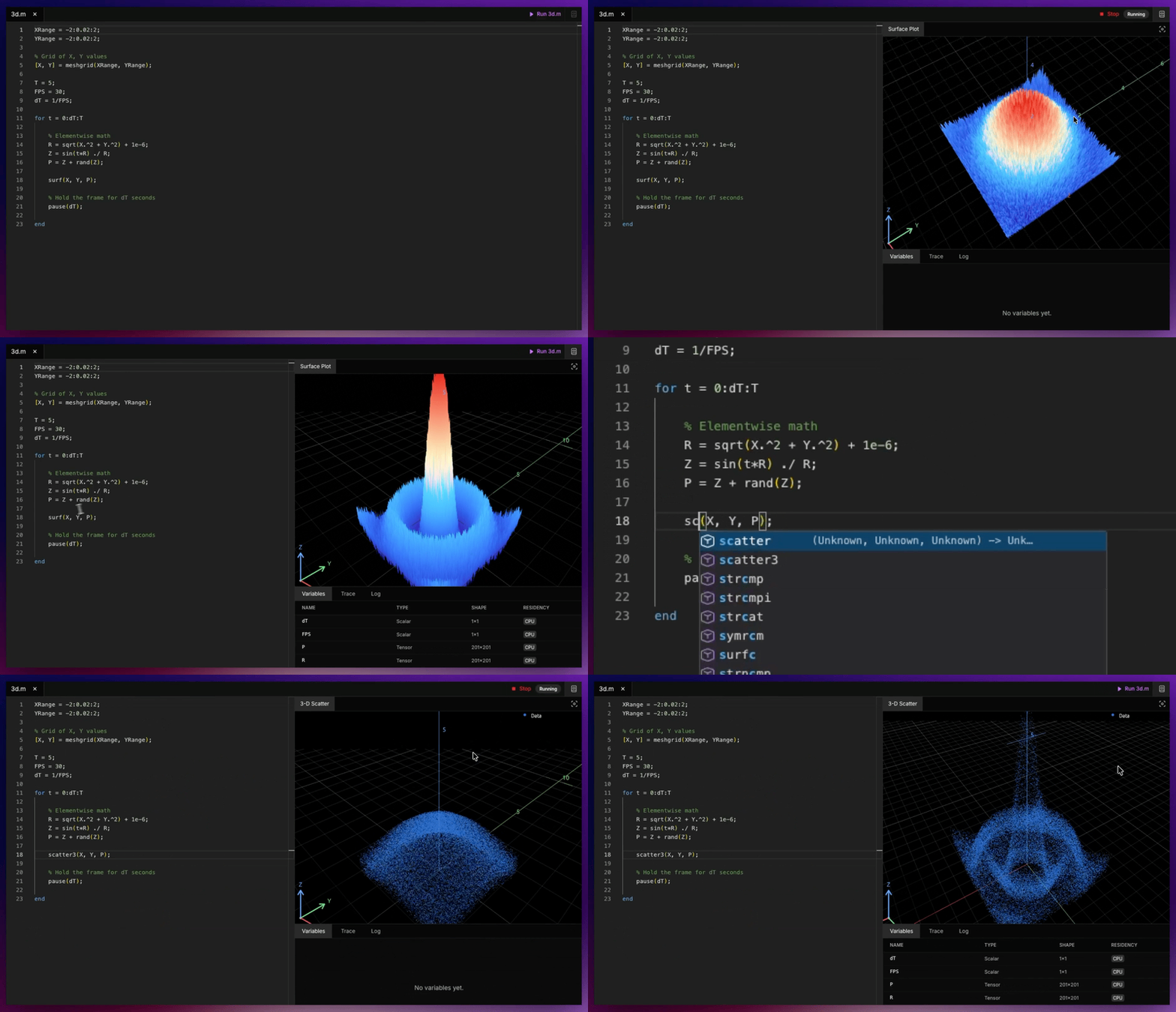
- Interactive 2D and 3D plotting with figure handles, subplot state, labels, legends, export, replay, and browser canvas integration.
- Session APIs for REPLs, notebooks, editors, browser sandboxes, and remote filesystem-backed projects.
- TypeScript bindings with filesystem providers for memory, IndexedDB, and remote HTTP-backed workspaces.
## GPU Acceleration
RunMat's acceleration engine captures array operations into fusion plans, estimates whether CPU or GPU execution is better for the current shapes, and keeps tensors resident on device when downstream work can reuse them.
```matlab
x = rand(10_000_000, 1, "single");
y = sin(x) .* exp(-x / single(10));
z = tanh(y) + single(0.1) .* y;
m = mean(z, "all");
```
Elementwise chains and reductions like this can be fused into larger GPU dispatches without writing kernel code. Smaller workloads can stay on CPU when transfer overhead would dominate.
See [GPU Acceleration & Fusion Engine](docs/gpu/index.md).
## Plotting
RunMat includes an open plotting engine used by the CLI, browser sandbox, and TypeScript bindings.
```matlab
x = 0:0.1:10;
plot(x, sin(x));
title("Sine wave");
grid on;
```
See [Plotting System](docs/plotting/index.md).
## Documentation
Start here:
- [Installation](docs/getting-started/install.md)
- [Command Line Interface](docs/getting-started/cli.md)
- [Configuration Reference](docs/getting-started/config.md)
- [Hello World](docs/getting-started/hello-world.md)
- [MATLAB Language Compatibility](docs/getting-started/compatability.md)
Runtime internals:
- [Compilation Pipeline](docs/compiler/index.md)
- [Virtual Machine](docs/vm/index.md)
- [Runtime Values & Type Model](docs/VALUES.md)
- [Builtins](docs/builtins/index.md)
- [Session Engine](docs/session/index.md)
- [GPU Acceleration](docs/gpu/index.md)
- [JIT Compiler](docs/jit/index.md)
- [Filesystem Abstraction](docs/fs/index.md)
- [WebAssembly & TypeScript](docs/wasm/index.md)
- [Language Server Protocol](docs/lsp/index.md)
- [Development](docs/development/index.md)
The full docs index is [docs/README.md](docs/README.md).
## Benchmarks
The [benchmarks](benchmarks/README.md) directory contains reproducible cross-language comparisons against NumPy, PyTorch, Octave, and Julia where applicable.
Representative published runs include:
| Benchmark | Result |
| --- | --- |
| [Monte Carlo GBM risk simulation](benchmarks/monte-carlo-analysis/README.md) | Up to 131x faster than NumPy on the published sweep. |
| [Elementwise math](benchmarks/elementwise-math/README.md) | Up to 144x faster than PyTorch at 1B elements on the published sweep. |
| [4K image preprocessing](benchmarks/4k-image-processing/README.md) | Up to 10x faster than NumPy on the published sweep. |
Run the suite:
```bash
python3 benchmarks/.harness/run_suite.py \
--suite benchmarks/.harness/suite.json \
--output results/suite_results.json
```
Benchmark results depend on hardware, driver stack, backend selection, and workload shape. The benchmark harness records device details and parity checks with each run.
## Development
Install the Rust toolchain from `rust-toolchain.toml`, then build the workspace:
```bash
cargo build
cargo test
```
Build the CLI with plotting support:
```bash
cargo build -p runmat --release --features gui
```
Work on the TypeScript/WASM package:
```bash
cd bindings/ts
npm install
npm run build
npm test
```
Useful docs:
- [Build System](docs/development/build-system.md)
- [Testing Strategy](docs/development/testing.md)
- [Supported Architectures](docs/development/supported-architectures.md)
- [Benchmarking](docs/development/benchmarking.md)
- [Telemetry](docs/development/telemetry.md)
## License
RunMat is licensed under the [Apache License 2.0](LICENSE.md).
RunMat is a registered trademark of Dystr Inc. MATLAB is a registered trademark of The MathWorks, Inc. RunMat is not affiliated with, endorsed by, or sponsored by The MathWorks, Inc.