# RSDayFlow 
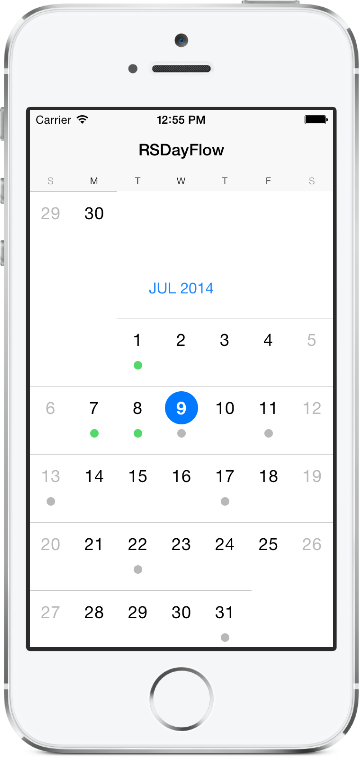
iOS 12+ Calendar with Infinite Scrolling. Only need 4 lines of code to set up.
> [RSDayFlow](https://github.com/ruslanskorb/RSDayFlow) is a slim fork of [DayFlow](https://github.com/evadne/DayFlow) with updates and extensions:
* Visual feedback of the currently selected cell
* Possibility to mark the date
* Design like iOS 7
* Much more updates
## Installation
*RSDayFlow requires iOS 12.0 or later.*
### Using [Swift Package Manager](https://swift.org/package-manager/)
1. To add the `RSDayFlow` package to your Xcode project, select File > Swift Packages > Add Package Dependency and enter the repository URL.
https://github.com/ruslanskorb/RSDayFlow.git
## Basic Usage
Import the class header.
``` objective-c
#import "RSDFDatePickerView.h"
```
Just create your date picker view and set a delegate / a data source if needed.
``` objective-c
- (void)viewDidLoad
{
[super viewDidLoad];
RSDFDatePickerView *datePickerView = [[RSDFDatePickerView alloc] initWithFrame:self.view.bounds];
datePickerView.delegate = self;
datePickerView.dataSource = self;
[self.view addSubview:datePickerView];
}
```
## Delegate (optional)
`RSDFDatePickerView` provides three delegate methods. The method `datePickerView:shouldHighlightDate:` asks the delegate if the date should be highlighted during tracking. The method `datePickerView:shouldSelectDate:` asks the delegate if the specified date should be selected. The method `datePickerView:didSelectDate:` called when a user click on a specific date. To use them, implement the delegate in your view controller.
```objective-c
@interface ViewController ()
```
Then implement the delegate functions.
```objective-c
// Returns YES if the date should be highlighted or NO if it should not.
- (BOOL)datePickerView:(RSDFDatePickerView *)view shouldHighlightDate:(NSDate *)date
{
return YES;
}
// Returns YES if the date should be selected or NO if it should not.
- (BOOL)datePickerView:(RSDFDatePickerView *)view shouldSelectDate:(NSDate *)date
{
return YES;
}
// Prints out the selected date.
- (void)datePickerView:(RSDFDatePickerView *)view didSelectDate:(NSDate *)date
{
NSLog(@"%@", [date description]);
}
```
## DataSource (optional)
`RSDFDatePickerView` provides three data source methods. The method `datePickerView:shouldMarkDate:` asks the data source if the date should be marked. The method `datePickerView:markImageColorForDate:` asks the data source about the color of the default mark image for the specified date. The method `datePickerView:markImageForDate:` asks the data source about the mark image for the specified date. The method `datePickerView:markImageColorForDate:` will be ignored if the method `datePickerView:markImageForDate:` is implemented. To use these methods, implement the data source in your view controller.
```objective-c
@interface ViewController ()
```
Then implement the data source functions.
```objective-c
// Returns YES if the date should be marked or NO if it should not.
- (BOOL)datePickerView:(RSDFDatePickerView *)view shouldMarkDate:(NSDate *)date
{
// The date is an `NSDate` object without time components.
// So, we need to use dates without time components.
NSCalendar *calendar = [NSCalendar currentCalendar];
unsigned unitFlags = NSYearCalendarUnit | NSMonthCalendarUnit | NSDayCalendarUnit;
NSDateComponents *todayComponents = [calendar components:unitFlags fromDate:[NSDate date]];
NSDate *today = [calendar dateFromComponents:todayComponents];
return [date isEqual:today];
}
// Returns the color of the default mark image for the specified date.
- (UIColor *)datePickerView:(RSDFDatePickerView *)view markImageColorForDate:(NSDate *)date
{
if (arc4random() % 2 == 0) {
return [UIColor grayColor];
} else {
return [UIColor greenColor];
}
}
// Returns the mark image for the specified date.
- (UIImage *)datePickerView:(RSDFDatePickerView *)view markImageForDate:(NSDate *)date
{
if (arc4random() % 2 == 0) {
return [UIImage imageNamed:@"img_gray_mark"];
} else {
return [UIImage imageNamed:@"img_green_mark"];
}
}
```
## Customization
Every view is customizable to fit your need.
Create a subclass of the desired view and override the default values.
## Coming Soon
- If you would like to request a new feature, feel free to raise as an issue.
## Demo
Build and run the `RSDayFlowExample` project in Xcode to see `RSDayFlow` in action.
Have fun. Make it faster. Fork and send pull requests. Figure out hooks for customization.
## Contact
Ruslan Skorb
- http://github.com/ruslanskorb
- ruslan.skorb@gmail.com
## License
This project is is available under the MIT license. See the LICENSE file for more info. Attribution by linking to the [project page](https://github.com/ruslanskorb/RSDayFlow) is appreciated.