# [rviscomi/capo.js](https://github.com/rviscomi/capo.js)
_Get your `` in order_
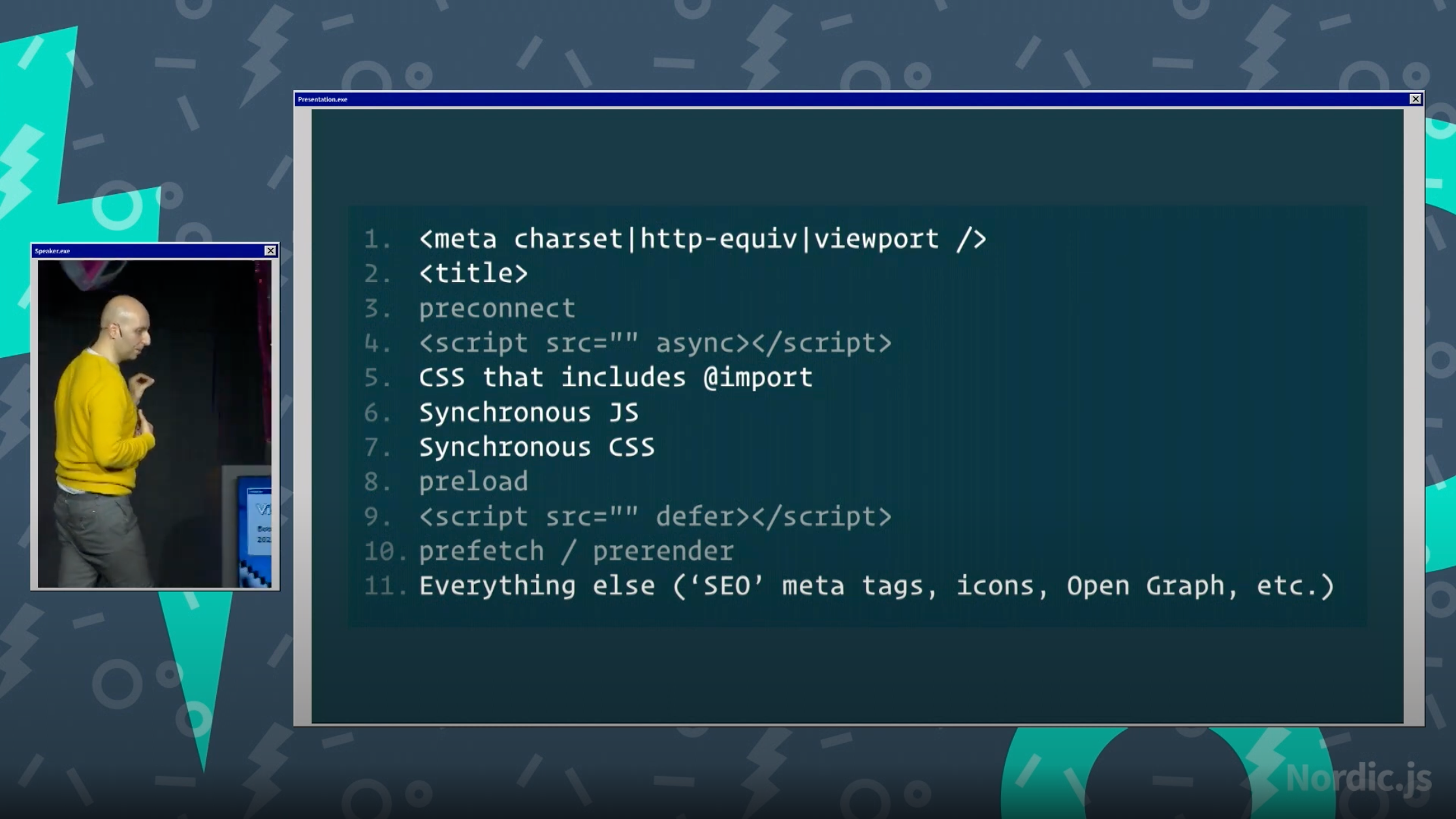
Inspired by [Harry Roberts](https://twitter.com/csswizardry)' work on [ct.css](https://csswizardry.com/ct/) and [Vitaly Friedman](https://twitter.com/smashingmag)'s [Nordic.js 2022 presentation](https://youtu.be/uqLl-Yew2o8?t=2873):
## Why it matters
How you order elements in the `` can have an effect on the (perceived) performance of the page.
This script helps you identify which elements are out of order.
## How to use it
✨ _New: Install the [Capo Chrome extension](https://chrome.google.com/webstore/detail/capo-get-your-%3Chead%3E-in-o/ohabpnaccigjhkkebjofhpmebofgpbeb)_ ✨
1. Install the [Chrome extension](https://chrome.google.com/webstore/detail/capo-get-your-%3Chead%3E-in-o/ohabpnaccigjhkkebjofhpmebofgpbeb)
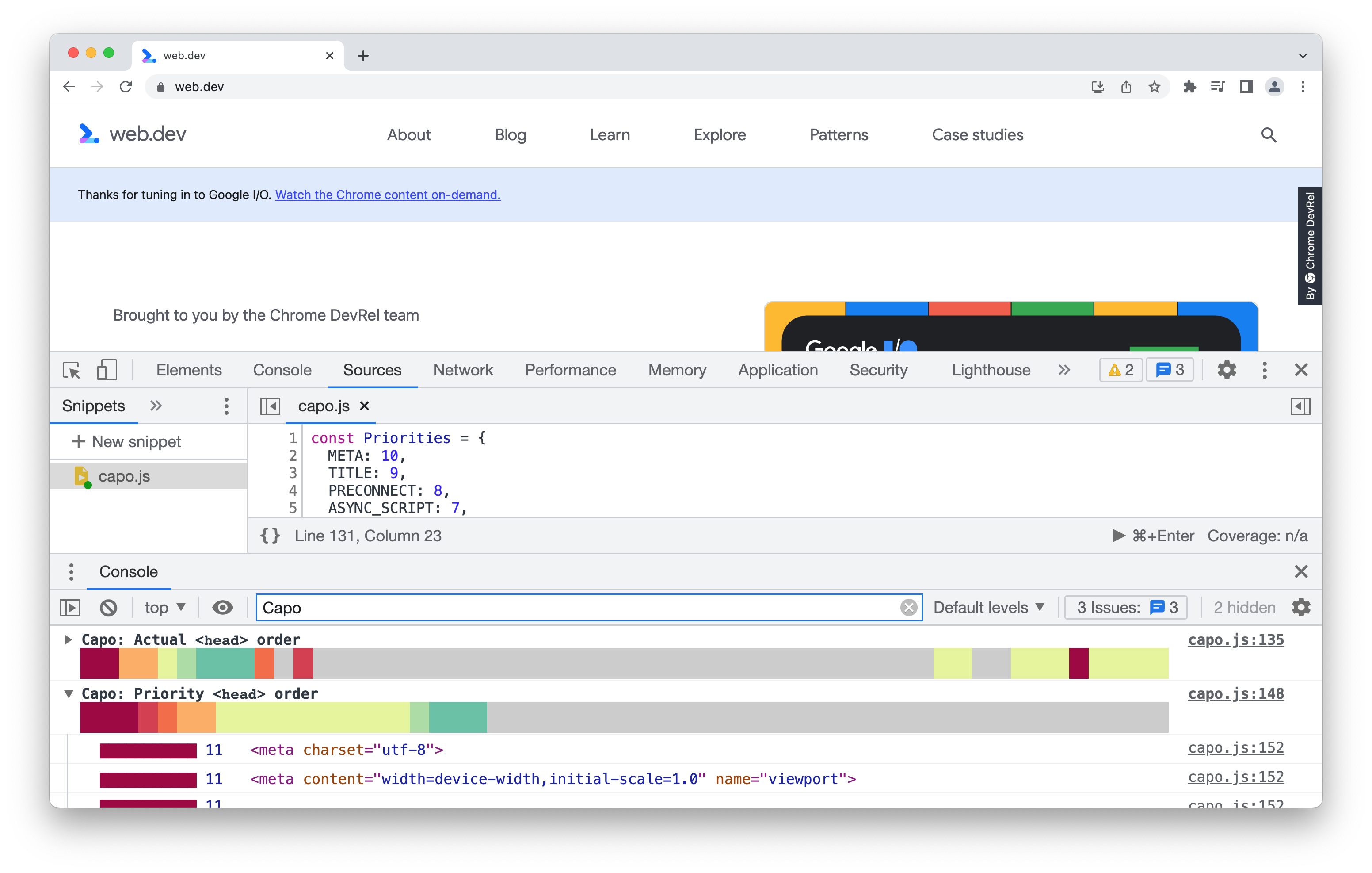
2. Explore the console logs
 For applications that add lots of dynamic content to the `` on the client, it'd be more accurate to look at the server-rendered `` instead.
## Programmatic API (v2)
You can also use capo.js programmatically to analyze HTML `` elements in Node.js or other JavaScript environments.
### Installation
```bash
npm install @rviscomi/capo.js
```
### Usage
#### ES Modules
```javascript
import { analyzeHead } from '@rviscomi/capo.js';
import { BrowserAdapter } from '@rviscomi/capo.js/adapters';
const head = /* your head element */;
const result = analyzeHead(head, new BrowserAdapter());
```
#### CommonJS
```javascript
const { analyzeHead } = require('@rviscomi/capo.js');
const { BrowserAdapter } = require('@rviscomi/capo.js/adapters');
const head = /* your head element */;
const result = analyzeHead(head, new BrowserAdapter());
```
Learn more about building your own adapters in the [custom adapters docs](https://rviscomi.github.io/capo.js/developer/custom-adapters/).
### Subpath Exports
Import only what you need for smaller bundle sizes:
```javascript
// Import just the core analyzer
import { analyzeHead, checkOrdering } from '@rviscomi/capo.js';
// Import just adapters
import { BrowserAdapter } from '@rviscomi/capo.js/adapters';
// Import rules API
import { ElementWeights, getWeight } from '@rviscomi/capo.js/rules';
// Import validation API
import { isValidElement, getValidationWarnings } from '@rviscomi/capo.js/validation';
```
### API Reference
#### Core Functions
- `analyzeHead(head, adapter)` - Analyzes a head element and returns detailed results
- `analyzeHeadWithOrdering(head, adapter)` - Analyzes with ordering violations
- `checkOrdering(elements)` - Checks for ordering violations in element array
- `getWeightCategory(weight)` - Gets the category name for a weight value
#### Rules API
- `ElementWeights` - Constant object mapping element types to weight values
- `getWeight(element, adapter)` - Gets the weight for a specific element
- `getHeadWeights(head, adapter)` - Gets weights for all elements in head
Plus individual detector functions: `isMeta()`, `isTitle()`, `isPreconnect()`, etc.
#### Validation API
- `VALID_HEAD_ELEMENTS` - Array of valid head element names
- `isValidElement(element, adapter)` - Checks if an element is valid in head
- `hasValidationWarning(element, adapter)` - Checks if element has warnings
- `getValidationWarnings(head, adapter)` - Gets all validation warnings
- `getCustomValidations(element, adapter)` - Gets custom validation rules
#### Adapters
- `BrowserAdapter` - For working with browser DOM elements
- `AdapterInterface` - Base interface for custom adapters
- `validateAdapter(adapter)` - Validates an adapter implementation
### Migration from v1.x
See the [migration guide](docs/src/content/docs/migration-v2.mdx) for detailed migration guide.
**Key changes:**
- All analysis functions now require an adapter parameter
- New subpath exports for granular imports
- Enhanced TypeScript support via JSDoc
### Chrome extension

See the [extension docs](docs/src/content/docs/user/extension.mdx) for detailed usage instructions.
### Other
Alternatively, you can use local overrides in DevTools to manually inject the capo.js script into the document so that it runs before anything else, eg the first child of ``. Harry Roberts also has a nifty [video](https://www.youtube.com/watch?v=UOn0b5kn3jk) showing how to use this feature. This has some drawbacks as well, for example the inline script might be blocked by CSP.
Another idea would be to use something like Cloudflare workers to inject the script into the HTML stream. To work around CSP issues, you can write the worker in such a way that it parses out the correct `nonce` and adds it to the inline script. _(Note: Not tested, but please share examples if you get it working! _😄_)_
## Summary view
The script logs two info groups to the console: the actual order of the ``, and the optimal order. In this collapsed view, you can see at a glance whether there are any high impact elements out of order.
Each "weight" has a corresponding color, with red being the highest and blue/grey being the lowest. See [src/lib/rules.js](src/lib/rules.js) for the exact mapping.
Here are a few examples.
### www.nytimes.com
For applications that add lots of dynamic content to the `` on the client, it'd be more accurate to look at the server-rendered `` instead.
## Programmatic API (v2)
You can also use capo.js programmatically to analyze HTML `` elements in Node.js or other JavaScript environments.
### Installation
```bash
npm install @rviscomi/capo.js
```
### Usage
#### ES Modules
```javascript
import { analyzeHead } from '@rviscomi/capo.js';
import { BrowserAdapter } from '@rviscomi/capo.js/adapters';
const head = /* your head element */;
const result = analyzeHead(head, new BrowserAdapter());
```
#### CommonJS
```javascript
const { analyzeHead } = require('@rviscomi/capo.js');
const { BrowserAdapter } = require('@rviscomi/capo.js/adapters');
const head = /* your head element */;
const result = analyzeHead(head, new BrowserAdapter());
```
Learn more about building your own adapters in the [custom adapters docs](https://rviscomi.github.io/capo.js/developer/custom-adapters/).
### Subpath Exports
Import only what you need for smaller bundle sizes:
```javascript
// Import just the core analyzer
import { analyzeHead, checkOrdering } from '@rviscomi/capo.js';
// Import just adapters
import { BrowserAdapter } from '@rviscomi/capo.js/adapters';
// Import rules API
import { ElementWeights, getWeight } from '@rviscomi/capo.js/rules';
// Import validation API
import { isValidElement, getValidationWarnings } from '@rviscomi/capo.js/validation';
```
### API Reference
#### Core Functions
- `analyzeHead(head, adapter)` - Analyzes a head element and returns detailed results
- `analyzeHeadWithOrdering(head, adapter)` - Analyzes with ordering violations
- `checkOrdering(elements)` - Checks for ordering violations in element array
- `getWeightCategory(weight)` - Gets the category name for a weight value
#### Rules API
- `ElementWeights` - Constant object mapping element types to weight values
- `getWeight(element, adapter)` - Gets the weight for a specific element
- `getHeadWeights(head, adapter)` - Gets weights for all elements in head
Plus individual detector functions: `isMeta()`, `isTitle()`, `isPreconnect()`, etc.
#### Validation API
- `VALID_HEAD_ELEMENTS` - Array of valid head element names
- `isValidElement(element, adapter)` - Checks if an element is valid in head
- `hasValidationWarning(element, adapter)` - Checks if element has warnings
- `getValidationWarnings(head, adapter)` - Gets all validation warnings
- `getCustomValidations(element, adapter)` - Gets custom validation rules
#### Adapters
- `BrowserAdapter` - For working with browser DOM elements
- `AdapterInterface` - Base interface for custom adapters
- `validateAdapter(adapter)` - Validates an adapter implementation
### Migration from v1.x
See the [migration guide](docs/src/content/docs/migration-v2.mdx) for detailed migration guide.
**Key changes:**
- All analysis functions now require an adapter parameter
- New subpath exports for granular imports
- Enhanced TypeScript support via JSDoc
### Chrome extension

See the [extension docs](docs/src/content/docs/user/extension.mdx) for detailed usage instructions.
### Other
Alternatively, you can use local overrides in DevTools to manually inject the capo.js script into the document so that it runs before anything else, eg the first child of ``. Harry Roberts also has a nifty [video](https://www.youtube.com/watch?v=UOn0b5kn3jk) showing how to use this feature. This has some drawbacks as well, for example the inline script might be blocked by CSP.
Another idea would be to use something like Cloudflare workers to inject the script into the HTML stream. To work around CSP issues, you can write the worker in such a way that it parses out the correct `nonce` and adds it to the inline script. _(Note: Not tested, but please share examples if you get it working! _😄_)_
## Summary view
The script logs two info groups to the console: the actual order of the ``, and the optimal order. In this collapsed view, you can see at a glance whether there are any high impact elements out of order.
Each "weight" has a corresponding color, with red being the highest and blue/grey being the lowest. See [src/lib/rules.js](src/lib/rules.js) for the exact mapping.
Here are a few examples.
### www.nytimes.com
 ### docs.github.io
 ### web.dev
 ## stackoverflow.com
 ## Detailed view
Expanding the actual or sorted views reveals the detailed view. This includes an itemized list of each `` element and its weight as well as a reference to the actual or sorted `` element.
### www.nytimes.com
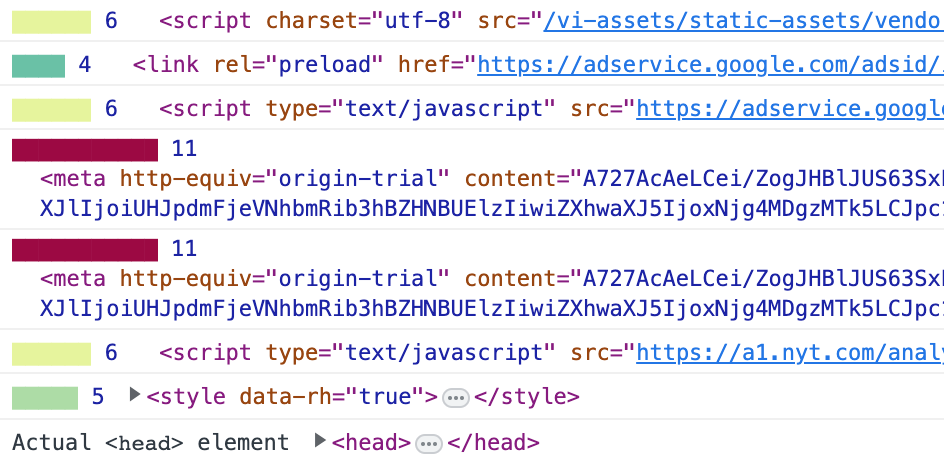
Here you can see a drilled-down view of the end of the `` for the NYT site, where high impact origin trial meta elements are set too late.
## Detailed view
Expanding the actual or sorted views reveals the detailed view. This includes an itemized list of each `` element and its weight as well as a reference to the actual or sorted `` element.
### www.nytimes.com
Here you can see a drilled-down view of the end of the `` for the NYT site, where high impact origin trial meta elements are set too late.