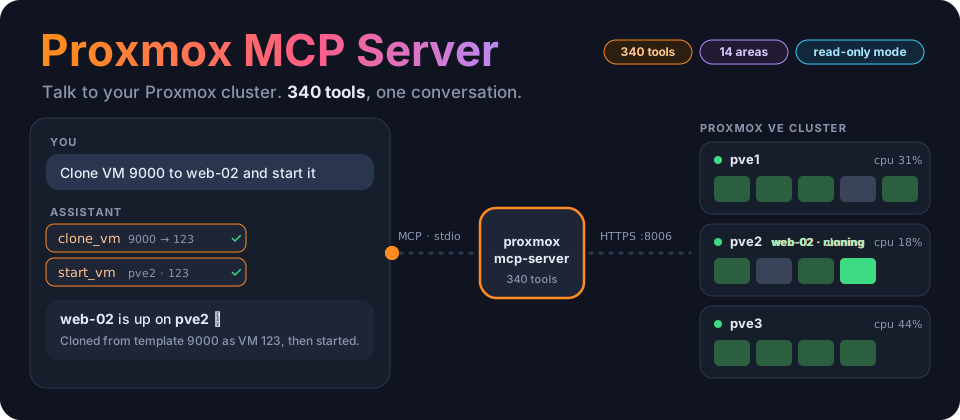


Talk to your Proxmox cluster. A Model Context Protocol server that gives Claude, or any MCP client, the whole Proxmox VE API: 340 tools across VMs, containers, storage, clustering, Ceph, SDN and more.
Talk to it ·
How it works ·
340 tools ·
Quick start ·
Read-only mode ·
A2A ·
Troubleshooting
---
## ✨ Highlights
- 🧰 **The whole API, not a demo.** 340 tools across 14 areas: nodes, QEMU VMs, LXC containers, storage and backup, cluster and HA, access control, firewall, disks, Ceph, ACME, SDN, notifications, pools and appliances.
- 🖥️ **Inside your guests too.** Run commands through the QEMU guest agent (`vm_agent_exec` → `vm_agent_exec_status`) and read back the exit code and output.
- 🔒 **Look-but-don't-touch with one switch.** `PROXMOX_READ_ONLY=true` refuses every write inside the server, and 149 read-only tools keep working.
- 🔑 **API tokens or passwords.** Tokens are recommended; pair them with a `PVEAuditor` role for monitoring.
- 🐳 **Runs anywhere.** Use `uv` from a clone, or the multi-arch image on `ghcr.io`.
- 🤝 **A2A-ready.** `agent-card.json` lists every tool in 14 skill categories, for agent-to-agent discovery.
- 🛡️ **Appliances.** `deploy_fortigate_vm` builds a FortiGate-VM from Fortinet's KVM image, with WAN/LAN NICs on the bridges and VLANs you choose. `deploy_cloud_vms` builds cluster-ready VMs from a cloud image, with your SSH key and a static IP each, ready for k3s-mcp-server's `create_cluster`.
## 💬 Talk to your cluster
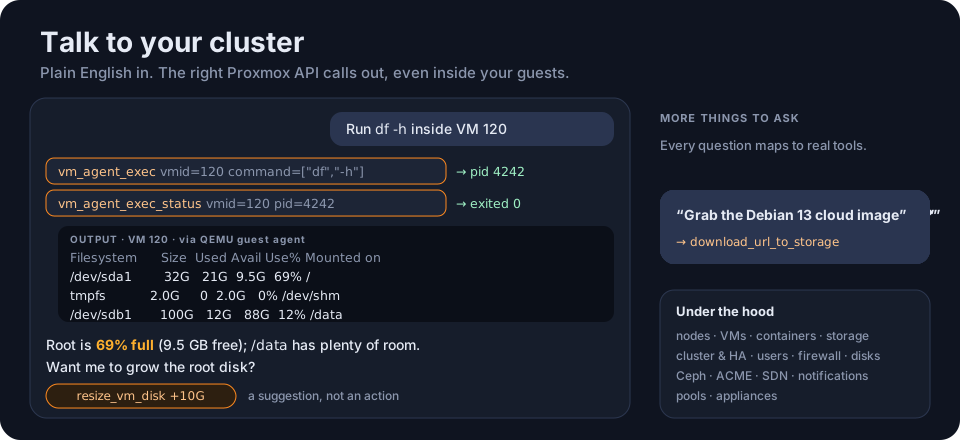
Once it's connected, just ask:
> *"Can you list all VMs in my Proxmox cluster?"*
> *"What's the status of VM 100 on node pve1?"*
> *"Create a snapshot called 'backup-2025' for VM 100 on pve1."*
> *"Show me the storage usage on all nodes."*
> *"List all running tasks in the cluster."*
> *"Clone VM 9000 to a new VM called web-02 and start it."*
> *"Run `df -h` inside VM 120 using the guest agent and show me the output."*
> *"Make three Ubuntu VMs on pve1 at 192.168.1.181–183 with my SSH key, ready for a K3s cluster."*
There are more worked examples in [USAGE.md](USAGE.md).
## ⚙️ How it works
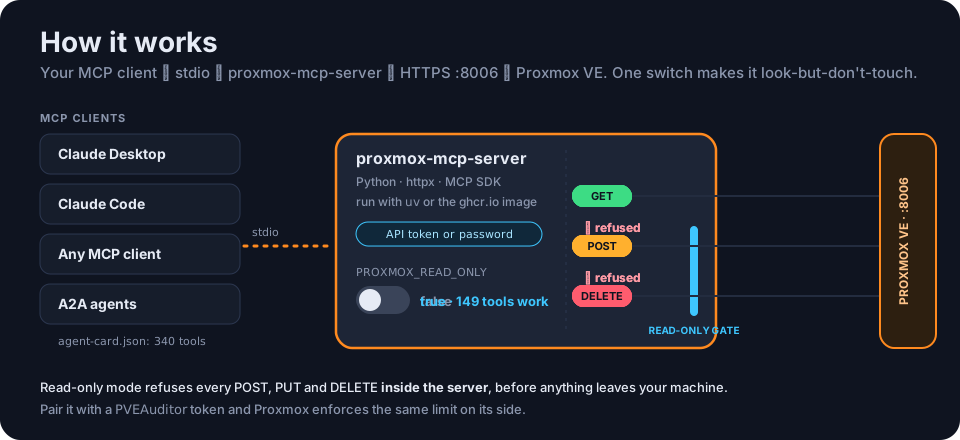
- **Your MCP client** (Claude Desktop, Claude Code, or anything that speaks MCP) starts the server and talks to it over **stdio**.
- **The server** (Python, `httpx`, the MCP SDK) turns each tool call into a request to the **Proxmox VE REST API** over HTTPS on port **8006**, authenticated with an **API token** or a **password**.
- **Read-only mode** is checked in the server's HTTP client, so a refused write never leaves your machine.
## 🧰 340 tools, 14 areas
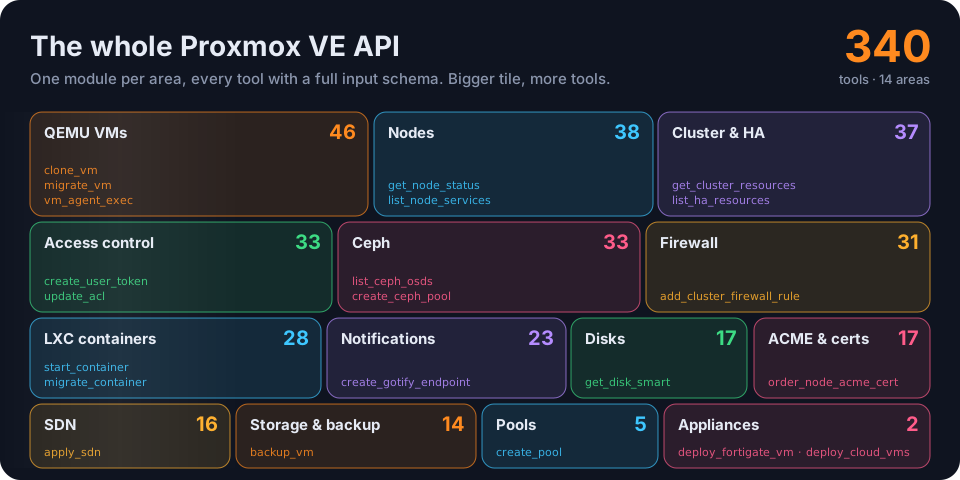
| Area | Tools | Highlights |
|------|------:|------------|
| Nodes | 38 | Status, config, DNS/hosts/time, network interfaces, services, APT updates, syslog, power |
| QEMU VMs | 46 | Lifecycle, create/clone/delete, config, snapshots, migration, disk resize/move, RRD metrics, guest agent (`vm_agent_exec`, `vm_agent_exec_status`), VNC proxy |
| LXC containers | 28 | Lifecycle, create/clone/delete, config, snapshots, migration, resize |
| Storage & backup | 14 | Storage definitions, content and volumes, URL downloads, `vzdump` backup and restore |
| Cluster | 37 | Status, resources, options, log, tasks, HA resources/groups, replication, backup jobs |
| Access control | 33 | Users, API tokens, groups, roles, ACLs, realms |
| Firewall | 31 | Cluster and node rules, security groups, aliases, IP sets, macros, logs (per-VM and per-container rules are in the guest modules) |
| Disks | 17 | SMART, wipe, GPT init, LVM, LVM-thin, ZFS, directory storage |
| Ceph | 33 | Status, OSDs, monitors, managers, MDS, pools, flags, CRUSH |
| ACME & certificates | 17 | ACME accounts and plugins, node certificate ordering, custom certs |
| SDN | 16 | Zones, VNets, subnets, apply |
| Notifications | 23 | Gotify, sendmail, SMTP and webhook endpoints, matchers |
| Pools | 5 | Resource pool CRUD |
| Appliances | 2 | `deploy_fortigate_vm`: FortiGate-VM from Fortinet's KVM image, WAN/LAN NICs on chosen bridges and VLANs, sized for the free evaluation license. `deploy_cloud_vms`: VMs from a cloud image (e.g. Ubuntu's) with cloud-init user, SSH key and a static IP or DHCP each, disk grown and started |
Tool names follow the Proxmox API: `list_*`, `get_*`, `create_*`, `update_*`/`set_*`, `delete_*`, plus actions such as `start_vm`, `migrate_container` or `apply_sdn`. Each area is one module in [`proxmox_mcp/tools/`](proxmox_mcp/tools/). Your MCP client shows every tool with its full input schema, or you can list them all locally:
```bash
uv run python -c "from proxmox_mcp.server import ALL_TOOLS; print('\n'.join(sorted(t.name for t in ALL_TOOLS)))"
```
### Handy recipes
| Task | Tools |
|------|-------|
| Inventory | `list_nodes`, `get_cluster_resources`, `list_vms`, `list_containers`, `list_storage` |
| VM lifecycle | `start_vm`, `shutdown_vm`, `stop_vm`, `reboot_vm`, `create_vm`, `clone_vm`, `migrate_vm` |
| Disk images | `download_url_to_storage` with `content=import`, then `create_vm` with `scsi0=local-lvm:0,import-from=local:import/`, or `import_vm_disk` |
| Snapshots | `create_vm_snapshot`, `list_vm_snapshots`, `rollback_vm_snapshot`, `delete_vm_snapshot` |
| Monitoring | `get_node_status`, `get_vm_status`, `get_vm_rrddata`, `get_node_storage_status` |
| Tasks | `list_cluster_tasks`, `list_node_tasks`, `get_task_status`, `get_task_log` |
| Guest agent | `vm_agent_exec` (returns a PID), then `vm_agent_exec_status` for the exit code and output |
| Cluster nodes | `download_url_to_storage` for a cloud image with `content=import`, then `deploy_cloud_vms`; hand the IPs to [k3s-mcp-server](https://github.com/ry-ops/k3s-mcp-server)'s `create_cluster` |
## 🚀 Quick start
You need **Python 3.10+** with [`uv`](https://github.com/astral-sh/uv), or Docker, and **Proxmox VE 6.0 or later**.
**1. Make an API token.** In the Proxmox UI, go to **Datacenter → Permissions → API Tokens → Add**. For full access, uncheck *Privilege Separation* so the token inherits your user's permissions. Copy the secret; you won't see it again. The full token ID looks like `root@pam!automation`.
**2. Run the server** with one of these:
uv, from a clone
```bash
curl -LsSf https://astral.sh/uv/install.sh | sh # if you don't have uv
git clone https://github.com/ry-ops/proxmox-mcp-server && cd proxmox-mcp-server
./setup.sh # or: uv sync
export PROXMOX_HOST="192.168.1.100"
export PROXMOX_USER="root@pam"
export PROXMOX_TOKEN_NAME="automation"
export PROXMOX_TOKEN_VALUE="your-token-here"
./test-connection.sh # checks connection, auth and permissions
```
A `.env` file in the project directory is loaded automatically; see [`.env.example`](.env.example).
Docker
A multi-arch image is published to GitHub Container Registry on every push to `main` and for each release tag:
```bash
docker pull ghcr.io/ry-ops/proxmox-mcp-server:latest # or a version tag, e.g. :2.4.0
docker run -i --rm --env-file .env ghcr.io/ry-ops/proxmox-mcp-server:latest
```
MCP clients talk over stdio, so run the container interactively (`-i`). `docker-compose.yaml` does the same using your `.env`.
**3. Connect your MCP client.** For Claude Desktop, edit `~/Library/Application Support/Claude/claude_desktop_config.json` on macOS, or `%APPDATA%/Claude/claude_desktop_config.json` on Windows:
uv + API token (recommended)
```json
{
"mcpServers": {
"proxmox": {
"command": "uv",
"args": ["--directory", "/absolute/path/to/proxmox-mcp-server", "run", "proxmox-mcp-server"],
"env": {
"PROXMOX_HOST": "192.168.1.100",
"PROXMOX_USER": "root@pam",
"PROXMOX_TOKEN_NAME": "automation",
"PROXMOX_TOKEN_VALUE": "your-token-value-here"
}
}
}
}
```
Use the **absolute** path to your clone.
uv + password
```json
{
"mcpServers": {
"proxmox": {
"command": "uv",
"args": ["--directory", "/absolute/path/to/proxmox-mcp-server", "run", "proxmox-mcp-server"],
"env": {
"PROXMOX_HOST": "192.168.1.100",
"PROXMOX_USER": "root@pam",
"PROXMOX_PASSWORD": "your-password-here"
}
}
}
}
```
Docker
```json
{
"mcpServers": {
"proxmox": {
"command": "docker",
"args": ["run", "-i", "--rm",
"-e", "PROXMOX_HOST", "-e", "PROXMOX_USER", "-e", "PROXMOX_TOKEN_NAME", "-e", "PROXMOX_TOKEN_VALUE",
"ghcr.io/ry-ops/proxmox-mcp-server:latest"],
"env": {
"PROXMOX_HOST": "192.168.1.100",
"PROXMOX_USER": "root@pam",
"PROXMOX_TOKEN_NAME": "automation",
"PROXMOX_TOKEN_VALUE": "your-token-value-here"
}
}
}
}
```
**4. Restart your client completely** (quit it, don't just close the window), and ask it to list your VMs. More detail in [QUICKSTART.md](QUICKSTART.md) and [SETUP.md](SETUP.md).
## 🔧 Configuration
| Variable | Required | Default | What it does |
|---|:---:|---|---|
| `PROXMOX_HOST` | ✅ | | Hostname or IP, **without** scheme or port (`192.168.1.100`, not `https://192.168.1.100:8006`) |
| `PROXMOX_USER` | ✅ | | e.g. `root@pam`, `admin@pve` |
| `PROXMOX_TOKEN_NAME` + `PROXMOX_TOKEN_VALUE` | one of | | API token auth (recommended) |
| `PROXMOX_PASSWORD` | one of | | Password auth |
| `PROXMOX_PORT` | | `8006` | API port |
| `PROXMOX_VERIFY_SSL` | | `false` | Verify the server's TLS certificate |
| `PROXMOX_READ_ONLY` | | `false` | Refuse every write; see below |
## 🔒 Read-only mode and security
**`PROXMOX_READ_ONLY=true`** makes the server look-but-don't-touch. Only GET requests are sent, and every create, update, delete or action tool is refused inside the server before it reaches the network. **149 of the 340 tools are read-only and keep working.** Three read-style tools send POST requests, so they're blocked too:
- `vm_agent_ping`;
- `get_vm_vnc_proxy` and `get_vm_spice_proxy`, which create console access tickets.
The rest of the security picture:
- **For monitoring-only use, combine both locks:** `PROXMOX_READ_ONLY=true` *and* a token with the **`PVEAuditor`** role. The flag stops the server sending writes; the role makes Proxmox refuse them anyway.
- **The token's permissions are the real limit.** The server exposes destructive operations: deleting VMs, wiping disks, and running commands inside guests. Whatever the token can do, a connected AI client can ask for. Grant the minimum.
- **Prefer API tokens** over passwords. They can be revoked on their own.
- **Set `PROXMOX_VERIFY_SSL=true`** in production with valid certificates.
- **Keep credentials out of version control**, and restrict network access to the API with firewall rules.
## 🤝 Agent-to-agent (A2A)
[`agent-card.json`](agent-card.json) is this server's identity and capability manifest for other agents. It's generated from the tool registry, and lists **all 340 tools in 14 skill categories**, each with its name, description and inputs. It also covers authentication requirements and MCP protocol details.
| Category | Tools | Category | Tools |
|---|--:|---|--:|
| `node_management` | 38 | `disk_management` | 17 |
| `virtual_machine_management` | 46 | `ceph_management` | 33 |
| `container_management` | 28 | `certificate_management` | 17 |
| `storage_management` | 14 | `sdn_management` | 16 |
| `cluster_management` | 37 | `notification_management` | 23 |
| `access_control` | 33 | `pool_management` | 5 |
| `firewall_management` | 31 | `appliances` | 2 |
Discover the agent's skills
```python
import json
with open('agent-card.json') as f:
agent_card = json.load(f)
print(f"Agent: {agent_card['name']} Version: {agent_card['version']}")
for skill in agent_card['skills']:
print(f"\n{skill['category']}:")
for capability in skill['capabilities']:
print(f" - {capability['name']}: {capability['description']}")
```
Call its tools over MCP
```python
from mcp import ClientSession, StdioServerParameters
from mcp.client.stdio import stdio_client
server_params = StdioServerParameters(
command="uv",
args=["--directory", "/path/to/proxmox-mcp-server", "run", "proxmox-mcp-server"],
env={
"PROXMOX_HOST": "192.168.1.100",
"PROXMOX_USER": "root@pam",
"PROXMOX_TOKEN_NAME": "automation",
"PROXMOX_TOKEN_VALUE": "your-token-value",
},
)
async with stdio_client(server_params) as (read, write):
async with ClientSession(read, write) as session:
await session.initialize()
tools = await session.list_tools()
result = await session.call_tool("list_vms", arguments={})
print(result.content)
```
Orchestrate it with other agents
```python
# Snapshot every VM, then hand off to other agents
async def backup_workflow():
vms = await proxmox_agent.call_tool("list_vms", {})
for vm in vms['data']:
await proxmox_agent.call_tool("create_vm_snapshot", {
"node": vm['node'],
"vmid": vm['vmid'],
"snapname": f"backup-{datetime.now():%Y%m%d-%H%M%S}",
})
await storage_agent.call_tool("check_capacity", {})
await notification_agent.call_tool("send_alert", {"message": f"Backup completed: {len(vms['data'])} VMs"})
```
## 🩺 Troubleshooting
Authentication errors
- Double-check the credentials and that the user has the permissions you need.
- For API tokens, make sure the token hasn't expired or been revoked.
- If the token was created with *Privilege Separation* on, give the token its own permissions, or recreate it with that option off.
Connection errors
- Check `PROXMOX_HOST` (no scheme, no port) and `PROXMOX_PORT`.
- Check you can reach the host: `curl -k https://YOUR_HOST:8006/api2/json/version`
- If `PROXMOX_VERIFY_SSL=true`, the certificate must be valid for that host.
Permission errors
The user or token needs privileges for each operation. Common ones: `VM.Monitor`, `VM.Audit`, `Datastore.Audit`, `Sys.Audit`, `VM.PowerMgmt`, `VM.Snapshot`.
Tools don't show up in Claude
- The path in the config must be **absolute**.
- The config file must be valid JSON.
- Quit Claude Desktop completely and start it again.
- Check Claude Desktop's logs. The server logs its authentication method and connection status to stderr, which shows up there.
Check the connection before involving Claude
```bash
./test-connection.sh
```
It checks the connection, the API, authentication, permission to list nodes, and access to cluster resources.
## 🛠️ Development
```bash
uv sync # dependencies, including dev tools
uv run proxmox-mcp-server # run the server directly
uv run pytest # tests
uv run ruff check . && uv run black .
```
```
proxmox_mcp/
├── server.py MCP server entrypoint and tool registry
├── client.py Proxmox API client: token/password auth, read-only guard
└── tools/ one module per API area:
nodes, qemu, lxc, storage, cluster, access, firewall,
disks, ceph, acme, sdn, notifications, pools, appliances
docs/ the animations on this page
agent-card.json A2A agent card
Dockerfile, docker-compose.yaml, setup.sh, test-connection.sh
QUICKSTART.md · SETUP.md · USAGE.md · CHANGELOG.md
```
**Dependencies:**
- **`mcp`** (>=1.0.0, <2): 2.x changed the server API and isn't supported yet.
- **`httpx`**: the async HTTP client.
- **`python-dotenv`**: loads `.env`.
## 🗺️ Roadmap
- Streamable-HTTP transport, to run the server as a network service ([#24](https://github.com/ry-ops/proxmox-mcp-server/pull/24), [#29](https://github.com/ry-ops/proxmox-mcp-server/pull/29))
- Support for `mcp` 2.x
- Automatic ticket refresh for long-running password-authenticated sessions
- A broader automated test suite
What has shipped is in [CHANGELOG.md](CHANGELOG.md).
## 🙌 Contributing
Issues and pull requests are welcome: new tools, better error handling, performance, docs, tests and bug fixes.
## 📚 Learn more
- [Proxmox VE API](https://pve.proxmox.com/wiki/Proxmox_VE_API) · [API viewer](https://pve.proxmox.com/pve-docs/api-viewer/) · [Admin guide](https://pve.proxmox.com/pve-docs/pve-admin-guide.html)
- [Model Context Protocol](https://modelcontextprotocol.io/) · [MCP servers](https://github.com/modelcontextprotocol/servers) · [uv](https://github.com/astral-sh/uv)
## License
MIT. See [LICENSE](LICENSE).
---
Part of ry-ops · building the pipes between infrastructure, automation, and observability · built by ry-ops