#  AI Usage Tracker




[](https://discord.gg/AZtNQtWuJA)

AI Usage Tracker




[](https://discord.gg/AZtNQtWuJA)

 A streamlined Windows dashboard and tray utility to monitor AI API usage, costs, and quotas across multiple providers.
**Website:** [aiusagetracker.outerstellar.net](https://aiusagetracker.outerstellar.net/)
## Support
If you want to support me and are interested in different AI model providers, you can sign up with my referral codes:
- [Opencode Go](https://opencode.ai/go?ref=BJK682KYXH):GLM-5.1, Kimi K2.6, MiMo-V2.5 (Pro), MiniMax M3, Qwen3.7 Max, DeepSeek V4 Pro/Flash
- [Z.AI](https://z.ai/subscribe?ic=JQTB1W1M0L): GLM-5.1, GLM-5, GLM-4.7, GLM-4.6, GLM-4.7-flash
- [MiniMax](https://platform.minimax.io/subscribe/token-plan?code=7tAWJBCP5L&source=link): Minimax M2.7
- [synthetic.new](https://synthetic.new/?referral=SNJDbFCgSUZso9E): Minimax M2.1, Kimi K2.5, GLM-4.7, etc.
### Documentation
- [User Manual](docs/user_manual.md)
- [CLI Reference](docs/cli_documentation.md)
- [Architecture & Philosophy](docs/ARCHITECTURE.md)
- [Monitor Guidelines](MONITORS.md)
### Community
Join the discussion on our [Discord Server](https://discord.gg/AZtNQtWuJA).
## Download
Download the latest installer or .zip file from the [Release](https://github.com/rygel/AIUsageTracker/releases) page.
## Key Features
- **OpenAI resets and expiration dates**: Hover over the OpenAI quota bar and quickly see the resets and their expiration dates
- **Multi-Provider Support**: Track usage for Anthropic, Gemini, OpenRouter, OpenCode, Kilo Code, DeepSeek, OpenAI, GitHub Copilot, Codex, Mistral, and more.
- **Smart Discovery**: Automatically scans environment variables, Claude Code credentials, and standard configuration files for existing API keys.
- **Auto-Updates**: Notifies you of new releases directly in the dashboard with a one-click download link.
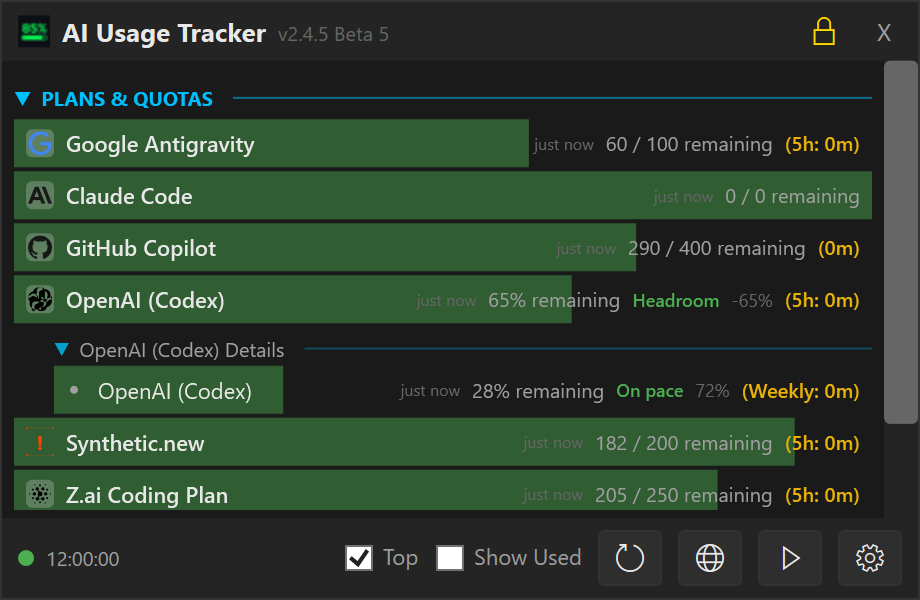
- **Minimalist Dashboard**: A compact, topmost window providing a quick overview of your current spend and token usage.
- **Compact Settings UI**: Streamlined provider cards with 40-50% less vertical space, larger dialog for better visibility.
- **Dynamic Tray Integration**:
- **Auto-Hide**: Dashboard hides automatically when focus is lost.
- **Individual Tracking**: Option to spawn separate tray icons for specific providers.
- **Live Progress Bars**: Tray icons feature "Core Temp" style bars that reflect usage levels in real-time.
- **Pace Projection & Badges**: See at a glance whether you'll exhaust your quota before it resets.
- **Headroom** (green) — projected usage under 70%, plenty of room left.
- **On pace** (green) — projected 70–100%, healthy usage rate.
- **Over pace** (red) — projected over 100%, on track to hit the limit before reset.
- Shows the projected end-of-period percentage (e.g. "Projected: 73%") so you can judge for yourself.
- Works independently for both 5-hour burst and 7-day rolling windows.
- Can be toggled on/off in Settings → Cards → "Pace-Aware Colours".
- **Inverted Progress Bars**: Default "Health Bar" mode showing **Remaining** capacity (starting green/full) instead of "Used" capacity.
- **Improved DeepSeek Support**: Detailed multi-currency (CNY/USD) balance tracking with official branding.
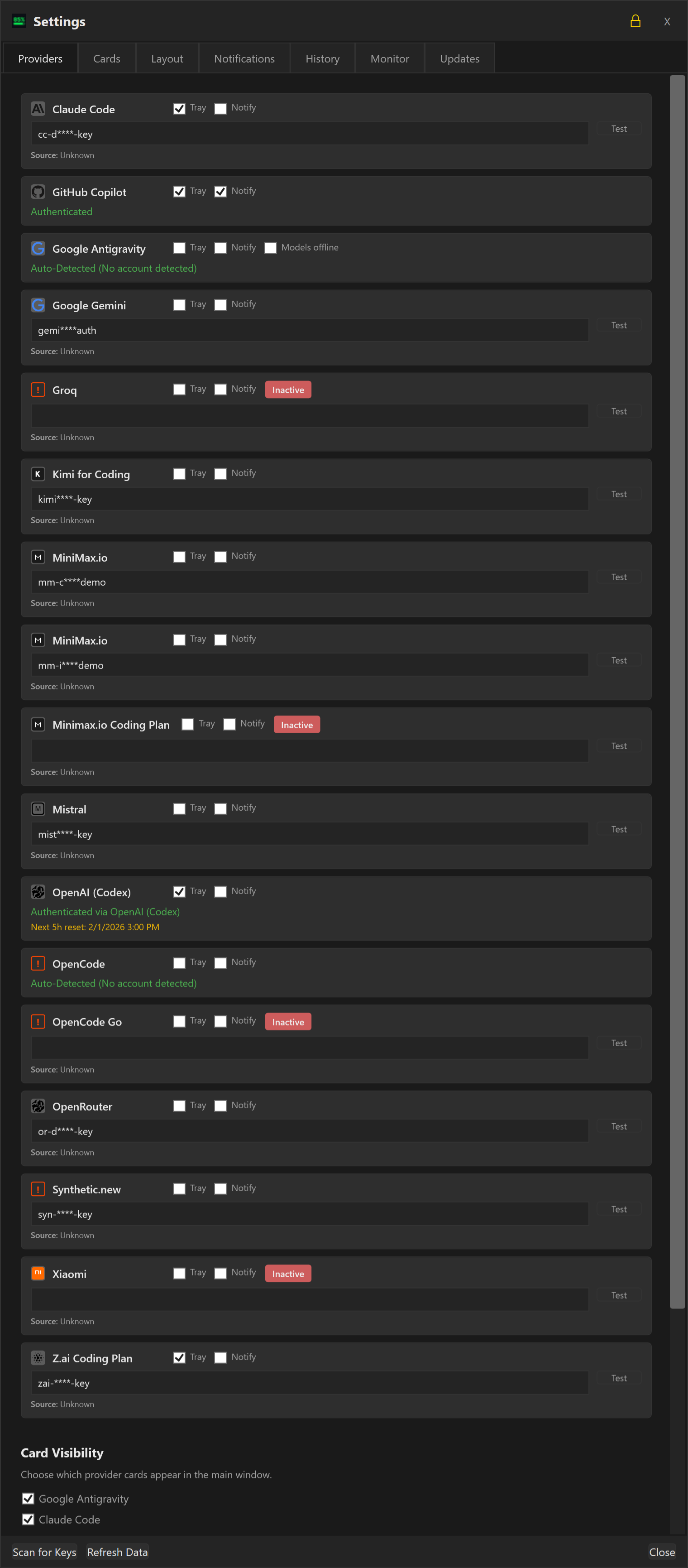
- **Secure Management**: Manage all keys and preferences through a refined, dark-themed settings menu.
## Supported Providers
| Provider | Integration | Status | Comment |
|:---------------------------------|:--------------------|:--------------------|--------------------------------------------------------------|
| **Antigravity** | via Antigravity GUI | ✅ Tested | |
| **Claude Code** | | ✅ Tested | |
| **DeepSeek** | API Key¹ | ⚠️ Beta | Testers welcome |
| **Gemini** | OAuth Device Flow | ✅ Tested | |
| **GitHub Copilot** | OAuth Device Flow | ✅ Tested | |
| **Kimi (Moonshot)** | API Key¹ | ✅ Tested | |
| **Minimax** (China) | API Key¹ | ⚠️ Beta | Testers welcome |
| **Minimax** (International) | API Key¹ | ⚠️ Beta | Testers welcome |
| **Mistral** | API Key¹ | ✅ Tested | but Mistral does not provide usage information via their API |
| **OpenAI (Codex)** | via Opencli OAuth | ️ ⚠️ Beta | Testers welcome |
| **OpenRouter** | not integrated yet | 🚧 Planned | Testers welcome |
| **Opencode Zen** (coding plan) | API Key¹ | ⚠️ Beta | Testers welcome |
| **Opencode Zen** (pay-as-you-go) | API Key¹ | ✅ Tested | |
| **Synthetic** | API Key¹ | ✅ Tested | |
| **Z.AI** (Coding Plan) | API Key¹ | ✅ Tested | |
¹ API Key can be either entered directly or discovered automatically via opencode configuration
### Screenshots
**Dashboard (Main Interface)**
**Providers**
A streamlined Windows dashboard and tray utility to monitor AI API usage, costs, and quotas across multiple providers.
**Website:** [aiusagetracker.outerstellar.net](https://aiusagetracker.outerstellar.net/)
## Support
If you want to support me and are interested in different AI model providers, you can sign up with my referral codes:
- [Opencode Go](https://opencode.ai/go?ref=BJK682KYXH):GLM-5.1, Kimi K2.6, MiMo-V2.5 (Pro), MiniMax M3, Qwen3.7 Max, DeepSeek V4 Pro/Flash
- [Z.AI](https://z.ai/subscribe?ic=JQTB1W1M0L): GLM-5.1, GLM-5, GLM-4.7, GLM-4.6, GLM-4.7-flash
- [MiniMax](https://platform.minimax.io/subscribe/token-plan?code=7tAWJBCP5L&source=link): Minimax M2.7
- [synthetic.new](https://synthetic.new/?referral=SNJDbFCgSUZso9E): Minimax M2.1, Kimi K2.5, GLM-4.7, etc.
### Documentation
- [User Manual](docs/user_manual.md)
- [CLI Reference](docs/cli_documentation.md)
- [Architecture & Philosophy](docs/ARCHITECTURE.md)
- [Monitor Guidelines](MONITORS.md)
### Community
Join the discussion on our [Discord Server](https://discord.gg/AZtNQtWuJA).
## Download
Download the latest installer or .zip file from the [Release](https://github.com/rygel/AIUsageTracker/releases) page.
## Key Features
- **OpenAI resets and expiration dates**: Hover over the OpenAI quota bar and quickly see the resets and their expiration dates
- **Multi-Provider Support**: Track usage for Anthropic, Gemini, OpenRouter, OpenCode, Kilo Code, DeepSeek, OpenAI, GitHub Copilot, Codex, Mistral, and more.
- **Smart Discovery**: Automatically scans environment variables, Claude Code credentials, and standard configuration files for existing API keys.
- **Auto-Updates**: Notifies you of new releases directly in the dashboard with a one-click download link.
- **Minimalist Dashboard**: A compact, topmost window providing a quick overview of your current spend and token usage.
- **Compact Settings UI**: Streamlined provider cards with 40-50% less vertical space, larger dialog for better visibility.
- **Dynamic Tray Integration**:
- **Auto-Hide**: Dashboard hides automatically when focus is lost.
- **Individual Tracking**: Option to spawn separate tray icons for specific providers.
- **Live Progress Bars**: Tray icons feature "Core Temp" style bars that reflect usage levels in real-time.
- **Pace Projection & Badges**: See at a glance whether you'll exhaust your quota before it resets.
- **Headroom** (green) — projected usage under 70%, plenty of room left.
- **On pace** (green) — projected 70–100%, healthy usage rate.
- **Over pace** (red) — projected over 100%, on track to hit the limit before reset.
- Shows the projected end-of-period percentage (e.g. "Projected: 73%") so you can judge for yourself.
- Works independently for both 5-hour burst and 7-day rolling windows.
- Can be toggled on/off in Settings → Cards → "Pace-Aware Colours".
- **Inverted Progress Bars**: Default "Health Bar" mode showing **Remaining** capacity (starting green/full) instead of "Used" capacity.
- **Improved DeepSeek Support**: Detailed multi-currency (CNY/USD) balance tracking with official branding.
- **Secure Management**: Manage all keys and preferences through a refined, dark-themed settings menu.
## Supported Providers
| Provider | Integration | Status | Comment |
|:---------------------------------|:--------------------|:--------------------|--------------------------------------------------------------|
| **Antigravity** | via Antigravity GUI | ✅ Tested | |
| **Claude Code** | | ✅ Tested | |
| **DeepSeek** | API Key¹ | ⚠️ Beta | Testers welcome |
| **Gemini** | OAuth Device Flow | ✅ Tested | |
| **GitHub Copilot** | OAuth Device Flow | ✅ Tested | |
| **Kimi (Moonshot)** | API Key¹ | ✅ Tested | |
| **Minimax** (China) | API Key¹ | ⚠️ Beta | Testers welcome |
| **Minimax** (International) | API Key¹ | ⚠️ Beta | Testers welcome |
| **Mistral** | API Key¹ | ✅ Tested | but Mistral does not provide usage information via their API |
| **OpenAI (Codex)** | via Opencli OAuth | ️ ⚠️ Beta | Testers welcome |
| **OpenRouter** | not integrated yet | 🚧 Planned | Testers welcome |
| **Opencode Zen** (coding plan) | API Key¹ | ⚠️ Beta | Testers welcome |
| **Opencode Zen** (pay-as-you-go) | API Key¹ | ✅ Tested | |
| **Synthetic** | API Key¹ | ✅ Tested | |
| **Z.AI** (Coding Plan) | API Key¹ | ✅ Tested | |
¹ API Key can be either entered directly or discovered automatically via opencode configuration
### Screenshots
**Dashboard (Main Interface)**
**Providers**
 For the complete screenshot set (all settings tabs, info dialog, tray states, and context menu), see the [User Manual](docs/user_manual.md).
## Installation
### Manual
1. Download the latest `AIUsageTracker_Setup_v2.3.4-beta.11.exe` from the [Releases](https://github.com/rygel/AIUsageTracker/releases) page.
2. Run the installer.
3. The app will launch and automatically scan for common API keys.
## Configuration & Settings
Access the **Settings** menu by right-clicking the tray icon or using the gear icon on the dashboard.
### Application Settings
- **Show All Providers**: Toggle to show all configured providers, even those with 0 usage or errors.
- **Compact Mode**: Reduces the height of each item, removing the icon and condensing the layout.
- **Pin Window**: Keeps the dashboard open even when focus is lost.
- **Always On Top**: Ensures the dashboard floats above other windows.
- **Invert Progress Bars**:
- **Checked**: Bars represent **Remaining** capacity (Start Full/Green -> End Empty/Red).
- **Unchecked**: Bars represent **Used** capacity (Start Empty -> End Full/Red).
- **Color Thresholds**: Customize the percentage at which bars turn Yellow (Warning) or Red (Critical).
- **Auto Refresh Interval**:
- **Minutes**: Set how often (in minutes) the app should automatically check provider APIs for new consumption data.
- **Disable**: Set to **0** to disable automatic background refreshing.
### Provider Management
- **API Keys**: enter or update specific keys for each provider.
- **Track in Tray**: Check the box next to any provider to add a dedicated icon for it in your system tray.
- **Sub-Quotas**: For complex providers like Antigravity, you can pin specific model quotas to the tray.
## Storage
Configuration is stored in `auth.json` in the application data directory.
- **Automatic Backup**: Your previous configuration is preserved during updates.
- **Secure**: API keys are stored locally.
## License
MIT
For the complete screenshot set (all settings tabs, info dialog, tray states, and context menu), see the [User Manual](docs/user_manual.md).
## Installation
### Manual
1. Download the latest `AIUsageTracker_Setup_v2.3.4-beta.11.exe` from the [Releases](https://github.com/rygel/AIUsageTracker/releases) page.
2. Run the installer.
3. The app will launch and automatically scan for common API keys.
## Configuration & Settings
Access the **Settings** menu by right-clicking the tray icon or using the gear icon on the dashboard.
### Application Settings
- **Show All Providers**: Toggle to show all configured providers, even those with 0 usage or errors.
- **Compact Mode**: Reduces the height of each item, removing the icon and condensing the layout.
- **Pin Window**: Keeps the dashboard open even when focus is lost.
- **Always On Top**: Ensures the dashboard floats above other windows.
- **Invert Progress Bars**:
- **Checked**: Bars represent **Remaining** capacity (Start Full/Green -> End Empty/Red).
- **Unchecked**: Bars represent **Used** capacity (Start Empty -> End Full/Red).
- **Color Thresholds**: Customize the percentage at which bars turn Yellow (Warning) or Red (Critical).
- **Auto Refresh Interval**:
- **Minutes**: Set how often (in minutes) the app should automatically check provider APIs for new consumption data.
- **Disable**: Set to **0** to disable automatic background refreshing.
### Provider Management
- **API Keys**: enter or update specific keys for each provider.
- **Track in Tray**: Check the box next to any provider to add a dedicated icon for it in your system tray.
- **Sub-Quotas**: For complex providers like Antigravity, you can pin specific model quotas to the tray.
## Storage
Configuration is stored in `auth.json` in the application data directory.
- **Automatic Backup**: Your previous configuration is preserved during updates.
- **Secure**: API keys are stored locally.
## License
MIT