Desk # Desk **Every agent. One desk.** A calm macOS workspace for Claude Code, Codex and friends.
Projects, terminals, files, git and chat in one window, and the right account for every project. [**Download for macOS**](https://github.com/s-nish/desk/releases/latest/download/Desk.dmg) · [Website](https://github.com/s-nish/desk/tree/main/site) · [Report an issue](https://github.com/s-nish/desk/issues) ![macOS 12+](https://img.shields.io/badge/macOS-12%2B-0297DE?style=flat-square&logo=apple&logoColor=white) ![Apple silicon](https://img.shields.io/badge/Apple%20silicon-arm64-0297DE?style=flat-square) ![Tauri 2](https://img.shields.io/badge/Tauri-2-FC734D?style=flat-square&logo=tauri&logoColor=white) ![License: MIT](https://img.shields.io/badge/License-MIT-EAF4F8?style=flat-square) ![Sandboxes on Modal](https://img.shields.io/badge/Sandboxes-Modal-7FEE64?style=flat-square&labelColor=0b0b0d)
Desk's Home screen: every project as a card with one-click Claude Code, Codex and Shell sessions, recent conversations, and usage rings in the sidebar. The screenshot follows your GitHub theme. Switch between light and dark to see both.

## Runs the agents you already use

Claude Code

Codex

Gemini CLI

Cursor Agent

Grok

OpenCode

GitHub
Desk runs the command-line tools you already have installed and signed in. It never stores or sends your tokens, unless you paste one into Settings ▸ Sandboxes so an agent can sign in inside a sandbox; that token is kept in a file only you can read and goes only to that sandbox. ## New in 1.5 | | | | --- | --- | | **Every agent, in the notch** | Working and waiting agents sit beside the camera. Hover to see them all, allow or deny a request, or reply without switching windows. Turn it on in **Settings ▸ Notch**. | | **Answer from your phone** | Pair your phone once with a QR code in **Settings ▸ Phone**. It reaches Desk over your own Tailscale tailnet (`tailscale serve`), never the open internet, and can see every open chat and agent tab, then allow, deny, reply and stop. Desk itself only listens on `127.0.0.1`. | | **Sandboxes on Modal** | Run a chat in a **[Modal](https://modal.com)** cloud sandbox, Docker Cloud, or an isolated Docker container on this Mac. Desk syncs the project in and out, forwards dev-server ports to `localhost`, and stops sandboxes that sit idle. Set them up in **Settings ▸ Sandboxes**. | | **More than one window** | ⌘ ⇧ N opens another Desk window with its own projects and tabs. Settings, accounts and sandboxes stay in step, and windows reopen where you left them. | ## Highlights | | | | --- | --- | | **The right account, every time** | Pick a Claude Code, Codex and GitHub account per project. Every tab opens already signed in as the right you. | | **Terminal or chat** | Run agents in real terminals, or as a conversation with attachments, permission modes and a worktree per chat. | | **Files beside the session** | Browse and edit with syntax highlighting. Preview images, PDFs and CSV. Unsaved buffers survive a restart. | | **Review before you ship** | Stage, commit and open pull requests. Comment on a diff line and send it to the agent. Desk never pushes on its own. | | **A browser for your dev server** | Dock it next to the agent. Design mode picks an element and hands it over as context. | | **Limits at a glance** | Usage rings for every account: blue, cantaloupe from 80%, red at the limit. | | **Quit without fear** | Open files, unsaved buffers, splits and tab order all come back. | ## Tour
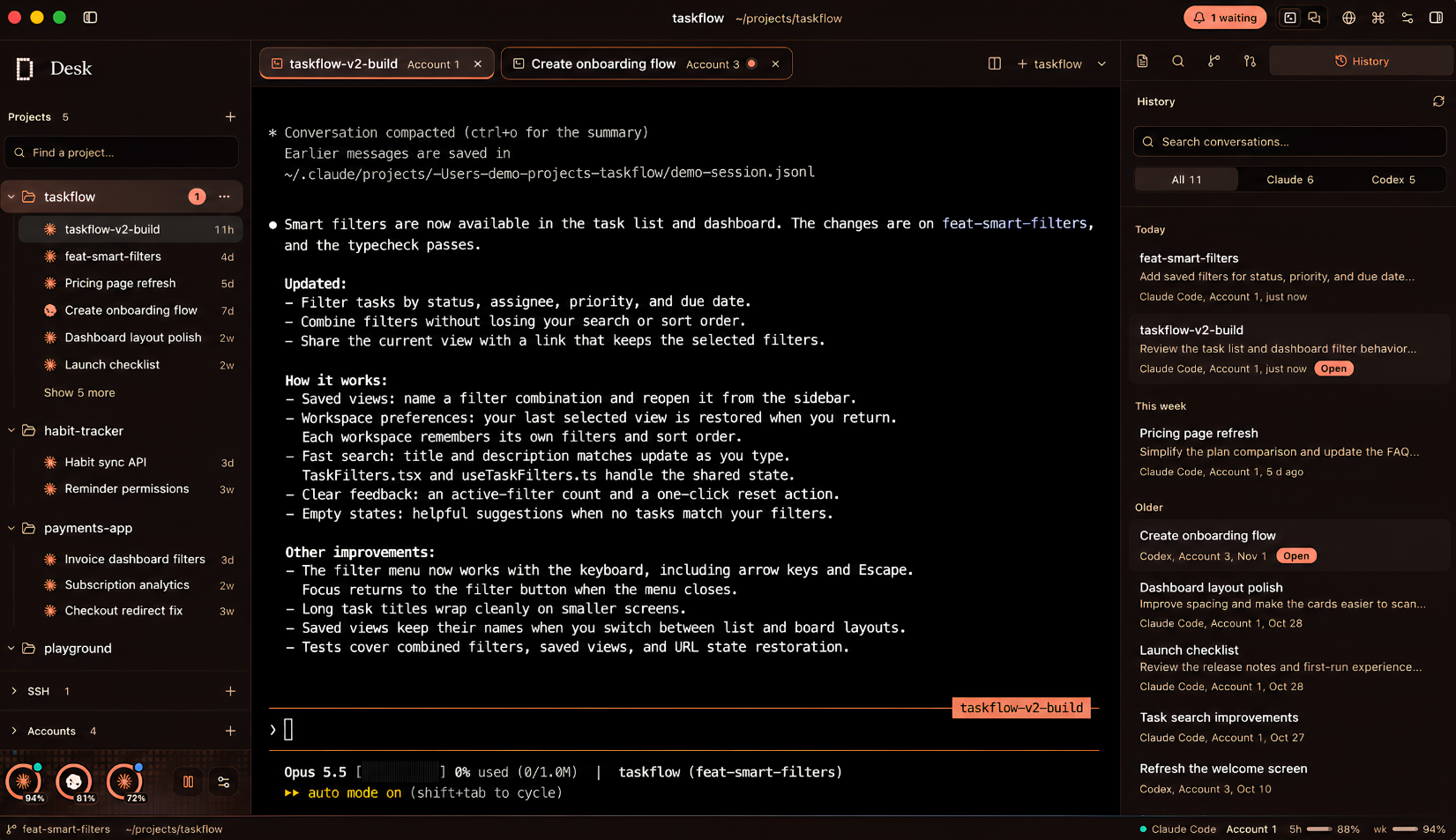
Claude Code in a Desk terminal with the project's conversation history
Terminals and history. Every past conversation, one click away.
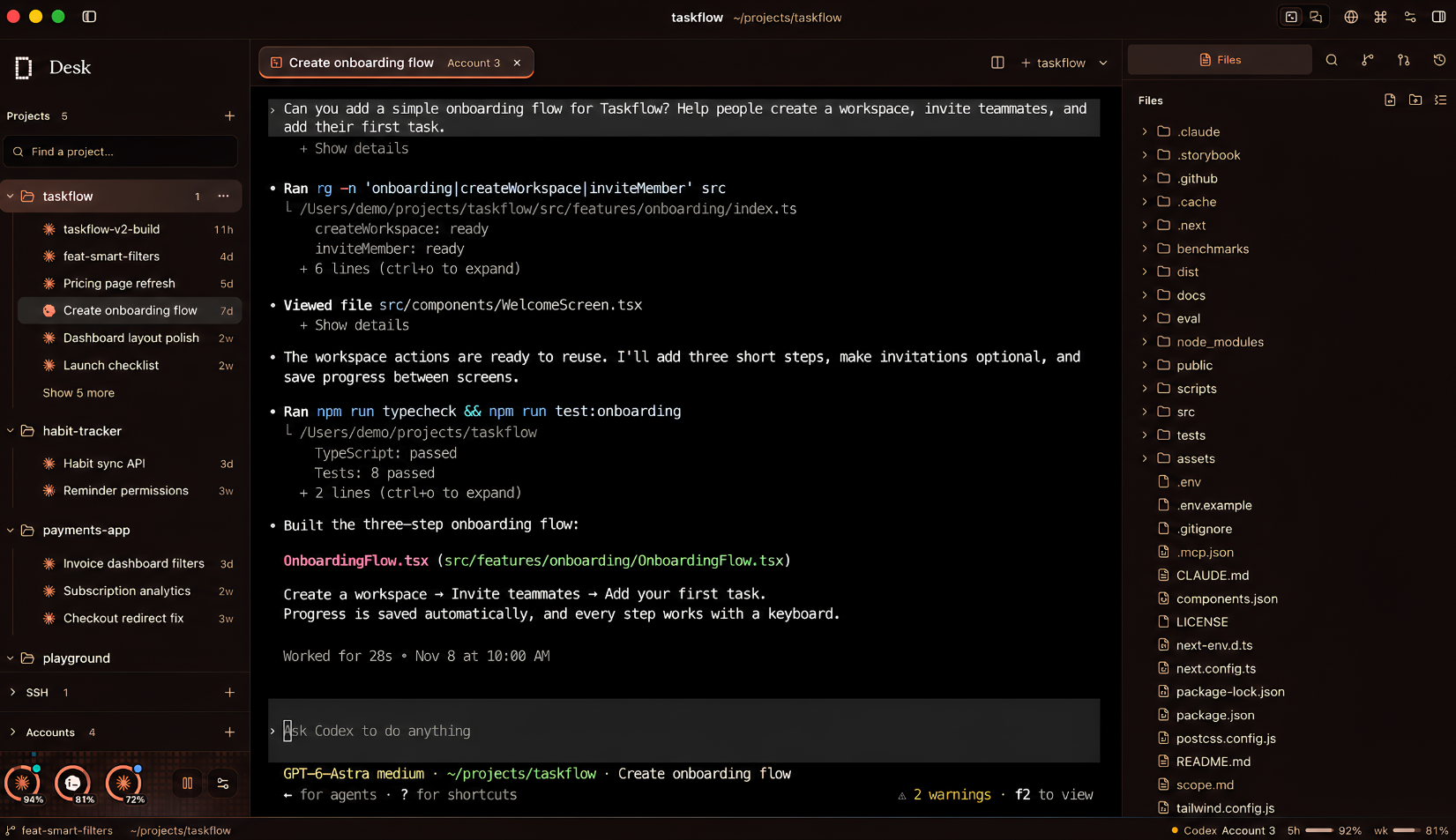
Codex in a Desk terminal beside the file tree
Files. The tree and editor stay next to the session.
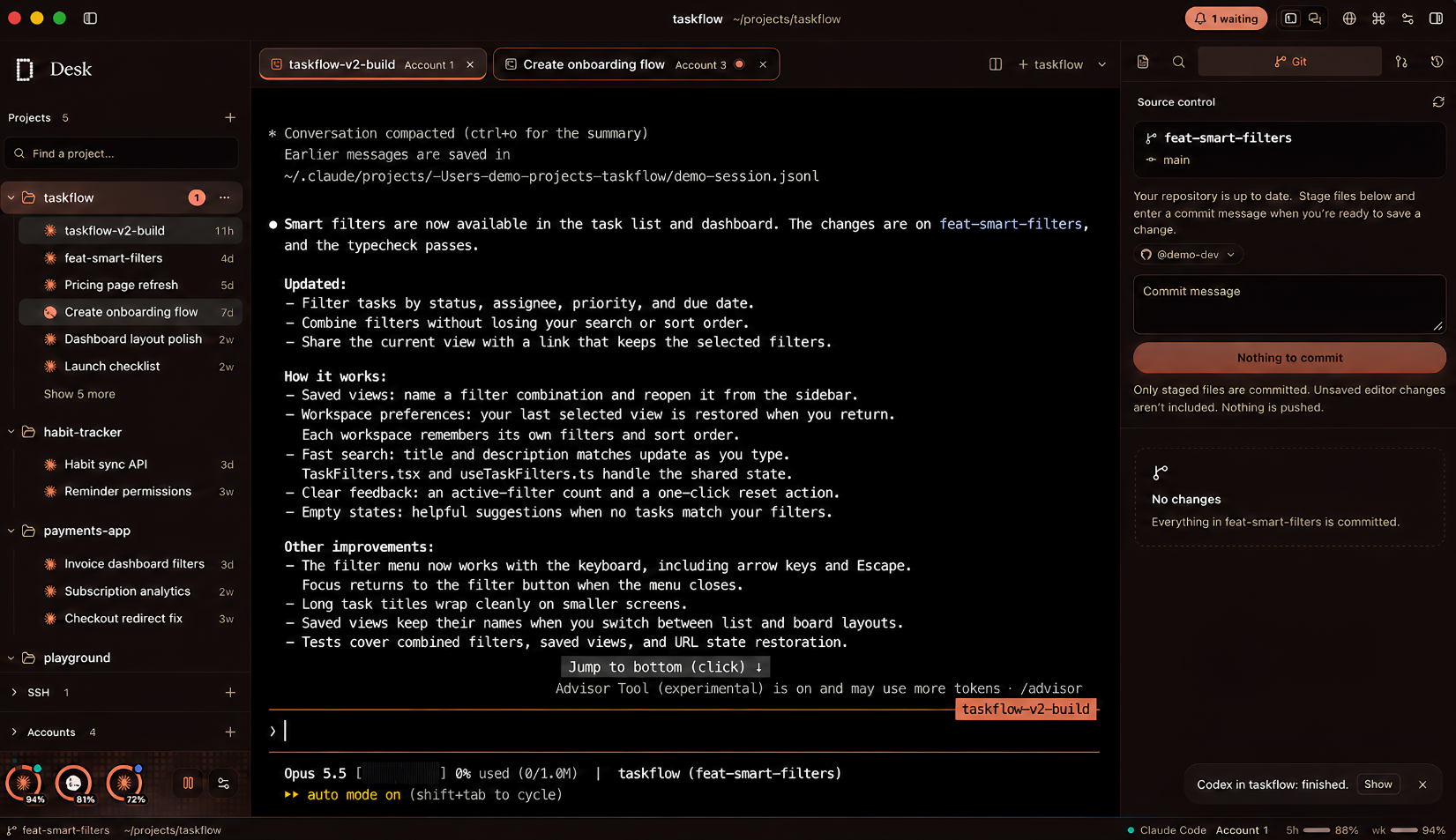
Desk's source control panel beside a running agent
Git. Review, commit and open PRs with the project's GitHub account.
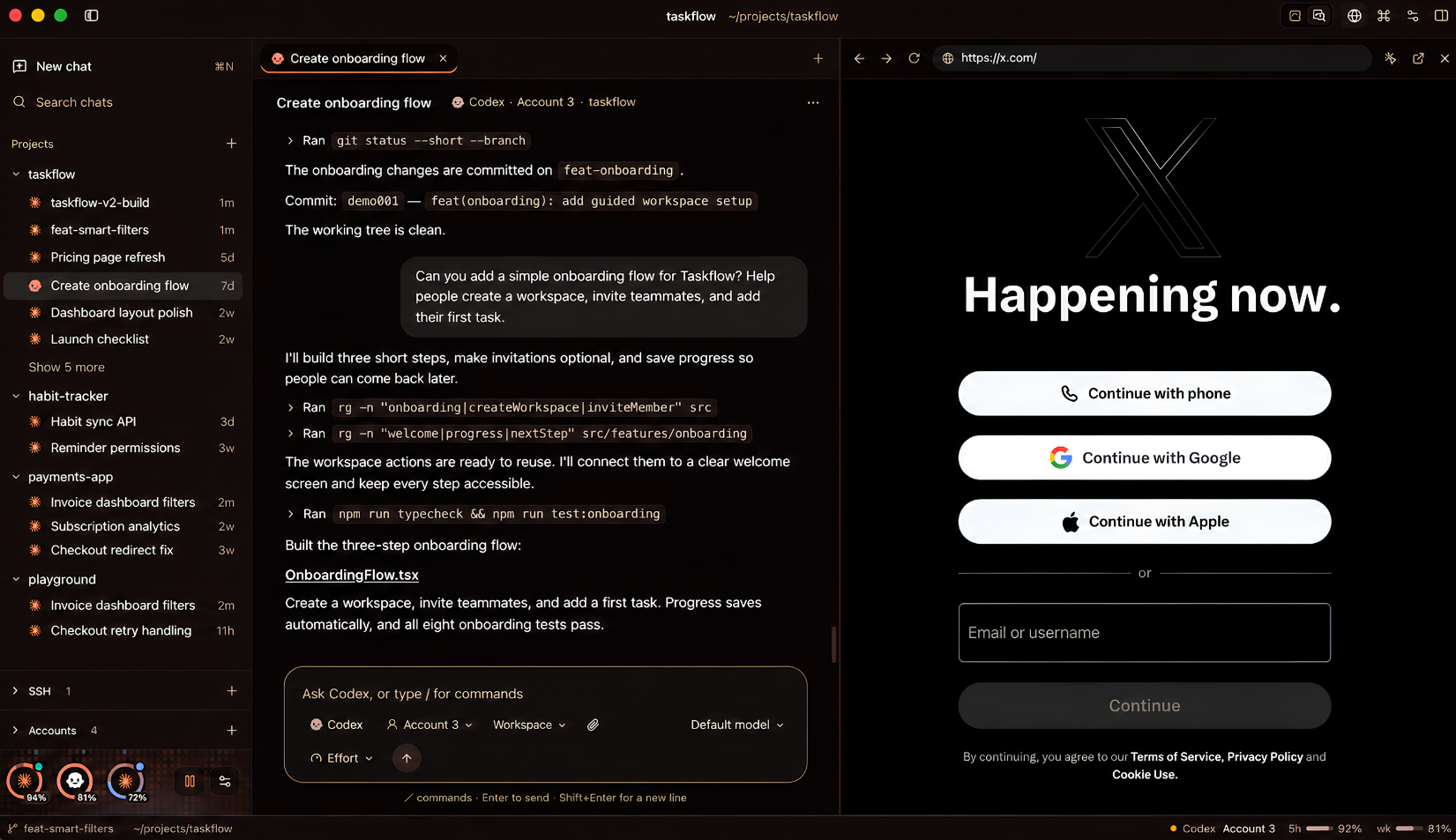
A Codex chat with a docked browser pane
Chat and browser. A conversation view with a browser docked beside it.
## Make it yours
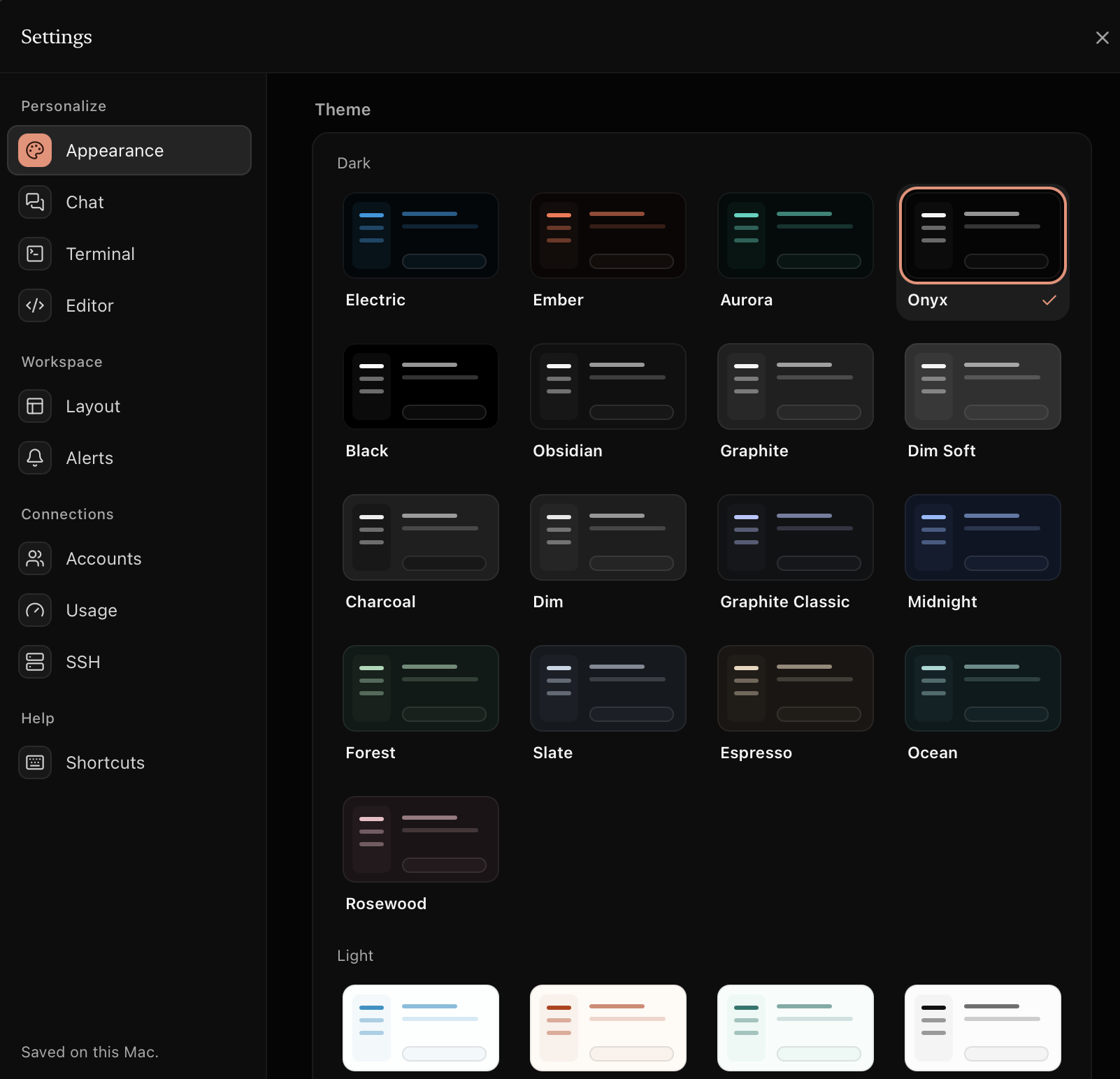
Appearance settings with theme previews
Appearance. 24 app themes, dark and light.
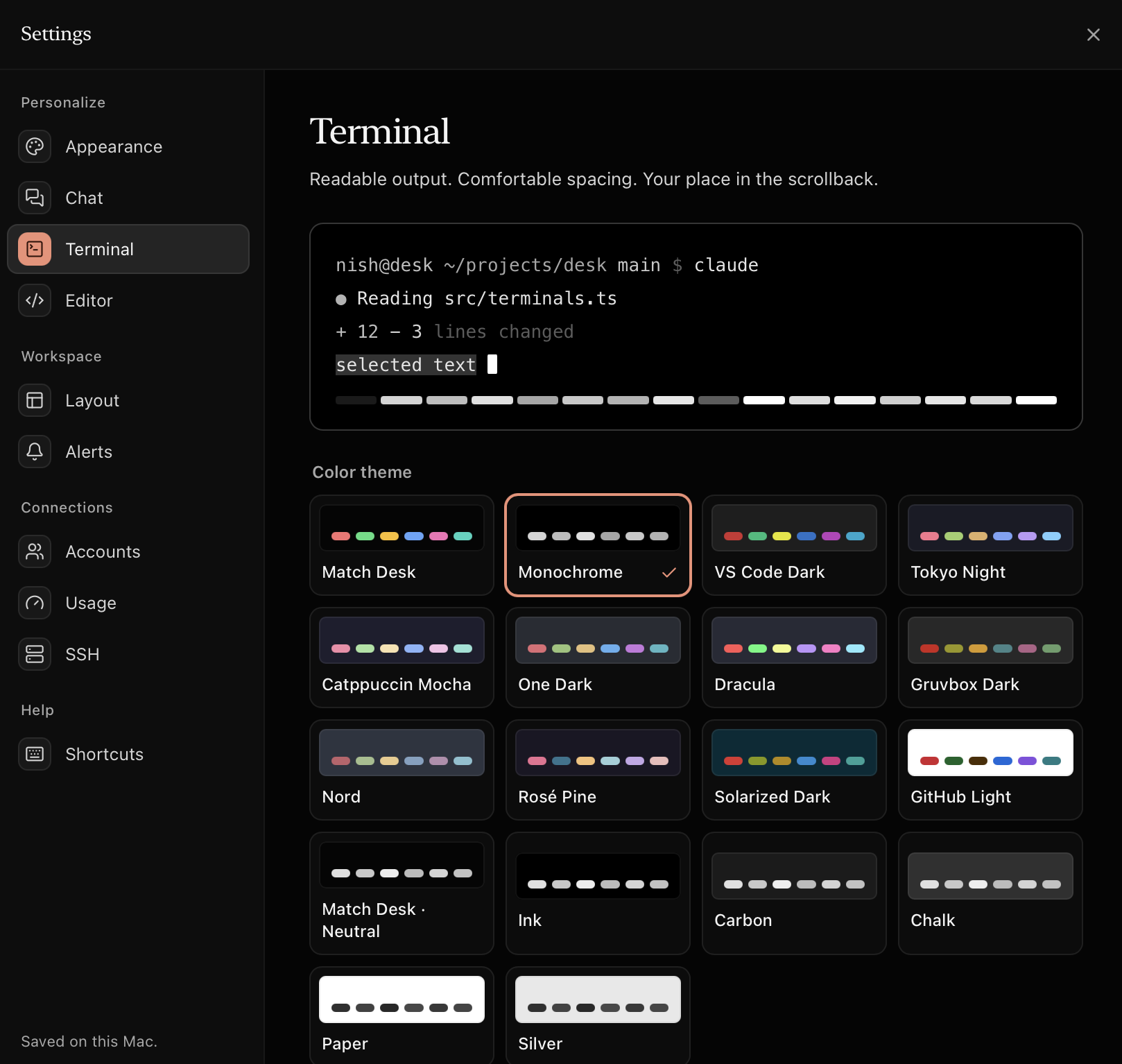
Terminal settings with colour palettes
Terminal. 18 palettes with a live preview.
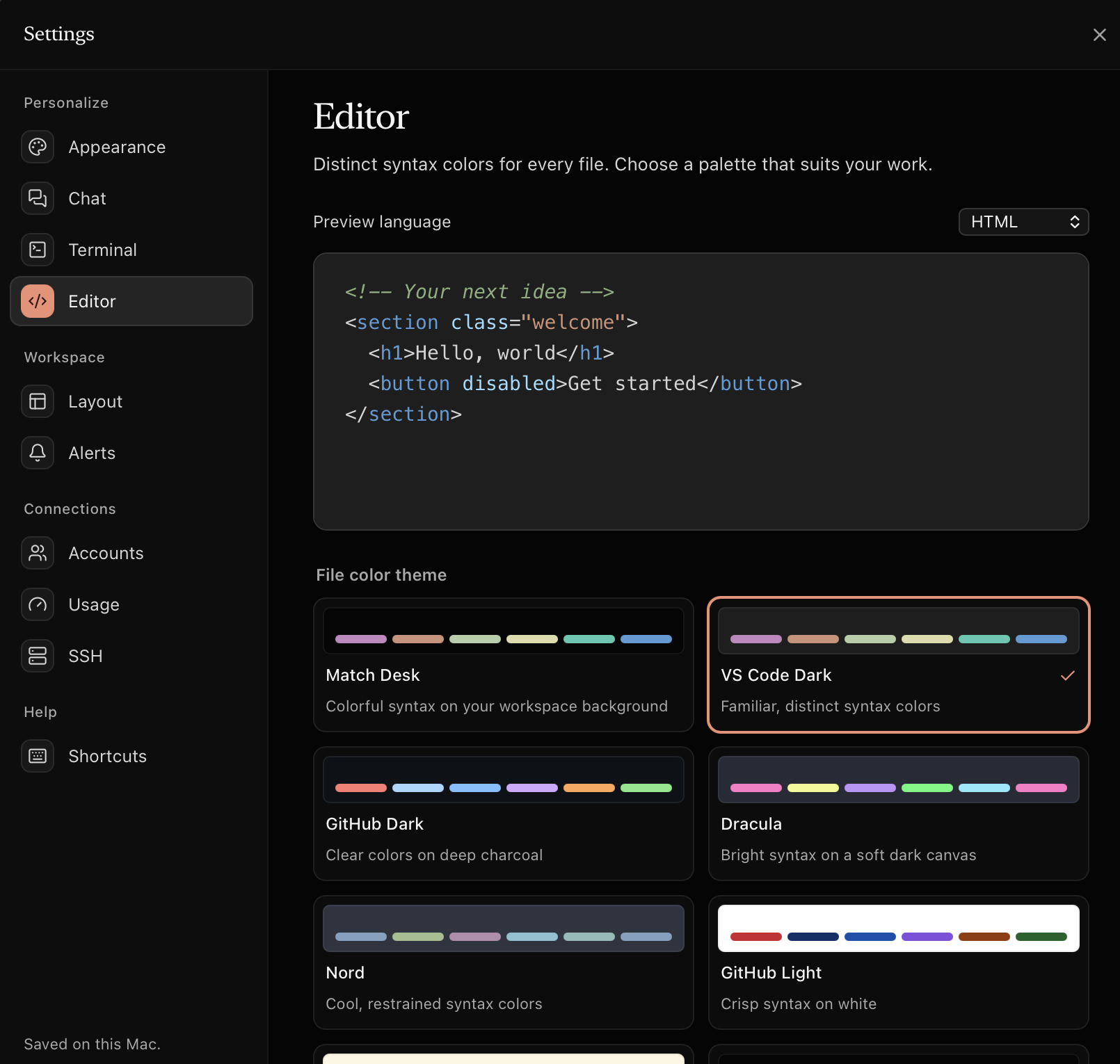
Editor settings with syntax colour themes
Editor. Syntax colours, previewed per language.
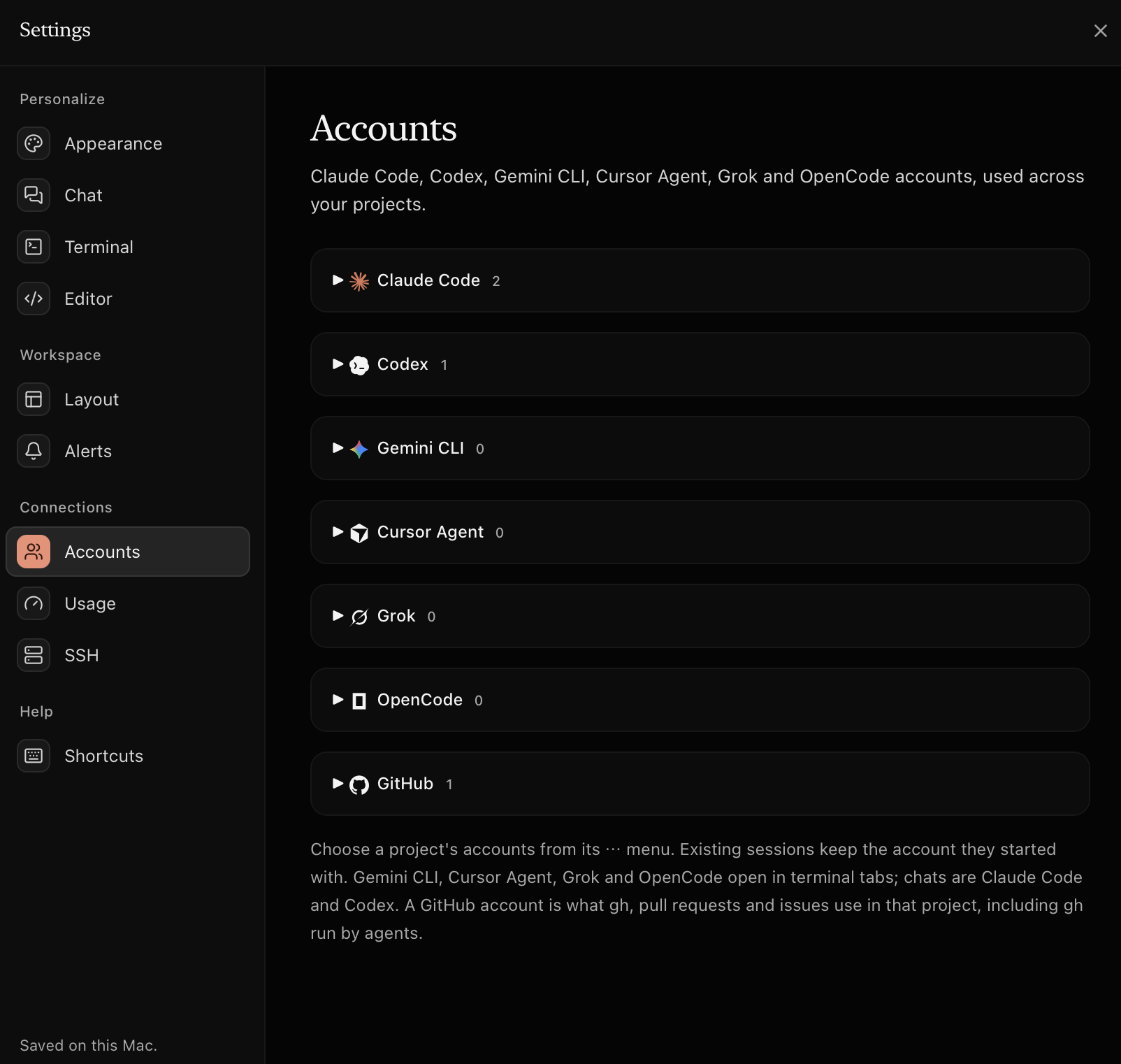
Accounts settings listing every supported tool
Accounts. Seven tools, as many accounts as you need.
Desk opens in **Electric**: Midnight `#02070A`, Electric Blue `#0297DE` and a touch of Cantaloupe `#FC734D`, with serif headings, pill buttons and an animated pixel-wave backdrop on Home. The four **pixel themes** are Electric, Electric Light, Ember and Aurora. Turn the animation off from the sidebar or **Settings ▸ Appearance**. It always stays still when Reduce motion is on. ## Install **From Terminal:** ```sh curl -fL https://github.com/s-nish/desk/releases/latest/download/Desk.dmg -o ~/Downloads/Desk.dmg && open ~/Downloads/Desk.dmg ``` **Or by hand:** download [**Desk.dmg**](https://github.com/s-nish/desk/releases/latest/download/Desk.dmg) from the latest release. Then drag Desk to Applications, and install and sign in to the agents you use, such as `claude` or `codex`. Desk picks them up on launch. > [!TIP] > Desk isn't notarized yet. If you downloaded it in a browser, macOS asks on first launch: open **System Settings ▸ Privacy & Security** and choose **Open Anyway**. The Terminal command above skips that prompt. > [!NOTE] > The release is built for Apple silicon. On an Intel Mac, [build from source](#develop). ## How accounts work An account is a config folder. Desk sets the right folder for every terminal and chat it opens. | Tool | Variable | Default folder | Extra accounts | | ----------- | ------------------- | -------------- | ------------------------- | | Claude Code | `CLAUDE_CONFIG_DIR` | `~/.claude` | `~/.claude-` | | Codex | `CODEX_HOME` | `~/.codex` | `~/.codex-` | | GitHub | `GH_CONFIG_DIR` | `~/.config/gh` | `~/.config/gh-` | Desk finds existing folders on launch. **Add account** creates a new folder and runs the tool's own sign-in inside it. To show which email is signed in, Desk reads that one field locally: `oauthAccount.emailAddress` from `.claude.json`, and only the `email` claim from Codex's `auth.json`. > [!IMPORTANT] > **Pull requests are untrusted code.** When you check out or review someone else's pull request, Desk asks first and marks the worktree untrusted. Agents there start without the branch's own settings, hooks and MCP servers (`--setting-sources user --strict-mcp-config`), in plan mode for Claude Code and a read-only sandbox for Codex. ## Shortcuts | Keys | Action | Keys | Action | | --------------- | ------------------------------ | --------------- | ----------------------------- | | ⌘ ⇧ P | Command palette | ⌘ P | Open file in project | | ⌘ ⇧ F | Search and replace | ⌘ O | Add project folder | | ⌘ \\ | Toggle split panes | ⌘ B / ⌘ ⇧ B | Toggle projects / files | | ⌘ T | New Claude Code tab | ⌘ K | Clear terminal | | ⌘ W | Close tab | ⌘ 1–9 | Switch tabs | | ⌘ S | Save file | ⌥ ⌘ ↑ / ↓ | Switch projects | | ⌘ , | Settings | ⇧ Enter | Newline in Claude Code / Codex | | ⌘ ⇧ N | New window | ⌥ ⌘ N | New SSH connection | Drop folders on the window to add projects. Drop files on a terminal to paste their paths.
More details: workspace, terminal, editor and appearance
**Workspace** - **Home** appears whenever nothing is open: every project as a card with one-click Claude Code, Codex and Shell sessions, plus recent conversations. - **Recovery** restores open files, unsaved buffers, tab selection and split layout. Changed files on disk show a conflict before overwrite. Terminal tabs restore as restart cards. - **Tab order:** drag tabs to reorder, or focus one and use ⌥ ⇧ ← / →. Esc cancels a drag. - **Split panes:** click a pane to target it, drag the divider or use its arrow keys to resize. - **Source control** covers the repository root, including when the project is a subfolder. Unsaved editor buffers are not included in commits. - **Project search** respects ignore files and skips binary files and build folders. Replace previews every change and skips dirty buffers. **Terminal** - 12 original palettes plus 6 neutral ones, individual colour overrides and smooth scrolling. Text contrast is corrected to 7:1 where xterm supports it. - 20,000 lines of history. Incoming output never moves you to the bottom; use **Latest output** or ⇧ End to return. **Editor** - Eight file colour themes: Match Desk, VS Code Dark, GitHub Dark, Dracula, Nord, GitHub Light, Solarized Light and Monochrome. - Syntax highlighting follows filenames, with lazy-loaded support for many languages. **Appearance** - 24 themes, or match your system. Comfortable or compact spacing, panel visibility and optional account colours. - Preferences are saved on this Mac.
## Develop Requires Rust ([rustup](https://rustup.rs)) and Node 20+. ```sh npm install npm run tauri dev # live-reloading dev build npm run tauri build # release Desk.app and .dmg in src-tauri/target/release/bundle cd src-tauri && cargo test # backend tests ``` | Path | What lives there | | --- | --- | | `src-tauri/src` | Rust backend: `pty.rs` terminals, `accounts.rs` account discovery, `files.rs` tree and editor I/O, `gh.rs` GitHub | | `src` | React UI. `terminals.ts` and `editors.ts` keep xterm.js and CodeMirror alive outside React, so sessions survive tab and project switches | | `site` | The landing page: plain HTML, CSS and JS | App state is saved to `~/Library/Application Support/Desk/state.json`.
Validation
```sh npm run build npm run test:backend npm run dev -- --host 127.0.0.1 --port 1421 # In another terminal (uses an installed Chrome, isolated data, mocked IPC): npm run test:ui npm run test:appearance ``` Set `CHROME_PATH` to use a different Chrome, or `DESK_TEST_URL` for a different dev-server address. The UI smoke test covers restoration, split panes, search and replace, Git controls, the command palette and quit-time persistence. Appearance checks cover theme contrast, system theme changes, terminal palettes, scrollback and alternate-screen navigation.
## License [MIT](LICENSE) Claude, Codex, Gemini, Cursor, Grok, OpenCode and GitHub are trademarks of their owners. Desk is independent and not affiliated with them. Logos from [Lobe Icons](https://lobehub.com/icons) (MIT).