📓SFDLA DLAdapter
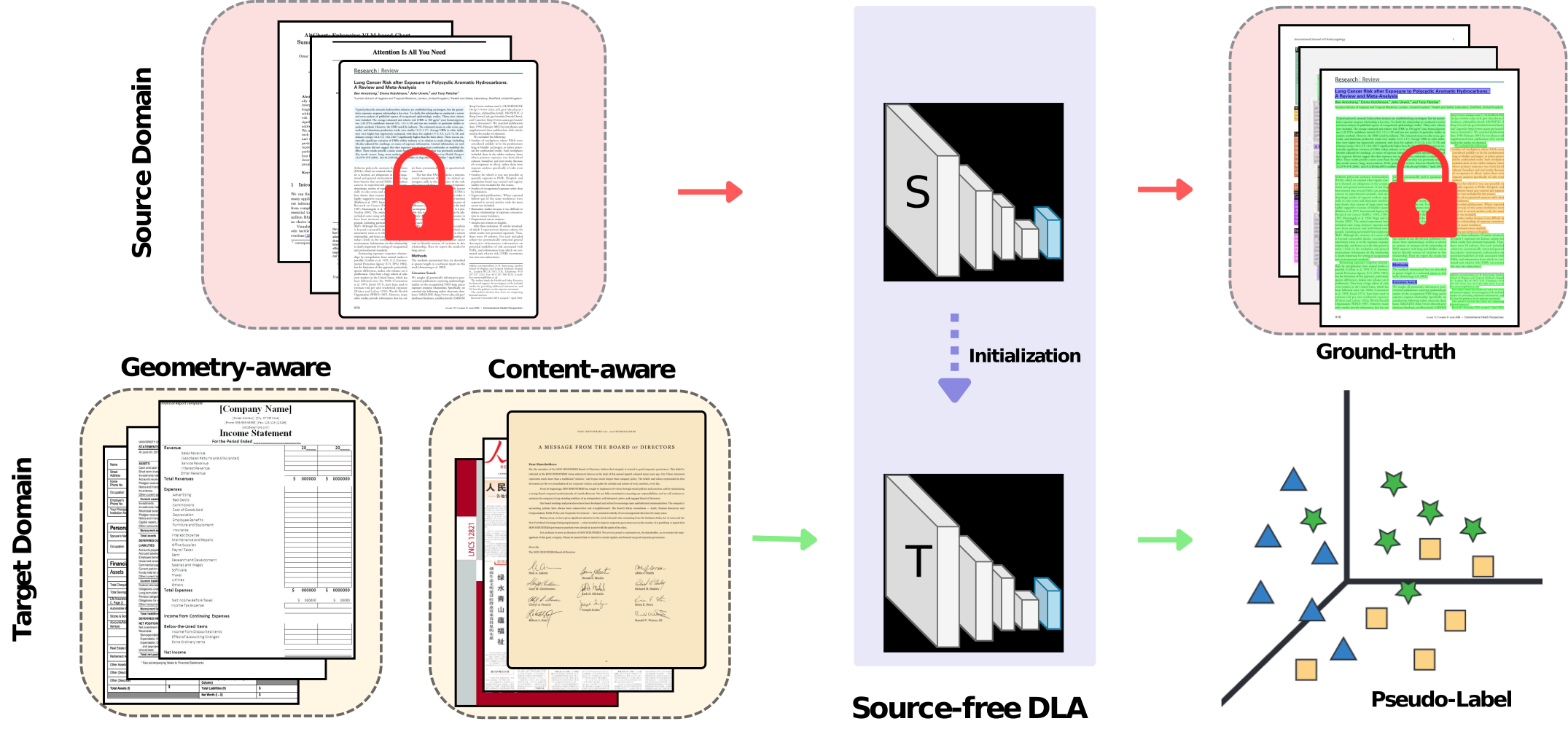
Source-Free Document Layout Analysis

## Installation
You can Clone this Git.
In the subfolder 'Docker Environment' there is a [Dockerfile](https://github.com/s3setewe/sfdla-DLAdapter/blob/main/Docker%20Environment/Dockerfile) that installs the corresponding runtime environment. Ubuntu 18.04 with Anaconda, Cuda 10.2, Python 3.6, Pytorch 1.9 and detectron2 was used. A corresponding Docker Compose file is included.
The Dockerfile can be built like this, for example:
- sudo docker build -t dla_sfda_basic
We use 4 NVIDIA GeForce GTX 1080 Ti.
## Dataset Preparation
Download the dataset from public sources
- [PubLayNet](https://github.com/ibm-aur-nlp/PubLayNet)
- [DocLayNet](https://github.com/DS4SD/DocLayNet)
- [M6Doc](https://github.com/HCIILAB/M6Doc)
You can create the benchmark datasets with the Python Files in [/datasets](https://github.com/s3setewe/sfdla-DLAdapter/tree/main/datasets). Adapt your path variables
## Source Models
The source models can be found here:
Source Model
## Models after Source Free Domain Adaption
The models can be found here:
Source-Free Adapted Model
## Model Inference
You can use the run_inference_with_evaluation function in [/dla-sfda/simple_inference.py](https://github.com/s3setewe/sfdla-DLAdapter/blob/main/dla-sfda/simple_inference.py). You have to change the Parameter depending on your System.
```python
results = run_inference_with_evaluation(
dataset_name="name_of_dataset",
annotation_json_path="/path/to/annotation/file.json",
image_root_dln_path="/path/to/PNG/",
repo_source_root="/path/to/Folder/with/dla-sfda/",
model_config_yaml="dla-sfda/configs/your_detectron_model_config.yaml",
model_path="/path/to/model/model.pth"
)
```
A file with the result can be found here: [/log_results_source_and_adapted_models.txt](https://github.com/s3setewe/sfdla-DLAdapter/blob/main/log_results_source_and_adapted_models.txt)
## Train the Source Models
You can run [/dla-sfda/train_source.py](https://github.com/s3setewe/sfdla-DLAdapter/blob/main/dla-sfda/train_source.py)
Choose the name parameter in the name function.
For that you have to adapt the paths in [/dla-sfda/configs/SourceModelConfig.py](https://github.com/s3setewe/sfdla-DLAdapter/blob/main/dla-sfda/configs/SourceModelConfig.py) and your corresponding config yaml.
## Train Source-Free Domain Adaption
You can run [/dla-sfda/train_sfdla.py](https://github.com/s3setewe/sfdla-DLAdapter/blob/main/dla-sfda/train_sfdla.py)
Choose the name parameter in the name function.
For that you have to adapt the paths in [/dla-sfda/configs/SFDA_DLA_Configuration_Loader.py](https://github.com/s3setewe/sfdla-DLAdapter/blob/main/dla-sfda/configs/SFDA_DLA_Configuration_Loader.py) and your corresponding config yaml. Further hyperparameters can be controlled in [/dla-sfda/train_sfdla.py](https://github.com/s3setewe/sfdla-DLAdapter/blob/main/dla-sfda/train_sfdla.py) main function.
## 🌳 Citation
If you find this code useful for your research, please consider citing:
```
@misc{tewes2025sfdlasourcefreedocumentlayout,
title={SFDLA: Source-Free Document Layout Analysis},
author={Sebastian Tewes and Yufan Chen and Omar Moured and Jiaming Zhang and Rainer Stiefelhagen},
year={2025},
eprint={2503.18742},
archivePrefix={arXiv},
primaryClass={cs.CV},
url={https://arxiv.org/abs/2503.18742},
}
```