---
layout: '@/layouts/Doc.astro'
title: '🚂 Loooooooong Sequence Lengths'
date: 2024-02-12
description: 'Optimizations for extremely long sequence lengths in Megatron-DeepSpeed as part of the DeepSpeed4Science project.'
---
- [DeepSpeed4Science (09/2023)](#deepspeed4science-092023)
- [New Features](#new-features)
- [New optimizations](#new-optimizations)
- [Initial Results](#initial-results)
- [Installation](#installation)
- [Using `install.sh`](#using-installsh)
- [Step-by-Step](#step-by-step)
- [Running](#running)
- [ZeRO Offloading](#zero-offloading)

Figure 1: This work was done as part of the DeepSpeed4Science project,
in collaboration with Microsoft.
The new
[Megatron-DeepSpeed](https://github.com/microsoft/Megatron-DeepSpeed)
release contains a variety of improvements / optimizations to enable
pre-training Transformer based architectures with significantly longer
sequences than was previously possible.
> [!NOTE] 📓 Note:
>
> Additional details can be found in the [📁
> `DeepSpeed4Science`](https://github.com/microsoft/Megatron-DeepSpeed/tree/main/examples_deepspeed/deepspeed4science/megatron_long_seq_support)
> folder.
## [DeepSpeed4Science](https://ai4science.azurewebsites.net/2023/09/18/model-showcase-genslms/) (09/2023)
### New Features
- Enabled Megatron-LM’s sequence parallel.
- Enabled rotary positional embedding.
- Enabled FlashAttention v1 and v2.
- Enabled new fused kernels from NVIDIA.
### New optimizations
- Enabled attention map memory optimization, where we first generated
attention mask on CPU memory and then moved it into GPU memory to
avoid out-of-memory errors when training with very large sequence
lengths.
- Position embedding partitioning, where we split weights of position
encoding across all GPUs when enabling sequence parallel to further
reduce the memory footprint.
### Initial Results
Table 1: Long sequence length support[^1] from
[`microsoft/Megatron-DeepSpeed`](https://github.com/microsoft/Megatron-DeepSpeed)
| Sequence Length | Old Megatron-DeepSpeed (TFLOPS) | New Megatron-DeepSpeed (TFLOPS) |
|:--:|:--:|:--:|
| 2k | 25 | 68 |
| 4k | 28 | 80 |
| 8k | OOM | 86 |
| 16k | OOM | 92 |
| 32k | OOM | 100 |
| 64k | OOM | 106 |
| 128k | OOM | 119 |
| 256k | OOM | 94 |
Data
``` python
gpus = ('32', '64', '128')
colors = {
'Old Megatron-DS': '#FF5252',
'Megatron-LM': '#76b900',
'New Megatron-DS': '#1A8FFF',
}
data = {
'25B': {
'Old Megatron-DS': np.array([36, 42, 42]),
'Megatron-LM': np.array([26, 48, 52]),
'New Megatron-DS': np.array([192, 448, 512]),
},
'33B': {
'Old Megatron-DS': np.array([28, 32, 32]),
'Megatron-LM': np.array([14, 46, 52]),
'New Megatron-DS': np.array([128, 384, 448]),
},
}
```
Make the plots
``` python
x = np.arange(len(gpus))
width = 0.25
multiplier = 0
outdir = Path(os.getcwd()).joinpath('assets')
outdir.mkdir(exist_ok=True, parents=True)
improvement = {}
for idx, (model_size, d) in enumerate(data.items()):
multiplier = 0
figure, axes = plt.subplots(figsize=(7.5, 4))
fig = plt.gcf()
ax = plt.gca()
for label, value in d.items():
offset = width * multiplier
rects = ax.barh(
x + offset,
value,
width,
label=label,
color=colors[label],
alpha=0.8
)
ax.bar_label(
rects,
padding=3,
color=colors[label],
family='monospace',
weight='bold'
)
multiplier += 1
ax.set_ylabel(
'GPUs',
fontsize=18,
family='sans-serif',
loc='center',
)
ax.set_yticks(x + width, gpus)
plt.figtext(
0.005, 0.93, f"{model_size}", fontsize=24, fontweight='bold', ha='left'
)
ax.set_xlabel(
'Sequence Length (k)', fontsize=18, loc='center'
)
ax.legend(
bbox_to_anchor=(0.005, 1.04, 0.99, .098),
alignment='center',
edgecolor="#83838320",
frameon=True,
ncols=3,
fontsize=13,
mode="expand",
borderaxespad=0.01
)
save_figure(fname=f'{model_size}', outdir=outdir)
_ = plt.show()
```
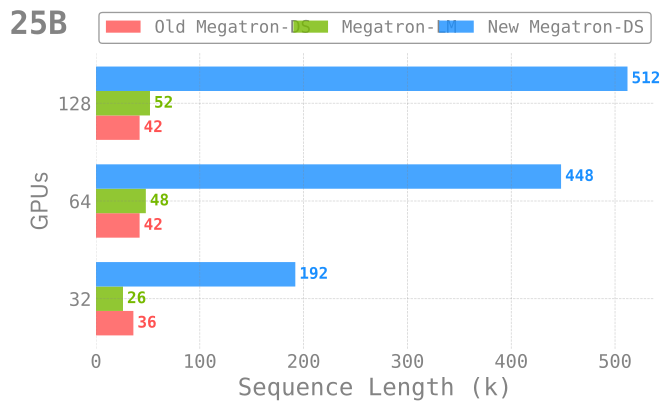
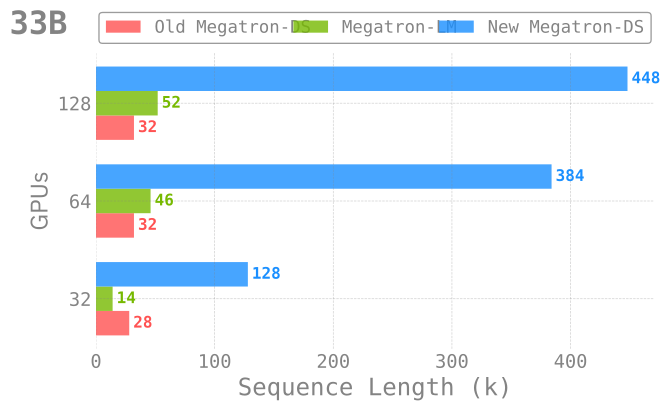
Figure 2: Pre-training with long sequence support across different model
sizes and numbers of GPUs. In each case, the `new` (current)
implementation **significantly** outperforms both NVIDIA/Megatron-LM as
well as our previous implementation.
## Installation
### Using [`install.sh`](https://github.com/ramanathanlab/genslm/blob/foremans/ds4sci/examples/long-sequences/install.sh)
> [!TIP] Installation
>
> **Important**
To install, simply:
>
> ``` bash
> git clone https://github.com/ramanthanlab/GenSLM/
> cd GenSLM/examples/long-sequences/
> ./install.sh
> ```
>
> Explicitly,
> [`./install.sh`](https://github.com/ramanathanlab/genslm/blob/foremans/ds4sci/examples/long-sequences/install.sh)
> will:
>
> 1. **Automatically** create a virtual environment *on top of* the
> latest `conda` module
> 2. Install (+ update[^2]) / build all the required
> [dependencies](#dependencies) into this virtual environment
### Step-by-Step
For completeness, we describe below the steps for installing and
building each of the dependencies.
1. Clone GitHub repo:
``` bash
git clone https://github.com/ramanthanlab/GenSLM
```
2. Load `conda` module:
- ThetaGPU:
``` bash
# ThetaGPU:
if [[ "$(hostname)==theta*" ]]; then
export MACHINE="ThetaGPU"
export CONDA_DATE="2023-01-10"
module load conda/2023-01-11
conda activate base
fi
```
- Polaris:
``` bash
# Polaris:
if [[ "$(hostname)==x3*" ]]; then
export MACHINE="Polaris"
export CONDA_DATE="2023-01-10"
module load conda/2023-01-10-unstable
conda activate base
fi
```
3. Setup Virtual Environment[^3]:
``` bash
cd ./genslm/examples/long-sequences
# create a new virtual environment
mkdir -p "venvs/${MACHINE}/${CONDA_DATE}"
python3 -m venv "venvs/${MACHINE}/${CONDA_DATE}" --system-site-packages
source "venvs/${MACHINE}/${CONDA_DATE}/bin/activate"
```
4. Create a new folder
(`genslm/examples/long-sequences/deps/${MACHINE}`) where we’ll
installing dependencies locally:
``` bash
mkdir -p "deps/${MACHINE}"
cd "deps/${MACHINE}"
```
#### Dependencies
We provide below the details needed to install each of the required
dependencies.
[ `saforem2/ezpz`](https://github.com/saforem2/ezpz)
1. [ `saforem2/ezpz`](https://github.com/saforem2/ezpz)
``` bash
pip install -e "git+https://github.com/saforem2/ezpz.git#egg=ezpz"
```
[ `Microsoft/DeepSpeed`](https://github.com/microsoft/DeepSpeed)
2. [ `Microsoft/DeepSpeed`](https://github.com/microsoft/DeepSpeed)
``` bash
git clone https://github.com/microsoft/DeepSpeed.git
cd DeepSpeed
python3 -m pip install -e .
```
[ `Microsoft/Megatron-DeepSpeed`](https://github.com/microsoft/Megatron-DeepSpeed)
3. [
`Microsoft/Megatron-DeepSpeed`](https://github.com/microsoft/Megatron-DeepSpeed):
``` bash
git clone https://github.com/microsoft/Megatron-DeepSpeed.git
```
[ `NVIDIA/apex`](https://github.com/NVIDIA/apex)
4. [ `NVIDIA/apex`](https://github.com/NVIDIA/apex)
``` bash
git clone https://github.com/NVIDIA/apex
cd ../apex/
pip install -v --disable-pip-version-check --no-cache-dir --no-build-isolation --global-option="--cpp_ext" --global-option="--cuda_ext" -e ./
```
[ `pybind/PyBind11`](https://github.com/pybind/pybind11)
5. [ `pybind/PyBind11`](https://github.com/pybind/pybind11)
``` bash
pip install pybind11
```
[ `Dao-AILab/flash-attention`](https://github.com/Dao-AILab/flash-attention)
6. [
`Dao-AILab/flash-attention`](https://github.com/Dao-AILab/flash-attention):
> [!CAUTION] Flash Attention
>
> - The new release supports three different implementations of
> FlashAttention: (`v1.0.4`, `v2.x`, `triton`)
> - FlashAttention `v2.x` may have numerical instability issues. For
> the best performance, we recommend using FlashAttention + Triton
- `v1.0.4`:
``` bash
python3 -m pip install flash-attn==1.0.4
```
- `v2.x`:
``` bash
git clone https://github.com/Dao-AILab/flash-attention
cd flash-attention
python3 setup.py install
```
- `openai/triton`:
``` bash
git clone -b legacy-backend https://github.com/openai/triton
cd triton/python
python3 -m pip install cmake
python3 -m pip install .
```
## Running
The [`ALCF/`](./ALCF/) directory contains shell scripts for setting up
the environment and specifying the options to be used when launching.
Various options can be specified dynamically at runtime by setting them
in your environment, e.g.:
``` bash
MODEL_SIZE_KEY="GPT25B" SEQ_LEN=128000 USE_FLASH_ATTN=1 MICRO_BATCH=1 GAS=1 SP_TYPE="megatron" ZERO_STAGE=1 ./ALCF/train-gpt3.sh
```
Explicitly:
- [`ALCF/train-gpt3.sh`](./ALCF/train-gpt3.sh): **Main entry point for
training**
- This script will **automatically** source the rest of the required
[`ALCF/*.sh`](./ALCF/) scripts below
- [`ALCF/models.sh`](./ALCF/models.sh): Contains some example model
architectures for GPT3-style models
- [`ALCF/args.sh`](./ALCF/args.sh): Logic for parsing / setting up
runtime options for Megatron and DeepSpeed
- [`ALCF/setup.sh`](./ALCF/args.sh): Locate and activate virtual
environment to be used, ensure MPI variables are set properly
- [`ALCF/launch.sh`](./ALCF/launch.sh): Identify available resources and
build the command to be executed
- i.e. figure out how many: `{nodes, GPUs per node, GPUs total}`, to
pass to `mpi{run,exec}`
- then, use this to build
`mpiexec python3 pretrain_gpt.py`
## ZeRO Offloading
[🚀 **W&B Report**: *Looooooooong
Sequences*](https://wandb.ai/l2hmc-qcd/Megatron-DS-Benchmarking/reports/Looooooong-Sequences--Vmlldzo1MzI2NjA1)
These newly introduced optimizations, in combination with
[ZeRO-Offload](https://www.deepspeed.ai/tutorials/zero-offload/) allows
us to go even further.
By employing ZeRO-Offloading, we are able to free up additional memory
which can be used for *even longer* sequences.
Though work is still ongoing, this is a promising direction that will
allow us to consider significantly larger genomes than previously
possible.
We use [Weights & Biases](https://wandb.ai) to track these experiments,
and have aggregated our initial results in the [W&B
Report](https://wandb.ai/l2hmc-qcd/Megatron-DS-Benchmarking/reports/Looooooong-Sequences--Vmlldzo1MzI2NjA1)
below.
We can evaluate the performance of our model by looking at two different
metrics for throughput: `samples_per_sec` and `TFLOPS`.
Explicitly, we see that we are able to scale up to significantly longer
sequences (`420k / 128k ~ 3.3x`) with only a minimal impact on
throughput performance (`81 / 105 ~ 77\%`)[^4].
Table 2: Impact on TFLOPS as a function of increasing sequence length.
Table from:
[`throughput/TFLOPS`](https://api.wandb.ai/links/l2hmc-qcd/awklywn7)
| Name | Sequence Length (k) | (`seq_len / min_seq_len`) | TFLOPS | TFLOPS (% of peak) |
|:--:|:--:|:--:|:--:|:--:|
| GPT25B | 420 | **3.28125** | 81.77225 | **77.867** |
| GPT25B | 400 | 3.125 | 90.62 | 86.297 |
| GPT25B | 360 | 2.8125 | 81.6325 | 77.7348 |
| GPT25B | 360 | 2.8125 | 82.6824 | 78.7346 |
| GPT25B | 192 | 1.5 | 115.8228 | 110.2927 |
| GPT25B | 128 | 1 | 106.672 | 101.5788 |
| GPT25B | 128 | 1 | 105.014 | 100.00 |
Figure 3: Weights & Biases Report
[^1]: The described experiments were performed on 4 NVIDIA DGX A100-40GB
nodes, all using `TPSIZE=32`\[^tpsize\], connected through 8 HDR
InfiniBand (200Gb/s per HDR).
[^2]:
2. `deepspeed-0.10.3`
3. `pytorch==2.0.0+cu118`
[^3]: Where `"${MACHINE}"` $\in$ `{"ThetaGPU", "Polaris"}` and
`"${CONDA_DATE}"` $\in$ `{"2023-01-10", "2023-01-11"}`
[^4]: [`throughput/TFLOPS`](https://api.wandb.ai/links/l2hmc-qcd/awklywn7)