# SageOx CLI (`ox`)
[](https://github.com/sageox/ox/releases)
[](LICENSE)
[](https://goreportcard.com/report/github.com/sageox/ox)
[](https://github.com/rsnodgrass/ai-human-docs)
[](https://github.com/sageox/ox/actions/workflows/ci.yml)
**The hivemind for human-agent teams.** `ox` is the open-source CLI for
[SageOx](https://sageox.ai). It loads your team's decisions, conventions, and
session history into every coding agent session automatically, and records your
sessions back to the shared context so the next coworker inherits them.
Today that context lives in scattered places: a meeting nobody recorded, a Slack
thread three weeks deep, the head of whoever wrote the code. So humans repeat
themselves and AI coworkers drift — rebuilding the same lost context every
session. `ox` closes that gap. Decisions become shared memory; every session
starts with the full picture instead of from zero.
> **Capture the conversation, then build on it.** `ox` brings team context into
> your coding sessions; the [SageOx desktop app](https://sageox.ai/product/desktop)
> helps make capturing human context in the first place even easier. One click
> records a call or an in-person conversation, and within 60 seconds after the
> recording ends, SageOx distills it into shared context your AI coworkers can
> build on — no re-explaining, no copied notes.
> **[Install SageOx Desktop →](https://sageox.ai/product/desktop)** (macOS 14.4+)
**Ask your coding agent what the team already figured out — even if it happened
in a different agent, on a different machine, days ago.**

One session, every moment that matters: it **recalls** a teammate's Codex work
and your own prior Claude Code session, **coordinates** by murmuring and noticing
a teammate already in the same files, and proposes a plan **enriched** with
collisions, prior art, and who owns the area. All of it because every session is
recorded to your team's shared, queryable history.
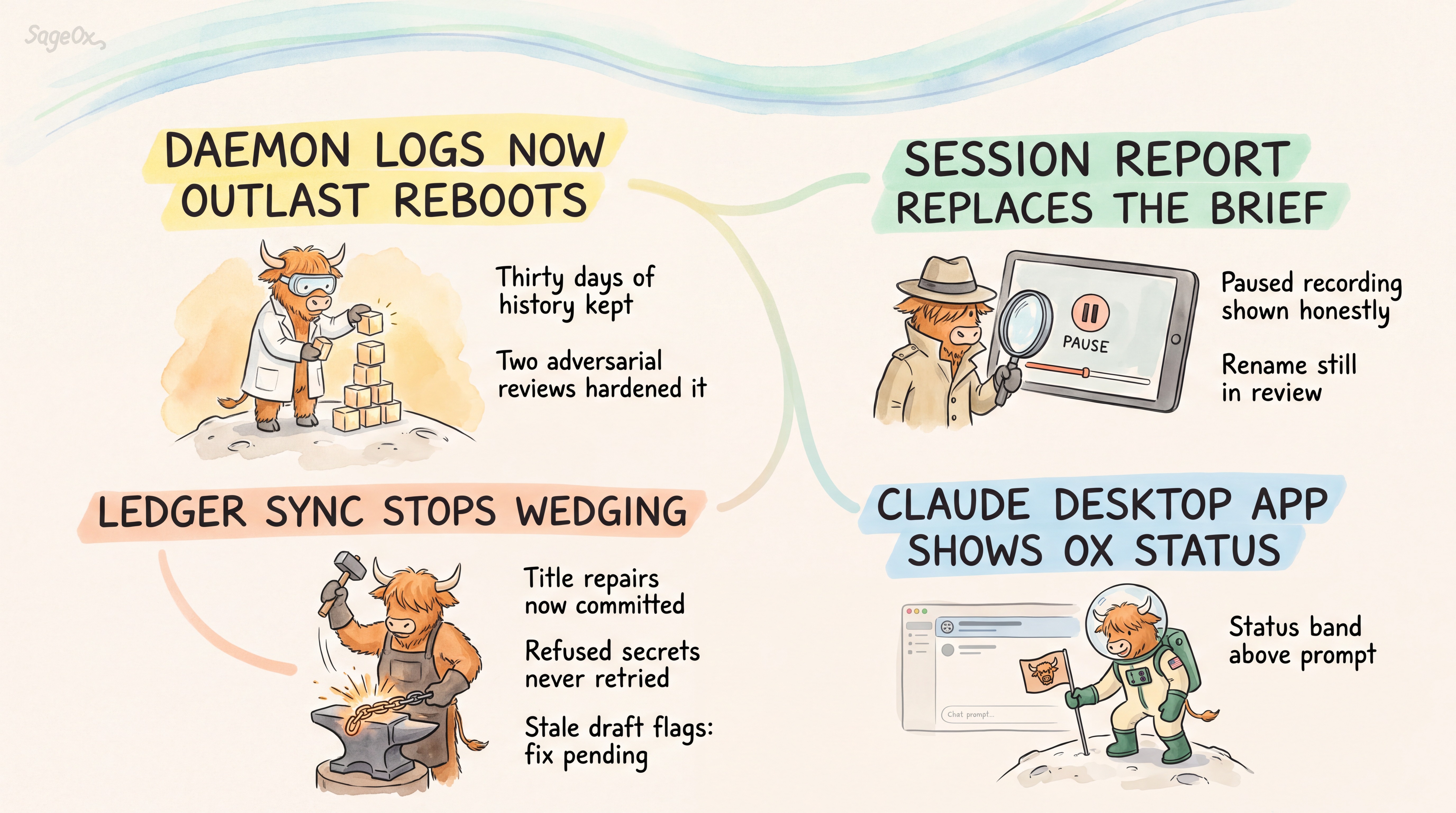
## Latest Project Activity
[](https://sageox.ai/team/team_jihjpfkt8b)
---
## Install
On macOS, the CLI requires macOS 13 Ventura or later.
**Homebrew (macOS / Linux):**
```bash
brew install sageox/tap/ox
```
**npm (macOS / Linux / FreeBSD):**
```bash
npx @sageox/ox@latest install
```
This puts `ox` on PATH and logs you in. It changes no repository; run `ox init` inside each repo you want to link.
**Install script (macOS / Linux / FreeBSD):**
```bash
curl -sSL https://raw.githubusercontent.com/sageox/ox/main/scripts/install.sh | bash
```
**From source (contributor / developer path):**
```bash
git clone https://github.com/sageox/ox.git && cd ox
make build && make install
```
This builds bleeding-edge HEAD — less tested than a release, and it won't
self-update. Use Homebrew or the install script above for everyday use; both
put `ox` and its 10 adapter binaries on PATH together and self-update via
`ox upgrade`.
Verify with `ox version`.
## Quickstart
```bash
cd ~/src/my-project # your code repo
ox login # authenticate with sageox.ai
ox init # one-time per repo: creates .sageox/
git add .sageox/ && git commit -m "initialize SageOx"
ox doctor # diagnose (ox doctor --fix auto-repairs)
ox feedback --file report.txt # send private feedback to SageOx Support
ox status # auth, project, sync state, and daemon health
```
That's the whole setup. When an AI coworker runs `ox agent prime` at the start of
a session, team context loads in automatically.
**Recording is on by default.** Once a repo is initialized, every new AI coworker
session records automatically — there's nothing to start. Context only compounds
when sessions are actually captured, and the payoff arrives a week later when a
teammate's agent already knows what you decided today.
Secrets are stripped locally before anything uploads, and you can record manually
or turn it off entirely — open the config editor and pick a recording mode:
```bash
ox config # interactive editor; walks you through the modes
```
More detail in [What gets recorded](#what-gets-recorded).
Then just ask your AI coworker things it couldn't have known on its own:
- *"What did we decide about the daemon design, and who worked on it?"*
- *"Draft a plan from this week's team discussions."*
- *"Show me an effective prompt a teammate used on this repo recently."*
---
## What gets recorded
`ox` records coding sessions — the conversation between you and your AI coworker —
so teammates and future sessions can learn from prior work. Here is exactly what
leaves your machine, and what doesn't.
**Recording is on by default.** In an initialized repo, each new AI coworker
session records automatically, and secrets are stripped locally before anything is
uploaded.
### What is captured
Your prompts, the agent's responses, and tool invocations — commands run, files
read or written, and their outputs. File paths and diffs appear when your agent
touches them.
Nothing is scraped passively. `ox` only captures what passes through the agent
conversation itself.
### What is redacted before upload
`ox` scans for secrets **locally, before anything is stored or synced**, and
replaces them with `[REDACTED_*]` markers. There is nothing to configure.
Common credential formats are stripped automatically: cloud provider keys,
service tokens (GitHub, GitLab, Slack, Stripe, npm, PyPI, and others), private
keys, connection strings, auth headers, JWTs, and `KEY=value` assignments and
shell exports. The full pattern list lives in
[`internal/session/secrets.go`](https://github.com/sageox/ox/blob/main/internal/session/secrets.go)
— read it rather than trusting this summary.
> ⚠️ **`ox` does not respect `.gitignore` for session capture.** If your agent
> reads a file that contains a secret in a non-standard format, the redaction
> patterns above are the only filter. Avoid pointing your agent at `.env` files
> or credential files you would not want recorded.
### Where it goes
Sessions are written to your local cache first — `~/.cache/sageox/` — then synced
to your team's shared history, a git repository hosted on sageox.ai. Content is
stored as LFS blobs; only metadata is git-tracked. **In the current version,
there is no self-hosted or local-only ledger** — the shared history always
lives on sageox.ai. You can still keep an individual session from being
published to it (see
[Turning it off, or recording manually](#turning-it-off-or-recording-manually)
below), but there's no way to run the ledger itself somewhere you control.
If you're offline or an upload fails, the session stays cached and
`ox doctor --fix` retries it later. Cached sessions persist until uploaded or
removed; there's no TTL or automatic pruning.
Occasionally a Ledger ends up with history the server refuses: a session file committed
with Git conflict markers, or a session artifact committed as full content instead of its
LFS pointer. The daemon then pauses uploads and keeps your work local until the history is
clean. `ox doctor` reports what is in the way, and two targeted repairs fix it. A repair that changes at least one file
adds exactly one commit; one with nothing to fix adds none. Neither rewrites existing history.
| Step | Command | What it does |
|------|---------|--------------|
| 1 | `ox doctor` | Reports what blocks the push and names the repair to run. |
| 2 | `ox doctor --fix-slug=session-conflict-markers` | Resolves conflict markers committed into session files, keeping the version your team already has. It also fixes markers already pushed, which leave a session unreadable for everyone; every clone resolves them identically, so one teammate's repair fixes the whole team. |
| 3 | `ox doctor --fix-slug=session-pointer-restore` | Replaces session artifacts committed as full content with their LFS pointers, uploads your own never-uploaded sessions, and leaves teammates' sessions untouched. |
| 4 | `ox status` | Shows uncommitted Ledger changes; it does not show commits awaiting push. The daemon log reports when the push succeeds. |
If a repair reports files it could not fix, it names each one and the reason, and changes
nothing for those files.
`ox uninstall` removes local session data and config. Sessions already synced are
not deleted; add `--local-only` to skip notifying the server.
Enterprise self-hosted deployment isn't available today —
[talk to us](https://sageox.ai) if you need it.
### Who can read it
Anyone on your team with access to that shared history. Scope is your team — not
public, not shared across teams. **Other than turning off recording for the session
altogether, there are no finer per-session privacy controls:** if you are on a
team and you record, your teammates can read your sessions.
### Turning it off, or recording manually
Recording starts automatically with each new AI coworker session. To end the
active one:
```bash
ox session stop # end the active session
```
To change the standing behavior — record manually, or not at all — open the
config editor and choose a recording mode:
```bash
ox config # interactive editor; walks you through the modes
```
| Mode | Behavior |
|---|---|
| `auto` | Agent hooks start recording automatically — **default** |
| `manual` | Recording only when you run `ox session start` |
| `disabled` | Agent hooks won't auto-start; manual start still works |
All three modes govern what **agent hooks** do. `ox session start` always works —
including under `disabled`, which stops automatic capture but is not a hard lock.
Your user-level setting overrides every repo and team setting. A `disabled` you
set for yourself can't be undone by a repo you cloned or a team you joined.
**Can I keep a session from being published automatically?** That's a separate
setting from the recording mode above — `session_publishing` controls what
happens when a session *stops*, not whether it starts:
```bash
ox config set session_publishing manual # don't auto-publish when a session stops
```
With `session_publishing: manual`, a session is *held* on your machine when it
stops: nothing summarizes it, pushes it to the shared ledger, or deletes it —
not the background daemon, not `ox doctor`, and not closing your AI coworker.
`ox session list` shows it as `held`, and `ox doctor` / `ox status` list your
held sessions. Publish one when you're ready with `ox session upload `;
its summary is generated after it's published. This is different from
`session_recording: disabled` above, which
stops automatic capture entirely; `manual` publishing still records, it just
doesn't publish automatically. (Don't confuse the two `manual` values:
`session_recording: manual` changes when capture *starts*; `session_publishing:
manual` changes whether a finished session *publishes*.)
Full detail: [Privacy Policy](https://sageox.ai/privacy) ·
[Terms of Service](https://sageox.ai/terms) ·
[Acceptable Use Policy](https://sageox.ai/acceptable-use)
---
## What you get
| Capability | | Command | Learn more |
|---|:---:|---|---|
| Query past sessions, discussions, and code — across agents and machines | ✅ | `ox query "..."` | [query](docs/reference/query.mdx) |
| Auto-recorded coworker sessions | ✅ | `ox agent prime`, `ox session list` | [session capture](docs/architecture/session-capture-architecture.md) |
| Real-time coordination signals between coworkers | ✅ | `ox murmur "..."` | — |
| Team-context-enriched plans (design, GTM, rollout, engineering) | ✅ | `ox plan enrich`, `ox plan render` | [plan](docs/reference/plan) |
| Planning-relevant code insights (hotspots, contention) | ✅ | `ox code insights` | — |
| Load an expert AI coworker into context | ✅ | `ox coworker load ` | — |
| Diagnose and auto-fix your setup | ✅ | `ox doctor --fix` | [doctor](docs/reference/doctor.mdx) |
✅ generally available
## How it works
`ox init` writes a `.sageox/` directory that ties the repo to your team. From
then on, `ox agent prime` injects team context — conventions, security
requirements, architectural decisions, prior sessions — into each AI coworker
before it writes a line. Coworkers, human and AI, share that context.
The payoff is multiplayer by default. When a discussion, an implementation
session, and the resulting code all carry the same shared context, a reviewer
opening the PR has the full story — the original reasoning, the session that
built it, and the diff — without chasing anyone down.
---
## Works with your coding agent
`ox` is agent-agnostic. The same recorded context is primed into, and queryable
from, whichever agent your team uses.
| Agent | Prime context | Record sessions | What fires it |
|---|:---:|:---:|---|
| **Claude Code** | ✅ | ✅ | hooks — session, prompt, tool, and compaction |
| **Codex CLI** | ✅ | ✅ | hooks — session, prompt, and tool |
| **Gemini CLI** | ✅ | ✅ | hooks — tool and stop |
| **Droid** | ✅ | ✅ | hooks — tool and stop |
| **OpenCode** | ✅ | ✅ | plugin — session start |
| **Amp** | ✅ | ✅ | plugin records; `AGENTS.md` primes |
| **Pi** | ✅ | ✅ | `AGENTS.md` |
| **Aider** | ✅ | ✅ | `CONVENTIONS.md` |
| **Goose** | ✅ | ✅ | hooks — session, prompt, tool, and tool-failure |
| **Cursor** | ✅ | ➖ | instruction file |
| Windsurf · Cline · Copilot · Kiro | ✅ | ➖ | instruction file |
✅ shipped · ➖ planned. Claude Code is the primary, most-tested target; see
[agent compatibility](docs/guides/agent-compatibility.md) for the per-agent detail.
`ox query`, `ox murmur`, and `ox status` are plain CLI commands. They work from
any agent — including ones with no adapter — as long as `ox` is on `PATH`.
### Orchestrators
`ox` runs inside [Block Buzz](https://github.com/block/buzz),
[Conductor](https://conductor.build), and
[Gas City](https://github.com/gastownhall/gascity).
Agent and orchestrator names are trademarks of their respective owners; `ox`
is compatible with, not affiliated with, them.
## Configuration
Run `ox config` to open the interactive editor — it lists every setting with its
current value and source, walks you through valid choices, and writes the right
file for you. It's the recommended way to change anything, recording mode included.
```bash
ox config # interactive settings editor (TUI)
```
Configuration resolves in this order, highest priority to lowest:
1. **CLI flags** — `--verbose`, `--quiet`, `--json`
2. **Environment variables**
3. **User config** — `~/.config/sageox/config.yaml` · your machine, all repos
4. **Repo config** — `.sageox/config.json` · this repo, all users
5. **Team config** — from your team context · all repos on the team
**User config beats repo and team config.** That inverts the usual order, and it's
deliberate: a repo or team can suggest a default, but it cannot override your
personal preferences — recording mode, telemetry, and the like.
For scripting, `ox config set ` writes the user file directly; add
`--repo` to write the repo file instead.
## Contributing
**We're accepting contributions.** Bug reports, fixes, docs improvements, and new
agent adapters are all welcome — the ➖ rows in the compatibility table above are
a good place to start.
[Open an issue](https://github.com/sageox/ox/issues) to report something or float
an idea before you build it; send a pull request directly for small fixes.
`ox` is MIT licensed — see [LICENSE](LICENSE).
## Tools we love
`ox` stands on a lot of open source — see [CREDITS](docs/CREDITS.md).
We build `ox` in great company. These are the tools we rely on — and love —
every day. Gratitude to the teams behind them, and to the wider developer
community.


