StableGen is a Blender add-on that textures meshes and whole scenes with diffusion models, and generates new meshes from a prompt or an image. It renders guidance images from cameras in your scene, sends the work to a [ComfyUI](https://github.com/comfyanonymous/ComfyUI) server on the same computer or elsewhere on your network, and projects the results back onto the meshes.
## One prompt to a rigged asset
Describe a character and pick one of the preview images; StableGen does the rest in one run. TRELLIS.2 builds the mesh, SkinTokens rigs it, and views generated around it are projected into its texture. A run can also start from an image, skip the rig, or keep the texture TRELLIS.2 makes itself. Afterwards, LATO.2 can rebuild any mesh as low-poly topology, and Make Solid removes the hidden interior shells TRELLIS.2 meshes carry. [TRELLIS.2](https://github.com/sakalond/StableGen/wiki/TRELLIS.2-mesh-generation)
## What it does
### Texture any model
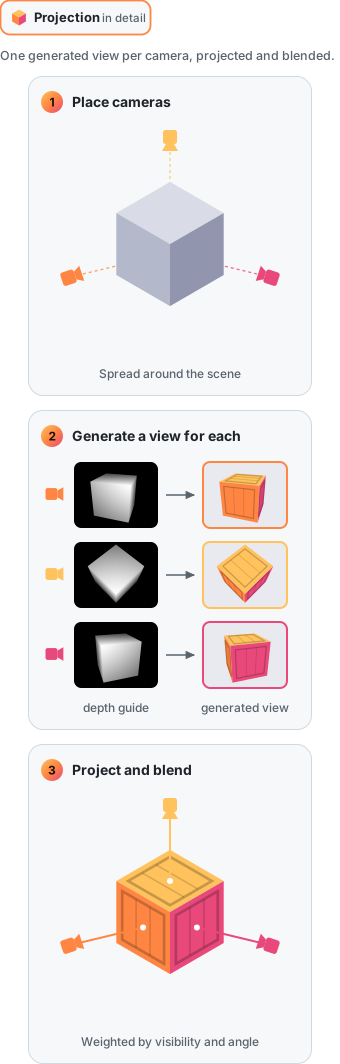
Place cameras around one object or a whole scene. StableGen generates a view from each camera and projects it onto every surface that camera sees; each view is generated with the earlier ones as context, so the texture stays consistent all the way round. [Generation modes](https://github.com/sakalond/StableGen/wiki/Generation-modes) · [Cameras](https://github.com/sakalond/StableGen/wiki/Cameras)
### Edit part of a texture
Paint over the part you want to change and describe the change. Masked Edit regenerates only the painted region, in every view that sees it, and leaves the rest of the texture as it was. [Masked Edit](https://github.com/sakalond/StableGen/wiki/Masked-Edit)
### PBR materials
Marigold estimates albedo, roughness, metallic and normal maps from the generated views. StableGen projects them like the color and bakes them into standard maps for other software. [PBR maps](https://github.com/sakalond/StableGen/wiki/PBR-maps)
### Rig and animate
SkinTokens adds a skeleton and skin weights to a character, during a TRELLIS.2 run or on any mesh you select. Motion from FBX or BVH files, such as Mixamo animations, can then be retargeted onto the rig. [Rigging and animation](https://github.com/sakalond/StableGen/wiki/Rigging-and-animation)
### Export to a game engine
Bake the result, PBR maps included, into UV textures and export it with its rig and animations: glTF for Godot and the web, or FBX for Unreal Engine and Unity. Below, a village in Unreal Engine 5.7 built only from StableGen exports: the houses, props, trees and ground as GLB with PBR maps, and five rigged characters as FBX with their walk. Orbit GIFs and MP4s, multi-color 3MF files for 3D printing, and the scene queue for unattended batches are in the same place. [Export](https://github.com/sakalond/StableGen/wiki/Export) · [Batch processing](https://github.com/sakalond/StableGen/wiki/Batch-processing-and-the-Scene-Queue)
## Working by hand
Each step can also be done by hand: reorder the cameras, give views their own prompts and describe objects once for every view that sees them, change how the views blend and reproject without generating again, extract PBR maps, and repaint a region with Masked Edit.
## How it works
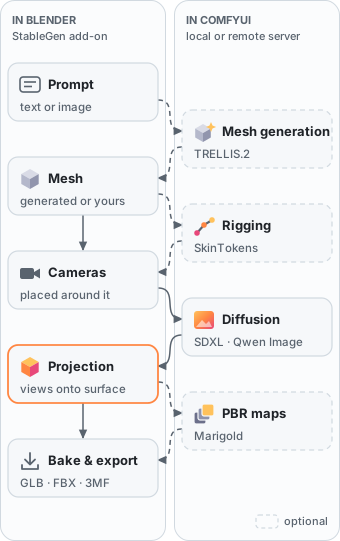
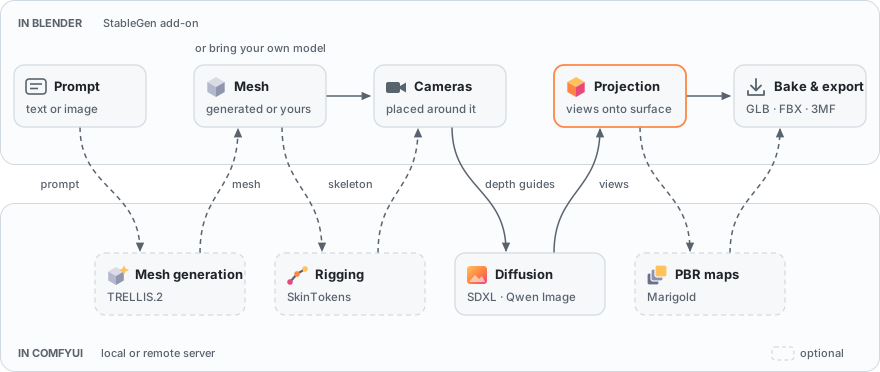
StableGen runs inside Blender and sends the model work to a ComfyUI server, on the same computer or another one on the network. You start from a prompt, an image or your own model, and the results come back into the scene as materials, meshes and armatures.
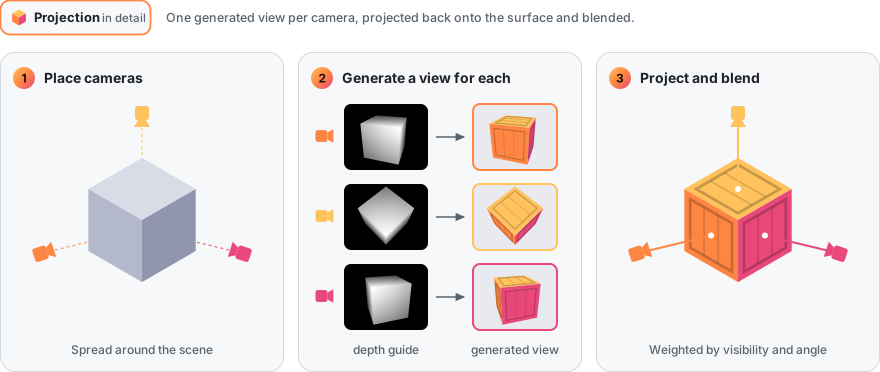
Texturing works by projection. Each camera gets a generated view that follows the geometry through a depth guide, and the views are blended onto the surface by how directly each camera sees it.
### Built on
- [ComfyUI](https://github.com/comfyanonymous/ComfyUI) runs every model, locally or on another machine.
- [TRELLIS.2](https://github.com/microsoft/TRELLIS.2) generates meshes, through ComfyUI's own TRELLIS.2 nodes.
- [SDXL](https://huggingface.co/stabilityai/stable-diffusion-xl-base-1.0) with ControlNet and IPAdapter, and [Qwen Image](https://github.com/QwenLM/Qwen-Image), generate the texture views. [MOSS-Image](https://huggingface.co/OpenMOSS-Team/MOSS-Image-SFT) and [Bria FIBO 2.0](https://huggingface.co/briaai/Fibo-2.0-edit-turbo) are available as experimental architectures.
- [SkinTokens](https://github.com/VAST-AI-Research/SkinTokens) rigs characters.
- [LATO.2](https://github.com/LoHhhha/LATO.2) rebuilds meshes as low-poly topology, through the [ComfyUI-LATO2](https://github.com/sakalond/ComfyUI-LATO2) node.
- [Marigold](https://github.com/prs-eth/Marigold) and [StableDelight](https://github.com/Stable-X/StableDelight) estimate the PBR maps.
## Gallery
## Requirements
- Blender 4.2 to 4.5, or 5.1 and later. Blender 5.0 is not supported.
- ComfyUI: StableGen can install its own, use one you have, or connect to one on another machine. An NVIDIA GPU is preferred: about 8 GB of VRAM for SDXL, and 16 GB or more for Qwen Image.
- Windows, Linux, or macOS on Apple Silicon.
- 10 GB to over 50 GB of disk space for models, depending on what you install, plus about 5 GB for StableGen's own ComfyUI.
## Installation
1. Download the add-on ZIP for your system (Windows x64, Linux x64 or macOS on Apple Silicon) from [Releases](https://github.com/sakalond/stablegen/releases). In Blender, open **Edit > Preferences > Get Extensions**, choose **Install from Disk** in the top-right menu, and select the ZIP.
2. Under **System > Network**, enable **Allow Online Access**.
3. Open the StableGen panel in the 3D Viewport's sidebar (**N**). Its **ComfyUI setup** page opens the first time, and later under **•••** > **ComfyUI setup**. Choose where ComfyUI comes from:
- **Install StableGen's own**: pick an install folder and press **Install ComfyUI**. StableGen sets up ComfyUI with its own Python and torch for your GPU, about 5 GB, then starts and stops it by itself. Tested on Windows so far.
- **Use my ComfyUI folder**: a ComfyUI you already have (portable, git or Desktop install, or one that runs on your system Python). StableGen installs models into it and starts it when needed.
- **Connect to a server**: a ComfyUI on another machine, at its server address. Install the models there with the installer (below).
4. Under **Models** on the same page, install what you need: SDXL or Qwen Image 2.1 for texturing, TRELLIS.2 for meshes, auto-rigging, PBR maps, LATO.2 and the experimental architectures. Each shows its download size; installs can be queued and removed, and an interrupted download resumes. When the selected architecture's models are missing, an **Install** line under Architecture downloads them too.
5. Set **Output Directory** in the add-on preferences.
On a remote ComfyUI, or without Blender, run the installer on that machine and restart ComfyUI:
```bash
python installer.py --packages 3,8
```
Package 3 sets up SDXL texturing, package 13 Qwen Image 2.1, package 8 mesh generation, package 14 auto-rigging, packages 15 to 17 the experimental architectures, and package 18 LATO.2 low-poly remeshing. `python installer.py --create-comfyui ` sets up StableGen's own ComfyUI there.
[Installation](https://github.com/sakalond/StableGen/wiki/Installation) covers every installer package, unattended installs, a remote server and manual setup.
## Quick start
Press N in the 3D Viewport and open the **StableGen** tab.
**Texture a model**
1. Select the mesh and click **Add cameras**.
2. Choose an **Architecture** and a **Preset**, then a **Checkpoint** on the **Texture** page.
3. Describe the surface in **Texture prompt** and click **Generate textures**.
4. Switch the viewport to **Rendered** shading to see the result. **Bake** and **Export** turn it into ordinary textures and files.
**Generate an asset**
1. Set **Architecture** to **TRELLIS.2** and choose a preset tagged **Mesh + texture**.
2. On the **Mesh** page, describe the object. **Generate mesh from** starts on **Prompt**, with the **Preview gallery** on.
3. To rig a character in the same run, enable **Auto-rig** under **Rigging & Animation**.
4. Click **Generate asset**, then pick a preview image.
[Quick start](https://github.com/sakalond/StableGen/wiki/Quick-start) goes through both in detail.
## Documentation
The [StableGen wiki](https://github.com/sakalond/StableGen/wiki) covers every feature in detail:
- **Getting started:** [Installation](https://github.com/sakalond/StableGen/wiki/Installation) · [Manual installation](https://github.com/sakalond/StableGen/wiki/Manual-installation) · [Quick start](https://github.com/sakalond/StableGen/wiki/Quick-start)
- **Texturing:** [Architectures and presets](https://github.com/sakalond/StableGen/wiki/Architectures-and-presets) · [Generation modes](https://github.com/sakalond/StableGen/wiki/Generation-modes) · [Masked Edit](https://github.com/sakalond/StableGen/wiki/Masked-Edit) · [Cameras](https://github.com/sakalond/StableGen/wiki/Cameras) · [Blending and projection](https://github.com/sakalond/StableGen/wiki/Blending-and-projection) · [PBR maps](https://github.com/sakalond/StableGen/wiki/PBR-maps)
- **Mesh generation and rigging:** [TRELLIS.2 mesh generation](https://github.com/sakalond/StableGen/wiki/TRELLIS.2-mesh-generation) · [Rigging and animation](https://github.com/sakalond/StableGen/wiki/Rigging-and-animation)
- **Output and automation:** [Export](https://github.com/sakalond/StableGen/wiki/Export) · [Batch processing and the Scene Queue](https://github.com/sakalond/StableGen/wiki/Batch-processing-and-the-Scene-Queue) · [Output files](https://github.com/sakalond/StableGen/wiki/Output-files) · [Troubleshooting](https://github.com/sakalond/StableGen/wiki/Troubleshooting)
## License
StableGen is released under the [GNU General Public License v3.0](LICENSE). The models and nodes it runs on ComfyUI have their own licenses, and three of them are for non-commercial use only:
- Qwen Image 2.1 and Qwen Image 2.1 Turbo are released under the [Qwen Research License](https://huggingface.co/Qwen/Qwen-Image-2.1/blob/main/LICENSE). Qwen Image Edit and SDXL are not affected.
- Bria FIBO 2.0 is released under [CC BY-NC 4.0](https://huggingface.co/briaai/Fibo-2.0-edit-turbo); commercial use needs an agreement with Bria.
- TRELLIS.2's image encoder, Meta's DINOv3, has its own license. See [TRELLIS.2 third-party licenses](https://github.com/sakalond/StableGen/wiki/TRELLIS.2-mesh-generation#third-party-licenses).
## Acknowledgements
StableGen began as a bachelor's thesis by Ondřej Sakala at the Faculty of Information Technology, Czech Technical University in Prague, supervised by Ing. Radek Richtr, Ph.D. ([full text](https://dspace.cvut.cz/handle/10467/123567)). Part of its development took place during a study stay at Kanazawa University in summer 2026; travel costs were supported by a grant from Nadace „Nadání Josefa, Marie a Zdeňky Hlávkových“.
It builds on [ComfyUI](https://github.com/comfyanonymous/ComfyUI) and [Blender](https://www.blender.org/), ran TRELLIS.2 through [ComfyUI-TRELLIS2](https://github.com/PozzettiAndrea/ComfyUI-TRELLIS2) before ComfyUI had its own nodes, and was inspired by the [Dream Textures](https://github.com/carson-katri/dream-textures) and [Diffused Texture](https://github.com/FrederikHasecke/diffused-texture-addon) add-ons.
Research StableGen draws on
- Ho et al. (2020), Denoising Diffusion Probabilistic Models, [arXiv:2006.11239](https://arxiv.org/abs/2006.11239)
- Rombach et al. (2022), Latent Diffusion Models, [arXiv:2112.10752](https://arxiv.org/abs/2112.10752)
- Zhang et al. (2023), ControlNet, [arXiv:2302.05543](https://arxiv.org/abs/2302.05543)
- Ye et al. (2023), IP-Adapter, [arXiv:2308.06721](https://arxiv.org/abs/2308.06721)
- Chen et al. (2023), Text2Tex, [arXiv:2303.11396](https://arxiv.org/abs/2303.11396)
- Richardson et al. (2023), TEXTure, [arXiv:2302.01721](https://arxiv.org/abs/2302.01721)
- Zeng et al. (2023), Paint3D, [arXiv:2312.13913](https://arxiv.org/abs/2312.13913)
- Le et al. (2024), EucliDreamer, [arXiv:2311.15573](https://arxiv.org/abs/2311.15573)
- Ceylan et al. (2024), MatAtlas, [arXiv:2404.02899](https://arxiv.org/abs/2404.02899)
- Siddiqui et al. (2022), Texturify, [arXiv:2204.02411](https://arxiv.org/abs/2204.02411)
- Bokhovkin et al. (2023), Mesh2Tex, [arXiv:2304.05868](https://arxiv.org/abs/2304.05868)
- Levin and Fried (2024), Differential Diffusion, [arXiv:2306.00950](https://arxiv.org/abs/2306.00950)
## Contact
- **Questions, help and results:** the [Discord server](https://discord.gg/jhGp9Rsgh3) or [GitHub Discussions](https://github.com/sakalond/StableGen/discussions)
- **Bug reports:** [GitHub Issues](https://github.com/sakalond/StableGen/issues), with your Blender and StableGen versions and the console output
- **Author:** Ondřej Sakala, [sakalaondrej@gmail.com](mailto:sakalaondrej@gmail.com), [@sakalond](https://x.com/sakalond) on X
 StableGen