salt.md: One workspace. People and agents.

Docs, databases and realtime editing for your team. The same workspace is open to Claude, ChatGPT and Cursor, on exactly the access you grant them.
One binary, on your own server.

Website · Live demo · Documentation · Quickstart
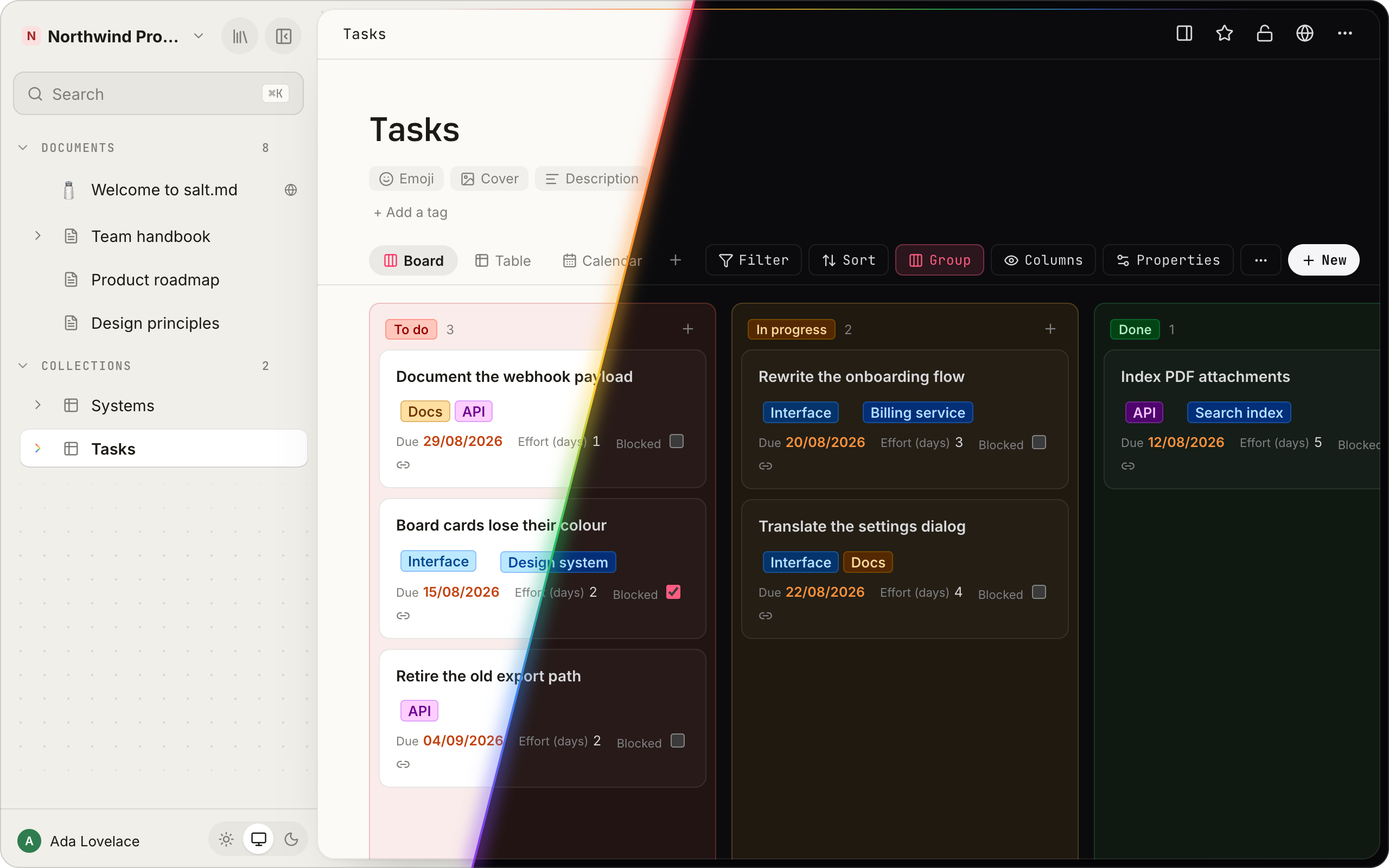

A Tasks board in salt.md, cut in two: light mode on the left, dark mode on the right.

## Quickstart ```sh curl -fsSL https://raw.githubusercontent.com/saltmd/salt.md/main/install.sh | sh ``` One command downloads the binary for your platform, installs it, starts it and prints the address to open. On a Linux server it sets itself up as a systemd service, and running it again upgrades it. No `curl` on the machine? `wget -qO- … | sh` does the same. Or with Docker: ```sh docker run -d -p 8420:8420 -v salt-data:/data ghcr.io/saltmd/salt.md:latest ``` There is nothing else to install: no database server, no cache, no object store. Reverse proxies, TLS and backups are in the [self-hosting guide](https://salt.md/wiki/self-hosting/). ## People and agents in the same place An agent is asked to organise the launch notes. A page appears, a database is created, the rows fill in. A person opens the same board a second later and carries on. Same pages, same permissions, same history. Connect Claude, ChatGPT, Codex, Cursor, Gemini CLI or any other MCP client to `/mcp` and it works on the workspace you use: - **Pages**: create, edit, move, duplicate, trash and restore - **Databases**: create them, change the schema, add and query rows, set up views - **Search** with the same permission checks a person gets - **Bulk imports** from any JSON source, without the content passing through the agent - **Comments**, and an append-only note trail on every page - **Presence**: the page shows which agent is working on it, before you start typing **And a list it cannot touch.** No agent can create or delete accounts, issue tokens, take or restore a backup, change instance settings or decide who is in a workspace, and the server tells every agent that connects. A credential carries its person's access and never more, every workspace decides what agents may do there, and the activity log keeps their changes apart from yours. [MCP tools](https://salt.md/wiki/mcp-tools/) · [Agent access](https://salt.md/wiki/agent-access/) · [Permissions](https://salt.md/wiki/permissions/) ## A whole workspace
A page in the block editor.

Write. A block editor with a slash menu, checklists, code, tables, callouts and diagrams. Page links, backlinks, covers and icons.

A collection as a table with typed columns.

Organise. Any page becomes a collection with typed properties: select, date, person, relation, rollup, formula and more.

The same collection as a month calendar.

Plan. Table, board, list, gallery, calendar, timeline or form, each with its own filters. Any date can be an iCal feed.

The search dialog with passage results.

Find. Full-text search over every page and the text inside uploaded PDFs, one shortcut away from anywhere.

A page with the comments panel open.

Together. Realtime editing with live cursors, comments, page history and an activity log.

The library showing pages as a graph of linked dots.

Connect. The library holds every page you can open, and the graph shows what links where.

Moving in? Markdown files, CSVs and a Notion export import from the same menu. ## Under the hood ```mermaid flowchart LR people(["People
browser · desktop · phone"]) --> salt agents(["Agents
Claude · ChatGPT · Cursor"]) -- MCP --> salt tools(["Your tools"]) -- "REST · webhooks · iCal" --> salt salt["salt.md
one Go binary"] --> data[("SQLite file
+ uploads")] ``` One Go process, built with `CGO_ENABLED=0`: a static binary with a pure-Go SQLite driver and the frontend embedded. No PostgreSQL, no Redis, no object store, no separate collaboration server. - **Install**: one binary, `install.sh`, or the Docker image - **Data**: one SQLite file plus an uploads directory - **Update**: swap the binary or pull the image, restart - **Backup**: stop, copy two paths, start - **Platforms**: Linux and macOS on amd64 and arm64, Windows on amd64 The [desktop app](https://salt.md/wiki/desktop-app/) for macOS and Linux is a window onto a server you run, not a second copy of the product. ## Documentation [salt.md/wiki](https://salt.md/wiki/) covers every screen, every property type, every tool an agent can call and every setting on the server. It is written next to this code and checked against it on every build: a tool name that no longer exists, an API path that is not a route or a screenshot whose screen has changed fails the build. Every page is also plain Markdown at the same address with `.md` on the end, indexed for agents at [/wiki/llms.txt](https://salt.md/wiki/llms.txt). ## Contributing Issues and pull requests are welcome. Pull requests need a signed [CLA](CLA.md); [CONTRIBUTING.md](CONTRIBUTING.md) says what that means and why it exists. Security reports go to **dev@salt.md**, not to a public issue: see [SECURITY.md](SECURITY.md). ## License [AGPL-3.0](LICENSE). Use it, run it at work, change it. If you offer it to others over a network, publish your changes. The components salt.md is built on, with their licences in full, are in [THIRD-PARTY-NOTICES.md](THIRD-PARTY-NOTICES.md). A running instance serves the same list at `/licenses`.