{
"cells": [
{
"cell_type": "markdown",
"id": "0",
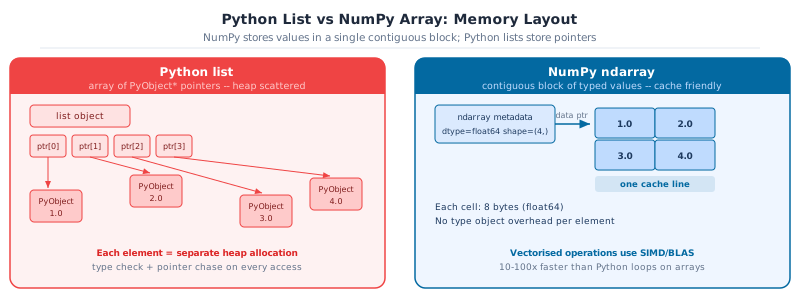
"metadata": {},
"source": [
"---\n",
"title: \"Chapter 6: NumPy basics\"\n",
"---"
]
},
{
"cell_type": "markdown",
"id": "1",
"metadata": {},
"source": [
"[](https://colab.research.google.com/github/sambaiga/ds-mlops-path/blob/main/tutorials/01-python-basics/06-numpy.ipynb) [](https://raw.githubusercontent.com/sambaiga/ds-mlops-path/main/tutorials/01-python-basics/06-numpy.ipynb)"
]
},
{
"cell_type": "markdown",
"id": "2",
"metadata": {},
"source": [
"A Python loop can normalise 2,400 exam scores. It can. It takes thirty lines, runs ten times slower than it should, and looks nothing like the code the person reviewing your pull request expects to see.\n",
"\n",
"NumPy does it in one: `(student_data - student_data.mean(axis=0)) / student_data.std(axis=0)`. No loop. No temporary variables. The operation, stated directly.\n",
"\n",
"That shape, a short expression operating on an entire matrix, is the syntax that Pandas, scikit-learn, and PyTorch all speak. The standard library tools from Chapter 5 handle exact arithmetic on small collections; this chapter introduces the data structure that handles numbers at scale. Chapter 7 (`07-numpy-advanced.ipynb`) extends it with broadcasting, vectorisation, and linear algebra.\n",
"\n",
"> Callout markers: [book cover page](../../index.qmd#callout-guide)."
]
},
{
"cell_type": "markdown",
"id": "3",
"metadata": {},
"source": [
"## Meet NumPy\n",
"\n",
"NumPy ([numpy.org](https://numpy.org)) was created in 2005 by Travis Oliphant to give Python scientists the numeric performance of Fortran and C without leaving the language. The idea was simple: store numbers in a contiguous block of memory with a fixed type, and let a thin Python wrapper call heavily optimised C and Fortran routines on that block. Two decades later, nearly every numerical computing library in Python (pandas, scikit-learn, PyTorch, TensorFlow) uses NumPy arrays as its currency.\n",
"\n",
"### How it compares\n",
"\n",
"| Approach | Speed on large arrays | Readable math | When to use |\n",
"| --- | --- | --- | --- |\n",
"| Python `list` + loop | Slow (Python objects, GIL) | Verbose | Small collections, mixed types |\n",
"| **NumPy `ndarray`** | **Fast (C/Fortran, contiguous)** | **Concise (`a * 2`)** | **Numeric data of any size** |\n",
"| PyTorch `Tensor` | Fast (optionally GPU) | Similar to NumPy | Deep learning, autodiff |\n",
"| JAX `Array` | Very fast (XLA, JIT, GPU/TPU) | NumPy-compatible | Research, differentiable programs |\n",
"| CuPy `ndarray` | GPU only | NumPy-compatible | Large-scale GPU computing |\n",
"\n",
"For everything up to classical ML on a laptop, NumPy is the right level of abstraction. PyTorch and JAX add complexity (device management, gradient tracking) that you don't need yet.\n",
"\n",
"### Already in your environment\n",
"\n",
"NumPy is included in `pyproject.toml`. If you ever start a standalone project:\n",
"\n",
"```bash\n",
"uv add numpy # or: pip install numpy\n",
"```\n",
"\n",
"Official docs and API reference: [numpy.org/doc](https://numpy.org/doc/stable/)"
]
},
{
"cell_type": "markdown",
"id": "4",
"metadata": {},
"source": [
"::: {.callout-note collapse=\"true\" icon=false}\n",
"## Learning Objectives\n",
"\n",
"| # | Skill | Covered in |\n",
"|---|---|---|\n",
"| 1 | Explain why NumPy arrays outperform Python lists for numeric data | Sec. 1 |\n",
"| 2 | Create arrays with `array`, `arange`, `zeros`, `ones`, and a `Generator` | Sec. 2 |\n",
"| 3 | Inspect and reshape arrays using `shape`, `dtype`, `reshape`, and stacking | Sec. 3 |\n",
"| 4 | Select data with integer indexing, slicing, and fancy indexing | Sec. 4 |\n",
"| 5 | Filter arrays with boolean masks and `np.where` | Sec. 5 |\n",
"| 6 | Compute per-column and per-row statistics with `axis` | Sec. 6 |\n",
":::"
]
},
{
"cell_type": "markdown",
"id": "5",
"metadata": {},
"source": [
"## 1. Why NumPy? The `ndarray`\n",
"\n",
"A Python `list` can hold anything (mixed types, nested objects), which makes it flexible but slow for numeric work: every element is a separate Python object, and arithmetic on a list means a Python-level loop.\n",
"\n",
"A NumPy **`ndarray`** (\"n-dimensional array\") is different: it stores **one fixed dtype** in a single contiguous block of memory. That uniformity lets NumPy hand the math off to compiled C/Fortran loops instead of the Python interpreter, often 10-100x faster, and with far less memory per element."
]
},
{
"cell_type": "code",
"execution_count": null,
"id": "6",
"metadata": {},
"outputs": [],
"source": [
"import numpy as np\n",
"\n",
"study_hours = [12, 5, 18, 9, 22]\n",
"\n",
"# A Python list has no element-wise arithmetic: this is string repetition, not math!\n",
"print(\"list * 2 :\", study_hours * 2)\n",
"\n",
"hours = np.array(study_hours)\n",
"print(\"array * 2 :\", hours * 2) # element-wise multiplication"
]
},
{
"cell_type": "markdown",
"id": "7",
"metadata": {},
"source": [
"{fig-alt=\"Two panels. Left red panel: Python list with pointer boxes and scattered PyObject heap cells. Right blue panel: NumPy ndarray with a contiguous block of float64 values labeled one cache line.\"}"
]
},
{
"cell_type": "markdown",
"id": "8",
"metadata": {},
"source": [
"\n",
" Key Concept: ndarray = dtype + shape + contiguous memory
\n",
"A NumPy array is homogeneous (one dtype for every element) and has a fixed shape. Because elements sit next to each other in memory, NumPy can vectorise operations: apply one compiled loop to the whole array instead of looping in Python.
Lists are general-purpose containers; arrays are numeric data structures. Use a list for a heterogeneous bag of objects, an array for a column of numbers.\n",
"
"
]
},
{
"cell_type": "markdown",
"id": "9",
"metadata": {},
"source": [
"\n",
" Activity 1: ndarray vs list arithmetic
\n",
"Feel the difference between Python lists and NumPy arrays.
Steps:
\n",
"1. Create scores_list = [78, 85, 92, 91, 55] and scores_arr = np.array(scores_list).
\n",
"2. Compute the z-score: (scores_arr - scores_arr.mean()) / scores_arr.std().
\n",
"3. Confirm the result has mean ~0 and std ~1 using .mean() and .std().
\n",
"4. Try scores_list - scores_list[0] and note the error.
\n",
"Expected: z-scores around [-0.3, 0.3, 1.1, 0.9, -2.0].\n",
"
"
]
},
{
"cell_type": "markdown",
"id": "10",
"metadata": {},
"source": [
"## 2. Creating Arrays\n",
"\n",
"The most direct way to create an array is `np.array()` from a Python list (or list of lists, for 2D data). For larger or synthetic data, NumPy provides dedicated creation functions so you never have to type out values by hand."
]
},
{
"cell_type": "markdown",
"id": "11",
"metadata": {},
"source": [
"\n",
" Key Concept: use default_rng, not the legacy random API
\n",
"rng = np.random.default_rng(42) creates an independent, reproducible stream. The legacy np.random.seed(42) sets global state shared by every library in your process: a hidden coupling that makes results hard to reproduce. Prefer default_rng for all new code.\n",
"
"
]
},
{
"cell_type": "code",
"execution_count": null,
"id": "12",
"metadata": {},
"outputs": [],
"source": [
"# 1D array: one measurement per student\n",
"study_hours = np.array([12, 5, 18, 9, 22])\n",
"\n",
"# 2D array: rows = students, columns = measurements\n",
"# columns: [study_hours, attendance_pct, prior_gpa]\n",
"student_data = np.array(\n",
" [\n",
" [12, 85, 3.1],\n",
" [5, 60, 2.4],\n",
" [18, 95, 3.8],\n",
" [9, 70, 2.9],\n",
" [22, 98, 3.9],\n",
" ]\n",
")\n",
"print(student_data)\n",
"print(f\"shape: {student_data.shape}\") # (5 students, 3 columns)"
]
},
{
"cell_type": "markdown",
"id": "13",
"metadata": {},
"source": [
"For larger arrays, typing out every value is impractical. These functions build arrays from a rule instead of a literal list:\n",
"\n",
"| Function | Produces |\n",
"|---|---|\n",
"| `np.arange(start, stop, step)` | Evenly spaced integers/floats, like `range()` |\n",
"| `np.linspace(start, stop, n)` | `n` evenly spaced floats, **inclusive** of both ends |\n",
"| `np.zeros(shape)` / `np.ones(shape)` | Array filled with `0.0` / `1.0` |\n",
"| `np.full(shape, value)` | Array filled with a constant |\n",
"| `np.eye(n)` | `n x n` identity matrix |"
]
},
{
"cell_type": "code",
"execution_count": null,
"id": "14",
"metadata": {},
"outputs": [],
"source": [
"print(\"arange(0, 10) :\", np.arange(0, 10))\n",
"print(\"arange(0, 10, 2) :\", np.arange(0, 10, 2))\n",
"print(\"linspace(0, 1, 5) :\", np.linspace(0, 1, 5))\n",
"print(\"zeros((2, 3)) :\\n\", np.zeros((2, 3)))\n",
"print(\"ones(3) :\", np.ones(3))\n",
"print(\"full((2, 2), 7) :\\n\", np.full((2, 2), 7))"
]
},
{
"cell_type": "markdown",
"id": "15",
"metadata": {},
"source": [
"### Random Data with a `Generator`\n",
"\n",
"Synthetic data and simulations need reproducible randomness. Modern NumPy (1.17+) recommends `np.random.default_rng(seed)` over the legacy `np.random.seed(...)`. A `Generator` object is self-contained, so two generators never interfere with each other's state (unlike the old global `np.random.seed`, which silently affects every call anywhere in the program)."
]
},
{
"cell_type": "code",
"execution_count": null,
"id": "16",
"metadata": {},
"outputs": [],
"source": [
"rng = np.random.default_rng(seed=42) # one independent, reproducible stream\n",
"\n",
"print(\"uniform [0, 1) :\", rng.random(3))\n",
"print(\"normal(mean=0,std=1):\", rng.normal(0, 1, size=3))\n",
"print(\"integers [60, 100) :\", rng.integers(60, 100, size=5))"
]
},
{
"cell_type": "markdown",
"id": "17",
"metadata": {},
"source": [
"\n",
" Pro Tip: prefer default_rng over np.random.seed
\n",
"np.random.seed(42) mutates a single global random state shared by your whole program. Any other code (or library) calling np.random.* shifts that shared state and breaks your reproducibility. rng = np.random.default_rng(42) gives you an isolated generator: pass it around explicitly, and your results stay reproducible no matter what else runs.\n",
"
"
]
},
{
"cell_type": "markdown",
"id": "18",
"metadata": {},
"source": [
"\n",
"
Activity 2: build a synthetic student dataset\n",
"\n",
"Using
rng = np.random.default_rng(7), generate a
student_data array of shape
(50, 3) for 50 students with columns:
\n",
"
\n",
"study_hours: rng.uniform(0, 25, size=50)attendance_pct: rng.uniform(50, 100, size=50)prior_gpa: rng.uniform(2.0, 4.0, size=50)
\n",
"Combine the three 1D arrays into one
(50, 3) array with
np.column_stack.\n",
"
student_data.shape  # -> (50, 3)\n",
    "student_data[0]     # -> array([study_hours_0, attendance_pct_0, prior_gpa_0])
\n",
"
Hint: np.column_stack([a, b, c]) stacks 1D arrays as columns of a 2D array.\n",
"
\n",
" Key Concept: check .shape and .dtype before any computation
\n",
"Shape mismatches and dtype surprises are the most common silent NumPy bugs. A (5, 3) array minus a (3, 5) array either errors or broadcasts in a way you did not intend. Print arr.shape, arr.dtype whenever a result looks wrong.\n",
"
"
]
},
{
"cell_type": "code",
"execution_count": null,
"id": "22",
"metadata": {},
"outputs": [],
"source": [
"student_data = np.array(\n",
" [\n",
" [12.0, 85.0, 3.1],\n",
" [5.0, 60.0, 2.4],\n",
" [18.0, 95.0, 3.8],\n",
" [9.0, 70.0, 2.9],\n",
" ]\n",
")\n",
"\n",
"print(f\"shape : {student_data.shape}\") # (rows, columns)\n",
"print(f\"ndim : {student_data.ndim}\")\n",
"print(f\"size : {student_data.size}\") # rows * columns\n",
"print(f\"dtype : {student_data.dtype}\")"
]
},
{
"cell_type": "markdown",
"id": "23",
"metadata": {},
"source": [
"\n",
" Common Mistake: mixed int/float input silently upcasts
\n",
"np.array([1, 2, 3.5]) produces a float64 array, not a mix of int and float. NumPy must pick one dtype for the whole array and silently widens every element to fit. This is usually harmless, but np.array([1, 2, 3], dtype=np.int32) / 2 truncating, or an unexpected int8 overflowing past 127, are the same root cause: always check .dtype when results look wrong.\n",
"
"
]
},
{
"cell_type": "markdown",
"id": "24",
"metadata": {},
"source": [
"### Reshaping\n",
"\n",
"`reshape()` returns the **same data** viewed with a different shape. It doesn't copy or reorder values, so the total element count (`size`) must stay the same. `-1` tells NumPy \"infer this dimension from the others\":"
]
},
{
"cell_type": "code",
"execution_count": null,
"id": "25",
"metadata": {},
"outputs": [],
"source": [
"x = np.arange(12)\n",
"print(f\"x : {x} shape={x.shape}\")\n",
"\n",
"x_grid = x.reshape(3, 4)\n",
"print(f\"reshape(3,4):\\n{x_grid}\")\n",
"\n",
"# -1 means \"figure this dimension out for me\"\n",
"x_col = x.reshape(-1, 1) # turn a 1D array into a single column\n",
"print(f\"reshape(-1,1) shape: {x_col.shape}\")\n",
"\n",
"x_flat = x_grid.flatten() # back to 1D - always returns a COPY\n",
"print(f\"flatten() : {x_flat}\")"
]
},
{
"cell_type": "markdown",
"id": "26",
"metadata": {},
"source": [
"\n",
" Common Mistake: reshape() returns a view, flatten() returns a copy
\n",
"Mutating the result of .reshape() mutates the original array too. They share the same underlying memory. .flatten() always copies, so mutating it is safe. This distinction (view vs. copy) comes up constantly in NumPy; Sec. 11 covers it in more depth.\n",
"
"
]
},
{
"cell_type": "code",
"execution_count": null,
"id": "27",
"metadata": {},
"outputs": [],
"source": [
"original = np.arange(6)\n",
"view = original.reshape(2, 3)\n",
"view[0, 0] = 99 # mutating the reshaped VIEW...\n",
"\n",
"print(f\"view :\\n{view}\")\n",
"print(f\"original : {original}\") # ...also changed the original!"
]
},
{
"cell_type": "markdown",
"id": "28",
"metadata": {},
"source": [
"### Combining arrays: `column_stack`, `hstack`, `vstack`\n",
"\n",
"Assembling separate 1D arrays into one 2D matrix, or stacking two matrices together, is a common pattern. Use the right function for the shape change you want:\n",
"\n",
"| Function | Effect |\n",
"|---|---|\n",
"| `np.column_stack([a, b, ...])` | 1D arrays -> columns of a 2D array |\n",
"| `np.hstack([a, b])` | Join side-by-side (same number of rows) |\n",
"| `np.vstack([a, b])` | Stack on top of each other (same number of columns) |\n",
"| `np.concatenate([a, b], axis=...)` | General join along a chosen axis |"
]
},
{
"cell_type": "code",
"execution_count": null,
"id": "29",
"metadata": {},
"outputs": [],
"source": [
"gpa = np.array([3.1, 2.4, 3.8, 2.9])\n",
"attendance = np.array([85, 60, 95, 70])\n",
"\n",
"# Two 1D arrays -> one (4, 2) matrix\n",
"combined = np.column_stack([gpa, attendance])\n",
"print(f\"column_stack:\\n{combined}\")\n",
"\n",
"# Two (4, 2) batches of students -> one (8, 2) matrix\n",
"more_students = np.array([[3.5, 90], [2.0, 55]])\n",
"all_students = np.vstack([combined, more_students])\n",
"print(f\"vstack shape: {all_students.shape}\")"
]
},
{
"cell_type": "markdown",
"id": "30",
"metadata": {},
"source": [
"\n",
" Activity 3: build a student data matrix
\n",
"Stack 1D arrays into a 2D student data matrix and inspect its metadata.
\n",
"study_hours = np.array([12, 5, 18, 9, 22])
\n",
"attendance = np.array([85, 60, 95, 70, 98])
\n",
"gpa = np.array([3.1, 2.4, 3.8, 2.9, 3.9])
\n",
"Steps:
\n",
"1. Stack them into a (5, 3) matrix with np.column_stack.
\n",
"2. Print .shape and .dtype.
\n",
"3. Reshape to (3, 5) and confirm shapes swapped.
\n",
"Expected: original shape (5, 3), reshaped (3, 5).\n",
"
"
]
},
{
"cell_type": "markdown",
"id": "31",
"metadata": {},
"source": [
"## 4. Indexing and Slicing\n",
"\n",
"NumPy indexing extends Python's list slicing to multiple dimensions. For a 2D array, the convention is `array[rows, columns]`, and negative indices still count from the end."
]
},
{
"cell_type": "markdown",
"id": "32",
"metadata": {},
"source": [
"\n",
" Key Concept: basic slices return views, not copies
\n",
"Writing sub = student_data[:2] does not copy data: sub shares memory with student_data. Modifying sub[0, 0] = 99 also changes student_data[0, 0]. Call .copy() when you need an independent array.\n",
"
"
]
},
{
"cell_type": "code",
"execution_count": null,
"id": "33",
"metadata": {},
"outputs": [],
"source": [
"scores = np.array([62, 78, 85, 91, 55, 73, 88, 95, 67, 80])\n",
"\n",
"print(f\"first three : {scores[:3]}\")\n",
"print(f\"last three : {scores[-3:]}\")\n",
"print(f\"between 3 & 7 : {scores[3:7]}\")\n",
"print(f\"every other : {scores[::2]}\")\n",
"print(f\"reversed : {scores[::-1]}\")"
]
},
{
"cell_type": "code",
"execution_count": null,
"id": "34",
"metadata": {},
"outputs": [],
"source": [
"student_data = np.array(\n",
" [\n",
" [12, 85, 3.1],\n",
" [5, 60, 2.4],\n",
" [18, 95, 3.8],\n",
" [9, 70, 2.9],\n",
" [22, 98, 3.9],\n",
" ]\n",
")\n",
"\n",
"print(f\"row 0 : {student_data[0]}\")\n",
"print(f\"column 1 (all rows): {student_data[:, 1]}\") # every row, attendance column\n",
"print(f\"rows 1-3, col 0 & 2: \\n{student_data[1:4, [0, 2]]}\") # fancy column indexing\n",
"print(f\"single cell [2, 1] : {student_data[2, 1]}\")"
]
},
{
"cell_type": "markdown",
"id": "35",
"metadata": {},
"source": [
"\n",
" Common Mistake: basic slices are views; fancy/boolean indexing copies
\n",
"student_data[:, 1] (a slice) returns a view: mutating it mutates student_data. student_data[1:4, [0, 2]] (a list of indices, known as \"fancy indexing\") always returns a copy. If you need an independent array from a slice, call .copy() explicitly: col = student_data[:, 1].copy().\n",
"
"
]
},
{
"cell_type": "markdown",
"id": "36",
"metadata": {},
"source": [
"\n",
"
Activity 4: select top performers\n",
"\n",
"Given the
student_data array above (columns: study_hours, attendance_pct, prior_gpa), use slicing to print:
\n",
"
\n",
"- The
prior_gpa column (all rows) \n",
"- The first two rows, all columns
\n",
"- The
study_hours and prior_gpa columns (skip attendance) for every row \n",
"
\n",
"
Hint: For (3), use fancy column indexing:
student_data[:, [0, 2]].\n",
"
\n",
" Key Concept: use & and | for array logic, not and / or
\n",
"scores >= 70 and attendance >= 80 raises ValueError on arrays. Write (scores >= 70) & (attendance >= 80). The parentheses matter because & binds tighter than >=.\n",
"
"
]
},
{
"cell_type": "code",
"execution_count": null,
"id": "40",
"metadata": {},
"outputs": [],
"source": [
"scores = np.array([62, 78, 85, 91, 55, 73, 88, 95, 67, 80])\n",
"\n",
"passing_mask = scores >= 70\n",
"print(f\"mask : {passing_mask}\")\n",
"print(f\"passing : {scores[passing_mask]}\") # boolean indexing: keeps True positions\n",
"print(f\"n passing: {passing_mask.sum()}\") # True counts as 1, False as 0"
]
},
{
"cell_type": "markdown",
"id": "41",
"metadata": {},
"source": [
"Combine conditions with `&` (and) / `|` (or), **not** Python's `and`/`or`, which only work on single booleans, not arrays. Each side needs its own parentheses because `&`/`|` bind tighter than comparison operators:"
]
},
{
"cell_type": "code",
"execution_count": null,
"id": "42",
"metadata": {},
"outputs": [],
"source": [
"attendance = np.array([85, 60, 95, 70, 98, 45, 88, 92, 55, 80])\n",
"scores = np.array([62, 78, 85, 91, 55, 73, 88, 95, 67, 80])\n",
"\n",
"# Parentheses are required: & binds tighter than >= without them\n",
"at_risk = (scores < 70) & (attendance < 70)\n",
"print(f\"at_risk mask : {at_risk}\")\n",
"print(f\"n at risk : {at_risk.sum()}\")"
]
},
{
"cell_type": "markdown",
"id": "43",
"metadata": {},
"source": [
"`np.where(condition, if_true, if_false)` builds a new array by choosing between two values element-wise: the vectorised equivalent of a ternary expression inside a loop:"
]
},
{
"cell_type": "code",
"execution_count": null,
"id": "44",
"metadata": {},
"outputs": [],
"source": [
"labels = np.where(scores >= 70, \"pass\", \"fail\")\n",
"print(labels)\n",
"\n",
"# np.select handles more than two outcomes\n",
"grade = np.select(\n",
" [scores >= 90, scores >= 80, scores >= 70, scores >= 60],\n",
" [\"A\", \"B\", \"C\", \"D\"],\n",
" default=\"F\",\n",
")\n",
"print(grade)"
]
},
{
"cell_type": "markdown",
"id": "45",
"metadata": {},
"source": [
"\n",
"
Activity 5: flag students needing intervention\n",
"\n",
"Given
scores and
attendance arrays, build a boolean mask
needs_help that flags students with
score < 70 or attendance < 60, then print how many students were flagged and their scores.\n",
"
scores     = [62, 78, 85, 91, 55, 73, 88, 95, 67, 80]\n",
    "attendance = [85, 60, 95, 70, 98, 45, 88, 92, 55, 80]\n",
    "# needs_help -> True at indices 0, 4, 5, 8  (score<70 OR attendance<60)
\n",
"
\n",
" Key Concept: axis=0 collapses rows, axis=1 collapses columns
\n",
"student_data.mean(axis=0) gives one value per column: per-column statistics. student_data.mean(axis=1) gives one value per row: per-row statistics. Omitting axis collapses everything to a single scalar.\n",
"
"
]
},
{
"cell_type": "code",
"execution_count": null,
"id": "49",
"metadata": {},
"outputs": [],
"source": [
"student_data = np.array(\n",
" [\n",
" [12.0, 85.0, 3.1],\n",
" [5.0, 60.0, 2.4],\n",
" [18.0, 95.0, 3.8],\n",
" [9.0, 70.0, 2.9],\n",
" [22.0, 98.0, 3.9],\n",
" ]\n",
")\n",
"\n",
"print(f\"overall mean : {student_data.mean():.2f}\") # one number, all 15 values\n",
"print(f\"per-column mean : {student_data.mean(axis=0)}\") # shape (3,): one per column\n",
"print(f\"per-student mean : {student_data.mean(axis=1)}\") # shape (5,): one per row\n",
"print(f\"per-column std : {student_data.std(axis=0)}\")\n",
"print(f\"per-column min/max : {student_data.min(axis=0)} / {student_data.max(axis=0)}\")"
]
},
{
"cell_type": "markdown",
"id": "50",
"metadata": {},
"source": [
"\n",
" Pro Tip: say the axis name out loud
\n",
"\"axis=0\" is easy to misremember. Read it as: \"collapse axis 0 (the row axis): what's left is one value per column.\" If you want one statistic per column (the usual case before normalising a student data matrix), that is always axis=0.\n",
"
"
]
},
{
"cell_type": "markdown",
"id": "51",
"metadata": {},
"source": [
"\n",
" Activity 6: per-column and per-row statistics
\n",
"Compute aggregations along both axes.
\n",
"Using the student_data array from Activity 3:
\n",
"1. Compute the mean and std of each column (axis=0).
\n",
"2. Compute each student's mean score across all columns (axis=1).
\n",
"3. Z-score normalise the entire matrix with one expression:
\n",
"student_data_z = (student_data - student_data.mean(axis=0)) / student_data.std(axis=0)
\n",
"4. Confirm student_data_z.mean(axis=0) is all zeros (within floating-point tolerance).\n",
"
"
]
},
{
"cell_type": "markdown",
"id": "52",
"metadata": {},
"source": [
"\n",
" What's Next
\n",
"Chapter 6 covered the NumPy fundamentals: creating arrays, shapes, indexing, masking, and aggregations. Chapter 7 (07-numpy-advanced.ipynb) builds on these with the four topics that make NumPy genuinely powerful: broadcasting, vectorisation, linear algebra, and common gotchas.\n",
"
"
]
},
{
"cell_type": "markdown",
"id": "53",
"metadata": {},
"source": [
"## 7. Capstone exercises\n",
"\n",
"Apply everything from this notebook together. Each exercise is self-contained."
]
},
{
"cell_type": "markdown",
"id": "54",
"metadata": {},
"source": [
"\n",
"
Activity 7: build, normalise, and predict\n",
"\n",
"Using the
students dataset below:
\n",
"
\n",
"- Build a
(6, 3) array student_data with np.column_stack \n",
"- Z-score normalise
student_data (Sec. 6) \n",
"- Predict
exam_score with the given weights/bias using @ (Sec. 9), applied to the normalised data \n",
"- Compute the RMSE against
actual_scores using np.linalg.norm \n",
"
\n",
"