Bitig
A terminal emulator for Windows, built from scratch.
[](CHANGELOG.md) [](#installation) [](https://www.electronjs.org/) [](tsconfig.json) [](#license)Install · Feature tour · Architecture · Changelog · Roadmap · Features
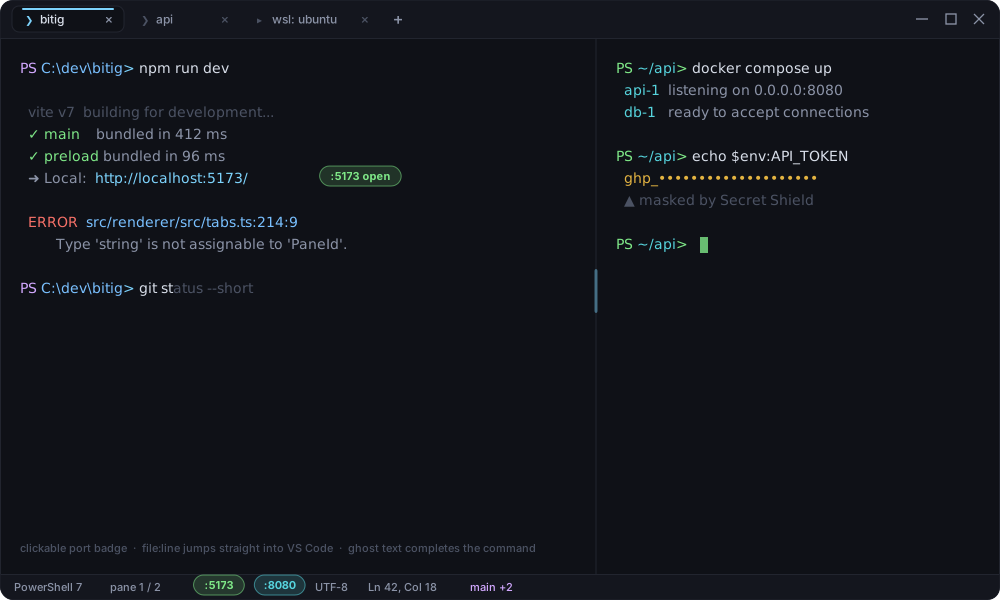 Tabs in the title bar · nested split panes · clickable port badges ·
 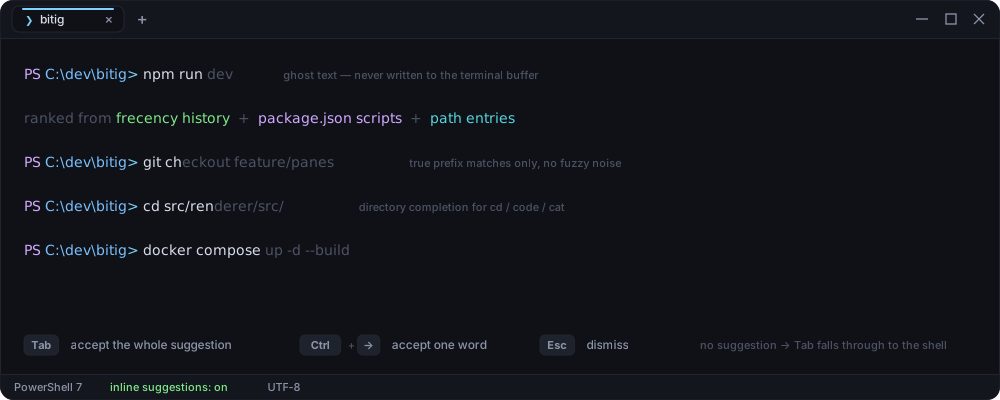 Fish style ghost text as you type. Only **true prefix matches** are ever
suggested, ranked by frecency (recency, run count, same working directory, and a
penalty for commands that failed), then by project context: `package.json`
scripts across `npm`/`pnpm`/`yarn`/`bun`, `Makefile` targets, and directory or
file names for the argument of path commands (`cd`, `code`, `cat`, `rm` and
friends).
The suggestion is drawn as an absolutely positioned DOM overlay and is **never**
written into the terminal buffer, so it cannot race with the shell's own echo.
| Key | Behaviour |
|---|---|
| `Tab` | Accept the whole suggestion |
| `Ctrl`/`Alt`+`→` | Accept one word at a time |
| `Esc` | Dismiss |
| `Tab` (no suggestion) | Falls through to the shell's own completion, untouched |
### Split panes and tabs
Fish style ghost text as you type. Only **true prefix matches** are ever
suggested, ranked by frecency (recency, run count, same working directory, and a
penalty for commands that failed), then by project context: `package.json`
scripts across `npm`/`pnpm`/`yarn`/`bun`, `Makefile` targets, and directory or
file names for the argument of path commands (`cd`, `code`, `cat`, `rm` and
friends).
The suggestion is drawn as an absolutely positioned DOM overlay and is **never**
written into the terminal buffer, so it cannot race with the shell's own echo.
| Key | Behaviour |
|---|---|
| `Tab` | Accept the whole suggestion |
| `Ctrl`/`Alt`+`→` | Accept one word at a time |
| `Esc` | Dismiss |
| `Tab` (no suggestion) | Falls through to the shell's own completion, untouched |
### Split panes and tabs
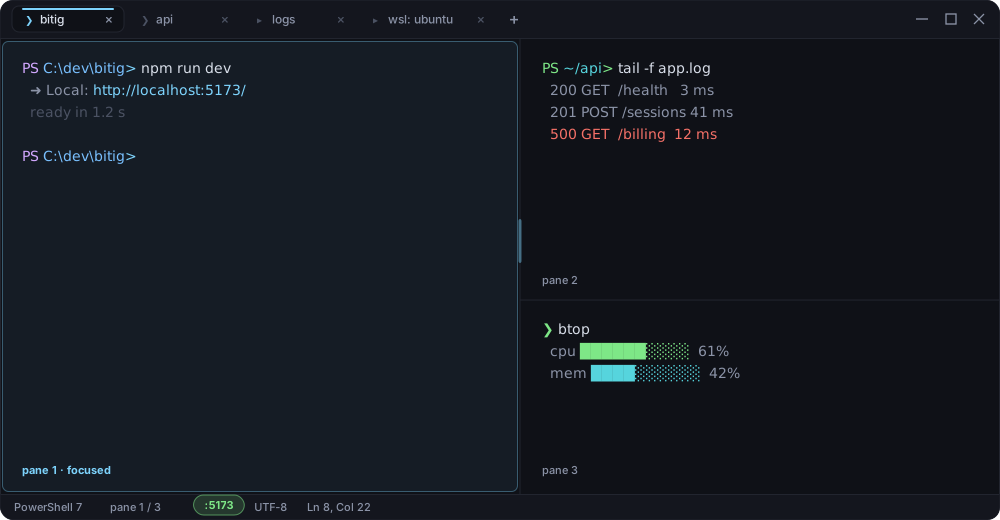 Every tab owns a pane tree, so splits nest arbitrarily and each leaf is its own
PTY session. The divider is draggable, any pane can be zoomed to the full tab
area, and closing a pane with a live session asks first.
Tabs drag to reorder, middle click to close, double click to rename, and
**retitle themselves to the current working directory** as you `cd` — driven by
an OSC 7 prompt hook that Bitig injects into PowerShell, CMD and bash, not by
the unreliable OSC 0/2 title stream.
`Ctrl+Shift+N` opens a fully independent window with its own tabs and shell
processes; closing the last one exits the process completely, with no ghost
background instance left behind.
### Universal command palette
Every tab owns a pane tree, so splits nest arbitrarily and each leaf is its own
PTY session. The divider is draggable, any pane can be zoomed to the full tab
area, and closing a pane with a live session asks first.
Tabs drag to reorder, middle click to close, double click to rename, and
**retitle themselves to the current working directory** as you `cd` — driven by
an OSC 7 prompt hook that Bitig injects into PowerShell, CMD and bash, not by
the unreliable OSC 0/2 title stream.
`Ctrl+Shift+N` opens a fully independent window with its own tabs and shell
processes; closing the last one exits the process completely, with no ghost
background instance left behind.
### Universal command palette
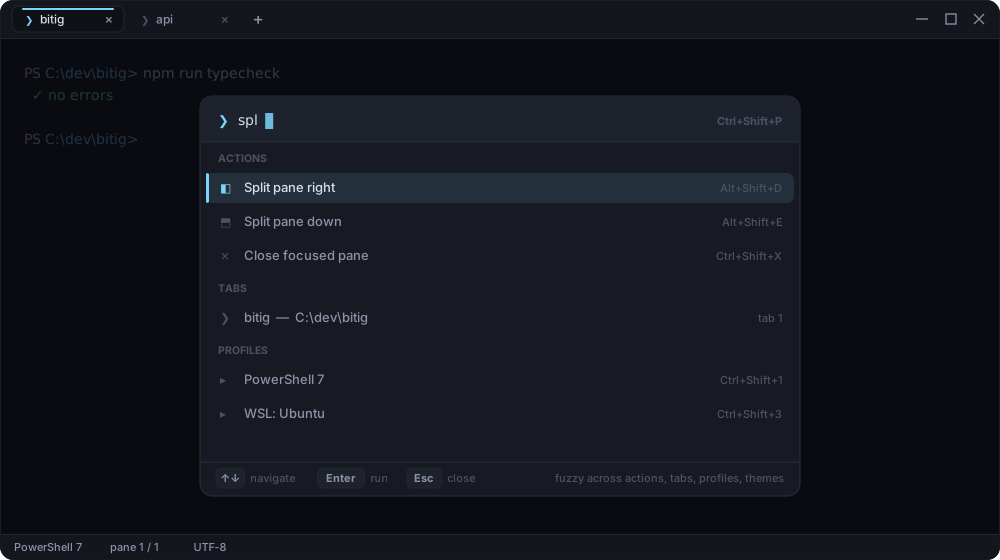 `Ctrl+Shift+P` fuzzy searches **actions, open tabs, shell profiles and themes**
in one list. Every entry shows its current shortcut, and because actions come
from the same central registry the keyboard settings use, plugin contributed
actions appear here too.
### Command history
`Ctrl+Shift+P` fuzzy searches **actions, open tabs, shell profiles and themes**
in one list. Every entry shows its current shortcut, and because actions come
from the same central registry the keyboard settings use, plugin contributed
actions appear here too.
### Command history
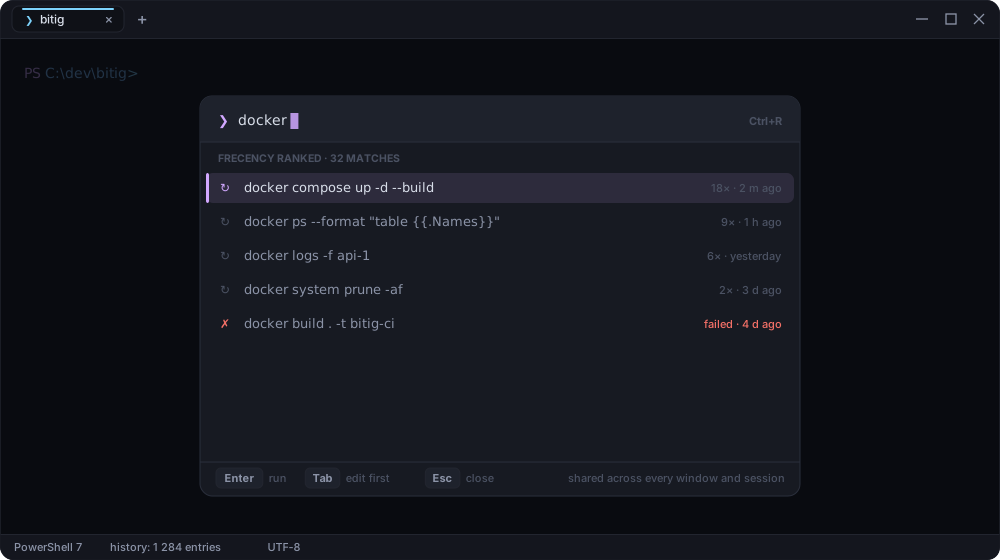 `Ctrl+R` opens Bitig's own history modal instead of relying on the shell's.
Entries are shared across every window and session, ranked by frecency, and
annotated with run count, age and whether the command failed. Secrets are masked
before anything is persisted.
### Bitig Betik — parametric runbooks
`Ctrl+R` opens Bitig's own history modal instead of relying on the shell's.
Entries are shared across every window and session, ranked by frecency, and
annotated with run count, age and whether the command failed. Secrets are masked
before anything is persisted.
### Bitig Betik — parametric runbooks
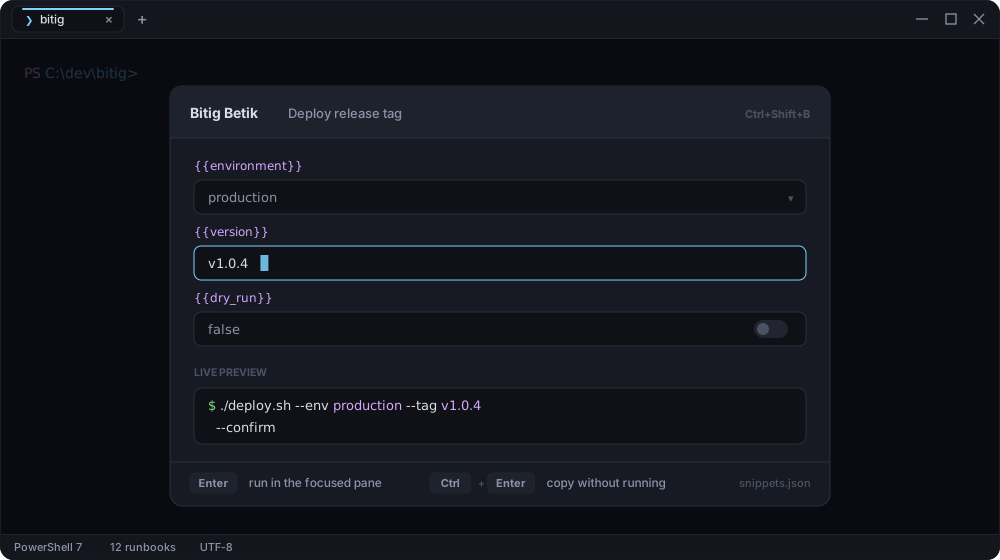 Turn a command you keep re-typing into a form. Put `{{variable}}` placeholders in
a snippet template and `Ctrl+Shift+B` renders them as typed fields with a live
preview of the exact command. Run it in the focused pane, or copy it without
running. Built in runbooks ship with the app; your own live in
`%APPDATA%/Bitig/snippets.json`.
### Otağ — Project Workspaces & Tree Session Restore
`Ctrl+Shift+O` opens **Otağ**, Bitig's workspace manager. Save your multi-tab layouts and deeply nested split panes into named developer workspaces (e.g. *Fullstack Dev*, *Docker Cluster*, *Backend API*). Workspaces serialize the exact binary pane tree structure, split ratios, active shells, and working directories. Restore them with one click or `Enter`. Workspaces are stored locally in `%APPDATA%/Bitig/workspaces.json` or can be version-controlled in your project under `.bitig/workspace.json`.
### WebGL GPU Hardware Acceleration
Bitig renders terminal text with **WebGL 2.0 GPU hardware acceleration** powered by `@xterm/addon-webgl`. Enjoy buttery-smooth scrolling at high refresh rates (144Hz+) with minimal CPU and battery usage. Automatically falls back gracefully to DOM rendering if GPU context is lost.
### Windows Explorer Context Menu & `bitig .` CLI
Open any directory directly in Bitig:
- **Right-click in File Explorer**: Select **"Open in Bitig Terminal"** from folder or directory background context menus.
- **CLI integration**: Run `bitig .` or `bitig /path/to/folder` from any command line to launch a session in that exact working directory.
### Terminal Drag & Drop File Path Insertion
Drag files or folders from Windows Explorer straight into any split terminal pane. Bitig shows an instant glowing drop border and inserts the properly quoted, escaped absolute file path (`"C:\Program Files\..."`) directly into your active shell prompt.
### In terminal search & multi-pane search
Turn a command you keep re-typing into a form. Put `{{variable}}` placeholders in
a snippet template and `Ctrl+Shift+B` renders them as typed fields with a live
preview of the exact command. Run it in the focused pane, or copy it without
running. Built in runbooks ship with the app; your own live in
`%APPDATA%/Bitig/snippets.json`.
### Otağ — Project Workspaces & Tree Session Restore
`Ctrl+Shift+O` opens **Otağ**, Bitig's workspace manager. Save your multi-tab layouts and deeply nested split panes into named developer workspaces (e.g. *Fullstack Dev*, *Docker Cluster*, *Backend API*). Workspaces serialize the exact binary pane tree structure, split ratios, active shells, and working directories. Restore them with one click or `Enter`. Workspaces are stored locally in `%APPDATA%/Bitig/workspaces.json` or can be version-controlled in your project under `.bitig/workspace.json`.
### WebGL GPU Hardware Acceleration
Bitig renders terminal text with **WebGL 2.0 GPU hardware acceleration** powered by `@xterm/addon-webgl`. Enjoy buttery-smooth scrolling at high refresh rates (144Hz+) with minimal CPU and battery usage. Automatically falls back gracefully to DOM rendering if GPU context is lost.
### Windows Explorer Context Menu & `bitig .` CLI
Open any directory directly in Bitig:
- **Right-click in File Explorer**: Select **"Open in Bitig Terminal"** from folder or directory background context menus.
- **CLI integration**: Run `bitig .` or `bitig /path/to/folder` from any command line to launch a session in that exact working directory.
### Terminal Drag & Drop File Path Insertion
Drag files or folders from Windows Explorer straight into any split terminal pane. Bitig shows an instant glowing drop border and inserts the properly quoted, escaped absolute file path (`"C:\Program Files\..."`) directly into your active shell prompt.
### In terminal search & multi-pane search
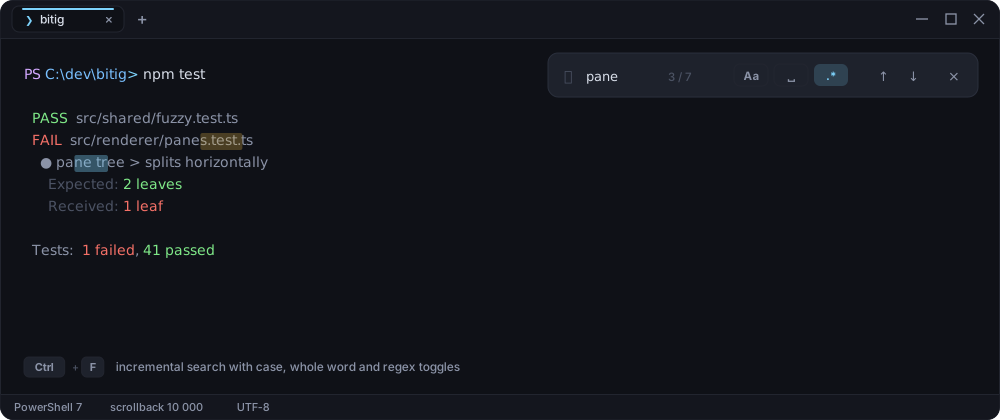 `Ctrl+F` searches the scrollback incrementally with case sensitivity, whole word, and regular expression modes. Toggle **`◫ Panes`** to search across all split terminals in the active tab simultaneously with real-time regex syntax error validation.
### Developer Cockpit
`Ctrl+F` searches the scrollback incrementally with case sensitivity, whole word, and regular expression modes. Toggle **`◫ Panes`** to search across all split terminals in the active tab simultaneously with real-time regex syntax error validation.
### Developer Cockpit
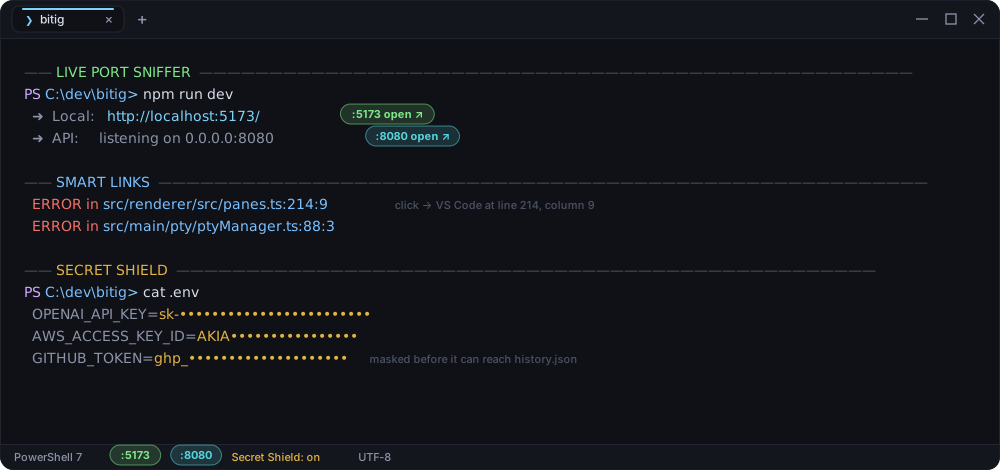 Three features that read the PTY stream and turn plain text into something you
can act on:
| | |
|---|---|
| **Live Port Sniffer** | Detects dev servers as they announce themselves and renders a clickable badge in the terminal and the status bar. Click it to open `localhost:PORT`. |
| **Smart Links** | Turns `src/main.ts:42:15` into a one click jump into VS Code or Cursor, at the exact line and column. |
| **Secret Shield** | Masks tokens (`sk-`, `ghp_`, `AKIA`, bearer tokens, private keys) **before** anything reaches the history store. |
### Bitig Bilge — the AI companion
Three features that read the PTY stream and turn plain text into something you
can act on:
| | |
|---|---|
| **Live Port Sniffer** | Detects dev servers as they announce themselves and renders a clickable badge in the terminal and the status bar. Click it to open `localhost:PORT`. |
| **Smart Links** | Turns `src/main.ts:42:15` into a one click jump into VS Code or Cursor, at the exact line and column. |
| **Secret Shield** | Masks tokens (`sk-`, `ghp_`, `AKIA`, bearer tokens, private keys) **before** anything reaches the history store. |
### Bitig Bilge — the AI companion
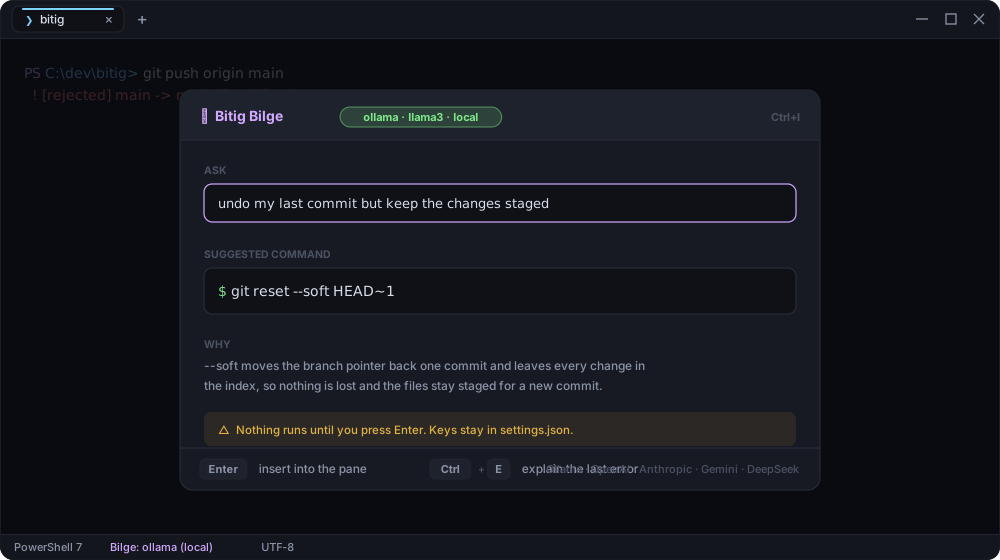 `Ctrl+I` turns a sentence into a command, and explains the error you just hit.
It runs fully local against **Ollama**, or bring your own key for OpenAI,
Anthropic, Gemini, DeepSeek and any OpenAI compatible endpoint. Nothing executes
until you press Enter, and keys never leave `settings.json`.
### Power modes
`Ctrl+I` turns a sentence into a command, and explains the error you just hit.
It runs fully local against **Ollama**, or bring your own key for OpenAI,
Anthropic, Gemini, DeepSeek and any OpenAI compatible endpoint. Nothing executes
until you press Enter, and keys never leave `settings.json`.
### Power modes
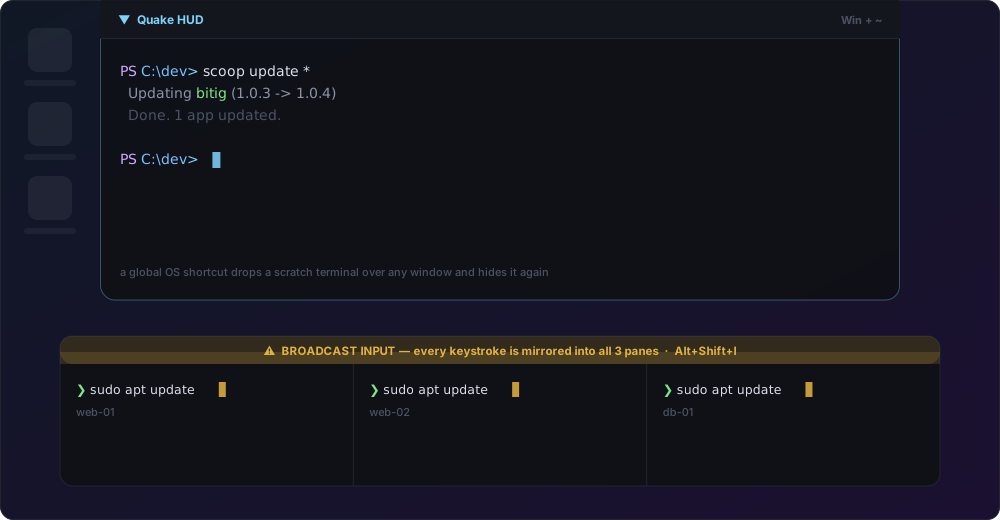 **Quake HUD** binds a global OS shortcut to a dropdown terminal that slides over
whatever you are doing and hides again. The HUD window is created lazily on first
use, so it never keeps the app alive in the background.
**Broadcast Input** (`Alt+Shift+I`) mirrors every keystroke into all panes of the
active tab, with an unmistakable synchronization banner so you always know it is
on.
### Themes
**Quake HUD** binds a global OS shortcut to a dropdown terminal that slides over
whatever you are doing and hides again. The HUD window is created lazily on first
use, so it never keeps the app alive in the background.
**Broadcast Input** (`Alt+Shift+I`) mirrors every keystroke into all panes of the
active tab, with an unmistakable synchronization banner so you always know it is
on.
### Themes
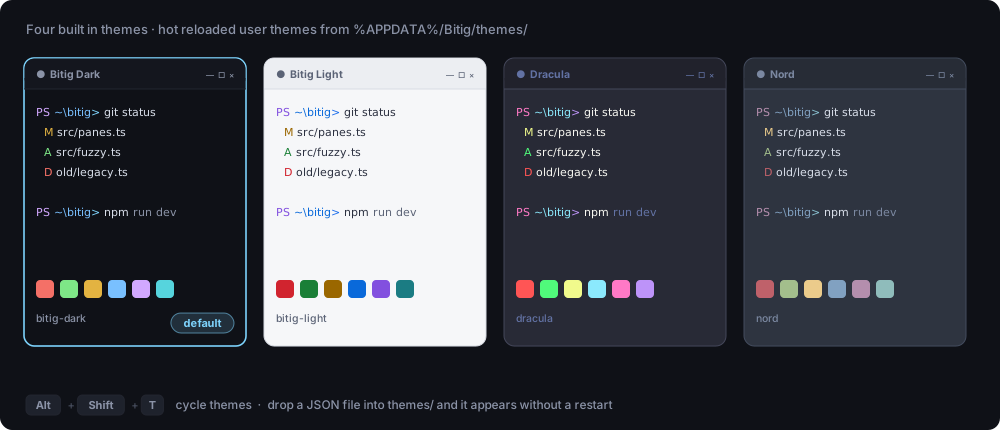 Four themes ship built in — `bitig-dark` (default), `bitig-light`, `dracula`,
`nord`. Drop a JSON file into `%APPDATA%/Bitig/themes/` and it appears
immediately, no restart. `Alt+Shift+T` cycles through them. A theme file mirrors
the xterm.js theme fields (all 16 ANSI colors plus background, foreground, cursor
and selection) plus a `ui` block for the window chrome.
### Transparency and background images
Four themes ship built in — `bitig-dark` (default), `bitig-light`, `dracula`,
`nord`. Drop a JSON file into `%APPDATA%/Bitig/themes/` and it appears
immediately, no restart. `Alt+Shift+T` cycles through them. A theme file mirrors
the xterm.js theme fields (all 16 ANSI colors plus background, foreground, cursor
and selection) plus a `ui` block for the window chrome.
### Transparency and background images
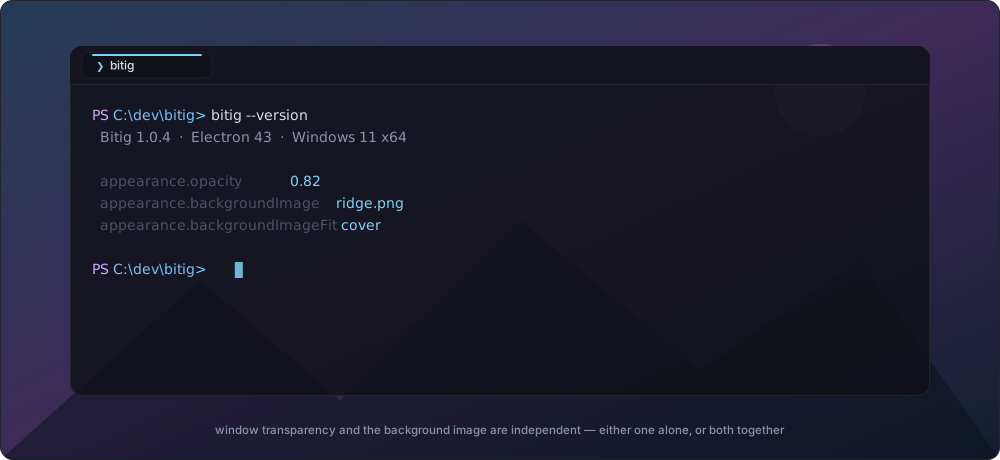 Window transparency and the background image are independent settings, like in
Windows Terminal: use either alone or both together, each with its own opacity,
and pick the image fit (`cover`, `contain`, `tile`, `center`).
### Settings panel
Window transparency and the background image are independent settings, like in
Windows Terminal: use either alone or both together, each with its own opacity,
and pick the image fit (`cover`, `contain`, `tile`, `center`).
### Settings panel
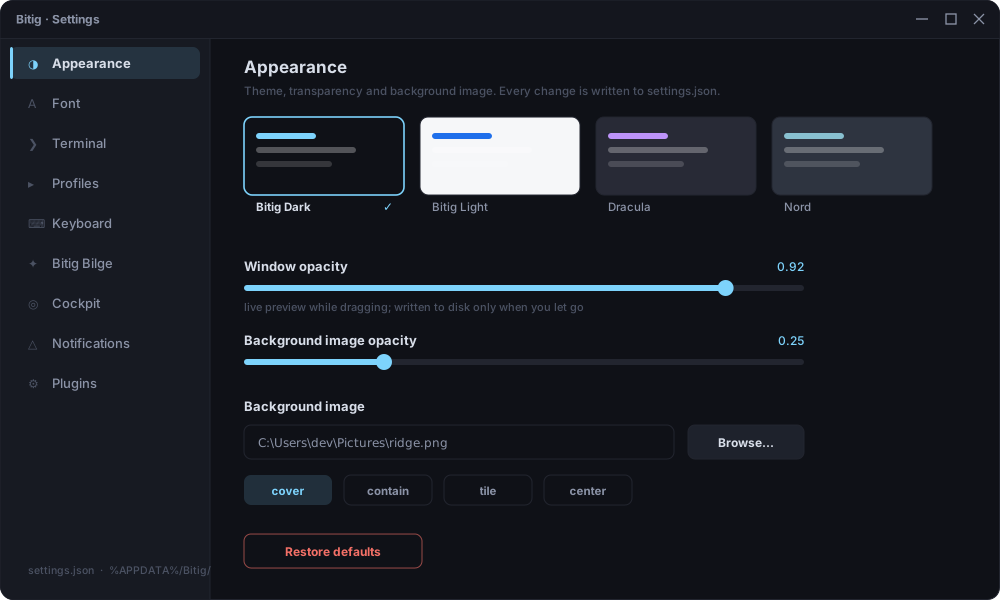 `Ctrl+,` or the gear in the title bar. Sliders preview instantly and write to
disk only when you let go, so dragging one does not hammer `settings.json`.
Everything the panel writes is plain JSON — nothing is locked behind the GUI.
### Shell profiles
`Ctrl+,` or the gear in the title bar. Sliders preview instantly and write to
disk only when you let go, so dragging one does not hammer `settings.json`.
Everything the panel writes is plain JSON — nothing is locked behind the GUI.
### Shell profiles
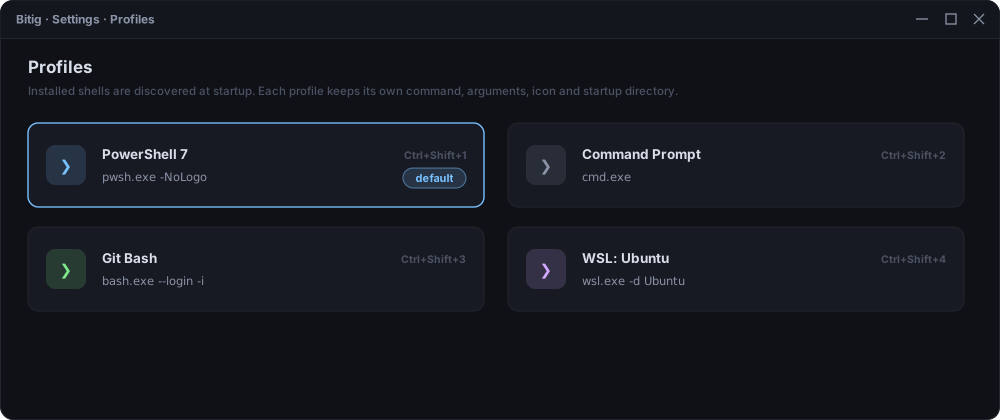 Installed shells are discovered at startup — PowerShell, Command Prompt, Git Bash
and every WSL distribution. Each profile keeps its own command, arguments, icon,
color and startup directory, and the first nine are one keystroke away
(`Ctrl+Shift+1..9`).
### Rebindable keyboard
Installed shells are discovered at startup — PowerShell, Command Prompt, Git Bash
and every WSL distribution. Each profile keeps its own command, arguments, icon,
color and startup directory, and the first nine are one keystroke away
(`Ctrl+Shift+1..9`).
### Rebindable keyboard
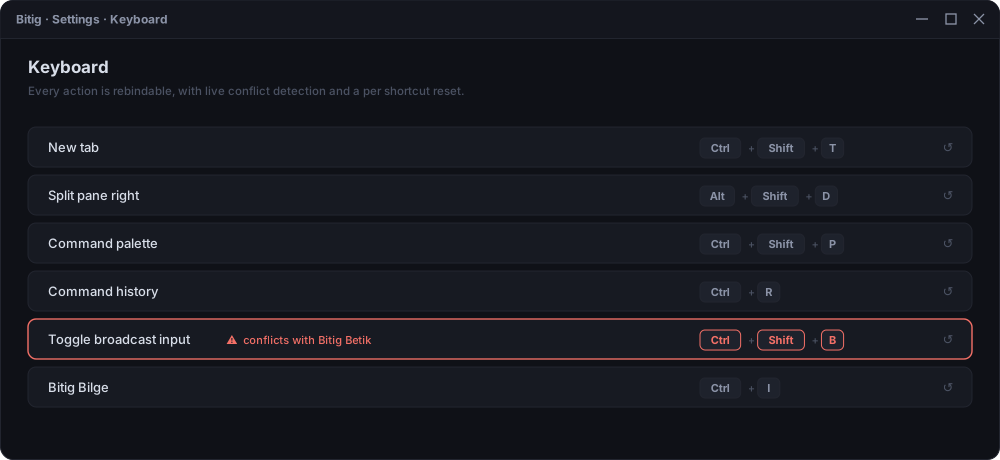 Every action resolves through one central registry, so every shortcut is
rebindable, conflicts are detected while you type them, and each binding has its
own reset.
### Fonts
Every action resolves through one central registry, so every shortcut is
rebindable, conflicts are detected while you type them, and each binding has its
own reset.
### Fonts
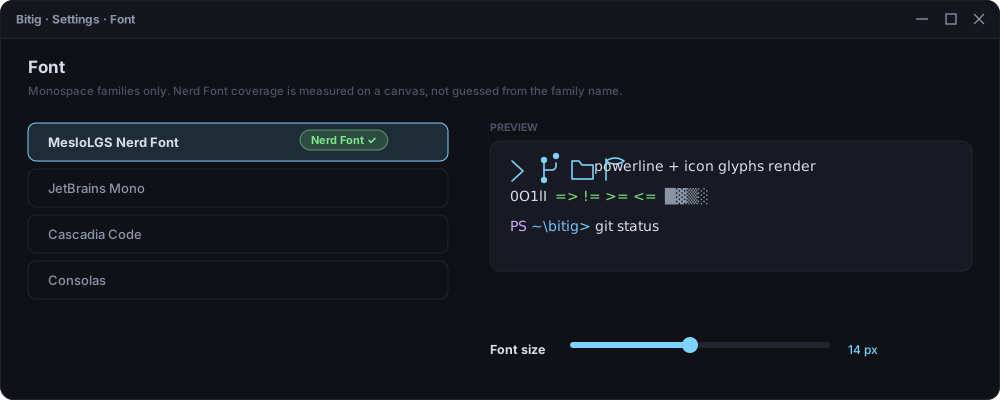 Only monospace families are listed, and **Nerd Font coverage is measured** by
rendering probe glyphs on a canvas against a reference code point — not guessed
from the family name, which is how most terminals get this wrong.
### Execution telemetry
Only monospace families are listed, and **Nerd Font coverage is measured** by
rendering probe glyphs on a canvas against a reference code point — not guessed
from the family name, which is how most terminals get this wrong.
### Execution telemetry
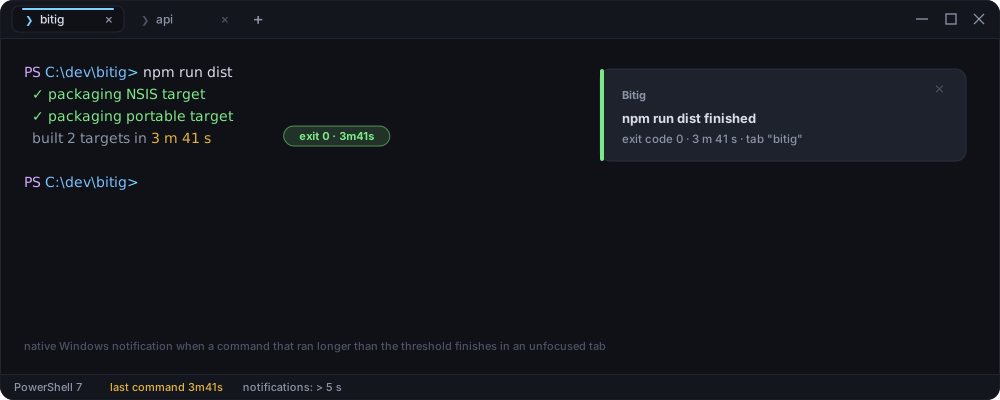 Bitig times every command. When one that ran longer than your threshold finishes
in a tab you are not looking at, you get a native Windows notification with the
exit code and the duration.
### Plugins
Bitig times every command. When one that ran longer than your threshold finishes
in a tab you are not looking at, you get a native Windows notification with the
exit code and the duration.
### Plugins
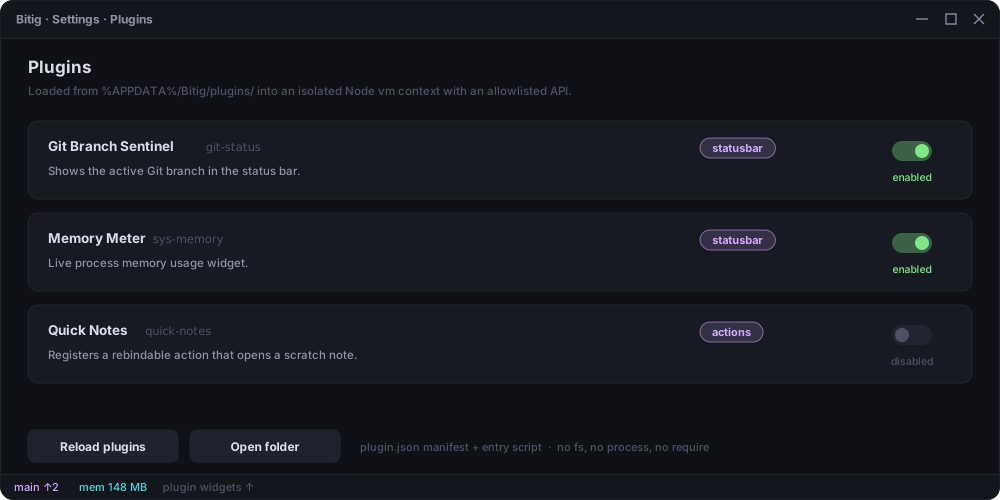 Each plugin is a folder under `%APPDATA%/Bitig/plugins/