# Ingest

Ingest parses directories of plain text files, such as source code, into a single markdown file suitable for ingestion by AI/LLMs.
---
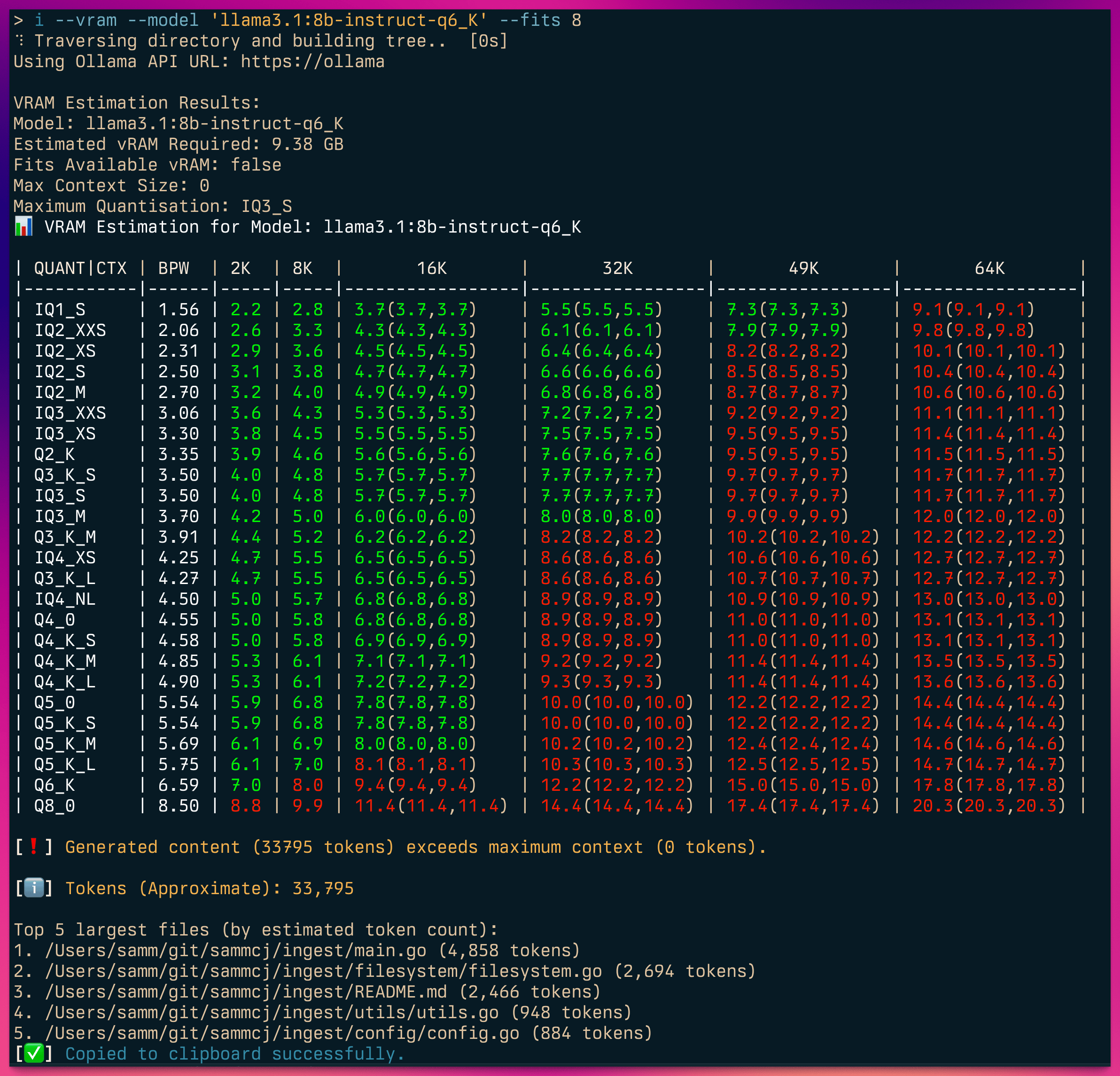
Ingest can also pass the prompt directly to any OpenAI compatible API for processing.
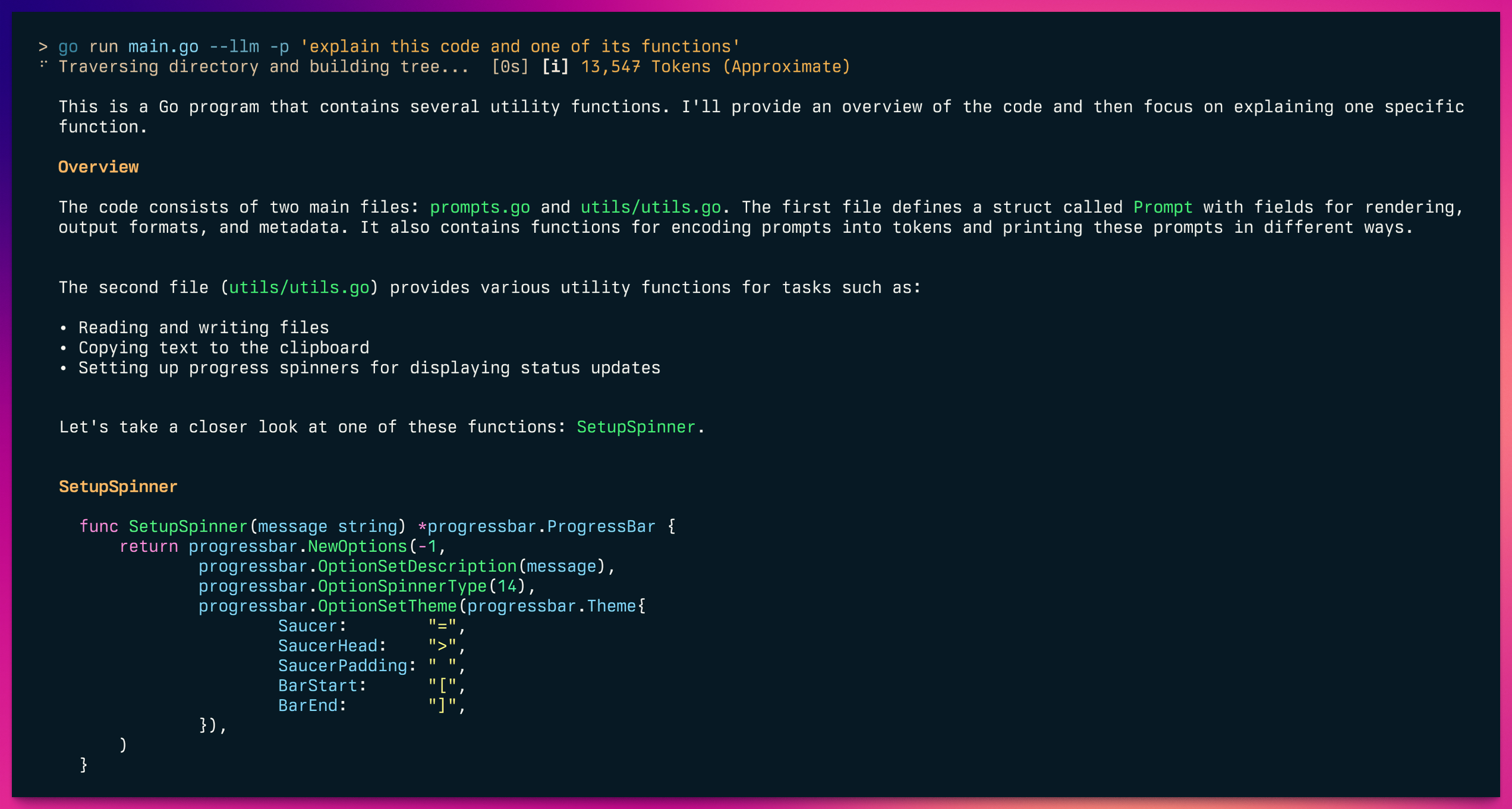
And ingest web URLs.
## Features
- Traverse directory structures and generate a tree view
- Include/exclude files based on glob patterns
- Compress code using Tree-sitter to extract key structural information while omitting implementation details
- Parse output directly to any OpenAI compatible API for processing
- Generate and include git diffs and logs
- Count tokens using a bundled offline tokeniser (default) or optionally use the Anthropic API (API key required, but no charge for counting)
- Customisable output templates
- Copy output to clipboard (when available)
- Export to file or print to console
- Optional JSON output
- Optionally save output to a file in ~/ingest
- Shell completions for Bash, Zsh, and Fish
- Web crawling to ingest web pages as Markdown
- PDF to markdown conversion and ingestion
Ingest Intro ("Podcast" Episode):
## Installation
### go install (recommended)
Make sure you have Go installed on your system, then run:
```shell
go install github.com/sammcj/ingest@HEAD
```
### curl
I don't recommend this method as it's not as easy to update, but you can use the following command:
```shell
curl -sL https://raw.githubusercontent.com/sammcj/ingest/refs/heads/main/scripts/install.sh | bash
```
### Manual install
1. Download the latest release from the [releases page](https://github.com/sammcj/ingest/releases)
2. Move the binary to a directory in your PATH, e.g. `mv ingest* /usr/local/bin/ingest`
## Usage
Basic usage:
```shell
ingest [flags]
```
ingest will default to the current working directory if no path is provided, e.g:
```shell
$ ingest
⠋ Traversing directory and building tree... [0s]
[ℹ️] Tokens (Approximate): 15,945
[✅] Copied to clipboard successfully.
```
### Token counting
The tokeniser vocabularies (o200k_base and cl100k_base) are compiled into the binary, so ingest works offline and never downloads or caches anything.
Anthropic has never published a Claude tokeniser, so offline counts are produced with o200k_base and scaled to the model given by `--model` (default `claude-opus-5`):
- Claude Opus 4.7 and later, including Opus 5, Sonnet 5 and Fable 5, use a tokeniser that produces roughly 30% more tokens for the same text than earlier Claude models. These are scaled by 1.53.
- Earlier Claude models are scaled by 1.18.
- Non-Claude models are counted with their own vocabulary, so no scaling is applied.
Both factors are approximations that vary with content. For an exact count use `-a/--anthropic`, which calls Anthropic's `count_tokens` endpoint with the same `--model` (free, but needs `ANTHROPIC_API_KEY`). `--no-correction` reports the raw o200k_base count.
Generate a prompt from a directory, including only Python files:
```shell
ingest -i "**/*.py" /path/to/project
```
Generate a prompt with git diff and copy to clipboard:
```shell
ingest -d /path/to/project
```
Generate a prompt for multiple files/directories:
```shell
ingest /path/to/project /path/to/other/project
```
Generate a prompt and save to a file:
```shell
ingest -o output.md /path/to/project
```
You can also provide individual files or multiple paths:
```shell
ingest /path/to/file /path/to/directory
```
Save output to to ~/ingest/.md:
```shell
ingest --save /path/to/project
```
Count tokens for a specific model, or exactly via the Anthropic API:
```shell
ingest --model claude-fable-5 /path/to/project
ingest --anthropic /path/to/project
```
## LLM Integration
Ingest can pass the generated prompt to any OpenAI compatible API for processing.
```shell
ingest --llm /path/to/project
```
By default this will use any prompt suffix from your configuration file:
```shell
./ingest utils.go --llm
⠋ Traversing directory and building tree... [0s]
This is Go code for a file named `utils.go`. It contains various utility functions for
handling terminal output, clipboard operations, and configuration directories.
...
```
You can provide a prompt suffix to append to the generated prompt:
```shell
ingest --llm -p "explain this code" /path/to/project
```
## Token Counting
Ingest provides token counting using either an offline tokeniser (default) or the Anthropic API for more accurate counts.
### Offline Token Counting (Default)
By default, ingest uses an offline tokeniser with a correction factor for improved accuracy:
```shell
ingest /path/to/project
# [ℹ️] Tokens (Approximate): 15,945
```
The offline tokeniser applies a 1.18x multiplier based on empirical analysis comparing it with Anthropic's API. This correction reduces average estimation error from ~17% to ~2%, providing slightly more accurate token counts without requiring an API key.
To disable the correction factor and use raw token counts, use the `--no-correction` flag:
```shell
ingest --no-correction /path/to/project
# Uses raw offline tokeniser without correction multiplier
```
The first time ingest runs, it downloads a small tokeniser file for offline use.
### Anthropic API Token Counting
For accurate token counts using Anthropic's counting API, use the `-a` or `--anthropic` flag:
```shell
export ANTHROPIC_API_KEY="your-api-key"
ingest -a /path/to/project
# ✓ Using Anthropic API (claude-sonnet-4-5) for token counting
# [ℹ️] Tokens (Approximate): 15,942
```
The API accepts keys from these environment variables (checked in order):
- `ANTHROPIC_API_KEY`
- `ANTHROPIC_TOKEN`
- `ANTHROPIC_TOKEN_COUNT_KEY`
**Performance optimisation**: When counting tokens for multiple files (e.g. in the "Top 15 largest files" report), ingest processes API requests in parallel batches of 4, significantly reducing the time needed for token counting.
If the API call fails, ingest automatically falls back to the offline tokeniser.
## Code Compression with Tree-sitter
**Experimental**
Ingest can compress source code files by extracting key structural information while omitting implementation details. This is useful for reducing token usage while preserving the important parts of the code structure.
```shell
ingest --compress /path/to/project
```
The compression extracts:
- Package/module declarations
- Import statements
- Function/method signatures (without bodies)
- Class definitions (without method bodies)
- Type definitions
- Comments
Currently supported languages:
- Go
- Python
- JavaScript (including arrow functions and ES6 module syntax)
- Bash
- C
- CSS
Example of compressed JavaScript:
```
// This is a JavaScript comment
import { something } from 'module';
export class MyJSClass { ... } // Body removed
constructor(name) { ... } // Body removed
greet(message) { ... } // Body removed
export function myJSFunction(x, y) { ... } // Body removed
const myArrowFunc = (a, b) => { ... } // Body removed
```
## Web Crawling & Ingestion
Crawl with explicit web mode
```shell
ingest --web https://example.com
```
Auto-detect URL and crawl
```shell
ingest https://example.com
```
Crawl with domain restriction
```shell
ingest --web --web-domains example.com https://example.com
```
Crawl deeper with more concurrency
```shell
ingest --web --web-depth 3 --web-concurrent 10 https://example.com
```
Exclude a path from the crawl
```shell
ingest --web https://example.com -e '/posts/**'
```
## Shell Completions
Ingest includes shell completions for Bash, Zsh, and Fish.
To load completions for the current session:
**Bash:**
```shell
source <(ingest completion bash)
```
**Zsh:**
```shell
source <(ingest completion zsh)
```
**Fish:**
```shell
ingest completion fish | source
```
For persistent completions (loaded automatically in each new shell session), see `ingest completion --help` for installation instructions specific to your system.
## Configuration
Ingest uses a configuration file located at `~/.config/ingest/ingest.json`.
The config file contains:
- `llm_model`: The model to use for processing the prompt with `--llm`. Required if you use `--llm`.
- `llm_base_url`: The OpenAI compatible endpoint, defaults to `$OPENAI_API_BASE` or `https://api.openai.com/v1`.
- `llm_prompt_prefix`: An optional prefix to prepend to the prompt, e.g. "This is my application."
- `llm_prompt_suffix`: An optional suffix to append to the prompt, e.g. "explain this code"
Ingest uses the following directories for user-specific configuration:
- `~/.config/ingest/patterns/exclude`: Add .glob files here to exclude additional patterns.
- `~/.config/ingest/patterns/templates`: Add custom .tmpl files here for different output formats.
These directories will be created automatically on first run, along with README files explaining their purpose.
### Flags
- `-a, --anthropic`: Use Anthropic API for token counting (requires API key in environment)
- `--compress`: Enable code compression using Tree-sitter to extract key structural information while omitting implementation details
- `--config`: Opens the config file in the default editor
- `--no-correction`: Disable offline tokeniser correction factor (use raw token count)
- `-c, --encoding`: Offline tokeniser vocabulary (o200k, cl100k)
- `-m, --model`: Model to count tokens for, defaults to claude-opus-5
- `--exclude-from-tree`: Exclude files/folders from the source tree based on exclude patterns
- `--git-diff-branch`: Generate git diff between two branches
- `--git-log-branch`: Retrieve git log between two branches
- `--include-priority`: Include files in case of conflict between include and exclude patterns
- `--json`: Print output as JSON
- `--llm`: Send the generated prompt to an OpenAI compatible LLM server for processing
- `--no-codeblock`: Disable wrapping code inside markdown code blocks
- `--no-default-excludes`: Disable default exclude patterns
- `--pattern-exclude`: Path to a specific .glob file for exclude patterns
- `--print-default-excludes`: Print the default exclude patterns
- `--print-default-template`: Print the default template
- `--relative-paths`: Use relative paths instead of absolute paths
- `--report`: Print the largest parsed files
- `--save`: Save output to ~/ingest/.md
- `--tokens`: Display the token count of the generated prompt
- `--verbose`: Print verbose output
- `--web-concurrent`: Maximum concurrent requests for web crawling
- `--web-depth`: Maximum depth for web crawling
- `--web-domains`: Comma-separated list of domains to restrict web crawling
- `--web`: Crawl a web page
- `-c, --encoding`: Optional tokeniser to use for token count
- `-d, --diff`: Include git diff
- `-e, --exclude`: Patterns to exclude (can be used multiple times)
- `-i, --include`: Patterns to include (can be used multiple times)
- `-l, --line-number`: Add line numbers to the source code
- `-n, --no-clipboard`: Disable copying to clipboard
- `-o, --output`: Optional output file path
- `-p, --prompt`: Optional prompt suffix to append to the generated prompt
- `-t, --template`: Path to a custom Handlebars template
- `-V, --version`: Print the version number (WIP - still trying to get this to work nicely)
### Excludes
You can get a list of the default excludes by parsing `--print-default-excludes` to ingest.
These are defined in [defaultExcludes.go](https://github.com/sammcj/ingest/blob/main/filesystem/defaultExcludes.go).
To override the default excludes, create a `default.glob` file in `~/.config/ingest/patterns/exclude` with the patterns you want to exclude.
### Templates
Templates are written in standard [go templating syntax](https://pkg.go.dev/text/template).
You can get a list of the default templates by parsing `--print-default-template` to ingest.
These are defined in [template.go](https://github.com/sammcj/ingest/blob/main/template/template.go).
To override the default templates, create a `default.tmpl` file in `~/.config/ingest/patterns/templates` with the template you want to use by default.
## Contributing
Contributions are welcome, Please feel free to submit a Pull Request.
You can help sponsor the project by trading the $INGEST SOL Token: https://bags.fm/Dm98Qa1Xw2n35bq73R2t1bFgXPApUKu2YwzU8TjWBAGS
## License
- Copyright 2024 Sam McLeod
- This project is licensed under the MIT License - see the [LICENSE](LICENSE) file for details.