Transcriptor MCP # 🎬 Now your AI assistant can watch videos! **Connect one server. Then ask Claude, ChatGPT or etc about a video:** the transcript, the chapters, the metadata, or a single frame. It works with 11 platforms, not only YouTube. [![Website](https://img.shields.io/badge/Website-transcriptor--mcp.org-C15F3C)](https://transcriptor-mcp.org) [![ChatGPT](https://img.shields.io/badge/ChatGPT-plugin%20directory-10A37F)](https://chatgpt.com/plugins/plugin_asdk_app_6a92e6e7ec10819189c404c0721c3207) [![MCP Registry](https://img.shields.io/badge/MCP%20Registry-transcriptor--mcp-6E56CF)](https://registry.modelcontextprotocol.io/v0/servers?search=transcriptor) [![Docker](https://img.shields.io/badge/Docker-artsamsonov/transcriptor--mcp-2496ED?logo=docker&logoColor=white)](https://hub.docker.com/r/artsamsonov/transcriptor-mcp) [![MCP Apps](https://img.shields.io/badge/MCP%20Apps-4%20interactive%20widgets-8A63D2)](#-widgets) [![License](https://img.shields.io/github/license/samson-art/transcriptor-mcp)](LICENSE) **[Connect](#-connect-in-30-seconds) · [What to ask](#-what-you-can-ask) · [Widgets](#-widgets) · [Platforms](#-platforms) · [Self-host](#-self-host)**




--- ## ⚡ Connect in 30 seconds The hosted endpoint is: ```text https://transcriptor.gateway.mcpal.io/mcp ``` ### 🖱️ One click [![Add to Cursor](https://img.shields.io/badge/Add%20to-Cursor-000000?style=for-the-badge&logo=cursor&logoColor=white)](https://cursor.com/install-mcp?name=transcriptor&config=eyJ1cmwiOiJodHRwczovL3RyYW5zY3JpcHRvci5nYXRld2F5Lm1jcGFsLmlvL21jcCJ9) [![Install in VS Code](https://img.shields.io/badge/Install%20in-VS%20Code-0098FF?style=for-the-badge&logo=visualstudiocode&logoColor=white)](https://vscode.dev/redirect/mcp/install?name=transcriptor&config=%7B%22type%22%3A%22http%22%2C%22url%22%3A%22https%3A%2F%2Ftranscriptor.gateway.mcpal.io%2Fmcp%22%7D) [![Add to LM Studio](https://img.shields.io/badge/Add%20to-LM%20Studio-4B5563?style=for-the-badge)](https://lmstudio.ai/install-mcp?name=transcriptor&config=eyJ1cmwiOiJodHRwczovL3RyYW5zY3JpcHRvci5nYXRld2F5Lm1jcGFsLmlvL21jcCJ9) ### ⌨️ One command, for Claude Code ```bash claude mcp add --transport http transcriptor https://transcriptor.gateway.mcpal.io/mcp ``` Then run `/mcp` and approve the sign-in in the browser. After this, `claude mcp list` shows `✔ Connected`. ### 🧭 No terminal | Client | What to do | | --- | --- | | **Claude** (web and desktop) | Open [Settings → Customize → Connectors](https://claude.ai/settings/connectors). Select **Add** → **Add custom connector**, paste `https://transcriptor.gateway.mcpal.io/mcp`, then select **Add**. | | **ChatGPT** | Open [Transcriptor in the ChatGPT plugin directory](https://chatgpt.com/plugins/plugin_asdk_app_6a92e6e7ec10819189c404c0721c3207) and select **Install plugin**; sign in when asked. Or in ChatGPT open **Plugins**, search **Transcriptor**, select **Install plugin**. Then mention `@Transcriptor` in a chat. | | **Codex** | Same directory, one install: ChatGPT and Codex share it. In a Codex task open **Sources** → **Use plugins** → **Transcriptor**; in the CLI, `/plugins`. | ### 🧩 Any other MCP client If your client is not in the list above, add the server with this configuration: ```json { "mcpServers": { "transcriptor": { "url": "https://transcriptor.gateway.mcpal.io/mcp" } } } ``` If you want to run the server yourself, read [Self-host](#-self-host). The tools are the same and you need no account. --- ## 🧰 What you can ask | Ask for this | Tool | | --- | --- | | *"Summarize this video for me"* | `get_transcript` | | *"Give me the subtitles as an SRT file"* | `get_raw_subtitles` | | *"Is there a German track for this video?"* | `get_available_subtitles` | | *"Who published this and how many views?"* | `get_video_info` | | *"Go to the part about pricing"* | `get_video_chapters` | | *"Show me the screen at 4:12"* | `get_video_frame` | | *"Get English transcripts for the first 5 videos in this playlist"* | `get_playlist_transcripts` | | *"Find recent videos about X"* | `search_videos` (YouTube) | Long transcripts come in parts. Each response gives a cursor for the next part, so no text is lost.


Full tool reference (input and structured response) Each tool that takes a video accepts `url`. This is a link from a [supported platform](#-platforms) or a plain YouTube ID. Each tool returns `content` (text for the chat) and `structuredContent` (typed JSON for your code). #### `get_transcript` Clean plain text, without timestamps, HTML, or speaker names. Without `lang`, the tool returns the track in the video's original language. Most platforms other than YouTube do not say which language a video is in; when the tool cannot tell which track that is, it answers with the list of tracks, and you call it again with `type` and `lang`. The inputs are the same as for `get_raw_subtitles`. Response: `videoId`, `url` (the video page, as the server resolved it), `type`, `lang`, `text`, `is_truncated`, `total_length`, `start_offset`, `end_offset`. When more text is available, the response also has `next_cursor`. #### `get_raw_subtitles` Raw SRT or VTT content, in parts. Input: - `type` — `official` or `auto`. Without `lang`, the tool picks a track of this type - `lang` — a language code or track name, as `get_available_subtitles` lists it. Without it, the video's original language, as for `get_transcript` - `response_limit` — default `50000`, minimum `1000`, maximum `200000` - `next_cursor` — the cursor of the previous response Response: the fields of `get_transcript`, plus `format` (`srt` or `vtt`) and `content`. #### `get_available_subtitles` Response: `official` and `auto`. Each field is a sorted list of language codes. Use this tool first, then give `type` and `lang` to the tools above. #### `get_video_info` Extended metadata from yt-dlp: - identity — `videoId`, `title`, `description`, `webpageUrl` - author — `uploader`, `uploaderId`, `channel`, `channelId`, `channelUrl` - numbers — `duration`, `uploadDate`, `viewCount`, `likeCount`, `commentCount` - classification — `tags`, `categories`, `liveStatus`, `isLive`, `wasLive`, `availability` - images — `thumbnail` and `thumbnails` #### `get_video_chapters` Response: `chapters`. Each item has `startTime`, `endTime`, and `title`. When the video has no chapters, the list is empty. #### `get_video_frame` Input: - `timecode` — `"MM:SS"` or `"HH:MM:SS.mmm"` - `seconds` — an alternative to `timecode`. Give one of the two, not both - `format` — `jpeg` (default) or `png` - `width` — default `1280`, maximum `1920`, never larger than the source - `quality` — `2` to `31`, for jpeg only Response: an image block, plus `url`, `timestampSeconds`, `timestamp`, `mimeType`, `sizeBytes`, and `width`. This tool needs `ffmpeg`. The Docker image includes it. #### `get_playlist_transcripts` Input: - `url` — a playlist URL, or a watch URL with `list=` - `type`, `lang`, `format` — the same as `get_raw_subtitles`, except that `lang` is required: the original language is picked only for one video at a time - `playlistItems` — a yt-dlp `-I` value such as `1:5`, `1,3,7`, or `-1` - `maxItems` — the maximum number of videos Response: `results`. Each item has `videoId` and `text`. #### `search_videos` Input: - `query` — the search text - `limit` — default 10, maximum 50 - `offset` — the number of results to skip - `uploadDateFilter` — `hour`, `today`, `week`, `month`, or `year` - `response_format` — `json` (default) or `markdown` Response: `results`. Each item has `videoId`, `title`, `url`, `duration`, `uploader`, `viewCount`, and `thumbnail`.
--- ## 📺 Widgets Four tools have an interactive interface: `get_transcript`, `get_video_info`, `get_video_frame`, and `search_videos`. Clients that support [MCP Apps](https://github.com/modelcontextprotocol/ext-apps) and the ChatGPT Apps SDK show this interface in the chat. Other clients get the same data as text and JSON.
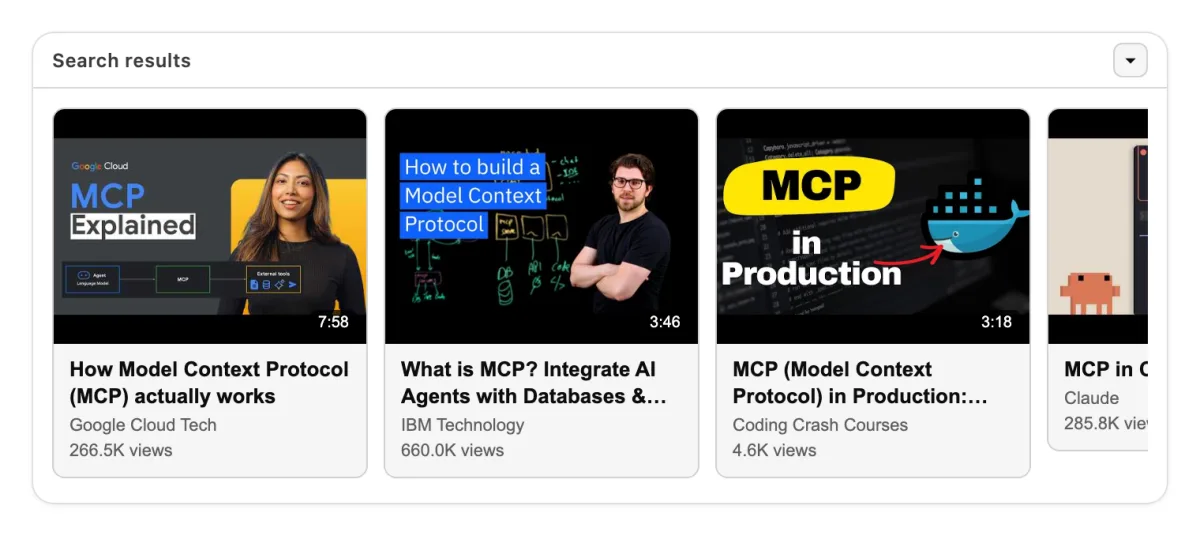
The search_videos widget: a carousel of result cards with thumbnails, durations, and view counts

search_videos · "model context protocol MCP server production"

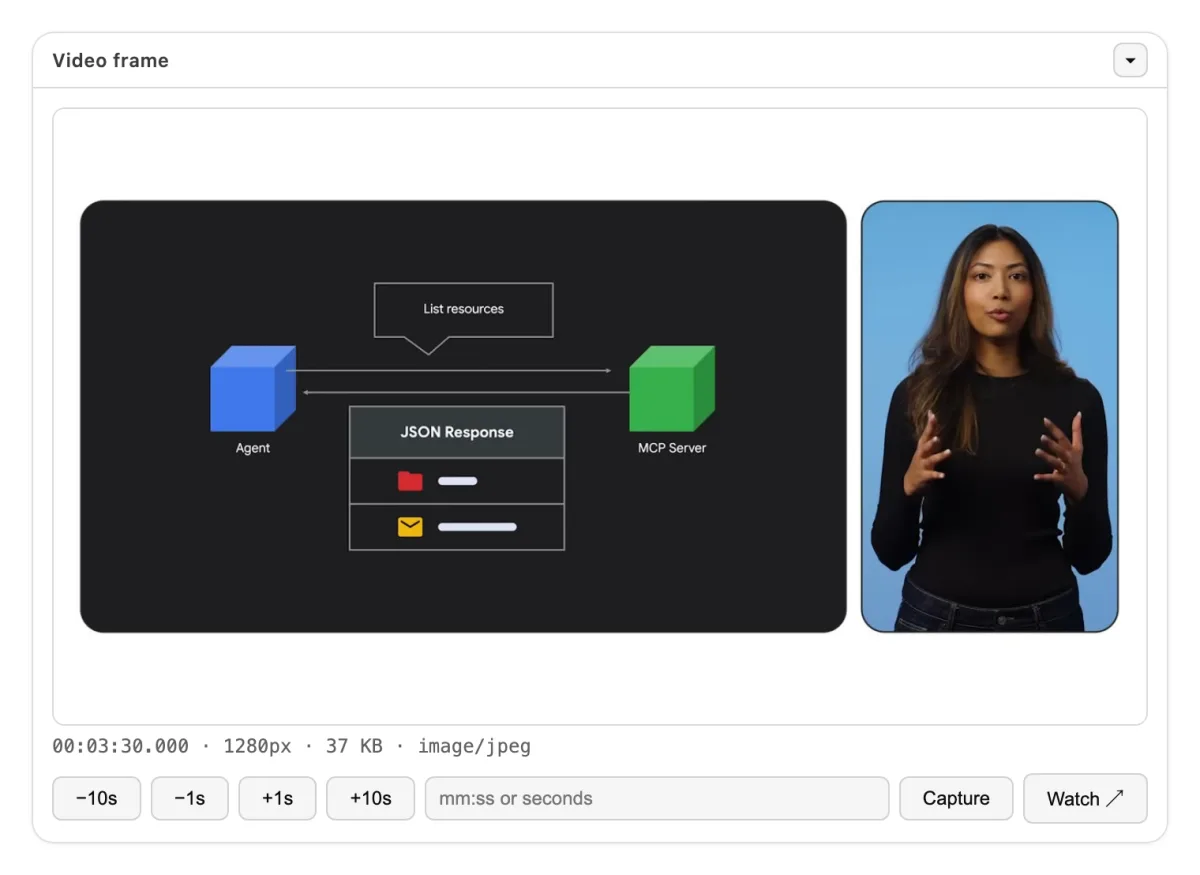
The get_video_frame widget: one captured frame with step controls and a timecode field

get_video_frame · an architecture slide at 3:30

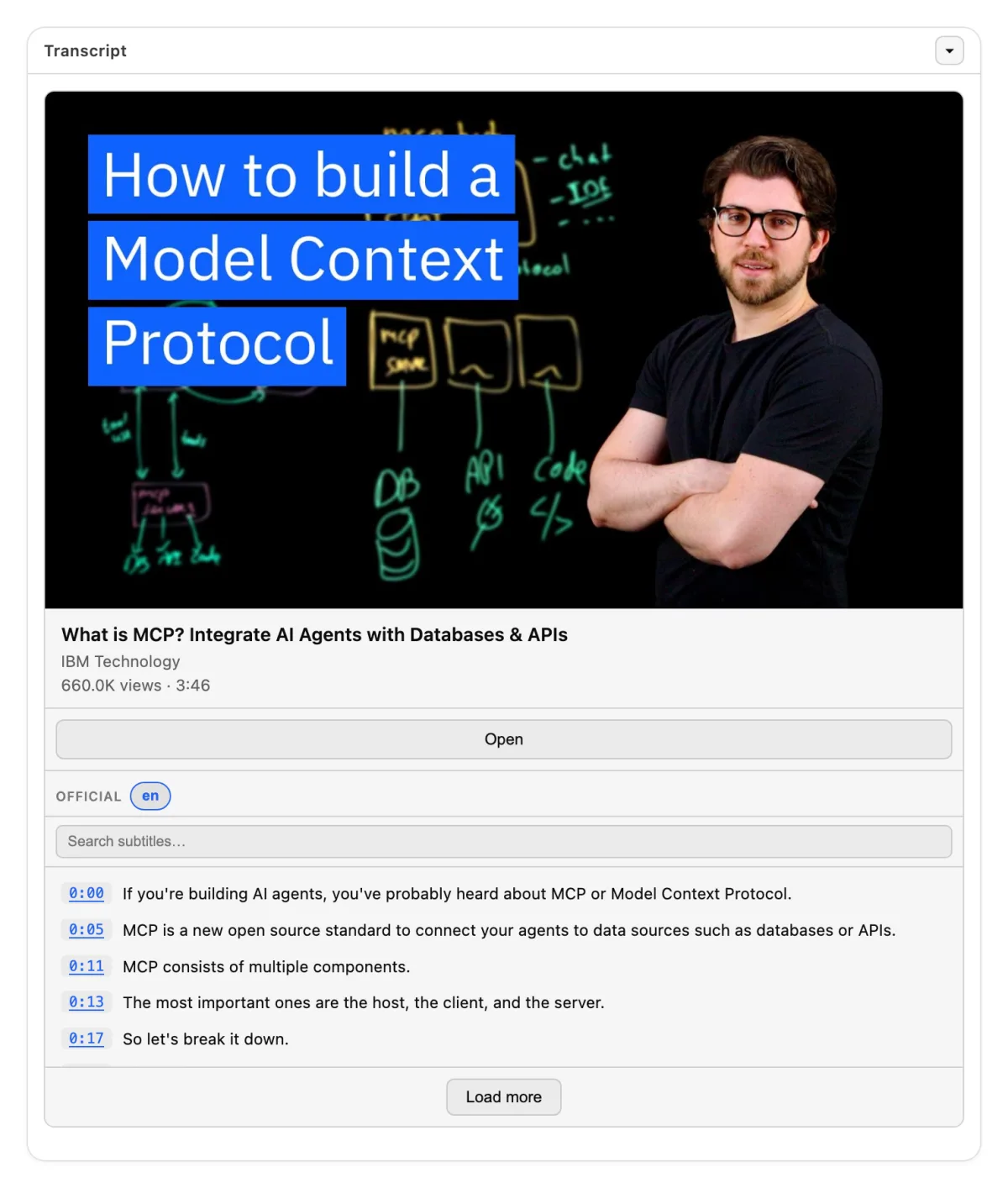
The get_transcript widget: a video card above a searchable list of timed captions

get_transcript · a 3-minute MCP explainer, official captions

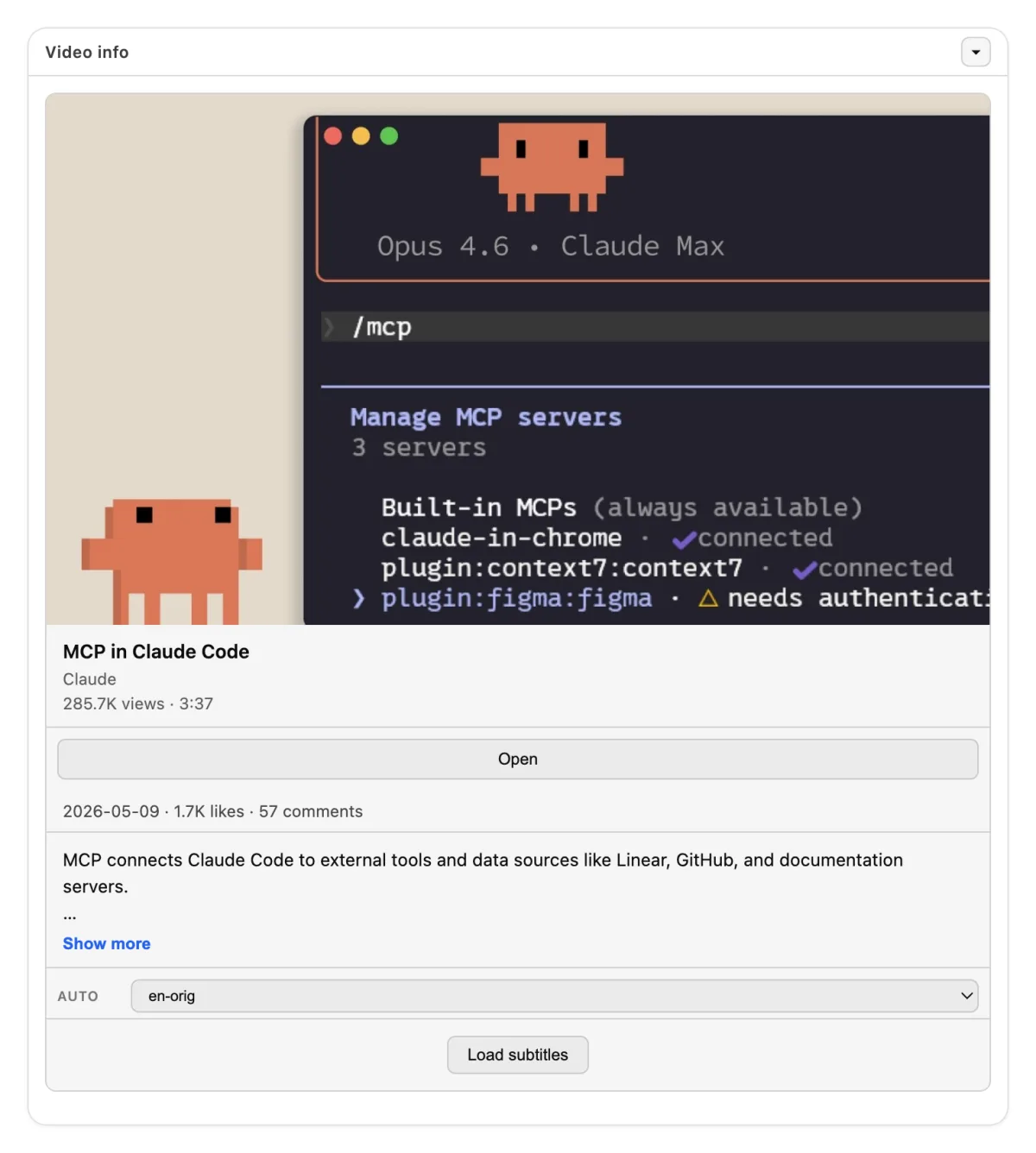
The get_video_info widget: thumbnail, channel, views, likes, description, and a subtitle language picker

get_video_info · channel, views, likes, and 169 caption languages

--- ## 🌍 Platforms **YouTube · Twitter/X · Instagram · TikTok · Twitch · Vimeo · Facebook · Bilibili · VK · Dailymotion · Reddit** Each tool that takes a video accepts a link from these 11 platforms. The tool `search_videos` works with YouTube only, through yt-dlp `ytsearch`. The server does not download video or audio files for you. It returns text, metadata, and single frames. --- ## 🐳 Self-host The tools are the same as on the hosted endpoint. You need no account. Run the server with Docker. The image serves Streamable HTTP on port 4200: ```bash docker run --rm -p 4200:4200 artsamsonov/transcriptor-mcp:latest ``` Then point your client at `http://localhost:4200/mcp`. For stdio, give the image an explicit command: ```bash docker run --rm -i artsamsonov/transcriptor-mcp:latest npm run start:mcp ``` ```json { "mcpServers": { "transcriptor": { "command": "docker", "args": ["run", "--rm", "-i", "artsamsonov/transcriptor-mcp:latest", "npm", "run", "start:mcp"] } } } ``` The server starts with no environment variables. Each variable below is optional. | Variable | Default | Function | | --- | --- | --- | | `MCP_PORT` and `MCP_HOST` | `4200` and `0.0.0.0` | The HTTP listener | | `COOKIES_FILE_PATH` | — | A Netscape cookies file for videos that need an account. See [cookies.example.txt](cookies.example.txt) | | `WHISPER_MODE` | `off` | Set `local` or `api` to transcribe the audio when a video has no subtitles. Then set `WHISPER_BASE_URL` or `WHISPER_API_KEY`. `WHISPER_MAX_DURATION_SECONDS` skips longer videos and live streams; a video whose length the platform does not report is measured with `ffprobe` after the audio download | | `CACHE_MODE` | `off` | Set `redis` and `CACHE_REDIS_URL` to cache subtitles and metadata | | `YT_DLP_MAX_CONCURRENCY` | `4` | How many yt-dlp/ffmpeg processes may run at once. `YT_DLP_MAX_QUEUE` (`8`) is how many calls may wait; beyond that a call is refused at once with "server busy". A call peaks at ~40 MiB, so the cap bounds platform throttling and latency, not memory | | `SUBTITLES_RATE_LIMIT_HOLD_MS` | `600000` | After a platform answers 429 to a subtitle download, the server stops asking that platform for subtitles for this long and answers `rate_limited` right away. Each repeat doubles the wait, up to an hour; a successful download clears it. Metadata is not held back | | `CANARY_INTERVAL_MS` | `900000` | How often the HTTP server fetches one transcript to prove the path still works. `0` turns it off; `CANARY_URL` picks the video | | `YT_DLP_*` | — | Timeouts, proxy, and JS runtimes. See [.env.example](.env.example) | The same port serves `GET /health` and `GET /metrics`. The metrics are in Prometheus format and include the `mcp_*` counters.
Transport, REST API, and development **Transport.** The server accepts `POST /mcp` only. `GET` and `DELETE` return `405`. The server is stateless and sends no `Mcp-Session-Id`. The Node process does not check bearer tokens. Put a reverse proxy or a gateway in front of it for authentication and TLS. The hosted endpoint works this way. **REST API.** A second image gives the same extraction over plain HTTP: ```bash docker run --rm -p 3000:3000 artsamsonov/transcriptor-mcp-api:latest ``` The Swagger interface is at `http://localhost:3000/docs`. For a full stack with the API and the MCP server, read [docker-compose.example.yml](docker-compose.example.yml). **Development.** ```bash npm ci npm run build npm run start:mcp # stdio npm run start:mcp:http # Streamable HTTP on port 4200 npm test ``` You need Node.js 22 or later (20 still works, but it reached end of life in April 2026), and `yt-dlp` in your PATH. Frame capture needs `ffmpeg`, and `WHISPER_MAX_DURATION_SECONDS` needs `ffprobe` (both ship in the same package, and in the Docker image). Other scripts: `lint`, `type-check`, `format`, `test:coverage`, `test:e2e:api`, and `test:e2e:mcp`. **Releases.** The maintainer cuts them. The steps are in [.claude/skills/release/SKILL.md](.claude/skills/release/SKILL.md). The version comes from `package.json` at runtime, through [src/version.ts](src/version.ts). Pushing a `v*` tag makes CI build both images and publish the [MCP Registry](https://registry.modelcontextprotocol.io) entry from [server.json](server.json). **Layout.** `src/mcp.ts` (stdio entry), `src/mcp-http.ts` (Streamable HTTP), `src/mcp-core.ts` (tools, prompts, widgets), `src/youtube.ts` (yt-dlp), `src/whisper.ts`, `src/cache.ts`, `src/index.ts` (REST API), `load/` (k6), and `src/e2e/` (Docker smoke tests).
--- ## 🤝 Contributing Pull requests are welcome. Read [CONTRIBUTING.md](CONTRIBUTING.md) first: it describes the cycle from issue to review, for people and for coding agents. ## ⚖️ Legal The hosted endpoint at `transcriptor.gateway.mcpal.io` is governed by the [Terms of Service](legal/TERMS_OF_SERVICE.md) and the [Privacy Policy](legal/PRIVACY_POLICY.md). A server you host yourself is not covered by those documents. It is governed by the MIT License only. ## 📄 License MIT © 2026 samson-art. Read [LICENSE](LICENSE). ## 💬 Support [Issues](https://github.com/samson-art/transcriptor-mcp/issues) · [GitHub profile](https://github.com/samson-art) · [LinkedIn](https://www.linkedin.com/in/artem-samsonov-284a66105/)