





让你的 AI 助手拥有超能力。一行命令,2,000+ AI 模型与 API。
English | 中文 | 日本語 | 한국어 | Español | Français | Deutsch | Português

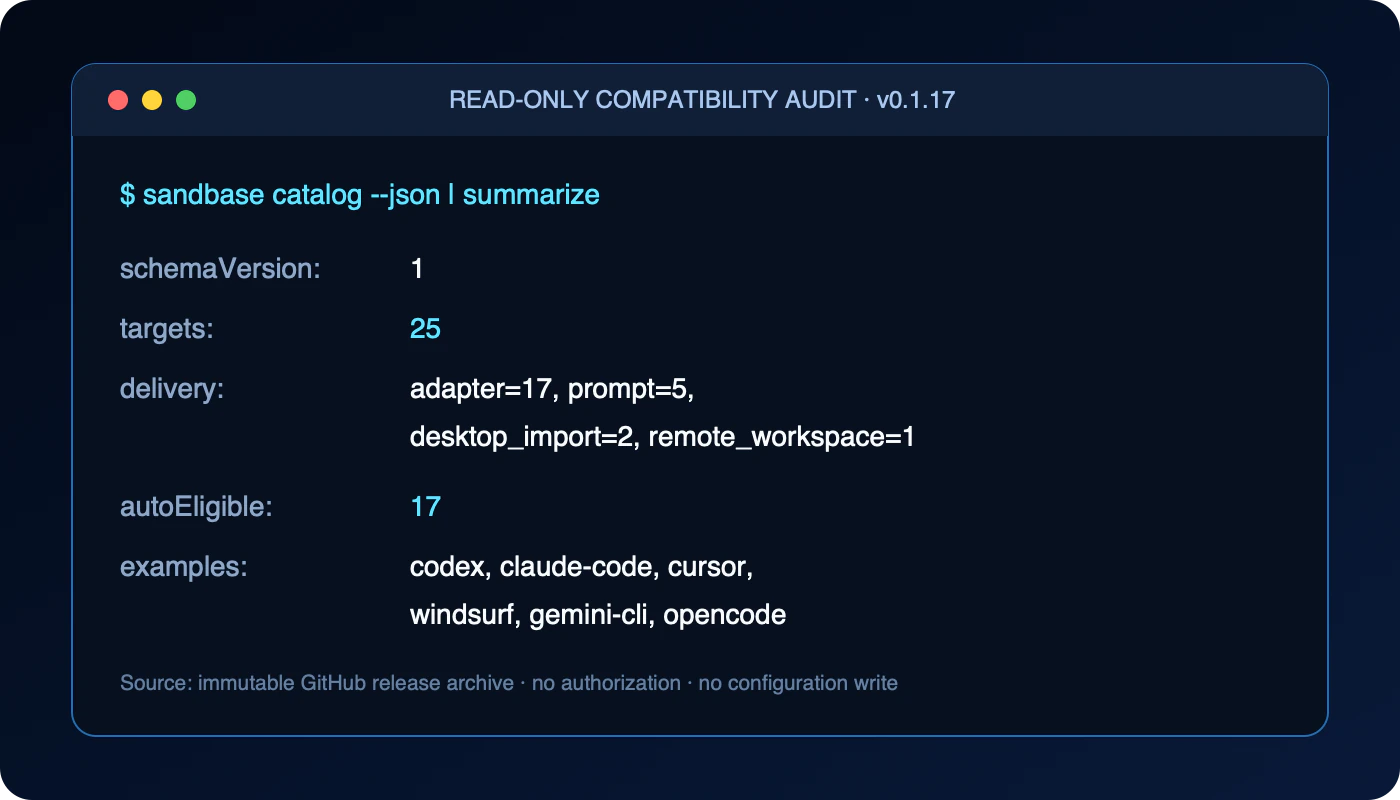
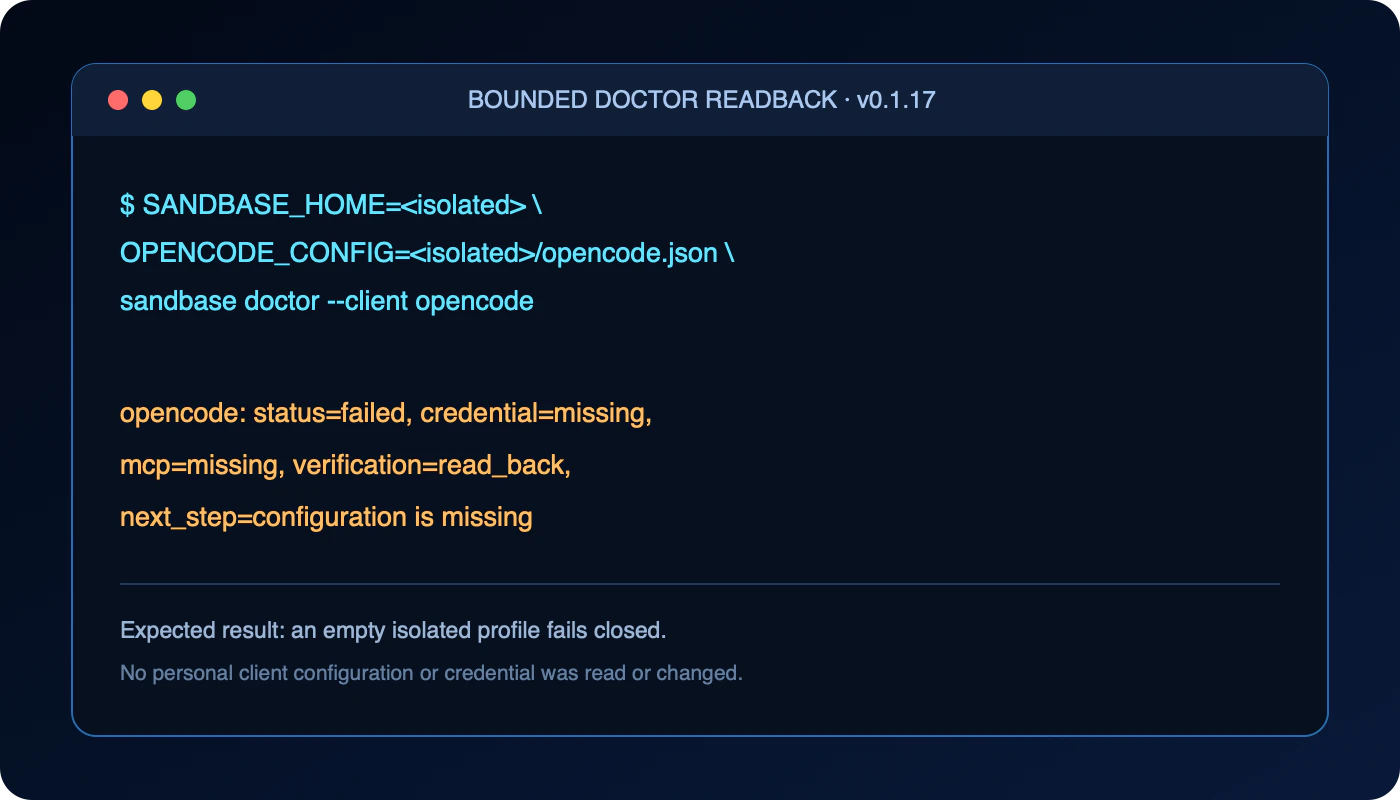
证据:不写配置的目录审计,以及针对空白隔离配置的受限 doctor 检查。
每个 GitHub 发布版都会随包公布自己的 SHA-256,可据此校验并固定到某个确切版本。 项目已进入[官方 MCP Registry](https://registry.modelcontextprotocol.io/v0.1/servers?search=io.github.sandbaseai%2Fcli),并被[中国独立开发者项目(程序员版)](https://github.com/1c7/chinese-independent-developer/blob/master/pages/README-Programmer-Edition.md#sandbase---github)独立收录。 查看[中文项目页](https://sandbaseai.github.io/cli/zh/)和[中文工作流指南](https://github.com/sandbaseai/cli/discussions/48)。如果 SandBase CLI 对你有帮助,请[给仓库一个 Star](https://github.com/sandbaseai/cli),让更多开发者发现它。 就这样。你的 Agent 现在能访问一切。 ## SandBase 开源技术栈 - **[SandBase Harness](https://github.com/sandbaseai/sandbase-harness)** — 自托管 Agent Runtime,提供持久会话、沙箱隔离、审批、审计与回放。 - **[SandBase Agent Skills](https://github.com/sandbaseai/sandbase-skills)** — 88 个可安装 Skills,覆盖研究、社交情报、营销和商业工作流。 - **[SandBase for Codex](https://github.com/sandbaseai/sandbase-codex-plugin)** — 官方 Codex 插件,封装 SandBase MCP 桥接器和引导式 Agent Skill。 --- ## 一套可验证的 Agent 工作流 连接后,让 Agent 按以下顺序工作,而不是直接猜测模型名称、输入字段或费用: 1. 使用 `sandbase_discover` 按任务或能力搜索候选模型与 API。 2. 使用 `sandbase_inspect` 读取当前输入 Schema、价格和执行要求。 3. 确认模型、参数和可能费用后,再使用 `sandbase_run` 执行。 4. 对异步任务使用 `sandbase_run_get` 查询状态和结果。 5. 使用 `sandbase_runs` 查看最近运行、状态与实际费用。 6. 使用 `sandbase_account` 检查账户余额。 例如,你可以要求: > 搜索适合生成产品演示图的模型。先比较输入字段和当前价格,只展示候选项,不要执行。 选择模型后再明确要求执行。模型目录、Schema、价格和运行结果都会变化,因此应以工具当次返回的数据为准。不要把示例输出当作实时结果。 --- ## 包含什么 | 分类 | 工具 | 能做什么 | |------|------|----------| | **网页搜索** | Google、Exa、Tavily、Scholar | 实时搜索任何信息 | | **社交媒体** | Twitter/X、YouTube、Reddit、Instagram、TikTok、小红书、微博、B站 | 监控趋势、获取帖子、分析内容 | | **网页抓取** | Firecrawl、Exa Content | 从任何公开网页提取数据 | | **AI 模型** | GPT-4o、Claude、Gemini、DeepSeek、Qwen、Llama | 调用任何模型,无需自己管 Key | | **图像生成** | Flux、DALL-E、Ideogram、Recraft | Logo、插画、原型图 | | **视频生成** | Kling、MiniMax、Runway、Luma | 短视频、动画 | | **音频** | ElevenLabs、Whisper | 文字转语音、语音转文字 | | **电商** | 淘宝、Amazon | 选品调研、价格对比 | | **金融** | 股票行情、公司信息 | 市场研究与分析 | --- ## 支持的客户端(25 个目标) 兼容所有主流 AI 编程工具: | 自动配置 | 手动配置 | |---------|---------| | Cursor、Cursor CLI | ChatGPT | | Claude Code | Claude Desktop | | Codex | | | Kiro IDE、Kiro CLI | | | Windsurf | | | Gemini CLI | | | Amp | | | Warp | | | OpenCode、Qwen Code、Kimi CLI | | | Hermes、OpenClaw | | 无需登录或修改任何文件,即可预览完整兼容性目录: ```sh npx -y @sandbaseai/cli@latest catalog --json ``` ```sh # 一次连接所有检测到的客户端 npx -y @sandbaseai/cli@latest connect # 或者指定某个客户端 npx -y @sandbaseai/cli@latest connect --client cursor ``` ### OpenClaw 快速开始 直接指定 OpenClaw,并在使用前让 CLI 回读验证由 SandBase 管理的 MCP 服务与 Skill: ```sh npx -y @sandbaseai/cli@latest connect --client openclaw npx -y @sandbaseai/cli@latest doctor --client openclaw ``` 当 `doctor` 确认凭证、MCP bridge 和 Skill 均已配置后,重启 OpenClaw, 再用自然语言提出一个需要 SandBase 的请求。如果 OpenClaw 中已经存在一个并非 SandBase 管理、但同样名为 `sandbase` 的 MCP 服务,安装器会保持原样,不会覆盖。 以后若要移除由 SandBase 管理的 MCP 条目和本地凭证: ```sh npx -y @sandbaseai/cli@latest unregister --client openclaw ``` OpenClaw 目前没有受支持的 Skill 移除命令,因此 `unregister` 会明确报告这一限制, 并保留已经验证过身份的 SandBase Skill。 ### Hermes 快速开始 SandBase 可以在同一次授权事务中安装由它管理的 Hermes Skill 和本地 MCP 条目: ```sh npx -y @sandbaseai/cli@latest connect --client hermes npx -y @sandbaseai/cli@latest doctor --client hermes ``` `doctor` 会验证所有权明确的本地凭证、MCP 条目与 Skill。随后重启 Hermes, 在新的客户端会话中确认原生发现,再使用 SandBase Skill 或 MCP 工具。如果已经存在 一个并非 SandBase 管理、但同样名为 `sandbase` 的 MCP 条目,安装器会保持原样。 若要只移除由 SandBase 管理的 Hermes 配置、Skill 和本地凭证,同时保留供其他客户端 共用的 bridge: ```sh npx -y @sandbaseai/cli@latest unregister --client hermes ``` 该集成已被独立收录于 [Hermes Atlas](https://github.com/ksimback/hermes-ecosystem) 和 [Awesome Hermes Agent](https://github.com/0xNyk/awesome-hermes-agent#integrations--bridges)。 --- ## 工作原理 ``` ┌─────────────────┐ ┌───────────────┐ ┌────────────────────┐ │ 你的 Agent │ MCP │ 本地 Bridge │ HTTPS │ SandBase API │ │ (Cursor 等) │────────▶│ (按需启动) │────────▶│ 2,000+ 模型/API │ │ │◀────────│ │◀────────│ │ └─────────────────┘ └───────────────┘ └────────────────────┘ ``` 1. 运行 `connect` → 浏览器打开授权 → 你点击同意 2. API Key 本地保存(权限 `0600`) 3. 自动为你的客户端写入 MCP 配置 4. Agent 按需调用工具。没有后台进程。 --- ## 价格 - **数据 API(搜索、社交、抓取、电商、金融)免费调用。** - discover、inspect、运行状态、余额、文件上传均免费。 - 模型(LLM、图像、视频、音频)按次或按百万 token 计费。 `sandbase inspect <工具名>` 会显示当前价格,`base_price: 0` 表示免费。价格可能变动,请以实时返回为准。 ## 命令 ### CLI 命令 ```sh sandbase connect [--client