---
## What is Claude Forge?
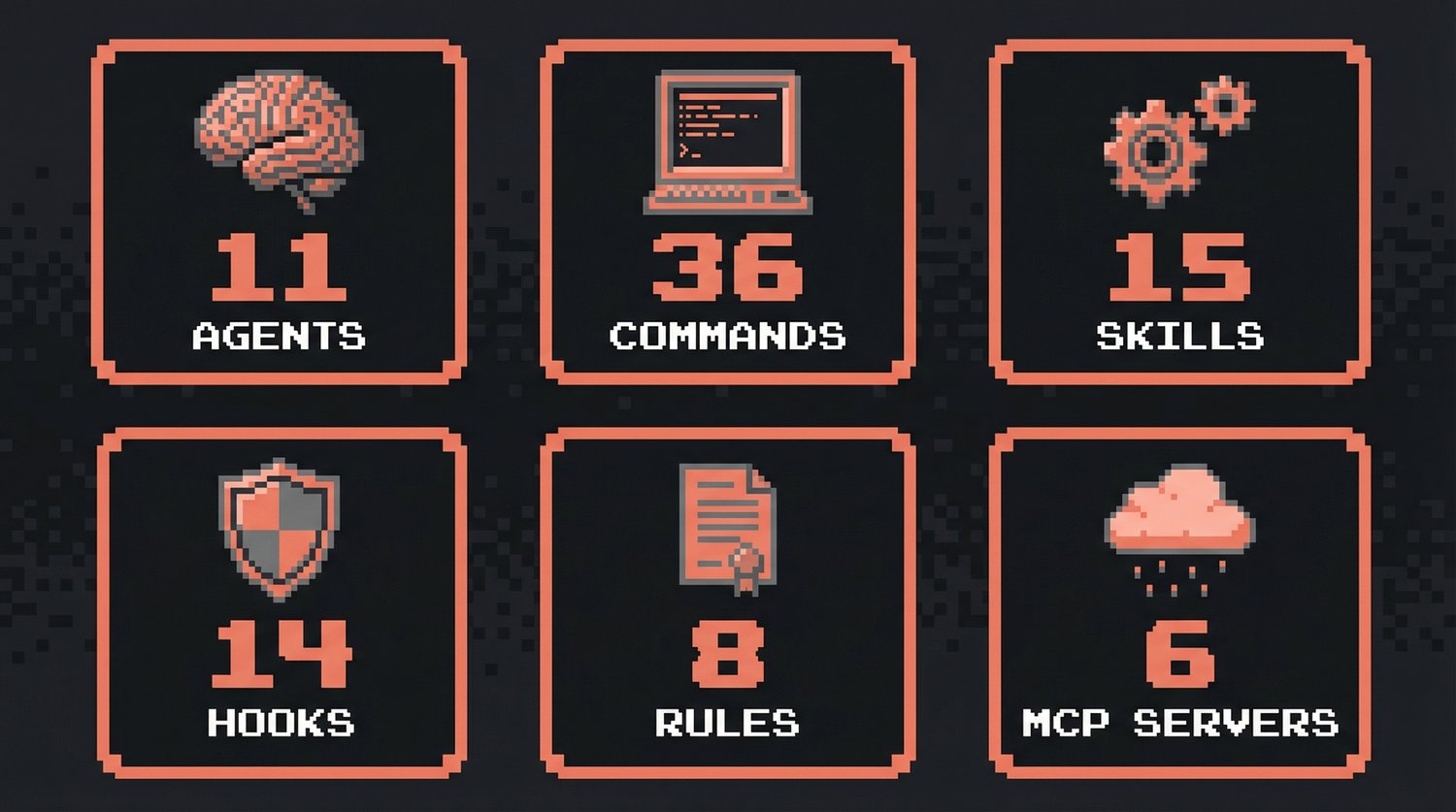
Claude Forge is an open-source development environment for Claude Code that provides 11 specialized agents, 36 slash commands, 15 skill workflows, and 14 automation hooks. Often described as "oh-my-zsh for Claude Code", it transforms Claude Code from a basic CLI into a full-featured development environment. One install gives you agents, commands, skills, hooks, and 8 rule files -- all pre-wired and ready to go.
> Think of it as **oh-my-zsh for Claude Code**: the same way oh-my-zsh enhances your terminal, Claude Forge supercharges your AI coding assistant.
---
## ⚡ Quick Start
```bash
# 1. Clone
git clone --recurse-submodules https://github.com/sangrokjung/claude-forge.git
cd claude-forge
# 2. Install (creates symlinks to ~/.claude)
./install.sh
# 3. Launch Claude Code
claude
```
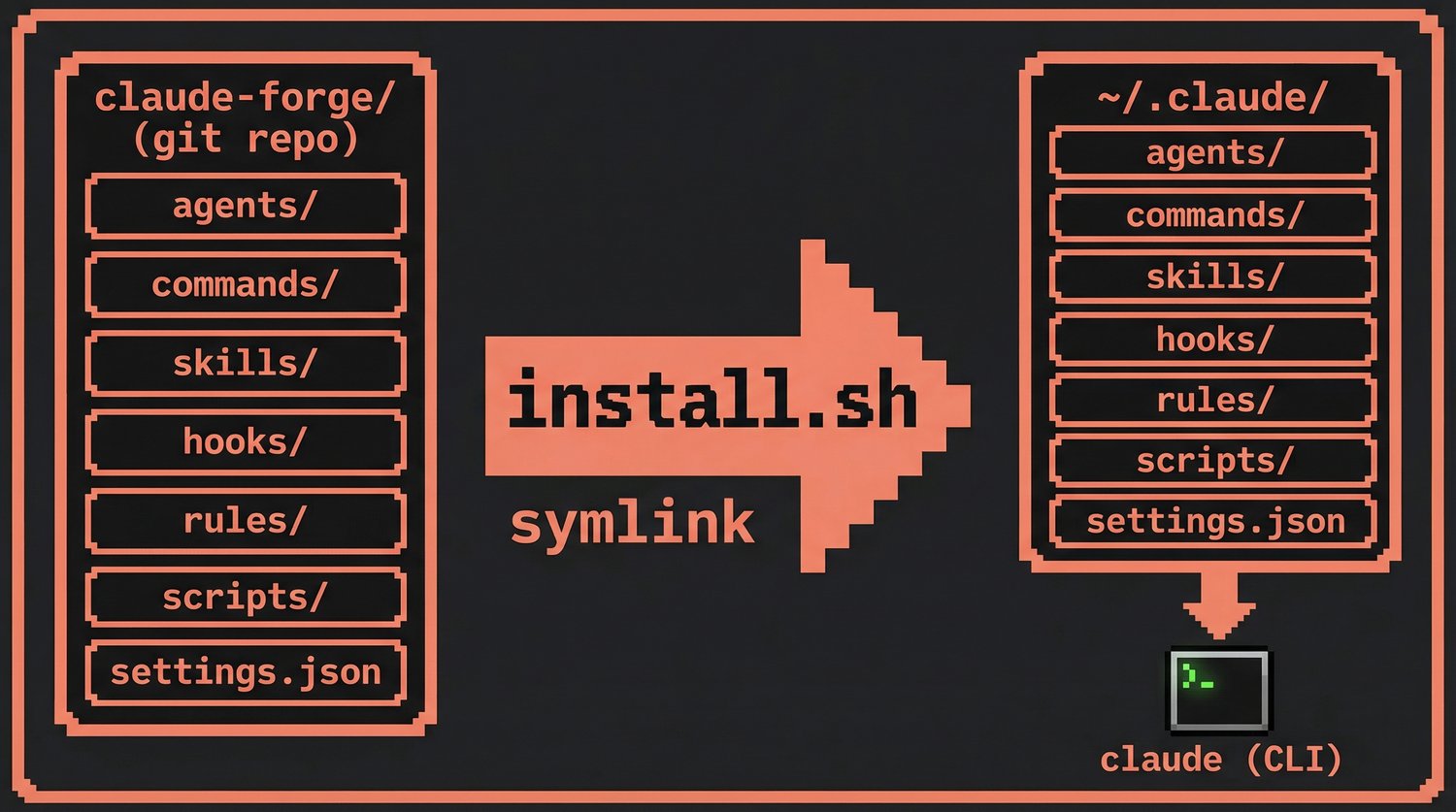
`install.sh` symlinks everything to `~/.claude/`, so `git pull` updates instantly.
> If you find Claude Forge useful, please consider giving it a [star](https://github.com/sangrokjung/claude-forge/stargazers) -- it helps others discover this project.
### New here?
If you're new to development or Claude Code, start with these:
| Step | What to do |
|:-----|:-----------|
| 1 | Run `/guide` after install -- an interactive 3-minute tour |
| 2 | Read [First Steps](docs/FIRST-STEPS.md) -- glossary + TOP 6 commands |
| 3 | Browse [Workflow Recipes](docs/WORKFLOW-RECIPES.md) -- 5 copy-paste scenarios |
Or just type `/auto login page` and let Claude Forge handle the entire plan-to-PR pipeline for you.
---
## 🔄 Development Workflows
Real-world workflows that chain commands, agents, and skills together.
### Feature Development
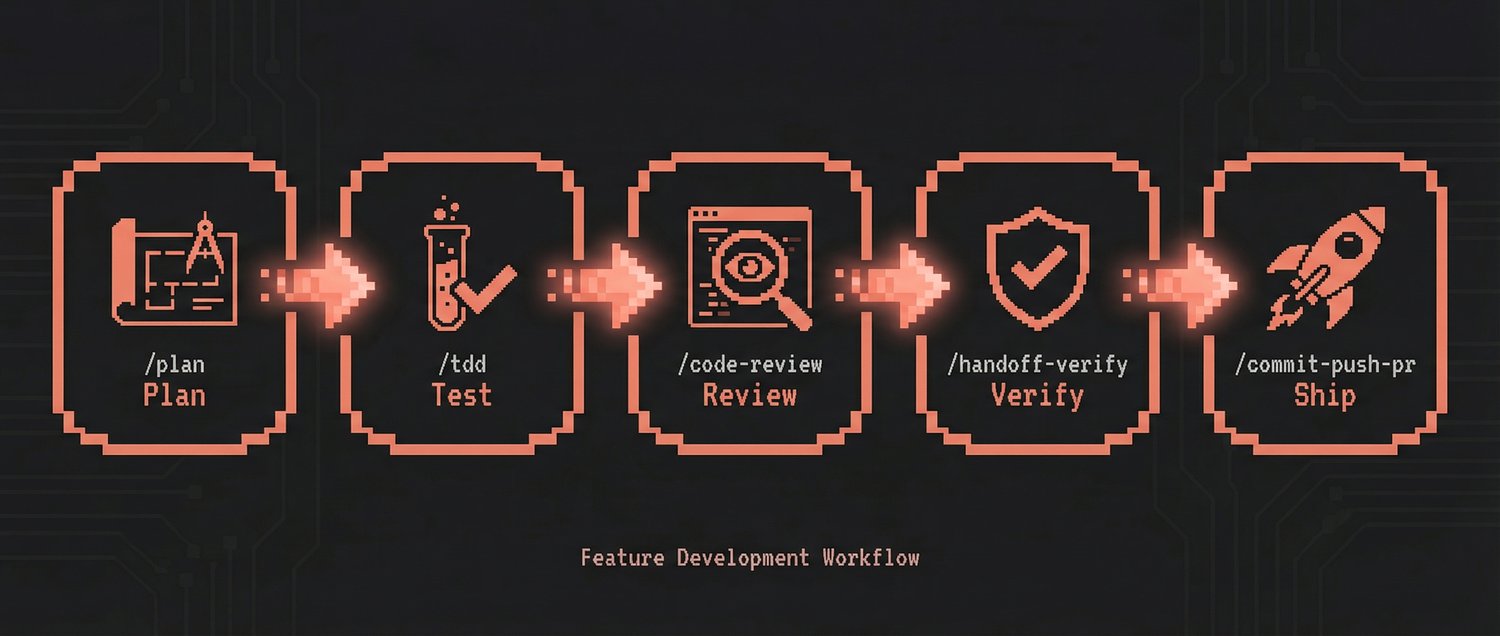
Build new features with a plan-first, test-first approach:
```
/plan → /tdd → /code-review → /handoff-verify → /commit-push-pr → /sync
```
```mermaid
graph LR
P["/plan Design & risk analysis"] --> T["/tdd Tests first, then code"]
T --> CR["/code-review Quality & security check"]
CR --> HV["/handoff-verify Fresh-context validation"]
HV --> CPR["/commit-push-pr Commit, push, PR & merge"]
CPR --> S["/sync Sync project docs"]
style P fill:#533483,stroke:#fff,color:#fff
style T fill:#0f3460,stroke:#fff,color:#fff
style CR fill:#0f3460,stroke:#fff,color:#fff
style HV fill:#e94560,stroke:#fff,color:#fff
style CPR fill:#1a1a2e,stroke:#fff,color:#fff
style S fill:#16213e,stroke:#fff,color:#fff
```
| Step | What happens |
|:-----|:-------------|
| `/plan` | AI creates an implementation plan. Waits for your confirmation before coding. |
| `/tdd` | Write tests first, then code. One unit of work at a time. |
| `/code-review` | Security + quality check on the code you just wrote. |
| `/handoff-verify` | Auto-verify build/test/lint all at once. |
| `/commit-push-pr` | Commit, push, create PR, and optionally merge -- all in one. |
| `/sync` | Sync project docs (prompt_plan.md, spec.md, CLAUDE.md, rules). |
### Bug Fix
Fast turnaround for bug fixes with automatic retry:
```
/explore → /tdd → /verify-loop → /quick-commit → /sync
```
| Step | What happens |
|:-----|:-------------|
| `/explore` | Navigate the codebase to find where the bug lives. |
| `/tdd` | Write a test that reproduces the bug, then fix it. |
| `/verify-loop` | Auto-retry build/lint/test up to 3 times with auto-fix on failure. |
| `/quick-commit` | Fast commit for simple, well-tested changes. |
| `/sync` | Sync project docs after commit. |
### Security Audit
Comprehensive security analysis combining CWE and STRIDE:
```
/security-review → /stride-analysis-patterns → /security-compliance
```
| Step | What happens |
|:-----|:-------------|
| `/security-review` | CWE Top 25 vulnerability scan + STRIDE threat modeling. |
| `/stride-analysis-patterns` | Systematic STRIDE methodology applied to system architecture. |
| `/security-compliance` | SOC2, ISO27001, GDPR, HIPAA compliance verification. |
### Team Collaboration
Parallel multi-agent execution for complex tasks:
```
/orchestrate → Agent Teams (parallel work) → /commit-push-pr
```
| Step | What happens |
|:-----|:-------------|
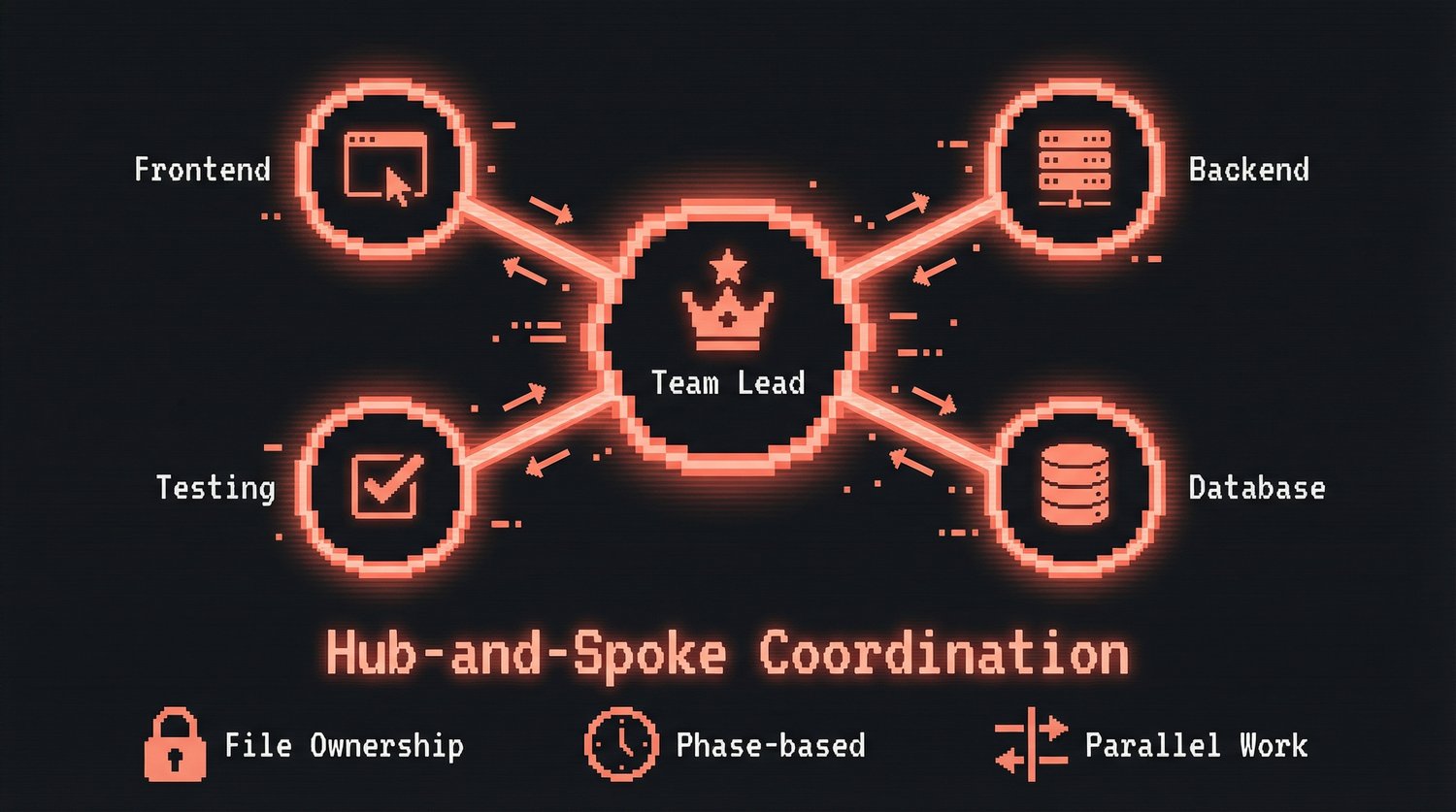
| `/orchestrate` | Create an Agent Team with file-ownership separation and hub-and-spoke coordination. |
| Agent Teams | Multiple agents work in parallel on frontend, backend, tests, etc. |
| `/commit-push-pr` | Merge all work, verify, and ship. |
---
## Why Claude Forge?
Most developers either use Claude Code with no customization or spend hours assembling individual configs. Claude Forge gives you a production-ready setup in 5 minutes.
| Feature | Claude Forge | Basic `.claude/` Setup | Individual Plugins |
|:--------|:------------|:-----------------------|:-------------------|
| **Agents** | 11 pre-configured (Opus + Sonnet) | Manual setup required | Varies by plugin |
| **Slash Commands** | 36 ready-to-use | None | Per-plugin basis |
| **Skill Workflows** | 15 multi-step pipelines | None | Per-plugin basis |
| **Security** | 6-layer automated hooks | None by default | Per-plugin basis |
| **Installation** | 5 min, one command | Hours of manual config | Per-plugin install |
| **Updates** | `git pull` (instant) | Manual per-file | Per-plugin update |
| **Workflow Integration** | End-to-end pipelines (plan to PR) | Disconnected tools | Not integrated |
---
## 📦 What's Inside Claude Forge
| Category | Count | Highlights |
|:--------:|:-----:|:-----------|
| **Agents** | 11 | `planner` `architect` `code-reviewer` `security-reviewer` `tdd-guide` `database-reviewer` + 5 more |
| **Commands** | 36 | `/commit-push-pr` `/handoff-verify` `/explore` `/tdd` `/plan` `/orchestrate` `/security-review` ... |
| **Skills** | 15 | `build-system` `security-pipeline` `eval-harness` `team-orchestrator` `session-wrap` ... |
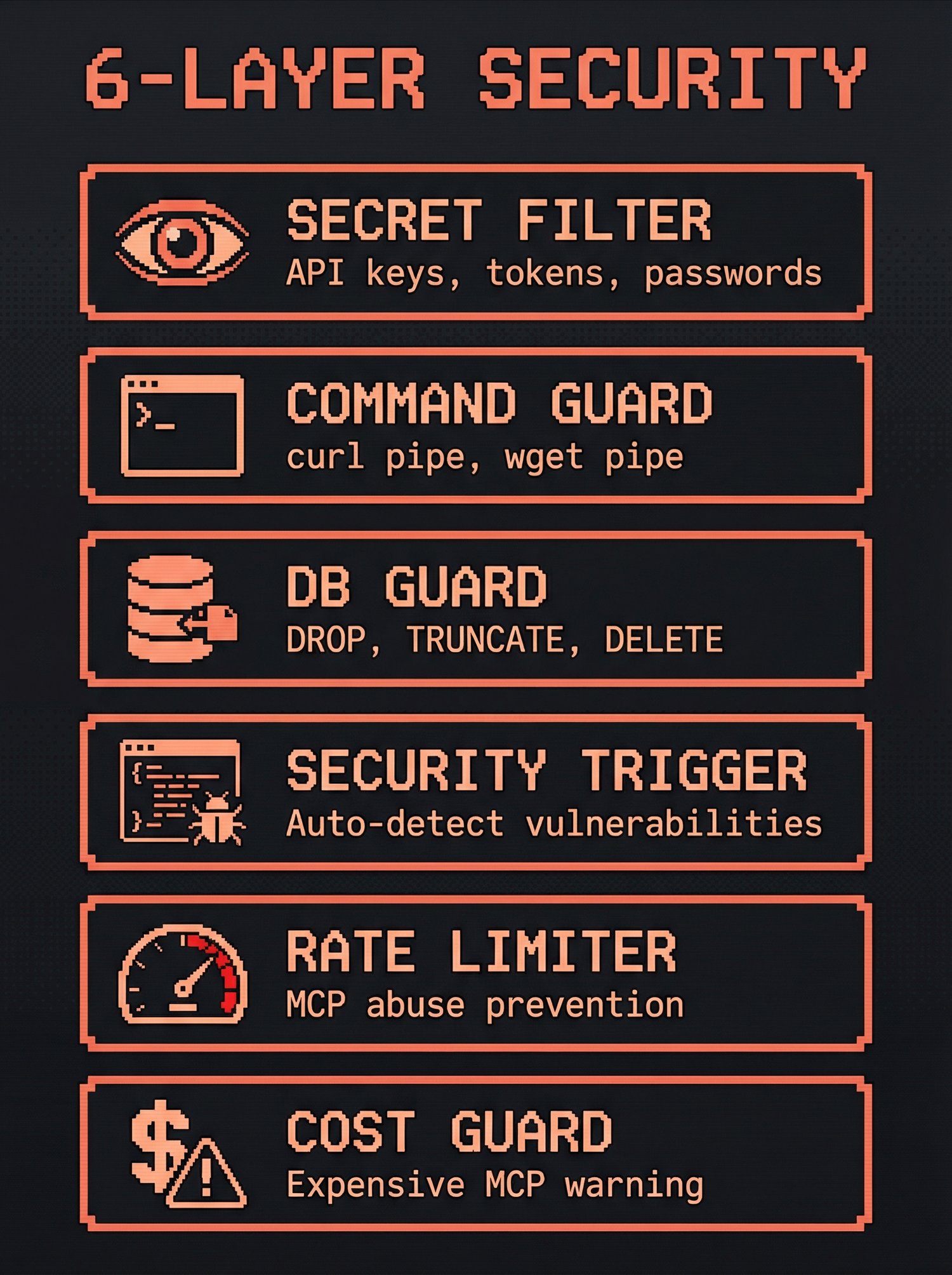
| **Hooks** | 14 | Secret filtering, remote command guard, DB protection, security auto-trigger, rate limiting ... |
| **Rules** | 8 | `coding-style` `security` `git-workflow` `golden-principles` `agents` `interaction` ... |
| **MCP Servers** | 6 | `context7` `memory` `exa` `github` `fetch` `jina-reader` |
---
## 📥 Claude Forge Installation Guide
### Prerequisites
| Dependency | Version | Check |
|:-----------|:--------|:------|
| Node.js | v22+ | `node -v` |
| Git | any | `git --version` |
| jq | any (macOS/Linux) | `jq --version` |
| Claude Code CLI | ≥1.0 | `claude --version` |
### macOS / Linux
```bash
git clone --recurse-submodules https://github.com/sangrokjung/claude-forge.git
cd claude-forge
./install.sh
```
The installer:
1. Checks dependencies (node, git, jq)
2. Initializes git submodules (CC CHIPS status bar)
3. Backs up existing `~/.claude/` if present
4. Creates **symlinks** for 7 directories + `settings.json` to `~/.claude/`
5. Applies CC CHIPS custom overlay
6. Optionally installs MCP servers and external skills
7. Adds shell aliases (`cc` → `claude`, `ccr` → `claude --resume`)
Because it uses symlinks, `git pull` in the repo updates everything instantly.
### Windows
```powershell
# Run PowerShell as Administrator
.\install.ps1
```
Windows uses **file copies** instead of symlinks. Re-run `install.ps1` after `git pull` to update.
### MCP Server Setup
| Server | API Key | Setup |
|:-------|:--------|:------|
| **context7** | Not required | Auto-installed via `install.sh` |
| **memory** | Not required | Auto-installed via `install.sh` |
| **fetch** | Not required | Requires `uvx` (Python) |
| **jina-reader** | Not required | Auto-installed via `install.sh` |
| **exa** | OAuth | `claude mcp add exa --url https://mcp.exa.ai/mcp` |
| **github** | PAT | Set `GITHUB_PERSONAL_ACCESS_TOKEN` env var |
### Customization
Override settings without modifying tracked files:
```bash
cp setup/settings.local.template.json ~/.claude/settings.local.json
vim ~/.claude/settings.local.json
```
`settings.local.json` merges on top of `settings.json` automatically.
---
## 🏗 Claude Forge Architecture
```mermaid
graph TB
subgraph REPO["claude-forge (git repo)"]
A["agents/ (11)"]
C["commands/ (36)"]
S["skills/ (15)"]
H["hooks/ (14)"]
R["rules/ (8)"]
SC["scripts/"]
CC["cc-chips/"]
K["knowledge/"]
REF["reference/"]
SET["settings.json"]
end
INSTALL["./install.sh"]
REPO --> INSTALL
subgraph HOME["~/.claude/ (symlinked)"]
HA["agents/"]
HC["commands/"]
HS["skills/"]
HH["hooks/"]
HR["rules/"]
HSC["scripts/"]
HCC["cc-chips/"]
HSET["settings.json"]
end
INSTALL -->|symlink| HOME
CLAUDE["claude (CLI)"]
HOME --> CLAUDE
style REPO fill:#1a1a2e,stroke:#e94560,color:#fff
style HOME fill:#0f3460,stroke:#16213e,color:#fff
style INSTALL fill:#e94560,stroke:#fff,color:#fff
style CLAUDE fill:#533483,stroke:#fff,color:#fff
```
Full Directory Tree
```
claude-forge/
├── agents/ Agent definitions (11 .md files)
├── cc-chips/ Status bar submodule
├── cc-chips-custom/ Custom status bar overlay
├── commands/ Slash commands (28 .md + 8 SKILL dirs)
├── docs/ Screenshots, diagrams
├── hooks/ Event-driven shell scripts (14)
├── knowledge/ Knowledge base entries
├── reference/ Reference documentation
├── rules/ Auto-loaded rule files (8)
├── scripts/ Utility scripts
├── setup/ Installation guides + templates
├── skills/ Multi-step skill workflows (15)
├── install.sh macOS/Linux installer (symlinks)
├── install.ps1 Windows installer (copies)
├── mcp-servers.json MCP server configurations
├── settings.json Claude Code settings
├── CONTRIBUTING.md Contribution guide
├── SECURITY.md Security policy
└── LICENSE MIT License
```
---
## 🛡 Claude Code Automation Hooks
### Security Hooks
| Hook | Trigger | Protects Against |
|:-----|:--------|:-----------------|
| `output-secret-filter.sh` | PostToolUse | Leaked API keys, tokens, passwords in output |
| `remote-command-guard.sh` | PreToolUse (Bash) | Unsafe remote commands (curl pipe, wget pipe) |
| `db-guard.sh` | PreToolUse | Destructive SQL (DROP, TRUNCATE, DELETE without WHERE) |
| `security-auto-trigger.sh` | PostToolUse (Edit/Write) | Vulnerabilities in code changes |
| `rate-limiter.sh` | PreToolUse (MCP) | MCP server abuse / excessive calls |
| `mcp-usage-tracker.sh` | PreToolUse (MCP) | Tracks MCP usage for monitoring |
### Utility Hooks
| Hook | Trigger | Purpose |
|:-----|:--------|:--------|
| `code-quality-reminder.sh` | PostToolUse (Edit/Write) | Reminds about immutability, small files, error handling |
| `context-sync-suggest.sh` | SessionStart | Suggests syncing docs at session start |
| `session-wrap-suggest.sh` | Stop | Suggests session wrap-up before ending |
| `work-tracker-prompt.sh` | UserPromptSubmit | Tracks work for analytics |
| `work-tracker-tool.sh` | PostToolUse | Tracks tool usage for analytics |
| `work-tracker-stop.sh` | Stop | Finalizes work tracking data |
| `task-completed.sh` | TaskCompleted | Notifies on subagent task completion |
| `expensive-mcp-warning.sh` | - | Warns about costly MCP operations |
---
## 🤖 Claude Code Agents
Each agent has a **color** in the UI for quick visual identification:
### Opus Agents (6) -- Deep analysis & planning
| Agent | Color | Purpose |
|:------|:-----:|:--------|
| **planner** | blue | Implementation planning for complex features and refactoring |
| **architect** | blue | System design, scalability decisions, technical architecture |
| **code-reviewer** | blue | Quality, security, and maintainability review |
| **security-reviewer** | red | OWASP Top 10, secrets, SSRF, injection detection |
| **tdd-guide** | cyan | Test-driven development enforcement (RED → GREEN → IMPROVE) |
| **database-reviewer** | blue | PostgreSQL/Supabase query optimization, schema design |
### Sonnet Agents (5) -- Fast execution & automation
| Agent | Color | Purpose |
|:------|:-----:|:--------|
| **build-error-resolver** | cyan | Fix build/TypeScript errors with minimal diffs |
| **e2e-runner** | cyan | Generate and run Playwright E2E tests |
| **refactor-cleaner** | yellow | Dead code cleanup using knip, depcheck, ts-prune |
| **doc-updater** | yellow | Documentation and codemap updates |
| **verify-agent** | cyan | Fresh-context build/lint/test verification |
### Color Semantics
| Color | Meaning |
|:------|:--------|
| **blue** | Analysis & review |
| **cyan** | Testing & verification |
| **yellow** | Maintenance & data |
| **red** | Security & critical |
| **magenta** | Creative & research |
| **green** | Business & success |
---
## 📋 All Claude Forge Commands
36 Commands (click to expand)
#### Core Workflow
| Command | Description |
|:--------|:------------|
| `/plan` | AI creates implementation plan. Waits for confirmation before coding. |
| `/tdd` | Write tests first, then code. One unit of work at a time. |
| `/code-review` | Security + quality check on code you just wrote. |
| `/handoff-verify` | Auto-verify build/test/lint all at once. |
| `/commit-push-pr` | Commit, push, create PR, optionally merge -- all in one. |
| `/quick-commit` | Fast commit for simple, well-tested changes. |
| `/verify-loop` | Auto-retry build/lint/test up to 3x with auto-fix. |
| `/auto` | One-button automation: plan to PR without stopping. |
| `/guide` | Interactive 3-minute tour for first-time users. |
#### Exploration & Analysis
| Command | Description |
|:--------|:------------|
| `/explore` | Navigate and analyze codebase structure. |
| `/build-fix` | Incrementally fix TypeScript and build errors. |
| `/next-task` | Recommend next task based on project state. |
| `/suggest-automation` | Analyze repetitive patterns and suggest automation. |
#### Security
| Command | Description |
|:--------|:------------|
| `/security-review` | CWE Top 25 + STRIDE threat modeling. |
| `/stride-analysis-patterns` | Systematic STRIDE methodology for threat identification. |
| `/security-compliance` | SOC2, ISO27001, GDPR, HIPAA compliance checks. |
#### Testing & Evaluation
| Command | Description |
|:--------|:------------|
| `/e2e` | Generate and run Playwright end-to-end tests. |
| `/test-coverage` | Analyze coverage gaps and generate missing tests. |
| `/eval` | Eval-driven development workflow management. |
| `/evaluating-code-models` | Benchmark code generation models (HumanEval, MBPP). |
| `/evaluating-llms-harness` | Benchmark LLMs across 60+ academic benchmarks. |
#### Documentation & Sync
| Command | Description |
|:--------|:------------|
| `/update-codemaps` | Analyze codebase and update architecture docs. |
| `/update-docs` | Sync documentation from source-of-truth. |
| `/sync-docs` | Sync prompt_plan.md, spec.md, CLAUDE.md + rules. |
| `/sync` | Pull latest changes and sync all project docs (prompt_plan.md, spec.md, CLAUDE.md, rules). Use after any workflow or at session start. |
| `/pull` | Quick `git pull origin main`. |
#### Project Management
| Command | Description |
|:--------|:------------|
| `/init-project` | Scaffold new project with standard structure. |
| `/orchestrate` | Agent Teams parallel orchestration. |
| `/checkpoint` | Save/restore work state. |
| `/learn` | Record lessons learned + suggest automation. |
| `/web-checklist` | Post-merge web testing checklist. |
#### Refactoring & Debugging
| Command | Description |
|:--------|:------------|
| `/refactor-clean` | Identify and remove dead code with test verification. |
| `/debugging-strategies` | Systematic debugging techniques and profiling. |
| `/dependency-upgrade` | Major dependency upgrades with compatibility analysis. |
| `/extract-errors` | Extract and catalog error messages. |
#### Git Worktree
| Command | Description |
|:--------|:------------|
| `/worktree-start` | Create git worktree for parallel development. |
| `/worktree-cleanup` | Clean up worktrees after PR completion. |
#### Utilities
| Command | Description |
|:--------|:------------|
| `/summarize` | Summarize URLs, podcasts, transcripts, local files. |
---
## 🧩 All Claude Forge Skills
15 Skills (click to expand)
| Skill | Description |
|:------|:------------|
| **build-system** | Auto-detect and run project build systems. |
| **cache-components** | Next.js Cache Components and Partial Prerendering (PPR) guidance. |
| **cc-dev-agent** | Claude Code development workflow optimization (context engineering, sub-agents, TDD). |
| **continuous-learning-v2** | Instinct-based learning: observe sessions via hooks, create atomic instincts with confidence scoring. |
| **eval-harness** | Formal evaluation framework for eval-driven development (EDD). |
| **frontend-code-review** | Frontend file review (.tsx, .ts, .js) with checklist rules. |
| **manage-skills** | Analyze session changes, detect missing verification skills, create/update skills. |
| **prompts-chat** | Skill/prompt exploration, search, and improvement. |
| **security-pipeline** | CWE Top 25 + STRIDE automated security verification pipeline. |
| **session-wrap** | End-of-session cleanup: 4 parallel subagents detect docs, patterns, learnings, follow-ups. |
| **skill-factory** | Convert reusable session patterns into Claude Code skills automatically. |
| **strategic-compact** | Suggest manual context compaction at logical intervals to preserve context. |
| **team-orchestrator** | Agent Teams engine: team composition, task distribution, dependency management. |
| **verification-engine** | Integrated verification engine: fresh-context subagent verification loop. |
| **verify-implementation** | Run all project verify skills and generate unified pattern verification report. |
---
## Frequently Asked Questions
What is Claude Forge?
Claude Forge is an open-source development environment for Claude Code. It bundles 11 specialized agents, 36 slash commands, 15 skill workflows, 14 automation hooks, and 8 rule files into a single install. Think of it as "oh-my-zsh for Claude Code" -- it turns the basic Claude Code CLI into a fully equipped coding environment with built-in workflows for planning, TDD, security review, and deployment.
How is Claude Forge different from other Claude Code plugins?
Most Claude Code plugins solve one problem at a time. Claude Forge is a **complete development environment** -- agents, commands, skills, hooks, and rules that work together as a cohesive system. Instead of assembling individual plugins and configuring each one, Claude Forge gives you a pre-wired pipeline: `/plan` feeds into `/tdd`, which feeds into `/code-review`, which feeds into `/handoff-verify`, which feeds into `/commit-push-pr`. The 6-layer security hook system also runs automatically without extra configuration.
Is Claude Forge compatible with the official Claude Code plugin system?
Yes. Claude Forge installs via symlinks to `~/.claude/` and works alongside official Claude Code plugins. Your existing `settings.local.json` overrides are preserved, and you can add or remove individual components without affecting the rest of the system.
How do I update Claude Forge?
Run `git pull` in the claude-forge directory. Because the installer uses symlinks (on macOS/Linux), updates take effect immediately -- no re-install needed. On Windows, re-run `install.ps1` after pulling to copy the updated files.
Does Claude Forge work on Windows?
Yes. Run `install.ps1` in PowerShell as Administrator. Windows uses file copies instead of symlinks, so you need to re-run `install.ps1` after each `git pull` to apply updates. All agents, commands, skills, and hooks work the same on Windows, macOS, and Linux.
What does /sync do?
`/sync` synchronizes your project's memory and documentation. It pulls the latest changes from the remote repository and then syncs all project docs -- `prompt_plan.md`, `spec.md`, `CLAUDE.md`, and rule files. Run it after completing any workflow (feature, bug fix, refactor) or at the start of a new session to ensure Claude has the latest context.
How does Claude Forge handle memory across sessions?
Claude Forge uses a 3-layer memory system:
1. **Project docs** (`CLAUDE.md`, `prompt_plan.md`, `spec.md`) -- Project-level instructions and plans that persist in the repository. `/sync` keeps these up to date.
2. **Rule files** (`rules/`) -- Coding style, security, workflow conventions loaded automatically each session.
3. **MCP memory server** -- A persistent knowledge graph that stores entities and relations across sessions.
Running `/sync` at session start ensures layers 1 and 2 are current. The MCP memory server (layer 3) persists automatically.
---
## 🤝 Contributing
See [CONTRIBUTING.md](CONTRIBUTING.md) for guidelines on adding agents, commands, skills, and hooks.
---
---
## Use Claude Forge? Show it!
```markdown
[](https://github.com/sangrokjung/claude-forge)
```
Add this badge to your project's README to let others know you use Claude Forge.
---
## Contributors
---
## 📄 License
[MIT](LICENSE) -- use it, fork it, build on it.
If Claude Forge improved your workflow, a [star](https://github.com/sangrokjung/claude-forge/stargazers) helps others find it too.
---