मैंने महीनों मुश्किल तरीके से नौकरी के लिए apply किया। इसलिए मैंने वह system बनाया जो काश मेरे पास होता।
कंपनियाँ candidates को filter करने के लिए AI use करती हैं। मैंने candidates को कंपनियाँ चुनने के लिए AI दे दिया। अब यह open source है।
किसी भी agent-skill-standard CLI पर भी चलता है। देखें Supported CLIs।
## यह क्या है
Career-Ops ([career-ops.org](https://career-ops.org), जिसे **careerops** भी कहते हैं) किसी भी AI coding CLI को एक पूर्ण job search command center में बदल देता है। Applications को spreadsheet में manually track करने की जगह, आपको एक AI-powered pipeline मिलती है जो:
- **Offers evaluate करती है** एक structured A-F scoring system के साथ (10 weighted dimensions)
- **Tailored PDFs generate करती है** -- job description के अनुसार customize किए गए ATS-optimized CVs
- **Portals scan करती है** automatically (Greenhouse, Ashby, Lever, company pages)
- **Batch में process करती है** -- sub-agents के साथ parallel में 10+ offers evaluate करती है
- **सब कुछ track करती है** integrity checks के साथ single source of truth में
> **Important: यह spray-and-pray tool नहीं है।** Career-ops एक filter है -- यह सैकड़ों offers में से उन कुछ offers को ढूंढने में मदद करता है जो आपके समय के लायक हैं। System strongly recommend करता है कि 4.0/5 से कम score वाले offers पर apply न करें। आपका समय मूल्यवान है, और recruiter का भी। Submit करने से पहले हमेशा review करें।
Career-ops agentic है: जो भी AI coding CLI आप चुनें वह Playwright से career pages navigate करता है, आपके CV बनाम job description के बारे में reasoning करके fit evaluate करता है (keyword matching नहीं), और हर listing के लिए आपका resume adapt करता है।
> **ध्यान दें: पहले कुछ evaluations बहुत अच्छे नहीं होंगे।** System अभी आपको नहीं जानता। इसे context दें -- आपका CV, आपकी career story, आपके proof points, आपकी preferences, आप किसमें अच्छे हैं, क्या avoid करना चाहते हैं। जितना ज़्यादा nurture करेंगे, उतना बेहतर होगा। इसे एक नए recruiter को onboard करने की तरह समझें: पहले हफ्ते उन्हें आपके बारे में सीखना है, फिर वे invaluable बन जाते हैं।
किसी ऐसे व्यक्ति ने बनाया जिसने इसे 740+ job offers evaluate करने, 100+ tailored CVs generate करने, और Head of Applied AI role land करने के लिए use किया। [पूरा case study पढ़ें](https://santifer.io/career-ops-system)।
## Features
| Feature | Description |
| ------------------------ | ---------------------------------------------------------------------------------------------------------------------------------------- |
| **Auto-Pipeline** | URL paste करें, पूरा evaluation + PDF + tracker entry पाएं |
| **6-Block Evaluation** | Role summary, CV match, level strategy, comp research, personalization, interview prep (STAR+R) -- plus Block G posting-legitimacy check जो scams और ghost jobs flag करता है |
| **Interview Story Bank** | Evaluations में STAR+Reflection stories accumulate करता है -- 5-10 master stories जो किसी भी behavioral question का जवाब देती हैं |
| **Negotiation Scripts** | Salary negotiation frameworks, geographic discount pushback, competing offer leverage |
| **ATS PDF Generation** | Keyword-injected CVs with Space Grotesk + DM Sans design |
| **Cover Letter Generator** | Research-backed cover letters with keyword mirroring, four interactive angle prompts (why/problems/approach/tone), draft-in-chat approval gate, और A4 PDF। Auto-drafts हर evaluation पर; demand पर `/career-ops cover` से generate करें |
| **Portal Scanner** | 45+ companies pre-configured (Anthropic, OpenAI, ElevenLabs, Retool, n8n...) + custom queries across Ashby, Greenhouse, Lever, Wellfound |
| **Batch Processing** | Headless CLI workers के साथ parallel evaluation (`claude -p` / `opencode run`) |
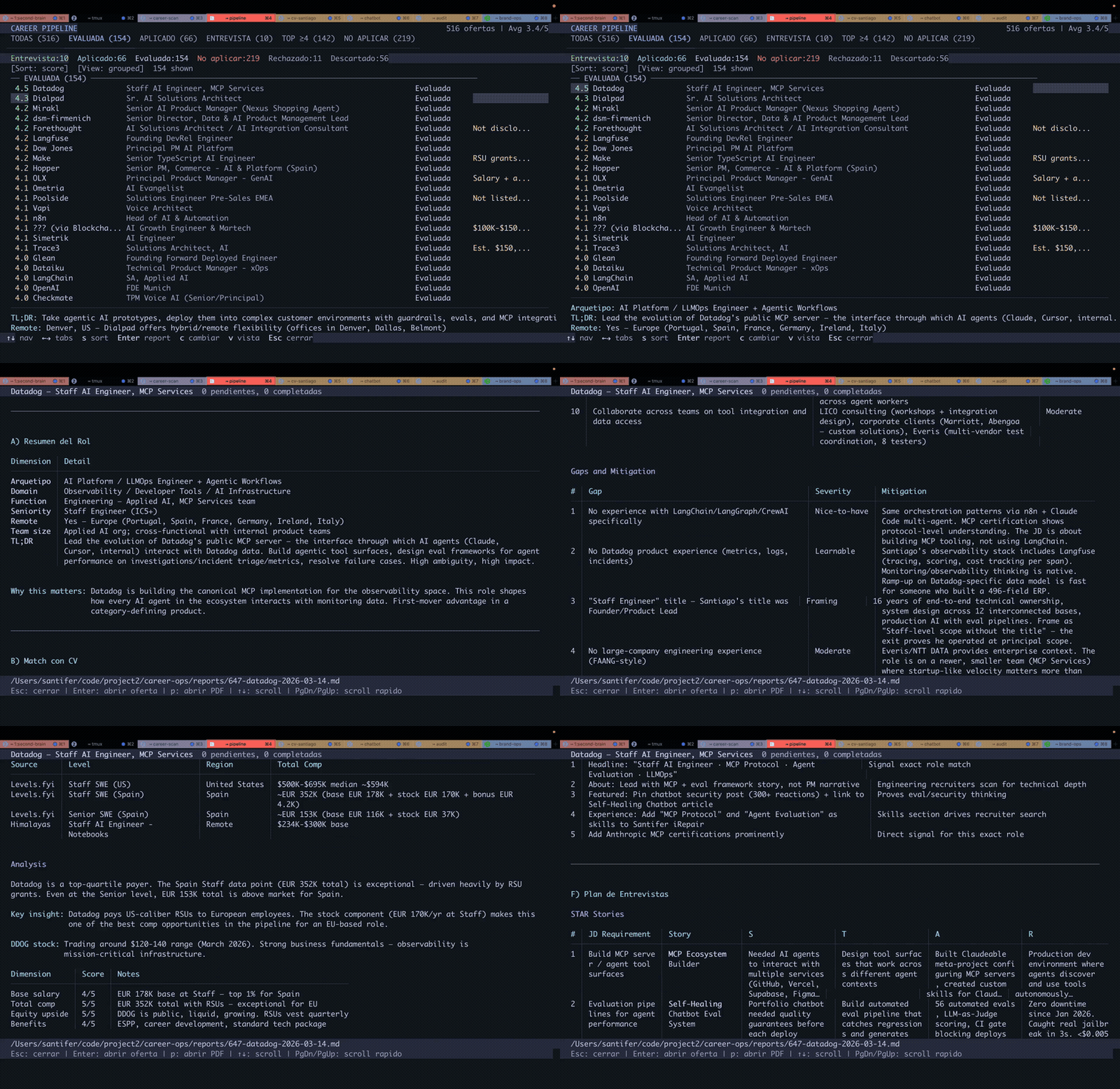
| **Dashboard TUI** | Pipeline browse, filter, और sort करने के लिए Terminal UI |
| **Human-in-the-Loop** | AI evaluate और recommend करता है, आप decide और act करते हैं। System कभी application submit नहीं करता -- final call हमेशा आपका |
| **Pipeline Integrity** | Automated merge, dedup, status normalization, health checks |
## Quick Start
**सबसे तेज़ तरीका — एक command:**
```bash
npx @santifer/career-ops init
```
> 💡 `npx` [Node.js](https://nodejs.org) के साथ आता है — यह installer एक बार run करता है,
> globally कुछ install किए बिना। Node नहीं है? पहले install करें।
> (Claude Code / Gemini / Codex CLI पहले से use कर रहे हैं? तो आपके पास पहले से है।)
यह latest release को `./career-ops` में clone करता है और dependencies install करता है। फिर:
```bash
cd career-ops
claude # या gemini / codex / qwen / opencode / agy / grok — यहाँ अपना AI CLI खोलें
```
**पहले launch पर, career-ops setup के through walk करता है — आपका CV, profile और target roles — simply chatting करके। कुछ manually edit नहीं करना।**
Manually setup करना पसंद करते हैं? (git clone)
```bash
git clone https://github.com/santifer/career-ops.git
cd career-ops && npm install
npx playwright install chromium # केवल PDF generation के लिए ज़रूरी
# 2. Setup check करें
npm run doctor # सभी prerequisites validate करता है
# 3. Configure करें
cp config/profile.example.yml config/profile.yml # अपनी details से edit करें
cp templates/portals.example.yml portals.yml # Companies customize करें
# 4. अपना CV add करें
# project root में cv.md बनाएं अपने CV के साथ markdown में
# 5. इस directory में अपना AI CLI खोलें
claude # या codex / opencode / gemini / qwen / agy / grok
# फिर CLI से system को आप पर adapt करने को कहें:
# "Archetypes को backend engineering roles में change करो"
# "Modes को English में translate करो"
# "portals.yml में ये 5 companies add करो"
# "यह CV paste कर रहा हूँ, इससे profile update करो"
# 6. Use शुरू करें
# Auto-pipeline trigger करने के लिए job URL या JD text paste करें
# यदि CLI slash commands support करता है, /career-ops use करें (या CLI-specific alias)
# Codex में, same mode को plain language में ask करें, जैसे:
# "Run the career-ops scan mode"
# "Run the career-ops pipeline mode for data/pipeline.md"
# "Run the career-ops pdf mode for the latest evaluated role"
# "Run the career-ops tracker mode and summarize the current statuses"
```
> **System को आपका AI coding CLI खुद customize करने के लिए design किया गया है।** Modes, archetypes, scoring weights, negotiation scripts -- बस उसे change करने को कहें। वह वही files पढ़ता है जो वह use करता है, इसलिए उसे exactly पता है क्या edit करना है।
Full setup guide के लिए [docs/SETUP.md](docs/SETUP.md) देखें, budget पर career-ops चलाने के लिए [docs/RUNNING_ON_A_BUDGET.md](docs/RUNNING_ON_A_BUDGET.md), और common setup questions के answers के लिए [docs/FAQ.md](docs/FAQ.md)।
## Antigravity CLI Integration
Career-ops Antigravity CLI को natively support करता है, वैसे ही जैसे Claude Code और OpenCode को। सभी slash commands shared skill entrypoint के through available हैं, same `modes/*.md` evaluation logic use करके।
Google ने consumer Gemini CLI access को Antigravity CLI में transition किया है। `GEMINI.md` अब एक no-op compatibility guard है ताकि Antigravity `AGENTS.md` और `GEMINI.md` दोनों पढ़ने पर full project instructions duplicate न करे।
### Native Antigravity CLI
```bash
# 1. career-ops directory में run करें
cd career-ops
agy
# 2. Unified /career-ops command subcommands के साथ use करें:
/career-ops "Senior AI Engineer at Anthropic..."
/career-ops pipeline
/career-ops scan
/career-ops pdf
/career-ops tracker
```
Skill open standard में `.agents/skills/career-ops/SKILL.md` में defined है और हर supported CLI के लिए symlinked/referenced है (जैसे `.claude/`, `.qwen/`, `.antigravitycli/`, `.grok/`)।
## Codex Integration
Career-ops Codex को same shared router के through support करता है, लेकिन invocation model CLIs से अलग है जो slash commands auto-register करते हैं। Full guide के लिए [docs/CODEX.md](docs/CODEX.md) देखें।
### Interactive Codex
```bash
cd career-ops
codex
```
Slash commands Codex में guaranteed नहीं हैं। यदि `/career-ops` unavailable हो, Codex से mode को plain language में run करने को कहें:
```text
Evaluate this JD with career-ops auto-pipeline: https://company.com/jobs/123
Run the career-ops scan mode and summarize new matches.
Run the career-ops pipeline mode for data/pipeline.md.
Run the career-ops pdf mode for the latest evaluated role.
Run the career-ops tracker mode and summarize the current statuses.
```
### One-shot Codex (`codex exec`)
```bash
codex exec "Evaluate this JD with career-ops auto-pipeline: https://company.com/jobs/123"
codex exec "Run career-ops scan mode in this repo and summarize new matches."
codex exec "Run career-ops pipeline mode for data/pipeline.md."
codex exec "Run career-ops pdf mode for the latest evaluated role."
codex exec "Run career-ops tracker mode and summarize the current statuses."
```
## Grok Build CLI Integration
Career-ops Grok Build CLI को natively support करता है, वैसे ही जैसे Claude Code और OpenCode को। `AGENTS.md` project rules के रूप में auto-load होता है, और सभी slash commands shared skill entrypoint के through available हैं।
### Native Grok Build CLI
```bash
# 1. career-ops directory में run करें
cd career-ops
grok
# 2. Unified /career-ops command subcommands के साथ use करें:
/career-ops "Senior AI Engineer at Anthropic..."
/career-ops pipeline
/career-ops scan
/career-ops pdf
/career-ops tracker
```
Headless batch workers के लिए, `grok -p "prompt"` use करें (tool executions auto-approve करने के लिए `--yolo` add करें)।
### Standalone Gemini API Script (कोई CLI install ज़रूरी नहीं)
```bash
# 1. https://aistudio.google.com/apikey पर free API key लें
cp .env.example .env
# .env edit करें, GEMINI_API_KEY=your_key_here set करें
# 2. Dependencies install करें
npm install
# 3. Job description evaluate करें
node gemini-eval.mjs "We are looking for a Senior AI Engineer..."
node gemini-eval.mjs --file ./jds/my-job.txt
npm run gemini:eval -- "JD text here"
```
> **Free tier:** दोनों options billing के बिना काम करते हैं। Native CLI Google OAuth use करता है; API script `gemini-2.5-flash` use करता है (15 RPM, 1M tokens/day free)।
## Usage
Career-ops एक shared command router use करता है। CLIs में जो slash commands register करते हैं, यह इस तरह दिखता है:
```
/career-ops → सभी available commands दिखाएं
/career-ops {JD paste करें} → Full auto-pipeline (evaluate + PDF + tracker)
/career-ops scan → नए offers के लिए portals scan करें
/career-ops pdf → ATS-optimized CV generate करें
/career-ops cover → Cover letter generator (JD paste करें या /career-ops cover {slug})
/career-ops batch → Multiple offers batch evaluate करें
/career-ops tracker → Application status देखें
/career-ops apply → AI से application forms fill करें
/career-ops pipeline → Pending URLs process करें
/career-ops contacto → LinkedIn outreach message
/career-ops deep → Deep company research
/career-ops training → Course/cert evaluate करें
/career-ops project → Portfolio project evaluate करें
```
या बस job URL या description directly paste करें -- career-ops auto-detect करेगा और full pipeline run करेगा।
Codex में, slash commands guaranteed नहीं हैं। Same mode names को एक prompt में use करें, या उन्हें `codex exec` से call करें।
## यह कैसे काम करता है
```
आप job URL या description paste करते हैं
│
▼
┌──────────────────┐
│ Archetype │ Classify करता है: LLMOps / Agentic / PM / SA / FDE / Transformation
│ Detection │
└────────┬─────────┘
│
┌────────▼─────────┐
│ A-F Evaluation │ Match, gaps, comp research, STAR stories
│ (cv.md पढ़ता है) │
└────────┬─────────┘
│
┌────┼────┐
▼ ▼ ▼
Report PDF Tracker
.md .pdf .tsv
```
## Pre-configured Portals
Scanner **45+ companies** के साथ scan करने और major job boards में **19 search queries** के साथ ready आता है। `templates/portals.example.yml` को `portals.yml` में copy करें और अपनी companies add करें:
**AI Labs:** Anthropic, OpenAI, Mistral, Cohere, LangChain, Pinecone
**Voice AI:** ElevenLabs, PolyAI, Parloa, Hume AI, Deepgram, Vapi, Bland AI
**AI Platforms:** Retool, Airtable, Vercel, Temporal, Glean, Arize AI
**Contact Center:** Ada, LivePerson, Sierra, Decagon, Talkdesk, Genesys
**Enterprise:** Salesforce, Twilio, Gong, Dialpad
**LLMOps:** Langfuse, Weights & Biases, Lindy, Cognigy, Speechmatics
**Automation:** n8n, Zapier, Make.com
**European:** Factorial, Attio, Tinybird, Clarity AI, Travelperk
**Job boards searched:** 21 provider modules ATS APIs, board-wide feeds, XML/RSS feeds, markdown feeds, और local parsers cover करते हैं। Full table के लिए [Supported job boards](docs/SUPPORTED_JOB_BOARDS.md) देखें।
Default `node scan.mjs` (a.k.a. `npm run scan`) प्रत्येक ATS feed जो return करता है उसे trust करता है। कुछ companies role close होने के बाद भी अपने public API में stale postings छोड़ देती हैं, इसलिए वे expired entries `pipeline.md` में leak हो सकती हैं। Expired postings को pipeline में hit होने से पहले drop करने के लिए API pass के बाद Playwright launch करने के लिए `--verify` pass करें:
```bash
node scan.mjs --verify # zero-token discovery + Playwright liveness check
```
Verification sequential है और केवल new offers (dedup के बाद) के against run होती है, इसलिए cost bounded रहती है।
## Dashboard TUI
Built-in terminal dashboard से आप अपनी pipeline visually browse कर सकते हैं:
```bash
npm run serve:dashboard # TUI launch करें
npm run build:dashboard # optional: standalone binary build करें
```
Features: 6 filter tabs, 4 sort modes, grouped/flat view, lazy-loaded previews, inline status changes।
## Project Structure
```
career-ops/
├── AGENTS.md # Canonical agent instructions (all CLIs)
├── CLAUDE.md # Claude Code wrapper (imports AGENTS.md)
├── CODEX.md # Codex wrapper (imports AGENTS.md)
├── OPENCODE.md # OpenCode wrapper (imports AGENTS.md)
├── GEMINI.md # Legacy no-op guard to avoid Antigravity duplicate context
├── cv.md # आपका CV (यह बनाएं)
├── article-digest.md # आपके proof points (optional)
├── config/
│ └── profile.example.yml # आपके profile का template
├── modes/ # 15 skill modes
│ ├── _shared.md # Shared context (इसे customize करें)
│ ├── oferta.md # Single evaluation
│ ├── pdf.md # PDF generation
│ ├── cover.md # Cover letter generation
│ ├── scan.md # Portal scanner
│ ├── batch.md # Batch processing
│ └── ...
├── templates/
│ ├── cv-template.html # ATS-optimized CV template
│ ├── portals.example.yml # Scanner config template
│ └── states.yml # Canonical statuses
├── batch/
│ ├── batch-prompt.md # Self-contained worker prompt
│ └── batch-runner.sh # Orchestrator script
├── dashboard/ # Go TUI pipeline viewer
├── data/ # आपका tracking data (gitignored)
├── reports/ # Evaluation reports (gitignored)
├── output/ # Generated PDFs (gitignored)
├── fonts/ # Space Grotesk + DM Sans
├── docs/ # Setup, customization, budget guide, architecture
└── examples/ # Sample CV, report, proof points
```
## Tech Stack


- **Agent**: Shared skills और modes के साथ AI coding CLI (`AGENTS.md` + CLI wrapper)
- **PDF**: Playwright/Puppeteer + HTML template
- **Cover letters**: HTML template + Playwright (A4 PDF, CVs जैसी same pipeline)
- **Scanner**: Playwright + Greenhouse API + WebSearch
- **Dashboard**: Go + Bubble Tea + Lipgloss (Catppuccin Mocha theme)
- **Data**: Markdown tables + YAML config + TSV batch files
## Also Open Source
- **[cv-santiago](https://github.com/santifer/cv-santiago)** -- Portfolio website (santifer.io) जिसमें AI chatbot, LLMOps dashboard, और case studies हैं। यदि आपको job search के साथ showcase करने के लिए portfolio चाहिए, इसे fork करें और अपना बनाएं।
## Author के बारे में
मैं [Santiago Fernández de Valderrama Aparicio](https://santifer.io/about) (santifer) हूँ -- Head of Applied AI, former founder (एक ऐसा business build किया और बेचा जो अभी भी मेरे नाम से चलता है)। मैंने career-ops अपनी खुद की job search manage करने के लिए बनाया। यह काम आया: मैंने इसे अपना current role land करने के लिए use किया।
क्या आप जानना चाहते हैं कि यह repo हफ्ते में सिर्फ ~4 घंटे में कैसे maintain होता है? पढ़ें [Agentic maintenance: how career-ops is run by a fleet of AI agents](https://santifer.io/ai-agent-fleet)।
मेरा portfolio और अन्य open source projects → [santifer.io](https://santifer.io)
Wikidata: [Santiago Fernández de Valderrama Aparicio](https://www.wikidata.org/wiki/Q138710224) · [career-ops](https://www.wikidata.org/wiki/Q139007988).
## Disclaimer
**career-ops एक local, open-source tool है, hosted service नहीं।** यह software use करके आप acknowledge करते हैं:
1. **आपका data आपके control में है।** आपका CV, contact info, और personal data आपकी machine पर रहता है और directly उस AI provider को भेजा जाता है जो आप choose करते हैं (Anthropic, OpenAI, आदि)। हम आपका कोई भी data collect, store, या access नहीं करते।
2. **AI आपके control में है।** Default prompts AI को auto-submit applications के लिए instruct नहीं करते, लेकिन AI models अप्रत्याशित रूप से behave कर सकते हैं। यदि आप prompts modify करते हैं या अलग models use करते हैं, तो आप अपने risk पर करते हैं। **Submit करने से पहले accuracy के लिए AI-generated content हमेशा review करें।**
3. **आप third-party ToS का पालन करते हैं।** आपको इस tool को उन career portals के Terms of Service के अनुसार use करना है जिनसे आप interact करते हैं (Greenhouse, Lever, Workday, LinkedIn, आदि)। Employers को spam करने या ATS systems को overwhelm करने के लिए इस tool का use न करें।
4. **कोई guarantee नहीं।** Evaluations recommendations हैं, truth नहीं। AI models skills या experience hallucinate कर सकते हैं। Authors employment outcomes, rejected applications, account restrictions, या किसी अन्य consequences के लिए liable नहीं हैं।
Full details के लिए [LEGAL_DISCLAIMER.md](LEGAL_DISCLAIMER.md) देखें। यह software [MIT License](LICENSE) के under "as is" provide किया जाता है, बिना किसी warranty के।
## Contributors
career-ops use करके hired हुए? [अपनी story share करें!](https://github.com/santifer/career-ops/issues/new?template=i-got-hired.yml)
## License & Trademark
Code [MIT](LICENSE) के under licensed है। "career-ops" नाम और brand [Trademark Policy](TRADEMARK.md) के under governed हैं, community use के लिए permissive, commercial product naming और endorsement के लिए reserved।
## Connect करें
[](https://santifer.io)
[](https://linkedin.com/in/santifer)
[](https://x.com/santifer)
[](https://discord.gg/8pRpHETxa4)
[](mailto:hi@santifer.io)