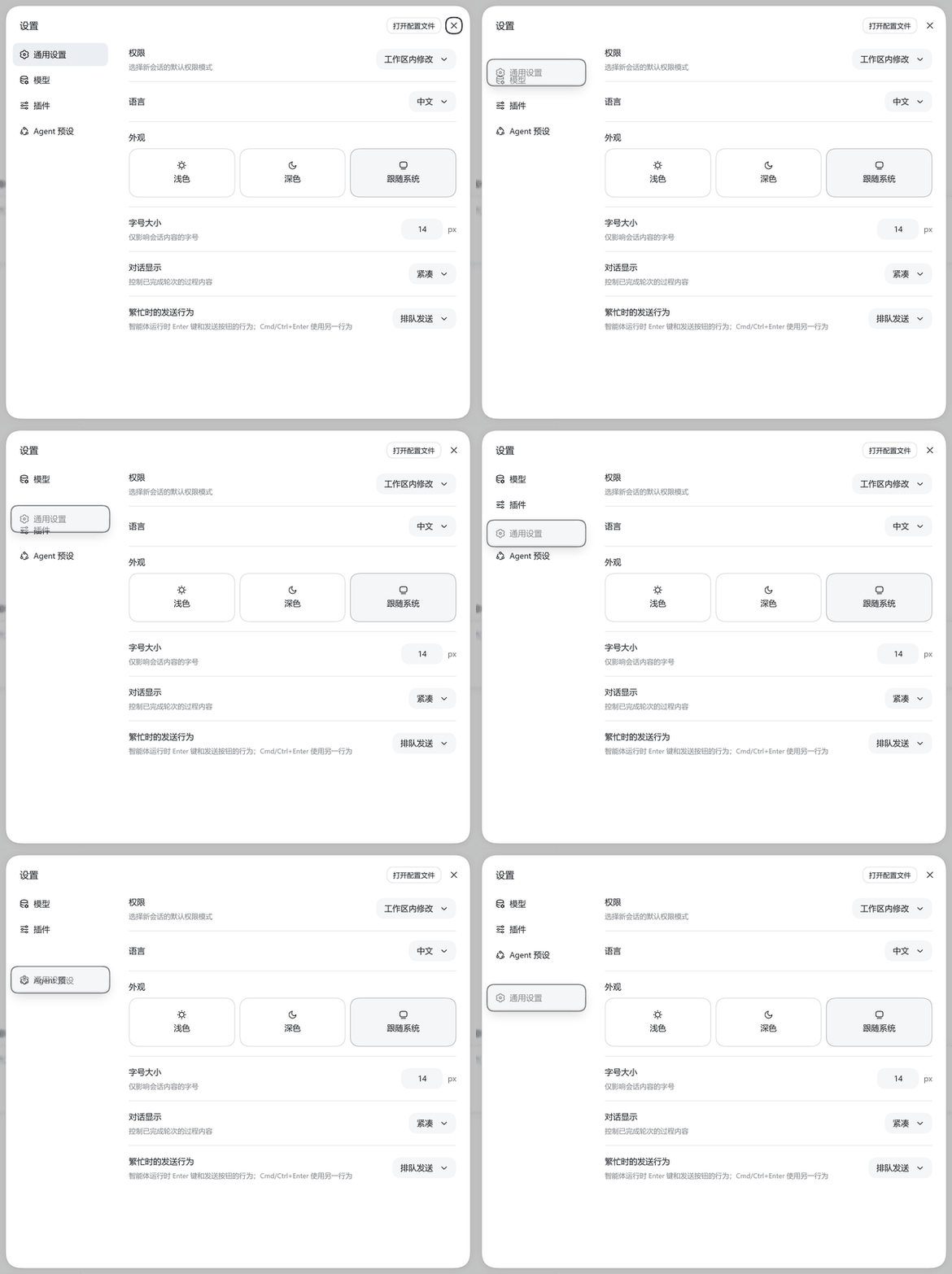
# dsh-settings-nav-order **Long-press and drag to reorder the settings panel's nav sections.** **English** · [中文](README.md) [![platform-web](https://img.shields.io/badge/platform-web-blue)](#installation) [![license](https://img.shields.io/badge/license-MIT-green)](LICENSE) Long-press and drag a settings section to reorder it Long-pressing "通用设置" (General) and dragging it down — the dragged row turns translucent and follows the cursor; releasing saves.
--- ## What it does In the DeepSeek Harness settings panel, the order of nav sections is fixed by each plugin's own `order` value. The more plugins you install, the harder it gets to arrange them the way you work. This plugin adds a **hidden gesture**: **long-press any section for ~0.3 s, drag it up or down, release to save.** Next time you open the settings panel, your order is still there. It ships **no UI of its own** — no new settings page, no slot registrations, no visual change to the nav. You will not find it anywhere in the interface. That is deliberate. | | | |---|---| | **Before** | ![before](assets/before.png) | | **After** | ![after](assets/after.png) | ## Features - **Long-press to drag** — after a 0.3 s hold the row becomes **50% translucent with an outline and shadow**, and follows the pointer vertically in real time - **Release to save** — the order is written to the plugin's own folder; there is no save button - **Survives restarts** — your order is re-applied the next time the panel opens - **Accidental-drag protection** — primary button only; moving more than 6 px during the hold cancels the drag; the click that ends a drag is swallowed so you never switch pages by accident - **Render-resistant** — a `MutationObserver` follows panel re-opens and React re-renders, re-applying your order every time - **Clean uninstall** — removes every listener, observer and style, and restores the official order immediately - **Does not touch shared config** — never writes `settings.yaml`, never modifies external data ## Installation Requires Node.js plus `dsh` and `pnpm`: ```sh npm install -g @deepseek-ai/dsh pnpm ``` Then install the plugin (replace `web` with your profile name): ```sh dsh plugin --profile web add dsh-settings-nav-order ``` **Restart `dsh` afterwards** — a newly added bundle is not hot-applied to a running process: ```sh dsh --profile web ``` Then **refresh the browser page** and open the settings panel (the gear at the bottom of the sidebar). > Installing from GitHub source also works: `dsh plugin --profile web add github:/dsh-settings-nav-order` ## Usage 1. Open the settings panel (the gear button at the bottom of the sidebar) 2. **Long-press** any section in the left nav for ~0.3 s 3. It turns translucent and follows your pointer — drag it to the position you want 4. **Release** — the order is saved immediately To go back to the official order, see "Uninstall" below. ## Where the data lives The order record is written inside **the plugin's own folder**: ``` /data/order.json ``` It looks like this: ```json { "version": 1, "order": ["general", "models", "plugins", "agent-presets", "jet-hub"] } ``` **This is the plugin's entire data footprint — one file.** ### Explicit boundaries | Thing | Behaviour | |---|---| | `~/.dsh/settings.yaml` | **Never written.** No settings namespace is registered | | Other plugins' files | **Never touched** | | Your existing config and sessions | **Never modified** | | Any external data | **Not changed** | Why not use the official `ctx.settings` (which writes `settings.yaml`)? Because that is a **shared config file**, and by design DSH **does not clean up** a plugin's namespace section when the plugin is uninstalled — it lingers forever. An order record is a *preference cache*, not configuration, so keeping it in the plugin's own folder is cleaner: **it disappears with the folder on uninstall, leaving zero residue.** ## Uninstall ```sh dsh plugin --profile web remove dsh-settings-nav-order ``` After uninstalling: 1. **The official order is restored immediately** — the cleanup logic explicitly puts the nav DOM back into the official ledger order (`ctx.slots.entries('settings.section')` sorted ascending by `order`); it does **not** rely on React happening to re-render 2. Every event listener, observer and style is removed 3. `dsh plugin remove` drops the package from the profile's `dsh.profile.bundles`, so the patch layer it ships stops being loaded > You need to **restart `dsh` and refresh the page** to see the nav restored. > To go back to the default order without uninstalling, just delete `data/order.json` and refresh. ## How it works The settings nav list **is not a Slot** — it is rendered directly by the settings panel. So the plugin: 1. Reads the `settings.section` ledger (`ctx.slots.entries`) and computes the row order with the exact same algorithm the panel uses 2. Locates the nav list with a stable selector: `[role="dialog"][aria-modal="true"] > nav > div:last-child` 3. Pairs DOM buttons with ledger entries **by label text** (falling back to positional pairing only when nothing matches by text and the counts are equal) 4. Once the long-press is established, moves DOM nodes with `insertBefore` and applies a `translateY` to the dragged row so it tracks the pointer 5. Uses a `MutationObserver` (with a storm watchdog) to follow panel re-opens and re-renders, re-applying the order 6. Persists the order via the Host half's `GET/POST /api/settings-nav-order/order` **Every style, subscription, observer and listener hangs off the plugin's fiber**, so stopping or uninstalling cleans up and restores everything automatically. **Prior art this builds on** (same architecture): - [`dsh-settings-nav-organizer`](https://github.com/zhengjy01/dsh-settings-nav-organizer) — provided the battle-tested pattern for locating the nav DOM, reading the ledger, the storm watchdog, and fiber cleanup - [`@choi-p/dsh-footer-order`](https://github.com/Choi-Peng/dsh-footer-order) — provided the "DOM child ↔ ledger entry id" pairing strategy and demonstrated a truly traceless uninstall ## Known limitations 1. **The nav list is not a Slot**, so this plugin relies on a DOM selector. If DSH changes the settings panel structure (the `nav > div:last-child` layer), dragging breaks — the selector needs updating. Failure is **silent** (nothing errors, dragging just stops working), so re-verify after upgrading DSH. 2. Dragging only changes the **display order**; it does not modify any plugin's `order` value. When other plugins add or remove settings pages, entries not present in `order.json` appear at their official position. 3. If the Host route is unavailable (for example right after installing, before a restart), the plugin degrades to **session-only** behaviour and says so in the browser console. ## Troubleshooting Open the browser console (F12); every log line from this plugin is prefixed with `[settings-nav-order]`: | Log | Meaning | |---|---| | `已载入顺序记录:N 项` | Started fine; N is the number of saved entries | | `顺序已保存:a → b → c` | The drag was saved | | `顺序记录读取失败…` | The Host route is unreachable — did you restart `dsh`? | | `mutation 风暴,挂起观察器 2 秒` | The page is re-rendering heavily; the plugin is protecting itself | If dragging does nothing at all: ```js // 1) does the selector find the nav list? document.querySelector('[role="dialog"][aria-modal="true"] > nav > div:last-child') // 2) does its