[](https://github.com/sbarex/SourceCodeSyntaxHighlight/releases) [](https://github.com/sbarex/SourceCodeSyntaxHighlight/releases)
[](https://www.buymeacoffee.com/sbarex)

# Syntax Highlight
The application offers a Quick Look Extension for macOS 10.15 Catalina and later for previewing source files.
Inside it uses [Highlight](http://www.andre-simon.de/doku/highlight/en/highlight.php) to render source code with syntax highlighting.
> **`Syntax Highlight` is distributed in the hope that it will be useful but WITHOUT ANY WARRANTY.**
If you like this application and find it useful, [buy me a coffee](https://www.buymeacoffee.com/sbarex)!
- [Installation](#installation)
- [Download precompiled release](#download-precompiled-release)
- [Install with Homebrew](#install-with-homebrew)
- [Note for the precompiled release](#note-for-the-precompiled-release)
- [Build from source](#build-from-source)
- [Enable the Quick Look extension](#enable-the-quick-look-extension)
- [File format management](#file-format-management)
- [Supported formats](#supported-formats)
- [Application settings](#application-settings)
- [Rendering settings](#rendering-settings)
- [External Language Server support](#external-language-server-support)
- [Version control support](#version-control-support)
- [Plain files](#plain-files)
- [Colors](#colors)
- [Inquiry file](#inquiry-file)
- [Command line interface](#command-line-interface)
- [Add support to a custom format](#add-support-to-a-custom-format)
- [FAQ](#faq)
- [Known bugs](#known-bugs)
- [Note for developers](#note-for-developers)
- [Info about decoding dynamic UTI identifiers](#info-about-decoding-dynamic-uti-identifiers)
- [Other useful links](#other-useful-links)
- [Credits](#credits)
## Installation
You can install the application in various ways. When the main application is launched it automatically checks for updates.
After installation, _the application must be launched at least once to allow the system to detect the Quick Look extension_. [See below](#enable-the-quick-look-extension) for instructions on how to enable the Quick Look extension.
### Download precompiled release
Head over to the [releases](https://github.com/sbarex/SourceCodeSyntaxHighlight/releases) page to view the latest version. Move `Syntax Highlight.app` into the `Applications` folder.
### Install with Homebrew
Syntax Highlight can also be installed via [Homebrew](https://brew.sh). If you have not installed Homebrew, follow the simple instructions [here](https://brew.sh/). After that, install the current version of Syntax Highlight with the following command:
```bash
brew install syntax-highlight
```
### Note for the precompiled release
The [precompiled app](https://github.com/sbarex/SourceCodeSyntaxHighlight/releases) is codesigned and notarized.
### Build from source
The release application is compiled as a universal binary (Intel and Apple silicon processor).
After cloning remember to fetch submodules:
```bash
git submodule init
```
```bash
git submodule update
```
## Enable the Quick Look extension
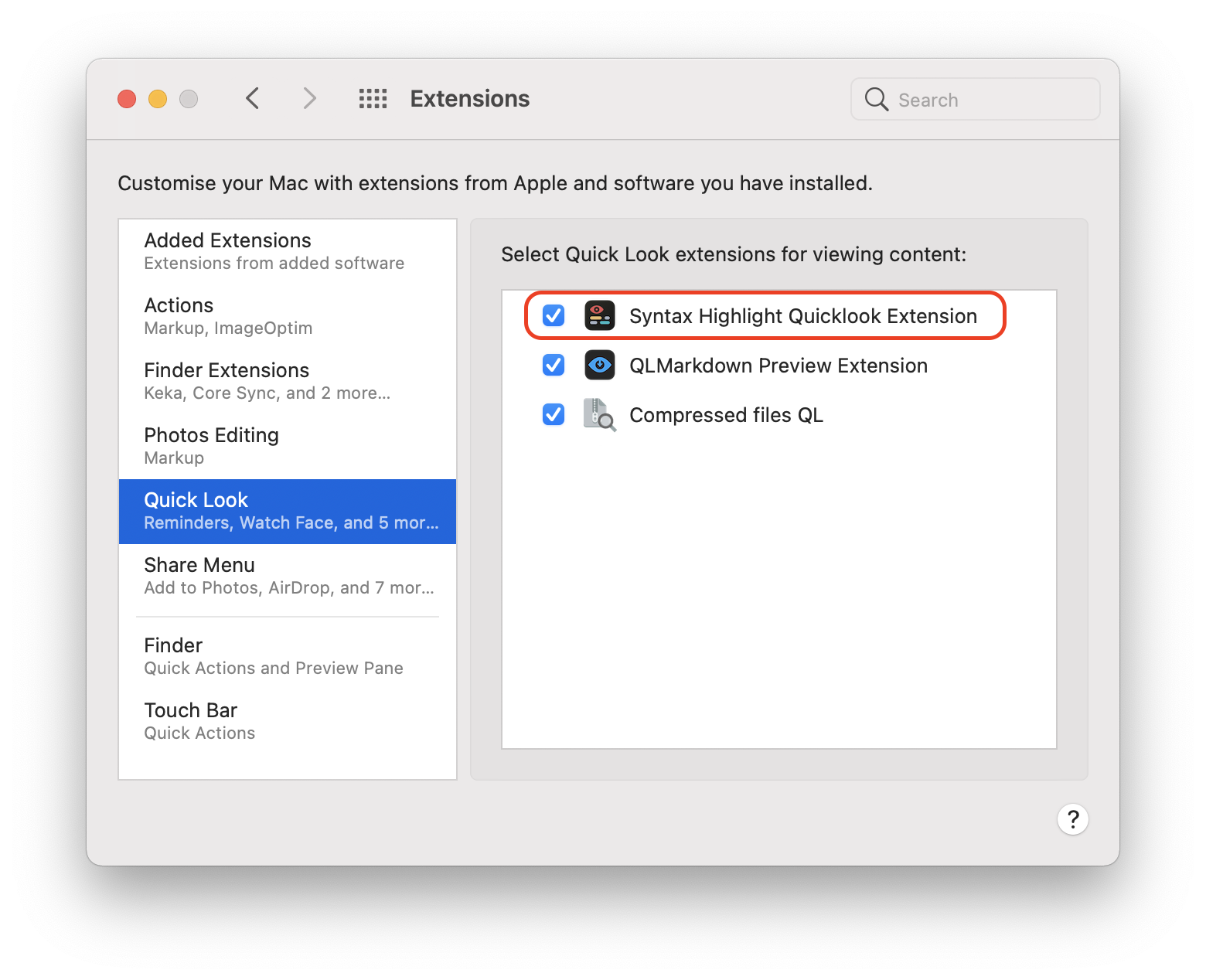
_To use the Quick Look preview you must launch the Application at least once._ In this way the Quick Look Extension will be discovered by the system and will be available in the `System preferences > Extensions > Quick Look`.
## File format management
The Quick Look Extension uses the [Uniform Type Identifier (UTI)](https://developer.apple.com/library/archive/documentation/FileManagement/Conceptual/understanding_utis/understand_utis_intro/understand_utis_intro.html) to handle the supported formats (and not simply the file name extension).
Inside the definition on an UTI there are the list of extensions and mime type associated with it.
Some file types are directly associated to a UTI by the system. Other formats are registered by the owner application. In this way some extensions can be associated to multiple UTIs based on the applications currently installed. For this reason, this application supports many UTIs even if they are apparently redundant.
_**MacOS 10.15 Catalina does not** allow to manage some file formats including (but not limited to):_ `.xml`, `.plist`, `.html`, `.ts`, `.dart`, `.txt`, common images (`.jpg`, `.gif`, `.png`), …
On _**macOS 11 Big Sur**, the system allows you to manage these previously unauthorized extensions:_ `.plist`.
On _**macOS 12 Monterey**, the system allows you to manage these previously unauthorized extensions:_ `.xml`.
### Supported formats
Most programming languages are supported.
The application can also handle some [plain files](#plain-files) **without extension**.
- Ada (`.ada`)
- Adobe Acrobat Sequence files (`.sequ`) _as `XML`_
- Adobe Flash ActionScript source files (`.as`)
- Adobe Flex files (`.mxml`) files _as `XML`_
- Adobe JSX script files (`.jsx`)
- Adobe UPX Javascript (`.psjs`)
- Apple loctable (`.loctable`) _as `plist (XML)`_
- Apple workflow (`.wflow`) _as `plist (XML)`_
- AppleScript (`.scpt`, `.applescript`, `.ascr`) _automatically decompiled with `osadecompile`_
- Apple shell script files (`.command`)
- Assembler source files (`.asm`, `.s79`)
- Astro files (`.astro`) _as `JSX`_.
- Autolit files (`.au3`, `.a3x`)
- Azkaban flow files (`.flow`) as _`YAML`_
- ATL files (`.atl`)
- (G)AWK files (`.awk`)
- Bash Script files (`.bash`)
- Bezel (`.bezel`) as _plain text_
- BibTex (`.bib`)
- C shell script files (`.csh`)
- C source files (`.c`, `.h`)
- C# source files (`.cs`)
- C++ source files (`.cpp`, `.cp`, `.c++`, `.cc`, `.cxx`, `.hpp`, `.hh`, `.hxx`, `.ipp` )
- ClojureScript (`.cli`, `.cljs`, `.cljc`, `.edn`)
- CMake files (`.cmake`)
- CocoaPod files (`.podspec`) _as `Ruby`_
- CoffeeScript source files (`.coffee`)
- ColdFusion files (`.cfc`, `.cfm`, `.cfml`)
- Configuration files (`.conf`)
- Configuration profiles (`.mobileconfig`) _as `XML`_
- Crystal language (`.cr`)
- CSON source files (`.cson`)
- CSS files (`.css`)
- Cuda files (`.cu`) _as `C++`_
- D (`.d`)
- Dart source files (`.dart`) **`.dart` is reserved by macOS and cannot be handled.**
- Designspace files (`.designspace`) _as `XML`_
- Diff files (`.diff`, `.patch`)
- Dockerfile (`.dockerfile`)
- Document Type Definition (`.dtd`)
- DOS batch files (`.bat`, `.cmd`)
- Dylang (`.dylan`)
- ECore files (`.ecore`)
- Eiffel project files (`.ecf`) _as `XML`_
- Eiffel source files (`.e`, `.ex`, `.exs`)
- Elixir files (`.ex`, `.exs`, `.heex`)
- ePub [Navigation Center eXtended](https://idpf.org/epub/20/spec/OPF_2.0_latest.htm#Section2.4.1) (`.ncx`) _as XML_.
- ePub [Open Packaging Format](https://idpf.org/epub/20/spec/OPF_2.0_latest.htm) (`.opf`) files _as XML_.
- Erlang source files (`.erl`, `.hri`)
- F# source files (`.fsx`, `.fs`)
- fish source files (`.fish`)
- FonTool files (`.ttx`) _as `XML`_.
- Fortran source files (`.f`, `.for`, `.f90`, `.f95`)
- GCC linked files (`.ld`, `.map`, `.d`)
- Gdscript (Godot engine) (`.gd`).
- Gleam (`.gleam`)
- Golang source files (`.go`)
- Google Earth KML Document files (`.kml`) _as `XML`_
- Gradle source files (`.gradle`)
- Graphics Language Transmission Format (`.gltf`) _as `JSON`_
- Groovy source files (`.groovy`)
- Haskell source files (`.hs`, `.lhs`)
- HTML Abstraction Markup Language (`.haml`)
- IDL source files (`.pro`)
- INF files (`.inf`)
- INI configuration files (`.ini`, `.cfg`)
- Inno source files (`.iss`)
- INO source files (`.ino`)
- IntelliJ IDEA module (`.iml`)
- Interface Builder Storyboard (`.storybard`) _as `XML`_
- Interface Builder XIB (`.xib`) _as `XML`_
- Java Compiled Class (`.class`) _require `javap` to decompile_
- Java Properties files (`.properties`) _as `INI`_
- Java Server Page files (`.jsp`)
- Java source code (`.java`, `.jav`)
- Java Web Start (`.jnlp`)
- JavaFX ML (`.fxml`)
- JavaScript files (`.js`, `.jscript`, `.javascript`, `.mjs`, `.jsm`)
- JSON files (`.json`, `.jsonc`, `.json5`) ** On macOS 13 Ventura with Apple Silicon the `.json` extension is reserved by the system and cannot be handled.**
- JSON Canvas (`.canvas`) _as `JSON`_
- JSON Line files (`.jsonl`) _as `JSON`_
- Julia source files (`.jl`)
- Jupyter Notebook files (`.ipynb`) _as `JSON`_
- Kermeta source files (`.kmt`)
- Korn Shell script files (`.ksh`)
- Kotlin source files (`.kt`, `.kts`)
- LESS stylesheet (`.less`)
- Lilypond files (`.ly`, `.ily`)
- Lisp source files (`.lisp`, `.lsp`, `.asd`, `.el`)
- Logos source files (`.xm`)
- Lua source files (`.lua`)
- Makefile files (`.mk`, `.mak`)
- MAMEdev layout files (`.lay`) _as `XML`_.
- Markdown files (`.md`, `.rmd`): _please use [QLMarkdown](https://github.com/sbarex/QLMarkdown)_ which allows you to choose whether to display formatted output or the highlighted source code.
- Media Presentation Description (`.mpd`) _as `XML`_.
- MetaTrader (`.mq4`, `.mq5`) files _as CPP_.
- MF source files (`.mf`)
- Microsoft Active Server Page files (`.asp`, `.aspx`)
- Microsoft PowerShell files (`.psm1`, `.psd1`, `.ps1`)
- Microsoft Visual Studio C# Project (`.csproj`) _as `XML`_
- [MiniScript](https://miniscript.org/) files (`.ms`)
- NextFlow (`.nf`) _as `Groovy (Java)`_
- Nim source files (`.nim`)
- Nix Expression Language (`.nix`)
- Node CommonJS module (`.cjs`)
- Objective-C source files (`.m`)
- Objective-C++ source files (`.mm`)
- OCaml source files (`.ml`, `.mll`, `.mly`)
- OpenSSH RSA public key (`.pub`) _as plain text_
- OpenTimelineIO files (`.otio`) _as JSON_
- OpenType feature file specification (`.fea`)
- OPML (Outline Processor Markup Language) files (`.opml`) _as `XML`_
- Oracle PL/SQL files (`.fnc`, `.prc`, `.trg`, `.pks`, `.pkb`, `.pck`, `.tps`, `.tpb`, `.typ`, `.tab`, `.avt`, `.con`, `.sqs`, `.vw`, `.mvw`, `.trg`) _as `SQL`_
- Paradox files (`.sc`)
- Pascal source files (`.pas`)
- Patch files (`.patch`, `.diff`)
- PDE source files (`.pde`, `.ino`)
- Perl script files (`.pl`, `.pm`, `.t`)
- Planning Domain Description Language (`.pddl`) _as `Lisp`_
- PHP source files (`.php`, `.php3`, `.php4`, `.ph3`, `.ph4`, `.phtml`)
- Project Object Model files (`.pom`) _as XML_
- Properties files (`.properties`) _as `INI`_
- Property List files (`.plist`) _dynamically decompiled with `plutil`_ **On macOS 10.15 Catalina `.plist` is reserved by the system and cannot be handled.**
- Python source files (`.py`, `.py3`, `.pyi`)
- R (`.r`)
- Racket (`.rkt`) _as `Lisp`_
- RAML (`.raml`) _as `YAML`_
- Rexx (`.rex`, `.rexx`)
- RDF files (`.rdf`)
- README files (`.readme`) _as plain text_
- reStructuredText document (`.rst`)
- Rez files (`.r`)
- Ruby on Rails files (`.rhtml`, `.erb`, `.rjs`)
- Ruby Gems file (`.gemfile`)
- Ruby script (`.rb`, `.rbw`)
- Rust source files (`.rs`)
- SageMath files (`.sage`) _as `Python`_
- SAS files (`.sas`)
- SASS/SCSS files (`.scss`)
- Scala source files (`.sc`, `.sbt`, `.scala`)
- [Scala scale file format](https://huygens-fokker.org/scala/scl_format.html) (`.scl`) _as plain text_
- Scheme source files (`.scm`, `.ss`, `.sls`, `.sps`, `.sld`, `.sch`) _as `Lisp`_
- Shell script files (`.bashrc`, `.zshrc`, `.sh`)
- Smali (`.smali`) _as plain text_.
- Solidity source files (`.sol`)
- SQL files (`.sql`)
- Standard ML source files (`.ml`)
- Stata files (`.do`, `.ado`) _as plain text_
- Steam app manifest files (`.acf`) _as plain text_.
- Svelte (`.svelte`) _as `HTML`_
- Swift source files (`.swift`)
- Symfony Twig files (`.twig`)
- TCL source files (`.tcl`)
- Tenex C Shell script files (`.tcsh`)
- Terraform files (`.tfvars`, `.tfstate`, `.tf`, `.hcl`) _as `YAML`_
- TeX and LaTeX files (`.tex`, `.sty`, `.cls`, `.latex`, `.ltx`, `.texi`, `.ctx`, `.sty`)
- Text files (`.txt`, `.text`)
- TOML files (`.toml`)
- TypeScript files (`.ts`, `.tsx`, `.cts`, `.mts`) **`.ts` and `.mts` are reserved by macOS and cannot be handled.**
- Unity document (`.unity`) _as `YAML`_
- Visual Studio Code Workspace (`.code-workspace`) _as `JSON`_
- Verilog HDL files (`.v`, `.vl`)
- VHDL source files (`.vhd`, `.vhdl`)
- VIM script files (`.vim`)
- Visual Basic source files (`.vb`, `.bas`, `.basic`, `.vbs`)
- Vue source files (`.vue`)
- XAML source files (`.xaml`) _as `XML`_
- Xcode entitlement files (`.entitlements`) (dynamically decompiled with `plutil`) _as `XML`_
- Xcode localizable strings files (`.strings`, `.stringsdict`) (dynamically decompiled with `plutil`) _as `XML`_
_ Xcode scheme _as `XML`_
- XHTML files (`.xhtml`)
- XML files (`.xml`) **Before macOS 12 Monterey `.xml` is reserved by the system and cannot be handled.**
- XSD Schema files (`.xsd`, `.xquery`, `.xq`, `.xu`)
- XUL files (`.xul`)
- YAML files (`.yaml`)
- Z shell script files (`.zsh`)
- Zig source files (`.zig`)
- Zig Object Notation files (`.zon`) _as JSON_.
## Application settings
With the standalone application you can customize the rendering settings.
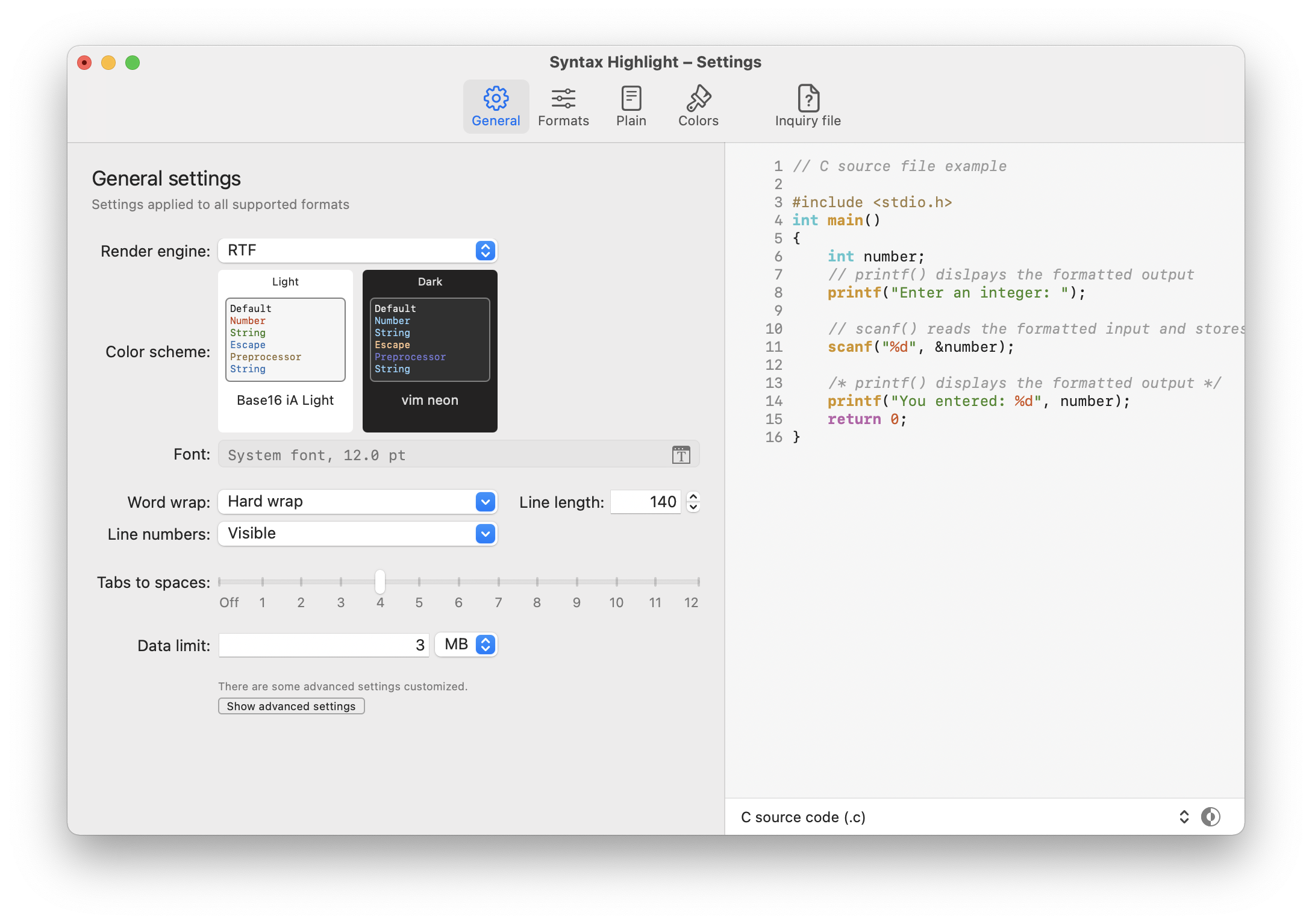
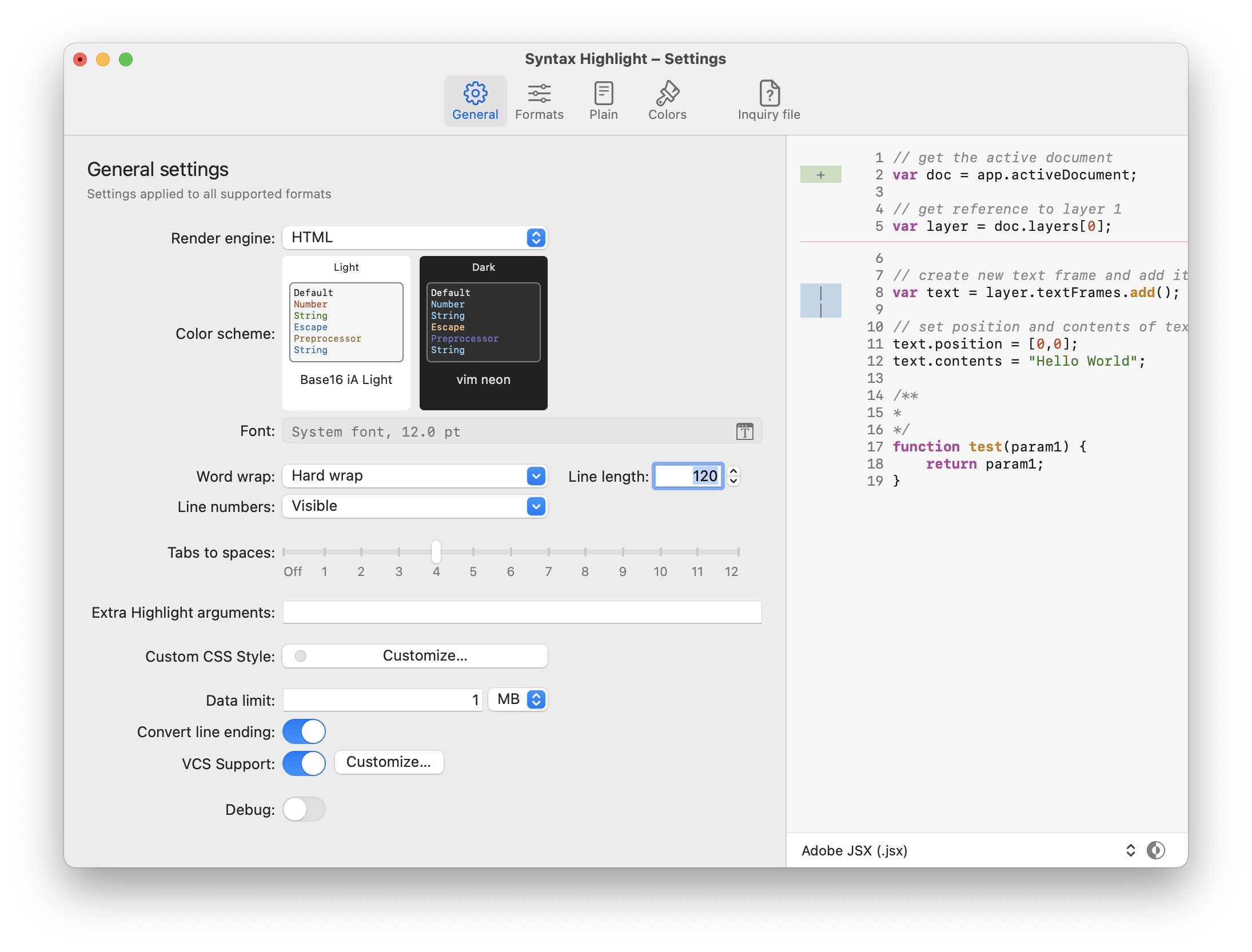
You can show _advanced settings_ using the relative command on the view menu.
### Rendering settings
You can set the settings for all supported formats on the _General_ tab.
|Settings|Description|Advanced|
|:---------|:-------------| :----: |
|Render engine|Engine used to render the highlighted code. _Before macOS 12 Monterey_ **the recommended engine is `RTF`.** Choose the `HTML` engine if you want to use a custom CSS to override the color scheme (or you have choose a theme with some extra CSS inside it). Advanced users must choose the `HTML` engine to handle the hover functionality of a Language Server. ||
|Color scheme|Chose the color scheme for light and dark appearance.||
|Font|You can chose a preferred font or use the standard monospaced font.||
|Word wrap|Allow to handle word wrap for long lines. _Hard wrap_ break the line after a fixed length (_can cause some highlight glitch_). _Soft wraps_ allow to break the line at the preview windows width. When word wraps is disabled, you can only enable it for minified files that have only one line. One line file detection is done on the source file and not on the preprocessor output. **Starting from macOS 12 Monterey the soft wrap is always enabled when using the `RTF` engine.** ||
|Line numbers|Allow to show the line numbers.||
|Tabs to spaces|Allow to translate tabs to spaces. Set to zero to use tabs. ||
|Extra highlight arguments|Additional standard argument passed to `highlight`. **Arguments that contains a white space must be protected inside quotes.** See `man highlight` to a list of valid arguments and plugins. Eg: `--doc-title='title with space'` |Yes|
|Custom CSS Style| If the render engine is set to _HTML_ allow to define a custom CSS style to override/extend the color scheme. More info about `highlight` HTML output on [this page](https://gitlab.com/saalen/highlight/wikis/CSS-Themes).|Yes|
|Interactive preview| _DEPRECATED and available only before macOS 12 Monterey._ If the render engine is set to _HTML_ enable the javascript interpreter inside the preview window. Set only if you use some `highlight` plugins that output javascript code. This option disable the possibility to move the Quick Look preview with click and drag inside the window and opening the file with a double click. |Yes|
|Data limit| Maximum amount of data to format, data beyond the limit is omitted. Specify 0 to not limit. This option is ignored when using a Language Server. ||
|Convert line ending| Allow to convert Windows (`CRLF`) and Mac Classic (`CR`) line ending to the Unix style (`LN`). This option is ignored when a _preprocessor_ is set or when a _Language Server_ is enabled. The line ending conversion is made my [`dos2unix`](https://waterlan.home.xs4all.nl/dos2unix.html). |Yes|
|VCS Support| If enabled, allow to highlight lines added/edited/removed from last commit. It can handle VCS based on `git` and `mercurial`. |Yes|
|Custom Quick Look size|Allow you to choose a custom size for the content area of the Quick Look window. _Use with caution on macOS before version 12 Monterey_.||
|Show about info | If enabled, shows information about this application at the bottom of the preview page.|Yes|
|Debug | If enabled, a `colorize.log` and `colorize.rtf\|html` file will be created on your Desktop folder with the log of last rendering.|Yes|
You can also override the global options for some formats on the _Formats_ tab.
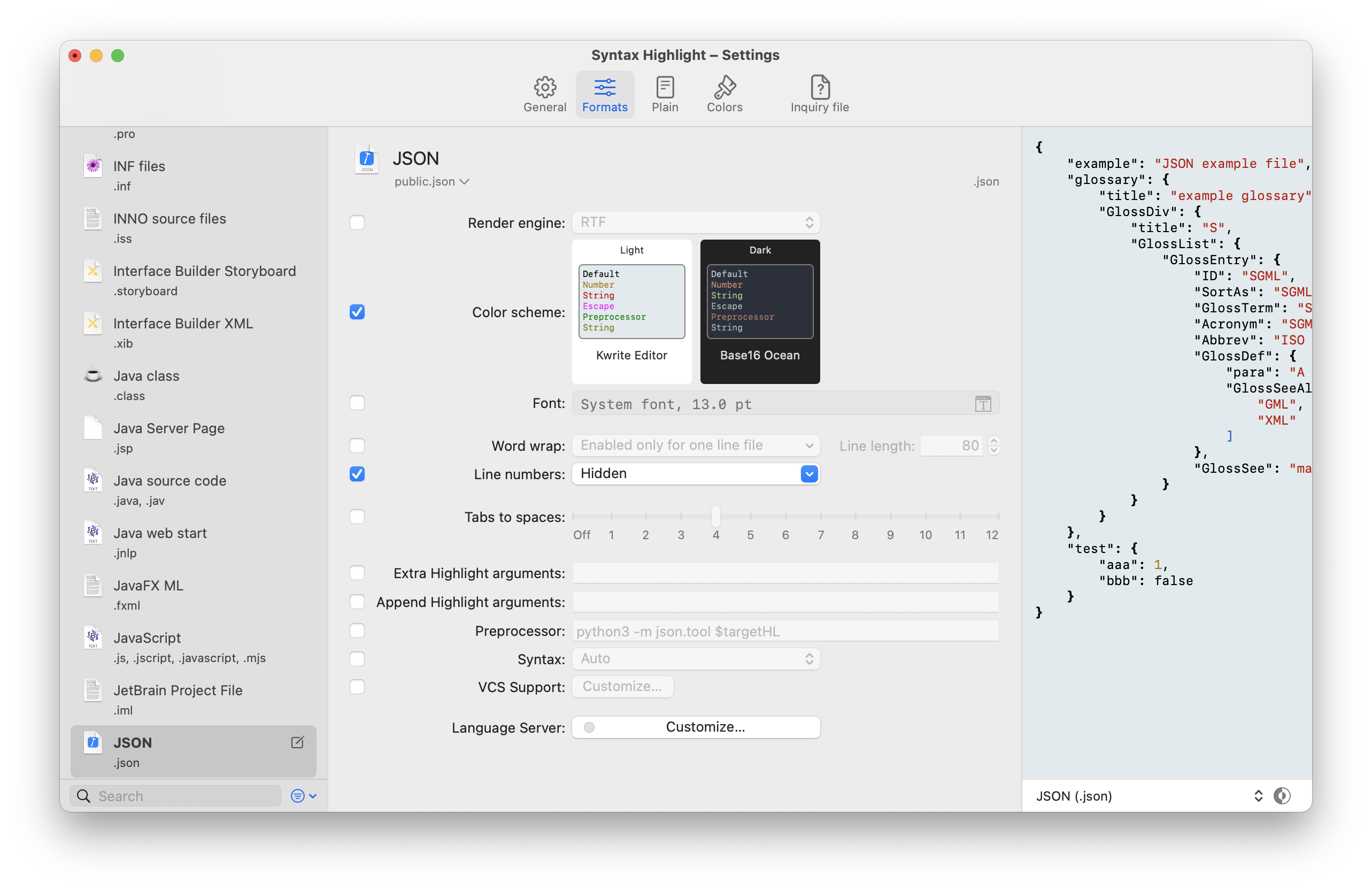
When customizing the settings for a specific format, these options will be available:
|Settings|Description|Advanced|
|:---------|:-------------| :----: |
|Append highlight arguments|Arguments _appended_ to the _Extra highlight arguments_. Arguments that contains a white space must be protected inside quotes. |Yes|
|Preprocessor|Set a program or a shell script to preprocess the source file before the formatting. The program must output to stdout the data to be passed to `highlight`. You **must** pass the name of the source file using the `$targetHL` placeholder. You can also use the placeholder `$escaped_targetHL` _with the special chars escaped_ inside a double quotes. With the preprocessor you can handle file format not directly supported by `highlight`. This option is ignored when using a Language Server. The execution of the preprocessor is made inside the same env of the script that handle `highlight`. For example you can beautify a JSON file with this preprocessor: `python3 -m json.tool $targetHL` or `python3 -m json.tool "$escaped_targetHL"`. _When you use a preprocessor you will probably want to disable the support for version control._ |Yes|
|Syntax| Set which language must be used to recognize the source file. If not set will be used the file name extension. |Yes|
### External Language Server support
Advanced users can customize the single format to use an external [Language Server](https://langserver.org/):
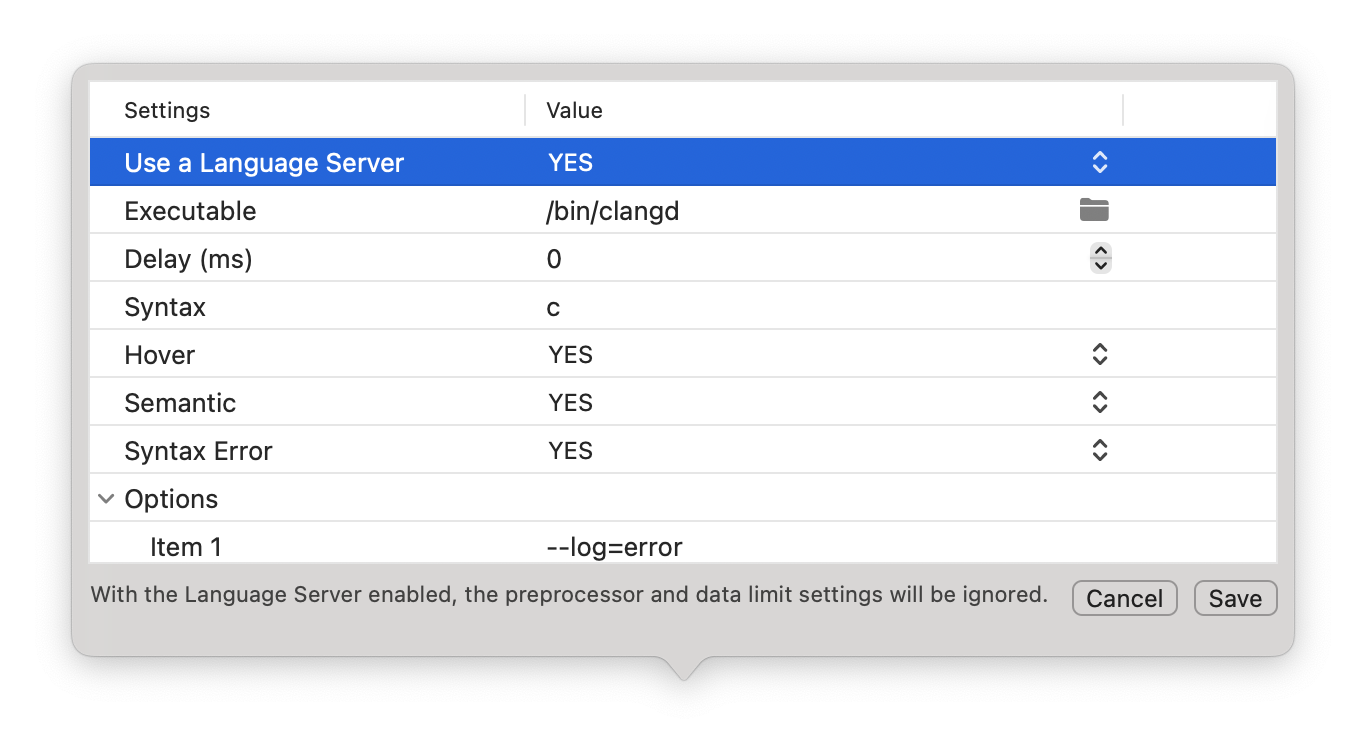
|Settings|Description|Advanced|
|:---------|:-------------| :----: |
|Executable|Full path of the Language Server executable. |Yes|
|Delay|Server initialization delay in ms.|Yes|
|Syntax| Syntax which is understood by the server.|Yes|
|Hover| Execute hover requests. Require the `HTML` render engine.|Yes|
|Semantic| Retrieve semantic token types (the Language Server must implement the protocol 3.16).|Yes|
|Syntax Error| Retrieve syntax error information (assumes hover or semantic).|Yes|
|Options| Custom command line options to pass to the Language Server.|Yes|
When using an external Language Server the preprocessor and the data limit settings are ignored.
Some format have a preconfigured custom settings to handle the data (for example java compiled class file can be decompiled before render).
### Version control support
You can also enable the support of common VCS to highlight the added/edited/removed lines from last commit.
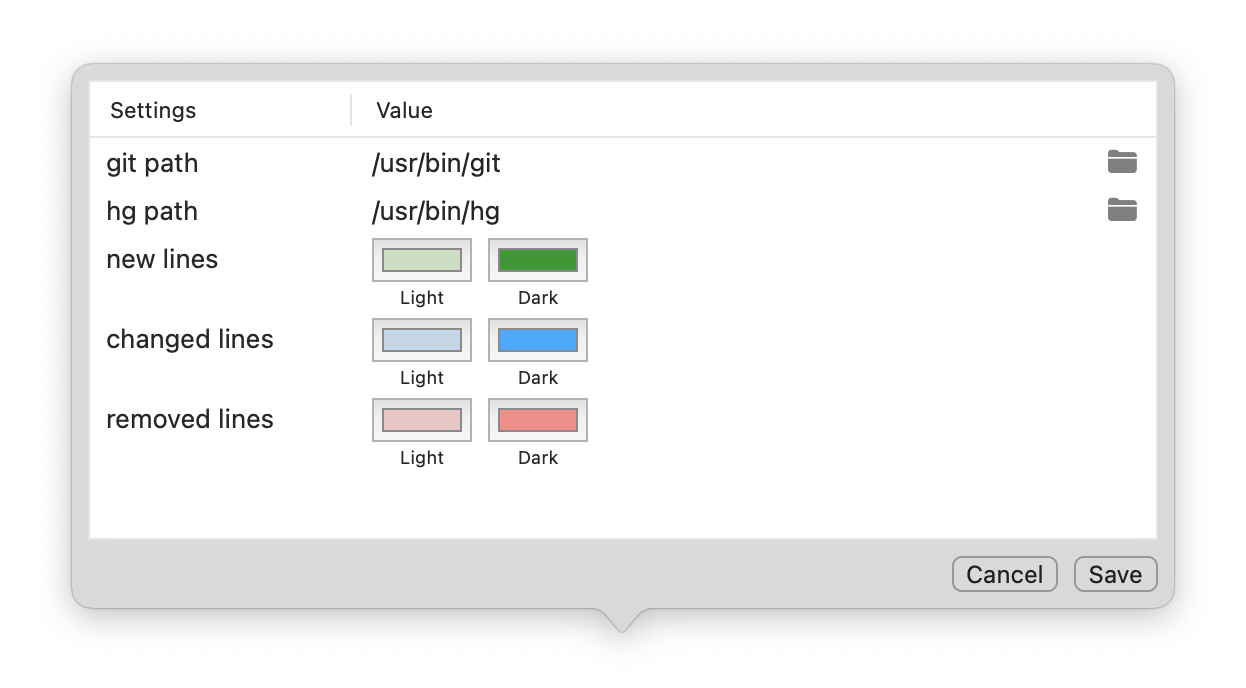
In the General settings you must enable the VCS support. Then you can customize the path of `git` and `mercurial` binary.
The you can choose the colors used to mark the changed lines. On every format you can also customize the colors.
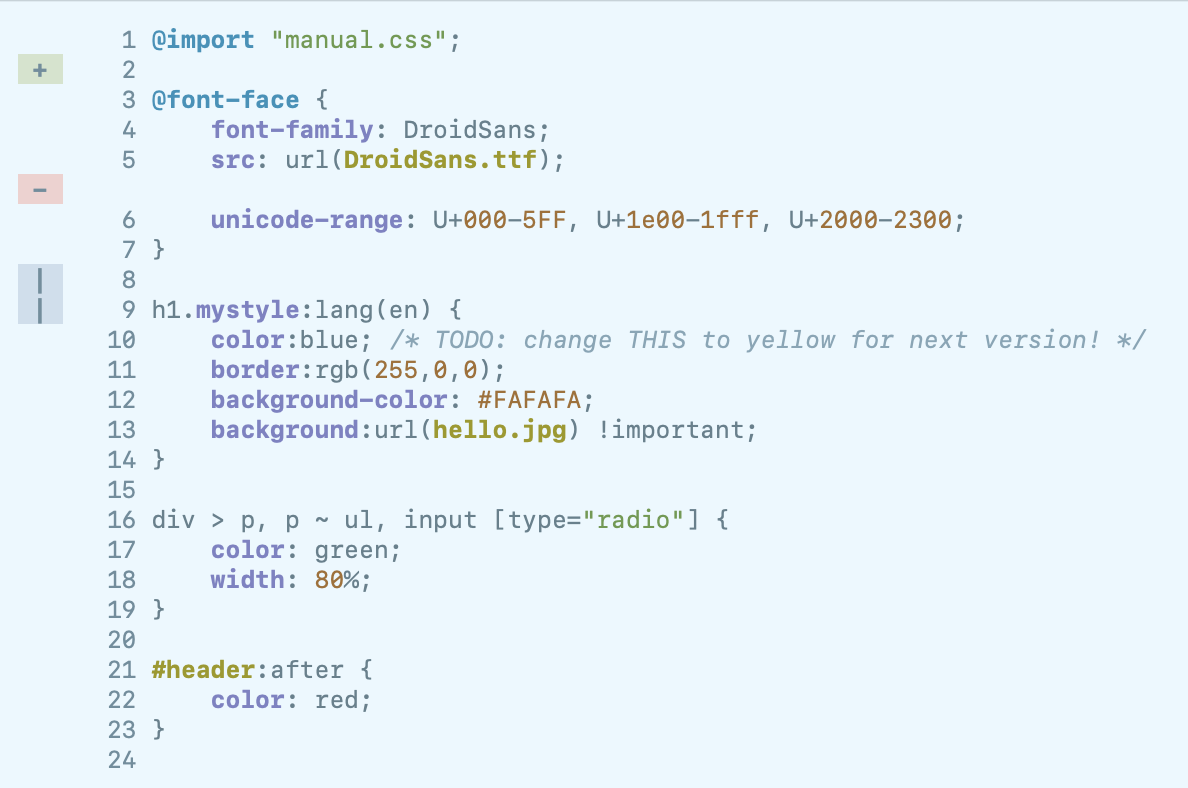
_On `RTF` mode, the VCS plugin can be disabled if the syntax language defines more keyword groups than those defined in the theme._
### Plain files
The Application can preview plain files **without an extension** whose format is unknown.
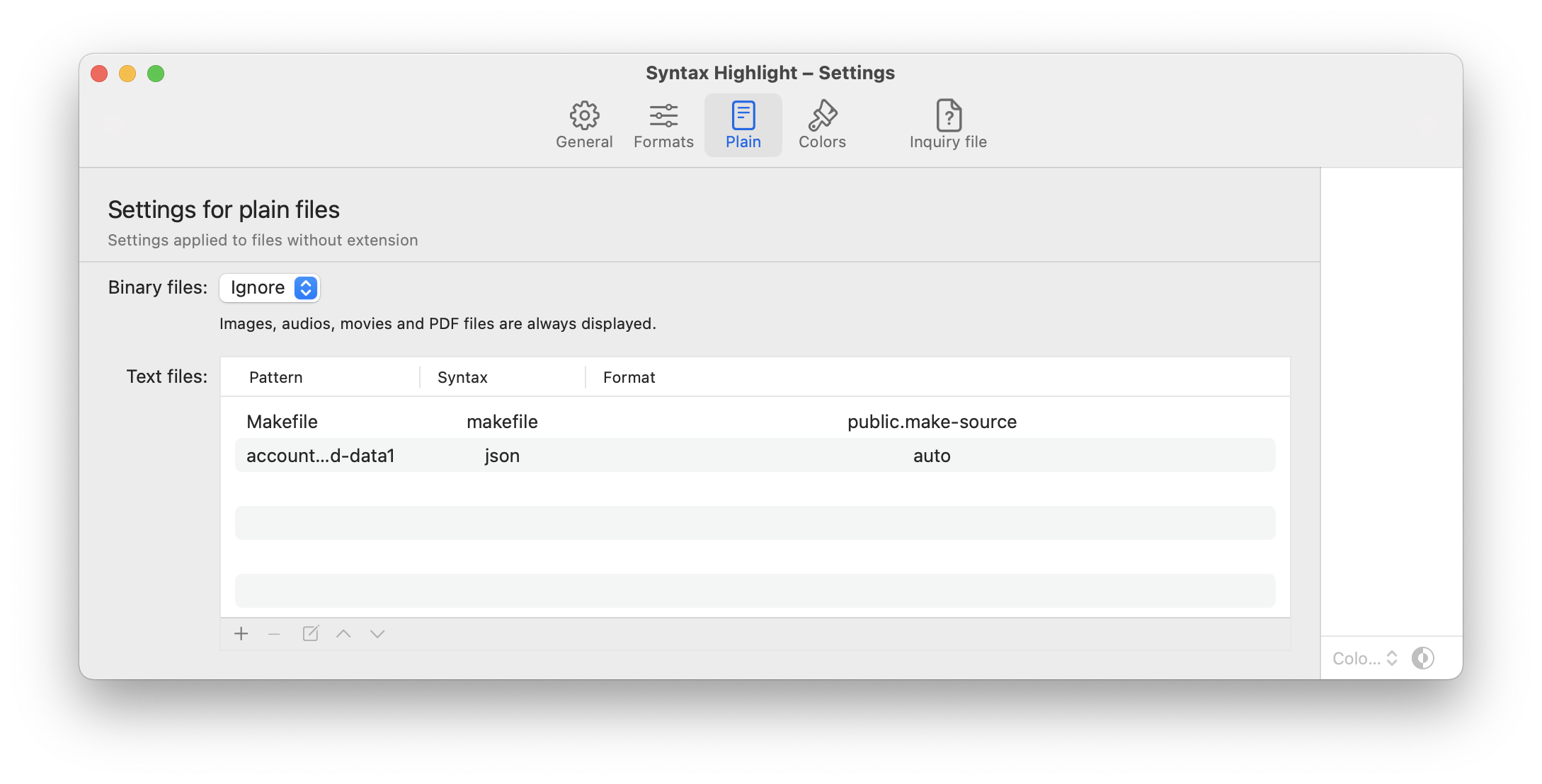
Only files recognized by the system with one of the following UTIs can be handled:
- `public.data`
- `public.item`
- `public.content`
- `public.unix-executable`
_Files with an extension or associated to a dynamic UTI will not be handled. Files that have a only one dot as the first character in their name (like `.gitignore`, `.env`, ...) are considered to have no extension._
Unknown files are analyzed with the system utility `/usr/bin/file` for recognize mime type and encoding. No preprocessor is applied before analyzing the file.
Files recognized as images are handled by displaying the content within a web page (even if the rendering engine set in the settings is `RTF`). To be displayed correctly, the image format must be supported by WebKit.
On macOS 12 Monterey images and even, audio, movies and PDF files are displayed with the native Quick Look interface.
For other binary files it is possible to display a hex dump.
For text files, syntax highlighting is tried.
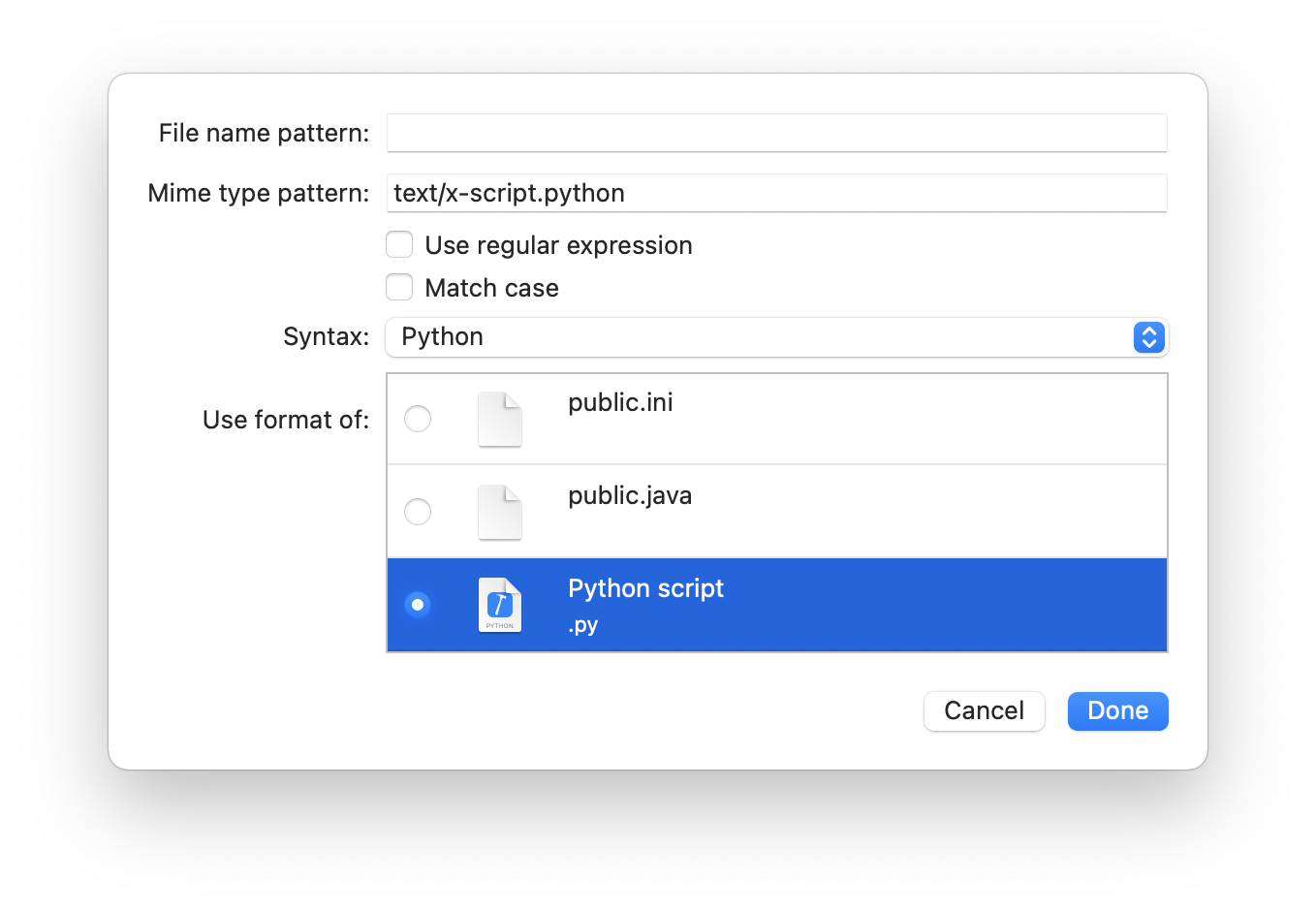
You can specify a criteria for the file name and the mime type to apply a syntax highlighting and/or a specific display format. The criteria are evaluated in the order in which they are set.
If no display format is set, the system will try to derive it starting from the mime type.
Note that some files with no extension can be recognized by macOS with a UTI if they have the `com.apple.FinderInfo` extended attributed set.
### Colors
The Application has a GUI to customize the color schemes.
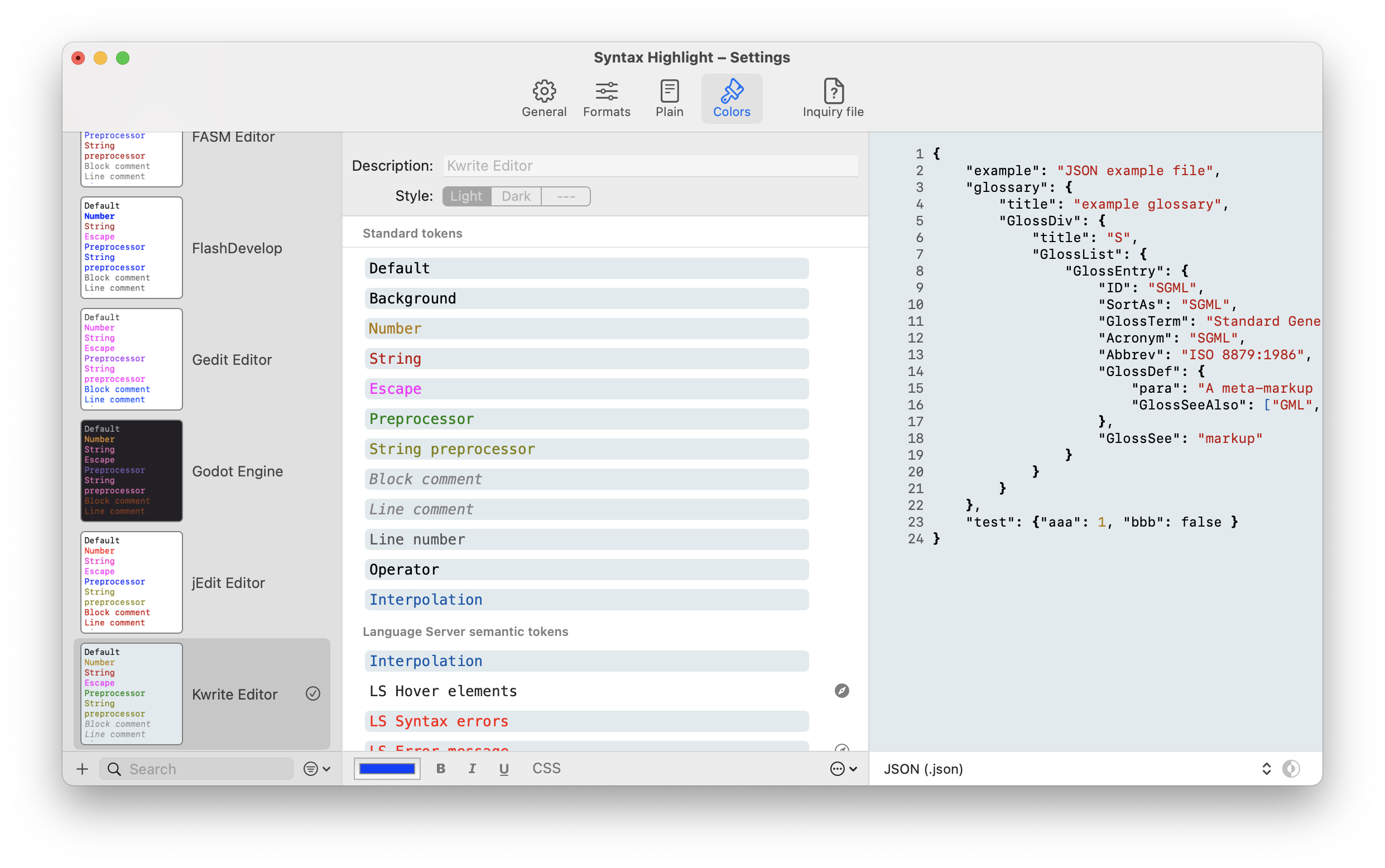
Standard schemas provided by `highlight` cannot be edited but can be duplicated and then customized.
For every tokens of a color scheme you can also set a custom inline CSS style. Some basic CSS style can be handled also by the `RTF` engine, but for a best view you must choose the `HTML` render engine. For this reason the preview of the Color Scheme always uses the `HTML` engine.
Please note that the inline CSS style is not put inside the HTML `style` attribute but embedded on the global `