# [SBOM Workbench](https://scanoss.com/product)
## Internationalization (i18n)
SBOM Workbench is multi-language enabled. This is done using the internationalization-framework i18next. See [official documentation](https://www.i18next.com) for more details.
There are currently 4 languages:
| Language | Language Code |
| ------------ | ------------- |
| **English** | [en](./en/) |
| **Spanish** | [es](./es/) |
| **Chinese** | [zh](./zh/) |
| **Japanese** | [jp](./jp/) |
### Contributing a new lenguage
The following steps must be followed to add a new language. For example let's add a translation for the French language:
1. Add new lenguage to i18n module. In [`src/shared/i18n/index.ts`](../../src/shared/i18n/index.ts) add a new entry in `AppI18n` specifing the lenguage code in ISO 639-1 format and the original name:
```ts
private static languages: Record = {
'en': 'English',
'es': 'Español',
'fr': 'Français', // -> the new entry!
}
```
2. Copy `assets/i18n/en` folder (and its contents) and rename to the new lenguage code:
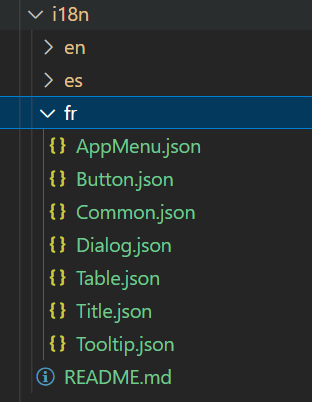
3. Replace all values into the translation files. Each file represents a namespace that has to be translated:
`Button.json`
```json
{
"NewProject": "Nouveau projet",
"ImportProject": "Importer un projet",
"Continue": "Continuer",
"Save": "Sauver"
}
```
4. Add the new language to the table in this readme
### Track Translation Progress
You can see the progress of your translation as you go. For this you need to start the application in development mode. See [installation and starting guide](../../README.md).
Once you have the application running in development mode, you can gradually change the translation files to see the changes reflected in the app:
1. Select the new language in Settings (File -> Settings). Reboot is required.
2. Change any value in your translation files.
3. Reload app (View -> Reload)
4. Open Translation Management to shows an overview of your translations in a nice UI. Check which keys are not yet translated. (View -> Open Translation Management)
### Contributing
You can help in SCANOSS translations submitting PR directly changing all files described in this guide. For more information see the [Contributing Guide](../../CONTRIBUTING.md) and [Code of Conduct](../../CODE_OF_CONDUCT.md).