
-blue)

Website · Download .dmg · All releases · Shortcuts
You can run one coding-agent session in a terminal. GraphCode lets you run ten — connected, unattended, and still yours to attach to and correct mid-run. Each node is a unit of work inside a real CLI coding-agent session: **Claude Code, GitHub Copilot CLI, Codex, OpenCode, or pi**, chosen per loop. Each edge is a hand-off, message, or spawn between them, and an edge never asks which agent is on either end — a Codex loop hands off to a Claude Code loop that messages a Copilot one. They are live terminals, not headless jobs. **[Graph Engineering, simplified →](https://graphcode.app/)** — the mental model, then the machinery. 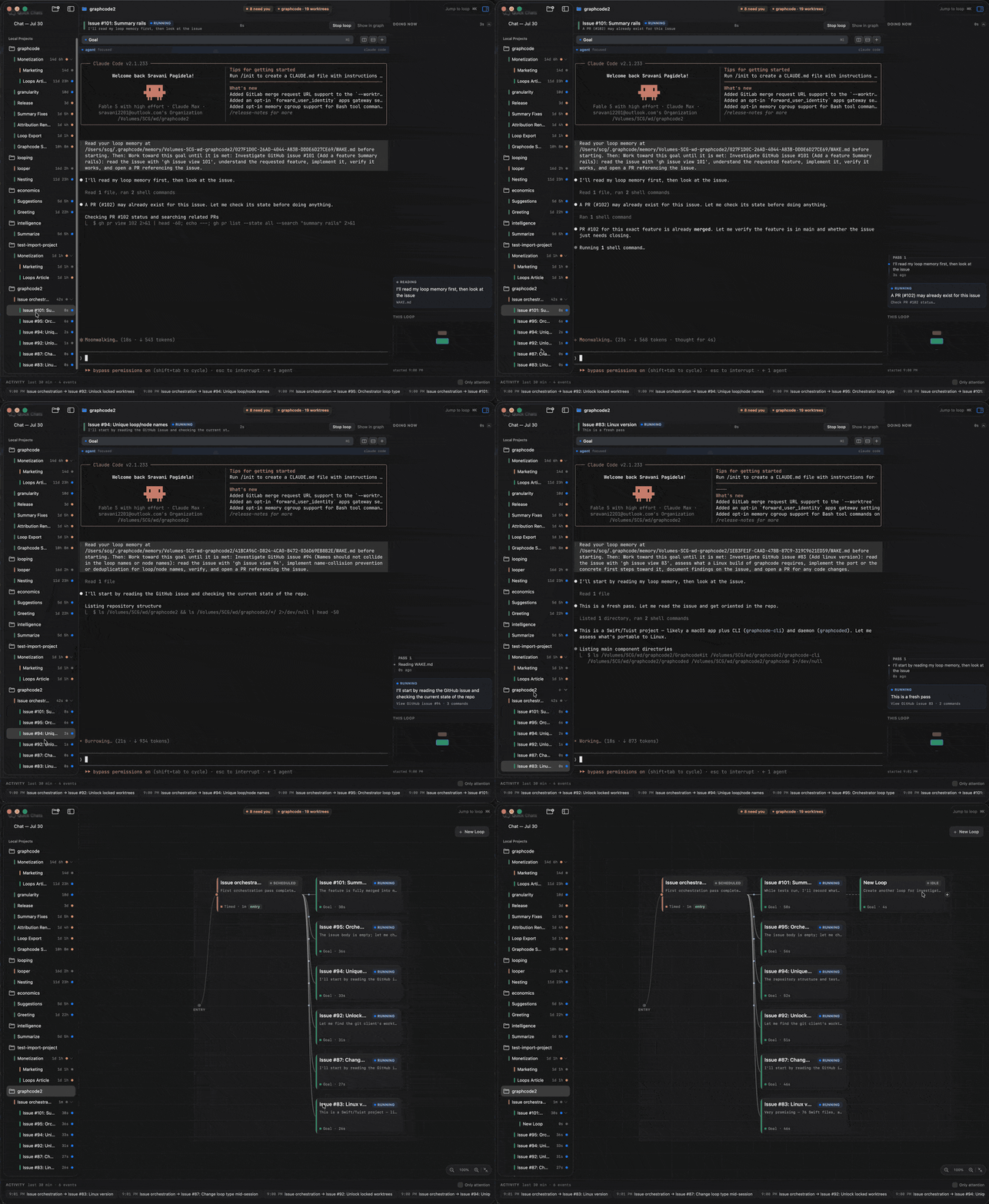 ## How it works Every loop type is "an agent runs repeatedly" — they differ in what *you* stop doing: | Loop type | You hand off | Runs until | For example | |---|---|---|---| | **Turn-based** | the check | you end it — each turn pauses for your review inside the session | a refactor you want to eyeball step by step | | **Goal-based** | the stop condition | a goal is met (optionally a shell predicate exits 0) | "fix the build" — done when `make test` passes | | **Time-based** | the trigger | you stop it — cadence lives in the prompt (`/loop 1h …`) | hourly issue triage | | **Composite** | the prompt | a sub-graph of loops runs it end to end | a pipeline that plans its own steps | Two design choices explain most of the rest: - **GraphCode schedules nothing.** A time-based loop's recurrence lives *inside* its session, written into the prompt with the agent's own `/loop` skill; the daemon only keeps the session alive. That is what makes a running loop something you can attach to and correct, rather than a job that already finished somewhere. Codex, OpenCode and pi have no such skill, so a time-based loop on them needs the experimental **Daemon heartbeat** switched on in Settings. - **Sessions outlive everything.** Each loop's terminal is a [`zmx`](https://zmx.sh) session, so it survives quitting the app and rebooting — the backend's session ID is persisted, so relaunching resumes the conversation with `--resume` rather than starting a duplicate. ## Install Requires **macOS 15+ on Apple Silicon** (arm64), with at least one agent CLI on your `PATH` — `claude`, `copilot`, `codex`, `opencode`, or `pi`. GraphCode launches whichever one a loop names; it bundles none of them. ```sh brew install --cask scgopi/graphcode/graphcode ``` Or drag **GraphCode** to Applications from the [latest `.dmg`](https://github.com/scgopi/GraphCode/releases/latest/download/graphcode-macos-arm64.dmg). Releases are Developer ID signed and notarized. If GraphCode runs a loop you'd otherwise have babysat, a ⭐ on the repo helps other people find it. ## Using it 1. **Add a project** — the sidebar's ⊕ menu: a local folder, a clone from a URL, or a remote repository over SSH (key auth and zmx on the server; loops run there while this Mac steers them). 2. **Create a loop** — ⊕ on the canvas. Write the prompt, pick the agent it runs as (Claude Code unless you change **Settings ▸ New loops use**), and hit Create; the type chooser explains what each kind hands off, and a goal's done check has a **Test** button that runs it as the daemon will. From a shell, `graphcode node create` takes the same choice as `--backend claudeCode | copilotCLI | codex | openCode | pi`; a loop that creates children without naming one hands them its own. 3. **Open it** — click the node for that loop's terminal workspace: tabs, splits, ⌘K to jump to any loop, ⌘⇧R to walk the ones asking for you ([shortcuts](https://graphcode.app/shortcuts.html)). You attach to the live session. 4. **Connect loops** — drag between nodes. An edge is a hand-off by default (fires when the source resolves); it can also be a message or a spawn, with a condition and a cycle guard. The agents on either end can differ. ## Parts | Piece | What it is | |---|---| | `graphcode.app` | The UI — project sidebar, graph canvas, and a per-loop terminal workspace with tabs and splits | | `graphcoded` | Background daemon (launchd agent). Owns every project's graph, fires hand-off edges, polls goal predicates, and keeps unattended sessions alive whether or not the app is open | | `graphcode` | CLI for the same daemon — start with `graphcode projects` and `graphcode --help`; use `status` before retrying, `node send --follow-up` to avoid interrupting a turn, and `reap --dry-run` before any PTY recovery | | `zmx` | Third-party session daemon that keeps each loop's PTY alive ([zmx.sh](https://zmx.sh)) | | GhosttyKit | Third-party terminal engine rendering each surface ([ghostty.org](https://ghostty.org)) | State lives in `~/.graphcode/` — graphs, recents, layouts, the daemon socket and logs, and the installed binaries. **Nothing is ever written inside a project folder you open.** ### Pin a Copilot CLI version Copilot loops follow the CLI's own version selection. To hold a specific published version, install it on every machine that runs Copilot, including remote hosts: ```sh npm install -g @github/copilot@1.0.84-5 copilot --prefer-version 1.0.84-5 --version ``` Then set **Settings ▸ Preferred versions ▸ Copilot CLI** to that version. GraphCode passes it to new and resumed Copilot sessions, locally and over SSH, and to Copilot title and summary requests; sessions already running are unaffected. Without the app, set `"copilotPreferredVersion": "1.0.84-5"` in `~/.graphcode/settings.json` — it is read on each launch, so no daemon restart is needed. Clear the field to return to the CLI's own selection. GraphCode installs nothing itself, so a version you have not installed on the host will not be there when a loop launches. ## Workspaces **File ▸ Workspace ▸ New Workspace…** opens a second GraphCode with projects, loops and terminal sessions entirely its own — for keeping unrelated lines of work apart when one sidebar of loops has grown past what you can monitor. It is a separate window with its own Dock tile, so it can live on a second screen. A workspace is a directory: `~/.graphcode-