# SciTeX (scitex)

Python Library for Science. For AI and Human Researchers



Docs ·
Quick Start ·
API ·
pip install scitex[all]
---
This repository provides `scitex`, the orchestration layer of the SciTeX ecosystem — solving key problems in scientific research:
## Problem and Solution
| # | Problem | Solution |
|---|---------|----------|
| 1 | **Fragmented tools** -- literature search, statistics, figures, and writing each require separate tools with incompatible formats | **Unified toolkit** -- `import scitex as stx` provides 73 modules under one namespace, accessible via Python API, CLI, and MCP. These modules are standalone packages but loosely coupled through a plugin registry — each works on its own, yet composes into designed synergy (save a figure → auto-exports CSV + YAML recipe → hash-tracked by Clew → citeable in scitex-writer). |
| 2 | **No verification** -- existing tools address whether work *could* be reproduced, not whether it *has* been verified | **Cryptographic verification** -- Clew builds SHA-256 hash-chain DAGs linking every manuscript claim back to source data |
| 3 | **AI agents lack context** -- general-purpose LLMs cannot operate across the full research lifecycle without domain-specific tools | **323 MCP tools** -- AI agents run statistics, create figures, search literature, and compile manuscripts through structured tool calls |
| 4 | **No custom tooling** -- every lab needs domain-specific tools, but building and sharing them requires deep infrastructure knowledge | **App Maker and Store** -- researchers create custom apps with [scitex-app](https://github.com/ywatanabe1989/scitex-app) SDK and share via [SciTeX Cloud](https://scitex.ai) |
| 5 | **Vendor lock-in** -- cloud research tools (Overleaf, Zotero, Mendeley, Colab, GitHub Copilot) keep data on third-party servers and depend on APIs that can disappear overnight or monetize tomorrow | **Open and self-hostable** -- every SciTeX package is AGPL-3.0; the full 39-package ecosystem runs on your own hardware (or SciTeX Cloud which itself is self-hostable); cloud integrations are pluggable extras, not requirements |
## SciTeX and Research Workflow
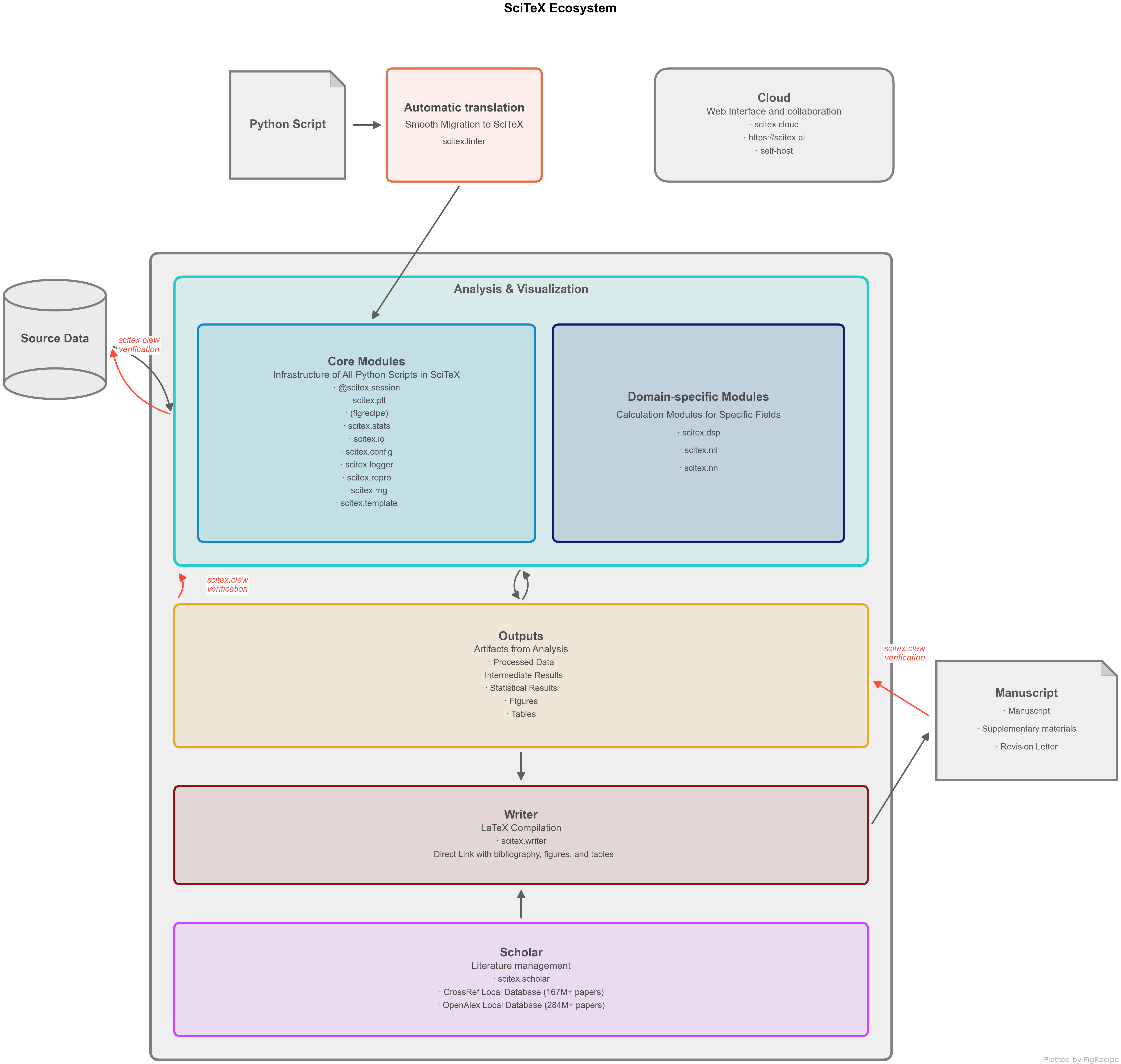
Figure 1. SciTeX research pipeline -- from literature search to manuscript compilation, with every step cryptographically linked.
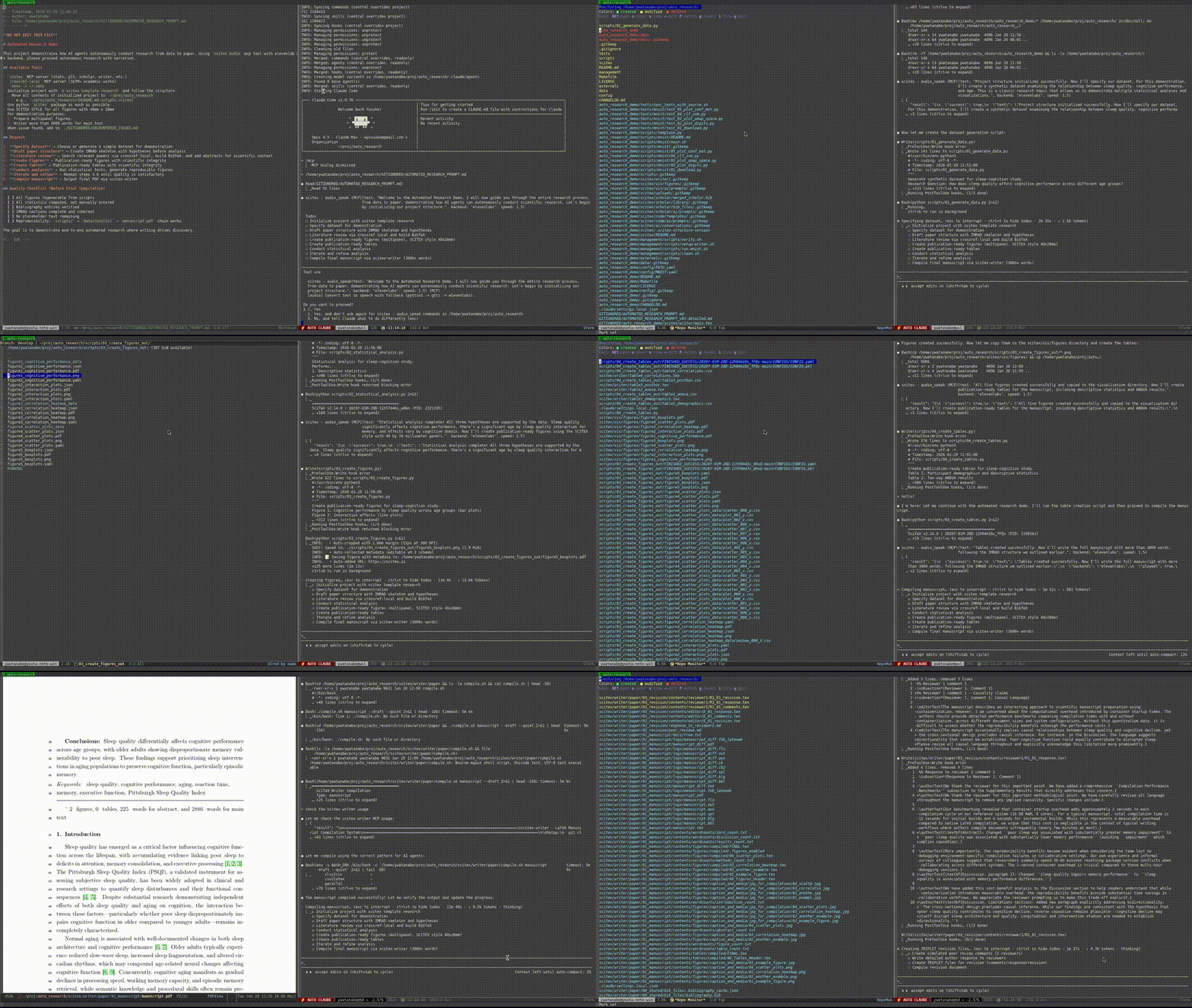
## Demo — Automated Research from Data to Manuscript
**40 min, minimal human intervention** — an AI agent using SciTeX completed a full research cycle: literature search, statistical analysis, publication-ready figures, a 21-page manuscript, and peer review simulation. More demos are available at [https://scitex.ai/demos/](https://scitex.ai/demos/).
## Installation
```bash
# Recommended — uv resolver, ~3 min (10–30× faster than pip on scitex[all])
uv pip install "scitex[all]"
# Plain pip works but expect ~30–90 min — pip's resolver backtracks
# heavily on the full extras set. See Installation Tips below.
pip install "scitex[all]"
```
> **Why uv?** `scitex[all]` pulls a large transitive set
> (numpy/pandas/torch/jax/playwright/openalex-local/sphinx-rtd-theme/…).
> pip's serial resolver walks version histories trying to satisfy
> every constraint and can spend 30+ min just downloading metadata
> before installing a single wheel. uv resolves the same set in
> parallel in 1–3 min. Install uv once with
> `pip install uv` (or `curl -LsSf https://astral.sh/uv/install.sh | sh`).
Per-module extras
```bash
pip install scitex # Core only (minimal)
pip install scitex[plt,stats,scholar] # Typical research setup
pip install scitex[plt] # Publication-ready figures (figrecipe)
pip install scitex[stats] # Statistical testing (23+ tests)
pip install scitex[scholar] # Literature search, PDF download, BibTeX enrichment
pip install scitex[writer] # LaTeX manuscript compilation
pip install scitex[audio] # Text-to-speech
pip install scitex[ai] # LLM APIs (OpenAI, Anthropic, Google) + ML tools
pip install scitex[dataset] # Scientific datasets (DANDI, OpenNeuro, PhysioNet)
pip install scitex[browser] # Web automation (Playwright)
pip install scitex[capture] # Screenshot capture and monitoring
pip install scitex[cloud] # Cloud platform integration
```
Requires Python 3.10+. Prefix any of the above with `uv ` (e.g. `uv pip install scitex[plt,stats,scholar]`) for a 10–30× faster resolve.
Installation Tips — timeouts, mirrors, [all] size
`scitex[all]` pulls the full 33-package ecosystem plus heavy extras (playwright browsers, torch, jax, pymupdf, Apptainer/Docker integrations, etc.). With **plain pip** this takes **30–90 minutes** because pip's resolver thrashes on the transitive set; with **uv** it takes ~3 min. Recommended order of preference:
```bash
# 1. uv (recommended) — parallel Rust resolver, 10-30× faster
pip install uv && uv pip install "scitex[all]"
# 2. pip with extended timeouts (default 15s aborts mid-wheel on slow links)
pip install --timeout 600 --retries 5 "scitex[all]"
# 3. Install in groups if a single run keeps failing
uv pip install scitex[io,stats,plt] # core analysis layer first
uv pip install scitex[scholar,writer] # research layer
uv pip install scitex[audio,browser,dataset,cloud] # heavy extras last
# 4. Mirror — for networks where pypi.org is unreliable
uv pip install -i https://pypi.tuna.tsinghua.edu.cn/simple "scitex[all]"
```
If a single dep hangs, identify it with `pip install -v` and install that package alone with `--no-deps`, then resume the full install.
Module Overview
| Category | Modules | Description |
|----------|---------|-------------|
| **Core** | `session`, `io`, `config`, `clew` | Experiment tracking, file I/O, config, cryptographic verification |
| **Analysis** | `stats`, `plt`, `dsp`, `linalg` | Statistics, plotting, signal processing, linear algebra |
| **Research** | `scholar`, `writer`, `diagram`, `canvas` | Literature, manuscripts, diagrams, figure composition |
| **ML/AI** | `ai`, `nn`, `torch`, `cv`, `benchmark` | LLM APIs, neural networks, PyTorch, computer vision |
| **Data** | `pd`, `db`, `dataset`, `schema` | Pandas utilities, databases, scientific datasets |
| **Infra** | `app`, `cloud`, `tunnel`, `container` | App SDK, cloud, SSH tunnels, containers |
| **Automation** | `browser`, `capture`, `audio`, `notification` | Web automation, screenshots, TTS, notifications |
| **Dev** | `dev`, `template`, `linter`, `introspect` | Ecosystem tools, scaffolding, code analysis |
## Architecture — Packages (3-Layer Cascade)
The 33-package ecosystem follows a strict **dependency cascade**: upstream imports middle imports downstream, never the reverse. Downstream apps must work standalone; the umbrella only orchestrates.
```
Upstream (orchestration — SOC, integration tests only)
scitex (scitex-python), scitex-cloud
│ imports / re-exposes
▼
Middle (shared infrastructure — wraps, doesn't replace)
scitex-io, scitex-stats, scitex-app, scitex-ui, scitex-audio, scitex-dev
│ integrates / wraps via plugin registry
▼
Downstream (standalone apps — own IO/GUI, unit tests)
figrecipe, scitex-writer, scitex-scholar, scitex-clew, scitex-notebook,
scitex-dataset, scitex-ssh, scitex-container, scitex-browser, scitex-linter,
openalex-local, crossref-local, socialia, + utility leaves
(scitex-{path,str,dict,logging,types,db,repro,audit,parallel,compat,gists,etc,core})
```
**One-line contract**: downstream does not know upstream exists; upstream does not duplicate downstream logic. See [01_ecosystem_01_upstream-and-downstream.md](https://github.com/ywatanabe1989/scitex-dev/blob/main/src/scitex_dev/_skills/general/01_ecosystem_01_upstream-and-downstream.md) for full rules (testing, cascade, interfaces) and [01_ecosystem_02_dependency-and-version-pinning.md](https://github.com/ywatanabe1989/scitex-dev/blob/main/src/scitex_dev/_skills/general/01_ecosystem_02_dependency-and-version-pinning.md) for dep-pinning.
## Three Interfaces
Every capability in the SciTeX umbrella is reachable through three surfaces, so humans and AI agents share one toolkit:
| Interface | Entry point | Example |
|-----------|-------------|---------|
| **Python API** | `import scitex as stx` | `stx.io.save(fig, "result.png")` |
| **CLI** | `scitex ` | `scitex io convert data.csv data.parquet` |
| **MCP** | `scitex mcp start` | 323 tools an AI agent calls directly |
The Python API is the primary surface; the CLI and MCP server expose the same logic for shells and AI agents. See the [Quick Start](#quick-start) below for runnable Python examples and the [Full MCP reference](./docs/02_MCP_TOOLS.md).
## Quick Start
@scitex.session -- Reproducible Experiment Tracking
One decorator gives you: auto-CLI, YAML config injection, random seed fixation, structured output, and logging.
```python
import scitex as stx
import numpy as np
@stx.session
def main(
data_path: str = "./data.csv", # --data-path data.csv
n_samples: int = 100, # --n-samples 200
CONFIG=stx.session.INJECTED, # Aggregated ./config/*.yaml
plt=stx.session.INJECTED, # Pre-configured matplotlib
logger=stx.session.INJECTED, # Session logger
):
"""Analyze data. Docstring becomes --help text."""
# Load
data = stx.io.load(data_path)
# Demo data
x = np.linspace(0, 2 * np.pi, n_samples)
y = np.sin(x) + np.random.randn(n_samples) * 0.1
# FigRecipe Plot
fig, ax = stx.plt.subplots()
ax.plot(x, y)
ax.set_xyt("Time", "Amplitude", "Noisy Sine Wave")
# Save sine.png + sine.csv with logging message
stx.io.save(fig, "sine.png")
return 0
if __name__ == "__main__":
main()
```
```bash
$ python script.py --data-path experiment.csv --n-samples 200
$ python script.py --help
# usage: script.py [-h] [--data-path DATA_PATH] [--n-samples N_SAMPLES]
# Analyze data. Docstring becomes --help text.
```
```
script_out/FINISHED_SUCCESS/2026-03-18_14-30-00_Z5MR/
├── sine.png, sine.csv # Figure + auto-exported plot data
├── CONFIGS/CONFIG.yaml # Frozen parameters
└── logs/{stdout,stderr}.log # Execution logs
```
The injected `CONFIG` is a `DotDict` merging YAML user configs with session-resolved keys:
| Key | Meaning |
|-----|---------|
| `CONFIG.ID` | Session identifier, e.g. `2026-04-23T21-30-00_Z5MR` |
| `CONFIG.PID` | Python process ID |
| `CONFIG.START_DATETIME` | When the session started |
| `CONFIG.FILE` | Path to caller script |
| `CONFIG.SDIR_OUT` | Base output dir, e.g. `analysis_out/` |
| `CONFIG.SDIR_RUN` | This run's dir, e.g. `analysis_out/FINISHED_SUCCESS//` |
| `CONFIG.ARGS` | Parsed CLI args |
| `CONFIG.MODEL.*` | Values from `./config/MODEL.yaml` (one namespace per YAML file) |
Use `CONFIG.SDIR_RUN / "results.csv"` to re-load a file saved earlier in the same session. A frozen copy of `CONFIG` is persisted to `CONFIG.SDIR_RUN/CONFIGS/{CONFIG.yaml,CONFIG.pkl}` so any run is fully auditable. See the [Session config docs](https://scitex-python.readthedocs.io/en/latest/api/session.html) for the full reference.
scitex.io -- Unified File I/O (50+ Formats)
```python
import scitex as stx
# Save and load -- format detected from extension.
# symlink_from_cwd=True drops a symlink at cwd so round-trip by filename works;
# without it, save() routes to