English · Português (BR) · 中文
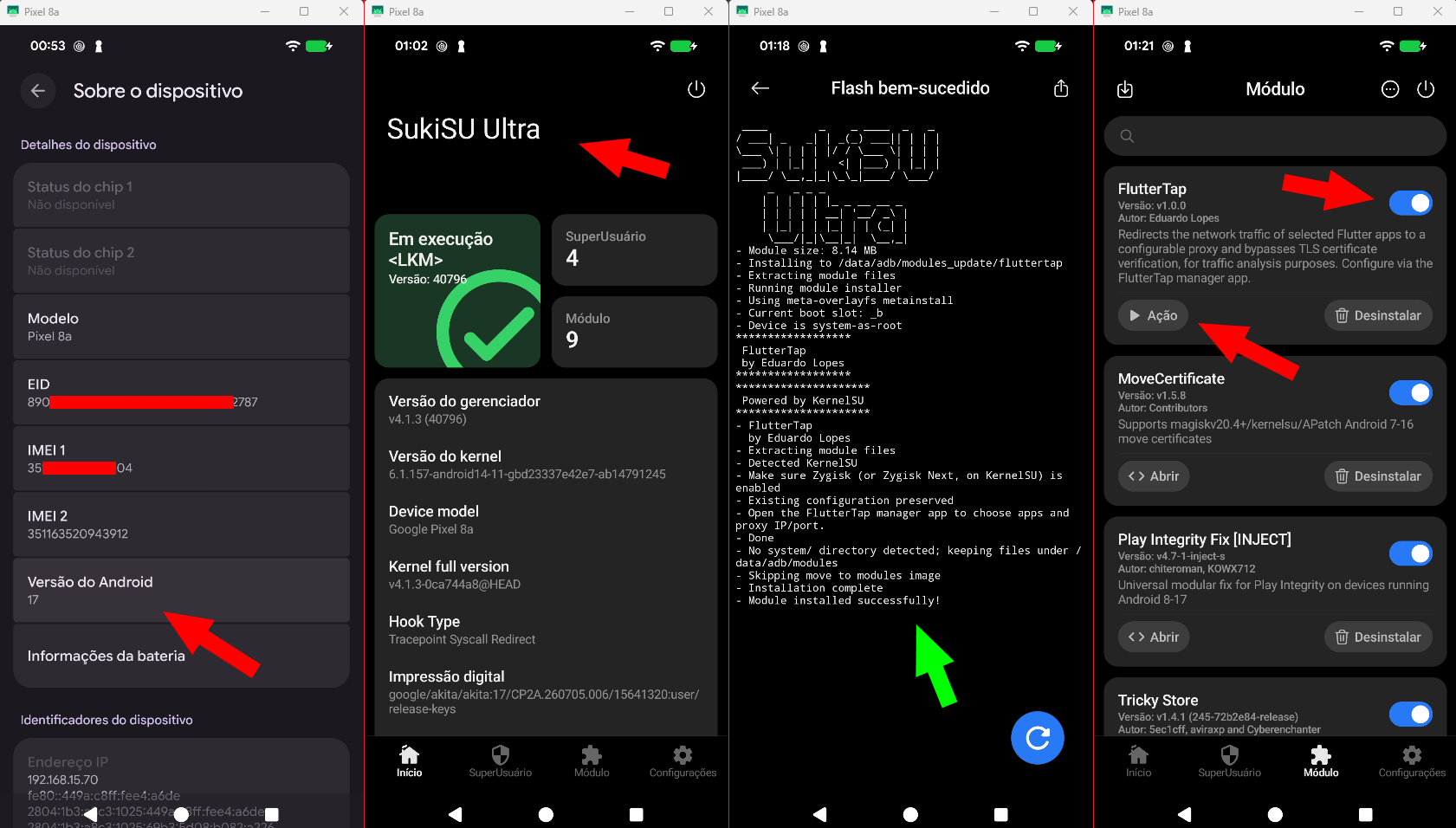
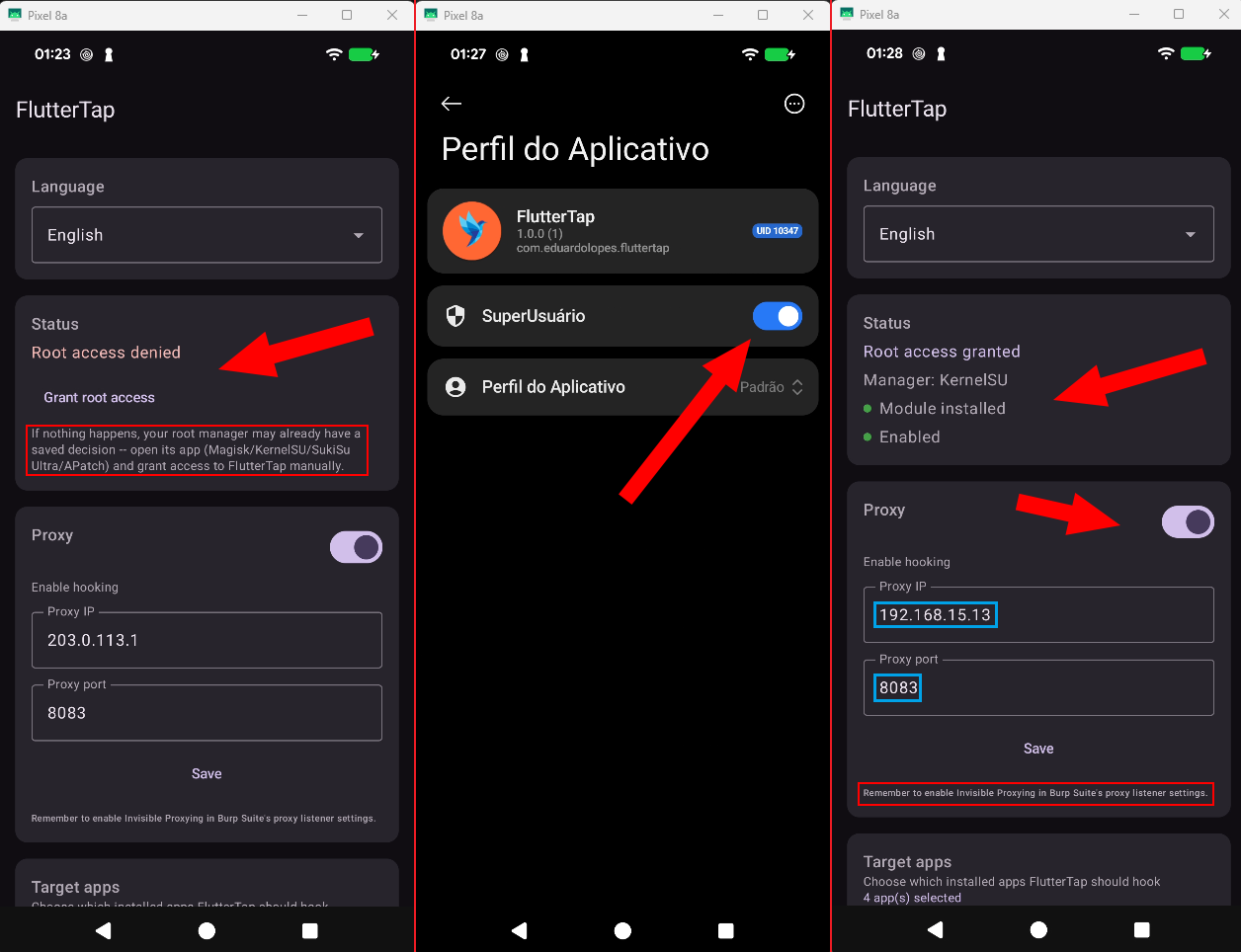
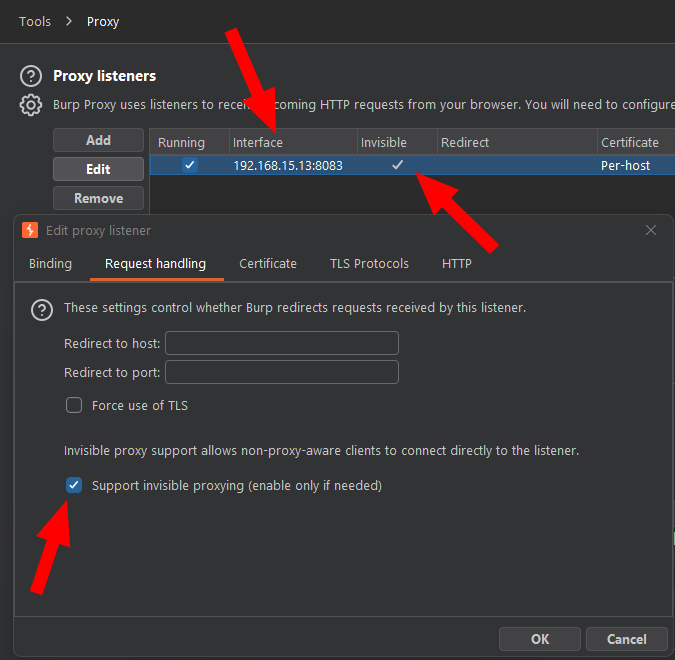
A **Zygisk** module that redirects the network traffic of selected **Flutter** apps to a configurable proxy and bypasses BoringSSL's TLS certificate verification — with no certificate installed on the device, no app repackaging, and no Frida session tethered over USB. It ships with a **manager app** (Jetpack Compose) for picking target apps and setting the proxy IP/port directly on the phone.
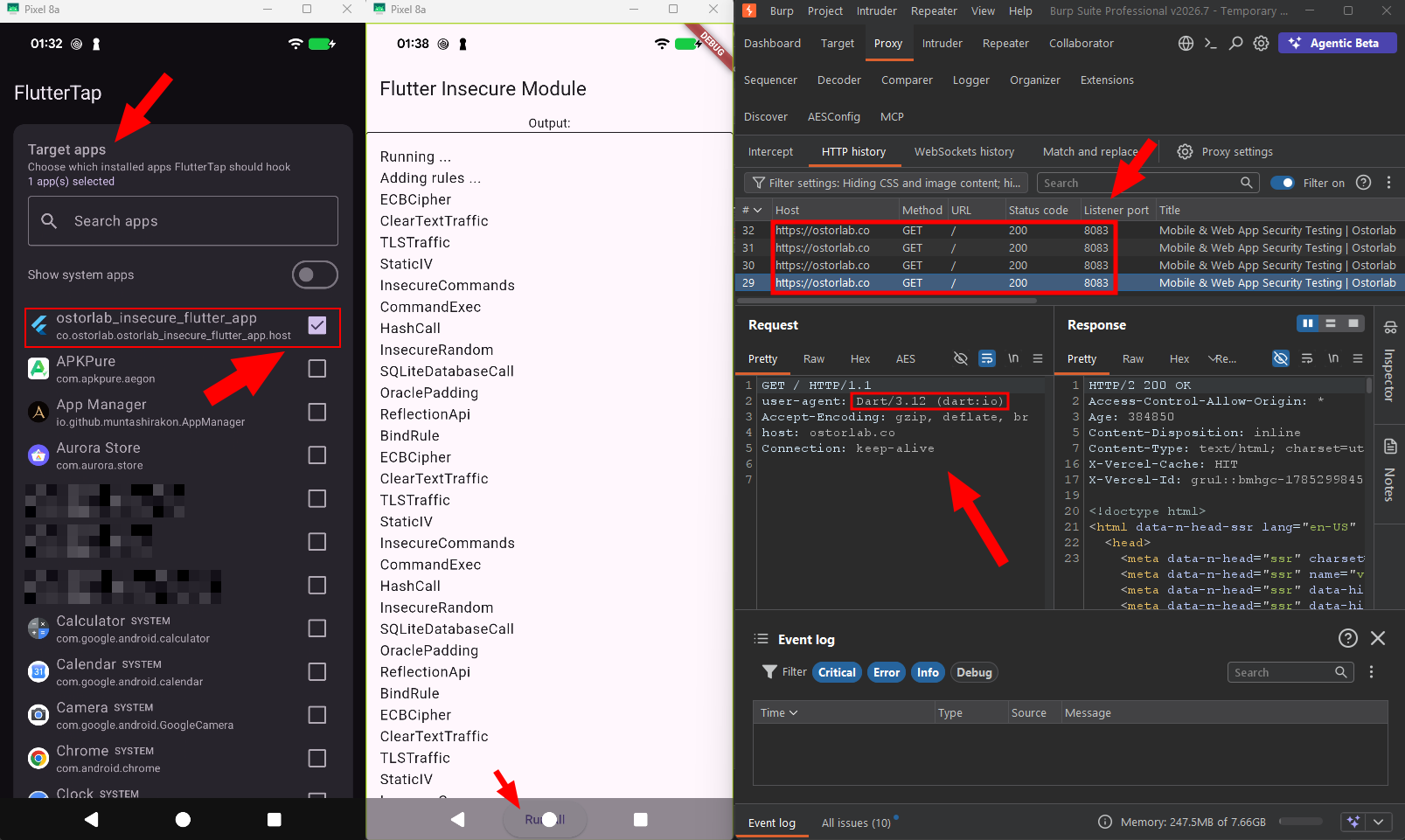
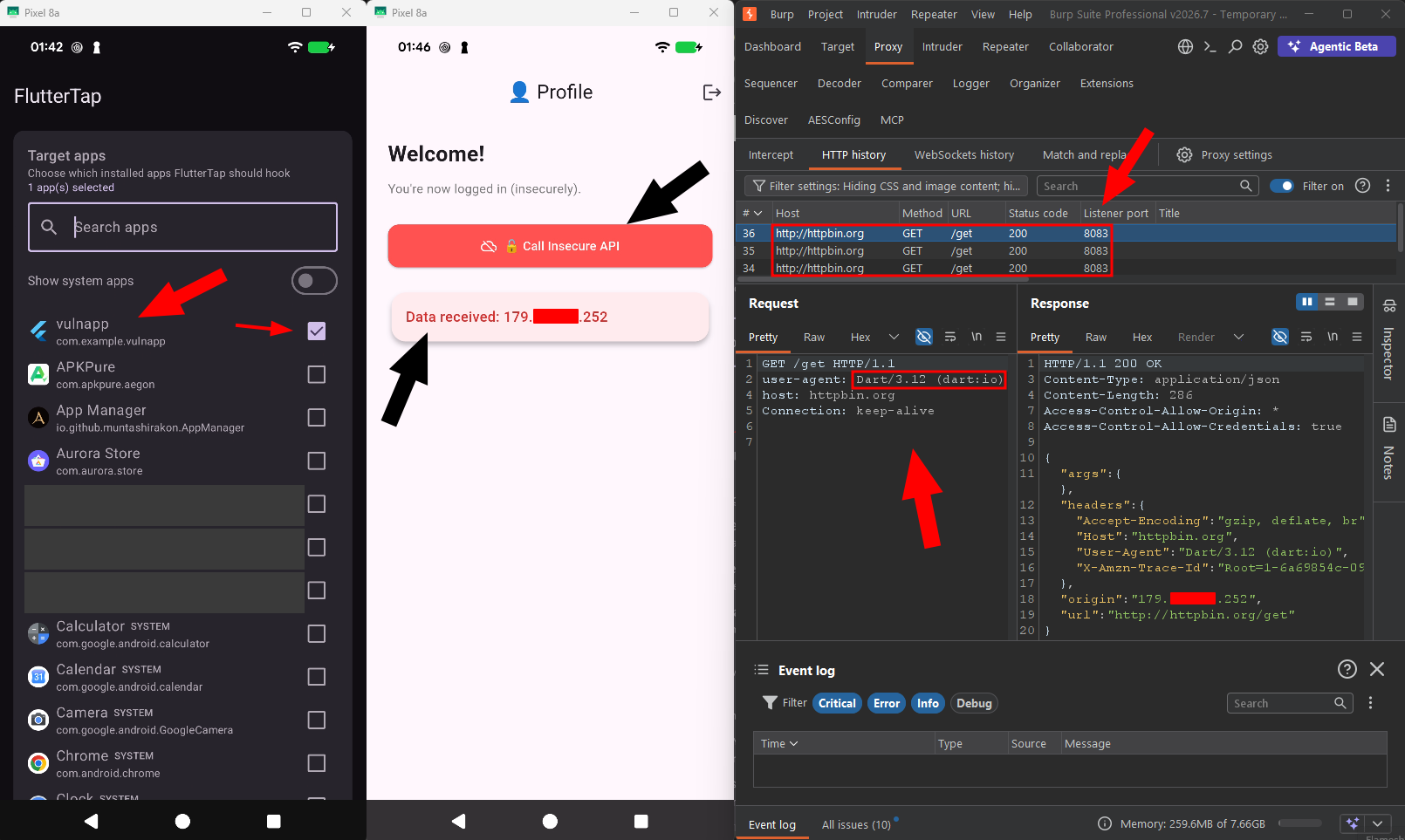
HTTPS traffic from a Flutter app arriving decrypted in Burp — with no CA certificate installed on the device.
## Why it exists Flutter apps don't use Android's TLS stack. The engine bundles its own **BoringSSL** and keeps its own trust chain, which means installing Burp's CA certificate on the system **intercepts nothing** — the app ignores the Android certificate store entirely. And since Flutter doesn't honour the Wi-Fi proxy either, the traffic simply leaves the device without ever passing through your interceptor. The workaround is well known, but it normally requires running a Frida script with `frida-server` active and a cable attached, every session. FlutterTap turns that same approach into a persistent module: install once, pick your apps, and it runs on its own on every boot. ## Why a module, and not Frida or LSPosed **Frida** is unbeatable for *discovering* how an app works — you edit JavaScript and see the effect in seconds. That's how the technique was born. The problem is *operating* with it: it depends on `frida-server` and a live session (close the terminal, lose the hook), doesn't survive a reboot, needs spawn (`-f`) to catch startup hooks, and — most relevant in real engagements — **opens a listening port and leaves well-known artifacts** (thread names, memory strings, `/proc` entries). Detecting Frida is literally the first thing any mobile protection SDK does. **LSPosed/Xposed** isn't a matter of convenience but of layer: it hooks **Java/ART methods**. In Flutter, `verify_cert_chain` and `GetSockAddr` are **unexported native functions inside `libflutter.so`** — there is no Java method to intercept. An LSPosed module would have to do exactly the same native work FlutterTap does, while dragging in the whole Xposed runtime for nothing. | | Frida | LSPosed | FlutterTap | |---|---|---|---| | Reaches native BoringSSL | yes | **not directly** | yes | | Survives a reboot | no | yes | yes | | No cable / external tooling | no | yes | yes | | Listening port / external process | yes (detectable) | no | no | | Catches the app from its first instant | only via manual spawn | yes | yes | | Zero impact on non-selected apps | — | depends | yes (`DLCLOSE`) | | Development iteration speed | **excellent** | medium | slow | That last row is an honest drawback: iterating on a native module is far slower than editing a `.js`. Which is exactly why the split makes sense — **Frida to discover, a module to operate**. ### Why it was built The motivation comes from real mobile traffic analysis work. In an actual engagement the app has to behave **naturally over time**: opened and closed repeatedly, receiving notifications, syncing in the background, used by someone who has never heard of Frida. And the setup has to be **reproducible** — reconfigurable by anyone ticking checkboxes, with no terminal and no memorised commands. FlutterTap turns a manual, fragile procedure into **infrastructure**. Per-app targeting exists precisely for that: it is not a global interceptor — it stays inert in every app you didn't select, unloading itself from memory immediately, which reduces both the risk of side effects and the detection surface. ## How it works None of the functions involved are exported, so they have to be located at runtime, in every process: 1. The module is loaded into each app process via Zygisk and checks whether that package is in the target list — if it isn't, it unloads itself immediately (zero footprint on non-selected apps). 2. On a monitoring thread, it waits for `libflutter.so` to load and parses its ELF segments. 3. It scans memory for the strings `"ssl_client"` and `"Socket_CreateConnect"` and, from those, resolves the real addresses of `verify_cert_chain` and `GetSockAddr` by **disassembling with Capstone** — the same library Frida uses under the hood. 4. It installs three hooks with Dobby: capture the destination `sockaddr`, rewrite IP/port to the proxy, and force the "certificate is valid" result. Implementation details, including where and why this diverges from the original approach, are in [`docs/ARCHITECTURE.md`](docs/ARCHITECTURE.md). ## Compatibility | Item | Support | |---|---| | Android | 10 (API 29) through 17 (API 37) | | Architectures | `arm64-v8a`, `x86_64` | | Root | Magisk, KernelSU, SukiSu Ultra, APatch | | Zygisk | Magisk's built-in Zygisk, Zygisk Next (**including with Zygisk Next Linker enabled**) or NeoZygisk | Validated on hardware in two deliberately different environments: - **OnePlus 5** — Android 10, Kitsune Magisk v27.2 + NeoZygisk 2.3 - **Pixel 8a** — Android 17, SukiSu Ultra + Zygisk Next 1.4.3, with **Zygisk Next Linker** enabled > **Zygisk is required.** Root alone is not enough: the whole mechanism lives in the Zygisk callbacks. On > Magisk, turn on the "Zygisk" setting. On KernelSU/SukiSu Ultra, install Zygisk Next or NeoZygisk. > APatch ships a compatible implementation. > > Compatibility with **Zygisk Next Linker** required specific fixes. If you maintain a Zygisk module that > breaks with that feature, the "Zygisk Next Linker compatibility" section of > [`docs/ARCHITECTURE.md`](docs/ARCHITECTURE.md) documents the three traps found (and one false lead that > cost real time), in reusable form. ## Installation **Recommended — via MMRL:** in [MMRL](https://mmrl.dev/) open *Repositories → Add* and paste the repository URL below. FlutterTap then installs in one tap and gets update notifications automatically: ``` https://raw.githubusercontent.com/script-or-script/FlutterTap-mmrl/main/json/modules.json ``` **Or manually:** download both files from the [latest release](../../releases/latest). 1. **Install the module**: flash `FlutterTap-