[](#)
[](#)
[](#)
[](https://travis-ci.org/segecey/SwiftIconFont)
[](http://cocoapods.org/pods/SwiftIconFont)
[](http://cocoapods.org/pods/SwiftIconFont)
[](http://cocoapods.org/pods/SwiftIconFont)
[](https://github.com/Carthage/Carthage)
[](https://houndci.com)
## Installation
### SPM
**Not yet supported. Please use Cocoapods or Carthage**
### Carthage
```bash
github "segecey/SwiftIconFont"
```
### Cocoapods
[CocoaPods](http://cocoapods.org) is a dependency manager for Cocoa projects.
You can install it with the following command:
```bash
gem install cocoapods
```
To integrate SwiftIconFont into your Xcode project using CocoaPods, specify it in your `Podfile`:
```ruby
use_frameworks!
pod 'SwiftIconFont'
```
## Example
To run the example project, clone the repo, and run `pod install` from the Example directory first.
## Prefixes
| Font | Prefix | Cheat Sheet |
| -------------------- | ------ | -------------------------------------------------------------------------------------- |
| Font Awesome 5 | fa5: | [List](http://fontawesome.io/icons/) |
| Font Awesome 5 Brand | fa5b: | [List](http://fontawesome.io/icons/) |
| Font Awesome 5 Solid | fa5s: | [List](http://fontawesome.io/icons/) |
| Ion Icons | io: | [List](http://ionicons.com) |
| Octicons | oc: | [List](https://octicons.github.com) |
| Open Iconic | ic: | [List](https://useiconic.com/open/) |
| Material Icon | ma: | [List](https://design.google.com/icons/) |
| Themify | ti: | [List](https://themify.me/themify-icons) |
| Map Icons | mi: | [List](http://map-icons.com) |
| Segoe MDL2 | sm: | [List](https://docs.microsoft.com/en-us/windows/uwp/design/style/segoe-ui-symbol-font) |
| Foundation 3 | fo: | [List](https://zurb.com/playground/foundation-icon-fonts-3) |
| Elegant Icon | el: | [List](https://www.elegantthemes.com/blog/resources/elegant-icon-font) |
| Captain | cp: | Please check example project. |
## Fonts
```swift
public enum Fonts: String {
case fontAwesome5 = "FontAwesome5Free-Regular"
case fontAwesome5Brand = "FontAwesome5Brands-Regular"
case fontAwesome5Solid = "FontAwesome5Free-Solid"
case iconic = "open-iconic"
case ionicon = "Ionicons"
case octicon = "octicons"
case themify = "themify"
case mapIcon = "map-icons"
case materialIcon = "MaterialIcons-Regular"
case segoeMDL2 = "Segoe mdl2 assets"
case foundation = "fontcustom"
case elegantIcon = "ElegantIcons"
case captain = "captainicon"
}
```
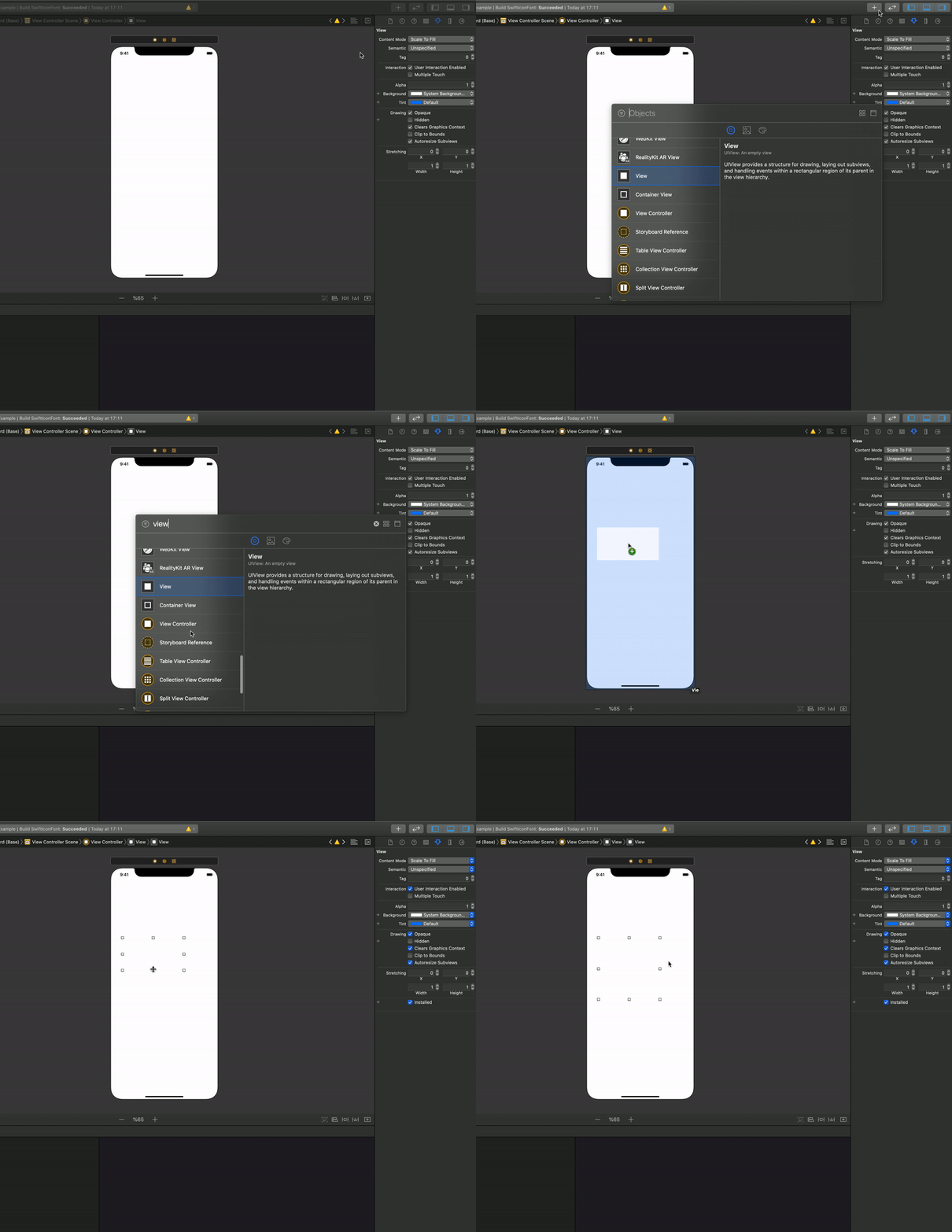
## Storyboard
## Runtime Structure
> < Prefix >:< Icon >
## Usage
In your UILabel, UIButton or UITextField, set a text containing a placeholder anywhere you want the icon to be. Somethink like this
> oc:logo-github
Then you can choose between 3 ways you can use SwiftIconFont.
#### 1. Without Custom Class
Simply import SwiftIconFont and call processIcons on any UILabel, UIButton or UITextField that has a placeholder.
```swift
label.parseIcon()
```
#### 2. Custom Class
The lazy way, just set your UILabel, UITextField, UIButton, UITextView, UIBarButtonItem class as SwiftIconLabel, SwiftIconTextField, SwiftIconButton, SwiftIconTextView, SwiftBarButtonItem, and thats it, your icons will be processed at runtime.
#### 3. Programmatically
```swift
import SwiftIconFont
label.font = UIFont.icon(from: .fontAwesome5, ofSize: 50.0)
label.text = String.fontAwesome5Icon(code: "twitter")
```
#### UIBarButtonItem (Without Custom Class)
```swift
import SwiftIconFont
twitterBarButton.icon(from: .fontAwesome5, code: "twitter", ofSize: 20)
```
#### UITabBarItem (Without Custom Class)
```swift
import SwiftIconFont
twitterTabBarButton.icon(from: .fontAwesome5, code: "twitter", imageSize: CGSizeMake(20, 20), ofSize: 20)
```
#### UIImage
```swift
import SwiftIconFont
let githubLogo = UIImage(from: .octicon, code: "logo-github", textColor: .black, backgroundColor: .clear, size: CGSize(width: 150, height: 50))
```
#### UIImageView
```swift
import SwiftIconFont
let githubLogoImageView: UIImageView = UIImageView(frame: CGRect(x: 120, y: self.view.frame.size.height - 130, width: 150, height: 50))
githubLogoImageView.setIcon(from: .octicon, code: "logo-github", textColor: .black, backgroundColor: .clear, size: nil)
```
#### macOS
- NSTextField, NSImage, NSView
- Please check **ExampleMac** project
## Author
Sedat ÇİFTÇİ - me@sedat.ninja
## Contributors
josejuanqm
## License
SwiftIconFont is available under the MIT license. See the LICENSE file for more info.
## Contributing
1. Fork it ()
2. Create your feature branch (`git checkout -b my-new-feature`)
3. Commit your changes (`git commit -am 'Add some feature'`)
4. Push to the branch (`git push origin my-new-feature`)
5. Create new Pull Request