# Goodsidian
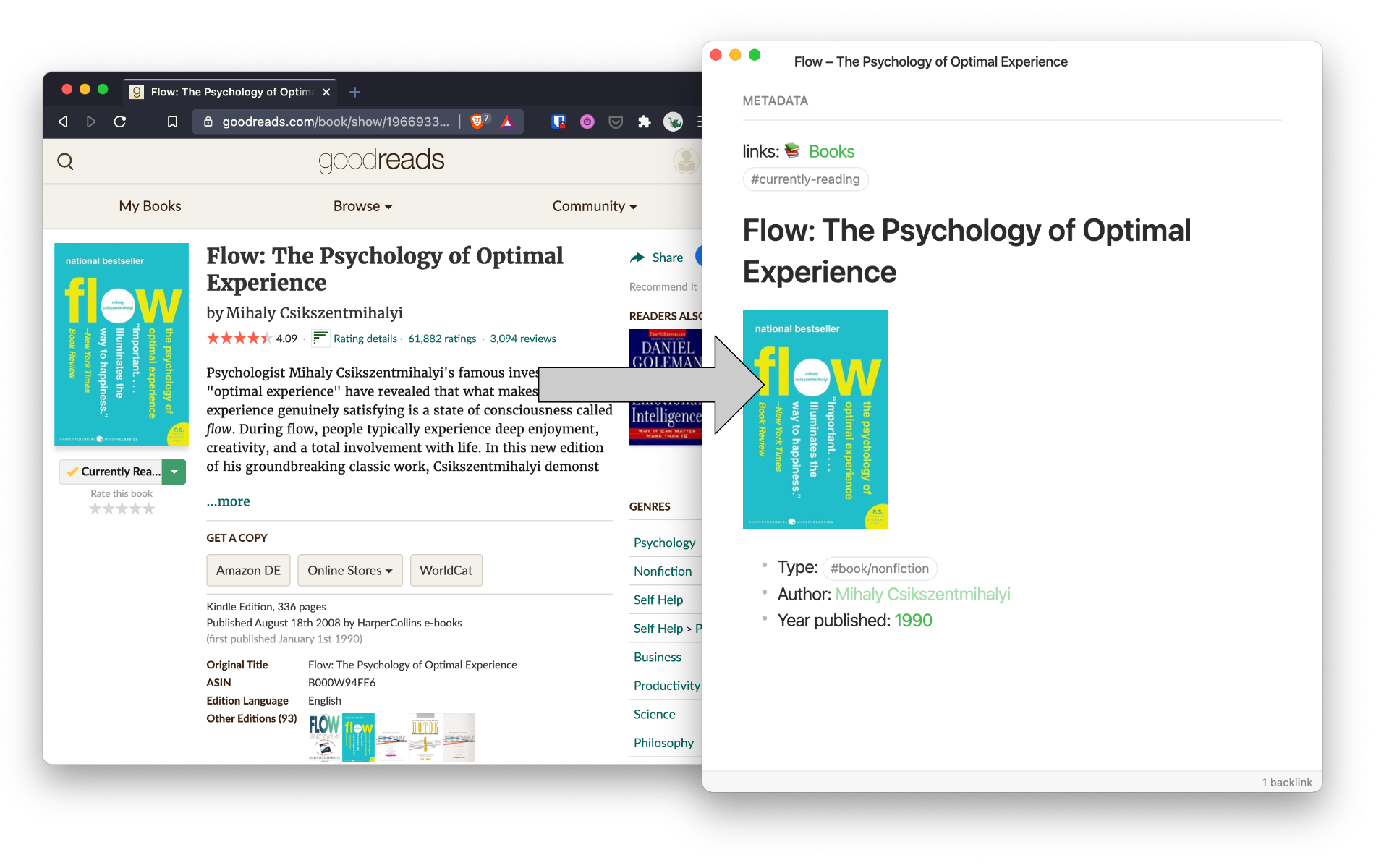
Goodsidian takes updates to your shelves on [Goodreads](https://www.goodreads.com/) and formats them to a note in [Obsidian](https://obsidian.md/).
> You can help me keep creating tools like this by [buying me a coffee](https://www.buymeacoffee.com/joschua).
 ## Help wanted! 🤝
I'd love to turn this into a proper plugin for Obsidian but my TypeScript knowledge is pretty *lacking*.
If you'd like to collaborate/contribute on that, head to the [Goodsidian plugin](https://github.com/selfire1/goodsidian-plugin) repo and reach out!
## Overview
Goodsidian extracts data from your "currently-reading" and "read" Goodreads rss feeds. That data then gets formatted and creates (if a new book) or updates (if book is read) a note in your Obsidian vault.
**Disclaimer**: Never run a script without knowing what it does. Make sure you understand the script and back up your vault. I use this script on my own vault but cannot guarantee no data losses or unintended changes.
If you find value in this resource, consider sponsoring my next read on Patreon.
## Setting up the script
This master branch of this script is written for bash on MacOS. Thanks to [bboerzel](https://github.com/selfire1/goodsidian/issues/1)'s contribution you can find the script for linux bash on [another branch](https://github.com/selfire1/goodsidian/tree/linux-bash).
## Variables
You can find the url to your Goodreads RSS feed by navigating to one of your shelfes and clicking the "RSS" button at the bottom of the page.
* for `url` enter the Goodreads rss url for the "currently-reading" shelf
* for `readurl` enter the Goodreads rss url for the "read" shelf
* for `vaultpath` enter the path to your vault
## Name of your bookshelf
Open your Goodreads rss feed. It will say something like "Joschua's bookshelf" in the beginning. Replace `Joschua.s bookshelf` in line 24 in the script with the name of your bookshelf.
## Adapt your format
### Currently reading
For a book that's being currently read the default output will look like this:
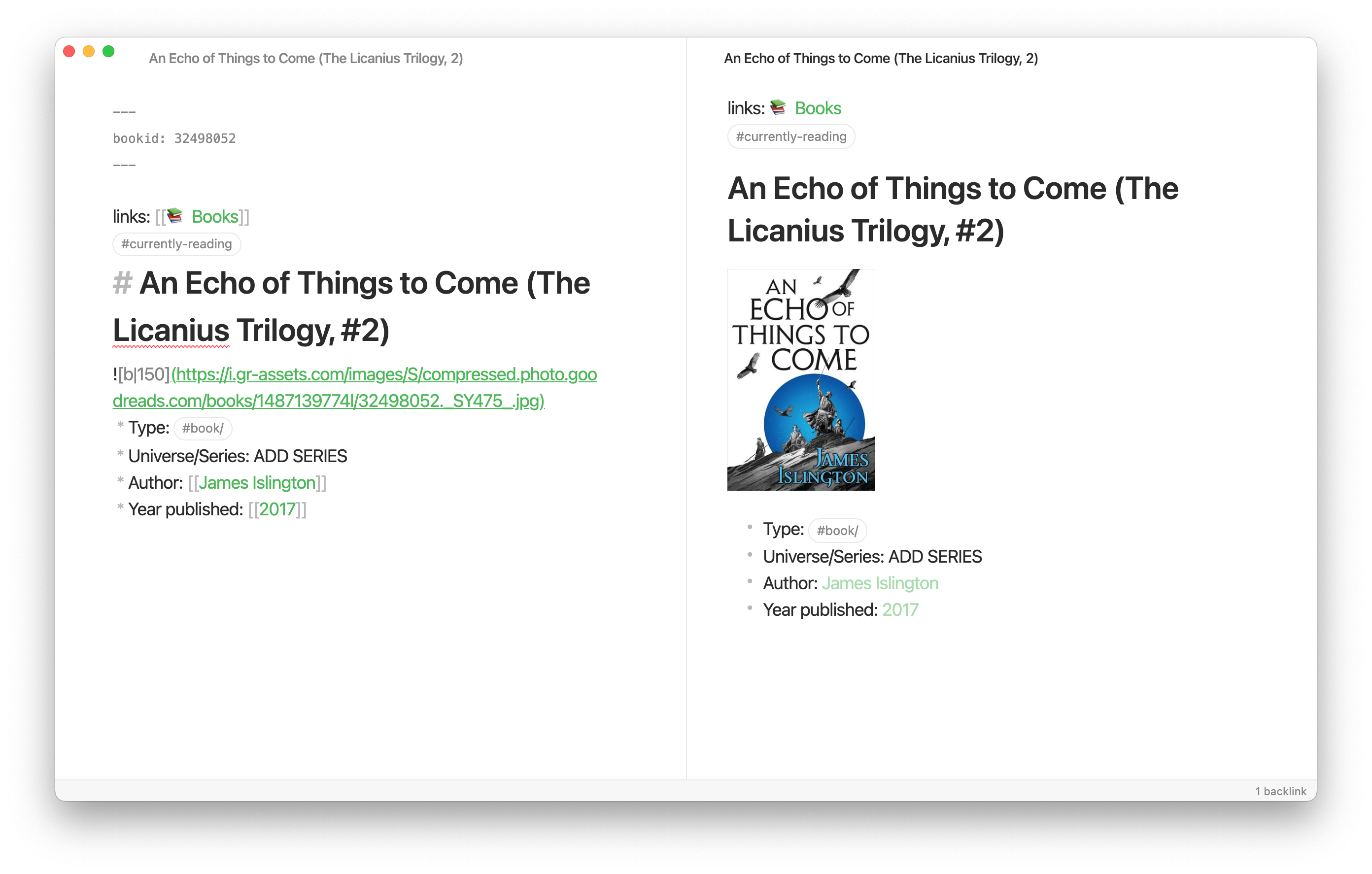
For your use case you will surely want to change this. You can do so with the following variables:
* `${title}`: Self-explanatory. The title.
* `${author}`: The author.
* `${bookid}`: The Goodreads bookid. Keep this in your frontmatter, so that the script can check for books marked as "read"
* `${imglink}`: The link to the book cover.
* `${pub}`: Year published
### Read
When a book is marked 'read' in the Goodreads rss feed, the script checks if a note has a corresponding Goodreads bookid. If so, it removes the `#currently-reading` tag, adds a `#read` tag. It also appends two lines for "Year read" and "Month read" after the "Year published" line.
So when tinkering with the formatting, be aware that the script targets the bookid and the "Year read" lines. If you delete or change these around, the script might have unintended consquences.
## Running the script
If you're unfamiliar with file navigation and executing a script, [here](https://joschuasgarden.com/Shell#File+navigation) is a short overview.
Otherwise, set the script as executable and run it. It might take a bit but then should notify you on new books read or currently-reading book notes created.
Forks and improvements are welcome. If you have a problem, don't hesitate to raise an issue or shoot me a message at hi@joschuasgarden.com. I'll do my best to help out.
## Detailed script commentary
First, the script sets the urls and path to vault as variables. It also assigns the current time to variables.
```bash
# url for "Currently reading":
url="https://www.goodreads.com/url-to-your-rss-feed-shelf=currently-reading"
# url for "Read":
readurl="https://www.goodreads.com/url-to-your-rss-feed-shelf=read"
# Enter the path to your Vault
vaultpath="Path/to/your/vault"
# Assign times to variables
year=$(date +%Y)
nummonth=$(date +%m)
month=$(date +%B)
```
Next up the script grabs the data from the rss feed and takes out the items that we need. First from the "currently-reading" sheld and then from the "read" shelf:
```bash
# This grabs the data from the currently reading rss feed and formats it
IFS=$'\n' feed=$(curl --silent "$url" | grep -E '(title>|book_large_image_url>|author_name>|book_published>|book_id>)' | \
sed -e 's///' \
-e 's/Joschua.s bookshelf: currently-reading//' \
-e 's///' -e 's/<\/book_large_image_url>/ | /' \
-e 's///' -e 's/<\/title>/ | /' \
-e 's/<author_name>//' -e 's/<\/author_name>/ | /' \
-e 's/<book_published>//' -e 's/<\/book_published>/ | /' \
-e 's/<book_id>//' -e 's/<\/book_id>/ | /' \
-e 's/^[ \t]*//' -e 's/[ \t]*$//' | \
tail +3 | \
fmt
)
# Grab the bookid from READ data from the url and format it
IFS=$'\n' readfeed=$(curl --silent "$readurl" | grep -E '(book_id>)' | \
sed -e 's/<book_id>//' -e 's/<\/book_id>/ | /' \
-e 's/^[ \t]*//' -e 's/[ \t]*$//' | \
fmt
)
```
Next up we turn the data into an array, a list essentially. Each item that we pulled from the rss gets split up. We also remove leading and trailing whitespace.
```bash
# Turn the data into an array
arr=($(echo $feed | tr "|" "\n")) # CURRENTLY-READING
readarr=($(echo $readfeed | tr "|" "\n")) # READ
# Remove whitespace on each element: CURRENTLY-READING
for (( i = 0 ; i < ${#arr[@]} ; i++ ))
do
arr[$i]=$(echo "${arr[$i]}" | sed -e 's/^[ \t]*//' -e 's/[ \t]*$//')
done
# Remove whitespace on each element: READ
for (( i = 0 ; i < ${#readarr[@]} ; i++ ))
do
readarr[$i]=$(echo "${readarr[$i]}" | sed -e 's/^[ \t]*//' -e 's/[ \t]*$//')
done
```
Since there are five elements we extracted (Title, bookid, author, image link and year published) we can divide the length of our list by five and get the amount of new books.
Then we start a loop for the amount of new books. In each iteration we check if a note for this book exists already (by checking looking for a note with corresponding bookid). If there is one, we delete the book from our array since we don't need a second note on a book.
```bash
# Get the amount of books by dividing array by 5
bookamount=$( expr "${#arr[@]}" / 5)
for (( i = 0 ; i < ${bookamount} ; i++ ))
do
# Create a temporary counter to loop through books
counter=$( expr "$i" \* 5)
# Set variables
bookid=${arr[$( expr "$counter" + 1)]}
# Check if book already exists in note by bookid
if grep -q "${bookid}" -r "${vaultpath}"
then
# code if found
unset arr["$counter"]
unset arr[$( expr "$counter" + 1)]
unset arr[$( expr "$counter" + 2)]
unset arr[$( expr "$counter" + 3)]
unset arr[$( expr "$counter" + 4)]
# code if not found
fi
done
```
We then have to reindex our array to find the length. By dividing through five again, we can see how many books we have left. If there are none left, a notification is shown.
```bash
# Reindex array to take away gaps
for i in "${!arr[@]}"; do
new_array+=( "${arr[i]}" )
done
arr=("${new_array[@]}")
unset new_array
# Get the amount of books by dividing array by 5
bookamount=$( expr "${#arr[@]}" / 5)
if (( "$bookamount" == 0 )); then
osascript -e "display notification \"No new books found.\" with title \"Currently-reading: No update\""
fi
```
For all remaining books we set our variables. The script also deletes illegal characters (':' and '/') and unwanted ('#'). Hash characters are used by Obsidian to denote headers.
```bash
# Start the loop for each book
for (( i = 0 ; i < ${bookamount} ; i++ ))
do
counter=$( expr "$i" \* 5)
# Set variables
title=${arr["$counter"]}
bookid=${arr[$( expr "$counter" + 1)]}
imglink=${arr[$( expr "$counter" + 2)]}
author=${arr[$( expr "$counter" + 3)]}
pub=${arr[$( expr "$counter" + 4)]}
# Delete illegal (':' and '/') and unwanted ('#') characters
cleantitle=$(echo "${title}" | sed -e 's/\///' -e 's/:/ –/' -e 's/#//')
```
Then a booknote gets created for each new book. We show a notification for each created book.
```bash
# Write the contents for the book file
if [[ "$cleantitle" == "" ]];
then
osascript -e "display notification \"Failed to create note due to empty array.\" with title \"Error!\""
else
echo "---
bookid: ${bookid}
---
links: [[Books MOC]]
#currently-reading
# ${title}

* Type: #book/
* Universe/Series: ADD SERIES
* Author: [[${author}]]
* Year published: [[${pub}]]" >> "${vaultpath}/${cleantitle}.md"
# Display a notification when creating the file
osascript -e "display notification \"Booknote created!\" with title \"${cleantitle//\"/\\\"}\""
fi
done
```
Next up we get into the meat of things. We now check if any book notes that were "currently-reading" now have been read.
We take all bookids from the 'read' shelf and check if there is any note that contains them and is marked with the tag `#currently-reading`.
For any that are found the `#currently-read` tag gets replaced by a `#read` tag and we also add a line for "Year read" and a line for "Month read".
A notification gets displayed if anything has been found.
```bash
ifbookid=$(find "${vaultpath}" -type f -print0 | xargs -0 grep -li "${cbookid}")
ifcurrread=$(find "${vaultpath}" -type f -print0 | xargs -0 grep -li "#currently-reading")
if find "${vaultpath}" -type f -print0 | xargs -0 grep -li "${cbookid}"
then
# Code if found: update read books
fname=$(find "${vaultpath}" -type f -print0 | xargs -0 grep -li "${cbookid}")
sed -i '' "/Year published: \[\[[0-9][0-9][0-9][0-9]\]\]/ a\\
\* Year read: #read${year}" "$fname"
sed -i '' "/Year read: #read${year}/ a\\
\* Month read: [[${year}-${nummonth}-${month}|${month} ${year}]]" "$fname"
sed -i '' -e 's/#currently-reading/#read/' "$fname"
# Grab the name of the changed book
fname=$(echo ${fname} | sed 's/^.*\///' | sed 's/\.[^.]*$//')
osascript -e "display notification \"${fname}\" with title \"Updated read books\""
else
# code if not found: No new books
osascript -e "display notification \"No new read books.\" with title \"Read: No update\""
fi
#circle through bookid array
cbookid=${readarr["$i"]}
# If in the path to the vault, there is a file with the current id, then …
if find "${vaultpath}" -not -path "*/\.*" -type f \( -iname "*.md" \) -print0 | xargs -0 grep -li "${cbookid}"
then
# … set variable fname to that file
fname=$(find "${vaultpath}" -not -path "*/\.*" -type f \( -iname "*.md" \) -print0 | xargs -0 grep -li "${cbookid}")
# Check if it has tag "#currently-reading"
if grep "#currently-reading" "${fname}"
then
# If yes, change the formatting, delete the "#currently-reading" tag
sed -i '' "/Year published: \[\[[0-9][0-9][0-9][0-9]\]\]/ a\\
\* Year read: #read${year}" "$fname"
sed -i '' "/Year read: #read${year}/ a\\
\* Month read: [[${year}-${nummonth}-${month}|${month} ${year}]]" "$fname"
sed -i '' -e 's/#currently-reading/#outline \/ #welcome/' "$fname"
# Grab the name of the changed book
declare -i updatedbooks; updatedbooks+=1
fname=$(echo ${fname} | sed 's/^.*\///' | sed 's/\.[^.]*$//')
# Show notification
osascript -e "display notification \"${fname}\" with title \"Updated read books\""
fi
fi
done
# code if not found: No new books
if [[ ${updatedbooks} = "" ]]
then
osascript -e "display notification \"No new read books.\" with title \"Read: No update\""
fi
```
## Help wanted! 🤝
I'd love to turn this into a proper plugin for Obsidian but my TypeScript knowledge is pretty *lacking*.
If you'd like to collaborate/contribute on that, head to the [Goodsidian plugin](https://github.com/selfire1/goodsidian-plugin) repo and reach out!
## Overview
Goodsidian extracts data from your "currently-reading" and "read" Goodreads rss feeds. That data then gets formatted and creates (if a new book) or updates (if book is read) a note in your Obsidian vault.

**Disclaimer**: Never run a script without knowing what it does. Make sure you understand the script and back up your vault. I use this script on my own vault but cannot guarantee no data losses or unintended changes.
If you find value in this resource, consider sponsoring my next read on Patreon.
## Setting up the script
This master branch of this script is written for bash on MacOS. Thanks to [bboerzel](https://github.com/selfire1/goodsidian/issues/1)'s contribution you can find the script for linux bash on [another branch](https://github.com/selfire1/goodsidian/tree/linux-bash).
## Variables
You can find the url to your Goodreads RSS feed by navigating to one of your shelfes and clicking the "RSS" button at the bottom of the page.
* for `url` enter the Goodreads rss url for the "currently-reading" shelf
* for `readurl` enter the Goodreads rss url for the "read" shelf
* for `vaultpath` enter the path to your vault
## Name of your bookshelf
Open your Goodreads rss feed. It will say something like "Joschua's bookshelf" in the beginning. Replace `Joschua.s bookshelf` in line 24 in the script with the name of your bookshelf.
## Adapt your format
### Currently reading
For a book that's being currently read the default output will look like this:

For your use case you will surely want to change this. You can do so with the following variables:
* `${title}`: Self-explanatory. The title.
* `${author}`: The author.
* `${bookid}`: The Goodreads bookid. Keep this in your frontmatter, so that the script can check for books marked as "read"
* `${imglink}`: The link to the book cover.
* `${pub}`: Year published
### Read
When a book is marked 'read' in the Goodreads rss feed, the script checks if a note has a corresponding Goodreads bookid. If so, it removes the `#currently-reading` tag, adds a `#read` tag. It also appends two lines for "Year read" and "Month read" after the "Year published" line.
So when tinkering with the formatting, be aware that the script targets the bookid and the "Year read" lines. If you delete or change these around, the script might have unintended consquences.
## Running the script
If you're unfamiliar with file navigation and executing a script, [here](https://joschuasgarden.com/Shell#File+navigation) is a short overview.
Otherwise, set the script as executable and run it. It might take a bit but then should notify you on new books read or currently-reading book notes created.
Forks and improvements are welcome. If you have a problem, don't hesitate to raise an issue or shoot me a message at hi@joschuasgarden.com. I'll do my best to help out.
## Detailed script commentary
First, the script sets the urls and path to vault as variables. It also assigns the current time to variables.
```bash
# url for "Currently reading":
url="https://www.goodreads.com/url-to-your-rss-feed-shelf=currently-reading"
# url for "Read":
readurl="https://www.goodreads.com/url-to-your-rss-feed-shelf=read"
# Enter the path to your Vault
vaultpath="Path/to/your/vault"
# Assign times to variables
year=$(date +%Y)
nummonth=$(date +%m)
month=$(date +%B)
```
Next up the script grabs the data from the rss feed and takes out the items that we need. First from the "currently-reading" sheld and then from the "read" shelf:
```bash
# This grabs the data from the currently reading rss feed and formats it
IFS=$'\n' feed=$(curl --silent "$url" | grep -E '(title>|book_large_image_url>|author_name>|book_published>|book_id>)' | \
sed -e 's///' \
-e 's/Joschua.s bookshelf: currently-reading//' \
-e 's///' -e 's/<\/book_large_image_url>/ | /' \
-e 's///' -e 's/<\/title>/ | /' \
-e 's/<author_name>//' -e 's/<\/author_name>/ | /' \
-e 's/<book_published>//' -e 's/<\/book_published>/ | /' \
-e 's/<book_id>//' -e 's/<\/book_id>/ | /' \
-e 's/^[ \t]*//' -e 's/[ \t]*$//' | \
tail +3 | \
fmt
)
# Grab the bookid from READ data from the url and format it
IFS=$'\n' readfeed=$(curl --silent "$readurl" | grep -E '(book_id>)' | \
sed -e 's/<book_id>//' -e 's/<\/book_id>/ | /' \
-e 's/^[ \t]*//' -e 's/[ \t]*$//' | \
fmt
)
```
Next up we turn the data into an array, a list essentially. Each item that we pulled from the rss gets split up. We also remove leading and trailing whitespace.
```bash
# Turn the data into an array
arr=($(echo $feed | tr "|" "\n")) # CURRENTLY-READING
readarr=($(echo $readfeed | tr "|" "\n")) # READ
# Remove whitespace on each element: CURRENTLY-READING
for (( i = 0 ; i < ${#arr[@]} ; i++ ))
do
arr[$i]=$(echo "${arr[$i]}" | sed -e 's/^[ \t]*//' -e 's/[ \t]*$//')
done
# Remove whitespace on each element: READ
for (( i = 0 ; i < ${#readarr[@]} ; i++ ))
do
readarr[$i]=$(echo "${readarr[$i]}" | sed -e 's/^[ \t]*//' -e 's/[ \t]*$//')
done
```
Since there are five elements we extracted (Title, bookid, author, image link and year published) we can divide the length of our list by five and get the amount of new books.
Then we start a loop for the amount of new books. In each iteration we check if a note for this book exists already (by checking looking for a note with corresponding bookid). If there is one, we delete the book from our array since we don't need a second note on a book.
```bash
# Get the amount of books by dividing array by 5
bookamount=$( expr "${#arr[@]}" / 5)
for (( i = 0 ; i < ${bookamount} ; i++ ))
do
# Create a temporary counter to loop through books
counter=$( expr "$i" \* 5)
# Set variables
bookid=${arr[$( expr "$counter" + 1)]}
# Check if book already exists in note by bookid
if grep -q "${bookid}" -r "${vaultpath}"
then
# code if found
unset arr["$counter"]
unset arr[$( expr "$counter" + 1)]
unset arr[$( expr "$counter" + 2)]
unset arr[$( expr "$counter" + 3)]
unset arr[$( expr "$counter" + 4)]
# code if not found
fi
done
```
We then have to reindex our array to find the length. By dividing through five again, we can see how many books we have left. If there are none left, a notification is shown.
```bash
# Reindex array to take away gaps
for i in "${!arr[@]}"; do
new_array+=( "${arr[i]}" )
done
arr=("${new_array[@]}")
unset new_array
# Get the amount of books by dividing array by 5
bookamount=$( expr "${#arr[@]}" / 5)
if (( "$bookamount" == 0 )); then
osascript -e "display notification \"No new books found.\" with title \"Currently-reading: No update\""
fi
```
For all remaining books we set our variables. The script also deletes illegal characters (':' and '/') and unwanted ('#'). Hash characters are used by Obsidian to denote headers.
```bash
# Start the loop for each book
for (( i = 0 ; i < ${bookamount} ; i++ ))
do
counter=$( expr "$i" \* 5)
# Set variables
title=${arr["$counter"]}
bookid=${arr[$( expr "$counter" + 1)]}
imglink=${arr[$( expr "$counter" + 2)]}
author=${arr[$( expr "$counter" + 3)]}
pub=${arr[$( expr "$counter" + 4)]}
# Delete illegal (':' and '/') and unwanted ('#') characters
cleantitle=$(echo "${title}" | sed -e 's/\///' -e 's/:/ –/' -e 's/#//')
```
Then a booknote gets created for each new book. We show a notification for each created book.
```bash
# Write the contents for the book file
if [[ "$cleantitle" == "" ]];
then
osascript -e "display notification \"Failed to create note due to empty array.\" with title \"Error!\""
else
echo "---
bookid: ${bookid}
---
links: [[Books MOC]]
#currently-reading
# ${title}

* Type: #book/
* Universe/Series: ADD SERIES
* Author: [[${author}]]
* Year published: [[${pub}]]" >> "${vaultpath}/${cleantitle}.md"
# Display a notification when creating the file
osascript -e "display notification \"Booknote created!\" with title \"${cleantitle//\"/\\\"}\""
fi
done
```
Next up we get into the meat of things. We now check if any book notes that were "currently-reading" now have been read.
We take all bookids from the 'read' shelf and check if there is any note that contains them and is marked with the tag `#currently-reading`.
For any that are found the `#currently-read` tag gets replaced by a `#read` tag and we also add a line for "Year read" and a line for "Month read".
A notification gets displayed if anything has been found.
```bash
ifbookid=$(find "${vaultpath}" -type f -print0 | xargs -0 grep -li "${cbookid}")
ifcurrread=$(find "${vaultpath}" -type f -print0 | xargs -0 grep -li "#currently-reading")
if find "${vaultpath}" -type f -print0 | xargs -0 grep -li "${cbookid}"
then
# Code if found: update read books
fname=$(find "${vaultpath}" -type f -print0 | xargs -0 grep -li "${cbookid}")
sed -i '' "/Year published: \[\[[0-9][0-9][0-9][0-9]\]\]/ a\\
\* Year read: #read${year}" "$fname"
sed -i '' "/Year read: #read${year}/ a\\
\* Month read: [[${year}-${nummonth}-${month}|${month} ${year}]]" "$fname"
sed -i '' -e 's/#currently-reading/#read/' "$fname"
# Grab the name of the changed book
fname=$(echo ${fname} | sed 's/^.*\///' | sed 's/\.[^.]*$//')
osascript -e "display notification \"${fname}\" with title \"Updated read books\""
else
# code if not found: No new books
osascript -e "display notification \"No new read books.\" with title \"Read: No update\""
fi
#circle through bookid array
cbookid=${readarr["$i"]}
# If in the path to the vault, there is a file with the current id, then …
if find "${vaultpath}" -not -path "*/\.*" -type f \( -iname "*.md" \) -print0 | xargs -0 grep -li "${cbookid}"
then
# … set variable fname to that file
fname=$(find "${vaultpath}" -not -path "*/\.*" -type f \( -iname "*.md" \) -print0 | xargs -0 grep -li "${cbookid}")
# Check if it has tag "#currently-reading"
if grep "#currently-reading" "${fname}"
then
# If yes, change the formatting, delete the "#currently-reading" tag
sed -i '' "/Year published: \[\[[0-9][0-9][0-9][0-9]\]\]/ a\\
\* Year read: #read${year}" "$fname"
sed -i '' "/Year read: #read${year}/ a\\
\* Month read: [[${year}-${nummonth}-${month}|${month} ${year}]]" "$fname"
sed -i '' -e 's/#currently-reading/#outline \/ #welcome/' "$fname"
# Grab the name of the changed book
declare -i updatedbooks; updatedbooks+=1
fname=$(echo ${fname} | sed 's/^.*\///' | sed 's/\.[^.]*$//')
# Show notification
osascript -e "display notification \"${fname}\" with title \"Updated read books\""
fi
fi
done
# code if not found: No new books
if [[ ${updatedbooks} = "" ]]
then
osascript -e "display notification \"No new read books.\" with title \"Read: No update\""
fi
```