


alt text

EvoSkill: Automated Skill Discovery for Coding Agents

Paper Blog Built by Sentient Labs License: Apache 2.0

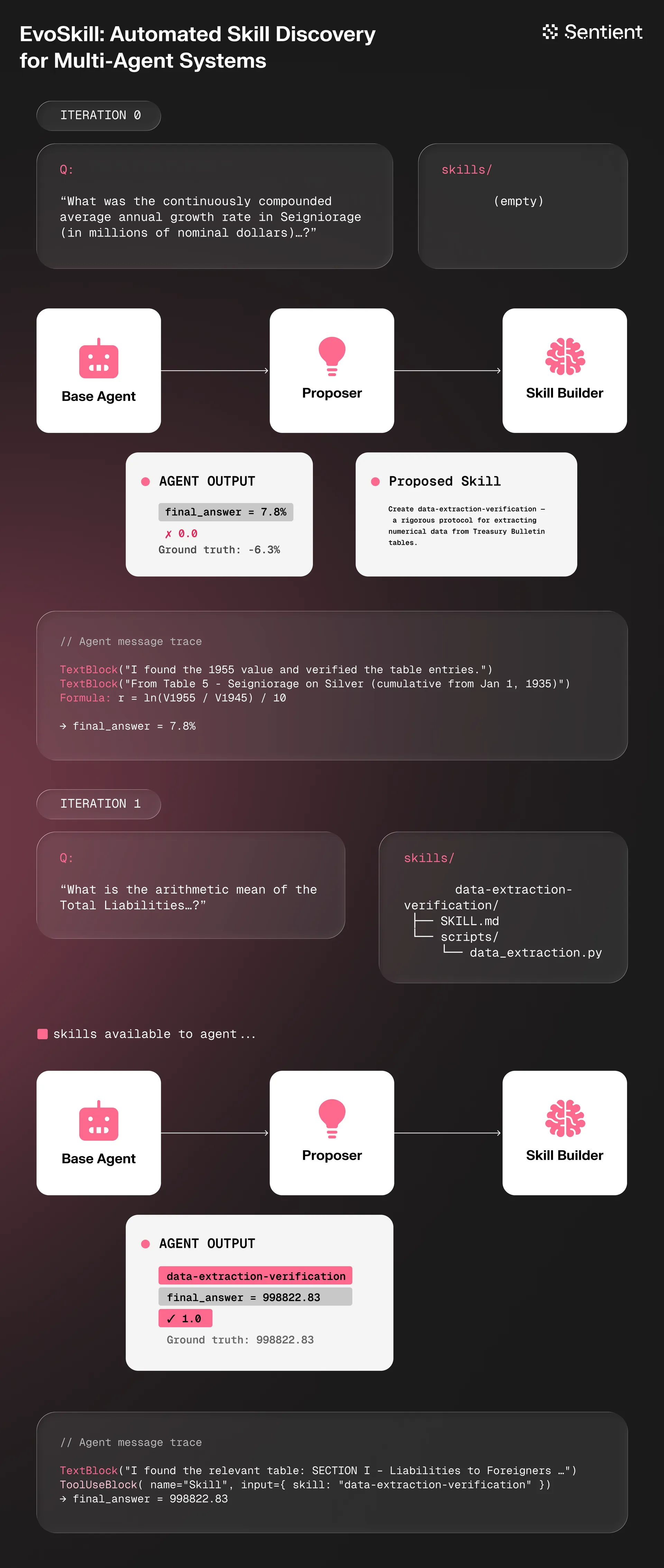
Turn your general AI agents into state-of-the-art specialists with a benchmark and EvoSkill, a toolkit for automatically creating and improving AI skills, compatible with Claude Code, Codex CLI, OpenCode, OpenHands, Goose, Harbor, and more. EvoSkill significantly extends the feedback-driven idea of [GEPA](https://github.com/sentient-agi/gepa-plus) from single-file optimization to complete agent evolution. Instead of only revising one prompt in place like GEPA, EvoSkill proposes multiple skill and prompt mutations jointly, evaluates new variants on held-out data, and has each iteration produce an entirely new agent program.

EvoSkill Architecture

Install in seconds, then run `evoskill init` and `evoskill run` to supercharge any coding agent with AI-created skills and prompts automatically. Depending on the agent, you are free to use any model provider of your choice ([OpenRouter](https://openrouter.ai/models?q=g), [Anthropic](https://platform.claude.com/docs/en/about-claude/models/overview), [OpenAI](https://platform.openai.com/), [Fireworks](https://fireworks.ai/), and more) and any model you want (Claude, GLM, Minimax, Kimi, GPT, Gemini, Qwen, and others). Also join us on [Discord](https://discord.gg/sentientfoundation) to discuss your experience, share suggestions, or show off your work! ## 🤖 Supported agents
Agent Support Notes
Claude Code
OpenCode CLI v1.4.0+ required (structured output support)
OpenHands No native structured output; uses fallback JSON extraction
Goose CLI v1.25.0+ required (skill discovery via summon extension)
Codex CLI Skill discovery via .agents/skills/ symlink
Harbor Containerized task benchmarks with built-in verifiers
## 🎨 Features
Capability Status Explanation
Evolution with a benchmark Skills can be effectively improved against your own or academic benchmarks.
Cross-agent transferability Skills are packaged as reusable folders with instructions, metadata, and helper scripts, compatible with many coding agents.
Cross-model transferability Demonstrated in EvoSkills, skills evolved with a fixed LLM can transfer their performance increase to other LLMs.
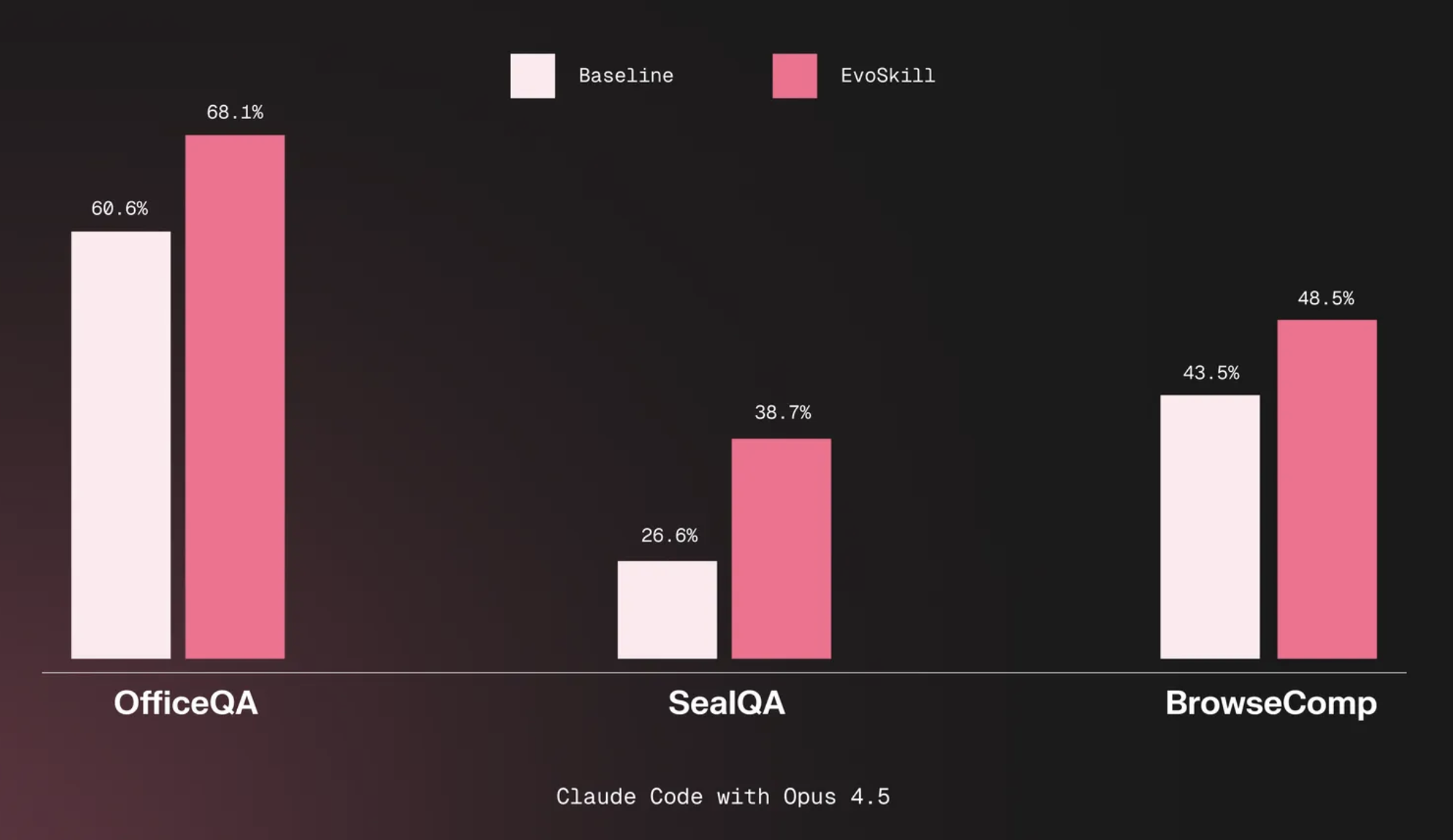
Cross-task transferability Generated skills can be generic enough to transfer across tasks, for instance a SealQA skill improving BrowseComp performance (as shown in EvoSkill).
Evolution without a benchmark 🛠️ An open research direction where benchmarks are generated on the fly (ex. Hermes-Agent self-evolution).
Continuous evolution 🛠️ Integrating the ability to improve skills from regular usage.
## Table of Contents - [Installation](#installation) - [Quickstart](#quickstart) - [Harbor Integration](#harbor-integration) - [CLI Reference](#cli-reference) - [Configuration Reference](#configuration-reference) - [How It Works](#how-it-works) - [Git Branches](#git-branches) - [When the Loop Gets Stuck](#when-the-loop-gets-stuck) - [Python API](#python-api) - [Citation](#citation) - [License](#license) ## Installation **One command (recommended):** ```bash # Clone + install everything (Python deps, uv, optional agent CLIs) curl -fsSL https://raw.githubusercontent.com/sentient-agi/EvoSkill/main/install.sh | bash # Or, if you already cloned the repo: ./install.sh # Install Python deps + all agent harness CLIs (macOS/Homebrew) ./install.sh --all-agents # Install Python deps + specific agent CLIs ./install.sh --agents claude,opencode ``` The installer handles Python 3.12+, [`uv`](https://github.com/astral-sh/uv), and `uv sync` automatically. Harbor is included in the Python package. Agent CLIs are optional — install only the harness you plan to use. **Manual install:** **Requirements:** - Python 3.12+ - [`uv`](https://github.com/astral-sh/uv) (recommended) or `pip` ```bash # Using uv (recommended) uv sync # Or using pip pip install -e . ``` **Agent CLI (install whichever harness you plan to use):** ```bash brew install --cask claude-code # Claude Code brew install opencode # OpenCode (v1.4.0+) brew install --cask codex # Codex CLI brew install block-goose-cli # Goose (v1.25.0+) ``` Harbor is included in the Python install above (`uv sync` / `pip install -e .`). Run this only if you need the Harbor CLI standalone: ```bash pip install harbor # Harbor (containerized benchmarks) ``` **Common auth setup:** ```bash # Anthropic (Claude Code harness) export ANTHROPIC_API_KEY=your-key-here # OpenAI (Codex harness) export OPENAI_API_KEY=your-key-here # OpenRouter (OpenCode / Goose / OpenHands harnesses) export OPENROUTER_API_KEY=your-key-here # Fireworks AI (OpenCode / OpenHands harnesses, LLM scorer) export FIREWORKS_API_KEY=your-key-here ``` OpenRouter-backed evolution runs also accept `LLM_API_KEY`, but `OPENROUTER_API_KEY` is the preferred env var. --- ## Quickstart ### 1. Initialize a project Run `evoskill init` inside any git repository: **CSV dataset (question/answer pairs):** ```bash $ evoskill init EvoSkill — Project Setup Which agent runtime? › claude Dataset source? › CSV Absolute path to dataset CSV? › /path/to/questions.csv Question/input column name? › question Answer column name? › answer Category column name? › Additional data directories? › How do you want to run EvoSkill? › Local ``` **Harbor dataset (containerized benchmark tasks):** ```bash $ evoskill init EvoSkill — Project Setup Which agent runtime? › claude Dataset source? › Harbor Choose a Harbor dataset: › swe-bench/swe-bench-verified Where to store this dataset? › .evoskill/harbor/datasets/swe-bench-verified How do you want to run EvoSkill? › Local ``` This creates `.evoskill/config.toml` and `.evoskill/task.md`. - **Dataset source** — CSV (static question/answer pairs) or Harbor (containerized tasks with built-in verifiers). - **Data dirs** — (CSV only) absolute paths to directories the agent needs. Comma-separated if multiple. - **Execution mode** — Local (direct), Docker (containerized, supports remote via `DOCKER_HOST`), or Daytona (managed cloud sandbox). ### 2. Describe your task Edit `.evoskill/task.md` to describe what the agent should do: ```markdown # Task Answer questions about quarterly financial reports. Return only the numeric answer with units. ## Examples - "What was revenue in Q3?" → "$4.2B" --- # Constraints - Always include units in the answer - Do not explain your reasoning, just return the answer ``` ### 3. Run the loop ```bash evoskill run ``` EvoSkill uses the execution mode you chose during `evoskill init` (local, Docker, or Daytona). You can override with `--docker` or `--remote` flags. EvoSkill prints a live progress table: ```bash Iter Accuracy Δ Skills Frontier Status 1 42.0% — 0 [1] baseline 2 51.3% +9.3% 1 [1, 2] ★ new best 3 49.7% -1.6% 1 [1, 2] discarded ... ``` ### 4. Evaluate and inspect ```bash evoskill eval # score the best program on the validation set evoskill skills # list all discovered skills evoskill diff # see what changed vs baseline evoskill logs # view past run history ``` ### 5. Use the best program After the loop finishes, the best program lives on a git branch: ```bash git branch | grep program/ # list all program branches git checkout program/iter-skill-3 # switch to the best one ``` From there you can inspect what the loop discovered: ```bash cat .claude/program.yaml # system prompt, tools, score ls .claude/skills/ # all learned skills ``` Copy `.claude/program.yaml` and `.claude/skills/` into your deployment to use the evolved agent configuration. ## Harbor Integration [Harbor](https://github.com/harbor-framework/harbor) is a framework for evaluating AI agents against containerized benchmark tasks. EvoSkill integrates with Harbor as an alternative to CSV-based datasets, using Harbor's built-in verifiers as the scoring mechanism. ### How it works Instead of running agents against static CSV questions, Harbor mode: 1. **Loads tasks** from a downloaded Harbor dataset (each task has its own Dockerfile, test harness, and verifier) 2. **Runs `harbor run`** for each task, spawning a sandboxed container where the coding agent solves the task 3. **Reads the verifier reward** from the container output (0.0 to 1.0) 4. **Feeds results** back into EvoSkill's self-improvement loop to evolve better skills ### Setup ```bash pip install harbor # install the Harbor CLI ``` Run `evoskill init` and select **Harbor** as the dataset source. Init will show available datasets from the [Harbor Hub](https://hub.harborframework.com/datasets) and auto-download your selection. ### Configuration When Harbor is selected during init, the following config is auto-generated: ```toml [dataset] source = "harbor" harbor_tasks_root = ".evoskill/harbor/datasets/swe-bench-verified" train_ratio = 0.18 val_ratio = 0.12 [harbor] enabled = true inner_agent = "claude-code" # auto-derived from harness.name inner_model = "anthropic/claude-sonnet-4-6" # auto-derived from harness.model env = "docker" # "docker" for local, "daytona" for remote n_concurrent = 1 timeout_multiplier = 1.0 container_skills_path = "/skills" [scorer] type = "harbor" ``` The `inner_agent` and `inner_model` are automatically derived from your harness selection. The `env` is derived from your execution mode (`docker` for local/Docker, `daytona` for Daytona). ### Filtering tasks You can filter which tasks are included using glob patterns: ```toml [dataset] harbor_include = ["swe-bench/*"] # only include matching tasks harbor_exclude = ["swe-bench/hard*"] # exclude matching tasks harbor_difficulty = ["easy", "medium"] # filter by difficulty metadata harbor_limit = 50 # max number of tasks ``` ### Execution modes | Mode | How Harbor runs tasks | Notes | |------|----------------------|-------| | Local | `harbor run -e docker` | Requires Docker installed locally | | Docker | `harbor run -e docker` | Harbor tasks dir mounted as volume | | Daytona | `harbor run -e daytona` | Harbor uses Daytona API to create task sandboxes. `DAYTONA_API_KEY` is forwarded automatically. | ## CLI Reference | Command | Description | |---------|-------------| | `evoskill init` | Initialize a new project (creates `.evoskill/`) | | `evoskill run` | Run the self-improvement loop | | `evoskill run --docker` | Run in a Docker container | | `evoskill run --remote` | Run on a Daytona sandbox | | `evoskill eval` | Evaluate the best program on the validation set | | `evoskill skills` | List all skills discovered so far | | `evoskill diff` | Diff baseline vs best, or between two iterations | | `evoskill logs` | Show recent run history | | `evoskill reset` | Delete all program branches and start fresh | | `evoskill remote status` | Check progress of a remote run | | `evoskill remote logs` | View logs from a remote run | | `evoskill remote download` | Pull results from a completed remote run | | `evoskill remote stop` | Stop and clean up a remote run | ### `evoskill run` ```bash evoskill run [--continue] [--verbose] [--quiet] [--config PATH] [--docker] [--remote] [--rebuild] ``` | Flag | Description | |------|-------------| | `--continue` | Resume from the existing frontier instead of starting fresh. | | `--verbose` | Show per-sample pass/fail results | | `--quiet` | Show the progress table only, suppress proposer output | | `--config PATH` | Load a specific config TOML file instead of `.evoskill/config.toml` | | `--docker` | Run inside a Docker container (builds image from `Dockerfile` if needed) | | `--remote` | Run on a Daytona sandbox (requires `[remote]` config) | | `--rebuild` | Force rebuild the Docker image before running | `evoskill eval` also accepts `--config PATH`. ### `evoskill diff` ```bash evoskill diff # baseline → current best evoskill diff 3 7 # iteration 3 vs iteration 7 ``` The diff is scoped to the `.claude/` directory — it shows changes to skills and the system prompt, not your source code. ### `evoskill logs` ```bash evoskill logs # last 5 runs (default) evoskill logs --last 10 # last 10 runs ``` ### `evoskill reset` ```bash evoskill reset # prompts for confirmation ``` Deletes all `program/*` branches, `frontier/*` tags, the loop checkpoint, and feedback history. Your source code, `config.toml`, `task.md`, and any skills in `.claude/skills/` are left untouched. ## Configuration Reference `evoskill init` creates `.evoskill/config.toml`. All fields are optional — defaults are shown below. Relative dataset and data directory paths are resolved from the project root, meaning the directory containing `.evoskill`. ```toml [harness] name = "claude" # "claude", "opencode", "codex", "goose", or "openhands" model = "sonnet" # Claude alias, Codex model name, or provider/model for OpenCode/Goose/OpenHands data_dirs = ["/absolute/path/to/data_dir"] # extra directories the agent can read [evolution] mode = "skill_only" # "skill_only" or "prompt_only" iterations = 20 frontier_size = 3 concurrency = 4 no_improvement_limit = 5 [dataset] path = "data/questions.csv" # relative to project root, or an absolute path question_column = "question" ground_truth_column = "ground_truth" category_column = "" # optional, for stratified sampling train_ratio = 0.18 val_ratio = 0.12 [scorer] type = "multi_tolerance" # see scorer types below ``` Alternate configs can live next to the default config: ```text .evoskill/config.toml .evoskill/config.openrouter.toml ``` Run with an explicit config: ```bash evoskill eval --config .evoskill/config.openrouter.toml evoskill run --config .evoskill/config.openrouter.toml ``` **Common evolution model setups:** Anthropic: ```toml [harness] name = "claude" model = "claude-sonnet-4-6" ``` OpenAI: ```toml [harness] name = "codex" model = "gpt-5" ``` OpenRouter: ```toml [harness] name = "opencode" model = "openrouter/openai/gpt-5-mini" ``` Fireworks AI: ```toml [harness] name = "openhands" # or "opencode" model = "fireworks_ai/accounts/fireworks/models/llama-v3p1-70b-instruct" ``` Notes: - `claude` is Anthropic-only. - `codex` uses bare OpenAI model names such as `gpt-5`, `o3`, or `gpt-5.1-codex-mini`. - `opencode`, `goose`, and `openhands` are multi-provider harnesses and can also use Claude and OpenAI models. - `opencode`, `goose`, and `openhands` accept `provider/model` strings such as `anthropic/claude-sonnet-4-6`, `openai/gpt-5`, or `openrouter/openai/gpt-5-mini`. - Fireworks AI uses `FIREWORKS_API_KEY`. OpenHands (litellm) expects the `fireworks_ai/` prefix while OpenCode (models.dev) expects `fireworks-ai/`. Goose has no built-in Fireworks provider — use a manual OpenAI-compatible configuration. ### Scorer types | Type | Description | |------|-------------| | `multi_tolerance` | Flexible string matching: exact, numeric tolerance, list overlap (default) | | `exact` | Case-insensitive exact string match | | `llm` | LLM-as-judge grading with a custom rubric | | `script` | Shell script scorer — receives `{predicted}` and `{expected}` as variables | | `harbor` | Reads reward from Harbor's built-in verifier (auto-set when dataset source is Harbor) | **LLM scorer options:** ```toml [scorer] type = "llm" rubric = "Award 1.0 if the answer is numerically correct within 5%, 0.0 otherwise." model = "claude-sonnet-4-6" # defaults to claude-sonnet-4-6 provider = "anthropic" # "anthropic", "openai", "google", "openrouter", or "fireworks" ``` For OpenRouter-backed scoring, set `provider = "openrouter"` and use an OpenRouter model ID such as `openai/gpt-5-mini` or `google/gemini-2.5-flash`. Authentication uses `OPENROUTER_API_KEY` and falls back to `LLM_API_KEY` if needed. For Fireworks-backed scoring, set `provider = "fireworks"` and use a Fireworks model ID such as `accounts/fireworks/models/llama-v3p1-70b-instruct`. Authentication uses `FIREWORKS_API_KEY`. **Script scorer options:** ```toml [scorer] type = "script" command = "python score.py --predicted {predicted} --expected {expected}" ``` ## Remote Execution EvoSkill runs can take hours. Use Docker or Daytona to run on remote hardware and free up your machine. ### Docker (BYOC) Build the image from the included `Dockerfile`: ```bash docker build -t evoskill . evoskill run --docker ``` To run on a remote server, point Docker to it: ```bash export DOCKER_HOST=ssh://user@your-server evoskill run --docker ``` Monitor and stop: ```bash docker compose -f .evoskill/docker-compose.yml logs -f docker compose -f .evoskill/docker-compose.yml down ``` ### Daytona (Managed) Install the Daytona SDK and set your API key: ```bash pip install daytona export DAYTONA_API_KEY=your-daytona-key ``` Build and push your image (Daytona runs x86 sandboxes, so cross-compile if you're on Apple Silicon): ```bash # On Apple Silicon (ARM) — cross-compile for x86 docker buildx build --platform linux/amd64 -t your-registry/evoskill:latest --push . # On x86 Linux — standard build docker build -t evoskill . docker tag evoskill your-registry/evoskill:latest docker push your-registry/evoskill:latest ``` Set in `.evoskill/config.toml`: ```toml [remote] target = "daytona" [remote.daytona] image = "your-registry/evoskill:latest" cpu = 4 # max 4 vCPUs per sandbox memory = 8 # max 8 GB per sandbox disk = 10 # max 10 GB per sandbox timeout = 0 # 0 = no auto-stop, or minutes until auto-stop ``` The `DAYTONA_API_KEY` can also be set as `api_key` under `[remote.daytona]`, but the env var is preferred to avoid committing secrets. Then: ```bash evoskill run --remote # launch evoskill remote status # check progress evoskill remote logs -f # stream live output evoskill remote logs # view last output evoskill remote download # pull results when done evoskill remote stop # cancel and clean up ``` ## How It Works

EvoSkill Architecture

The self-improvement loop follows five stages: 1. **Base Agent** — Attempts benchmark questions using the current best program (system prompt + skills). 2. **Proposer** — Analyzes failure cases and proposes targeted skill or prompt changes to address them. 3. **Generator** — Creates the proposed changes: writes new skill files or rewrites the system prompt. 4. **Evaluator** — Scores the new program variant on a held-out validation set to measure improvement. 5. **Frontier** — Tracks the top-N performing programs as git branches; the best survive to the next iteration. This cycle repeats for a configurable number of iterations, automatically converging on stronger agent configurations. ## Git Branches EvoSkill uses your repo's git history to version every program it creates. During a run it automatically creates and switches between branches — you don't need to do anything. After a run your branch layout will look like: ``` main ← your code, untouched program/base ← initial baseline agent program/iter-skill-1 ← after iteration 1 program/iter-skill-2 ← after iteration 2 ... ``` Frontier members are marked with `frontier/*` tags. EvoSkill only ever writes to branches prefixed `program/`, so there is no risk of it touching your working branch. ## When the Loop Gets Stuck If accuracy stops improving, try the following: 1. **Check the feedback log** — `.claude/feedback_history.md` records what the proposer tried each iteration and why it succeeded or failed. 2. **Resume instead of restarting** — `evoskill run --continue` picks up from the last frontier rather than discarding progress. 3. **Reset and start fresh** — `evoskill reset` clears all branches and lets you start over with a revised `task.md`. ## Python API For programmatic usage, EvoSkill exposes a high-level Python API. ### `EvoSkill` ```python from src.api import EvoSkill evo = EvoSkill( task="sealqa", model="sonnet", mode="skill_only", max_iterations=20, frontier_size=3, concurrency=4, train_ratio=0.18, val_ratio=0.12, continue_mode=False, ) result = await evo.run() # Synchronous usage result = EvoSkill(task="base").run_sync() ``` ### `EvalRunner` ```python from src.api import EvalRunner summary = await EvalRunner( task="sealqa", model="sonnet", max_concurrent=8, ).run() ``` ## Citation If you use EvoSkill in your research, please cite the [original paper](https://arxiv.org/abs/2603.02766): ```bibtex @misc{alzubi2026evoskillautomatedskilldiscovery, title={EvoSkill: Automated Skill Discovery for Multi-Agent Systems}, author={Salaheddin Alzubi and Noah Provenzano and Jaydon Bingham and Weiyuan Chen and Tu Vu}, year={2026}, eprint={2603.02766}, archivePrefix={arXiv}, primaryClass={cs.AI}, url={https://arxiv.org/abs/2603.02766}, } ``` ## License This project is licensed under the Apache 2.0 License - see the [LICENSE](LICENSE) file for details.