# macOS - Matchering 2.0 Docker Image
### [NEW! Try Matchering 2.0 WITHOUT Installation!](https://www.youtube.com/watch?v=Aw0nH6QqAck)
**[Docker Desktop for Mac]** requires **Apple macOS Mojave 10.14 or newer**.
1. Download and install **[Docker Desktop for Mac with Intel Chip]** or **[Docker Desktop for Mac with Apple M1 Chip]**. Use the **Docker Desktop** shortcut if it didn't start automatically
2. Wait for **Docker** to load: its menu bar icon will stop flashing. You can simply close the **Login with your Docker ID** window when it appears
3. **IMPORTANT**: Increase the amount of **Memory** used by **Docker** from **2.00 GB** to **4.00 GB**:
- Open the **Docker Desktop** menu by clicking the **Docker menu bar icon**
- Select **Preferences**
- Go to **Resources > Advanced** tab, increase **Memory** to **4.00 GB** and click **Apply & Restart**
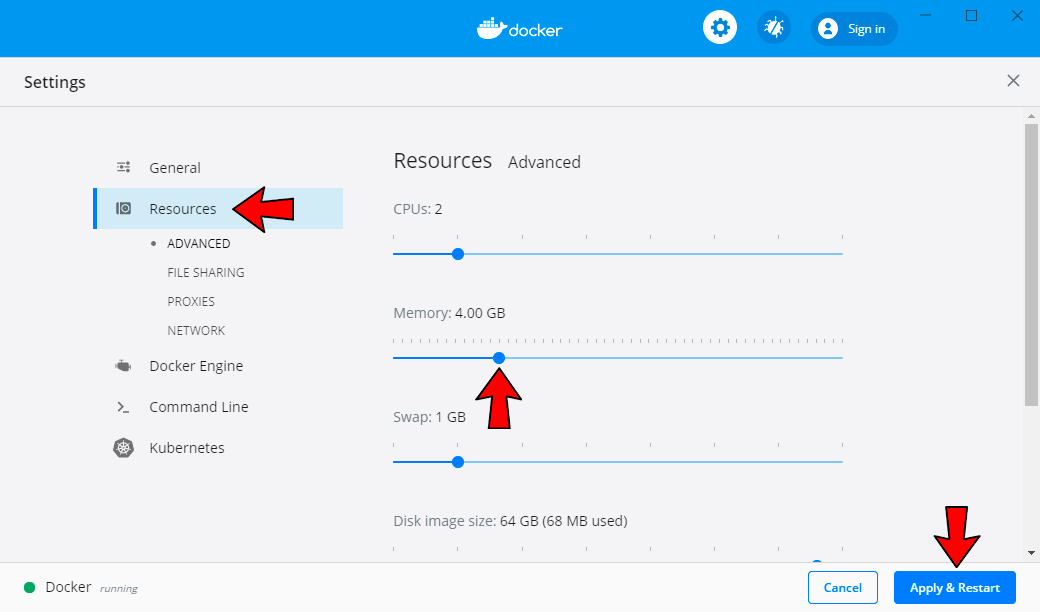
*If you don't have **Advanced** tab, that's fine. Just keep going*
4. Wait for **Docker** to load again
5. Press ⌘ Command + Space to open the **Spotlight** menu. Type `Terminal` and then hit ↵ Return
6. Copy and paste this command into the **Terminal**, then press ↵ Return:
```
docker run -dp 8360:8360 -v mgw-data:/app/data --name mgw-app --restart always sergree/matchering-web
```
7. Wait for **Matchering 2.0** to load. It will print `Status: Downloaded newer image...`
8. Enjoy your **Matchering 2.0** at 🎉 **http://127.0.0.1:8360** 🎉 It will also run automatically at startup
### IMPORTANT: Read the [Keep the Privacy] page if you would like to host our web application publicly!
## 💓 WhatBPM
Looking for the perfect BPM or key for a new EDM track?
**[Check out WhatBPM!](https://sergree.github.io/whatbpm)**
A completely free open-source web service from the author of Matchering.
[Docker Desktop for Mac]: https://hub.docker.com/editions/community/docker-ce-desktop-mac
[Docker Desktop for Mac with Intel Chip]: https://desktop.docker.com/mac/stable/amd64/Docker.dmg
[Docker Desktop for Mac with Apple M1 Chip]: https://desktop.docker.com/mac/stable/arm64/Docker.dmg
[Docker Toolbox]: https://docs.docker.com/toolbox/overview/
[Keep the Privacy]: https://github.com/sergree/matchering/wiki/Keep-the-Privacy