# Spotify Guide
> [Español](spotify.es.md) | Legal notes: [LEGAL.md](../LEGAL.md)
Reverbic integrates Spotify in two complementary ways:
- **Remote Control** — search, play/pause, seek, volume, and device transfer through the official [Spotify Web API](https://developer.spotify.com/documentation/web-api). Audio plays on another Spotify client (desktop, mobile, web); Reverbic acts as the remote.
- **Native playback** — audio streams inside Reverbic itself through [librespot](https://github.com/librespot-org/librespot), an open-source Spotify Connect library.
The *Playback mode* setting chooses between **Auto** (native when possible, remote otherwise), **Remote**, or **Native**. **Spotify Premium is required** in both cases.
## Setup
Each user registers their own Spotify application (see [LEGAL.md](../LEGAL.md)); the account that owns it needs Premium.
1. Sign in at the [Spotify Developer Dashboard](https://developer.spotify.com/dashboard) and click **Create app**.
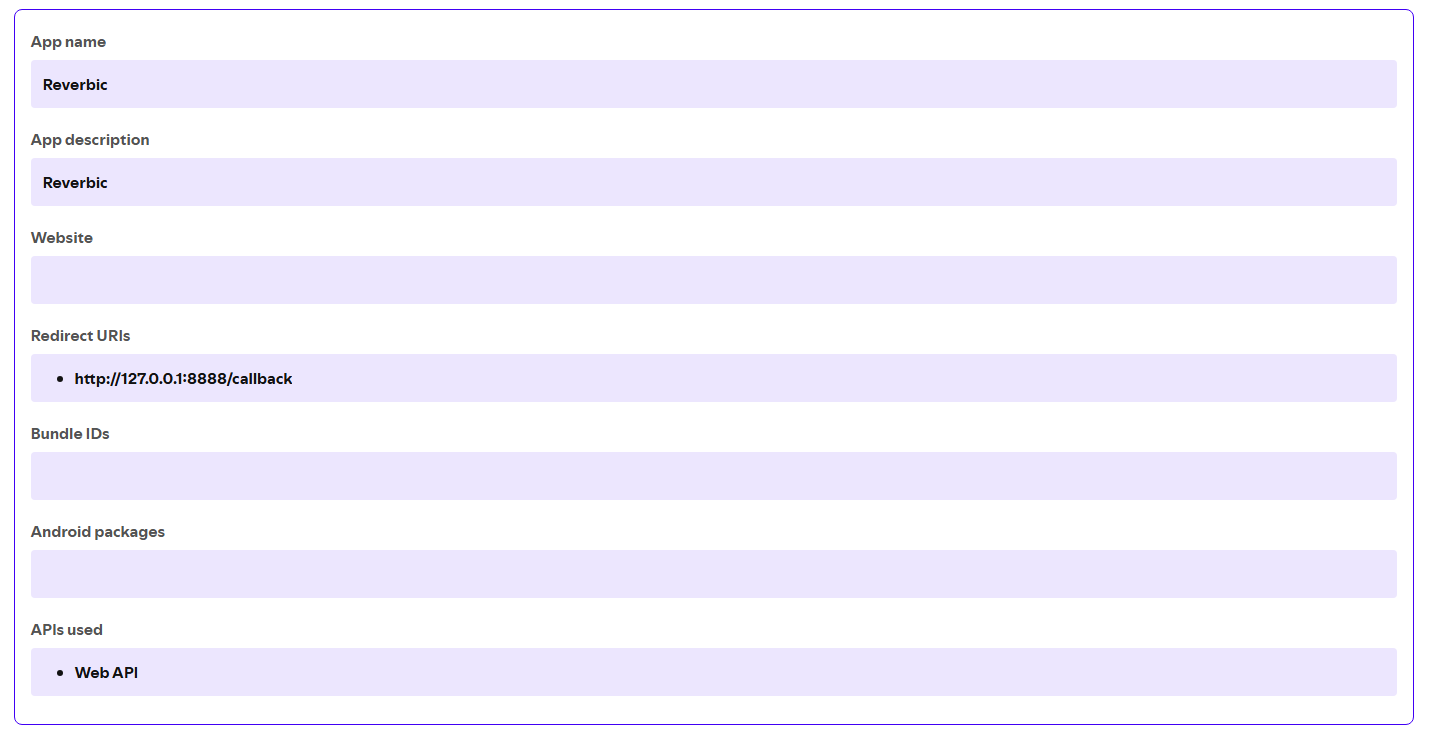
2. Fill **App name** and **App description** with anything you like (e.g. "Reverbic").
3. In **Redirect URIs**, add exactly:
```
http://127.0.0.1:8888/callback
```
4. Under **Which API/SDKs are you planning to use?**, check **Web API**, accept the Developer Terms, and click **Save**. The app's settings should end up looking like this:
 5. On the app's page, open **Settings** → **Basic Information** and copy the **Client ID**:
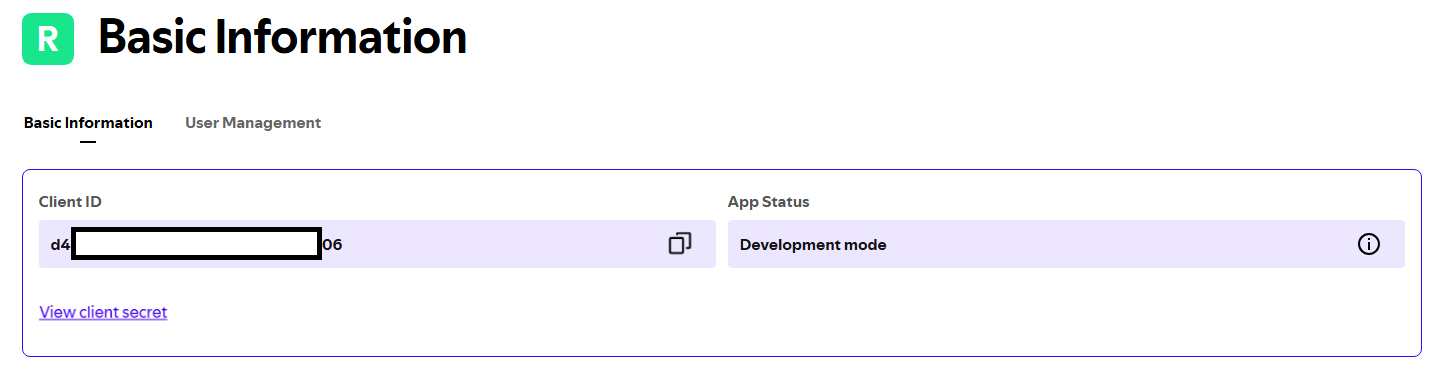 6. In Reverbic, open Settings, paste it into **Spotify Client ID**, then connect from the Spotify tab — your browser opens so you can authorize the app.
The app stays in Spotify's *Development Mode*, which is fine for personal use. Authentication uses the official OAuth PKCE flow; the refresh token is stored in the operating system's keyring, never in plain text.
## Useful shortcuts
| Key | Action |
| --- | --- |
| `↵` / `Space` | Play / pause-resume |
| `Alt+L` | Like the current track |
| `Ctrl+D` | Cycle playback device (Remote mode) |
| `←→` | Switch sub-tabs (search, liked, playlists) |
| `Alt+D` | Disconnect the Spotify session |
## Risks and limitations (outside Reverbic's control)
- **2026 policy changes**: Spotify's Widevine DRM enforcement and stricter API access target unofficial Spotify Connect clients like librespot. Native playback could be blocked or degraded at any time, with possible temporary restrictions on the account that uses it. **Remote Control mode does not depend on librespot** and is the reasonable fallback. Details in [LEGAL.md](../LEGAL.md).
- **Developer Mode quotas**: the Web API app you register is subject to Spotify's Developer Mode terms (including the Premium requirement for the app owner), which can change without notice.
## Common issues
- **"No active device" in Remote mode** — Spotify needs at least one open client (desktop, mobile, web) to receive commands. Open one and use `Ctrl+D` to target it.
- **Playback stops working after a long time** — the session token expired or was revoked; disconnect (`Alt+D`) and reconnect from the Spotify tab.
- **Native playback fails but Remote works** — usually a librespot-side restriction (see risks above); switch *Playback mode* to **Remote**.
6. In Reverbic, open Settings, paste it into **Spotify Client ID**, then connect from the Spotify tab — your browser opens so you can authorize the app.
The app stays in Spotify's *Development Mode*, which is fine for personal use. Authentication uses the official OAuth PKCE flow; the refresh token is stored in the operating system's keyring, never in plain text.
## Useful shortcuts
| Key | Action |
| --- | --- |
| `↵` / `Space` | Play / pause-resume |
| `Alt+L` | Like the current track |
| `Ctrl+D` | Cycle playback device (Remote mode) |
| `←→` | Switch sub-tabs (search, liked, playlists) |
| `Alt+D` | Disconnect the Spotify session |
## Risks and limitations (outside Reverbic's control)
- **2026 policy changes**: Spotify's Widevine DRM enforcement and stricter API access target unofficial Spotify Connect clients like librespot. Native playback could be blocked or degraded at any time, with possible temporary restrictions on the account that uses it. **Remote Control mode does not depend on librespot** and is the reasonable fallback. Details in [LEGAL.md](../LEGAL.md).
- **Developer Mode quotas**: the Web API app you register is subject to Spotify's Developer Mode terms (including the Premium requirement for the app owner), which can change without notice.
## Common issues
- **"No active device" in Remote mode** — Spotify needs at least one open client (desktop, mobile, web) to receive commands. Open one and use `Ctrl+D` to target it.
- **Playback stops working after a long time** — the session token expired or was revoked; disconnect (`Alt+D`) and reconnect from the Spotify tab.
- **Native playback fails but Remote works** — usually a librespot-side restriction (see risks above); switch *Playback mode* to **Remote**.