[](https://twitter.com/sfyc23)
[](https://weibo.com/sfyc23)
[](https://android-arsenal.com/api?level=21)
[](https://jitpack.io/#sfyc23/CountTimeProgressView)
[](LICENSE)
# CountTimeProgressView
> [中文](README.md) | **English**
**CountTimeProgressView** is a Kotlin-based Android circular countdown progress view. Drop-in, zero runtime dependency, with first-class support for both classic **View (XML)** and **Jetpack Compose**. It ships a full state machine, lifecycle-aware pause/resume, warning threshold, and resume-from-progress out of the box.
Minimum supported version: **Android 5.0 (API 21)**.
---
## Preview
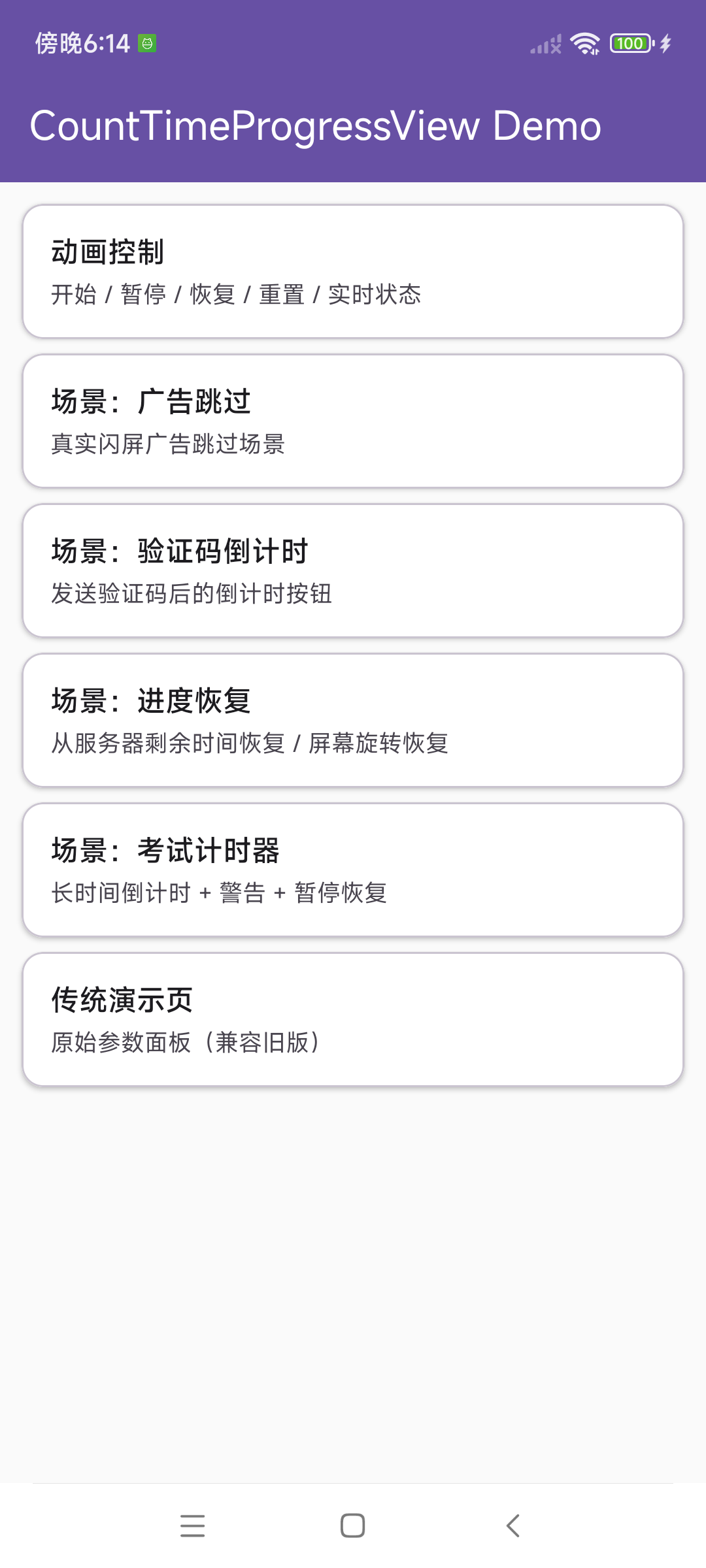
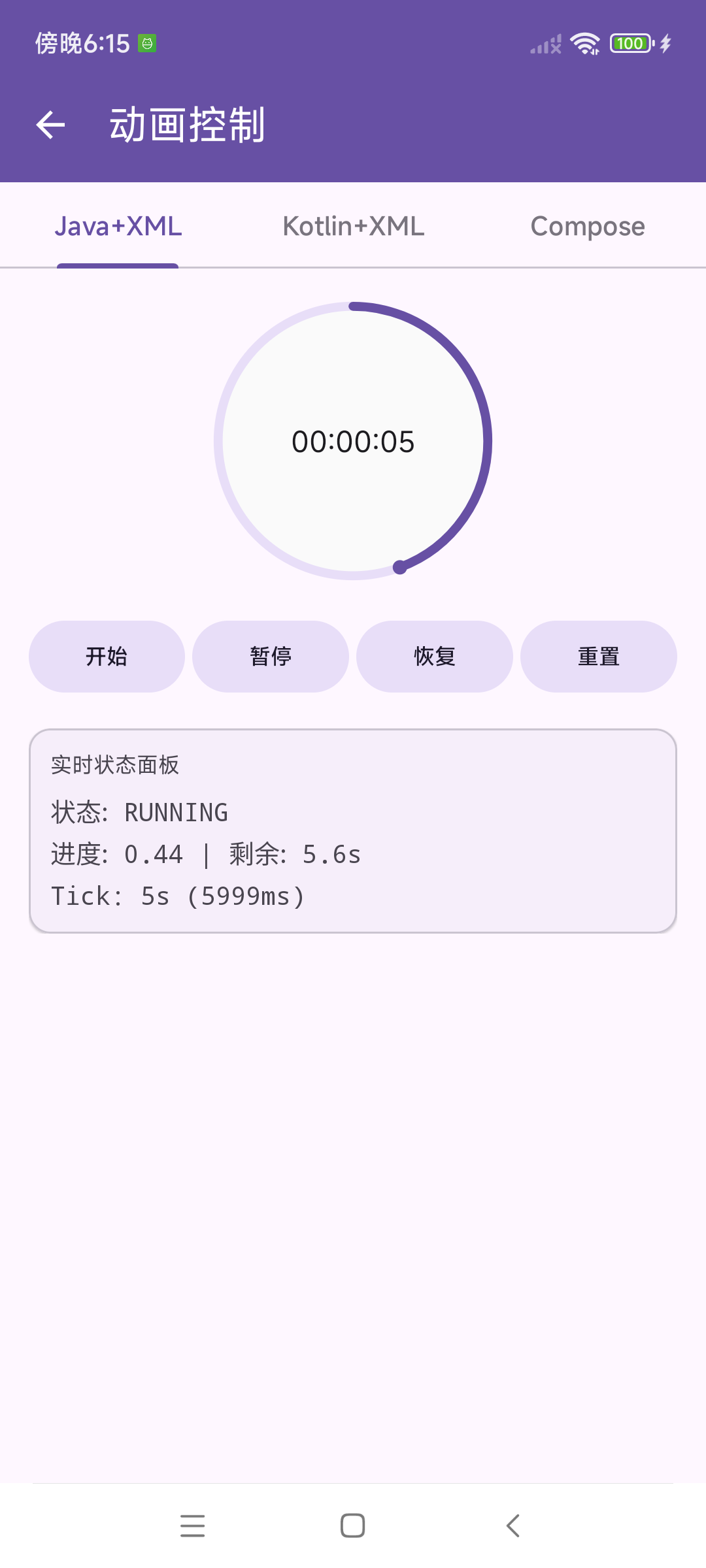
The demo app includes real-world scenarios: **Ad Skip / Verification Code / Progress Resume / Exam Timer**, each with `Java + XML`, `Kotlin + XML`, and `Jetpack Compose` implementations.
---
## Features
- **One-line integration** — classic View / Jetpack Compose, no AppCompat required
- **Full state machine** — `IDLE` → `RUNNING` → `PAUSED` / `CANCELED` / `FINISHED`, all in a single listener
- **Multiple text styles** — `jump`, `second`, `clock` (mm:ss), `none`, plus custom `textFormatter`
- **Warning threshold** — auto-change color and fire a callback in the last N seconds (e.g. red in the final 3s)
- **Per-second tick** — fires only on second change; perfect for OTP buttons and ad-skip buttons
- **Resume anywhere** — start from `fromProgress` or `fromRemaining` for list recycling / server-synced countdowns
- **Lifecycle-aware** — `bindLifecycle(owner)` auto pauses in background and resumes on foreground
- **Rich visual customization** — gradient progress bar, `StrokeCap`, marker ball, custom interpolator
- **Click delay** — block clicks for the first N seconds with `disabledText` (ideal for splash ads)
- **Accessibility-friendly** — automatic `contentDescription`, `wrap_content` defaults to 84dp
---
## Install
### Step 1. Add the JitPack repository
In your root `settings.gradle` (or top-level `build.gradle`):
```groovy
dependencyResolutionManagement {
repositoriesMode.set(RepositoriesMode.FAIL_ON_PROJECT_REPOS)
repositories {
google()
mavenCentral()
maven { url 'https://jitpack.io' }
}
}
```
### Step 2. Add the dependency
In your app module `build.gradle`:
```groovy
dependencies {
implementation 'com.github.sfyc23:CountTimeProgressView:2.1.0'
}
```
> Releases are published to JitPack automatically on every git tag. See the badge at the top for the latest version.
---
## Quick Start
### Option 1. XML layout
```xml
```
### Option 2. Kotlin
```kotlin
with(countTimeProgressView) {
countTime = 6000L
textStyle = CountTimeProgressView.TEXT_STYLE_SECOND
titleCenterText = "Skip (%s)s"
// v2.1 Turn red in the last 3 seconds
warningTime = 3000L
warningColor = Color.parseColor("#FF3B30")
// v2.1 Not clickable for the first 2 seconds
clickableAfterMillis = 2000L
disabledText = "Please wait"
setOnCountdownEndListener {
Toast.makeText(context, "Time's up", Toast.LENGTH_SHORT).show()
}
setOnClickCallback { overageTime ->
if (isRunning) cancelCountTimeAnimation() else startCountTimeAnimation()
}
// Unified state listener
setOnStateChangedListener { state ->
Log.d("CTPV", "state=$state") // IDLE / RUNNING / PAUSED / CANCELED / FINISHED
}
// Fires only on second change — great for OTP / ad-skip buttons
setOnTickListener { remainingMillis, remainingSeconds ->
Log.d("CTPV", "Remaining: ${remainingSeconds}s")
}
setOnWarningListener { remainingMillis ->
Log.d("CTPV", "About to finish!")
}
// Fires on every animation frame
addOnProgressChangedListener { progress, remainingMillis ->
Log.d("CTPV", "progress=$progress, remaining=$remainingMillis")
}
// Auto pause / resume with lifecycle
bindLifecycle(this@SimpleActivity)
startCountTimeAnimation()
// Or start from a specific progress / remaining time:
// startCountTimeAnimation(fromProgress = 0.5f)
// startCountTimeAnimationFromRemaining(3000L)
}
```
### Option 3. Java
```java
countTimeProgressView.setCountTime(5000L);
countTimeProgressView.setTextStyle(CountTimeProgressView.TEXT_STYLE_CLOCK);
countTimeProgressView.setWarningTime(3000L);
countTimeProgressView.setWarningColor(Color.parseColor("#FF3B30"));
countTimeProgressView.setClickableAfterMillis(2000L);
countTimeProgressView.setDisabledText("Please wait");
countTimeProgressView.setOnCountdownEndListener(() ->
Toast.makeText(this, "Time's up", Toast.LENGTH_SHORT).show());
countTimeProgressView.setOnStateChangedListener(state ->
Log.d("CTPV", "state=" + state));
countTimeProgressView.setOnTickListener((remainingMillis, remainingSeconds) ->
Log.d("CTPV", "Remaining: " + remainingSeconds + "s"));
countTimeProgressView.bindLifecycle(this);
countTimeProgressView.startCountTimeAnimation();
```
### Option 4. Jetpack Compose
The library ships a lightweight Compose adapter `CountTimeProgressViewCompose` (no Compose runtime dependency required). Use it directly inside `AndroidView`:
```kotlin
AndroidView(
modifier = Modifier.size(84.dp),
factory = { ctx ->
CountTimeProgressViewCompose.create(ctx) {
countTime = 5000L
textStyle = CountTimeProgressView.TEXT_STYLE_SECOND
warningTime = 3000L
warningColor = Color.RED
setOnStateChangedListener { state -> /* ... */ }
setOnTickListener { _, sec -> /* ... */ }
startCountTimeAnimation()
}
},
update = { view ->
CountTimeProgressViewCompose.update(view) {
// React to Compose State changes here
}
}
)
```
---
## Typical Use Cases
| Scenario | Recommended Setup |
| :--- | :--- |
| **Splash ad skip button** | `textStyle=jump` + `clickableAfterMillis` + `disabledText` to prevent mis-taps |
| **OTP / Verification code** | `textStyle=second` + `setOnTickListener` (only on second change) |
| **Server-synced countdown** | `startCountTimeAnimationFromRemaining(remainMs)` |
| **List item countdown** | `startCountTimeAnimation(fromProgress = 0.7f)` + `bindLifecycle` |
| **Exam / long timer** | `textStyle=clock` (mm:ss) + `warningTime` to turn red near the end |
| **Jetpack Compose screens** | `AndroidView` + `CountTimeProgressViewCompose.create` |
---
## State Machine
```
startCountTimeAnimation()
IDLE ─────────────────────────────▶ RUNNING
▲ │ ▲ │
│ resetCountTimeAnimation() │ │ │ pause / resume
│ │ │ ▼
└─────────── CANCELED / FINISHED ─── PAUSED
```
- `IDLE` — initial / after reset
- `RUNNING` — ticking
- `PAUSED` — manual or lifecycle-driven pause
- `CANCELED` — stopped via `cancelCountTimeAnimation()`
- `FINISHED` — naturally ended; `OnCountdownEndListener` fires here
Use `setOnStateChangedListener { state -> ... }` to observe every transition in one place.
---
## Full XML Attributes
| Attribute | Format | Description | Default |
| :--- | :--- | :--- | :--- |
| `backgroundColorCenter` | color | Center background color | `#00BCD4` |
| `borderWidth` | dimension | Ring stroke width | `3dp` |
| `borderDrawColor` | color | Progress color | `#4dd0e1` |
| `borderBottomColor` | color | Track color | `#D32F2F` |
| `markBallWidth` | dimension | Marker ball width | `6dp` |
| `markBallColor` | color | Marker ball color | `#536DFE` |
| `markBallFlag` | boolean | Show marker ball | `true` |
| `startAngle` | float | Start angle (0 = top) | `0f` |
| `clockwise` | boolean | Clockwise or counter-clockwise | `true` |
| `countTime` | integer | Total time in milliseconds | `5000` |
| `textStyle` | enum | `jump` / `second` / `clock` / `none` | `jump` |
| `titleCenterText` | string | Center text (for `jump`) | `"jump"` |
| `titleCenterColor` | color | Center text color | `#FFFFFF` |
| `titleCenterSize` | dimension | Center text size | `16sp` |
| `autoStart` | boolean | Auto-start on attach | `false` |
| `finishedText` | string | Text shown when finished | `-` |
| `showCenterText` | boolean | Whether to show center text | `true` |
| `strokeCap` | enum | `butt` / `round` / `square` | `butt` |
| `gradientStartColor` | color | Gradient start color | `-` |
| `gradientEndColor` | color | Gradient end color | `-` |
| `warningTime` | integer | Warning threshold in ms (fires when remaining ≤ value) | `0` |
| `warningColor` | color | Progress color in warning state | `#FF3B30` |
| `clickableAfter` | integer | Ms after start before clicks are accepted | `0` |
| `disabledText` | string | Text shown during non-clickable period | `-` |
> **Unit note**: `borderWidth` and `markBallWidth` setters take a **dp** value and store pixels internally. `titleCenterTextSize` takes an **sp** value. For raw pixel values, use `setBorderWidthPx()`, `setMarkBallWidthPx()`, `setTitleCenterTextSizePx()`.
---
## API Cheatsheet
| Method | Description |
| :--- | :--- |
| `startCountTimeAnimation()` | Start from the beginning |
| `startCountTimeAnimation(fromProgress: Float)` | Start from a `0f..1f` progress |
| `startCountTimeAnimationFromRemaining(millis: Long)` | Start with a given remaining time |
| `pauseCountTimeAnimation()` / `resumeCountTimeAnimation()` | Pause / resume |
| `cancelCountTimeAnimation()` | Cancel (enters `CANCELED`) |
| `resetCountTimeAnimation()` | Reset back to `IDLE` |
| `bindLifecycle(owner)` | Bind lifecycle, auto pause/resume |
| `setOnCountdownEndListener { }` | Fired when countdown finishes naturally |
| `setOnStateChangedListener { state -> }` | Unified state listener |
| `setOnTickListener { ms, sec -> }` | Fires only on second change |
| `setOnWarningListener { ms -> }` | Fires when entering warning threshold |
| `setOnClickCallback { overage -> }` | View clicked, with remaining time |
| `addOnProgressChangedListener { p, ms -> }` | Per-frame progress callback |
| `setGradientColors(start, end)` | Set gradient progress color |
| `textFormatter = { millis -> "..." }` | Custom center text formatter |
---
## Changelog
### 2.1.0 (2026-04-16)
- Added `CountdownState` state machine (IDLE / RUNNING / PAUSED / CANCELED / FINISHED) with `setOnStateChangedListener`
- Added per-second tick callback `setOnTickListener` (fires only on second change)
- Added warning threshold `warningTime` / `warningColor` / `setOnWarningListener` (XML supported)
- Added resume-from-progress: `startCountTimeAnimation(fromProgress)` and `startCountTimeAnimationFromRemaining(millis)`
- Added click-delay `clickableAfterMillis` / `disabledText` (XML supported)
- Fixed `wasRunning` restore: animation auto-resumes from saved progress after rotation
- Added lifecycle-aware auto pause/resume via `bindLifecycle(owner)`
- Removed unused `displayText` dead code
### 2.0.0 (2026-04-15)
- Added **Pause / Resume / Reset** animation APIs
- Added `progress` getter/setter and per-frame progress callback
- Added **gradient progress bar** (SweepGradient, XML supported)
- Added **StrokeCap**, **Interpolator**, **autoStart**, **finishedText**, **showCenterText**
- Added **Jetpack Compose adapter** `CountTimeProgressViewCompose`
- Added **SavedState** and **accessibility** support
- Added `wrap_content` support with 84dp default
- Split callbacks into `OnCountdownEndListener` + `setOnClickCallback()` (lambda-friendly)
- Migrated to AndroidX; `minSdk` raised to 21
- Library module no longer depends on AppCompat
- See full notes in [CHANGELOG.md](CHANGELOG.md)
### Older Versions
- **1.1.3 (2017-11-11)** — Rewritten in Kotlin
- **1.1.1 (2017-03-27)** — Fix: stop running on exit
- **1.1.0 (2017-02-07)** — Clockwise animation support
- **1.0.0 (2016-12-20)** — First release
---
## Contributing
Issues and PRs are welcome! Please read [CONTRIBUTING.md](CONTRIBUTING.md) before submitting.
## License
Licensed under the [Apache License 2.0](LICENSE).