# @shadcn/lint
**Write design system rules that agents can verify.**
`.
```tsx
Submit
```
```text
TS2353: Object literal may only specify known properties, and 'padding' does not exist in type 'Pick'.
```
The rule works. But this error only tells the agent that padding is not
allowed. It doesn’t tell it how to size the Button.
With `@shadcn/lint`, the same rule comes with **guidance from your design
system**:
```tsx
Submit
```
```text
"p-4" is not allowed on : owns its spacing.
Use a size (sm, lg), or margin here or gap on the parent for space around it.
Add a size in components/ui/button.tsx only if the design explicitly calls for one.
```
### You decide what can change
Expressing these policies in TypeScript can take complex types. With
`@shadcn/lint`, you configure them without changing your component API.
Here are some examples.
**Allow spacing with margin. Allow full width. Keep size and shape in the Button.**
```js
"shadcn/no-restyle": ["error", {
allow: ["layout"],
contracts: [
{ pattern: "^Button$", allow: ["w-full", "mt-*", "mb-*"] },
],
}]
```
```tsx
// Allowed: use a size and let the page control placement and full width.
Save changes
```
It sees:
```text
Use the size prop instead of padding.
```
### Placeholders
Use your component’s sizes, variants, and file paths in error messages.
For spacing errors, `{{sizes}}` lists the available sizes:
```js
"shadcn/no-restyle": ["error", {
allow: ["layout"],
message: {
spacing: "Use a {{component}} size: {{sizes}}.",
},
}]
```
For a Button with `sm` and `lg` sizes, the error becomes:
```text
Use a Button size: sm, lg.
```
You can also tell agents where to find theme colors. For example, in
`no-raw-colors`:
```js
message: "Use a theme color from {{file}}."
```
If your theme is in `src/index.css`, the error becomes:
```text
Use a theme color from src/index.css.
```
See all [message placeholders](https://github.com/shadcn-ui/lint/blob/main/docs/rules.md#your-own-words).
### Contracts
Give each component its own rules. For example, let pages change a card
title's typography:
```js
"shadcn/no-restyle": ["error", {
allow: ["layout"],
contracts: [
{ pattern: "^CardTitle$", allow: ["layout", "typography"] },
],
}]
```
```tsx
// Allowed by the contract.
Account settings
// Reported: the contract does not allow color overrides.
Account settings
```
See [contracts and custom messages](https://github.com/shadcn-ui/lint/blob/main/docs/design-systems.md).
## Get started
Requires Node.js 20.19 or later and a version supported by your linter.
Bun 1.3 or later works too, with `bun lint` or `bun --bun lint`.
### React
#### ESLint
Requires ESLint 9.30 or later.
```bash
npm install -D @shadcn/lint eslint @typescript-eslint/parser
```
Create `eslint.config.mjs`. If your framework already configures ESLint,
keep its parser setup and add the plugin, rule, and component override.
```js
import { plugin as shadcn } from "@shadcn/lint"
import tsParser from "@typescript-eslint/parser"
import { defineConfig } from "eslint/config"
export default defineConfig([
{
files: ["**/*.{js,jsx,ts,tsx}"],
languageOptions: {
parser: tsParser,
parserOptions: { ecmaFeatures: { jsx: true } },
},
plugins: { shadcn },
rules: {
"shadcn/no-arbitrary-values": "error",
},
},
])
```
```bash
npx eslint .
```
#### Oxlint
Requires Oxlint 1.80 or later.
```bash
npm install -D @shadcn/lint oxlint
```
Create `.oxlintrc.json`:
```json
{
"jsPlugins": ["@shadcn/lint"],
"rules": {
"shadcn/no-arbitrary-values": "error"
}
}
```
```bash
npx oxlint
```
### Vue
#### ESLint
Requires ESLint 9.30 or later.
```bash
npm install -D @shadcn/lint eslint @typescript-eslint/parser vue-eslint-parser
```
Create `eslint.config.mjs`. If you already use `eslint-plugin-vue`, keep
its parser setup and add the plugin and rule to that block.
```js
import { plugin as shadcn } from "@shadcn/lint"
import tsParser from "@typescript-eslint/parser"
import { defineConfig } from "eslint/config"
import vueParser from "vue-eslint-parser"
export default defineConfig([
{
files: ["**/*.vue"],
languageOptions: {
parser: vueParser,
parserOptions: { parser: tsParser },
},
plugins: { shadcn },
rules: {
"shadcn/no-arbitrary-values": "error",
},
},
])
```
```bash
npx eslint .
```
#### Oxlint
Requires Oxlint 1.80 or later. Oxlint reads the ` 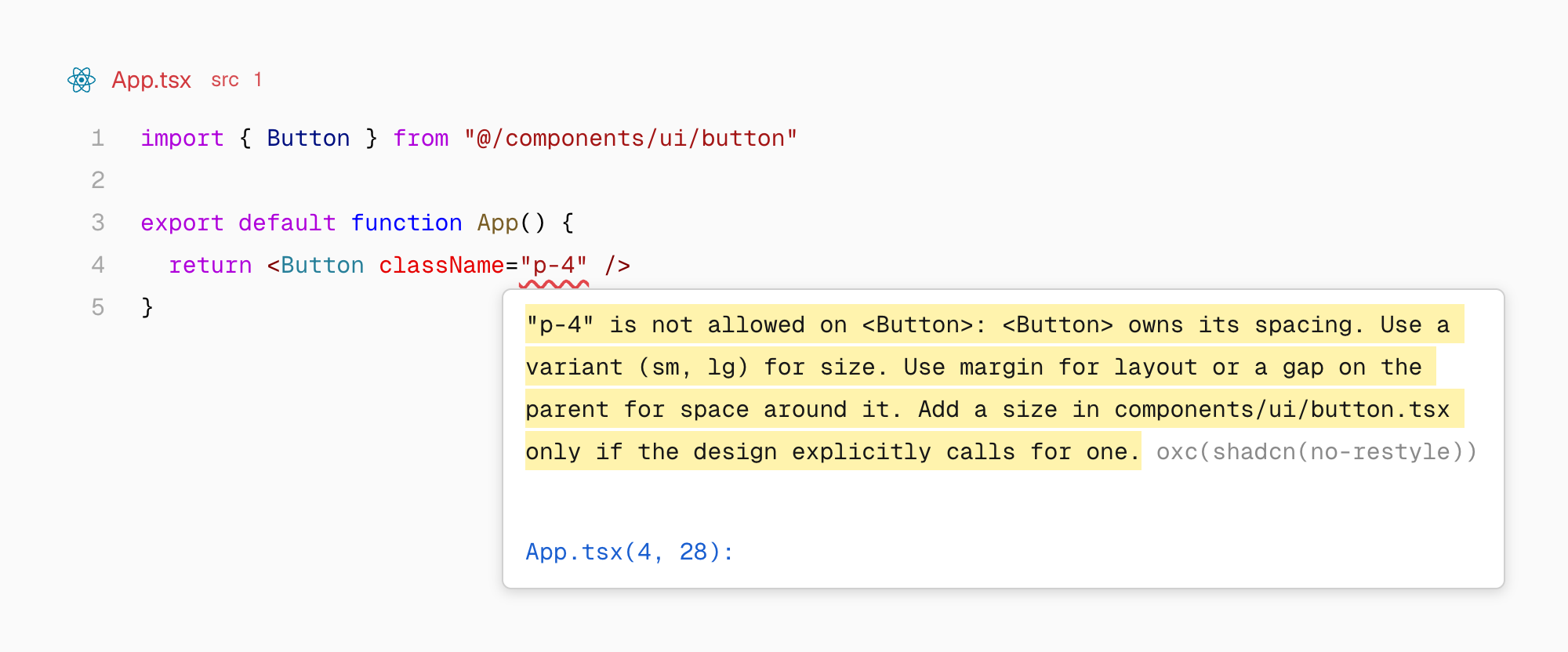 `@shadcn/lint` is an [agent-first linter](#built-for-agents) for Tailwind design systems.
You define what’s allowed. When an agent breaks a rule, the error explains what’s wrong and suggests a fix based on your components, variants, and theme.
**Works with your existing design system. No rewrite required.**
`@shadcn/lint` works with Tailwind v4 projects (**shadcn/ui not required**). Available for both **ESLint and Oxlint**. Works with **React, Svelte, and Vue**.
## Table of contents
- [Quickstart](#quickstart)
- [TypeScript vs @shadcn/lint](#typescript-vs-shadcnlint)
- [Built for agents](#built-for-agents)
- [Get started](#get-started)
- [Rules](#rules)
- [Frameworks](#frameworks)
- [Configuration](#settings)
## Quickstart
Give your coding agent this prompt:
```text
Read https://github.com/shadcn-ui/lint/blob/main/SETUP.md
and set up @shadcn/lint in this project.
```
Once installed, [choose your rules](#rules) and configure what’s allowed
in your design system.
Prefer to configure it yourself? See [Get started](#get-started).
## TypeScript vs @shadcn/lint
Take a Button that allows margin and width, but controls its own padding.
You can enforce that with types by limiting its `style` prop to
`Pick
`@shadcn/lint` is an [agent-first linter](#built-for-agents) for Tailwind design systems.
You define what’s allowed. When an agent breaks a rule, the error explains what’s wrong and suggests a fix based on your components, variants, and theme.
**Works with your existing design system. No rewrite required.**
`@shadcn/lint` works with Tailwind v4 projects (**shadcn/ui not required**). Available for both **ESLint and Oxlint**. Works with **React, Svelte, and Vue**.
## Table of contents
- [Quickstart](#quickstart)
- [TypeScript vs @shadcn/lint](#typescript-vs-shadcnlint)
- [Built for agents](#built-for-agents)
- [Get started](#get-started)
- [Rules](#rules)
- [Frameworks](#frameworks)
- [Configuration](#settings)
## Quickstart
Give your coding agent this prompt:
```text
Read https://github.com/shadcn-ui/lint/blob/main/SETUP.md
and set up @shadcn/lint in this project.
```
Once installed, [choose your rules](#rules) and configure what’s allowed
in your design system.
Prefer to configure it yourself? See [Get started](#get-started).
## TypeScript vs @shadcn/lint
Take a Button that allows margin and width, but controls its own padding.
You can enforce that with types by limiting its `style` prop to
`Pick