
vscode-background
### [Visual Studio Code](https://code.visualstudio.com) にも背景画像を。
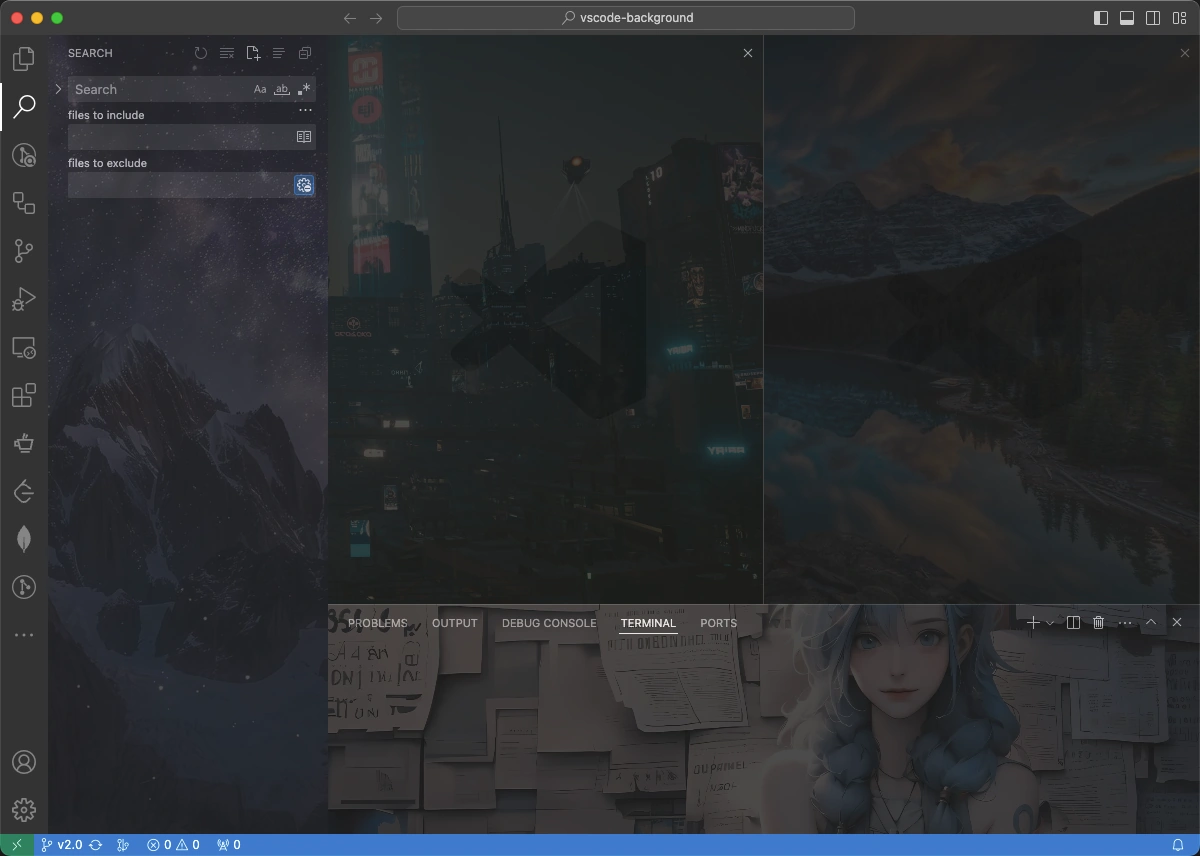
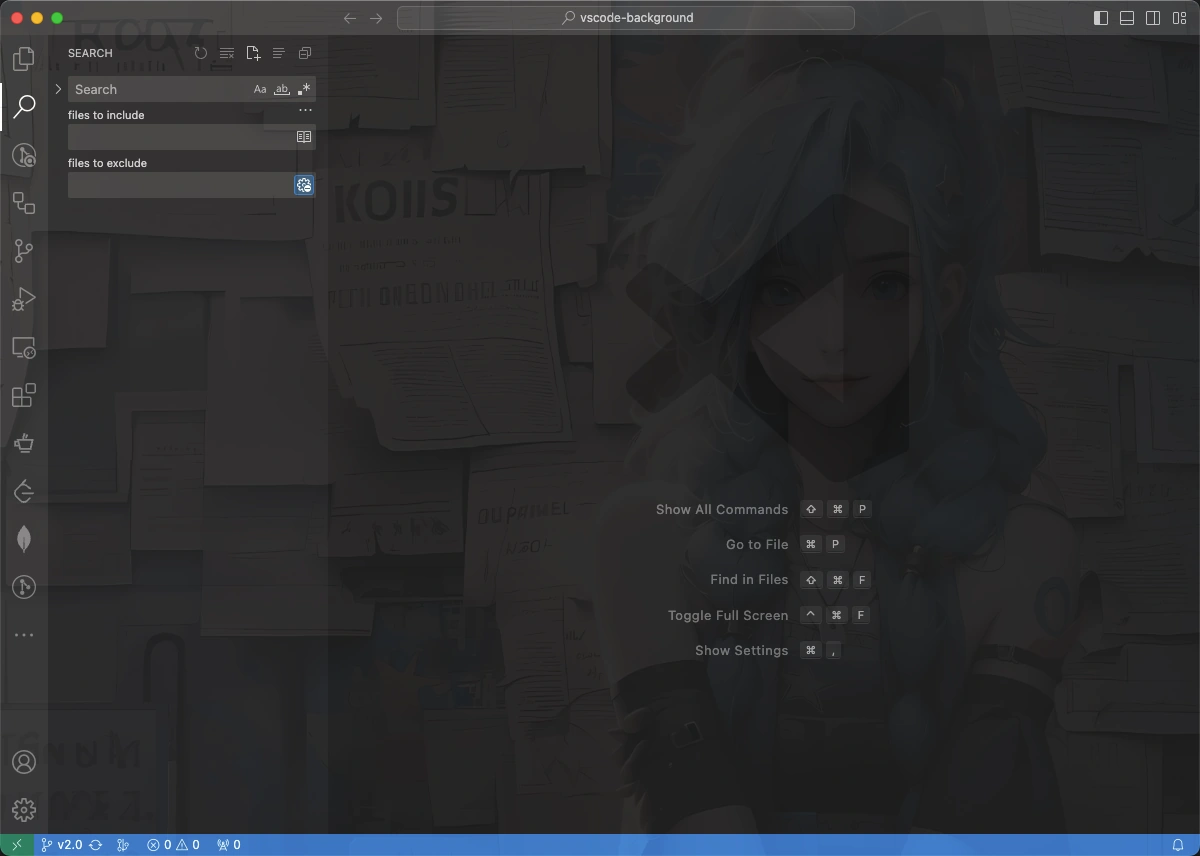
`フルスクリーン`、`エディター`、`サイドバー`、`補助バー(auxiliarybar)`、`パネル`、`画像の切り替わり`、`画像・CSSのカスタマイズ`...
[GitHub](https://github.com/shalldie/vscode-background) | [Visual Studio Marketplace](https://marketplace.visualstudio.com/items?itemName=shalldie.background)
[](https://marketplace.visualstudio.com/items?itemName=shalldie.background)
[](https://github.com/shalldie/vscode-background)
[](https://github.com/shalldie/vscode-background/actions)
[](https://github.com/shalldie/vscode-background)
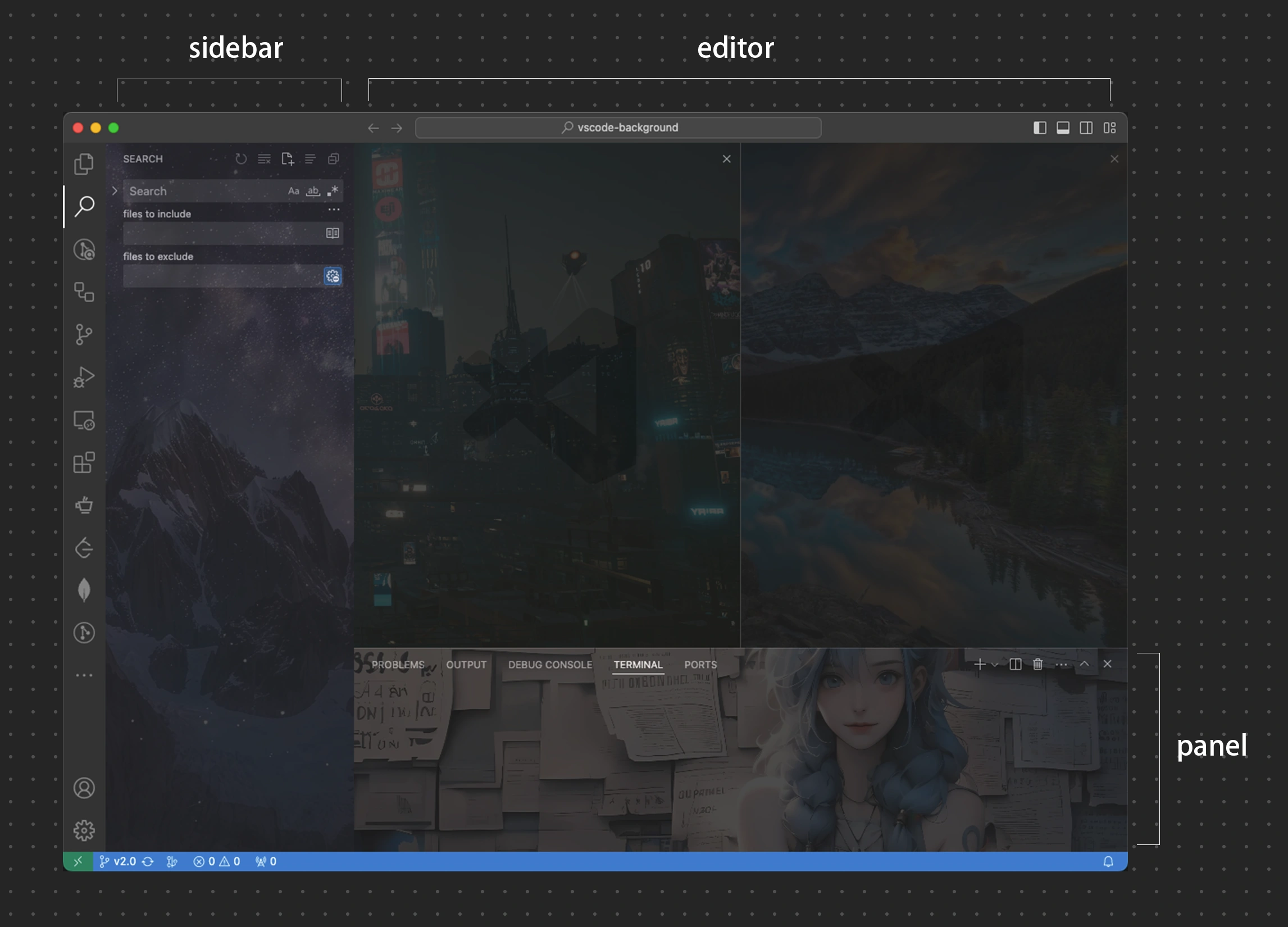
複数の領域、`エディタ`、`サイドバー`、`補助バー(auxiliarybar)`、`パネル`
`フルスクリーン`
 ### グローバル設定
| 設定 | 型 | デフォルト | 説明 |
| :------------------- | :-------: | :--------: | :----------------------------------------- |
| `background.enabled` | `Boolean` | `true` | 拡張機能を有効化するかどうかを制御します。 |
### エディタ部分の設定
エディタ部分の設定を行うには、`background.editor`を編集します.
| 設定 | 型 | デフォルト | 説明 |
| :--------- | :--------: | :----------: | :-------------------------------------------------------------------------- |
| `useFront` | `boolean` | `true` | 画像を最前面に表示するかどうかを制御します。 |
| `style` | `object` | `{}` | 全ての画像に適応される CSS を制御します。 [MDN Reference][mdn-css] |
| `styles` | `object[]` | `[]` | 画像ごとに個別のCSSを制御します。 |
| `images` | `string[]` | `[]` | カスタム画像に対応、オンライン画像やローカル画像、フォルダもサポート。 |
| `interval` | `number` | `0` | 次の画像を表示するまでの秒数を制御します。`0`の場合、画像は変更されません。 |
| `random` | `boolean` | `false` | 画像の表示順をランダムにするかを制御します。 |
[mdn-css]: https://developer.mozilla.org/docs/Web/CSS
設定例:
```json
{
"background.editor": {
"useFront": true,
"style": {
"background-position": "100% 100%",
"background-size": "auto",
"opacity": 0.6
},
"styles": [],
// `images`はオンライン画像、ローカル画像、およびフォルダをサポートしています。
"images": [
// オンライン画像については、`https`のみ許可されています。
"https://hostname/online.jpg",
// ローカル画像
"file:///local/path/img.jpeg",
"/home/xie/downloads/img.gif",
"C:/Users/xie/img.bmp",
"D:\\downloads\\images\\img.webp",
// ローカルパスでは `~` と環境変数が使用できます
"~/Pictures/img.png",
"${HOME}/Pictures/img.png",
// ローカルフォルダ
"/home/xie/images",
// data URL
"data:image/*;base64,
### グローバル設定
| 設定 | 型 | デフォルト | 説明 |
| :------------------- | :-------: | :--------: | :----------------------------------------- |
| `background.enabled` | `Boolean` | `true` | 拡張機能を有効化するかどうかを制御します。 |
### エディタ部分の設定
エディタ部分の設定を行うには、`background.editor`を編集します.
| 設定 | 型 | デフォルト | 説明 |
| :--------- | :--------: | :----------: | :-------------------------------------------------------------------------- |
| `useFront` | `boolean` | `true` | 画像を最前面に表示するかどうかを制御します。 |
| `style` | `object` | `{}` | 全ての画像に適応される CSS を制御します。 [MDN Reference][mdn-css] |
| `styles` | `object[]` | `[]` | 画像ごとに個別のCSSを制御します。 |
| `images` | `string[]` | `[]` | カスタム画像に対応、オンライン画像やローカル画像、フォルダもサポート。 |
| `interval` | `number` | `0` | 次の画像を表示するまでの秒数を制御します。`0`の場合、画像は変更されません。 |
| `random` | `boolean` | `false` | 画像の表示順をランダムにするかを制御します。 |
[mdn-css]: https://developer.mozilla.org/docs/Web/CSS
設定例:
```json
{
"background.editor": {
"useFront": true,
"style": {
"background-position": "100% 100%",
"background-size": "auto",
"opacity": 0.6
},
"styles": [],
// `images`はオンライン画像、ローカル画像、およびフォルダをサポートしています。
"images": [
// オンライン画像については、`https`のみ許可されています。
"https://hostname/online.jpg",
// ローカル画像
"file:///local/path/img.jpeg",
"/home/xie/downloads/img.gif",
"C:/Users/xie/img.bmp",
"D:\\downloads\\images\\img.webp",
// ローカルパスでは `~` と環境変数が使用できます
"~/Pictures/img.png",
"${HOME}/Pictures/img.png",
// ローカルフォルダ
"/home/xie/images",
// data URL
"data:image/*;base64, ## 注意点
> **この拡張機能は、VSCode 本体の html ファイルを編集することで機能します。**
問題が発生した際は、[Common Issues](docs/common-issues.md)を参照してください。
## アンインストール
[Common Issues#how-to-uninstall](docs/common-issues.md#how-to-uninstall)を参照してください。
## 貢献者 🙏
[
## 注意点
> **この拡張機能は、VSCode 本体の html ファイルを編集することで機能します。**
問題が発生した際は、[Common Issues](docs/common-issues.md)を参照してください。
## アンインストール
[Common Issues#how-to-uninstall](docs/common-issues.md#how-to-uninstall)を参照してください。
## 貢献者 🙏
[ ](https://github.com/shalldie)
[
](https://github.com/shalldie)
[ ](https://github.com/suiyun39)
[
](https://github.com/suiyun39)
[ ](https://github.com/frg2089)
[
](https://github.com/frg2089)
[ ](https://github.com/AzureeDev)
[
](https://github.com/AzureeDev)
[ ](https://github.com/tumit)
[
](https://github.com/tumit)
[ ](https://github.com/asurinsaka)
[
](https://github.com/asurinsaka)
[ ](https://github.com/u3u)
[
](https://github.com/u3u)
[ ](https://github.com/kuresaru)
[
](https://github.com/kuresaru)
[ ](https://github.com/Unthrottled)
[
](https://github.com/Unthrottled)
[ ](https://github.com/rogeraabbccdd)
[
](https://github.com/rogeraabbccdd)
[ ](https://github.com/SatoMasahiro2005)
## コントリビューションガイド
[Contributing Guide](docs/contributing.md)を参照してください。
## チェンジログ
[チェンジログ](https://github.com/shalldie/vscode-background/blob/master/CHANGELOG.md)で全ての変更を確認できます。
## 画像をシェアする
[こちら](https://github.com/shalldie/vscode-background/issues/106)で背景用の画像のシェアを行っています。
## v1からの移行
v3.0 以降、v1 のトップレベル設定はサポートされなくなりました。移行については [migration-from-v1.md](docs/migration-from-v1.md) を参照してください。
## ライセンス
MIT
](https://github.com/SatoMasahiro2005)
## コントリビューションガイド
[Contributing Guide](docs/contributing.md)を参照してください。
## チェンジログ
[チェンジログ](https://github.com/shalldie/vscode-background/blob/master/CHANGELOG.md)で全ての変更を確認できます。
## 画像をシェアする
[こちら](https://github.com/shalldie/vscode-background/issues/106)で背景用の画像のシェアを行っています。
## v1からの移行
v3.0 以降、v1 のトップレベル設定はサポートされなくなりました。移行については [migration-from-v1.md](docs/migration-from-v1.md) を参照してください。
## ライセンス
MIT