
| ← Back to Claude Code Best Practice | |
 ### The Paradigm Shift
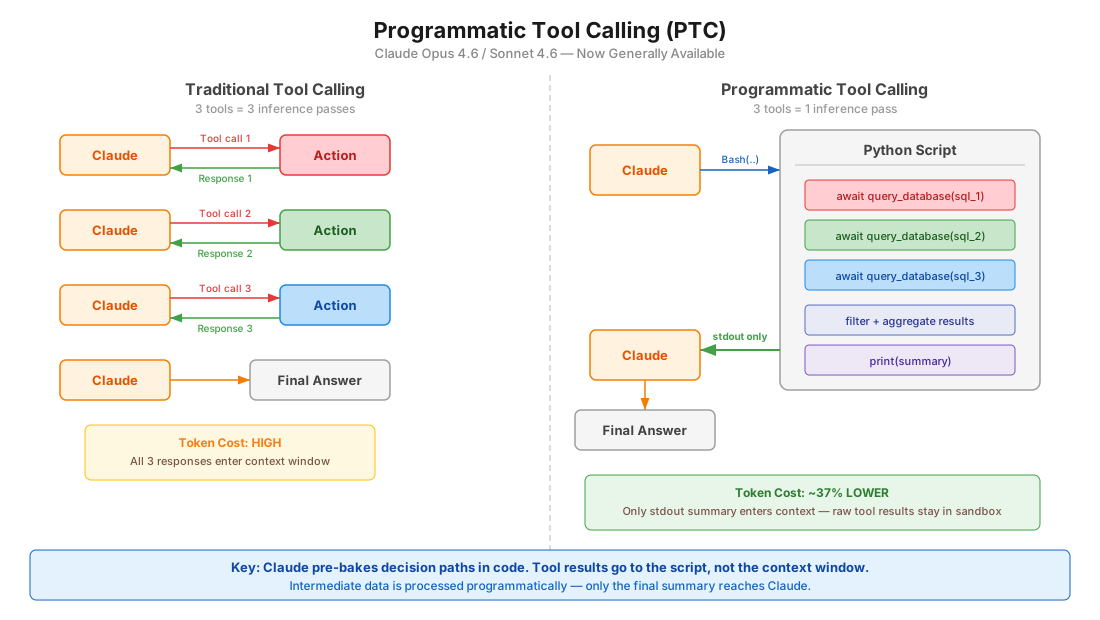
**Before (Traditional Tool Calling):**
```
User prompt → Claude → Tool call 1 → Response 1 → Claude → Tool call 2 → Response 2 → Claude → Tool call 3 → Response 3 → Claude → Final answer
```
Each tool call requires a full model round trip. 3 tools = 3 inference passes.
**After (Programmatic Tool Calling):**
```
User prompt → Claude → writes Python script → Script calls Tool 1, Tool 2, Tool 3 internally → stdout → Claude → Final answer
```
Claude writes code that orchestrates all tools. Only the final `stdout` enters the context window. 3 tools = 1 inference pass.
### How It Works
1. You define tools with `allowed_callers: ["code_execution_20250825"]`
2. Claude writes Python that calls those tools as async functions inside a sandbox
3. When a tool function is called, the sandbox pauses and the API returns a `tool_use` block
4. You provide the tool result — it goes to the **running code**, not Claude's context
5. Code resumes, processes results, calls more tools if needed
6. Only `stdout` from the final execution reaches Claude
### Key Configuration
```json
{
"tools": [
{
"type": "code_execution_20250825",
"name": "code_execution"
},
{
"name": "query_database",
"description": "Execute a SQL query. Returns rows as JSON objects with fields: id (str), name (str), revenue (float).",
"input_schema": {
"type": "object",
"properties": {
"sql": { "type": "string", "description": "SQL query to execute" }
},
"required": ["sql"]
},
"allowed_callers": ["code_execution_20250825"]
}
]
}
```
### The `allowed_callers` Field
| Value | Behavior |
|-------|----------|
| `["direct"]` | Traditional tool calling only (default if omitted) |
| `["code_execution_20250825"]` | Only callable from Python sandbox |
| `["direct", "code_execution_20250825"]` | Both modes available |
**Recommendation:** Choose one mode per tool, not both. This gives Claude clearer guidance.
### The `caller` Field in Responses
Every tool use block includes a `caller` field so you know how it was invoked:
```json
// Direct (traditional)
{ "caller": { "type": "direct" } }
// Programmatic (from code execution)
{ "caller": { "type": "code_execution_20250825", "tool_id": "srvtoolu_abc123" } }
```
### Advanced Patterns
**Batch processing** — process N items in 1 inference pass:
```python
regions = ["West", "East", "Central", "North", "South"]
results = {}
for region in regions:
data = await query_database(f"SELECT SUM(revenue) FROM sales WHERE region='{region}'")
results[region] = data[0]["revenue"]
top = max(results.items(), key=lambda x: x[1])
print(f"Top region: {top[0]} with ${top[1]:,}")
```
**Early termination** — stop as soon as success criteria are met:
```python
endpoints = ["us-east", "eu-west", "apac"]
for endpoint in endpoints:
status = await check_health(endpoint)
if status == "healthy":
print(f"Found healthy endpoint: {endpoint}")
break
```
**Conditional tool selection:**
```python
file_info = await get_file_info(path)
if file_info["size"] < 10000:
content = await read_full_file(path)
else:
content = await read_file_summary(path)
print(content)
```
**Data filtering** — reduce what Claude sees:
```python
logs = await fetch_logs(server_id)
errors = [log for log in logs if "ERROR" in log]
print(f"Found {len(errors)} errors")
for error in errors[-10:]:
print(error)
```
### Model Compatibility
| Model | Supported |
|-------|-----------|
| Claude Opus 4.6 | Yes |
| Claude Sonnet 4.6 | Yes |
| Claude Sonnet 4.5 | Yes |
| Claude Opus 4.5 | Yes |
### Constraints
| Constraint | Detail |
|-----------|--------|
| **Not on Bedrock/Vertex** | API and Foundry only |
| **No MCP tools** | MCP connector tools cannot be called programmatically |
| **No web search/fetch** | Web tools not supported in PTC |
| **No structured outputs** | `strict: true` tools incompatible |
| **No forced tool choice** | `tool_choice` cannot force PTC |
| **Container lifetime** | ~4.5 minutes before expiry |
| **ZDR** | Not covered by Zero Data Retention |
| **Tool results as strings** | Validate external results for code injection risks |
### When to Use PTC
| Good Use Cases | Less Ideal |
|----------------|------------|
| Processing large datasets needing aggregates | Single tool calls with simple responses |
| 3+ dependent tool calls in sequence | Tools needing immediate user feedback |
| Filtering/transforming results before Claude sees them | Very fast operations (overhead > benefit) |
| Parallel operations across many items | |
| Conditional logic based on intermediate results | |
### Token Efficiency
- Tool results from programmatic calls are **not added to Claude's context** — only final `stdout`
- Intermediate processing happens in code, not model tokens
- 10 tools programmatically ≈ 1/10th the tokens of 10 direct calls
---
## Dynamic Filtering for Web Search/Fetch
### The Problem
Web search and fetch tools dump full HTML pages into Claude's context window. Most of that content is irrelevant — navigation, ads, boilerplate. Claude then reasons over all of it, wasting tokens and reducing accuracy.
### The Solution
Claude now **writes and executes Python code to filter web results** before they enter the context window. Instead of reasoning over raw HTML, Claude filters, parses, and extracts only relevant content in a sandbox.
### How It Works
**Before:**
```
Query → Search results → Fetch full HTML × N pages → All content enters context → Claude reasons over everything
```
**After:**
```
Query → Search results → Claude writes filtering code → Code extracts relevant content only → Filtered results enter context
```
### API Configuration
Uses updated tool type versions with a beta header:
```json
{
"model": "claude-opus-4-6",
"max_tokens": 4096,
"tools": [
{
"type": "web_search_20260209",
"name": "web_search"
},
{
"type": "web_fetch_20260209",
"name": "web_fetch"
}
]
}
```
**Header required:** `anthropic-beta: code-execution-web-tools-2026-02-09`
**Enabled by default** when using the new tool type versions with Sonnet 4.6 and Opus 4.6.
### Benchmark Results
**BrowseComp** (finding specific information on websites):
| Model | Without Filtering | With Filtering | Improvement |
|-------|-------------------|----------------|-------------|
| Sonnet 4.6 | 33.3% | **46.6%** | +13.3 pp |
| Opus 4.6 | 45.3% | **61.6%** | +16.3 pp |
**DeepsearchQA** (multi-step research, F1 score):
| Model | Without Filtering | With Filtering | Improvement |
|-------|-------------------|----------------|-------------|
| Sonnet 4.6 | 52.6% | **59.4%** | +6.8 pp |
| Opus 4.6 | 69.8% | **77.3%** | +7.5 pp |
**Token efficiency:** Average 24% fewer input tokens. Sonnet 4.6 sees cost reduction; Opus 4.6 may increase slightly due to more complex filtering code.
### Use Cases
- Sifting through technical documentation
- Verifying citations across multiple sources
- Cross-referencing search results
- Multi-step research queries
- Finding specific data points buried in large pages
---
## Tool Search Tool
### The Problem
Loading all tool definitions upfront wastes context. If you have 50 MCP tools at ~1.5K tokens each, that's 75K tokens before the user even asks a question.
### The Solution
Mark infrequently-used tools with `defer_loading: true`. They're excluded from the initial context. Claude discovers them on-demand via a Tool Search Tool.
### Configuration
```json
{
"tools": [
{
"type": "mcp_toolset",
"mcp_server_name": "google-drive",
"default_config": { "defer_loading": true },
"configs": {
"search_files": { "defer_loading": false }
}
}
]
}
```
### Best Practices
- Keep 3-5 most-used tools always loaded, defer the rest
- Write clear, descriptive tool names and descriptions (search relies on them)
- Document available capabilities in the system prompt
### When to Use
- Tool definitions consuming > 10K tokens
- 10+ tools available
- Multiple MCP servers
- Tool selection accuracy issues from too many options
### Token Savings
~85% reduction in tool definition tokens (77K → 8.7K in Anthropic's benchmarks).
### Claude Code Equivalent
Claude Code has **MCP tool search auto mode** (enabled by default since v2.1.7). When MCP tool descriptions exceed 10% of context, they're deferred and discovered via `MCPSearch`. Configure the threshold with `ENABLE_TOOL_SEARCH=auto:N` where N is the context percentage (0-100).
---
## Tool Use Examples
### The Problem
JSON schemas define structure but can't express:
- When to include optional parameters
- Which parameter combinations make sense
- Format conventions (date formats, ID patterns)
- Nested structure usage
### The Solution
Add `input_examples` to tool definitions — concrete usage patterns beyond the schema.
### Configuration
```json
{
"name": "create_ticket",
"description": "Create a support ticket",
"input_schema": {
"type": "object",
"properties": {
"title": { "type": "string" },
"priority": { "type": "string", "enum": ["low", "medium", "high", "critical"] },
"assignee": { "type": "string" },
"labels": { "type": "array", "items": { "type": "string" } }
},
"required": ["title"]
},
"input_examples": [
{
"title": "Login page returns 500 error",
"priority": "critical",
"assignee": "oncall-team",
"labels": ["bug", "auth", "production"]
},
{
"title": "Add dark mode support",
"priority": "low",
"labels": ["feature-request", "ui"]
},
{
"title": "Update API docs for v2 endpoints"
}
]
}
```
### Best Practices
- Use **realistic data**, not placeholder strings like "example_value"
- Show **variety**: minimal, partial, and full specifications
- Keep concise: **1-5 examples per tool**
- Focus on resolving ambiguity — target behavioral clarity over schema completeness
- Show parameter correlations (e.g., `priority: "critical"` tends to have `assignee`)
### Results
72% → 90% accuracy on complex parameter handling in Anthropic's benchmarks.
---
## Claude Code Relevance
### What applies directly to Claude Code users
| Feature | Claude Code Status | Action |
|---------|-------------------|--------|
| Tool Search | Built-in since v2.1.7 as MCPSearch auto mode | Tune `ENABLE_TOOL_SEARCH=auto:N` if you have many MCP tools |
| Dynamic Filtering | Not available in CLI (API-level web tools) | Relevant for Agent SDK users doing web research |
| PTC | Not available in CLI | Relevant for Agent SDK users building custom agents |
| Tool Use Examples | Not configurable in CLI | Relevant for custom MCP server authors |
### For Agent SDK developers
If you're building agents with `@anthropic-ai/claude-agent-sdk`, PTC is immediately actionable:
1. Add `code_execution_20250825` to your tools array
2. Set `allowed_callers` on tools that benefit from batching/filtering
3. Implement the tool result loop (pause → provide result → resume)
4. Return structured data (JSON) from tools for easier programmatic parsing
### For MCP server authors
If you're building custom MCP servers, Tool Use Examples can improve how Claude uses your tools:
- Add `input_examples` to tool schemas
- Document return formats clearly in descriptions (PTC needs to parse them)
---
## Sources
- [Anthropic Engineering: Advanced Tool Use](https://www.anthropic.com/engineering/advanced-tool-use)
- [Programmatic Tool Calling Documentation](https://platform.claude.com/docs/en/agents-and-tools/tool-use/programmatic-tool-calling)
- [Code Execution Tool Documentation](https://platform.claude.com/docs/en/agents-and-tools/tool-use/code-execution-tool)
- [Improved Web Search with Dynamic Filtering](https://claude.com/blog/improved-web-search-with-dynamic-filtering)
### The Paradigm Shift
**Before (Traditional Tool Calling):**
```
User prompt → Claude → Tool call 1 → Response 1 → Claude → Tool call 2 → Response 2 → Claude → Tool call 3 → Response 3 → Claude → Final answer
```
Each tool call requires a full model round trip. 3 tools = 3 inference passes.
**After (Programmatic Tool Calling):**
```
User prompt → Claude → writes Python script → Script calls Tool 1, Tool 2, Tool 3 internally → stdout → Claude → Final answer
```
Claude writes code that orchestrates all tools. Only the final `stdout` enters the context window. 3 tools = 1 inference pass.
### How It Works
1. You define tools with `allowed_callers: ["code_execution_20250825"]`
2. Claude writes Python that calls those tools as async functions inside a sandbox
3. When a tool function is called, the sandbox pauses and the API returns a `tool_use` block
4. You provide the tool result — it goes to the **running code**, not Claude's context
5. Code resumes, processes results, calls more tools if needed
6. Only `stdout` from the final execution reaches Claude
### Key Configuration
```json
{
"tools": [
{
"type": "code_execution_20250825",
"name": "code_execution"
},
{
"name": "query_database",
"description": "Execute a SQL query. Returns rows as JSON objects with fields: id (str), name (str), revenue (float).",
"input_schema": {
"type": "object",
"properties": {
"sql": { "type": "string", "description": "SQL query to execute" }
},
"required": ["sql"]
},
"allowed_callers": ["code_execution_20250825"]
}
]
}
```
### The `allowed_callers` Field
| Value | Behavior |
|-------|----------|
| `["direct"]` | Traditional tool calling only (default if omitted) |
| `["code_execution_20250825"]` | Only callable from Python sandbox |
| `["direct", "code_execution_20250825"]` | Both modes available |
**Recommendation:** Choose one mode per tool, not both. This gives Claude clearer guidance.
### The `caller` Field in Responses
Every tool use block includes a `caller` field so you know how it was invoked:
```json
// Direct (traditional)
{ "caller": { "type": "direct" } }
// Programmatic (from code execution)
{ "caller": { "type": "code_execution_20250825", "tool_id": "srvtoolu_abc123" } }
```
### Advanced Patterns
**Batch processing** — process N items in 1 inference pass:
```python
regions = ["West", "East", "Central", "North", "South"]
results = {}
for region in regions:
data = await query_database(f"SELECT SUM(revenue) FROM sales WHERE region='{region}'")
results[region] = data[0]["revenue"]
top = max(results.items(), key=lambda x: x[1])
print(f"Top region: {top[0]} with ${top[1]:,}")
```
**Early termination** — stop as soon as success criteria are met:
```python
endpoints = ["us-east", "eu-west", "apac"]
for endpoint in endpoints:
status = await check_health(endpoint)
if status == "healthy":
print(f"Found healthy endpoint: {endpoint}")
break
```
**Conditional tool selection:**
```python
file_info = await get_file_info(path)
if file_info["size"] < 10000:
content = await read_full_file(path)
else:
content = await read_file_summary(path)
print(content)
```
**Data filtering** — reduce what Claude sees:
```python
logs = await fetch_logs(server_id)
errors = [log for log in logs if "ERROR" in log]
print(f"Found {len(errors)} errors")
for error in errors[-10:]:
print(error)
```
### Model Compatibility
| Model | Supported |
|-------|-----------|
| Claude Opus 4.6 | Yes |
| Claude Sonnet 4.6 | Yes |
| Claude Sonnet 4.5 | Yes |
| Claude Opus 4.5 | Yes |
### Constraints
| Constraint | Detail |
|-----------|--------|
| **Not on Bedrock/Vertex** | API and Foundry only |
| **No MCP tools** | MCP connector tools cannot be called programmatically |
| **No web search/fetch** | Web tools not supported in PTC |
| **No structured outputs** | `strict: true` tools incompatible |
| **No forced tool choice** | `tool_choice` cannot force PTC |
| **Container lifetime** | ~4.5 minutes before expiry |
| **ZDR** | Not covered by Zero Data Retention |
| **Tool results as strings** | Validate external results for code injection risks |
### When to Use PTC
| Good Use Cases | Less Ideal |
|----------------|------------|
| Processing large datasets needing aggregates | Single tool calls with simple responses |
| 3+ dependent tool calls in sequence | Tools needing immediate user feedback |
| Filtering/transforming results before Claude sees them | Very fast operations (overhead > benefit) |
| Parallel operations across many items | |
| Conditional logic based on intermediate results | |
### Token Efficiency
- Tool results from programmatic calls are **not added to Claude's context** — only final `stdout`
- Intermediate processing happens in code, not model tokens
- 10 tools programmatically ≈ 1/10th the tokens of 10 direct calls
---
## Dynamic Filtering for Web Search/Fetch
### The Problem
Web search and fetch tools dump full HTML pages into Claude's context window. Most of that content is irrelevant — navigation, ads, boilerplate. Claude then reasons over all of it, wasting tokens and reducing accuracy.
### The Solution
Claude now **writes and executes Python code to filter web results** before they enter the context window. Instead of reasoning over raw HTML, Claude filters, parses, and extracts only relevant content in a sandbox.
### How It Works
**Before:**
```
Query → Search results → Fetch full HTML × N pages → All content enters context → Claude reasons over everything
```
**After:**
```
Query → Search results → Claude writes filtering code → Code extracts relevant content only → Filtered results enter context
```
### API Configuration
Uses updated tool type versions with a beta header:
```json
{
"model": "claude-opus-4-6",
"max_tokens": 4096,
"tools": [
{
"type": "web_search_20260209",
"name": "web_search"
},
{
"type": "web_fetch_20260209",
"name": "web_fetch"
}
]
}
```
**Header required:** `anthropic-beta: code-execution-web-tools-2026-02-09`
**Enabled by default** when using the new tool type versions with Sonnet 4.6 and Opus 4.6.
### Benchmark Results
**BrowseComp** (finding specific information on websites):
| Model | Without Filtering | With Filtering | Improvement |
|-------|-------------------|----------------|-------------|
| Sonnet 4.6 | 33.3% | **46.6%** | +13.3 pp |
| Opus 4.6 | 45.3% | **61.6%** | +16.3 pp |
**DeepsearchQA** (multi-step research, F1 score):
| Model | Without Filtering | With Filtering | Improvement |
|-------|-------------------|----------------|-------------|
| Sonnet 4.6 | 52.6% | **59.4%** | +6.8 pp |
| Opus 4.6 | 69.8% | **77.3%** | +7.5 pp |
**Token efficiency:** Average 24% fewer input tokens. Sonnet 4.6 sees cost reduction; Opus 4.6 may increase slightly due to more complex filtering code.
### Use Cases
- Sifting through technical documentation
- Verifying citations across multiple sources
- Cross-referencing search results
- Multi-step research queries
- Finding specific data points buried in large pages
---
## Tool Search Tool
### The Problem
Loading all tool definitions upfront wastes context. If you have 50 MCP tools at ~1.5K tokens each, that's 75K tokens before the user even asks a question.
### The Solution
Mark infrequently-used tools with `defer_loading: true`. They're excluded from the initial context. Claude discovers them on-demand via a Tool Search Tool.
### Configuration
```json
{
"tools": [
{
"type": "mcp_toolset",
"mcp_server_name": "google-drive",
"default_config": { "defer_loading": true },
"configs": {
"search_files": { "defer_loading": false }
}
}
]
}
```
### Best Practices
- Keep 3-5 most-used tools always loaded, defer the rest
- Write clear, descriptive tool names and descriptions (search relies on them)
- Document available capabilities in the system prompt
### When to Use
- Tool definitions consuming > 10K tokens
- 10+ tools available
- Multiple MCP servers
- Tool selection accuracy issues from too many options
### Token Savings
~85% reduction in tool definition tokens (77K → 8.7K in Anthropic's benchmarks).
### Claude Code Equivalent
Claude Code has **MCP tool search auto mode** (enabled by default since v2.1.7). When MCP tool descriptions exceed 10% of context, they're deferred and discovered via `MCPSearch`. Configure the threshold with `ENABLE_TOOL_SEARCH=auto:N` where N is the context percentage (0-100).
---
## Tool Use Examples
### The Problem
JSON schemas define structure but can't express:
- When to include optional parameters
- Which parameter combinations make sense
- Format conventions (date formats, ID patterns)
- Nested structure usage
### The Solution
Add `input_examples` to tool definitions — concrete usage patterns beyond the schema.
### Configuration
```json
{
"name": "create_ticket",
"description": "Create a support ticket",
"input_schema": {
"type": "object",
"properties": {
"title": { "type": "string" },
"priority": { "type": "string", "enum": ["low", "medium", "high", "critical"] },
"assignee": { "type": "string" },
"labels": { "type": "array", "items": { "type": "string" } }
},
"required": ["title"]
},
"input_examples": [
{
"title": "Login page returns 500 error",
"priority": "critical",
"assignee": "oncall-team",
"labels": ["bug", "auth", "production"]
},
{
"title": "Add dark mode support",
"priority": "low",
"labels": ["feature-request", "ui"]
},
{
"title": "Update API docs for v2 endpoints"
}
]
}
```
### Best Practices
- Use **realistic data**, not placeholder strings like "example_value"
- Show **variety**: minimal, partial, and full specifications
- Keep concise: **1-5 examples per tool**
- Focus on resolving ambiguity — target behavioral clarity over schema completeness
- Show parameter correlations (e.g., `priority: "critical"` tends to have `assignee`)
### Results
72% → 90% accuracy on complex parameter handling in Anthropic's benchmarks.
---
## Claude Code Relevance
### What applies directly to Claude Code users
| Feature | Claude Code Status | Action |
|---------|-------------------|--------|
| Tool Search | Built-in since v2.1.7 as MCPSearch auto mode | Tune `ENABLE_TOOL_SEARCH=auto:N` if you have many MCP tools |
| Dynamic Filtering | Not available in CLI (API-level web tools) | Relevant for Agent SDK users doing web research |
| PTC | Not available in CLI | Relevant for Agent SDK users building custom agents |
| Tool Use Examples | Not configurable in CLI | Relevant for custom MCP server authors |
### For Agent SDK developers
If you're building agents with `@anthropic-ai/claude-agent-sdk`, PTC is immediately actionable:
1. Add `code_execution_20250825` to your tools array
2. Set `allowed_callers` on tools that benefit from batching/filtering
3. Implement the tool result loop (pause → provide result → resume)
4. Return structured data (JSON) from tools for easier programmatic parsing
### For MCP server authors
If you're building custom MCP servers, Tool Use Examples can improve how Claude uses your tools:
- Add `input_examples` to tool schemas
- Document return formats clearly in descriptions (PTC needs to parse them)
---
## Sources
- [Anthropic Engineering: Advanced Tool Use](https://www.anthropic.com/engineering/advanced-tool-use)
- [Programmatic Tool Calling Documentation](https://platform.claude.com/docs/en/agents-and-tools/tool-use/programmatic-tool-calling)
- [Code Execution Tool Documentation](https://platform.claude.com/docs/en/agents-and-tools/tool-use/code-execution-tool)
- [Improved Web Search with Dynamic Filtering](https://claude.com/blog/improved-web-search-with-dynamic-filtering)