---
## At a Glance
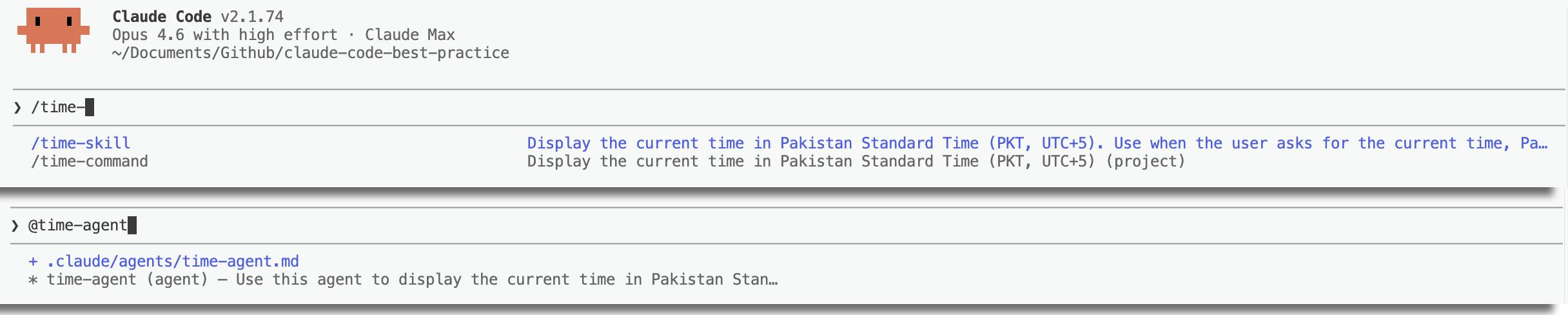
| | Agent | Command | Skill |
|---|---|---|---|
| **Location** | `.claude/agents/.md` | `.claude/commands/.md` | `.claude/skills//SKILL.md` |
| **Context** | Separate subagent process | Inline (main conversation) | Inline (main conversation) |
| **User-invocable** | No `/` menu — invoked by Claude or via Agent tool | Yes — `/command-name` | Yes — `/skill-name` (unless `user-invocable: false`) |
| **Auto-invoked by Claude** | Yes — via `description` field | No | Yes — via `description` field (unless `disable-model-invocation: true`) |
| **Accepts arguments** | Via `prompt` parameter | `$ARGUMENTS`, `$0`, `$1` | `$ARGUMENTS`, `$0`, `$1` |
| **Dynamic context injection** | No | Yes — `` !`command` `` | Yes — `` !`command` `` |
| **Own context window** | Yes — isolated | No — shares main | No — shares main (unless `context: fork`) |
| **Model override** | `model:` frontmatter | `model:` frontmatter | `model:` frontmatter |
| **Tool restrictions** | `tools:` / `disallowedTools:` | `allowed-tools:` | `allowed-tools:` |
| **Hooks** | `hooks:` frontmatter | — | `hooks:` frontmatter |
| **Memory** | `memory:` frontmatter (user/project/local) | — | — |
| **Can preload skills** | Yes — `skills:` frontmatter | — | — |
| **MCP servers** | `mcpServers:` frontmatter | — | — |
---
## When to Use Each
### Use an Agent when:
- The task is **autonomous and multi-step** — the agent needs to explore, decide, and act without constant guidance
- You need **context isolation** — the work shouldn't pollute the main conversation window
- The agent needs **persistent memory** across sessions (e.g., a code reviewer that learns patterns)
- You want to **preload domain knowledge** via skills without cluttering the main context
- The task benefits from **running in the background** or in a **git worktree**
- You need **tool restrictions** or a **different permission mode** (e.g., `acceptEdits`, `plan`)
**Example**: `weather-agent` — autonomously fetches weather data using its preloaded `weather-fetcher` skill, runs in a separate context with restricted tools.
### Use a Command when:
- You need a **user-initiated entry point** — a workflow the user explicitly triggers
- The workflow involves **orchestrating** other agents or skills
- You want to **keep context lean** — command content is not injected into the session context until the user triggers it
**Example**: `weather-orchestrator` — the user triggers it, it asks for C/F preference, invokes the agent, then invokes the SVG skill.
### Use a Skill when:
- You want **Claude to auto-invoke** based on user intent — skill descriptions are injected into the session context for semantic matching
- The task is a **reusable procedure** that can be invoked from multiple places (commands, agents, or Claude itself)
- You need **agent preloading** — baking domain knowledge into a specific agent at startup
**Example**: `weather-svg-creator` — Claude auto-invokes it when the user asks for a weather card; also callable from commands.
---
## The Command → Agent → Skill Architecture
This repository demonstrates a layered orchestration pattern:
```
User triggers /command
↓
Command orchestrates the workflow
↓
Command invokes Agent (separate context, autonomous)
↓
Agent uses preloaded Skill (domain knowledge)
↓
Command invokes Skill (inline, for output generation)
```
**Concrete example** — the weather system:
```
/weather-orchestrator (command — entry point, asks C/F)
↓
weather-agent (agent — fetches temperature autonomously)
├── weather-fetcher (agent skill — preloaded API instructions)
↓
weather-svg-creator (skill — creates SVG inline)
```
---
## Frontmatter Comparison
### Agent Frontmatter
```yaml
---
name: my-agent
description: Use this agent PROACTIVELY when...
tools: Read, Write, Edit, Bash
model: sonnet
maxTurns: 10
permissionMode: acceptEdits
memory: user
skills:
- my-skill
---
```
### Command Frontmatter
```yaml
---
description: Do something useful
argument-hint: [issue-number]
allowed-tools: Read, Edit, Bash(gh *)
model: sonnet
---
```
### Skill Frontmatter
```yaml
---
name: my-skill
description: Do something when the user asks for...
argument-hint: [file-path]
disable-model-invocation: false
user-invocable: true
allowed-tools: Read, Grep, Glob
model: sonnet
context: fork
agent: general-purpose
---
```
---
## Key Distinctions
### Auto-invocation
| Mechanism | Can Claude auto-invoke? | How to prevent |
|-----------|------------------------|----------------|
| Agent | Yes — via `description` (use "PROACTIVELY" to encourage it) | Remove or soften the description |
| Command | No — always user-initiated via `/` | N/A |
| Skill | Yes — via `description` | Set `disable-model-invocation: true` |
### Visibility in `/` menu
| Mechanism | Appears in `/` menu? | How to hide |
|-----------|---------------------|-------------|
| Agent | No | N/A |
| Command | Yes — always | Cannot be hidden |
| Skill | Yes — by default | Set `user-invocable: false` |
### Context isolation
| Mechanism | Runs in own context? | How to configure |
|-----------|---------------------|-----------------|
| Agent | Always | Built-in behavior |
| Command | Never | N/A |
| Skill | Optional | Set `context: fork` |
---
## Worked Example: "What is the current time?"
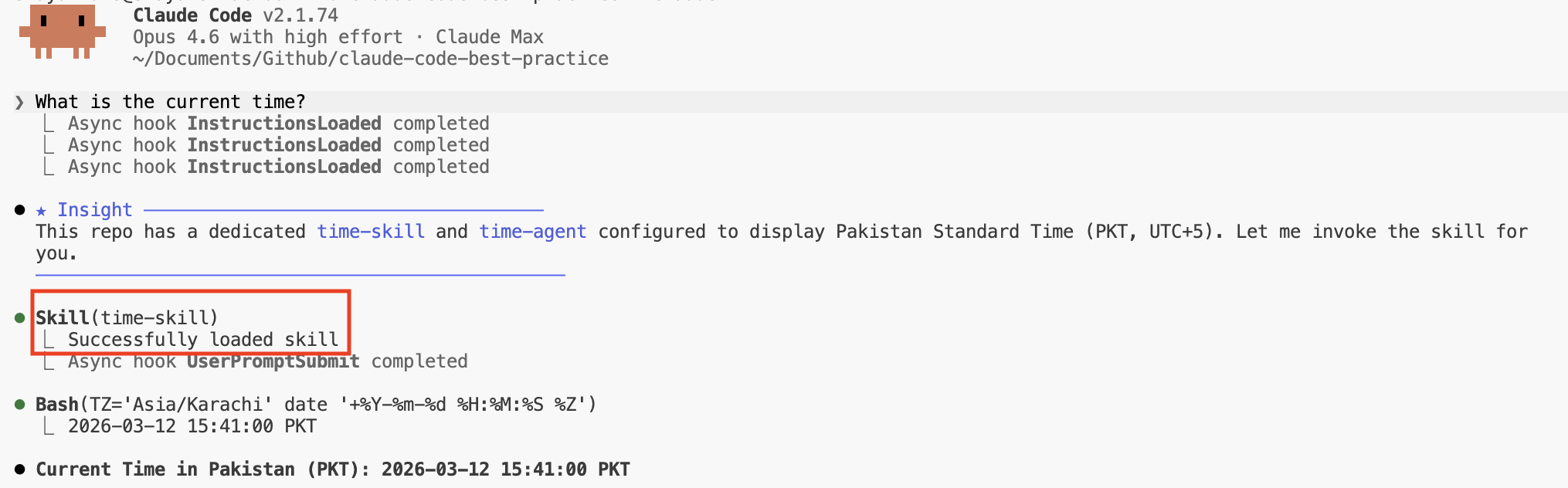
This repository has all three mechanisms defined for the same task — displaying the current time in PKT. Here's what happens when a user types **"What is the current time?"** without explicitly invoking any `/` command:
| Mechanism | Will it fire? | Why / Why not |
|-----------|--------------|---------------|
| `time-command` | No | Commands are **never auto-invoked**. The user would need to explicitly type `/time-command` for it to run. Commands have no auto-discovery pathway — they are strictly user-initiated. |
| `time-agent` | **Yes** (possible) | The agent's `description` says *"Use this agent to display the current time in Pakistan Standard Time"*. Claude matches this against the user's intent and may spawn it via the Agent tool. However, agents run in a **separate context window**, making them heavier than necessary for this simple task. |
| `time-skill` | **Yes** (most likely) | The skill's `description` says *"Display the current time in Pakistan Standard Time (PKT, UTC+5). Use when the user asks for the current time, Pakistan time, or PKT."* Claude matches this and invokes it via the Skill tool. Since it runs **inline** with no context overhead, it's the most efficient match. |
### Resolution order
When multiple mechanisms match the same intent, Claude prefers the **lightest-weight option** that satisfies the request:
```
1. Skill (inline, no context overhead) ← preferred
2. Agent (separate context, autonomous) ← used if skill is unavailable or task is complex
3. Command (never — requires explicit /) ← only if user types /time-command
```
### What if `disable-model-invocation: true` were set on the skill?
Then Claude **cannot** auto-invoke the skill. The agent becomes the only auto-invocable option, so Claude would spawn `time-agent` instead — at the cost of a separate context window for a one-liner bash command.
### What if both skill and agent had auto-invocation disabled?
Then **nothing fires automatically**. Claude would fall back to its own general knowledge and likely just run `TZ='Asia/Karachi' date` directly — no extension mechanism involved. The user would need to explicitly type `/time-command` or `/time-skill` to use one.
---
## Sources
- [Claude Code Skills — Docs](https://code.claude.com/docs/en/skills)
- [Claude Code Sub-agents — Docs](https://code.claude.com/docs/en/sub-agents)
- [Claude Code Slash Commands — Docs](https://code.claude.com/docs/en/slash-commands)
- [Skills Best Practice](../best-practice/claude-skills.md)
- [Commands Best Practice](../best-practice/claude-commands.md)
- [Sub-agents Best Practice](../best-practice/claude-subagents.md)