RigSpark Community
Run AI on your own computer: chat, make images and video, and talk to it.
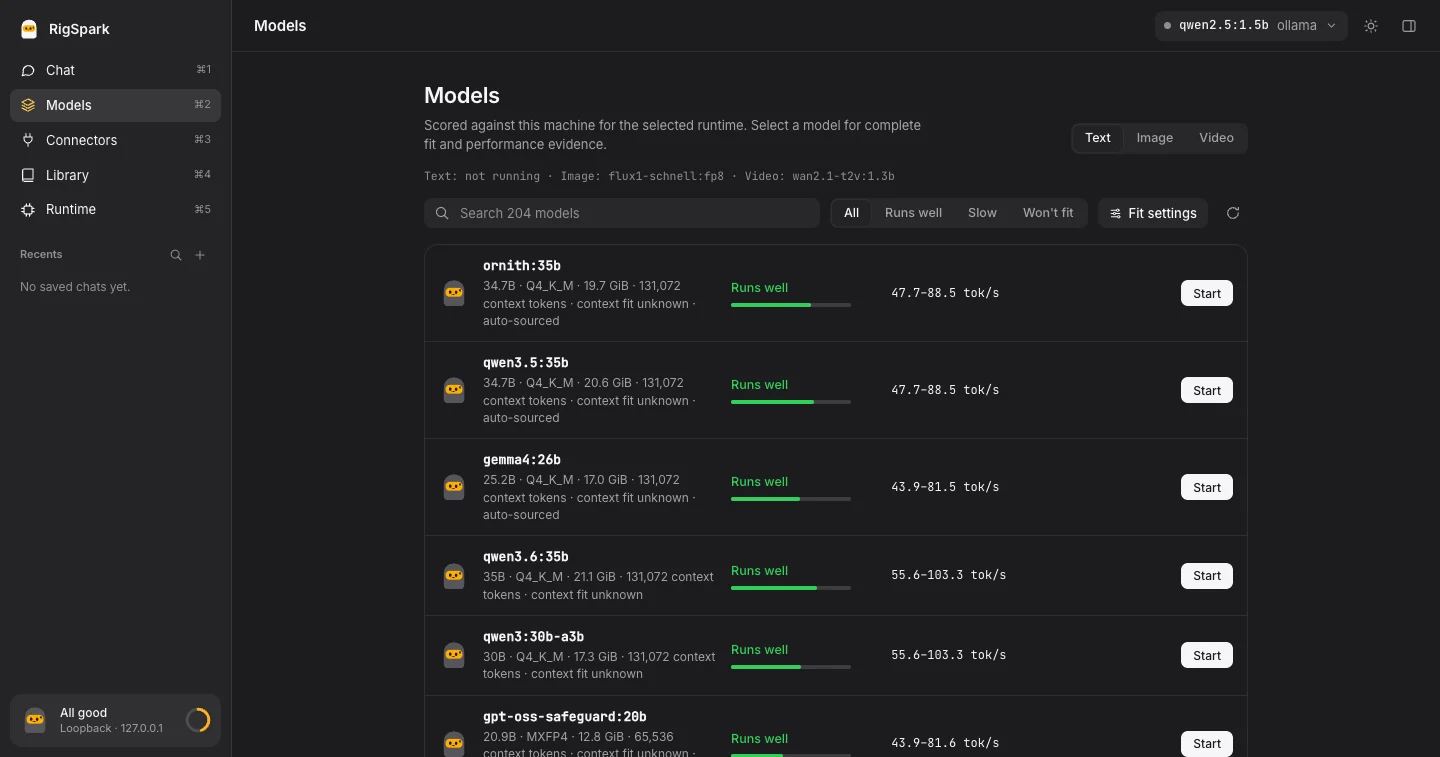
RigSpark checks your hardware and tells you which models will run before you download them.
Free and open source (MIT). No account. Your chats and files stay on your computer.
Download for Mac (Apple Silicon) ·
Mac (Intel) ·
Download for Windows ·
Linux (opens in your browser)
If RigSpark is useful to you, a ⭐ on GitHub helps other people find it.
## What you can do
- **Chat** with open models such as Llama, Qwen, Gemma and DeepSeek, fully offline.
- **Make images and short videos** from a prompt, in the same chat window.
- **Talk to it**: have replies read aloud, or dictate instead of typing.
- **Know before you download.** Every model gets a **yes / slow / no** verdict for
your RAM and GPU, with the reason, so you don't wait for a 20 GB download that
won't run.
- **Add any model from Hugging Face.** Paste a repository and RigSpark sizes each
version against your machine, then picks the largest one that fits.
- **Hand off to your tools.** Copy a picture into any app, or send it to Canva,
Figma and other connectors you add.
No GPU required: small models run on the CPU. On a Mac, RigSpark uses the
Apple Silicon GPU; on Linux, an NVIDIA GPU through Ollama or llama.cpp. Each
model shows its download size and memory need before you start.
## Get started
1. **Download and open the app.** The Mac app is signed and notarized by Apple.
The Windows installer needs no admin rights; it isn't code-signed yet, so if
SmartScreen warns, choose **More info → Run anyway**.
2. **Click Download & start.** RigSpark picks a starter model that fits your
computer, verifies the file, and starts it. Nothing else to install for chat.
3. **Chat, or press + to switch to Image, Video or Voice.** The first time you
make a picture, RigSpark offers to set up its image engine for you.
Advice and chat work offline; RigSpark goes online only to download models and
updates you ask for. On a Mac the app lives in the menu bar, and updates
install when you approve them, after their signature is checked.
### Where each feature runs
| | Mac (Apple Silicon) | Mac (Intel) | Windows | Linux |
| --- | :---: | :---: | :---: | :---: |
| Desktop app | ✓ | ✓ | ✓ | browser app (`rigspark gui`) |
| Chat | ✓ | ✓ | ✓ (CPU) | ✓ |
| Fit check, Hugging Face models | ✓ | ✓ | ✓ | ✓ |
| Images and video, set up for you | ✓ | ✓ | your own ComfyUI | ✓ |
| Spoken replies | ✓ | other server | other server | other server |
| Dictation | whisper.cpp | whisper.cpp | other server | whisper.cpp |
"Other server" means any local speech server with OpenAI's audio API (such as
Kokoro-FastAPI or LocalAI), added under **Runtime → Voice settings**. macOS 12 or
newer. How much a model needs depends on the model: the fit check shows it for
each one rather than a single minimum.
## Linux and the command line
There's no Linux desktop app yet. On Linux, install the command line and run
`rigspark gui`: it opens the same app in your browser. With Homebrew on macOS
or Linux:
```bash
brew install shashankswe2020-ux/tap/rigspark
rigspark recommend # rank models for this machine
rigspark can-run llama3.1:8b # check one model before downloading
rigspark up llama3.1:8b # download, verify and start it
rigspark chat # chat in the terminal
rigspark gui # open the app in your browser
```
Prebuilt archives for Linux, macOS and Windows are on the
[releases page](https://github.com/rigspark/rigspark/releases/latest).
[Cargo, checksums and upgrades →](docs/references/guide.md#install) ·
[Docker →](docs/references/guide.md#docker) ·
`llmup` remains a compatibility alias.
RigSpark runs models through Ollama, llama.cpp, MLX, LM Studio or BitNet, and
can point Claude Code, Codex or OpenCode at your local model with
`rigspark connect`. The [guide](docs/references/guide.md) covers every command.
[](assets/rigspark.mp4)
## Why you can trust the answers
- **Honest numbers.** When RigSpark can't source a figure, it shows `unknown`
instead of guessing. Speeds are estimates, not benchmarks.
- **Verified downloads.** Model files must match a pinned SHA-256 digest before
they run.
- **Local only.** RigSpark's servers listen on `127.0.0.1`, not your network,
and it sends no usage data.
- **Catalog updates when you choose.** The model list is signed and only
changes when you update it.
Updates only add or change models; recommendations and normal startup remain
offline.
```bash
rigspark catalog --status # which catalog you have
rigspark catalog --update # fetch and verify the latest signed catalog
```
`rigspark catalog --refresh` is a maintainer preview and doesn't install
anything. [How catalog updates work →](docs/references/guide.md#independent-catalog-updates)
## Community
RigSpark Community is free, MIT-licensed and built in the open. Bug reports,
model requests and pull requests are welcome:
- [Report a bug](https://github.com/rigspark/rigspark/issues/new?template=bug_report.yml) ·
[Suggest a feature](https://github.com/rigspark/rigspark/issues/new?template=feature_request.yml) ·
[Request a model](https://github.com/rigspark/rigspark/issues/new/choose)
- [Contributing guide](CONTRIBUTING.md) and
[good first issues](https://github.com/rigspark/rigspark/labels/good%20first%20issue)
- [Changelog](CHANGELOG.md) · [Terms of Use](TERMS.md) · [MIT License](LICENSE)
© 2026 RigSpark, Inc.
If RigSpark saved you a download that would never have run, you can
[buy me a coffee ☕](https://buymeacoffee.com/shashanksw9).
## Code signing policy
Windows releases are being set up for free code signing provided by [SignPath.io](https://about.signpath.io/), with a certificate by [SignPath Foundation](https://signpath.org/) (application under review).
Committers and reviewers: [Shashank Mishra](https://github.com/shashankswe2020-ux). Approvers: [Shashank Mishra](https://github.com/shashankswe2020-ux).
Privacy: RigSpark does not transfer any information to other networked systems unless you ask it to, such as downloading a model, an update or the model catalog. See the [Terms of Use](TERMS.md).