
dsh-reading-pad
An immersive read-only reading panel for DeepSeek Harness —— the model pushes a typeset Markdown into your right sidebar, or you flip through the chapters of your current writing project.





中文 · English
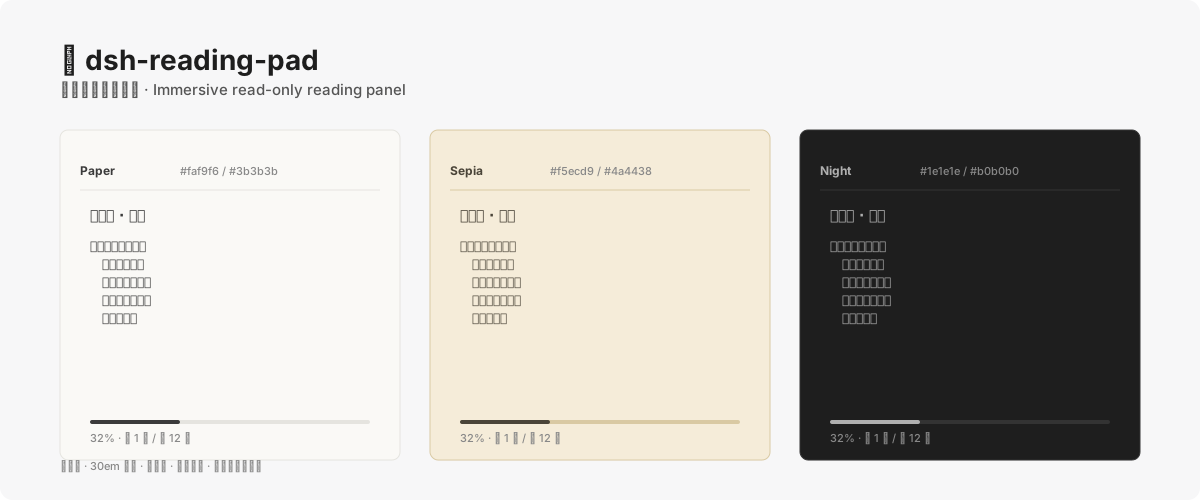
## What you get
- 📖 **AI-delivered prose** —— ask the model to push a typeset Markdown through `reading_pad_send` and read it in the panel; the text is rendered as-is, zero processing.
- 📚 **Manuscript chapters** —— switch to the "Manuscript" mode and flip through the chapters of your current writing project, without opening the writing workspace.
- 🎨 **Three low-blue-light themes** —— Paper (warm white) / Sepia (cream) / Night (dark grey), one-click switch, your choice is remembered.
- 📐 **30em measure typography** —— line width fixed at 30em (about 30 Chinese characters), line-height 1.6, 2em first-line indent, 0.8em paragraph gap —— designed after a printed book's rhythm, easy on the eyes.
- 🔤 **A⁻ / A⁺ font sizing** —— zoom between 16 and 20px, reflows automatically.
- 📊 **Progress bar + chapter browser** —— a thin bar shows where you are in the current chapter; the "Next chapter" button at the end of the chapter never auto-jumps (avoids accidental paging); first and last chapters grey out.
- 💾 **Scroll position persistence** —— close the tab and reopen it, you continue exactly where you stopped.
- 🔔 **New-content badge** —— when the AI delivers a new draft and the tab is unfocused, the tab title shows a "New" badge without stealing focus.
## Install
```sh
dsh plugin --profile web add dsh-reading-pad
```
After installing, **restart `dsh web`**, then open the right sidebar → add the "📖 Reading Pad" tab from the "+" menu.
**Requires DSH client packages >=0.1.5-rc.2.** Uses the official native right-sidebar keyed slots (`sidebar.right.pane.tab`), **no dependency** on `dsh-better-sidebar`.
You can also install directly from GitHub (skipping npm):
```sh
dsh plugin --profile web add github:shengyvself/dsh-reading-pad
```
## What you can do with it
After installing, just talk to the agent:
- "Push this draft to the reading pad" —— the AI calls `reading_pad_send` to deliver the typeset Markdown
- "Read chapter one" —— switch to the "Manuscript" mode and open the first chapter of your current writing project
- "Switch to Night theme" —— flip to the dark low-blue-light mode
- "Bump the font up a bit" —— press A⁺ to enlarge
The panel never acts on its own; it only shows content when you or the AI trigger it.
## Content sources
| Source | How |
|---|---|
| **AI-delivered prose** | The AI calls the `reading_pad_send` tool → the panel displays it. Typesetting is the AI's job; the panel renders as-is. |
| **Manuscript chapters** | The client reuses the writing module's existing HTTP RPC (`/api/writing/workspaceIndex` and `/api/writing/chapterText`) to read the current writing project's chapter list and full text. |
Outline / lore / drafting-pad drafts are phase-2 placeholders (greyed out).
## Compatibility
| Use case | DSH version | Plugin version |
|---|---|---|
| **Recommended** | **`0.1.5-rc.2+`** (currently maintained) | **`0.1.0`** |
| Minimum compatible | `0.1.5-rc.2+` | `0.1.0` |
Installing the plugin **does not** upgrade the host DSH. The `peerDependencies` declare a minimum client-package version of `>=0.1.5-rc.2`; verified working on `0.1.5-rc.2`.
## Security
The reading pad is a **read-only consumer**, with explicit boundaries:
- Writes only the local plugin state file (`~/.dsh/.json`, session display text + history ≤20 FIFO); never touches canon / creative files.
- No heavy third-party Markdown renderer. Rendering is a pure front-end M1 subset (headings / paragraphs / bold-italic / strikethrough / inline code / links-images / single-level lists / blockquote / hr / fenced code blocks / GFM tables); HTML is escaped, URLs restricted to `http` / `https` / relative paths.
- No network calls. Except for reusing the host's existing `/api/writing/*` HTTP RPC, there are no outbound requests.
Full policy: [`SECURITY.md`](./SECURITY.md).
## Dependency notes
Server-side dependencies (`@deepseek-ai/dsh-tools`, `@deepseek-ai/dsh-typert-protocol`) are declared in `peerDependencies` —— provided by the host DSH, never written to `dependencies` (avoids manifest shadowing the host version). Client-side packages also go through `peerDependencies` (cordis / dsh-client-* / react).
Since v0.1.0 the panel is **decoupled from `dsh-better-sidebar`**: it registers to the official native keyed slots (`sidebar.right.pane.tab` + `.title`) via `ctx.sidebarRightTabs.register` (two-step registration).
## Build
```bash
node scripts/build.mjs # server-side ESM copy + client esbuild to browser CJS (ModuleLoader wrapper, id=dsh-reading-pad)
```
## Development
See [`CONTRIBUTING.md`](./CONTRIBUTING.md), [`ARCHITECTURE.md`](./ARCHITECTURE.md), [`CHANGELOG.md`](./CHANGELOG.md).
## License
[Apache License 2.0](./LICENSE) © shengyvself