# RSSH
[English](README.md) | [中文](README_zh.md)
**The SSH client built to be an AI ops copilot.**
> Connect to a host and just ask "why is the disk full?" — the AI proposes commands, flags their side effects, and runs them in your terminal only after you approve. Sensitive data is redacted locally before anything leaves your machine.
>
> Desktop · Mobile · JetBrains · CLI — one shared data store.
[](https://github.com/shihuili1218/rssh/releases/latest)
[](https://github.com/shihuili1218/rssh/releases)

[](LICENSE)
[](https://deepwiki.com/shihuili1218/rssh)
⬇️ Download latest · Why RSSH?
---
## Why RSSH
### 🤖 AI triage
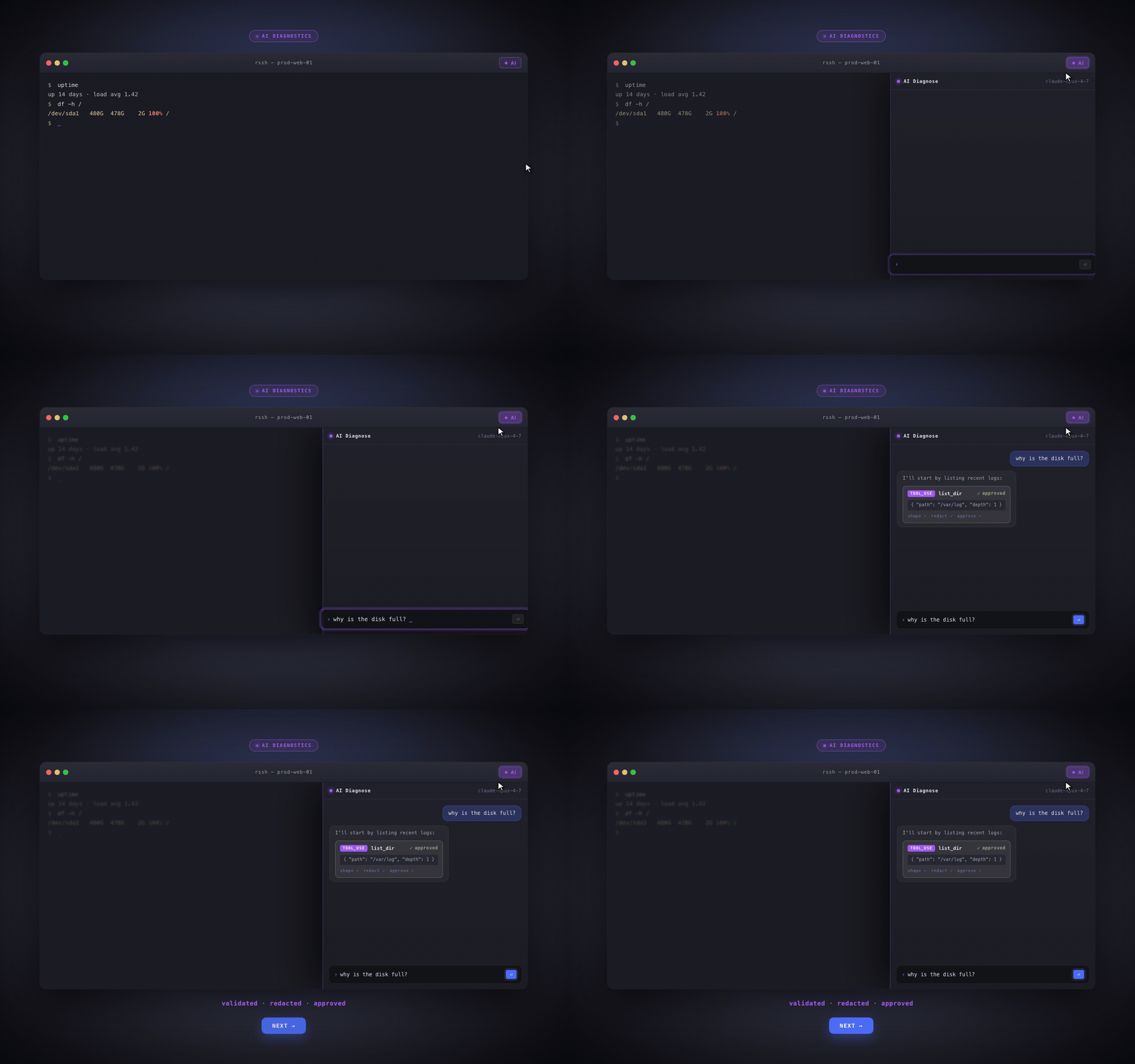
Not another chat box. It reads what is **actually happening** in your terminal, proposes **read-first** commands, each annotated with its side effects and gated behind an explicit "Run" click. Before any payload leaves your machine it passes a shape validator and local redaction — your keys and internal addresses never go out verbatim.
### 🎨 Color-coded command blocks
Every command and its output become a block with a color-coded left edge. In a thousand-line scrollback you spot the previous command's output at a glance. Rendered **fully locally** — zero remote dependency, no agent installed on the server.

### ⌨️ Configure once, use everywhere
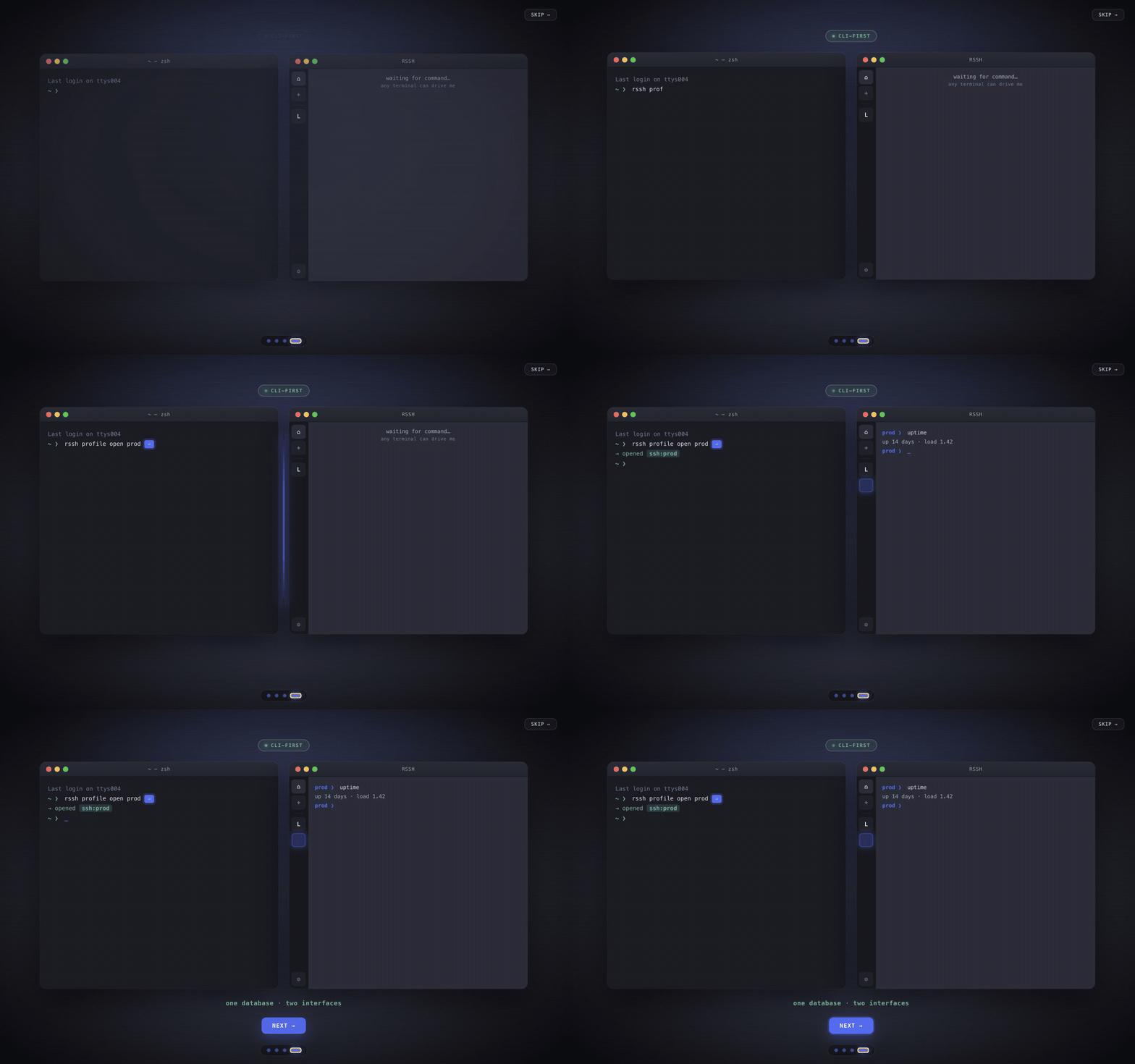
`rssh profile open prod` launches a session from any terminal — the CLI and GUI share one SQLite store. The same hosts and keys also run on **mobile** and inside a **JetBrains** tool window.
---
## Features
- **SSH** -- password, private key, SSH agent/Pageant, keyboard-interactive, jump host (ProxyJump)
- **Telnet** -- saved profiles, echo negotiation, line controls, expect/send login scripts
- **Serial Console (desktop)** -- saved UART profiles, text/hex modes, flow control, login scripts, DTR/RTS/break
- **Dynamic Discovery (Docker/K8S)** -- discover Docker containers and running Kubernetes pods through local CLI contexts, then open ephemeral exec terminals
- **Terminal** -- xterm emulation, 10 000-line scrollback, foldable color-coded command blocks, regex highlighting, search
- **Multi-session Workbench (desktop)** -- live terminal previews and selection-aware broadcast across connected sessions
- **SFTP** -- remote file browser and upload/download
- **Port Forwarding** -- local, remote and dynamic (SOCKS5), named configs, real-time stats
- **Local Terminal (desktop)** -- auto-detect zsh/bash/PowerShell
- **Session Recording** -- asciicast v2 format, variable-speed playback
- **Connections & Credentials** -- SQLite storage, import from `~/.ssh/config`
- **Security & Sync** -- secrets encrypted locally with ChaCha20-Poly1305, master key in the platform keychain when available, selective remote sync, encrypted backup to your own GitHub repo or WebDAV server
- **Snippets** -- reusable command shortcuts (Cmd+E)
- **Mobile** -- virtual keybar (Ctrl/Alt/arrows/Tab/Esc), safe area, stack navigation
- **IDE Plugin** -- run RSSH inside JetBrains IDEs in a tool window (shared data dir)
## Install
Download from [Releases](https://github.com/shihuili1218/rssh/releases):
| Platform | File | Notes |
|---------------------|------------------------------------------|------------------------------|
| macOS Apple Silicon | `rssh-{ver}-macos-aarch64.dmg` | |
| macOS Intel | `rssh-{ver}-macos-x86_64.dmg` | |
| Linux (deb) | `rssh-{ver}-linux-x86_64.deb` | Debian/Ubuntu |
| Linux (rpm) | `rssh-{ver}-linux-x86_64.rpm` | Fedora/RHEL |
| Linux (AppImage) | `rssh-{ver}-linux-x86_64.AppImage` | Any distro |
| Windows | `rssh-{ver}-windows-x86_64.msi` | Silent install: `msiexec /i` |
| Windows | `rssh-{ver}-windows-x86_64-setup.exe` | GUI installer |
| Windows | `rssh-{ver}-windows-x86_64-portable.zip` | Portable GUI + CLI |
| Android | `rssh-{ver}-android-universal.apk` | |
| iOS | | AppStore, by [@paradoxie](https://github.com/paradoxie) |
### IntelliJ / JetBrains plugin
Run the full RSSH UI inside a JetBrains IDE tool window — same hosts, keys and
settings as the desktop app (shared `~/.rssh`). Each zip bundles a headless
`rssh-server`, so it's self-contained and per-OS:
| Platform | File |
|---------------------|--------------------------------------------------|
| macOS Apple Silicon | `rssh-{ver}-macos-aarch64-jetbrains-plugin.zip` |
| macOS Intel | `rssh-{ver}-macos-x86_64-jetbrains-plugin.zip` |
| Linux | `rssh-{ver}-linux-x86_64-jetbrains-plugin.zip` |
| Windows | `rssh-{ver}-windows-x86_64-jetbrains-plugin.zip` |
Install: **Settings → Plugins → ⚙ → Install Plugin from Disk…**, pick the zip for
your OS and restart. Open the **RSSH** tool window (bottom) to start; the ✕ in its
title bar stops the embedded server.
## Development
See [CONTRIBUTING.md](CONTRIBUTING.md).
## License
MIT
## Friend Link
- [LINUX DO](https://linux.do/)