DockMate 🐳
A lightweight Docker & Podman TUI - manage containers and Compose projects from your terminal.





> **Note**: Previously named **DockWatch**.
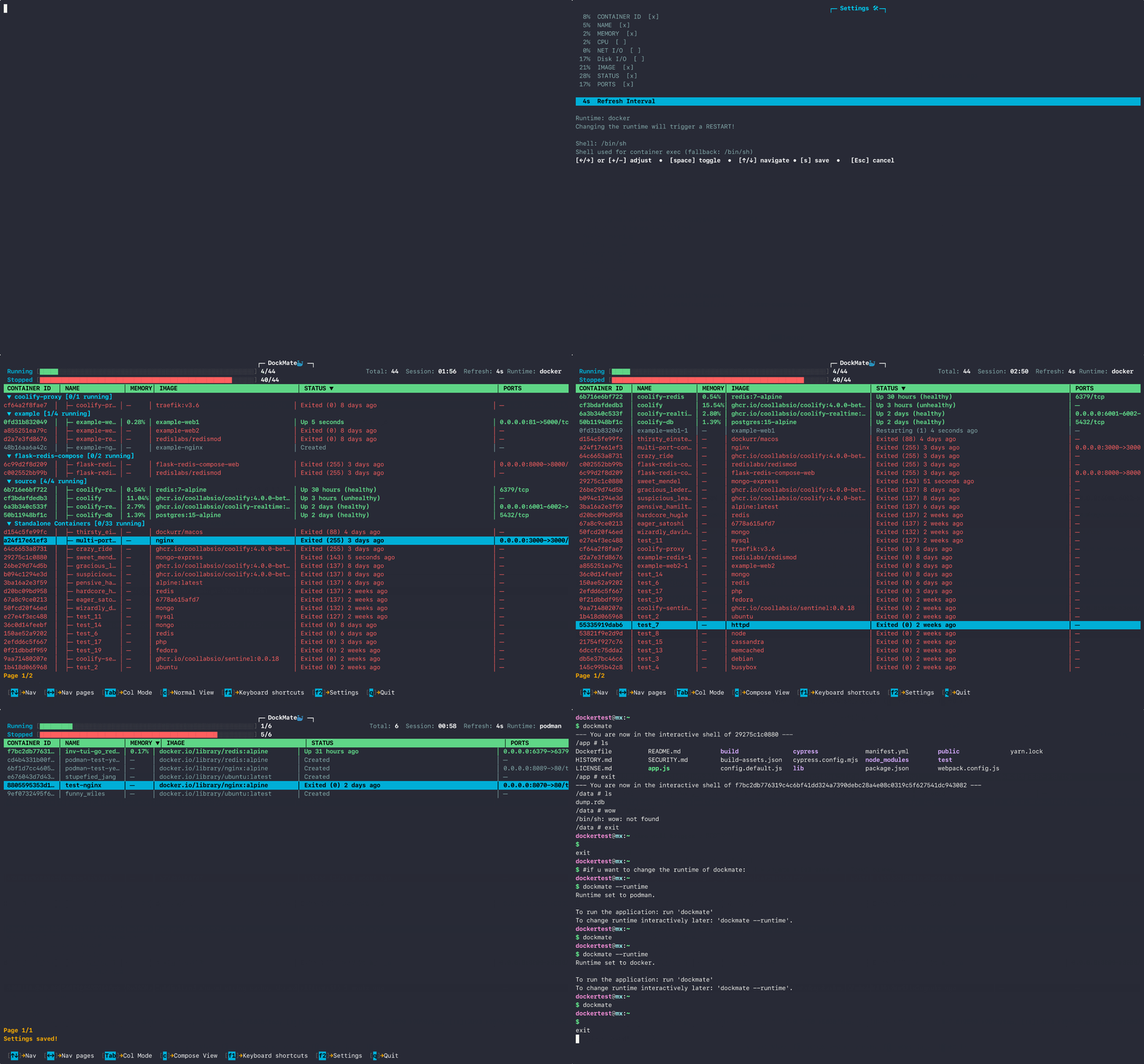
---
## 📥 Installation
### 🍺 Homebrew (Recommended)
Works on Linux & macOS.
```bash
brew install shubh-io/tap/dockmate
```
### 📦 Quick Install Script
```bash
curl -fsSL https://raw.githubusercontent.com/shubh-io/DockMate/main/install.sh | sh
```
Click for Manual Install, Source Build & Verification
### User-local Installation
If you lack `sudo` access or prefer local bins:
```bash
curl -fsSL https://raw.githubusercontent.com/shubh-io/DockMate/main/install.sh | INSTALL_DIR=$HOME/.local/bin sh
```
*Ensure `$HOME/.local/bin` is in your PATH.*
### Build from Source
Requires **Go 1.24+**:
```bash
git clone 'https://github.com/shubh-io/DockMate'
cd DockMate
go build -o dockmate
sudo mv dockmate /usr/local/bin/
```
### Verifying Downloads
Releases include SHA256 checksums.
```bash
# Example verification
curl -fsSL -o dockmate https://.../dockmate-linux-amd64
curl -fsSL -o dockmate.sha256 https://.../dockmate-linux-amd64.sha256
sha256sum -c dockmate.sha256
```
Click for Update Guide 🔄
### Standard Methods
| Method | Command |
| :--- | :--- |
| **Homebrew** | `brew upgrade shubh-io/tap/dockmate` |
| **Built-in** | `dockmate update` |
### 🛠️ Force Re-install / Troubleshooting
If `dockmate update` reports success but the version does not change, re-run the installer to force-replace the binary:
```bash
# curl
curl -fsSL https://raw.githubusercontent.com/shubh-io/DockMate/main/install.sh | sh
# wget
wget -qO- https://raw.githubusercontent.com/shubh-io/DockMate/main/install.sh | sh
```
**Custom Directory Users:**
If you originally installed to a custom location (e.g., `~/.local/bin`), you must specify it again to avoid installing to the default path:
```bash
curl -fsSL https://raw.githubusercontent.com/shubh-io/DockMate/main/install.sh | INSTALL_DIR="$HOME/.local/bin" sh
```
Click for Troubleshooting Guide❗
## Troubleshooting
### "Permission Denied" when running Compose actions
If the app fails to enter a directory, it is likely a filesystem permission mismatch between your current user and the project folder.
#### Symptoms
You see an error similar to this in the logs or terminal:
> `Error: compose error (docker up): chdir /home/dockertest/my-app: permission denied`
#### The Fix
Ensure your user has ownership of the project directory.
**Example Case:**
If your project is located at `~/path/to-your-folder/`, run:
```bash
# Replace '~/path/to-your-folder/' with your actual project path
sudo chown -R $USER:$USER ~/path/to-your-folder/
```
**Technical Note:**
This command recursively (`-R`) changes the owner to your current logged-in user (`$USER`). This grants **DockMate** the necessary permissions to execute compose commands within that directory.
## After Installation
Once installed, launch Dockmate using:
```bash
dockmate
```
---
## 🚀 Key Features
DockMate is the `htop` for Docker-lightweight, keyboard-driven, and zero-config.
* **⚡ Real-time Monitoring:** Stats for CPU, Memory, Disk I/O, Network, etc.
* **📦 Compose Management:** Full lifecycle control for Docker Compose and Podman Compose projects.
* **⌨️ Instant Control:** Start (`s`), Stop (`x`), Restart (`r`), and Remove (`d`) containers with single keystrokes.
* **🔍 Debugging:** View logs (`l`) or spawn an interactive shell (`e`) instantly.
* **🐳 Multi-Runtime:** Native support for **Docker** and **Podman**.
* **📂 Deep Info Panel:** View Compose metadata, project directories, and source paths.
* **⚙️ Persistent Settings:**
* * **Custom Shell:** Defaults to `/bin/sh`, but configurable to `/bin/bash`, `/bin/zsh`, etc.
* * **Refresh Rates:** Configurable Refresh Interval.
* * **State Saving:** Remembers your runtime (Docker/Podman) and column layouts on restart.
---
## ⌨️ Controls
### Navigation & Global
| Key | Action |
| --- | --- |
| `↑/↓` or `j/k` | Move cursor up/down |
| `←/→`| Navigate pages |
| `Tab` | Toggle column selection mode |
| `Enter` | Sort by selected column |
| `l` / `i` / `c` | Toggle **L**ogs / **I**nfo / **C**ompose view |
| `F1` | Help Menu |
| `F2` | Settings |
| `Esc` / `q` | Back / Quit |
### Container Actions (Single)
| Key | Action |
| --- | --- |
| `s` | **S**tart container |
| `x` | Stop container (E**x**it) |
| `r` | **R**estart container |
| `d` | **D**elete container |
| `e` | Open interactive shell (**E**xec) |
### Compose Project Actions (Grouped)
| Key | Action |
| --- | --- |
| `u` / `U` | **U**p (Create & Start all services) |
| `x` / `X` | Stop all services |
| `r` / `R` | **R**estart entire project |
| `p` / `P` | **P**ause / Unpause project |
| `d` / `D` | **D**own (Stop & Remove containers/networks) |
---
## 🛠️ Configuration & Runtimes
**Switching Runtimes (Docker ⇄ Podman)**
* **In-App:** Open Settings, toggle Runtime, and Save.
* **CLI:** Run `dockmate --runtime` to launch the interactive selector.
**Configuration File**
Settings are saved to `~/.config/dockmate/config.yml`. You can manually edit this to change defaults for refresh rates, preferred shell, and column visibility.
---
## 🆚 Why DockMate?
### DockMate vs LazyDocker
| Feature | DockMate | LazyDocker |
| :--- | :--- | :--- |
| **Philosophy** | ⚡ **Speed & Simplicity** | 🧰 Feature-rich Power User |
| **Engine Support** | ✅ **Docker + Podman (Native)** | ⚠️ Docker (Podman via workaround) |
| **Performance** | 🚀 **Instant (<2s) / Minimal Deps** | 🐢 Variable / Heavy Deps |
| **Tech Stack** | 🆕 **Bubble Tea (Modern)** | 👴 gocui (Legacy, old) |
| **Maintenance** | 🔄 **Built-in (`dockmate update`)** | ❌ Manual updates |
| **Input & UI** | ⌨️ **Keyboard-only / Text-based** | 🖱️ Mouse + Key / ASCII Graphs |
| **Scope** | 🎯 **Containers & Compose** | 📦 Containers + Images + Layers |
**Choose DockMate if you:**
* Want a fast, "install and go" tool.
* Need native **Podman** support.
* Prefer `htop`-style simplicity over complex dashboards.
#### Alternatives
##### If DockMate isn't for you, check out lazydocker, dry, or ctop.
---
## 🗺️ Roadmap
* [x] Docker Compose integration
* [x] Docker Compose management
* [x] Podman Support
* [x] Homebrew distribution
* [ ] Custom Key-Bindings
* [ ] Container search/filter
* [ ] Containers Network Management
* [ ] Resource monitoring alerts
* [ ] Image management
---
## Author
Shubhransh Nath - Creator of Dockmate TUI
GitHub: [@shubh-io](https://github.com/shubh-io)
---
## 🤝 Contributing & License
**License:** MIT. Do whatever you want, just keep the license intact.
If DockMate saves you keystrokes, consider dropping a ⭐ on the repo!