




Context running low? One click to summarize the early conversation
Two icon buttons in the official dock row below the composer, right next to the context ring: Compact context submits /compact to the current session to summarize older history; New session starts a fresh session in the same workspace.
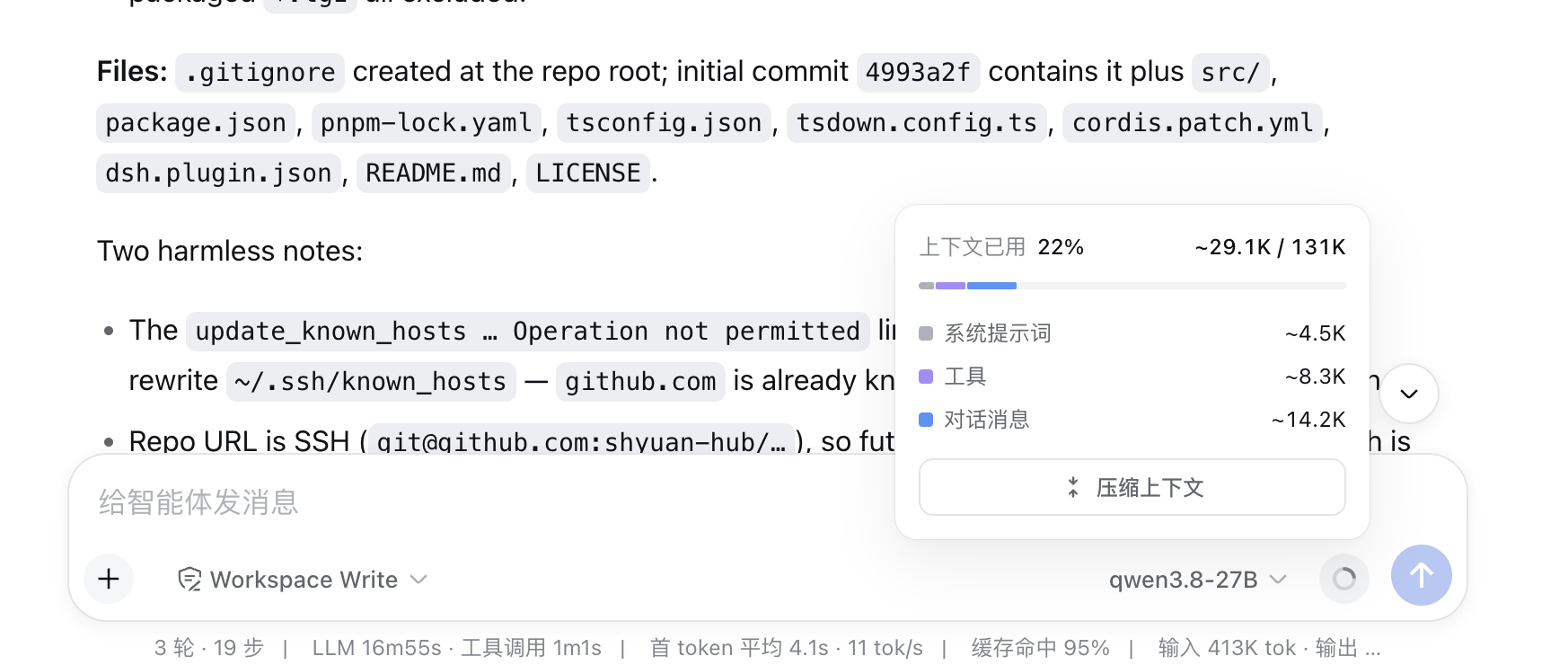
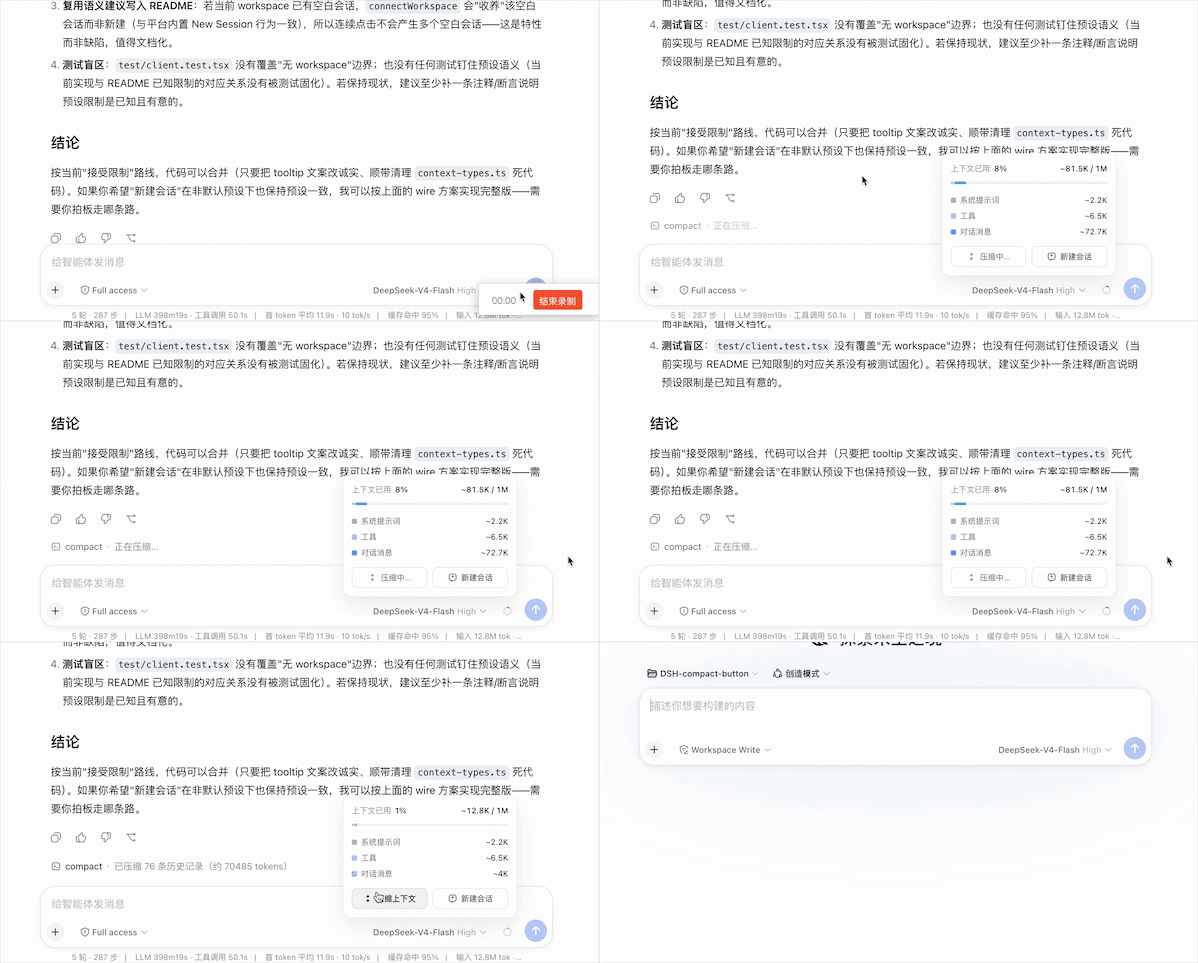
The dock row below the composer — two icons right beside the context ring
Demo
## 📑 Table of Contents
- [✨ Features](#-features)
- [🚀 Install](#-install)
- [🖥️ Desktop app](#️-desktop-app)
- [🖱️ Using the buttons](#️-using-the-buttons)
- [🔧 How it works](#-how-it-works)
- [🛠️ Development & build](#️-development--build)
- [⚠️ Known limitations](#️-known-limitations)
## ✨ Features
- **🔘 One-click compact** — long chats keep eating the context window and you used to type `/compact` by hand; now the icon sits in the dock row right under your cursor
- **🔁 Same command channel** — goes through **exactly the same path** as typing `/compact` (`session.command('/compact')`); the result shows up in the chat as a command row, no special behaviour
- **🎯 Icon-only with hover tooltip** — the buttons carry no text and match the context ring's look; hovering for 200ms raises the platform's native Tooltip, which then reports the outcome of your last click
- **🎨 Colour carries state** — pulsing while submitting, business blue when submitted, error red on failure — readable without a label, resets after 4s
- **🌏 Multilingual** — follows the DSH locale setting, switching between Chinese and English live
- **🆕 New session** — starts a fresh session in the **same workspace** and navigates to it; the agent preset and permission policy follow the deployment default (see Known limitations for what that implies)
- **🪶 Zero patch, zero intrusion** — registers into `conversation.composer.dock`, a slot the platform **declares and renders itself**. **No platform file is modified** — neither the npm platform bundle nor the desktop app's `app.asar`
## 🚀 Install
**Prerequisites**: DSH installed (`dsh web` runs), Node.js ≥ 20, pnpm ≥ 10.
**Option 1: from npm (recommended)**
```sh
dsh plugin --profile web add dsh-compact-button@latest
```
Option 2: from source (for debugging local changes)
```sh
# 1. Build and pack
git clone https://github.com/shyuan-hub/dsh-compact-button.git && cd dsh-compact-button
pnpm install && pnpm build
pnpm pack # produces dsh-compact-button-.tgz
# 2. Install through dsh plugin (file: channel)
dsh plugin --profile web add "file:/dsh-compact-button-.tgz"
```
After installing, **restart `dsh web`** and hard-refresh the browser (Cmd/Ctrl+Shift+R).
> ✅ No manual edits to the profile's `package.json`: this package declares `dsh.bundle.patch`, so `dsh plugin add` appends it to `dsh.profile.bundles` automatically.
>
> 🔧 For local iteration you can use the link channel instead: `dsh plugin --profile web add "link:"`, then `pnpm build` + restart `dsh web`.
>
> 🔄 Updating: `dsh plugin --profile web add dsh-compact-button@latest`, then restart `dsh web` and hard-refresh.
> 📦 The plugin ships its own bundle patch ([`cordis.patch.yml`](./cordis.patch.yml)): once installed into a profile it inserts this plugin's mount entry at boot, so you never edit the profile's `cordis.patch.yml` by hand; if an aggregate bundle already mounts this plugin the entry stands down, avoiding a double mount. Note this is the **cordis bundle-mount declaration layer** only — it does not rewrite any platform code.
Troubleshooting
| Symptom | Cause and fix |
|---|---|
| **No icons** in the row | Check that `dsh-compact-button` is in the profile's `dsh.profile.bundles` and that you restarted `dsh web`. The icons register into `conversation.composer.dock`, which the platform declares and renders, so it is normally always present. |
| Tooltip says "Command not matched" after clicking | The current composer has no session that can accept a command. Switch to a page with an active session and retry. |
| Install / changes don't take effect | This plugin needs a **`dsh web` restart** (a browser hard-refresh alone is not enough); restart, then hard-refresh. |
## 🖥️ Desktop app
The desktop app takes **exactly the same path** as the web version — install the plugin into the desktop profile. **You do not touch `app.asar`.**
```sh
# The desktop profile is owned exclusively by the Electron app.
# Fully quit DeepSeek Harness → relaunch.
```
> ⚠️ The `dsh` CLI cannot manage the desktop profile (it reports `profile "desktop" is managed exclusively by the Electron application`). Plugin install/uninstall for the desktop app goes through the app's own plugin management UI.
Because the icons register into an official platform slot, the desktop app bundling the platform inside `resources/app.asar` **is no longer an obstacle**: the plugin code is read from the profile, and the slot is declared and rendered by the platform code in the archive. Neither side needs modifying.
> 🔄 **No extra step after a desktop self-update.** The update replaces `app.asar`, which was never modified in the first place, and the plugin in the profile is untouched by it.
## 🖱️ Using the buttons
The dock row below the composer holds **two icons** side by side, to the left of the context ring: Compact (left) and New Session (right). The icons carry no text; purpose and state come from the **Tooltip plus icon colour**.
### Compact context (left icon)
| State | Tooltip (zh / EN) | Icon |
| --- | --- | --- |
| Idle | 压缩上下文 / Compact context | Normal (same tertiary label colour as the ring) |
| Submitting | 压缩中… / Compacting… | Pulsing (1s loop), button disabled against double-submit |
| Submitted | 已提交压缩 / Compaction submitted | Business blue |
| Not matched | 命令未匹配 / Command not matched | Normal |
| Failed | 提交失败 / Submission failed | Error red |
The state resets to idle after 4 seconds. Hovering at any time shows the result of the last click.
### New session (right icon)
Clicking starts a new session in **the current session's workspace** and navigates to it (`uiWorkspace.startSession()`). The button locks for about 1.5 seconds after a click to absorb double-clicks. The new session uses the deployment's default agent preset and permission settings — if the current session uses a non-default preset, the new session will not inherit it (see Known limitations).
## 🔧 How it works
- **Platform extension point**: `@deepseek-ai/dsh-client-ui-conversation` declares and renders `conversation.composer.dock` itself — a `list`-kind official slot, a centered flex container in the row below the composer sharing the line with `ContextMeter` (`justify-content:center`, `gap:12px`). The official `dsh-client-ui-chat` stats pill registers here too.
- **Client half**: uses `slots.inject` to wait for the declaration, then registers a side-by-side container (`ContextActionRow`) at `order: 1`, after the official `stats` (`order: 0`). Inside it, `CompactButton` on the left and `NewSessionButton` on the right:
- `CompactButton` calls `session.command('/compact')` — the same channel as a typed `/compact` (admission semantics belong to the Host's command-compact plugin; the result renders as a command row in the chat).
- `NewSessionButton` calls `uiWorkspace.startSession()` — opens a new session in the current session's workspace and navigates to it; locks for ~1.5s against double-clicks.
- Both icons use the platform `Tooltip` primitive (`side="top"`, `delayMs={200}`), matching the context ring's trigger behaviour.
- **Host half**: **inert**. `apply()` is an empty implementation, called once because `cordis.patch.yml` mounts the module onto the Node tree. The feature lives entirely client-side; there is nothing to do on the Node side.
- **i18n**: dictionaries register under the `compactButton` namespace (zh/en) and follow the DSH locale live.
### Artifacts
| File | Channel |
| --- | --- |
| `lib/index.js` | Host half (inert `apply()`, keeps the bundle-mount contract) |
| `lib/client.js` | Official profile channel (bundle id = package name `dsh-compact-button`) |
| `lib/client-registry.js` | Plugin-registry channel (bundle id = manifest id `dsh-external/dsh-compact-button`) |
## 🛠️ Development & build
```sh
pnpm install
pnpm typecheck # tsc --noEmit
pnpm test # vitest run
pnpm build # rm -rf lib && tsdown → lib/index.js + lib/client.js + lib/client-registry.js
pnpm watch # tsdown --watch
```
**Architecture**: a single npm package with a host/client split — the host (`src/index.ts`) is an inert empty `apply`; the client (`src/client/index.tsx`) registers `ContextActionRow` into the official dock slot and handles state transitions and i18n. The plugin follows the official DSH conventions (no default export, dual client bundles) and does not depend on npm or a checkout at runtime.
### Version-compatibility strategy (why no code change is needed per DSH release)
1. **No DSH peer dependencies.** The plugin never imports a value from a platform package at runtime — the client bundle only `require("react")`, `require("react/jsx-runtime")` and `require("@deepseek-ai/dsh-client-ui-primitives")` (all three are externals in the platform module table; see `CLIENT_EXTERNALS` in `tsdown.config.ts`), and services arrive through cordis injection. So `package.json` carries no `@deepseek-ai/dsh-*` peer/dev version range — a package manager can never pull out a second copy of the renderer to satisfy a range (a second slot-registry instance breaks slot registration outright).
2. **`@deepseek-ai/dsh-client-ui-primitives` is typed by a local ambient declaration rather than a dependency.** The version published to the registry is out of sync with what actually gets installed, so a devDependency would pin a range that cannot be resolved; `src/client/primitives.d.ts` mirrors the real `Tooltip.d.ts` signature, giving types without a dependency. If the real signature grows, extra props are simply ignored.
3. **Compatibility is decided by the official slot, not by patch anchors.** `conversation.composer.dock` is a public extension point the platform declares and renders. The plugin depends on neither `ContextMeter`'s internals nor on build-output formatting, so there is no format drift to tolerate. As long as the slot exists, the plugin works.
4. **Graceful degradation.** If the slot were ever removed, `slots.inject` would never resolve and the result is simply "icons not rendered" — no throw, no effect on the rest of the platform.
## ⚠️ Known limitations
- Depends on the official `conversation.composer.dock` slot, which the platform declares and renders. If upstream removes it or changes its semantics, the icons stop rendering (`slots.inject` never resolves; silent degradation).
- The dock is a centered flex row already occupied by the official `stats` pill at `order: 0`; this plugin uses `order: 1` to sit after it. If more occupants arrive, the visual order may need retuning.
- The compact button only submits `/compact`; admission and execution semantics belong to the Host-side command-compact plugin.
- The state hint resets after 4 seconds; no compaction progress is shown.
- The new-session button opens a session in the same workspace but **uses the deployment's default agent preset and permission settings**; a non-default preset on the current session is not inherited (client-side `uiWorkspace.startSession` exposes no preset/permission selection).
---