Row-Bot
(formerly Thoth)




Row-Bot is a local-first desktop AI assistant for doing real work with models,
memory and tools. You talk to it in conversations; it remembers what matters in
a local knowledge graph, works in the files, code folders, designs, workflows
and channels you give it, delegates to focused agents, and asks before anything
risky. It runs local models through [Ollama](https://ollama.com/), provider API
keys, ChatGPT, Claude or Grok subscriptions, or any OpenAI-compatible endpoint,
and keeps your data on your machine. One React app serves the desktop window,
browsers, phones and server mode.
## Features
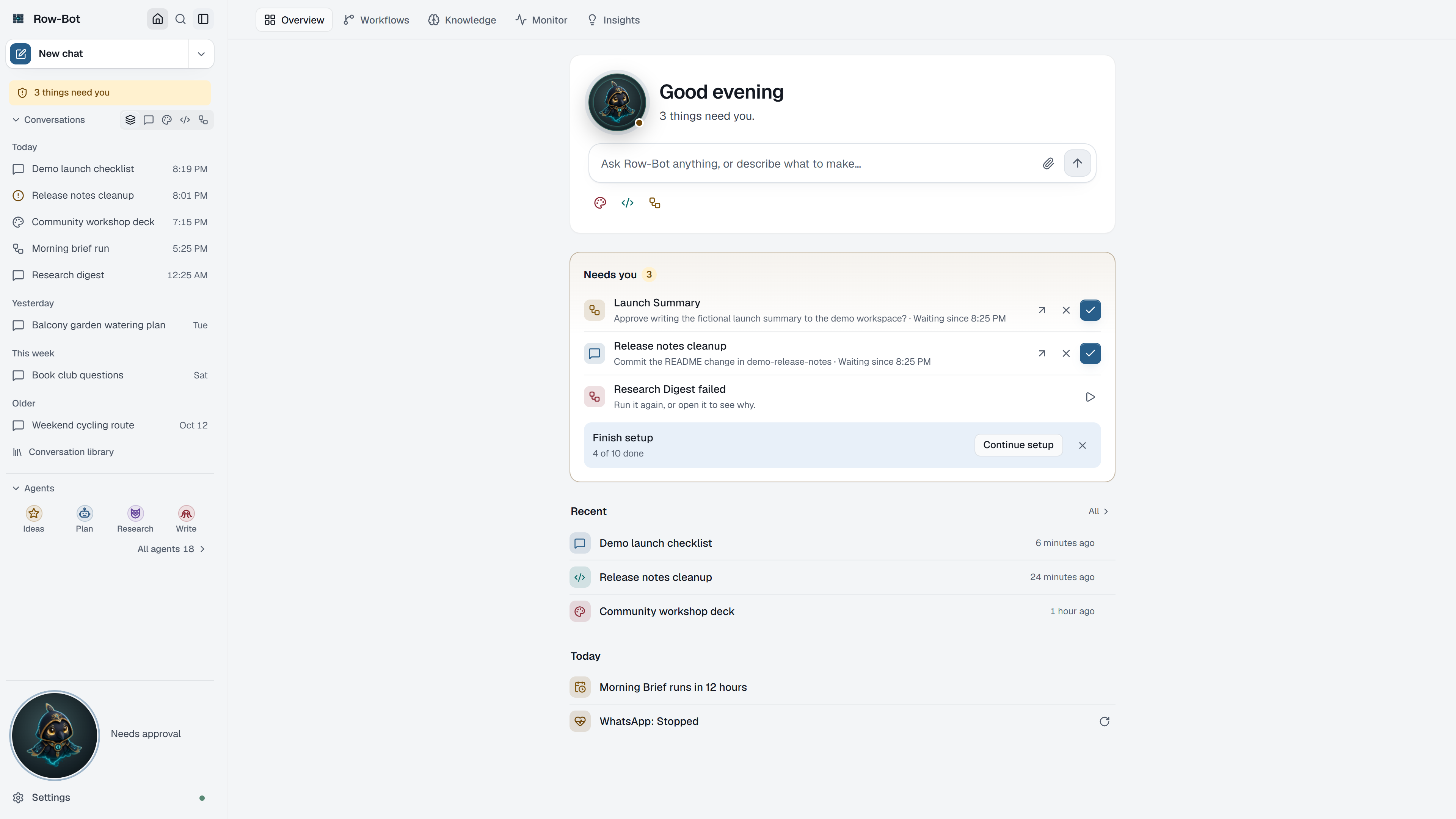
- **Conversations that do the work** - ask for a deck, an app or a report and
Row-Bot creates the design or code folder and keeps working in it; setup
cards turn on a missing tool or connect an app in place.
- **Goals and agents** - goals that keep going until done and pause when they
stop making progress; delegated agents with their own conversations, Stop
and Message; reusable agent profiles.
- **Approvals wherever you are** - risky actions wait for Approve or Deny in
the conversation, on Home, in the attention indicator, in Buddy or on a
connected channel.
- **Memory and knowledge** - a personal knowledge graph with recall, review,
Dream Cycle refinement, documents, and an Obsidian-compatible wiki vault.
- **Design and code panels** - decks, documents and mockups with Present,
Review, export (PDF, HTML, PNG, PPTX) and publish; code folders with
changes, files, Git, pull requests, checks, an interactive terminal and an
optional Docker sandbox.
- **Workflows** - scheduled, webhook and chained runs with approvals, delivery
to channels and run history.
- **Apps and skills** - connect services such as GitHub, Notion, Linear or
Stripe from one catalog in about a minute (sign in, paste a key, or run a
program on this computer), choose what each may do, and switch apps per chat
with + › Apps or an @mention; add skills from featured catalogs and use them
with their /name.
- **Tools** - web search, files, shell, managed browser, opt-in Computer Use
on Windows and macOS, Gmail and Calendar, image and video generation, and
custom tools.
- **Channels and voice** - Telegram, WhatsApp, Discord, Slack and SMS;
dictation, Talk and read-aloud with local Whisper or SenseVoice and Kokoro.
- **Monitor with fixes** - health checks that run by themselves, with one
fix per problem, and Insights that suggest improvements.
- **Devices and remote access** - connect a phone or another computer with a
QR code over Tailscale, your Wi-Fi or a public link; a living Buddy desktop
pet on Windows and macOS; backup and restore of your profile.
## Platforms
| Platform | Package | Notes |
|----------|---------|-------|
| Windows 10/11, 64-bit | Installer, about 420 MB | Native window, tray, desktop Buddy, Computer Use. |
| macOS 14 (Sonoma) or newer, Apple silicon | DMG, about 930 MB | Native window, tray, desktop Buddy, Computer Use. |
| Linux x86_64 (glibc) | Tarball and one-line installer, about 790 MB | Opens in your browser; a native window and tray need GTK or Qt and AppIndicator. |
| Docker, amd64 and arm64 | `ghcr.io/siddsachar/row-bot` | Authenticated single-owner server. |
Ollama is optional, for local models only. System requirements are in the
[installation guide](https://row-bot.ai/docs/getting-started/installation).
## Install
Download the Windows installer or the macOS DMG from
[GitHub Releases](https://github.com/siddsachar/row-bot/releases/latest) and
run it. On Windows it installs for your account only, without administrator
rights or questions, and opens Row-Bot when it finishes; on macOS, drag
Row-Bot to Applications.
On Linux:
```bash
curl -fsSL https://raw.githubusercontent.com/siddsachar/row-bot/main/installer/install-linux.sh | bash
# or a specific published release (replace X.Y.Z):
curl -fsSL https://raw.githubusercontent.com/siddsachar/row-bot/main/installer/install-linux.sh | bash -s -- X.Y.Z
```
The installer takes the latest release by default, verifies the tarball's
SHA-256, installs under `~/.local/share/row-bot` and creates
`~/.local/bin/row-bot`.
With Docker, from a checkout of this repository (pin `X.Y.Z` to a release
with a published container):
```bash
export ROW_BOT_IMAGE=ghcr.io/siddsachar/row-bot:X.Y.Z
docker compose -f deploy/docker/compose.yaml up --detach
docker compose -f deploy/docker/compose.yaml exec row-bot \
row-bot access invite --layout desktop --origin http://127.0.0.1:8080
```
Read [Docker and VPS operations](https://row-bot.ai/docs/operations/docker)
before exposing it beyond loopback.
Want to run Row-Bot without installing anything?
[Upvote it on PikaPods](https://feedback.pikapods.com/posts/1267/row-bot-open-source-ai-assistant-thats-always-on-workflows-memory-browser)
to help get it listed there.
### Updates
Installed Row-Bot keeps itself up to date: about once a day it checks GitHub,
downloads only what changed in the background, checks every file, and shows
**Restart to update** when the new version is ready (otherwise it installs the
next time you quit). If a new version doesn't start, Row-Bot goes back to the
previous one by itself, and Settings › Updates can go back on request. Turn
background checks or downloads off in Settings › Updates. Docker installs are
updated by pulling a newer image. Your data is never touched. See
[Updates](https://row-bot.ai/docs/operations/updates).
Upgrading from 5.1? It updates to 5.2 once with the full installer. On
Windows, 5.2 moves Row-Bot from Program Files to your account and asks once for
administrator approval to remove the old copy; on macOS, drag Row-Bot to
Applications one last time; Linux needs nothing.
Upgrading from 5.0? Your MCP servers, plugins, skills, accounts and channels
carry over to Settings › Apps and Skills; the
[v5.1.0 release notes](RELEASE_NOTES.md) say what moved.
Upgrading from 4.x? Read the [v5.0.0 release notes](RELEASE_NOTES.md) first:
the old NiceGUI interface is gone and several places moved. Users still on
Thoth or an early Row-Bot build should first run a previous migration-capable
Row-Bot release.
### From source
You need Python 3.12 or 3.13, [uv](https://docs.astral.sh/uv/), Git, and
Node.js 24.15+ with npm 11 to build the client.
```bash
git clone https://github.com/siddsachar/row-bot.git
cd row-bot
python -m pip install "uv>=0.7,<1.0"
uv sync --locked --all-extras --group test
cd frontend && npm ci --ignore-scripts --no-audit --no-fund && npm run build && cd ..
uv run python launcher.py
```
`launcher.py` starts the tray and opens the app at
`http://localhost:8080/app-v2/` (the next free port if 8080 is busy); on Linux
it opens your browser. Starting it again while it runs shows the running app.
Other entry points:
```bash
uv run python launcher.py serve --port 8080 # authenticated headless server
uv run python app.py # server only, no tray or window
```
Dependency changes go through `pyproject.toml` and `uv.lock`; never edit
`requirements.txt` by hand (see [AGENTS.md](AGENTS.md#dependencies)).
## Quick start
1. On first launch Row-Bot asks **How should Row-Bot think?**: on this
computer (Ollama), with your subscription (ChatGPT, Claude or Grok), with
an API key, or with a custom endpoint. Your pick becomes the default model,
a short test runs, and Home opens.
2. Start a conversation and ask for what you need, for example
`Create a six-slide pitch deck for my startup`,
`Review this repo and suggest the highest-risk issues`,
`Remember that my mom's birthday is March 15` or
`Remind me to call the dentist tomorrow at 9am`.
3. Press **Ctrl+K** (**⌘K** on macOS) to find conversations, commands and
settings by plain words, such as "connect telegram" or "dark mode".
4. **Setup Center** (Continue setup on Overview, or search for it with
Ctrl+K) walks through the rest: knowledge, workflows, designs, code, apps,
skills, tools and voice.
The [first launch guide](https://row-bot.ai/docs/getting-started/first-launch)
covers each path.
## Configuration and data
- **Data folder:** `~/.row-bot` (`%USERPROFILE%\.row-bot` on Windows), or the
folder in `ROW_BOT_DATA_DIR`. It holds conversations, memory, workflows,
settings and logs (`row_bot_app.log` and `logs/row_bot.log`).
- **Workspace folder:** `~/Documents/Row-Bot` by default, where file tools,
exports and backups go; change it in Settings › System.
- **Secrets:** provider keys and sign-ins are stored in Windows Credential
Manager, the macOS Keychain or Linux Secret Service/KWallet; Docker uses
encrypted records with a separate key volume. JSON settings hold metadata
only.
- **Backups:** Settings › Data › Back up now makes a zip without secrets.
- **Reference:** [models and providers](https://row-bot.ai/docs/configuration/models-and-providers),
[environment and configuration](https://row-bot.ai/docs/reference/generated/environment-and-config),
[data storage](https://row-bot.ai/docs/reference/generated/data-storage) and
[command-line options](https://row-bot.ai/docs/reference/generated/cli).
## Remote access and server mode
Row-Bot is a **single-owner, multi-device** application: one owner can use the
same instance from several trusted browsers, but it is not multi-user hosting.
A device joins with a one-time invitation (a QR code or link that expires after
10 minutes) and then holds a revocable session. Connect devices from Settings ›
Devices & remote access, or from a trusted terminal:
| Path | Use it when | Boundary |
|------|-------------|----------|
| Tailscale Serve | Private access across your devices (recommended). | Row-Bot never installs Tailscale, signs in, enables Funnel or overwrites another app's route. |
| Direct LAN | A trusted network. | Plain HTTP is unencrypted; prefer Tailscale or HTTPS outside a trusted LAN. |
| SSH tunnel | A remote host with no published port. | Keep Row-Bot on loopback and forward a port. |
| Docker | A headless, isolated instance. | Compose publishes to host loopback by default. |
| HTTPS reverse proxy or VPS | You manage DNS, TLS and the proxy. | Set `ROW_BOT_PUBLIC_URL`, `ROW_BOT_ALLOWED_HOSTS` and `ROW_BOT_TRUSTED_PROXY_CIDRS` exactly; never buffer `/api/v1/events`. |
```bash
row-bot serve --host 127.0.0.1 --port 8080
row-bot access invite --layout desktop --origin http://127.0.0.1:8080
row-bot access list
row-bot access doctor
```
If the owner loses every browser session, create a new invitation from a
trusted local terminal, SSH session or `docker compose exec`.
Back up the complete active `ROW_BOT_DATA_DIR` while Row-Bot is stopped (with
Docker, the data and encryption-key volumes together). Details:
[Remote access and server mode](https://row-bot.ai/docs/operations/remote-access)
and [Docker and VPS operations](https://row-bot.ai/docs/operations/docker).
## Development
- `src/row_bot/` holds the application (FastAPI server, agents, tools,
providers, memory, workflows, channels); `frontend/` is the React client,
served at `/app-v2/`. See [docs/SOURCE_LAYOUT.md](docs/SOURCE_LAYOUT.md) and
[docs/ARCHITECTURE.md](docs/ARCHITECTURE.md).
- [AGENTS.md](AGENTS.md) is the canonical guide for contributors and coding
agents: ground rules, where tests go and the test lanes.
- `scripts/run_test_matrix.py` is the test source of truth; CI runs its tiers:
```bash
uv run python scripts/run_test_matrix.py fast # static checks and contracts
uv run python scripts/run_test_matrix.py changed --base origin/main
uv run python scripts/run_test_matrix.py pr # what the Linux PR lane runs
uv run python scripts/run_test_matrix.py platform # OS-sensitive tests
uv run python scripts/run_test_matrix.py browser-smoke
npm --prefix frontend run check # client lint, types, tests, build
```
## Documentation
- [User guide](https://row-bot.ai/docs/) - the complete public documentation
([source](docs-site/README.md))
- [Release notes](RELEASE_NOTES.md)
- [Privacy and safety](https://row-bot.ai/docs/privacy-safety),
[Computer Use](https://row-bot.ai/docs/computer-use) and its
[security decision](docs/COMPUTER_USE_SECURITY.md)
- [Architecture](docs/ARCHITECTURE.md), [client platform](docs/CLIENT_PLATFORM.md),
[plugin system](docs/PLUGIN_SYSTEM_V2.md) and
[prompt context and cache](docs/PROMPT_CONTEXT_AND_CACHE.md)
- [Release process](docs/RELEASING.md) and [branching](docs/BRANCHING.md)
- [Troubleshooting](https://row-bot.ai/docs/troubleshooting)
- [row-bot.ai](https://row-bot.ai/) - product tour and demos
## Privacy
Row-Bot has no account system and no hosted inference; conversations, memory
and settings stay on your machine, and provider calls go only to the provider
or endpoint you choose. Its only first-party telemetry is install stats, on
by default: once a day, a random ID, the Row-Bot version and the system,
nothing else, so its maker can see how many installations are in use. Turn
**Share install stats** off in one click in Settings › System › Privacy, or set
`ROW_BOT_INSTALL_COUNT=0` on a server or in Docker. The opt-in Computer Use beta relies on Cua
Driver, whose upstream telemetry is disclosed and must be accepted first; see
[privacy and safety](https://row-bot.ai/docs/privacy-safety).
## Contributing and security
Pull requests are welcome; read [CONTRIBUTING.md](CONTRIBUTING.md) and the
[code of conduct](CODE_OF_CONDUCT.md). Please report vulnerabilities privately
as described in [SECURITY.md](SECURITY.md).
## License
Apache 2.0. See [LICENSE](LICENSE) and [NOTICE](NOTICE). Built with React,
FastAPI, LangGraph, LangChain, Ollama, FAISS, Cua Driver, Kokoro TTS,
faster-whisper and FunASR/SenseVoice.