# $\tau^2$-Bench: Evaluating Conversational Agents in a Dual-Control Environment
[](https://www.python.org)
[](https://github.com/astral-sh/ruff)
[](https://github.com/psf/black)
[](https://arxiv.org/abs/2506.07982)
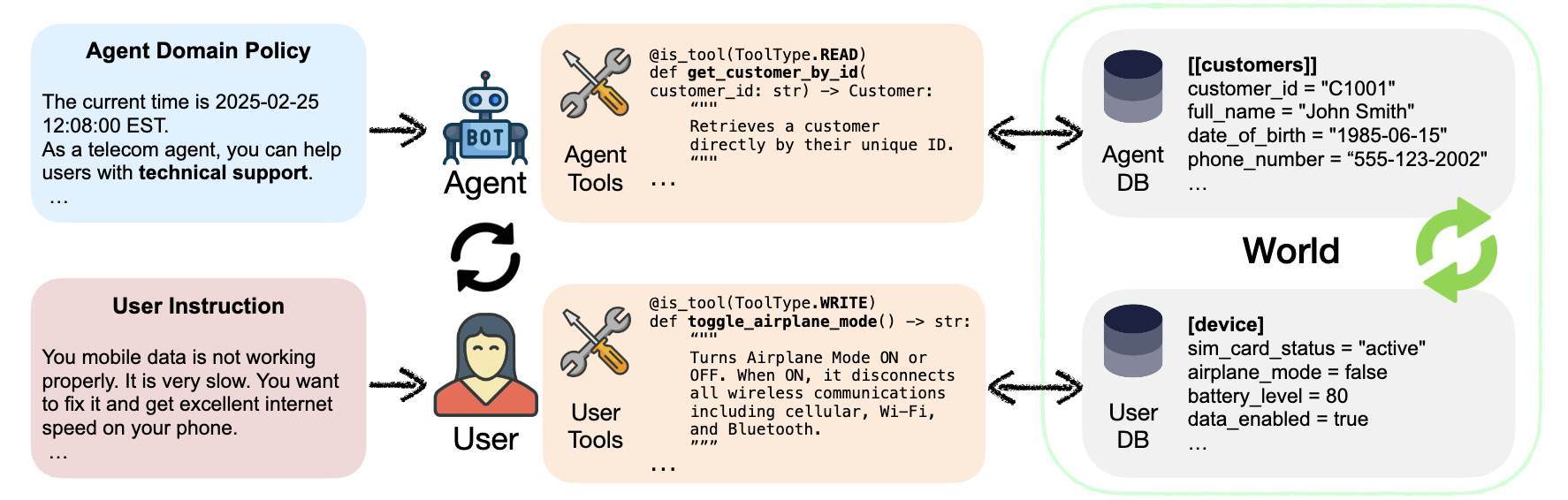 Figure 1: τ²-bench allows users to interact with the agent and the environment
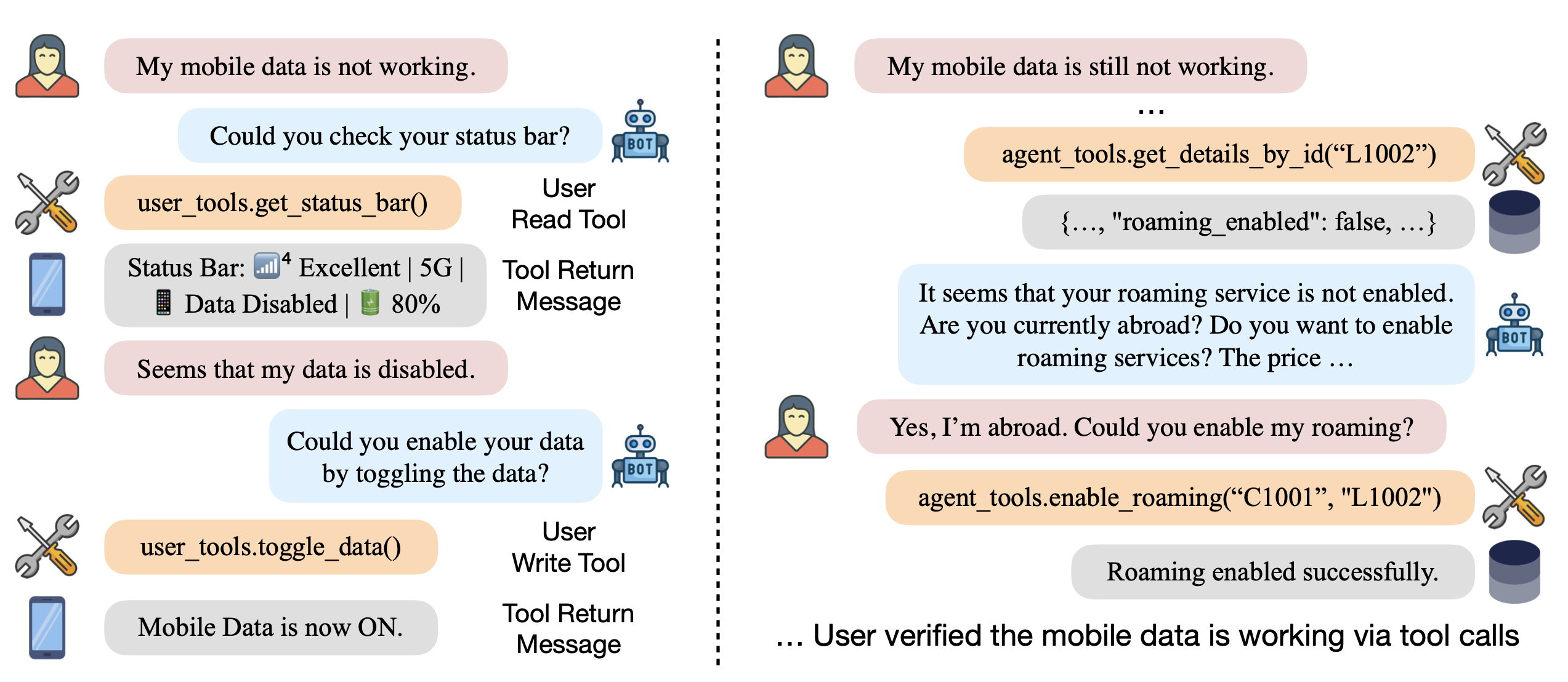 Figure 2: Trajectory of a conversation between an agent and a user
## Overview
$\tau^2$-bench implements a simulation framework for evaluating customer service agents across various domains.
Each domain specifies:
- a policy that the agent must follow
- a set of tools that the agent can use
- a set of tasks to evaluate the agent's performance
- Optionally: A set of tools that the user simulator can use
Domains are:
- `mock`
- `airline`
- `retail`
- `telecom`
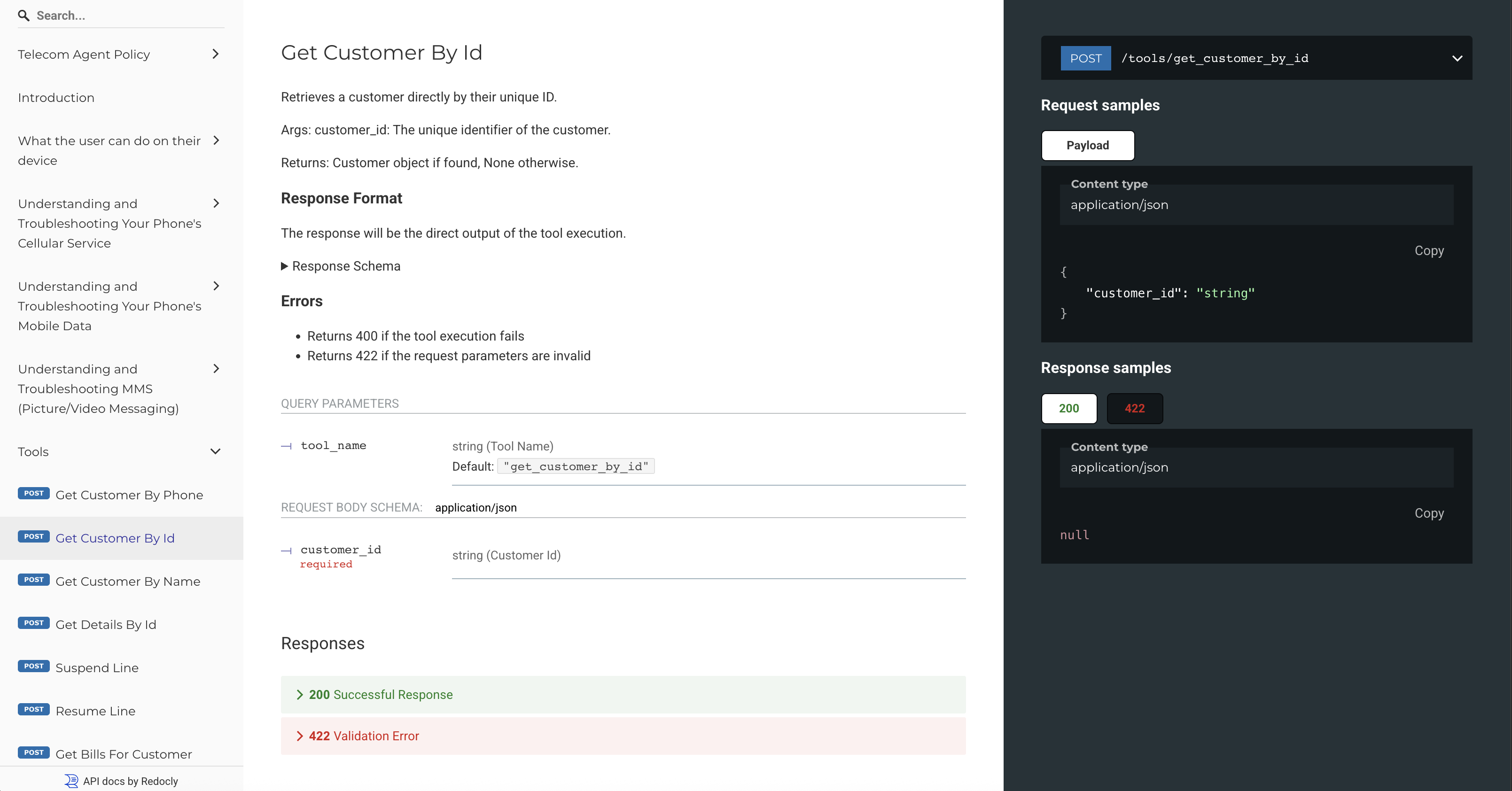
All the information that an agent developer needs to build an agent for a domain can be accessed through the domain's API docs.
Once $\tau^2$-bench is installed, to view a domain policy and API docs:
1. Run:
```sh
tau2 domain
```
2. Visit http://127.0.0.1:8004/redoc
## Requirements
- Python >= 3.13.0
- [pdm](https://pdm-project.org/en/latest/)
## Installation
1. Clone the repository:
```bash
git clone https://github.com/sierra-research/tau2-bench
cd tau2-bench
```
2. Create a new environment
Check that you have the correct python version
```bash
python --version
```
You should get `Python 3.13.0`
Create and activate new environment
```bash
python -m venv .venv
source .venv/bin/activate
```
3. Install dependencies
```bash
pdm install
```
4. Provide your LLM API keys
Copy `.env.example` as `.env` and edit it to include your API keys.
5. Set scripts as executable
```bash
chmod +x ./scripts/start_tau2_server.sh
```
6. Install package (required to run the CLI)
```bash
pip install .
```
7. Test the installation
To run a test evaluation on only 5 tasks, run:
```bash
tau2 run \
--domain airline \
--agent-llm gpt-4.1 \
--user-llm gpt-4.1 \
--debug-mode
```
(`debug-mode` will limit the results to 5 tasks and 1 trial per task.)
Results will be saved in `data/tau2/simulations/`
### Uninstall
To remove all the generated files and the virtual environment, run:
```bash
make clean
```
## Command Line Interface
The `tau2` command provides a unified interface for all functionality:
### Running Benchmark
```bash
tau2 run \
--domain \
--agent-llm \
--user-llm \
--num-trials \
--max-concurrency \
...
```
### Viewing Results
```bash
tau2 view
```
This tool allows you to:
- Browse simulation files (in `data/tau2/simulations/`)
- View agent performance metrics
- View a particular simulation
- View task details
### View domain documentation
```bash
tau2 domain
```
Visit http://127.0.0.1:8004/redoc to see the domain policy and API documentation.
## Experiments
### Running Ablation Studies (No User, or Agent with Oracle Plan)
`telecom` domain enables running ablation studies.
1. Running an LLM in `no-user` mode. In this mode, the LLM is given all the tools and the information upfront.
Just choose `llm_agent_solo` as the agent and `dummy_user` as the user.
```bash
tau2 run \
--domain telecom \
--agent llm_agent_solo \
--agent-llm gpt-4.1 \
--user dummy_user \
...
```
2. Running an LLM in `oracle-plan` mode. In this mode, the LLM is given an oracle plan ahead of time alleviating the need for action planning.
Just choose `llm_agent_gt` as the agent.
```bash
tau2 run \
--domain telecom \
--agent llm_agent_gt \
--agent-llm gpt-4.1 \
--user-llm gpt-4.1 \
...
```
### Running Telecom Domain with Workflow Policy
To test the impact of policy format, we provide an additional "workflow" policy for the telecom domain.
To run using this policy, use the `telecom-workflow` domain.
```bash
tau2 run \
--domain telecom-workflow \
--agent-llm gpt-4.1 \
--user-llm gpt-4.1 \
...
```
## Domains
For all the details see the domains [README](src/tau2/domains/README.md).
### Basics
- Code is located in `src/tau2/domains/`
- Data is located in `data/tau2/domains/`
- Each domain has its own configuration and task definitions
#### View domain-specific policy and API docs:
Run the following command to see the domain policy and API documentation.
```bash
tau2 env
```
Then visit http://127.0.0.1:8004/redoc
### Environment CLI (beta)
An interactive command-line interface for directly querying and testing domain environments. Features:
- Interactive query interface with domain-specific tools
- Support for multiple domains (airline, mock, etc.)
- Session management with history
To use:
```bash
make env-cli
```
Available commands:
- `:q` - quit the program
- `:d` - change domain
- `:n` - start new session (clears history)
Example usage:
```bash
$ make env-cli
Welcome to the Environment CLI!
Connected to airline domain.
Query (:n new session, :d change domain, :q quit)> What flights are available from SF to LA tomorrow?
Assistant: Let me check the flight availability for you...
[Flight details will appear here]
```
The Environment CLI is useful for:
- Testing domain tools and queries
- Debugging environment responses
- Exploring available domain functionality
- Quick domain interaction without starting the full server stack
## Run tests
To run the test suite use the command
```sh
make test
```
## Config
To configure the framework, see the [config](src/tau2/config.py) file.
### LLM Calls caching
LLM call caching is disabled by default.
To enable LLM calls caching:
- Make sure `redis` is running.
- Update the redis config in `config.py` if necessary.
- Set `LLM_CACHE_ENABLED` to `True` in `config.py`
## Evaluate Your Own Agent
For local or remote agent evaluation, see our [agent developer guide](src/tau2/agent/README.md).
## Orchestration Sequence Diagram
```mermaid
sequenceDiagram
participant O as Orchestrator
participant A as Agent
participant U as UserSimulator
participant E as Environment
Note over O: Initialize(task)
rect rgb(100, 150, 150)
O->>A: get_init_state_info(message_history)
A->>O: agent_state_info
O->>U: get_init_state_info(message_history)
U->>O: user_state_info
O->>E: set_state(initialization_data, initialization_actions, message_history)
end
Note over O: Start simulation
loop Pass messages between Agent, User, and Environment
alt Agent/Env to User
rect rgb(200, 150, 150)
O->>U: generate_next_message(msg, user_state_info)
U-->>O: (user_msg, user_state_info)
end
Note over O: Check if user_msg is STOP
else User/Env to Agent
rect rgb(100, 200, 100)
O->>A: generate_next_message(msg, agent_state_info)
A-->>O: (assistant_msg, agent_state_info)
Note over O: Check if too many errors
end
else User/Agent to Environment
rect rgb(150, 150, 200)
O->>E: get_response(tool_call)
E-->>O: tool_message
end
end
Note over O: Check if max turns reached.
end
Note over O: Return simulation run
```
## Citation
```bibtex
@misc{barres2025tau2,
title={$\tau^2$-Bench: Evaluating Conversational Agents in a Dual-Control Environment},
author={Victor Barres and Honghua Dong and Soham Ray and Xujie Si and Karthik Narasimhan},
year={2025},
eprint={2506.07982},
archivePrefix={arXiv},
primaryClass={cs.AI},
url={https://arxiv.org/abs/2506.07982},
}
```