# 🎬 Retflix
**A self-hosted, Netflix-style streaming app for your IPTV line — on web, mobile, and Samsung Smart TV.**
Connect your **Xtream Codes** provider or any **M3U / M3U8** playlist, and enjoy a premium streaming experience with a Netflix-grade interface. Browse & watch movies, series, and live TV on your computer, phone, or Samsung Smart TV with a native Tizen app.







> [!IMPORTANT]
> **Bring your own legal IPTV subscription.** Retflix ships with **no** content, channels, or credentials — it's only a player for an [Xtream Codes](https://en.wikipedia.org/wiki/Xtream_Codes) line or M3U/M3U8 playlist **you** already pay for. Not affiliated with Netflix. For personal use on your own network.
---
## 📸 Screenshots
> Demo data — placeholder titles & artwork, no real content.
| Home | Browse | Search |
|:---:|:---:|:---:|
| 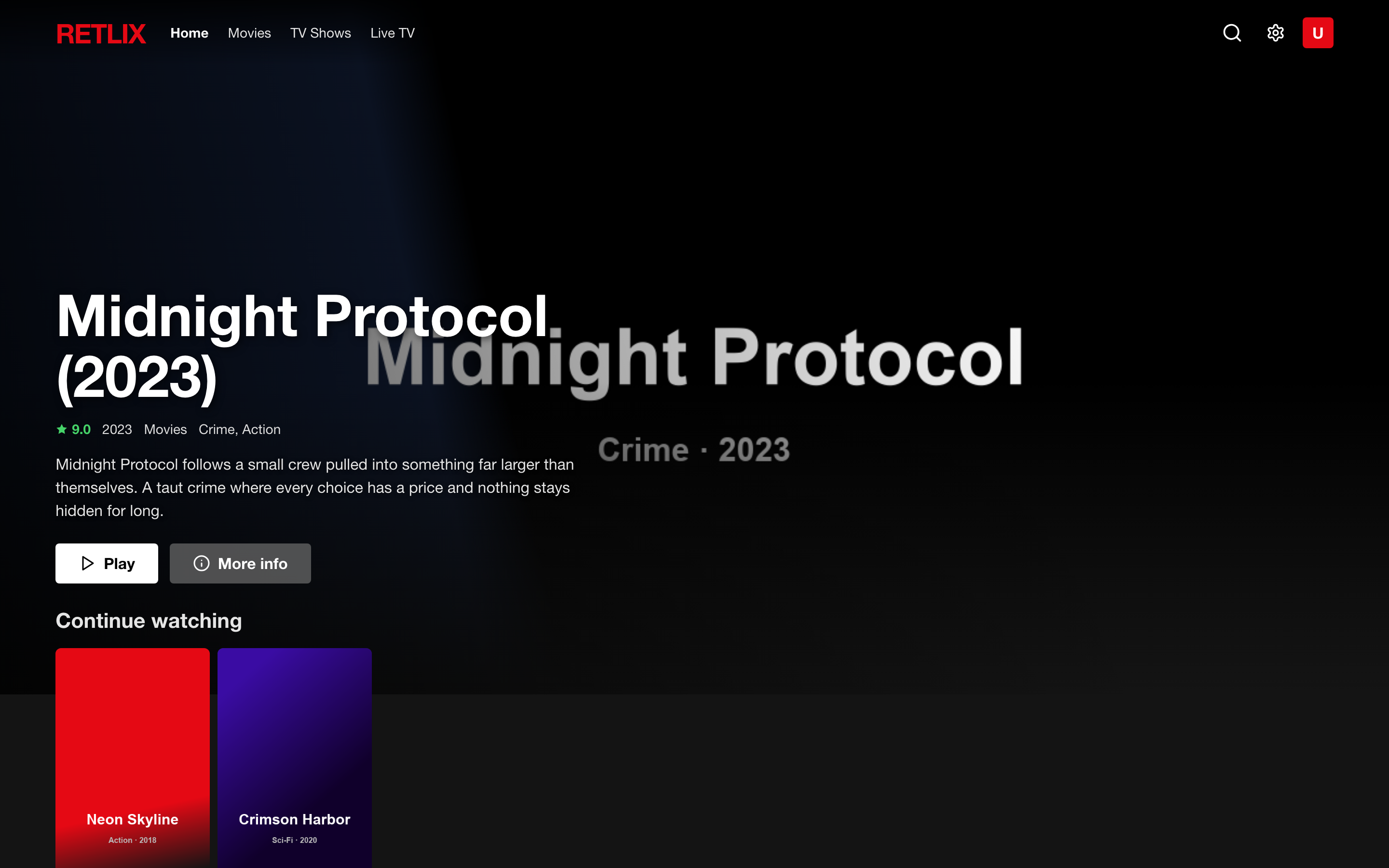 | 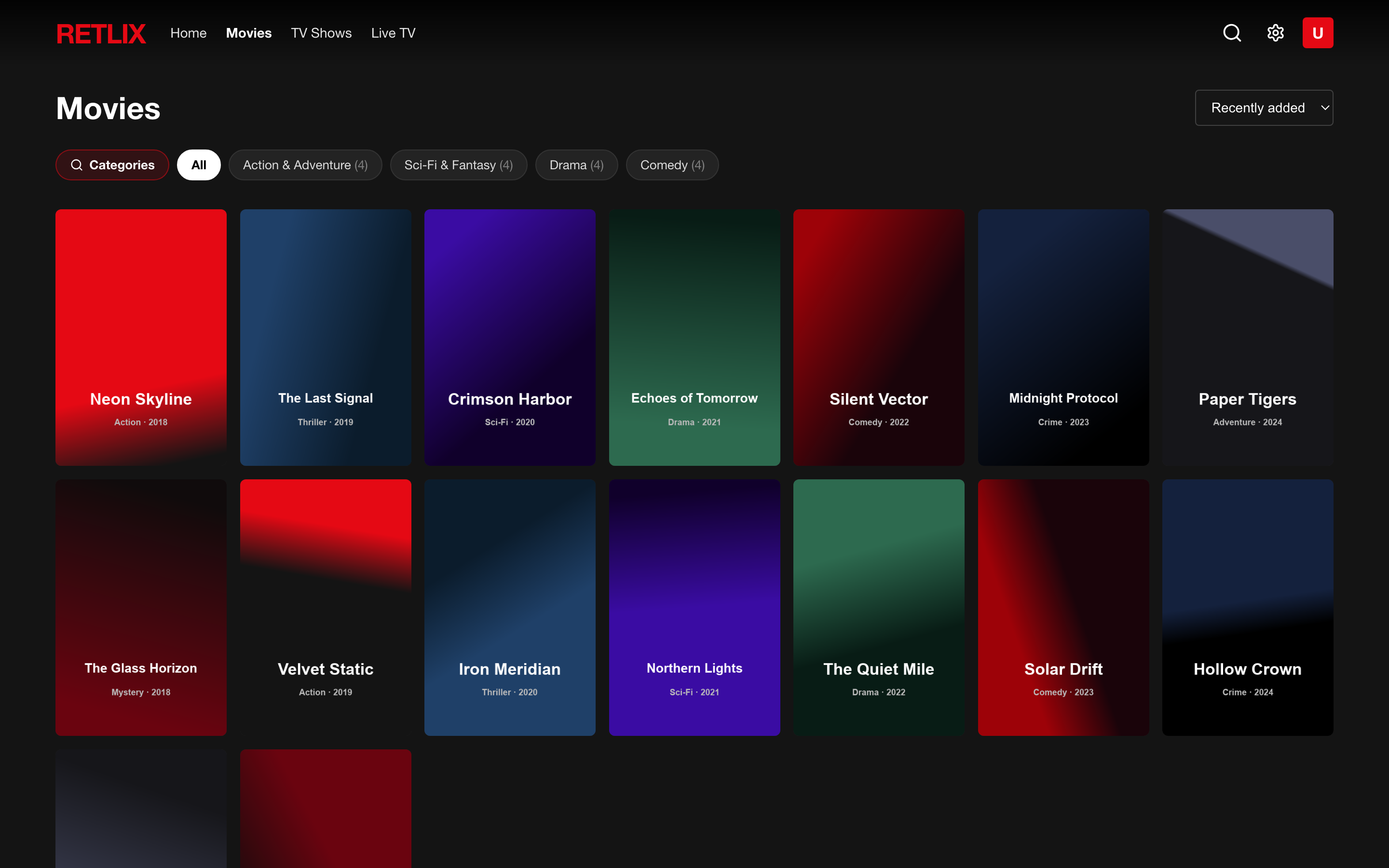 | 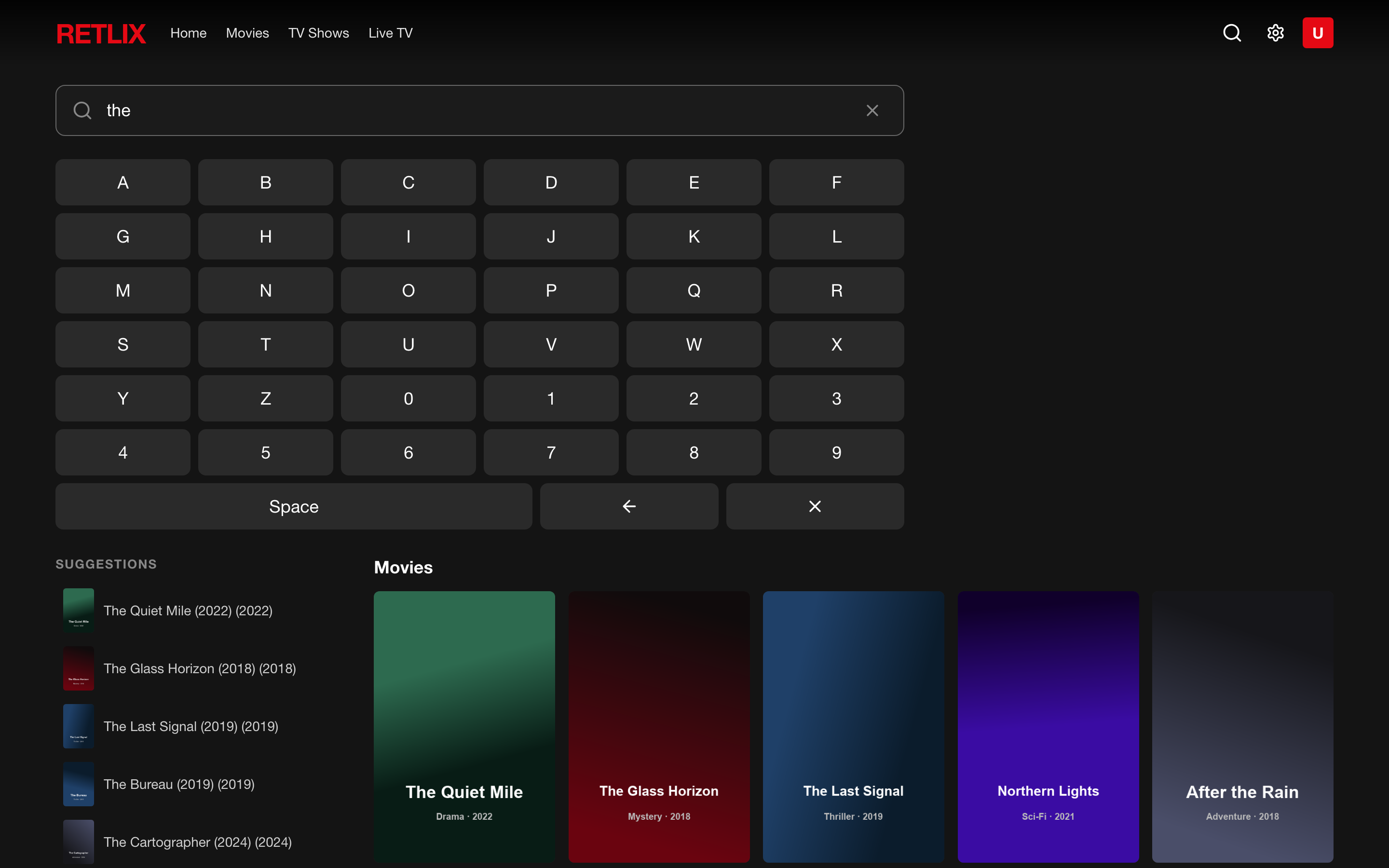 |
---
## 📑 Table of contents
- [Features](#-features)
- [Quick start (Docker)](#-quick-start-docker)
- [Manual install](#%EF%B8%8F-manual-install-without-docker)
- [Samsung TV app](#-samsung-tv-app)
- [Multilingual metadata (TMDB)](#-multilingual-metadata-tmdb)
- [Configuration](#%EF%B8%8F-configuration)
- [How it works](#-how-it-works)
- [Project structure](#-project-structure)
- [FAQ & limitations](#-faq--limitations)
- [License](#-license)
---
## ✨ Features
### Library
- **Two provider types** at setup:
- **Xtream Codes** — server URL + username + password, validated on connect.
- **M3U / M3U8** — any playlist URL; channels auto-categorized from group tags.
- Full catalog synced into a local **SQLite** database (web mode) or **localStorage** (TV standalone mode).
- **Two sync modes** (Xtream), both incremental and resumable:
- **Update library** — provider details (plot, cast, director, episodes). Fast.
- **Download everything** — adds IMDb cast photos + pre-cached artwork.
- On-disk **image cache** (posters, backdrops, episode stills, actor photos).
- **Adult content filter** — automatically hides XXX/adult categories and content.
### Discovery
- Netflix-style **home**: hero banner (web) or quick navigation grid (TV), *Continue Watching*, *My List* (favorites), and recommendation rows.
- **Browse** movies / series / live with category picker and sorting.
- **Global search** across titles and actors, with suggestions, typo-tolerant *"did you mean"*, and TV-optimized debounced search.
- Rich **detail page** (TV) or **modal** (web): synopsis, cast with photos, year, rating, genre, director, trailer, seasons & episodes.
- **Favorites / My List** — add titles to your personal list, persisted in localStorage.
- **Top 10** row with numbered cards for the most popular titles.
- **"NUOVO" badge** on recently added content.
### Player
- **Continuous, Netflix-style buffering**: stall watchdog with auto-recovery, transparent reconnect, next-episode prefetch, debounced spinner.
- Plays **MP4** natively; **MKV / AVI** through on-the-fly **ffmpeg → HLS** (web) or native HLS (TV).
- **Multi-audio language switching** and **subtitles** (WebVTT, Netflix-styled).
- Hardware video encoding on macOS (`h264_videotoolbox`); `libx264` elsewhere.
- Resume playback, *Continue Watching*, auto next-episode, full keyboard/remote shortcuts.
### Samsung Smart TV App
- **Native Tizen app** (`.wgt`) — installs from Tizen Studio, appears in the TV's app launcher.
- **Fully standalone** — connects directly to the Xtream Codes provider like IPTV Smarters. No server required for streaming.
- **D-pad spatial navigation** — full remote control support (arrows, OK, Back).
- **10-foot UI** — large text (24px+), big cards, visible focus rings, designed for viewing from 5 meters.
- **Netflix-style splash screen** with animated loading bar.
- **Category picker** — browse Film, Serie TV, Live TV with category grid selection.
- **Live TV channel list** — text-based grid for quick channel selection.
- **Player with seek** — skip ±10s with arrows, play/pause, volume, stall watchdog with auto-reconnect.
- **Page state persistence** — Back button always returns to where you were (scroll position + focused element).
- Compatible with **Samsung TVs 2017+** (Tizen 3.0, Chrome 47) — all CSS/JS transpiled for legacy browsers.
### Languages
- Full **multilingual UI** — 🇮🇹 Italiano · 🇬🇧 English · 🇪🇸 Español · 🇫🇷 Français · 🇩🇪 Deutsch · 🇵🇹 Português.
- Optional **multilingual content** via [TMDB](#-multilingual-metadata-tmdb).
---
## 🚀 Quick start (Docker)
```bash
git clone https://github.com//retflix.git
cd retflix
./run.sh
```
Open **http://localhost:3000**, connect your provider, and run a sync.
On a phone or TV browser, use the network URL printed by `run.sh` (e.g. `http://192.168.1.50:3000`).
```bash
docker compose up -d --build # build + start
docker compose logs -f # follow logs
docker compose down # stop
```
Your library and credentials live in `./data` on the host — **never** baked into the image.
---
## 🛠️ Manual install (without Docker)
Requires **Node.js ≥ 18** and **ffmpeg** on your `PATH`.
```bash
git clone https://github.com//retflix.git
cd retflix
npm install
npm run build
npm start # production → http://localhost:3000
```
Development (hot-reload):
```bash
npm run dev # or ./start.sh
```
---
## 📺 Samsung TV App
Retflix includes a standalone Samsung Tizen app that connects directly to your IPTV provider — no server needed for streaming.
### Prerequisites
- Samsung TV (2017 or newer, Tizen 3.0+)
- [Tizen Studio](https://developer.tizen.org/development/tizen-studio/download) installed on your computer
- TV in **Developer Mode** (Apps → press 1-2-3-4-5 → enable → set your PC's IP → restart TV)
### Build & Install
```bash
# Build the .wgt package
./build-tizen.sh
# Connect to your TV
sdb connect
# Sign the package (use your Tizen certificate profile)
tizen package -t wgt -s -- tizen-build/
# Install & launch
tizen install -n tizen-build/Retflix.wgt -t
tizen run -p sVPRCHljlj.Retlix -t
```
### Configuration
The TV app stores Xtream Codes credentials in localStorage. On first launch, configure your provider in **Settings** or pre-configure in `build-tizen.sh`:
```bash
# In build-tizen.sh, edit the provider line:
localStorage.setItem("retflix-provider", JSON.stringify({
url: "http://your-provider.com",
username: "your_username",
password: "your_password"
}))
```
### How it works on TV
```
Samsung TV (Tizen 3.0)
└─ Retflix.wgt (standalone web app)
├─ React UI (legacy ES5 bundle for Chrome 47)
├─ Xtream Codes API client (direct HTTP to provider)
├─ Native HLS player (no hls.js needed)
├─ D-pad spatial navigation engine
└─ localStorage (library cache, favorites, progress)
│
▼
IPTV Provider (Xtream Codes API)
├─ player_api.php → catalog, categories, details
├─ /movie/user/pass/id.mp4 → direct movie stream
├─ /series/user/pass/id.mp4 → direct episode stream
└─ /live/user/pass/id.m3u8 → direct live stream
```
No proxy, no intermediate server — the TV connects directly to the provider like IPTV Smarters.
---
## 🌍 Multilingual metadata (TMDB)
To show **plots & genres in your chosen language**, add a free [TMDB](https://www.themoviedb.org/) API key:
1. Create a free account → **Settings → API** → copy the **API Key (v3 auth)**.
2. In Retflix: **Settings → Language → TMDB** → paste the key → **Save**.
3. Pick a language and open a title — translated content is cached locally.
---
## ⚙️ Configuration
| Variable | Default | Description |
|-----------------|-----------|---------------------------------------------------|
| `PORT` | `3000` | HTTP port |
| `HOST` | `0.0.0.0` | Bind address (default exposes it on the LAN) |
| `TMDB_API_KEY` | — | Optional; multilingual plots/genres (or set in UI)|
The SQLite DB + image cache live in **`data/`** (gitignored). To start fresh, delete it or use **Settings → Disconnect**.
---
## 🧠 How it works
### Web / Desktop mode
```
Xtream / M3U ──────▶ Express backend ──▶ SQLite (local library + cache)
│ │
TMDB / IMDb ─────────────┤ enrichment (plots, genres, cast photos, i18n)
│
browser ◀── React UI ──┤ streams & images PROXIED through backend
(hls.js / mpegts.js) │ (credentials never reach the browser)
└─ ffmpeg → on-the-fly HLS for MKV/AVI
```
### Samsung TV mode
```
Samsung TV ◀── Retflix.wgt ──▶ IPTV Provider (Xtream Codes)
│ │
├─ player_api.php ─────┤ catalog + details
├─ /movie/ ────────────┤ direct MP4 stream
├─ /live/ ─────────────┤ direct HLS stream
└─ localStorage ───────┘ library cache + progress
```
---
## 📁 Project structure
```
server/ Express API, sync, stream proxy, M3U parser, ffmpeg, TMDB
src/ React app — pages, components, player, i18n, TV hooks
├─ pages/
│ ├─ Home.jsx Home with hero (web) or quick nav (TV)
│ ├─ Browse.jsx Browse with category picker (TV) or chips (web)
│ ├─ Search.jsx Search with on-screen keyboard (web) or IME (TV)
│ ├─ Watch.jsx Player (web — hls.js + mpegts.js)
│ ├─ WatchTV.jsx Player (TV — native HLS, no JS libraries)
│ ├─ DetailTV.jsx Full-page detail (TV — replaces modal)
│ └─ Settings.jsx Settings (TV has simplified standalone view)
├─ hooks/
│ ├─ useTv.js TV detection, spatial navigation, back handling
│ └─ pageState.js Save/restore scroll + focus for Back navigation
├─ apiTV.js Standalone Xtream API client (runs in browser)
├─ xtreamTV.js Xtream Codes URL builders + credential storage
└─ api.js API router (server mode or standalone TV mode)
tizen/ Samsung Tizen app config + icons
build-tizen.sh Build script for the .wgt Samsung TV package
data/ SQLite DB + image cache (runtime, never committed)
Dockerfile Multi-stage build (Node + ffmpeg)
docker-compose.yml
run.sh One-command Docker launcher
start.sh Dev mode launcher
stop.sh Port cleanup
```
---
## ❓ FAQ & limitations
- **MKV/AVI need ffmpeg** — included in Docker; install manually otherwise.
- **Samsung TV** requires Tizen 3.0+ (2017 models or newer) and Developer Mode for sideloading.
- **TV app is standalone** — no server needed for streaming. The server is only needed for the web version (enrichment, transcoding, image caching).
- **Adult content** is automatically filtered from the TV app home, search, and category listings.
- **IMDb cast photos** are rate-limited; they fill in gradually.
- **Single provider, single user, no app login** — run it on a network you trust.
- **localStorage limit** (~5MB) — the TV caches the library in a compact array format to fit.
---
## 📄 License
[MIT](LICENSE) — provided as-is. You are responsible for the legality of the IPTV source you connect.