[](https://deepwiki.com/SimplyMinimal/fleet-mcp)
# Fleet MCP
A Model Context Protocol (MCP) server that enables AI assistants to interact with [Fleet Device Management](https://fleetdm.com) for device management, security monitoring, and compliance enforcement.
## Demo
📸 Show/Hide Demo Screenshots
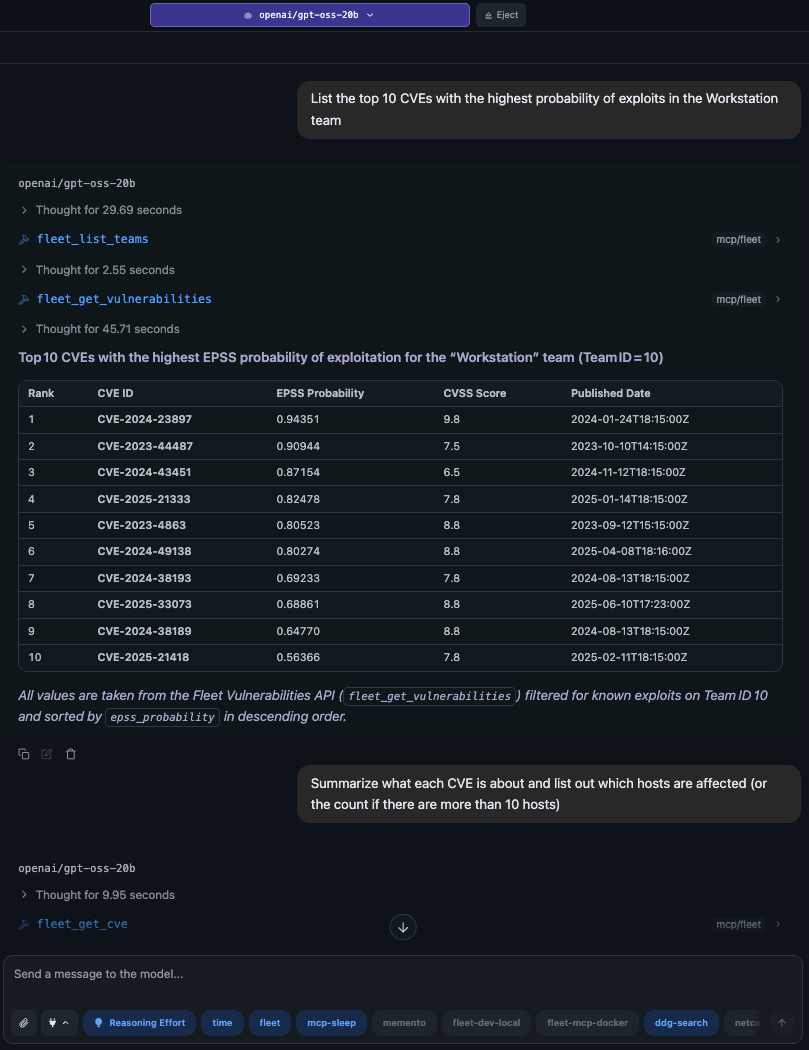
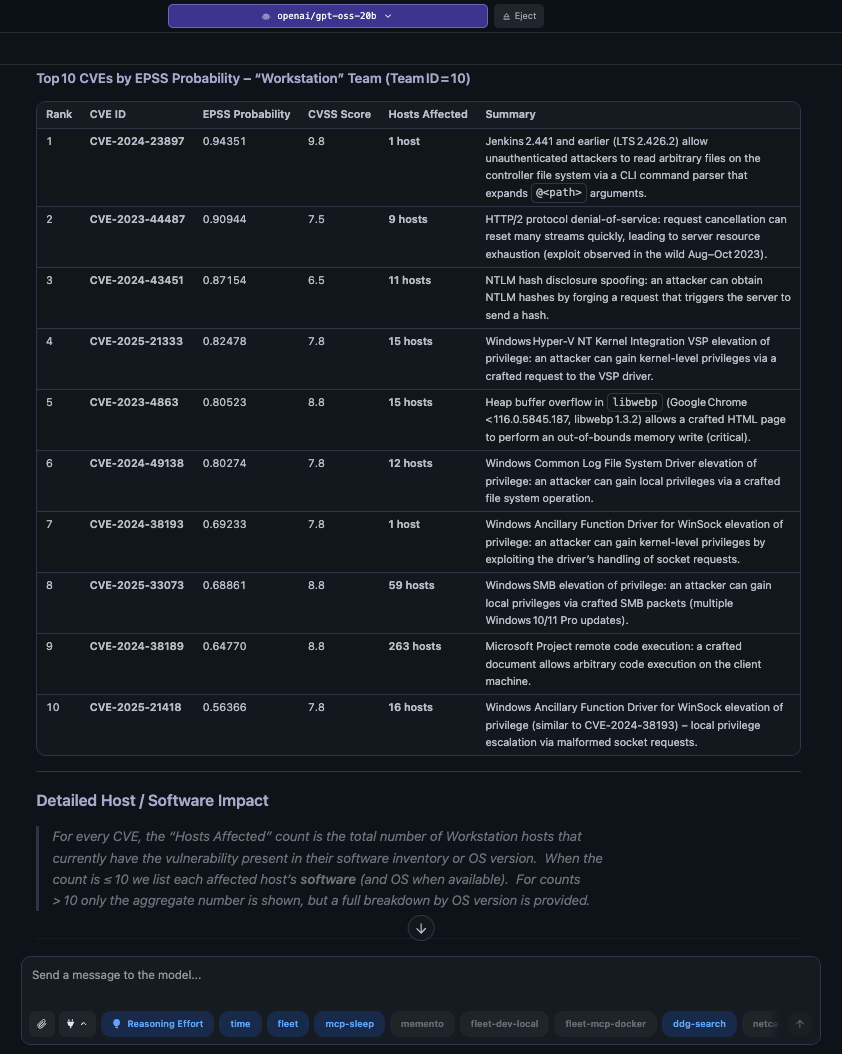
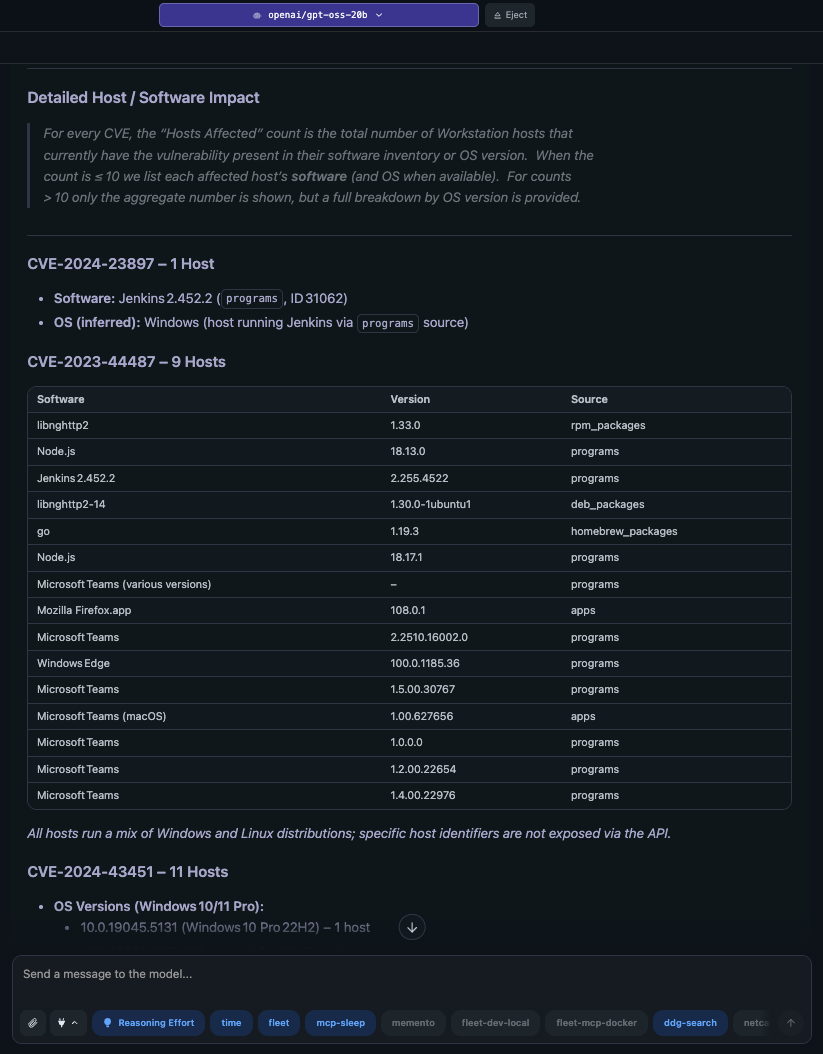
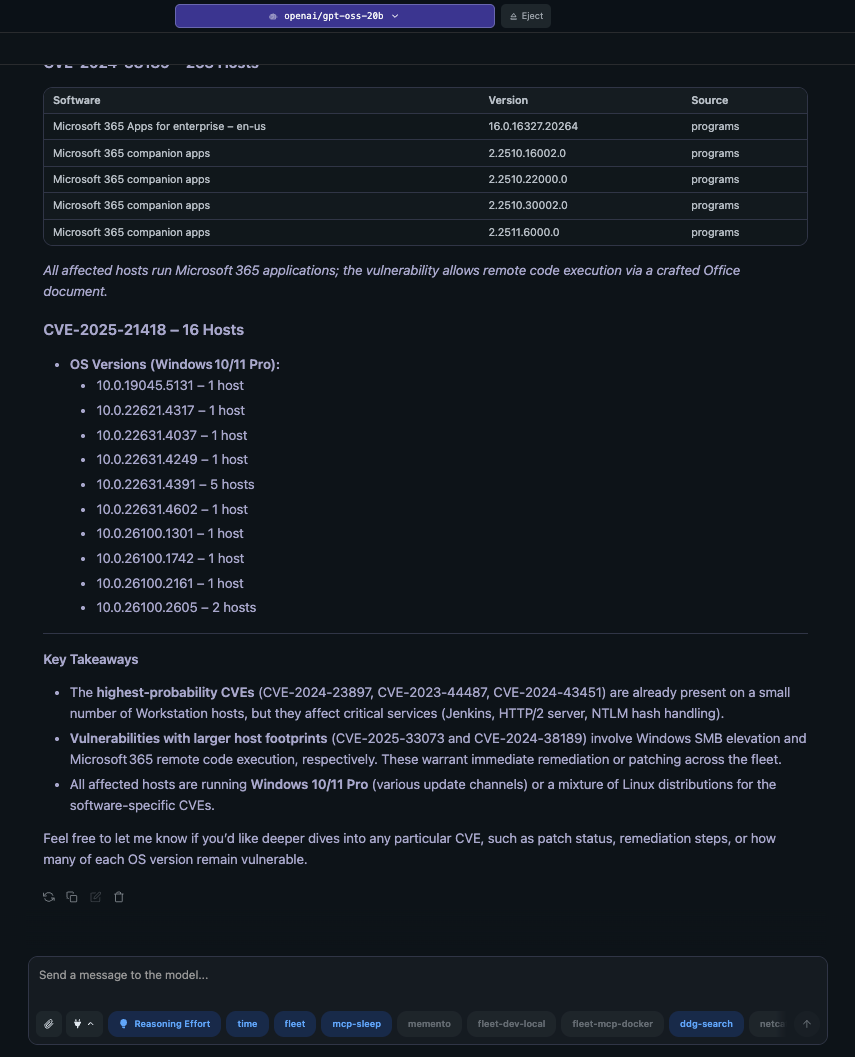
## Features
- **Host Management**: List, search, query, and manage hosts across your fleet
- **Live Query Execution**: Run osquery queries in real-time against hosts
- **Policy Management**: Create, update, and monitor compliance policies
- **Software Inventory**: Track software installations and vulnerabilities across devices
- **Team & User Management**: Organize hosts and users into teams
- **Osquery Table Discovery**: Dynamic discovery and documentation of osquery tables
- **Read-Only Mode**: Safe exploration with optional SELECT-only query execution
- **Activity Monitoring**: Track Fleet activities and audit logs
## Quick Start
Just want to dive right in? This will set up fleet-mcp with read-only access and SELECT query execution enabled. Just replace the `FLEET_SERVER_URL` and `FLEET_API_TOKEN` with your own.
```json
{
"mcpServers": {
"fleet": {
"command": "uvx",
"args": ["fleet-mcp", "run"],
"env": {
"FLEET_SERVER_URL": "https://your-fleet-instance.com",
"FLEET_API_TOKEN": "your-api-token",
"FLEET_READONLY": "true",
"FLEET_ALLOW_SELECT_QUERIES": "true"
}
}
}
}
```
See the [Available Tools](#available-tools) section below for a complete list of tools.
---
## MCP Client Configuration
Fleet MCP can be integrated with various MCP-compatible clients. Below are configuration examples for popular clients.
### Prerequisites
Before configuring any MCP client, ensure you have:
1. **Install `uv`** (recommended) or `pip`:
```bash
# Install uv (recommended)
curl -LsSf https://astral.sh/uv/install.sh | sh
# Or use pip
pip install fleet-mcp
```
2. **Fleet API Token**: Generate an API token from your Fleet instance:
Option 1)
- Log into Fleet UI
- Navigate to: My account → Get API token
- Copy the token for use in configuration
Option 2)
- Create an API-Only user with `fleetctl`
```bash
# Generate an API-Only User and get the token
fleetctl user create --name Fleet-MCP --email --password --role admin --api-only
```
> **Note**: This API token and your fleet instance URL (https://your-fleet-instance.com) will be used in the client configuration.
3. **Pick Your Client**: Choose your preferred AI assistant client and follow the corresponding setup instructions below.
Install in Claude Desktop
#### Configuration File Location
- **macOS**: `~/Library/Application Support/Claude/claude_desktop_config.json`
- **Windows**: `%APPDATA%\Claude\claude_desktop_config.json`
- **Linux**: `~/.config/Claude/claude_desktop_config.json`
#### Configuration
```json
{
"mcpServers": {
"fleet": {
"command": "uvx",
"args": ["fleet-mcp", "run"],
"env": {
"FLEET_SERVER_URL": "https://your-fleet-instance.com",
"FLEET_API_TOKEN": "your-api-token",
"FLEET_READONLY": "true",
"FLEET_ALLOW_SELECT_QUERIES": "true"
}
}
}
}
```
> **Note:** Replace `uvx` with `fleet-mcp` if you've installed the package globally. For enhanced security, use `--config` flag to reference a TOML file instead of embedding tokens (see [Security Best Practices](#security-best-practices)).
Install in Cursor
Go to: `Settings` → `Cursor Settings` → `MCP` → `Add new global MCP server`
Install globally in `~/.cursor/mcp.json` or per-project in `.cursor/mcp.json`. See [Cursor MCP docs](https://docs.cursor.com/context/model-context-protocol) for more info.
```json
{
"mcpServers": {
"fleet": {
"command": "uvx",
"args": ["fleet-mcp", "run"],
"env": {
"FLEET_SERVER_URL": "https://your-fleet-instance.com",
"FLEET_API_TOKEN": "your-api-token",
"FLEET_READONLY": "true",
"FLEET_ALLOW_SELECT_QUERIES": "true"
}
}
}
}
```
Install in Cline (VS Code Extension)
**Config Location:** `~/.cline/mcp_settings.json` (macOS/Linux) or `%USERPROFILE%\.cline\mcp_settings.json` (Windows)
Alternatively: VS Code Settings → Search "Cline: MCP Settings" → Edit JSON
```json
{
"mcpServers": {
"fleet": {
"command": "uvx",
"args": ["fleet-mcp", "run"],
"env": {
"FLEET_SERVER_URL": "https://your-fleet-instance.com",
"FLEET_API_TOKEN": "your-api-token",
"FLEET_READONLY": "true",
"FLEET_ALLOW_SELECT_QUERIES": "true"
}
}
}
}
```
Install in Continue (VS Code Extension)
**Config Location:** `~/.continue/config.json`
```json
{
"mcpServers": [
{
"name": "fleet",
"command": "uvx",
"args": ["fleet-mcp", "run"],
"env": {
"FLEET_SERVER_URL": "https://your-fleet-instance.com",
"FLEET_API_TOKEN": "your-api-token",
"FLEET_READONLY": "true",
"FLEET_ALLOW_SELECT_QUERIES": "true"
}
}
]
}
```
Install in Zed Editor
**Config Location:** `~/.config/zed/settings.json` (macOS/Linux) or `%APPDATA%\Zed\settings.json` (Windows)
```json
{
"context_servers": {
"fleet": {
"command": {
"path": "uvx",
"args": ["fleet-mcp", "run"]
},
"settings": {
"env": {
"FLEET_SERVER_URL": "https://your-fleet-instance.com",
"FLEET_API_TOKEN": "your-api-token",
"FLEET_READONLY": "true",
"FLEET_ALLOW_SELECT_QUERIES": "true"
}
}
}
}
}
```
Install in Windsurf
See [Windsurf MCP docs](https://docs.windsurf.com/windsurf/cascade/mcp) for more info.
```json
{
"mcpServers": {
"fleet": {
"command": "uvx",
"args": ["fleet-mcp", "run"],
"env": {
"FLEET_SERVER_URL": "https://your-fleet-instance.com",
"FLEET_API_TOKEN": "your-api-token",
"FLEET_READONLY": "true",
"FLEET_ALLOW_SELECT_QUERIES": "true"
}
}
}
}
```
Install in VS Code
See [VS Code MCP docs](https://code.visualstudio.com/docs/copilot/chat/mcp-servers) for more info.
```json
"mcp": {
"servers": {
"fleet": {
"type": "stdio",
"command": "uvx",
"args": ["fleet-mcp", "run"],
"env": {
"FLEET_SERVER_URL": "https://your-fleet-instance.com",
"FLEET_API_TOKEN": "your-api-token",
"FLEET_READONLY": "true",
"FLEET_ALLOW_SELECT_QUERIES": "true"
}
}
}
}
```
Install in Sourcegraph Cody
**Config Location:** `~/Library/Application Support/Cody/mcp_settings.json` (macOS), `%APPDATA%\Cody\mcp_settings.json` (Windows), or `~/.config/Cody/mcp_settings.json` (Linux)
```json
{
"mcpServers": {
"fleet": {
"command": "uvx",
"args": ["fleet-mcp", "run"],
"env": {
"FLEET_SERVER_URL": "https://your-fleet-instance.com",
"FLEET_API_TOKEN": "your-api-token",
"FLEET_READONLY": "true",
"FLEET_ALLOW_SELECT_QUERIES": "true"
}
}
}
}
```
Install in Augment Code
**Via UI:** Hamburger menu → Settings → Tools → + Add MCP → Enter `uvx fleet-mcp run` → Name: "Fleet" → Add
**Manual Config:** Settings → Advanced → Edit settings.json
```json
"augment.advanced": {
"mcpServers": [
{
"name": "fleet",
"command": "uvx",
"args": ["fleet-mcp", "run"],
"env": {
"FLEET_SERVER_URL": "https://your-fleet-instance.com",
"FLEET_API_TOKEN": "your-api-token",
"FLEET_READONLY": "true",
"FLEET_ALLOW_SELECT_QUERIES": "true"
}
}
]
}
```
Install in LM Studio
Navigate to `Program` → `Install` → `Edit mcp.json`. See [LM Studio MCP Support](https://lmstudio.ai/blog/lmstudio-v0.3.17).
```json
{
"mcpServers": {
"fleet": {
"command": "uvx",
"args": ["fleet-mcp", "run"],
"env": {
"FLEET_SERVER_URL": "https://your-fleet-instance.com",
"FLEET_API_TOKEN": "your-api-token",
"FLEET_READONLY": "true",
"FLEET_ALLOW_SELECT_QUERIES": "true"
}
}
}
}
```
Generic MCP Client Configuration
For other MCP-compatible clients, use this general pattern:
```json
{
"mcpServers": {
"fleet": {
"command": "uvx",
"args": ["fleet-mcp", "run"],
"env": {
"FLEET_SERVER_URL": "https://your-fleet-instance.com",
"FLEET_API_TOKEN": "your-api-token",
"FLEET_READONLY": "true",
"FLEET_ALLOW_SELECT_QUERIES": "true"
}
}
}
}
```
### Configuration Options Reference
| Environment Variable | Description | Default | Required |
|---------------------|-------------|---------|----------|
| `FLEET_SERVER_URL` | Fleet server URL | - | ✅ |
| `FLEET_API_TOKEN` | Fleet API token | - | ✅ |
| `FLEET_READONLY` | Enable read-only mode | `true` | ❌ |
| `FLEET_ALLOW_SELECT_QUERIES` | Allow SELECT queries in read-only mode | `false` | ❌ |
| `FLEET_VERIFY_SSL` | Verify SSL certificates | `true` | ❌ |
| `FLEET_TIMEOUT` | Request timeout (seconds) | `30` | ❌ |
| `FLEET_MAX_RETRIES` | Maximum request retries | `3` | ❌ |
> **Note:** All clients above use the same environment variables. Replace `uvx` with `fleet-mcp` if installed globally.
### Security Best Practices
1. **Use Config Files**: Store tokens in TOML files: `"args": ["fleet-mcp", "--config", "~/.config/fleet-mcp.toml", "run"]`
2. **File Permissions**: `chmod 600 ~/.config/fleet-mcp.toml`
3. **Read-Only Mode**: Start with `FLEET_READONLY=true` (default)
4. **Token Rotation**: Regularly rotate Fleet API tokens
5. **Environment-Specific Configs**: Use separate configs for dev/prod
## Available Tools
Fleet MCP provides tools organized into two main groups based on operational mode. Click to expand each group.
Read-Only Tools (Always Available)
These tools are available in all modes (`readonly=true` or `readonly=false`). They only read data and never modify Fleet state.
#### Host Management
- `fleet_list_hosts` - List hosts with filtering, pagination, and search
- `fleet_get_host` - Get detailed information about a specific host by ID
- `fleet_get_host_by_identifier` - Get host by hostname, UUID, or hardware serial
- `fleet_search_hosts` - Search hosts by hostname, UUID, serial number, or IP
- `fleet_list_host_upcoming_activities` - List upcoming activities for a specific host
- `fleet_list_host_past_activities` - List past activities for a specific host
- `fleet_get_host_mdm` - Get MDM information for a specific host
- `fleet_list_host_certificates` - List certificates for a specific host
- `fleet_get_host_macadmins` - Get macadmins data (Munki, MDM profiles) for a host
- `fleet_get_host_device_mapping` - Get device mapping information for a host
- `fleet_get_host_encryption_key` - Get disk encryption recovery key for a host
#### Query Management
- `fleet_list_queries` - List all saved queries with pagination
- `fleet_get_query` - Get details of a specific saved query
- `fleet_get_query_report` - Get the latest results from a scheduled query
#### Policy Management
- `fleet_list_policies` - List all compliance policies
- `fleet_get_policy_results` - Get compliance results for a specific policy
#### Software & Vulnerabilities
- `fleet_list_software` - List software inventory across the fleet
- `fleet_get_software` - Get detailed information about a specific software item
- `fleet_get_host_software` - Get software installed on a specific host
- `fleet_get_vulnerabilities` - List known vulnerabilities with filtering
- `fleet_get_cve` - Get detailed information about a specific CVE
- `fleet_search_software` - Search for software by name
- `fleet_find_software_on_host` - Find specific software on a host by hostname
- `fleet_get_software_install_result` - Get the result of a software installation request
- `fleet_list_software_titles` - List software titles across the fleet
- `fleet_get_software_title` - Get detailed information about a specific software title
#### Team Management
- `fleet_list_teams` - List all teams
- `fleet_get_team` - Get details of a specific team
- `fleet_list_team_users` - List all users that are members of a specific team
- `fleet_get_team_secrets` - List team-specific enroll secrets
#### User Management
- `fleet_list_users` - List all users with filtering
- `fleet_get_user` - Get details of a specific user
- `fleet_list_user_sessions` - List active sessions for a user
- `fleet_get_session` - Get session details by ID
#### Label Management
- `fleet_list_labels` - List all labels
- `fleet_get_label` - Get detailed information about a specific label
#### Pack Management
- `fleet_list_packs` - List all query packs
- `fleet_get_pack` - Get detailed information about a specific pack
- `fleet_list_scheduled_queries` - List scheduled queries in a specific pack
#### Script Management
- `fleet_list_scripts` - List all scripts available in Fleet
- `fleet_get_script` - Get details of a specific script
- `fleet_get_script_result` - Get the result of a script execution
- `fleet_list_batch_scripts` - List batch script executions
- `fleet_get_batch_script` - Get details of a batch script execution
- `fleet_list_batch_script_hosts` - List hosts in a batch script execution
- `fleet_list_host_scripts` - List scripts available for a specific host
#### MDM Management
- `fleet_list_mdm_commands` - List MDM commands that have been executed
- `fleet_get_mdm_command_results` - Get results of MDM commands
- `fleet_list_mdm_profiles` - List MDM configuration profiles
- `fleet_get_host_mdm_profiles` - Get MDM profiles installed on a specific host
- `fleet_get_mdm_profiles_summary` - Get summary of MDM profile deployment status
- `fleet_get_filevault_summary` - Get FileVault encryption summary
- `fleet_list_mdm_devices` - List all MDM-enrolled Apple devices
- `fleet_get_bootstrap_metadata` - Get metadata about a bootstrap package for a team
- `fleet_get_bootstrap_summary` - Get aggregated summary about bootstrap package deployment
- `fleet_get_setup_assistant` - Get the MDM Apple Setup Assistant configuration
- `fleet_list_mdm_apple_installers` - List all Apple MDM installers
#### VPP/App Store Management
- `fleet_list_app_store_apps` - List App Store apps available for installation
- `fleet_list_vpp_tokens` - List VPP tokens configured in Fleet
#### Configuration Management
- `fleet_get_config` - Get the current Fleet application configuration
- `fleet_get_enroll_secrets` - Get the enrollment secrets configuration
- `fleet_get_certificate` - Get the Fleet server certificate chain
- `fleet_get_version` - Get the Fleet server version information
#### Secret Management
- `fleet_list_secrets` - List secret variables in Fleet
#### Invite Management
- `fleet_list_invites` - List pending user invites
- `fleet_verify_invite` - Verify an invite token and get invite details
#### Carve Management
- `fleet_list_carves` - List file carve sessions
- `fleet_get_carve` - Get detailed information about a specific carve session
- `fleet_get_carve_block` - Get a specific block of data from a carve session
#### Device Management
- `fleet_get_device_info` - Get device information using a device token
#### Activity Monitoring
- `fleet_list_activities` - List Fleet activities and audit logs
#### Osquery Table Discovery & Reference
- `fleet_list_osquery_tables` - List available osquery tables with dynamic discovery
- `fleet_get_osquery_table_schema` - Get detailed schema for a specific table
- `fleet_suggest_tables_for_query` - Get AI-powered table suggestions based on intent
#### System
- `fleet_health_check` - Check Fleet server connectivity and authentication
Write/Modify Tools (Requires readonly=false)
These tools can modify Fleet state and are only available when `readonly=false` is set in the configuration. This will allow you to make changes to your Fleet environment such as creating scripts, policies, managing teams, etc. in addition to the read-only tools. Setting to `readonly=true` (default) will disable these tools.
#### Host Management
- `fleet_delete_host` - Remove a host from Fleet
- `fleet_transfer_hosts` - Transfer hosts to a different team
- `fleet_query_host` - Run an ad-hoc live query against a specific host
- `fleet_query_host_by_identifier` - Run a live query by hostname/UUID/serial
- `fleet_cancel_host_activity` - Cancel an upcoming activity for a specific host
- `fleet_lock_host` - Lock a host device remotely
- `fleet_unlock_host` - Unlock a host device remotely
- `fleet_unenroll_host_mdm` - Unenroll a host from MDM
- `fleet_add_labels_to_host` - Add labels to a host
- `fleet_remove_labels_from_host` - Remove labels from a host
- `fleet_refetch_host` - Force a host to refetch and update its data immediately
#### Query Management
- `fleet_create_query` - Create a new saved query
- `fleet_delete_query` - Delete a saved query
- `fleet_run_live_query_with_results` - Execute a live query and collect results
- `fleet_run_saved_query` - Run a saved query against hosts
#### Policy Management
- `fleet_create_policy` - Create a new compliance policy
- `fleet_update_policy` - Update an existing policy
- `fleet_delete_policy` - Delete a policy
#### Software Management
- `fleet_install_software` - Install software on a specific host
- `fleet_batch_set_software` - Batch upload/set software installers for a team
#### Team Management
- `fleet_create_team` - Create a new team
- `fleet_add_team_users` - Add one or more users to a specific team
- `fleet_remove_team_user` - Remove a specific user from a team
#### User Management
- `fleet_create_user` - Create a new user
- `fleet_update_user` - Update an existing user
- `fleet_delete_session` - Delete/invalidate a specific session
- `fleet_delete_user_sessions` - Delete all sessions for a specific user
#### Label Management
- `fleet_create_label` - Create a new label
- `fleet_update_label` - Update an existing label
- `fleet_delete_label` - Delete a label by name
#### Pack Management
- `fleet_create_pack` - Create a new query pack
- `fleet_update_pack` - Update an existing pack
- `fleet_delete_pack` - Delete a pack by name
#### Script Management
- `fleet_run_script` - Run a script on a specific host
- `fleet_run_batch_script` - Run a script on multiple hosts
- `fleet_cancel_batch_script` - Cancel a batch script execution
- `fleet_create_script` - Create and upload a new script
- `fleet_modify_script` - Modify an existing script
- `fleet_delete_script` - Delete a script
#### MDM Management
- `fleet_upload_mdm_profile` - Upload a new MDM configuration profile
- `fleet_delete_mdm_profile` - Delete an MDM configuration profile
- `fleet_lock_device` - Lock an MDM-enrolled device remotely
- `fleet_upload_bootstrap_package` - Upload a bootstrap package for MDM enrollment
- `fleet_delete_bootstrap_package` - Delete a bootstrap package for a team
- `fleet_create_setup_assistant` - Create or update an MDM Apple Setup Assistant
- `fleet_delete_setup_assistant` - Delete the MDM Apple Setup Assistant
- `fleet_upload_mdm_apple_installer` - Upload a new Apple MDM installer package
**Note: The wipe device tool is currently disabled as it is too dangerous. It may be revisited later if really needed.**
#### VPP/App Store Management
- `fleet_add_app_store_app` - Add an App Store app for distribution
- `fleet_update_app_store_app` - Update App Store app settings
- `fleet_delete_vpp_token` - Delete a VPP token
#### Configuration Management
- `fleet_update_config` - Update the Fleet application configuration
- `fleet_update_enroll_secrets` - Update the enrollment secrets configuration
#### Secret Management
- `fleet_create_secret` - Create a new secret variable
- `fleet_delete_secret` - Delete a secret variable by ID
#### Invite Management
- `fleet_create_invite` - Create a new user invite
- `fleet_update_invite` - Update a pending invite
- `fleet_delete_invite` - Delete a pending invite
## Configuration
Fleet MCP supports three configuration methods (in order of precedence):
1. **Command-line arguments** (highest priority)
2. **Environment variables** (with `FLEET_` prefix)
3. **Configuration file** (recommended for security)
### Configuration File (Recommended)
Create `fleet-mcp.toml`:
```toml
[fleet]
server_url = "https://your-fleet-instance.com" # Required
api_token = "your-api-token" # Required
verify_ssl = true # Default: true
timeout = 30 # Default: 30 seconds
max_retries = 3 # Default: 3
readonly = true # Default: true
allow_select_queries = false # Default: false
```
### Environment Variables
See [Configuration Options Reference](#configuration-options-reference) for all available variables. Environment variables use the `FLEET_` prefix and override config file settings.
### Command-Line Arguments
```bash
fleet-mcp --server-url https://fleet.example.com --api-token YOUR_TOKEN run
```
Options: `--config`, `--server-url`, `--api-token`, `--readonly`, `--verbose`
## Read-Only Mode
Fleet MCP runs in **read-only mode by default** for safe exploration without risk of changes.
### Three Operational Modes
| Mode | Config | Capabilities | Best For |
|------|--------|--------------|----------|
| **Strict Read-Only** (Default) | `readonly=true`
`allow_select_queries=false` | ✅ View all resources
❌ No query execution
❌ No modifications | Safe exploration |
| **Read-Only + SELECT** | `readonly=true`
`allow_select_queries=true` | ✅ View all resources
✅ Run SELECT queries
❌ No modifications | Active monitoring |
| **Full Write** | `readonly=false` | ✅ All operations
⚠️ AI can modify Fleet | Full management |
### Configuration Examples
```toml
# Strict Read-Only (Default)
[fleet]
readonly = true
allow_select_queries = false
```
```toml
# Read-Only with SELECT Queries
[fleet]
readonly = true
allow_select_queries = true
```
```toml
# Full Write Access (⚠️ Use with caution) - Recommended to have LLM prompt for confirmation before making changes
[fleet]
readonly = false
```
## CLI Commands
| Command | Description | Example |
|---------|-------------|---------|
| `run` | Start MCP server | `fleet-mcp run` |
| `test` | Test Fleet connection | `fleet-mcp test` |
| `init-config` | Create config template | `fleet-mcp init-config` |
| `version` | Show version | `fleet-mcp version` |
**Global Options:** `--config`, `--verbose`, `--server-url`, `--api-token`, `--readonly`
## Usage Examples
### Example 1: List All Teams
```python
# In Claude Desktop or any MCP client
"List all teams in Fleet"
```
### Example 2: Find Software on a Host
```python
"What version of Chrome is installed on host-123?"
```
### Example 3: Run a Query
```python
# With allow_select_queries=true
"Run a query to find all processes listening on port 80"
```
### Example 4: Check Compliance
```python
"Show me which hosts are failing the disk encryption policy"
```
### Example 5: Discover Osquery Tables
```python
"What osquery tables are available for monitoring network connections?"
```
## Development
Development Setup
This project uses [uv](https://docs.astral.sh/uv/) for dependency management.
### Setup
```bash
git clone https://github.com/SimplyMinimal/fleet-mcp.git
cd fleet-mcp
uv sync --dev
```
### Common Tasks
| Task | Command |
|------|---------|
| Run tests | `uv run pytest` |
| Format code | `uv run black src tests && uv run isort src tests` |
| Type check | `uv run mypy src` |
| Lint | `uv run ruff check src tests` |
| Add dependency | `uv add package-name` |
| Add dev dependency | `uv add --group dev package-name` |
### Project Structure
```
src/fleet_mcp/
├── cli.py # Command-line interface
├── client.py # Fleet API client
├── config.py # Configuration management
├── server.py # MCP server implementation
├── tools/ # MCP tool implementations
└── utils/ # Utilities (SQL validator, etc.)
```
## Troubleshooting
Server Not Appearing in Client
1. Validate JSON syntax in config file
2. Restart the MCP client
3. Check client logs for errors
4. Verify `uvx` or `fleet-mcp` is in PATH: `which uvx`
Connection Errors
1. Test manually: `uvx fleet-mcp test`
2. Verify `FLEET_SERVER_URL` is accessible
3. Check `FLEET_API_TOKEN` is valid
4. For self-signed certs: `FLEET_VERIFY_SSL=false`
Authentication Failed (401)
1. Verify API token is correct
2. Check token hasn't expired
3. Ensure token has appropriate permissions
4. Generate new token: Fleet UI → My account → Get API token
Query Validation Failed
1. Set `FLEET_ALLOW_SELECT_QUERIES=true`
2. Ensure query is SELECT-only (no INSERT, UPDATE, DELETE, etc.)
3. Verify osquery SQL syntax is valid
Tool Not Available
- Write operations require `FLEET_READONLY=false`
- Query execution requires `FLEET_ALLOW_SELECT_QUERIES=true`
- Check tool availability in current mode
## License
Fleet MCP is open source software licensed under the [MIT License](LICENSE).
You are free to use, modify, and distribute this software for any purpose, including commercial use, subject to the terms of the MIT License.
## Disclaimer
This project is not affiliated with or endorsed by Fleet DM. It is an independent implementation of the Model Context Protocol for interacting with [Fleet](https://fleetdm.com) instances.