 Agent S3:
Scaling Agents for Computer Use
Agent S3:
Scaling Agents for Computer Use
🌐 [Blog]
📄 [Paper (TMLR 2026)]
🎥 [Video]
🗨️ [Discord]
Agent S3 is the agent in the `gui-agents` package. It takes a natural-language task, looks at the screen, and completes the task by clicking, typing, and scrolling in ordinary desktop and web applications. It runs on macOS, Windows, and Linux.
## 🎯 Results
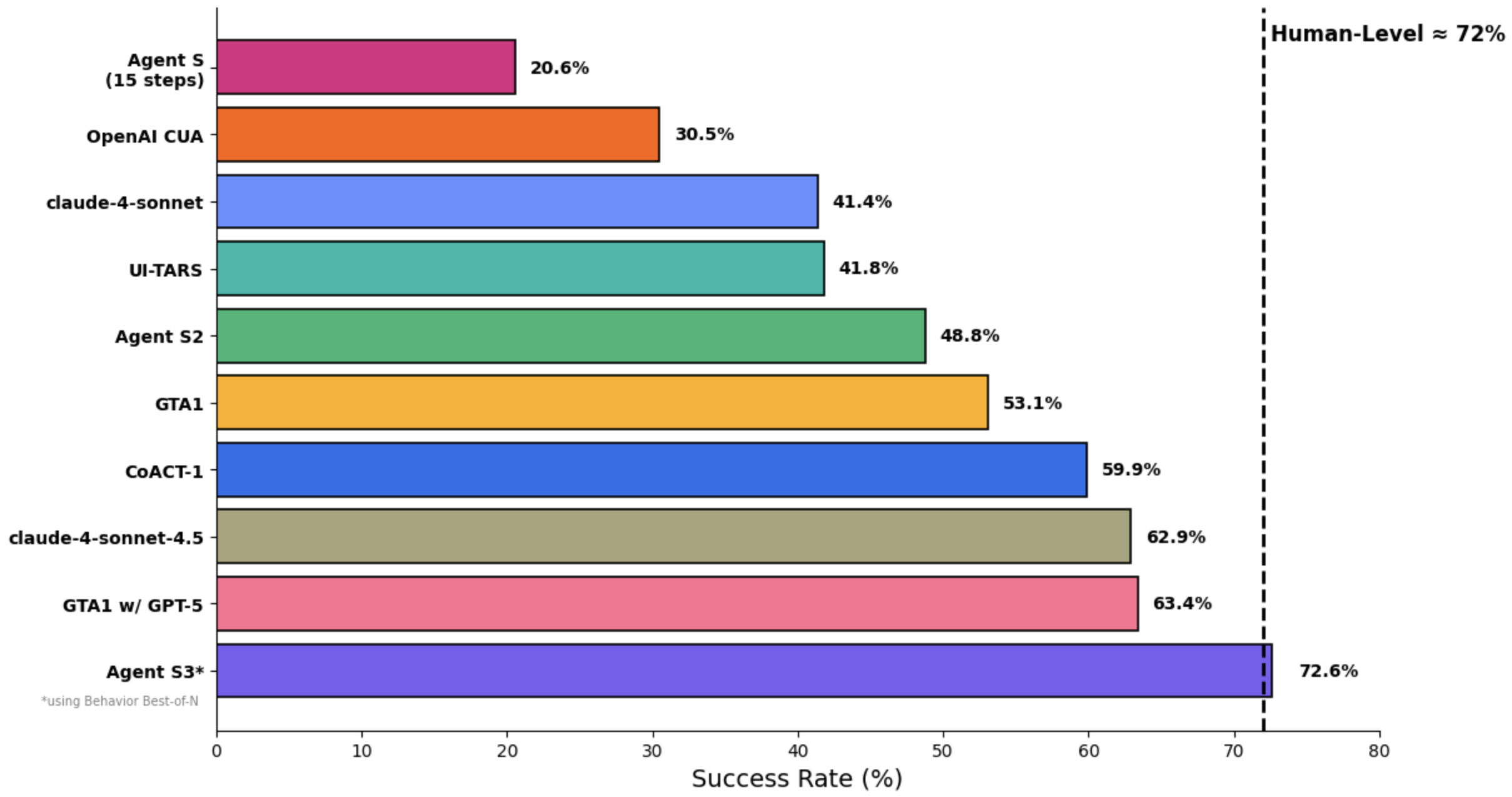
On OSWorld, Agent S3 alone reaches 66% in the 100-step setting, already exceeding the previous state of the art of 63.4% (GTA1 w/ GPT-5). With the addition of Behavior Best-of-N, performance climbs even higher to 72.6%, *surpassing* human-level performance on OSWorld (~72%)!
Agent S3 also demonstrates strong zero-shot generalization! On WindowsAgentArena, accuracy rises from 50.2% using only Agent S3 to 56.6% by selecting from 3 rollouts. Similarly on AndroidWorld, performance improves from 68.1% to 71.6%
## 🛠️ Installation & Setup
### Prerequisites
- **Single Monitor**: Our agent is designed for single monitor screens
- **Security**: The agent runs Python code to control your computer - use with care
- **Supported Platforms**: Linux, Mac, and Windows
### Installation
To install Agent S3 without cloning the repository, run
```bash
pip install gui-agents
```
If you would like to test Agent S3 while making changes, clone the repository and install using
```
pip install -e .
```
Don't forget to also `brew install tesseract`! Pytesseract requires this extra installation to work.
### API Configuration
#### Option 1: Environment Variables
Add to your `.bashrc` (Linux) or `.zshrc` (MacOS):
```bash
export OPENAI_API_KEY=
export ANTHROPIC_API_KEY=
export HF_TOKEN=
```
#### Option 2: Python Script
```python
import os
os.environ["OPENAI_API_KEY"] = ""
```
### Supported Models
We support Azure OpenAI, Anthropic, Gemini, Open Router, and vLLM inference. See [models.md](../../models.md) for details.
### Grounding Models (Required)
For optimal performance, we recommend [UI-TARS-1.5-7B](https://huggingface.co/ByteDance-Seed/UI-TARS-1.5-7B) hosted on Hugging Face Inference Endpoints or another provider. See [Hugging Face Inference Endpoints](https://huggingface.co/learn/cookbook/en/enterprise_dedicated_endpoints) for setup instructions.
## 🚀 Usage
> ⚡️ **Recommended Setup:**
> For the best configuration, we recommend using **OpenAI gpt-5-2025-08-07** as the main model, paired with **UI-TARS-1.5-7B** for grounding.
### CLI
Note, this is running Agent S3, our improved agent, without bBoN.
Run Agent S3 with the required parameters:
```bash
agent_s \
--provider openai \
--model gpt-5-2025-08-07 \
--ground_provider huggingface \
--ground_url http://localhost:8080 \
--ground_model ui-tars-1.5-7b \
--grounding_width 1920 \
--grounding_height 1080
```
#### Local Coding Environment (Optional)
For tasks that require code execution (e.g., data processing, file manipulation, system automation), you can enable the local coding environment:
```bash
agent_s \
--provider openai \
--model gpt-5-2025-08-07 \
--ground_provider huggingface \
--ground_url http://localhost:8080 \
--ground_model ui-tars-1.5-7b \
--grounding_width 1920 \
--grounding_height 1080 \
--enable_local_env
```
⚠️ **WARNING**: The local coding environment executes arbitrary Python and Bash code locally on your machine. Only use this feature in trusted environments and with trusted inputs.
#### Required Parameters
- **`--provider`**: Main generation model provider (e.g., openai, anthropic, etc.) - Default: "openai"
- **`--model`**: Main generation model name (e.g., gpt-5-2025-08-07) - Default: "gpt-5-2025-08-07"
- **`--ground_provider`**: The provider for the grounding model - **Required**
- **`--ground_url`**: The URL of the grounding model - **Required**
- **`--ground_model`**: The model name for the grounding model - **Required**
- **`--grounding_width`**: Width of the output coordinate resolution from the grounding model - **Required**
- **`--grounding_height`**: Height of the output coordinate resolution from the grounding model - **Required**
#### Optional Parameters
- **`--model_temperature`**: The temperature to fix all model calls to (necessary to set to 1.0 for models like o3 but can be left blank for other models)
#### Grounding Model Dimensions
The grounding width and height should match the output coordinate resolution of your grounding model:
- **UI-TARS-1.5-7B**: Use `--grounding_width 1920 --grounding_height 1080`
- **UI-TARS-72B**: Use `--grounding_width 1000 --grounding_height 1000`
#### Optional Parameters
- **`--model_url`**: Custom API URL for main generation model - Default: ""
- **`--model_api_key`**: API key for main generation model - Default: ""
- **`--ground_api_key`**: API key for grounding model endpoint - Default: ""
- **`--max_trajectory_length`**: Maximum number of image turns to keep in trajectory - Default: 8
- **`--enable_reflection`**: Enable reflection agent to assist the worker agent - Default: True
- **`--enable_local_env`**: Enable local coding environment for code execution (WARNING: Executes arbitrary code locally) - Default: False
#### Local Coding Environment Details
The local coding environment enables Agent S3 to execute Python and Bash code directly on your machine. This is particularly useful for:
- **Data Processing**: Manipulating spreadsheets, CSV files, or databases
- **File Operations**: Bulk file processing, content extraction, or file organization
- **System Automation**: Configuration changes, system setup, or automation scripts
- **Code Development**: Writing, editing, or executing code files
- **Text Processing**: Document manipulation, content editing, or formatting
When enabled, the agent can use the `call_code_agent` action to execute code blocks for tasks that can be completed through programming rather than GUI interaction.
**Requirements:**
- **Python**: The same Python interpreter used to run Agent S3 (automatically detected)
- **Bash**: Available at `/bin/bash` (standard on macOS and Linux)
- **System Permissions**: The agent runs with the same permissions as the user executing it
**Security Considerations:**
- The local environment executes arbitrary code with the same permissions as the user running the agent
- Only enable this feature in trusted environments
- Be cautious when the agent generates code for system-level operations
- Consider running in a sandboxed environment for untrusted tasks
- Bash scripts are executed with a 30-second timeout to prevent hanging processes
### `gui_agents` SDK
First, we import the necessary modules. `AgentS3` is the main agent class for Agent S3. `OSWorldACI` is our grounding agent that translates agent actions into executable python code.
```python
import pyautogui
import io
from gui_agents.s3.agents.agent_s import AgentS3
from gui_agents.s3.agents.grounding import OSWorldACI
from gui_agents.s3.utils.local_env import LocalEnv # Optional: for local coding environment
# Load in your API keys.
from dotenv import load_dotenv
load_dotenv()
current_platform = "linux" # "darwin", "windows"
```
Next, we define our engine parameters. `engine_params` is used for the main agent, and `engine_params_for_grounding` is for grounding. For `engine_params_for_grounding`, we support custom endpoints like HuggingFace TGI, vLLM, and Open Router.
```python
engine_params = {
"engine_type": provider,
"model": model,
"base_url": model_url, # Optional
"api_key": model_api_key, # Optional
"temperature": model_temperature # Optional
}
# Load the grounding engine from a custom endpoint
ground_provider = ""
ground_url = ""
ground_model = ""
ground_api_key = ""
# Set grounding dimensions based on your model's output coordinate resolution
# UI-TARS-1.5-7B: grounding_width=1920, grounding_height=1080
# UI-TARS-72B: grounding_width=1000, grounding_height=1000
grounding_width = 1920 # Width of output coordinate resolution
grounding_height = 1080 # Height of output coordinate resolution
engine_params_for_grounding = {
"engine_type": ground_provider,
"model": ground_model,
"base_url": ground_url,
"api_key": ground_api_key, # Optional
"grounding_width": grounding_width,
"grounding_height": grounding_height,
}
```
Then, we define our grounding agent and Agent S3.
```python
# Optional: Enable local coding environment
enable_local_env = False # Set to True to enable local code execution
local_env = LocalEnv() if enable_local_env else None
grounding_agent = OSWorldACI(
env=local_env, # Pass local_env for code execution capability
platform=current_platform,
engine_params_for_generation=engine_params,
engine_params_for_grounding=engine_params_for_grounding,
width=1920, # Optional: screen width
height=1080 # Optional: screen height
)
agent = AgentS3(
engine_params,
grounding_agent,
platform=current_platform,
max_trajectory_length=8, # Optional: maximum image turns to keep
enable_reflection=True # Optional: enable reflection agent
)
```
Finally, let's query the agent!
```python
# Get screenshot.
screenshot = pyautogui.screenshot()
buffered = io.BytesIO()
screenshot.save(buffered, format="PNG")
screenshot_bytes = buffered.getvalue()
obs = {
"screenshot": screenshot_bytes,
}
instruction = "Close VS Code"
info, action = agent.predict(instruction=instruction, observation=obs)
exec(action[0])
```
Refer to [`cli_app.py`](cli_app.py) for more details on how the inference loop works.
### OSWorld
To deploy Agent S3 in OSWorld, follow the [OSWorld Deployment instructions](../../osworld_setup/s3/OSWorld.md).