# getcourse-mcp **Automate a [GetCourse](https://getcourse.io) account from an AI agent — grant lesson/training access, manage users and groups — with no official API.** [![npm version](https://img.shields.io/npm/v/getcourse-mcp?color=CB3837&logo=npm&logoColor=white)](https://www.npmjs.com/package/getcourse-mcp) ![license](https://img.shields.io/badge/license-MIT-blue) ![MCP](https://img.shields.io/badge/MCP-server-6E56CF) ![TypeScript](https://img.shields.io/badge/TypeScript-strict-3178C6?logo=typescript&logoColor=white) ![PRs welcome](https://img.shields.io/badge/PRs-welcome-34c759) **English** · [Русский](./README.ru.md) getcourse-mcp — logged-in browser → MCP server → GetCourse
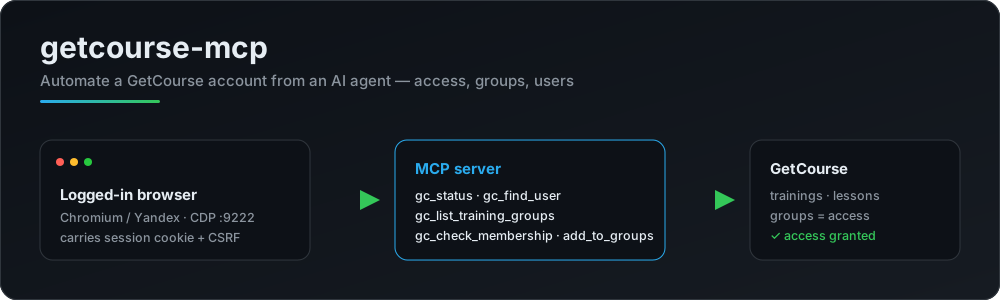
## Why GetCourse has no public API for the things admins do every day — opening a lesson for a student, adding someone to a training, moving users between groups. Those actions live only in the admin UI. **getcourse-mcp** exposes them as [MCP](https://modelcontextprotocol.io) tools. It drives a **browser you're already logged into** over CDP, so it reuses your real session cookie and CSRF token — no scraping of passwords, no fragile API keys. An AI agent (Claude, etc.) can then find a user, inspect their groups and grant access in one turn. - 🔑 **Uses your live session** — connects over CDP to a logged-in Chromium/Yandex browser - 👥 **Access by groups** — the GetCourse model: training/lesson access = group membership - 🧩 **5 focused tools** — status, find user, list groups, check membership, add to groups - 🪶 **TypeScript, ESM** — thin, strict, MIT, no account secrets in the repo ## How access works in GetCourse Access to a training (and its lessons) is granted by **group membership**. "Full access" to a course often means membership in a *Module 1* group plus a group that starts the drip schedule (module 1 now, the rest on a timer). To "give access like another student", read their groups and reproduce them: ```bash gc_find_user # student@example.com → id, name gc_check_membership # which of these groups is student X in? gc_add_user_to_groups # add student Y to the same groups ``` ### Franchise / "buyers-only" offers → access via a *completed* purchase Some offers (franchises, "только купившие" trainings) deliver access **only from a completed purchase** — group membership grants nothing there. Grant it in one call: ```bash gc_find_offers {"query":"Трафик Формула"} # → offer id, e.g. 6510356 gc_create_order {"email":"user@x.ru","offerIds":["6510356"],"complete":true} # creates the order AND completes a 0₽ payment → access is live immediately ``` ⚠️ **A priced deal left in «Новый» delivers NO access** — it must be *paid*. `complete:true` (or a later `gc_pay_order {"dealId":"…"}`) completes it → «Завершен» → access granted. GetCourse rejects a zero payment («Платеж не может быть нулевым»), so a 0₽ deal is completed via the status dropdown (`payed` = «Завершен»); a priced one via a *received* payment. The result is read from the deal's own «Статус:» field after a reload. Use `complete` only for 0₽/comp offers. A **0₽ order has nothing to pay**, so GetCourse flips it «Новый → Завершен» on creation by itself; `complete:true` then detects the finished deal and touches nothing. Purchase-based access does **not** appear in the user's groups — that's by design, not a bug. Verify it on `/teach/control/stat/user/id/` (Training / Lesson access), which reflects the grant immediately. ## Requirements 1. A Chromium-based browser (Chrome / Yandex) launched with a debug port on a **separate profile**, logged into your account: ``` browser.exe --remote-debugging-port=9222 --user-data-dir=C:\gc-cdp-profile ``` 2. Node ≥ 18. ## Setup ```bash npm install cp .env.example .env # set GETCOURSE_BASE_URL (and GETCOURSE_CDP_URL if not :9222) npm run build ``` Register it with your MCP client (see `.mcp.json.example`): ```json { "mcpServers": { "getcourse": { "command": "node", "args": ["dist/index.js"], "env": { "GETCOURSE_BASE_URL": "https://your-account.getcourse.ru" } } } } ``` ## Tools | Tool | Purpose | |------|---------| | `gc_status` | Check the CDP browser session **actually has admin rights** (not merely that a session exists). Reports the "logged in as a student" case separately. | | `gc_find_user` | Find a user by email → id, name, type, status. | | `gc_list_training_groups` | Access groups of a training (id + name). | | `gc_list_user_groups` | Groups a user belongs to (id + name). | | `gc_check_membership` | Is a user in the given groups? (instant, via the user list) | | `gc_add_to_groups` | Add an existing user to groups via the card (preserves other groups). `dryRun`. | | `gc_remove_from_groups` | Remove a user from groups = revoke access. `dryRun`. | | `gc_add_user_to_groups` | Add via the bulk import (creates the user if new) = grant access. `dryRun`. | | `gc_copy_access` | Give a user the same groups as a reference student. `dryRun`. | | `gc_update_user` | Edit card fields (first/last name, phone, city, comment). Email is out of scope. `dryRun`. | | `gc_find_offers` | Search sales offers by name → id + price + actuality. | | `gc_find_orders` | List a user's orders (dealId + status). | | `gc_create_order` | Create an order = grant access via a purchase (the only way for "buyers-only" trainings, where groups don't grant access). Reports the created deal's id and status; a priced deal in «Новый» means **no access until paid**, `complete:true` drives it to «Завершён». ⚠️ single-step: `dryRun:false` creates the order immediately. | | `gc_pay_order` | Complete a deal → «Завершен» → access delivered. `amount` "0" (default) → status `payed`; `amount` > 0 → received payment. Verified by the reloaded «Статус:». ⚠️ don't use `0` on a real paid deal. `dryRun`. | | `gc_set_order_status` | Change a deal's status (e.g. cancel a duplicate: `cancelled` + `cancelReasonId`; `payed` = «Завершен»). OK only if the reloaded card shows the target status. | | `gc_refund_order` | File a money refund for an order via the GetCourse payment module (real money back to the buyer's card). Only for payments processed by the platform; VAT must mirror the original receipt. `dryRun`. | | `gc_unlock_modules` | Open modules for a stuck (but paid) student: advance the module-delivery process past its «завершил модуль N» wait (clicks «перейти далее»). `all:true` opens the whole course; default opens the next module. Needs manager/supervisor rights on the process. `dryRun`. | | `gc_user_summary` | One call: profile + groups + orders for a user. | | `gc_list_mailing_categories` | List mailing categories (tag-like segmentation) — id + name. | | `gc_add_to_mailing_category` | Add a user to a mailing category. | | `gc_remove_from_mailing_category` | Remove a user from a mailing category. | ## Usage Run the MCP server over stdio, or call a tool directly for scripting: ```bash node dist/index.js # MCP (stdio) npx tsx src/run.ts gc_find_user '{"email":"user@example.com"}' # → Found: Jane Doe | user@example.com | student | active | id: 100200300 npx tsx src/run.ts gc_add_user_to_groups \ '{"email":"user@example.com","groupIds":["100001","100002"]}' # → OK [done] import submitted npx tsx src/run.ts gc_check_membership \ '{"email":"user@example.com","groups":[{"id":"100001","name":"Module 1"}]}' # → ✅ Module 1 (100001) ``` ## Implementation notes - **Granting access** (`gc_add_user_to_groups`) uses the bulk *Add users* form (`/pl/user/user/import?type=text`): email + selected groups. For an **existing** user the "overwrite on match" flag is required (`overwriteExisting`, default `true`), otherwise the groups are not applied — the import carries only the email, so no profile data is touched. - A direct mass action exists (`POST /pl/logic/operation/prepare?operationType=user_addtogroup`), but in the current UI it is a selection-builder wizard — a candidate to wire up as an alternative path. - **Membership** is checked through the user list filtered by a `user_ingrouprule` rule (`params.value.selected_id`), which reflects membership immediately (the training student list mirrors access asynchronously and is not reliable for verification). - **Writes never trust their own exit code.** A single-step operation can throw *after* the mutation landed, so `gc_create_order` snapshots the user's deals first and reports the deal that actually appeared — which also removes the "newest deal must be ours" guess. - **The session check tests rights, not the mere presence of a session.** `gc_status` probes the admin user list (`/pl/user/user`) — the endpoint `gc_find_user`/`resolveUserId` depend on. It used to check `/teach/control`, which renders for students too: a student session reported "✅ logged in" and every later read silently ran as that student. The "denied" signal is anchored on GetCourse's own error-page wording so stray list content can't lock an admin out. - **`__name` shim.** `page.evaluate` callbacks are serialized and run inside the page. esbuild (what `tsx` runs on) rewrites named inner functions into `__name(...)` calls, which do not exist there — hence `ReferenceError: __name is not defined` under `tsx src/*.ts` while the compiled `dist/*.js` works. Every navigation installs a no-op shim (`ensureEvalShim`), so both entry points behave the same. If you drive `page.goto` yourself, call `ensureEvalShim(page)` after it. ## Contributing Contributions are welcome — open an issue or a PR. Good first ideas: - direct `user_addtogroup` mass action instead of the import form - a "copy all groups from one student to another" tool - revoking access (`gc_remove_user_from_groups`) - exporting students; test coverage 1. Fork and branch: `git checkout -b feature/my-change` 2. `npm install`, make changes; `npm run build` and `npx tsc --noEmit` must pass 3. **Never commit secrets** (cookies/passwords/`.env`) or real account data 4. Open a PR describing what and why ## Security Secrets (cookies/passwords) live only in the browser and your environment — never in the repo. `.env` and a local `.mcp.json` are git-ignored. ## License MIT