
BomLens
> **BomLens** is a local-first [SBOM](https://sktelecom.github.io/bomlens/concepts/what-is-sbom/) generator and open-source risk assessor. It produces a CycloneDX SBOM, an open-source notice, and a security and license risk report for a single project in seconds — from source code, a container, a binary, firmware, an SBOM you received, or a HuggingFace AI model. CLI or browser UI, no SaaS.
[](https://github.com/sktelecom/bomlens/releases)
[](https://github.com/sktelecom/bomlens/pkgs/container/bomlens)
[](LICENSE)
[](https://www.bestpractices.dev/projects/13059)
[](https://securityscorecards.dev/viewer/?uri=github.com/sktelecom/bomlens)
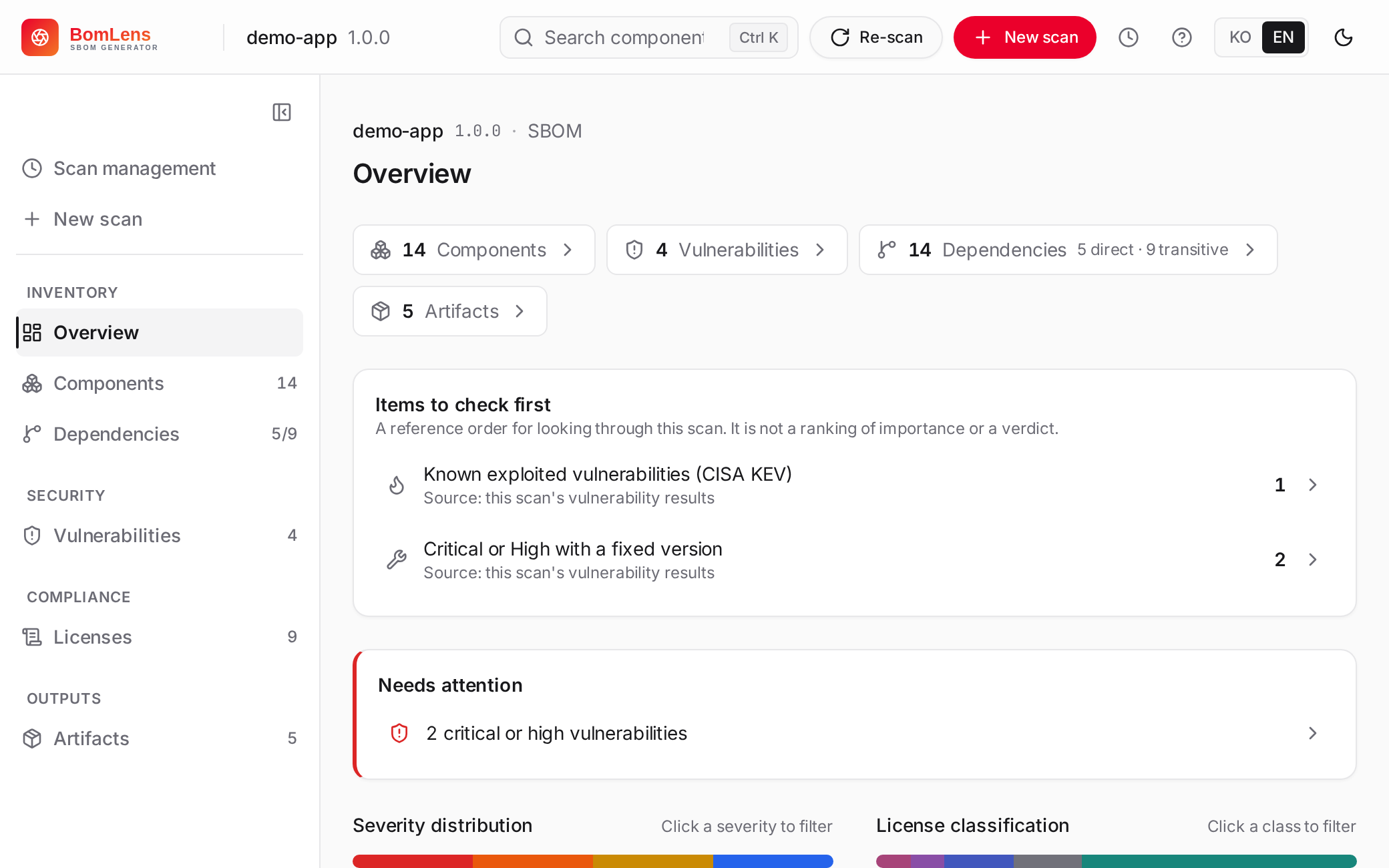
Try it without installing anything: the [live demo](https://sktelecom.github.io/bomlens/demo/) holds one finished scan of each kind — a Spring Boot project from source, a container image (1,393 components), a Raspberry Pi OS device image as firmware, an AI model as a CycloneDX ML-BOM checked against the G7 minimum elements, and a supplier SBOM checked against the format requirements. Read-only, nothing to install, nothing uploaded. To run your own scans, download the installer for [Windows](https://github.com/sktelecom/bomlens/releases/latest/download/BomLens-Setup.exe) or [macOS](https://github.com/sktelecom/bomlens/releases/latest/download/BomLens-Setup.dmg), or go straight to the [CLI](#cli-advanced).
## What it does
One Docker image, two jobs. It **generates**: scan your source code, a container image, or a binary and get a CycloneDX SBOM, an open-source notice, and a security report. It also **assesses open-source risk** in what you receive — a supplier's finished SBOM (`--analyze`) or a firmware binary — reporting licenses and known vulnerabilities with Critical-7d / High-30d remediation deadlines. Every scan emits the risk report by default. Originally built by SK Telecom for supply-chain security, now open source.
Languages: Java, Python, Node.js, Ruby, PHP, Rust, Go, .NET, Swift, C/C++ (Conan/vcpkg, or `--identify-vendored` when there is no package manager), Modelica (`annotation(uses(...))` only — the libraries a `.mo` file directly declares, no lockfile or transitive resolution). Inputs: a source folder, a GitHub URL, a ZIP archive, a Docker image, a binary or RootFS, an existing SBOM, a Yocto build directory, firmware, a HuggingFace AI model (CycloneDX ML-BOM checked against the [G7 minimum elements for AI](https://sktelecom.github.io/bomlens/guides/ai-model/), which map to the EU AI Act's Annex IV), an AI model file read offline from its own header (GGUF, safetensors, PyTorch, ONNX and more), a published research dataset from a Figshare item or a HuggingFace dataset, or a model not yet published, described from its publisher's declaration (`--ai-declare`). AI model and dataset scans also write an SPDX 3.0.1 document with the AI and Dataset profiles; what a scan cannot know (release dates, makers, how each dataset was used) is asked for in the web UI rather than guessed.
The project is under active development at SK Telecom's open source program office. Releases go out every week or two, and every change runs through CI covering ShellCheck, the scanner integration tests, the web UI contract tests, and a per-language check of the ten example projects.
Full docs — searchable, English and Korean — live at **[sktelecom.github.io/bomlens](https://sktelecom.github.io/bomlens/)**, mirrored under [docs/](docs/):
- [First scan](docs/start/first-scan.md) ([한국어](docs/start/first-scan.ko.md)) — install through your first SBOM
- [No-CLI quick start](docs/start/no-cli.md) ([한국어](docs/start/no-cli.ko.md)) — click by click, for non-developers
- [Input scenarios](docs/guides/by-input.md) — GitHub URL, ZIP, local source, an existing SBOM, firmware
- [CLI reference](docs/reference/cli.md) — every option and environment variable
- [CI/CD integration](docs/guides/ci-cd.md) — gate a pipeline on scan results
- [Verify a release](docs/guides/verify-release.md) — check the signatures and read the SBOM that ships with the image
- [What BomLens does not do](docs/concepts/limitations.md) — the limits we know about
- Contributing to the tool itself — [CONTRIBUTING](CONTRIBUTING.md) and the [architecture](docs/concepts/architecture.md)
## Quick Start
Everything runs on a Docker engine (20.10+). The desktop app and web UI manage the image for you; only the CLI asks you to pull it. On Windows, free [Rancher Desktop](https://rancherdesktop.io/) or WSL2 + docker-ce works well; Docker Desktop also works, with licensing caveats for larger organizations.
### Desktop app — no command line (recommended)
Download the installer and double-click it: [BomLens-Setup.exe](https://github.com/sktelecom/bomlens/releases/latest/download/BomLens-Setup.exe) for Windows or [BomLens-Setup.dmg](https://github.com/sktelecom/bomlens/releases/latest/download/BomLens-Setup.dmg) for macOS. It checks Docker, pulls the image, and opens the UI — no console window. The app is unsigned for now; if Windows SmartScreen or macOS blocks it, the [no-CLI quick start](docs/start/no-cli.md) ([한국어](docs/start/no-cli.ko.md)) shows how to proceed. Build details are in [`electron/`](electron/README.md).
### Web UI
```bash
git clone --depth 1 https://github.com/sktelecom/bomlens.git && cd bomlens # --depth 1: about 50 MB instead of the full history
./scripts/scan-sbom.sh --ui # opens http://localhost:8080; results save to the current folder
# Windows: double-click scripts\sbom-ui.bat
```
> **PowerShell**: don't paste the block above as-is — `.sh` has no default handler there, so it fails silently with no error and no output. Double-click `scripts\sbom-ui.bat` instead.
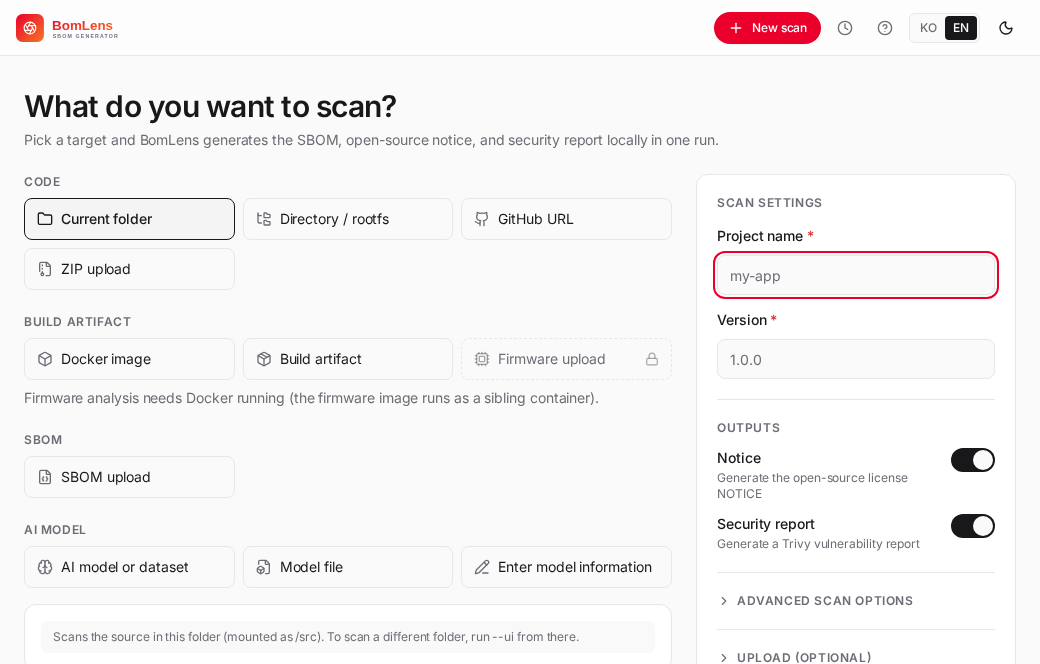
The page can take up to a minute to load the first time while the image is checked, so reload the tab if it shows a connection error. Enter a project name and version, pick a scan target (current folder, GitHub URL, ZIP, SBOM, firmware upload, or Docker image), click Run scan, then view or download the results; live logs stream as it runs. To scan a folder outside the launch directory, add `--mount ` (repeatable, or `--mount /` for the whole host); the desktop app has an Add folder button for the same.
### CLI (advanced)
```bash
docker pull ghcr.io/sktelecom/bomlens:latest # aliases: sbom-generator and sbom-scanner serve the same image
./scripts/scan-sbom.sh --project MyApp --version 1.0.0 --target examples/nodejs --all --generate-only
```
**PowerShell**: `docker pull` above works as-is, but the second line does not — `./scripts/scan-sbom.sh` has no default handler in PowerShell and fails silently with no error and no output. Run the same command through `scripts\scan-sbom.bat` instead (Git for Windows required). Outputs land in a `{Project}_{Version}/` subfolder, prefixed `{Project}_{Version}_…`: `bom.json` (SBOM), `NOTICE.{txt,html}`, `risk-report.{md,html}`, and `security.{json,md,html}`; add `--spdx` for an SPDX 2.3 copy. Other inputs and every option are in the [CLI reference](docs/reference/cli.md) and the [input-scenarios guide](docs/guides/by-input.md).
## Contributing & License
Issues and PRs welcome — see [CONTRIBUTING.md](CONTRIBUTING.md) ([한국어](CONTRIBUTING.ko.md)) and [GitHub Issues](https://github.com/sktelecom/bomlens/issues). For questions, where to ask and what to include are in [SUPPORT.md](SUPPORT.md).
Apache License 2.0 · © 2026 SK Telecom Co., Ltd. Bundled third-party tools keep their own licenses — see [NOTICE](NOTICE) and [THIRD_PARTY_LICENSES.md](THIRD_PARTY_LICENSES.md).