m3 Memory Banner

# ๐Ÿง  m3 Memory **A memory layer that outlives your agents.** You switch from Claude Code to Cursor, upgrade your model, start fresh next week โ€” and everything your tools learned about your project is gone. You re-explain the same decisions, the same preferences, the same hard-won context, over and over. **m3 fixes that.** It's a private, local-first memory your agents share and build on โ€” so your project's knowledge accumulates instead of resetting every time the agent does. One memory store, on your machine, that your tools and agents read from and write to โ€” whether that's Claude Code, Cursor, Gemini CLI, or any MCP-compatible agent. Under the hood, m3 treats agent memory as a **distributed-systems infrastructure problem**, not a simple retrieval feature โ€” a **shared, evolving, bitemporal, contradiction-aware knowledge base** that multiple heterogeneous agents and machines read and write, built to stay consistent over months and years. **The memory improves without being asked.** m3 is not only a store you write to and read back. An **autonomous Cognitive Loop** (`m3_cognitive_loop.py`) runs in the background and keeps working on what you already saved: **deferred enrichment** โ€” classification, embedding, and entity extraction โ€” runs off the hot path, so a write stays fast while the understanding of it deepens afterwards, and the loop builds an **entity relationship graph** from memories that arrived as plain text. **Curation is m3's own work, not an LLM's.** Near-duplicate detection is cosine similarity over embeddings against a threshold; decay and pruning are age-and-signal rules; and applying a curation plan โ€” bulk deletes, merges, supersessions โ€” is one deterministic function issuing direct SQL, with **no model in the loop**. That is deliberate: the apply step *used* to be an LLM agent, and it failed by looping single-row deletes across hundreds of IDs until it ran out of budget. An agent's judgement is still welcome for the genuinely subjective calls ("is this worth keeping?"), but it emits a *plan* and m3 executes it โ€” one round-trip instead of N, and no model needed for the mechanical part. **Contradictions are caught on three paths**, not one: deterministically on the write path (cosine similarity against a threshold, no model), by the loop's **Reflector pass** during enrichment (which writes `supersedes` edges), and by an explicit curation plan. Promotion of chat turns into long-term memory is the one thing that stays deliberate โ€” nothing promotes on your behalf. **It runs where your data has to stay.** A single `pip install` with no account, no API key, and no outbound calls โ€” at home in a **homelab**, on a **corporate or government network**, or **fully air-gapped**. Embedding runs on your own hardware via a **shared local embed server** โ€” one model in RAM that every m3 process reuses, rather than a copy per process โ€” the store is a file you own, and installation works with no internet at all. On the metric that isolates the memory layer โ€” **retrieval accuracy, no answer model or judge involved** โ€” m3 reaches **99.2% session-hit-rate @ k=10 and 100% @ k=20** on LongMemEval-S. --- ## ๐ŸŽฌ Quick video overview One decision saved from a conversation, then recalled by a *different* agent in a *new* session, on a different machine. Captioned throughout, so it reads fine muted. https://github.com/user-attachments/assets/09ab194a-d2a0-4fe5-a7db-69ae8225e39b Player not loading? Download the video to play locally. --- ## โšก Quickstart ```bash pip install m3-memory # or: pipx install m3-memory โ€” pick ONE and stay with it m3 setup # detects your agents, wires the MCP server, provisions the local embedder m3 doctor # verify: health, memory count, embedder, and which agents got wired ``` That's the whole install. No cloud account, no API key, no external embedding service. ### What it does, in four lines Save a decision โ€” your AI agent, or you from the shell: ```console $ m3 memory memory_write --type decision --title "auth-jwt-algorithm" \ --content "The auth service uses RS256 JWTs. HS256 was rejected because we need asymmetric verification at the edge." "Created: 84a944fb-ef3e-403b-9240-f53ab3c015f7" ``` Next week, in a different agent, on a different model โ€” ask in your own words: ```console $ m3 memory memory_search --query "which signing algorithm did we pick for tokens?" --k 3 Top 1 results: ---------------------------------------- 1. [84a944fb-ef3e-403b-9240-f53ab3c015f7] score=0.7501 type: decision title: auth-jwt-algorithm Content: The auth service uses RS256 JWTs. HS256 was rejected because we need asymmetric verification at the edge. ---------------------------------------- ``` The query shares no keywords with the stored text โ€” no "RS256", no "JWT" โ€” and still finds it. That's the hybrid engine: BM25 for exact terms, local BGE-M3 vectors for meaning, MMR for diversity. Your agent calls the same tools over MCP, so it recalls this automatically instead of asking you again. > New here? The **[5-Minute Getting Started Guide](docs/GETTING_STARTED.md)** walks the same path with more context, and [Core Tools](#-core-tools) lists the five you'll use most. --- ## ๐Ÿงฉ Beyond the core The Quickstart above is the whole product for most people: shared memory, wired into your agents, working offline. Everything below is **optional surface** you can ignore until you want it โ€” each row says what it costs to turn on.
๐Ÿค–Coding agents ยท included in the base install
m3 setup auto-detects and wires m3 into Claude Code, Cursor, Cline, Gemini CLI, Google Antigravity, Aider, OpenCode, OpenClaw, Hermes โ€” one shared memory across every agent, and any agent you add later is picked up automatically. (See MCP Client Install)
๐Ÿ‘ฅMulti-agent synchronization ยท included in the base install
agents coordinate through one store: memory scoped per agent / org / user, direct handoffs into another agent's inbox, shared tasks with a recursive task tree, and opt-in SQL-layer isolation so an agent's private notes stay private. Concurrent readers and writers are safe by design (WAL + retry), so a planner, an implementer and a reviewer can work at the same time. (See Multi-Agent Orchestration)
๐Ÿ–ฅ๏ธWeb dashboard, open to all users โ€” not just developers ยท included in the base install
a built-in, backend-agnostic control panel (default http://127.0.0.1:8088): browse memory, read your auto-generated Memory Wiki, explore the interactive knowledge graph, and watch system health / load. Just run m3 dashboard. (See Dashboard Guide)
๐Ÿ“–Auto-generated wiki + Obsidian export ยท core feature โ€” in the base install, nothing extra to enable
m3 wiki generate compiles your canonical memories (pinned, high-confidence, beliefs, procedures) and indexed files into a browsable, interlinked Markdown vault โ€” one page per topic, real hyperlinks for every relationship, and provenance links down to the source document each fact came from. Renders on GitHub, in a self-contained offline HTML viewer, or as an Obsidian vault (--obsidian for graph view + backlinks). (See Wiki Guide)
๐Ÿ˜PostgreSQL ยท optional โ€” you do not need a database
Most people should ignore this row. m3 stores everything in a local SQLite file by default: nothing to install, nothing to run. Point m3 at a PostgreSQL server instead when you want one shared store for several machines โ€” set pip install "m3-memory[postgres]" and M3_DB_BACKEND=postgres. It is a manual step today; m3 setup does not configure it for you. (See Architecture ยท Sync)
Also a drop-in memory backend for LangChain / LangGraph, CrewAI, and PydanticAI โ€” see the framework guides. > Every path gains automatic contradiction supersession, bitemporal historical queries, local sovereign embedding, and the full 100+ MCP tool set. --- ## โš–๏ธ How m3 Compares A full, feature-by-feature **comparison table** โ€” m3 vs **Mem0, Letta, Zep, Graphiti, LangChain Memory / LangMem, agentmemory, Chronos, Hindsight, Mastra OM, Memento**, and more โ€” with sourced benchmarks and honest "when to choose the other tool" guidance, lives in **[COMPARISON.md](docs/COMPARISON.md)**. Short version: m3 is the **local-first, MCP-native** option that stays *yours* and works across every agent โ€” where cloud services (Mem0), full agent runtimes (Letta), and graph-database systems (Zep, Graphiti) each ask you to adopt their infrastructure. See the [comparison guide](docs/COMPARISON.md) for the row-by-row detail. --- ## ๐Ÿš€ Quick Links & Badges

macOS Windows Linux

PyPI downloads GitHub clones Star history

PyPI Python 3.12+ Apache 2.0 MCP

LangChain Claude Antigravity Hermes OpenClaw OpenCode

> ๐Ÿ’ก **Get Started Quickly:** > * ๐Ÿš€ **[5-Minute "Human-First" Guide](docs/GETTING_STARTED.md)** > * ๐Ÿ–ฅ๏ธ **OS Installation:** [Windows Setup](docs/QUICKSTART_WINDOWS.md) ยท [macOS Setup](docs/QUICKSTART_MACOS.md) ยท [Linux Setup](docs/QUICKSTART_LINUX.md) --- ## ๐Ÿ“‘ Table of Contents - [Quickstart](#-quickstart) - [Beyond the Core (optional surface)](#-beyond-the-core) - [Overview & At a Glance](#-m3-at-a-glance) - [Memory Model](#-memory-model-at-a-glance) - [Installation & Onboarding](#-installation) - [Domain Gating (Token Optimization)](#-domain-gating-the-full-catalog-without-the-context-cost) - [Sovereign & Air-Gapped Deployments](#-sovereign--air-gapped-deployments) - [Interactive Features & Capabilities](#-what-m3-does) - [Documentation Index](#-documentation-index) - [Target Audience & Fit](#-who-this-is-for) - [Quality Assurance & Compliance](#-why-trust-this) - [Benchmarks & Performance](#-benchmarks) - [Core Tools Reference](#-core-tools) - [Agent Integration Prompts](#-for-ai-agents) - [Interactive Demos](#-see-it-in-action) --- ## โšก m3 at a Glance | Feature | Details | | :--- | :--- | | **Works With** | Claude Code ยท Cursor ยท Cline ยท Gemini CLI ยท Aider ยท Google Antigravity ยท OpenCode ยท OpenClaw ยท Hermes ยท LangChain/LangGraph ยท CrewAI ยท PydanticAI ยท Any MCP Agent | | **m3 Is** | A persistent memory layer ยท An MCP server ยท A hybrid retrieval engine ยท A bitemporal knowledge base | | **m3 Is Not** | An LLM ยท A chatbot ยท A plain vector database ยท A RAG framework ยท An IDE | | **Core Promise** | Private, offline-capable, locally owned memory shared securely across all your developer tools โ€” with FIPS 140-3-ready crypto and atomic multi-agent writes for regulated and multi-agent environments. | | **Deploys In** | Homelabs and self-hosted stacks ยท corporate and government networks ยท **air-gapped and classified environments** ยท regulated industries (FIPS 140-3-ready, GDPR tooling, audit logs). No account, no API key, no outbound calls. See [Sovereign & Air-Gapped Deployments](#-sovereign--air-gapped-deployments). | | **Speed** | A deferred write โ€” which includes validation, bitemporal logic, contradiction checking, hashing, and storing to SQLite with WAL โ€” takes just **~2.16 ms** (p50) / **3.66 ms** (p95). To ensure the caller never waits, m3 intentionally defers the heavy vector embedding to a background cognitive loop. The memory is immediately full-text searchable (hybrid search takes **~45 ms** p50 / **~48 ms** p95), and vector search picks it up as soon as the background pass completes. Warehouse sync upserts 3,000 rows in **25 ms**. Measured on a stock Windows desktop; see [Performance](docs/PERFORMANCE.md) for the hardware, the CPU-only numbers, and the caveats. | | **Retrieval Accuracy** | State-of-the-art for a local-first substrate โ€” **99.2% session-hit-rate @ k=10, 100% @ k=20** on LongMemEval-S (no oracle routing), with a gold session as the **#1 result for 91.8% of questions**. SHR measures the memory layer alone โ€” no answer model, no judge โ€” which is why it, not end-to-end QA, is the like-for-like comparison between memory systems. See [Benchmarks](#-benchmarks). | | **Entity & Relationship Enrichment** | **Yes.** m3 includes LLM-based entity extraction and relationship enrichment (Observer + Reflector), running as background cognitive passes over raw text โ€” automatic once a local or cloud LLM endpoint is configured. Observer emits entities, facts and typed relationships from unstructured text; Reflector resolves contradictions and writes `supersedes` edges. Any OpenAI-compatible endpoint (LM Studio / Ollama / llama.cpp auto-probed locally, or a cloud model). See [Enrichment Guide](docs/M3_ENRICH_GUIDE.md). | | **Context Efficiency** | Exposes 100+ tools but occupies just **~2% of a 200K context window** at startup โ€” the 10 registered schemas absorb 95% of real tool calls; lazy domain-gating loads the rest on demand. | | **Maturity** | Stable, battle-tested core engine (3,600+ tests) that's safe to build on today; new features and integrations are added actively. **SQLite by default; PostgreSQL as a first-class primary backend** (`M3_DB_BACKEND=postgres`) via a pluggable SQL storage seam. (See [features.json](docs/features.json)) | --- ## ๐Ÿง  Memory Model at a Glance m3 is a **typed, bitemporal, confidence-scored, self-maintaining knowledge base**. Every feature listed below is implemented natively (see [Memory Model Details](docs/MEMORY_MODEL.md)): * **Structured Metadata:** Every memory contains a `type`, `source`, `confidence`, `scope`, provenance (`change_agent`), and salience (`importance`, `decay_rate`). * **Verbatim, Non-Destructive Storage:** Memory content is stored exactly as written and **never altered in place** โ€” the raw text is always retrievable byte-for-byte. Corrections don't overwrite: a superseded fact is *closed* (its validity interval ends) and the new fact is linked to it, so both the original wording and its full edit history stay queryable. You get true verbatim recall *and* an audit trail, not one or the other. * **Bitemporal History:** Distinguishes valid-time from transaction-time. Because superseded facts are closed rather than deleted, you can query what the agent believed at any specific point in time. * **Contradiction Management:** Conflicting facts are resolved automatically on write. The stale fact is marked as superseded, and confidence values are updated dynamically via Bayesian confidence posteriors. Supersession fires above a deliberately conservative cosine bar (`CONTRADICTION_THRESHOLD`, default 0.92), so near-restatements of a claim close the old fact while genuinely different-but-related facts are both kept โ€” use `memory_supersede` to close one explicitly. (See [Technical Details](docs/TECHNICAL_DETAILS.md#contradiction-detection).) * **Self-Maintaining Lifecycle:** Implements memory decay, deduplication, automatic consolidation into higher-order beliefs, TTL expiry, and GDPR erasure. * **Procedural Memory:** A first-class `procedure` type (skill / runbook / how-to / checklist) that is **auto-distilled from successful task runs** โ€” the background loop rolls up a completed task and its step/result memories into a reusable, step-by-step procedure, preserved with `distills_from` provenance back to its sources. A "how do Iโ€ฆ" query surfaces it via a procedural retrieval boost. * **Write-Gating & Content Safety:** Filters out low-signal noise via an enrichment queue and content safety guardrails before storage. * **Explainable Retrieval:** Hybrid engine combining vector similarity, BM25 (FTS5), MMR diversity, and reranking. `memory_suggest` returns the exact score breakdown per result. (See [Confidence and Trust Guide](docs/CONFIDENCE_AND_TRUST.md)). * **Proven Accuracy:** On LongMemEval-S, m3 delivers **state-of-the-art retrieval for a local-first substrate โ€” 99.2% session-hit-rate @ k=10 and 100% @ k=20** (no oracle routing), with a gold session as the **#1 result for 91.8% of questions**. End-to-end QA accuracy is **92.0%** with no oracle metadata (see [Benchmarking Report](benchmarks/longmemeval/LME-S_Benchmarking_Report.md)). --- ## ๐Ÿ“ฆ Installation > ### โš ๏ธ Python 3.12+ required (changed in `2026.9.13.0`) > > **m3 now requires Python 3.12 or newer.** Releases up to and including > `2026.9.12.0` supported Python 3.11; from `2026.9.13.0` onward, `pip` will > refuse to install m3 on 3.11 and will silently keep you on the last 3.11-era > release instead of upgrading. > > **On Python 3.11?** Check with `python --version`. To upgrade: > * **macOS:** `brew install python@3.14 && brew link --overwrite python@3.14` > * **Windows:** `winget install -e --id Python.Python.3.14` > * **Debian/Ubuntu:** use [deadsnakes](https://launchpad.net/~deadsnakes/+archive/ubuntu/ppa) or a distro release shipping 3.14. > > After a Python minor-version bump, **recreate your virtualenv** > (`rm -rf .venv && python3 -m venv .venv`) โ€” see > [HOW-TO-UPGRADE.md](docs/HOW-TO-UPGRADE.md). Your memories are unaffected: > the databases live outside the venv under `~/.m3/engine`. > > We recommend **3.14 or newer** for new installs. Python 3.13 enters > security-fix-only maintenance upstream on October 1st (no further bug fixes), > so a future m3 release will raise the floor again โ€” announced at least one > minor release in advance. *The [Quickstart](#-quickstart) above covers the common path (`pip install m3-memory` โ†’ `m3 setup`). This section adds the alternatives: the shell installer, per-agent wiring, and manual MCP configuration.* ### The One-Liner (macOS & Linux) ```bash curl -fsSL https://raw.githubusercontent.com/skynetcmd/m3-memory/main/install.sh | bash ``` * *For Windows, please follow the [Windows Manual Installation Guide](docs/install_windows.md).* * *To install manually on any platform, refer to the [OS-Specific Install Instructions](INSTALL.md#tldr--manual-path-per-os) or examine the [installer script](https://raw.githubusercontent.com/skynetcmd/m3-memory/main/install.sh).* ### Developer Setup Wizard If you are developing inside python environments: ```bash pip install m3-memory m3 setup ``` The `m3 setup` wizard automatically **detects your installed agents** โ€” Claude Code, Cursor, Cline, Gemini CLI, OpenCode, Antigravity, OpenClaw, Hermes โ€” and wires the m3 `memory` MCP server into each, installs settings files/hooks, provisions the sovereign CPU embedder, and performs a system diagnostic. Detection and wiring re-run on every `m3 update`/`m3 setup`, and `m3 doctor --fix` repoints any config whose paths have moved โ€” so an agent you install *later* gets picked up automatically the next time you run setup or update. ### Integrating with AI Coding Tools #### ๐Ÿค– Claude Code Install as a plugin to unlock `/m3:*` slash commands, curation subagents, and automatic hooks: ``` /plugin marketplace add skynetcmd/m3-memory /plugin install m3@skynetcmd ``` *See [Claude Code Plugin Reference](docs/claude_code_plugin.md) and [Claude.ai Connector Guide](docs/claude_ai_connector.md).* #### โ–ท Cursor Auto-detected and wired by the setup wizard โ€” it writes the m3 `memory` MCP server into `~/.cursor/mcp.json`: ```bash m3 setup ``` Re-run after installing Cursor and it's picked up automatically; `m3 doctor --fix` repoints the entry if paths move. *See [MCP Client Install Guide](docs/MCP_CLIENT_INSTALL.md).* #### โ—ง Cline (VS Code) Auto-detected and wired by the setup wizard โ€” it writes the m3 `memory` MCP server into Cline's `cline_mcp_settings.json`: ```bash m3 setup ``` Also available from [Cline's MCP marketplace](https://github.com/cline/mcp-marketplace) (see [`llms-install.md`](llms-install.md)). *See [MCP Client Install Guide](docs/MCP_CLIENT_INSTALL.md).* #### ๐Ÿช Google Antigravity Install the plugin directly: ```bash agy plugin install https://github.com/skynetcmd/m3-memory ``` *See [Antigravity Plugin Reference](docs/antigravity_plugin.md).* #### ๐ŸฆŠ Hermes Agent Run the wizard to automatically wire up optimal memory providers: ```bash m3 setup ``` *See [Hermes Plugin Integration Guide](docs/HERMES.md).* #### ๐Ÿ Python / LangChain & LangGraph Use m3 as a drop-in Mem0 replacement or LangMem backend: ```bash pip install m3-memory[langchain] ``` *See [LangChain Integration Guide](docs/integrations/LANGCHAIN.md).* #### ๐Ÿ‘ฅ CrewAI (v1.x) A drop-in `StorageBackend` for CrewAI's unified memory: ```bash pip install m3-memory[crewai] # crewai>=1.10,<2 ยท Python 3.12โ€“3.13 (a 3.14 escape hatch is documented) ``` *See [CrewAI Integration Guide](m3_memory/integrations/crewai/README.md).* #### ๐Ÿงฉ PydanticAI m3 tools + auto-recall, or a formal `M3MemoryToolset`. Built on Pydantic v2 โ€” runs natively on Python 3.14: ```bash pip install m3-memory[pydantic-ai] # pydantic-ai-slim>=2,<3 ``` *See [PydanticAI Integration Guide](m3_memory/integrations/pydantic_ai/README.md).* --- ### โŒจ๏ธ The `m3` CLI โ€” the same memory, without an agent MCP is not the only way in. The `m3` CLI and the MCP server are **two front doors to the same database**, so anything an agent can do over MCP you can do from a shell โ€” the whole tool catalog, grouped as `memory`, `files`, `chatlog`, `tasks`, `agent`, `admin`, `conversations`, `diagnostics` and `entity`: ```bash m3 memory memory_search --query "which signing algorithm did we pick?" --k 5 m3 memory memory_write --content "..." --type belief --title "..." m3 memory memory_write_from_file --path notes.md --type belief --title "..." m3 chatlog status ``` Content comes from a command-line argument (`--content`) or from a file (`--path`) โ€” handy when the body is long enough that shell quoting would mangle it. Results go to **stdout** and logs to **stderr**, so output pipes cleanly into `jq`, `grep` or a script: ```bash m3 memory memory_search --query "postgres" --k 20 2>/dev/null | jq '.' ``` This matters when your MCP client drops the connection: **that is not a memory outage**. A dropped stdio session only the client can respawn leaves the store completely intact and fully usable from the CLI until you reconnect (`/mcp` in Claude Code). Check with `m3 --version`; if the CLI answers, m3 is up. *See the [CLI Reference](docs/CLI_REFERENCE.md) for the full command surface.* --- ### Manual MCP Server Configuration To expose m3 to any Model Context Protocol host, add it to your configuration file: ```json { "mcpServers": { "memory": { "command": "m3" } } } ``` --- ## ๐ŸŽš๏ธ Domain Gating: the Full Catalog Without the Context Cost m3 gives you the full 100+ tool surface while occupying just **2% of a 200K context window** at startup โ€” most MCP servers make you pay for every tool in every prompt. Tools are grouped into **9 domains** (`memory`, `chatlog`, `files`, `entity`, `agent`, `tasks`, `conversations`, `diagnostics`, `admin`) and loaded lazily. Only 10 schemas register at startup (~3,929 tokens). That set is chosen by measurement rather than judgement: across real-world multi-agent development sessions it absorbed **95% of all observed tool calls**, so gating the rest costs almost nothing in practice. When your agent needs more, it calls `tools_load_domain(domain="...")` to fetch a domain on demand โ€” or invokes any single tool by name through `m3_call`, with no domain load at all. | Gating Mode | Registered Tools | Tokens in Schema | % of 200K Window | | :--- | :---: | :---: | :---: | | **Lazy (Default)** | **10** | **~3,929** | **2.0%** | | Typical Active Session (+`memory` +`admin`) | 56 | ~17,548 | 8.8% | | Eager Mode (`M3_TOOLS_LAZY=0`) | 115 | ~29,658 | 14.8% | > ๐Ÿ› ๏ธ *Note: If your client does not support dynamic tool registration, set the environment variable `M3_TOOLS_LAZY=0` to register all tools eagerly.* --- ## ๐Ÿ›ก๏ธ Sovereign & Air-Gapped Deployments m3 operates completely offline by default. ### Sovereign Local Embedder A high-performance BGE-M3 embedder runs locally after installation. * **Default:** one **shared local embed server** on `127.0.0.1:8082`, running the `m3-embed-server` binary that ships inside the `m3-core-rs` wheel. CPU execution using GGUF format (`_assets/models/bge-m3-Q4_K_M.gguf`). Every m3 process reuses that single server โ€” one model in host RAM โ€” and one GPU context when a GPU wheel is installed โ€” instead of each loading its own copy. It is local-only and never leaves the machine. * **Optional (opt-in at `m3 setup`):** additionally embed **in-process** via the `m3-core-rs` native module (llama.cpp linked in-process, zero IPC). On measured real text it is **faster** than the shared server โ€” ~1.9ร— on short chunks, ~1.75ร— on medium โ€” so the reason to prefer shared is **memory, not latency**: in-process loads one model copy *per process*, and a typical setup runs several (MCP server, cognitive loop, CLI), while the shared server keeps one model in RAM for all of them. Choose in-process when you have RAM to spare and a short-text workload. ([measurements and caveats](docs/PERFORMANCE.md#embedding-and-the-shared-vs-in-process-question)) * **Hardware Acceleration (GPU):** Execute `m3 embedder install-gpu` to compile with CUDA, Vulkan, or Metal. * **External Provider Fallback:** Set `M3_EMBED_URL` to point at any OpenAI-compatible `/v1/embeddings` endpoint (Ollama, LM Studio, vLLM, or another machine's m3 embed server), and `M3_EMBED_FALLBACK_URL` for a second endpoint to try if the first is unreachable. ### Rust-Oxidized Performance Core m3 ships a Rust compute core (`m3_core_rs`) that speeds up MMR re-ranking, batch cosine distance calculations, and FTS compilations by **90ร— to 800ร—**. It is installed **by default** (the installer's `--no-native-wheel` is the opt-*out*), not an optional add-on. A pure-Python fallback covers every code path and is **results-equivalent** โ€” exact for FTS compilation and graph traversal, and within float tolerance for vector math, enforced by `tests/test_oxidation_parity.py`, `test_fts_parity.py` and `test_graph_neighbor_parity.py`. So the core changes speed, never answers: if the wheel is absent, or you set `M3_CORE_RS_DISABLE=1`, m3 falls back automatically and returns the same results more slowly. (See [Oxidation Benchmarks](docs/OXIDATION_BENCHMARKS.md)). ### Enterprise Security & Compliance * **FIPS 140-3 Ready:** Standardized encryption pathways allow routing through validated cryptographic modules (e.g., wolfSSL via `M3_FIPS_MODE=1`). * **Air-Gapped Install:** Supports installation without internet access via pre-compiled python wheels. (See [Sovereign Deployment Guide](docs/SOVEREIGN_DEPLOYMENT.md) & [FIPS Boundary Reference](docs/FIPS_MODULE_BOUNDARY.md)). * **Storage Location:** State lives under three roots, so databases and configuration can be relocated and secured independently: | Root | Default | Holds | | :--- | :--- | :--- | | `M3_ENGINE_ROOT` | `~/.m3/engine` | Databases + runtime state (`agent_memory.db`, `agent_chatlog.db`, `files_database.db`) | | `M3_CONFIG_ROOT` | `~/.m3/config` | Configuration (chatlog config, salt) | | `M3_MEMORY_ROOT` | `~/.m3-memory` | Payload / repo clone | **All three are overridable.** Set any of them to relocate that root. `M3_MEMORY_ROOT` also acts as a master override โ€” if set and the other two are unset, engine and config derive from it as `/engine` and `/config`. Precedence is `M3_ENGINE_ROOT` / `M3_CONFIG_ROOT` โ†’ `M3_MEMORY_ROOT/โ€ฆ` โ†’ the `~/.m3/โ€ฆ` default, so a specific root always wins over the master. (See [Architecture](docs/ARCHITECTURE.md).) --- ## ๐Ÿ”ฎ What m3 Does * **Memory Persistence:** Saves system architecture, project decisions, and preferences across tool boundaries using a local SQLite database. * **Autonomous Cognitive Loop:** Background worker (`m3_cognitive_loop.py`) that periodically sweeps chat logs to extract facts, reconcile contradictions, and construct an entity relationship graph. * **LLM-Based Entity Extraction & Relationship Enrichment:** m3 includes LLM-based entity extraction and relationship enrichment (Observer + Reflector), running as background cognitive passes over raw text โ€” automatic once a local or cloud LLM endpoint is configured. The **Observer** pass reads unstructured text and emits entities, facts and typed relationships; the **Reflector** pass re-reads what is already stored, resolves contradictions and writes `supersedes` edges. Both run off the hot path, so a write stays fast while the understanding of it deepens afterwards. Any OpenAI-compatible endpoint works โ€” point it at a local server (LM Studio, Ollama, llama.cpp โ€” auto-probed on `:1234` / `:11434`) to keep every token on your machine, or at a cloud model if you prefer. (See [Enrichment Guide](docs/M3_ENRICH_GUIDE.md)) * **Hybrid Vector & Keyword Search:** Seamlessly merges vector space, Full-Text Search (FTS5 BM25), and MMR diversity. * **Hierarchical File Ingestion:** A dedicated 26-tool files domain reads directories, chunks files, extracts facts, and reviews staleness โ€” with ~4ร— faster incremental re-ingest (unchanged sections reuse cached embeddings). * **Verbatim Chatlog Capture:** A dedicated 10-tool chatlog domain records conversation turns *before compaction*, so prior Claude/Gemini sessions stay searchable and nothing is lost to context-window truncation. * **Pluggable Storage Backend:** SQLite by default; select **PostgreSQL as a first-class primary store** with `M3_DB_BACKEND=postgres`. Same semantics on either backend โ€” the choice doesn't change behavior. * **Cross-Device Sync:** Optionally sync/federate to a PostgreSQL warehouse tier. Access the same memories on your laptop, desktop, or cloud environments. --- ## ๐Ÿ“š Documentation Index **Start here, in this order:** [Getting Started](docs/GETTING_STARTED.md) โ†’ [Memory Model](docs/MEMORY_MODEL.md) (what a memory *is*, and how supersession works) โ†’ [Agent Instructions](docs/AGENT_INSTRUCTIONS.md) (how to make your agent use it well). Everything else below is reference โ€” reach for it when you hit the specific thing it covers. | Quick & Core | Advanced & Architecture | Integrations & Compliance | | :--- | :--- | :--- | | ๐Ÿš€ **[Getting Started Guide](docs/GETTING_STARTED.md)** | ๐Ÿ—๏ธ **[System Architecture](docs/ARCHITECTURE.md)** | ๐Ÿงฉ **[LangChain/LangGraph](docs/integrations/LANGCHAIN.md)** | | โœจ **[Core Features](docs/CORE_FEATURES.md)** | ๐Ÿ”ง **[Technical Implementation](docs/TECHNICAL_DETAILS.md)** | ๐Ÿงฉ **[Hermes Agent](docs/HERMES.md)** | | โš™๏ธ **[Environment Variables](docs/ENVIRONMENT_VARIABLES.md)** | ๐Ÿง  **[Memory Model Guide](docs/MEMORY_MODEL.md)** | ๐Ÿ›ก๏ธ **[Compliance Guide](docs/COMPLIANCE.md)** (GDPR, FISMA) | | ๐Ÿ› ๏ธ **[Operations Playbook](docs/OPERATIONS.md)** | โšก **[Rust Oxidation benchmarks](docs/OXIDATION_BENCHMARKS.md)** | ๐Ÿ›ก๏ธ **[FIPS Cryptographic Boundary](docs/FIPS_MODULE_BOUNDARY.md)** | | ๐Ÿค– **[Agent Instructions & Rules](docs/AGENT_INSTRUCTIONS.md)** | ๐Ÿ” **[Myths & Facts Guide](docs/MYTHS_AND_FACTS.md)** | ๐Ÿ  **[Homelab Patterns](docs/HOMELAB_PATTERNS.md)** | | ๐Ÿงฉ **[Tool Capability Matrix](docs/CAPABILITY_MATRIX.md)** | ๐Ÿค– **[AI Context Injection Profile](docs/llm-context.md)** | ๐Ÿ”ข **[Machine-Readable Features](docs/features.json)** | ### More Documentation | Guide | Guide | Guide | | :--- | :--- | :--- | | ๐Ÿ—บ๏ธ [Roadmap](docs/ROADMAP.md) | ๐Ÿ”„ [Cross-Device Sync](docs/SYNC.md) | ๐Ÿ‘ฅ [Multi-Agent Orchestration](docs/MULTI_AGENT.md) | | โš–๏ธ [Comparison vs Alternatives](docs/COMPARISON.md) | โ“ [FAQ](docs/FAQ.md) | ๐Ÿ” [Security Policy](docs/SECURITY.md) | | ๐Ÿฉน [Troubleshooting](docs/TROUBLESHOOTING.md) | โŒจ๏ธ [CLI Reference](docs/CLI_REFERENCE.md) | ๐Ÿ“– [API Reference](docs/API_REFERENCE.md) | | ๐Ÿ“ [Files Memory](docs/FILES_MEMORY.md) | ๐Ÿ’ฌ [Chat Log Subsystem](docs/CHATLOG.md) | โœจ [Enrichment Guide](docs/M3_ENRICH_GUIDE.md) | | โฌ†๏ธ [Upgrade Guide](docs/HOW-TO-UPGRADE.md) | ๐Ÿฉบ [Health FAQ](docs/M3_HEALTH_FAQ.md) | ๐Ÿงฌ [Dual Embedding](docs/DUAL_EMBED.md) | | ๐Ÿ“œ [Changelog](CHANGELOG.md) | ๐Ÿค [Code of Conduct](docs/CODE_OF_CONDUCT.md) | ๐Ÿ—๏ธ [Build Wheels](docs/BUILD_WHEELS.md) | | ๐Ÿ“Š [Web Dashboard](docs/DASHBOARD.md) | ๐Ÿงฐ [Underlying Tools](docs/UNDERLYING_TOOLS.md) | ๐Ÿ˜ [PostgreSQL Sync](docs/SYNC_PG_TO_PG.md) | | โšก [Performance](docs/PERFORMANCE.md) | | | --- ## ๐ŸŽฏ Who This Is For ### m3 is a great fit if... * **You run a homelab or self-hosted stack:** m3 is a single `pip install` with no account, no API key, and no outbound calls โ€” it runs on the hardware you already own, alongside your other self-hosted services. SQLite by default (zero infrastructure); PostgreSQL when you want a shared store across machines. * **You operate under sovereignty or data-residency requirements** โ€” corporate, government, defence, healthcare, or any regulated environment: memory and embeddings never leave your boundary. The embedder runs on your own hardware, the store is a file you control, and installation works **fully air-gapped** from pre-compiled wheels. FIPS 140-3-ready crypto (`M3_FIPS_MODE=1`), GDPR `gdpr_forget` / `gdpr_export`, audit logs, and relocatable storage roots so databases and configuration can be secured independently. * **You want the freedom to switch or add agents without losing what they know:** change tools on the fly or down the road โ€” Claude Code, Gemini, OpenClaw, Hermes, whatever comes next โ€” and your project's knowledge carries over instead of disappearing with the switch. * **You build with LangChain/LangGraph:** An advanced replacement for standard memory models, adding bitemporal queries, contradiction management, and local embeddings. * **You build with CrewAI (v1.10โ€“1.x):** A drop-in `StorageBackend` (`Memory(storage=M3StorageBackend(user_id="crew-alpha"))`) that gives CrewAI bitemporal recall, contradiction-aware supersession, and local embeddings โ€” plus the thing single-vector stores can't do: a CrewAI-written memory can **also be searchable by every other m3 agent** (Claude Code, Gemini, LangChain) if you want. `pip install m3-memory[crewai]`. See the [CrewAI integration guide](m3_memory/integrations/crewai/README.md). * **You build with PydanticAI:** m3-backed memory as either drop-in tools + auto-recall (`register_m3_tools`, `m3_recall_processor`) **or** a formal `M3MemoryToolset` (a real PydanticAI `AbstractToolset`). Built on Pydantic v2, so it runs on Python 3.14 with a plain `pip install m3-memory[pydantic-ai]`. See the [PydanticAI integration guide](m3_memory/integrations/pydantic_ai/README.md). * **You need security and compliance:** Built-in `gdpr_forget` and `gdpr_export` tools, air-gapped support, and audit logs. * **You value privacy:** Zero external cloud requests or subscriptions required. ### m3 is NOT a fit if... * You need a hosted SaaS dashboard with managed infrastructure (use [Letta](https://letta.ai)). * **You don't want persistent memory:** you want each session to start fresh, with no ability to retrieve prior sessions' knowledge โ€” m3 exists to do the opposite, so your agent's built-in defaults are the simpler fit. --- ## ๐Ÿ›ก๏ธ Why Trust This * **Benchmarked Retrieval:** State-of-the-art for a local-first substrate โ€” 99.2% session-hit-rate @ k=10, 100% @ k=20 on LongMemEval-S โ€” with a published, reproducible methodology and no oracle routing. See [Benchmarks](#-benchmarks). * **Robust Coverage:** Over **3,600 tests** guarding that your memories survive upgrades and schema migrations, that capture never silently stops, and that behavior is identical on SQLite and PostgreSQL. Every release runs the **full suite on every lane** โ€” Linux, macOS and Windows ร— every supported Python version, each lane independent of the others. No subsets, no shortcuts. Warnings are treated as errors: a release does not pass until every warning is addressed, not just every failure. * **Measured, Not Asserted:** Latency for the write, search, sync and embed paths is published with its method, its hardware, and its limits โ€” including what the numbers look like **without a GPU** (~7ร— slower on embedding). See [Performance](docs/PERFORMANCE.md). * **Audit Reports:** Regular vulnerability reports (Bandit, secrets scans, pip-audit) published directly under [`docs/audits/`](docs/audits/). * **Explainable Retrieval:** No black-box queries; retrieval math is open, readable, and scoring parameters are outputted directly. * **Open Source:** Apache 2.0 licensed, free, with no SaaS walls or usage limits. --- ## ๐Ÿ“Š Benchmarks > **Read retrieval accuracy first โ€” it is the only number that measures the memory layer.** > > **Session Hit-Rate (SHR)** asks one question: *did the system surface the > evidence that answers the query?* No answer model is involved, so the score > reflects the memory layer and nothing else. It is the like-for-like metric > across memory systems. > > **End-to-end QA accuracy** runs that retrieved context through an LLM and has > a judge model grade the answer. Both choices move the score independently of > retrieval: a stronger answerer lifts a weaker memory layer, a lenient judge > lifts everyone, and neither is held constant across published comparisons. Two > systems quoting QA numbers are usually not measuring the same thing. > > Both are reported below. **SHR is the headline; QA is context.** ### Retrieval Accuracy โ€” Session Hit-Rate @ k *(the memory-layer metric)* Evaluated on the 500-question [LongMemEval-S](https://github.com/xiaowu0162/LongMemEval) dataset under default server configurations: | Retrieve Depth (k) | Session Hit-Rate (SHR) โ‚ | Success Count | vs. Prior Version | | :---: | :---: | :---: | :---: | | 1 | **91.8%** | 459 / 500 | First Report โ€  | | 5 | **98.2%** | 491 / 500 | +2.0pp | | 10 (Default) | **99.2%** | 496 / 500 | +2.4pp | | 20 | **100.0%** | 500 / 500 | First Report โ€ก | > โ€  **SHR@1** is the strictest cut โ€” a gold session as the single top-ranked result. m3 operates at **k=10** (its default), where a gold session is present for 99.2% of questions; k=1 is reported here for completeness, not as the headline. Cross-system SHR/recall figures are usually quoted at k=5, k=10, k=20, or k=50, so comparing another system's k=10+ number against this k=1 figure is not a like-for-like comparison. > โ‚ **Which aggregation.** These are binary per-question `recall_any@k` values โ€” the convention adjacent LongMemEval submissions report. The benchmarking report's per-question-type table aggregates slightly differently and reads marginally higher at shallow depth (98.8% at k=5, 99.4% at k=10); k=20 is 100.0% either way. The table above quotes the more conservative figures. > โ€ก **v3 improvement** โ€” the v3 engine reaches **100% SHR at k=20**, exceeding the prior version's **97.8% measured at the deeper k=30** ([LongMemEval issue #43](https://github.com/xiaowu0162/LongMemEval/issues/43)) โ€” higher recall at shallower depth. Both figures are retrieval-only SHR (no answerer). The "vs. Prior Version" deltas at k=5/k=10 compare v3 against the prior version's 96.2% / 96.8% at the same k. ### End-to-End QA Accuracy *(answer-model and judge dependent โ€” not a memory-layer comparison)* **92.0% accuracy** (460/500 correct responses) with zero oracle metadata routing. Reported for completeness; see the note above on why this number is not comparable across systems the way SHR is: | Question Domain | Count (n) | Accuracy | | :--- | :---: | :---: | | single-session-user | 70 | 94.3% | | single-session-assistant | 56 | 96.4% | | single-session-preference | 30 | 80.0% | | multi-session | 133 | 87.2% | | temporal-reasoning | 133 | 95.5% | | knowledge-update | 78 | 93.6% | | **Overall Summary** | **500** | **92.0%** | *Methodology and reproducibility details are located in the [LongMemEval-S Benchmarking Report](benchmarks/longmemeval/LME-S_Benchmarking_Report.md).* --- ## ๐Ÿงฐ Core Tools While m3 features 100+ tools, these five serve as your primary interface: | Tool Name | Operation Description | | :--- | :--- | | `memory_write` | Save a specific fact, project preference, or technical configuration. | | `memory_search` | Run hybrid keyword (BM25) and semantic vector search. | | `memory_update` | Edit existing facts to keep memory accurate. | | `memory_suggest` | Query memories alongside a mathematically explicit score breakdown. | | `memory_get` | Fetch details of a single memory using its unique ID. | *Refer to the [Agent Instructions Guide](docs/AGENT_INSTRUCTIONS.md) and [Full MCP Tool Catalog](docs/MCP_TOOLS.md) for complete parameter definitions.* --- ## ๐Ÿค– For AI Agents You can drop the agent ruleset file [`examples/AGENT_RULES.md`](examples/AGENT_RULES.md) into your workspace to teach your agent best practices (e.g., query before writing, update existing records instead of duplicating). ### Command Installation Prompts Copy and paste these prompts into your terminal client to let your agent set up m3 for you: #### Claude Code Prompt ```text Install m3-memory for persistent memory. Run: pip install m3-memory Then run: m3 setup That wires the m3 "memory" MCP server into my agents and provisions the local BGE-M3 embedder โ€” no external embedding service is needed. If it doesn't detect Claude Code, add {"mcpServers":{"memory":{"command":"m3"}}} to my ~/.claude/settings.json under "mcpServers". Then use /mcp to verify the memory server loaded. ``` #### Gemini CLI Prompt ```text Install m3-memory for persistent memory. Run: pip install m3-memory Then run: m3 setup That wires the m3 "memory" MCP server into my agents and provisions the local BGE-M3 embedder โ€” no external embedding service is needed. If it doesn't detect Gemini CLI, add {"mcpServers":{"memory":{"command":"m3"}}} to my ~/.gemini/settings.json under "mcpServers". ``` #### Active Chatlog Capture Plugin To configure instant conversation logging and backup, tell your active coding agent: ```text Install the m3-memory chat log subsystem. ``` The agent executes `bin/chatlog_init.py` and configures execution triggers (see [Chat Log Architecture Guide](docs/CHATLOG.md)). --- ## ๐ŸŽฌ See it in action ### Contradiction Detection & Automatic Resolution

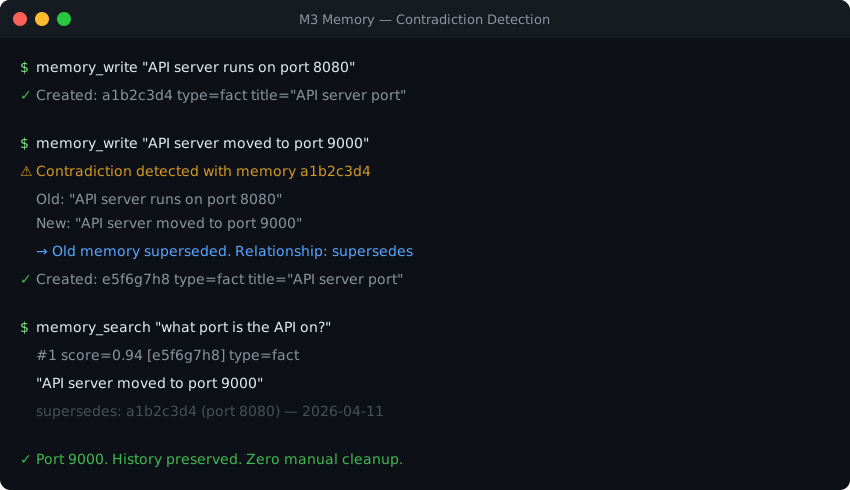
Contradiction Demo

### Hybrid Search Scoring Details

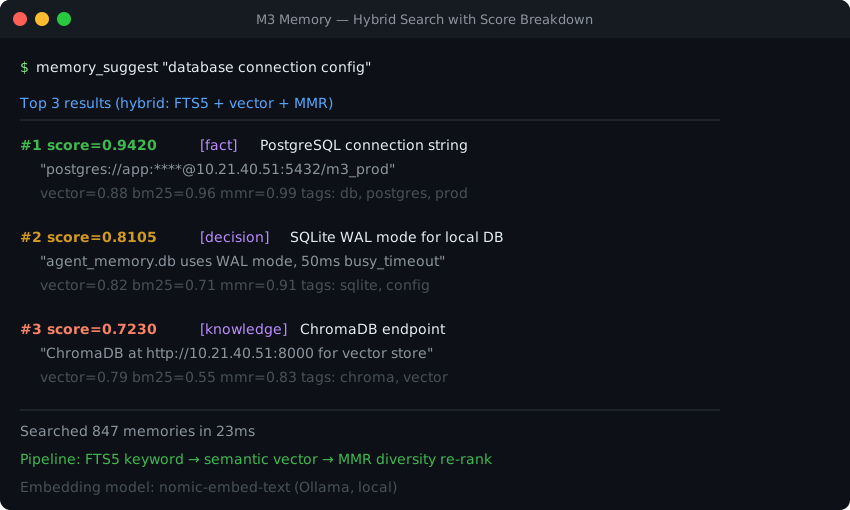
Hybrid Search Demo

### Multi-Device Database Sync

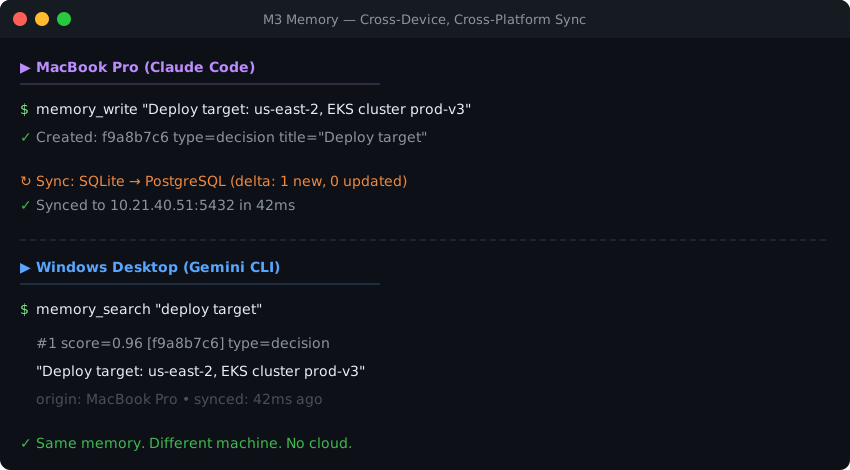
Sync Demo

--- ## ๐Ÿ’ฌ Community [![Discord Badge](https://raw.githubusercontent.com/skynetcmd/m3-memory/main/docs/badges/discord.svg)](https://discord.gg/ZcJ3EGC99B)   [![GitHub Issues Badge](https://raw.githubusercontent.com/skynetcmd/m3-memory/main/docs/badges/github-issues.svg)](https://github.com/skynetcmd/m3-memory/issues) [How to Contribute](docs/CONTRIBUTING.md) ยท [FAQ for Developers](docs/FAQ_FOR_DEVELOPERS.md) ยท [Good First Issues](docs/GOOD_FIRST_ISSUES.md) --- ## ๐Ÿ“œ License & Attributions This project is licensed under the Apache License 2.0. See [LICENSE](LICENSE) for details. ### Built with m3 Memory is authored and maintained by **skynetCMD**. It was built with the help of AI coding assistants โ€” **Gemini CLI**, **Claude Code**, and **Google Antigravity** โ€” which contributed code under the author's direction. (They are tools that assisted; they are not maintainers, sponsors, or co-owners of the project.) ### Asset & Icon Credits The provider badges under [`docs/badges/`](docs/badges/) embed small logo glyphs: * **OpenClaw & OpenCode icons** are from the MIT-licensed [LobeHub icon set](https://github.com/lobehub/lobe-icons) (`lobe-icons`). * **The Hermes badge** uses a generic caduceus glyph. See [NOTICE](NOTICE) for the full third-party attribution list.

PyPI downloads are the pepy.tech total. Badges are regenerated on a schedule by star-history.yml.

Python: m3 core runs on 3.12+ (including 3.14 and 3.15). The optional framework extras follow their own caps โ€” PydanticAI is 3.14-native (plain pip install); CrewAI requires 3.10โ€“3.13 (a 3.14 escape hatch is documented).
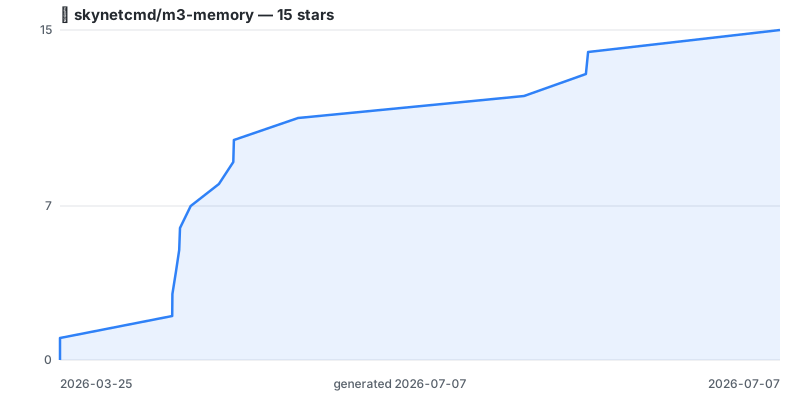

--- ### โญ Star History
โญ View star history โ†’ (click to expand the chart)
Star history for skynetcmd/m3-memory Chart regenerated on a schedule by [`.github/workflows/star-history.yml`](.github/workflows/star-history.yml) using the repo's own token โ€” no third-party embed. Click through for the live interactive version.