OpenAver
No Docker, no command line — one-line install for Win/Mac, a full GUI JAV collection manager the moment you open it.
Cover-wall browsing · Actress profiles & cross-language aliases · 8-source unified scraping · AI API that runs your library from a single sentence






**English** | [繁體中文](README.md)
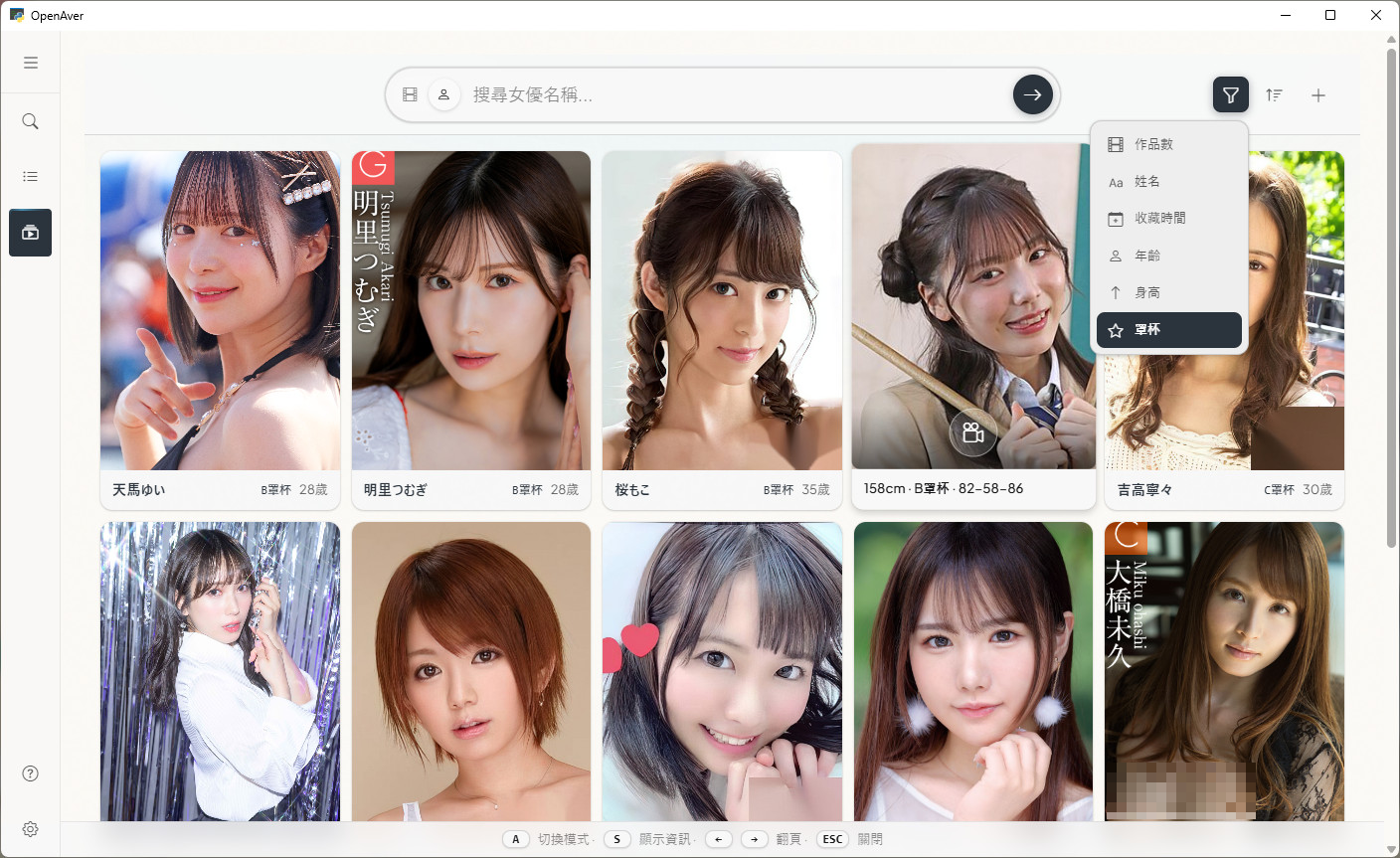
> **This isn't just "a scraper that feeds metadata to Jellyfin."** OpenAver is where you actually live with your collection — its Showcase is built around **cover + tag** as the navigation axes, with a **dedicated actress-browsing mode** (profile cards, sort by cup size / age / height, cross-language alias system that collapses all of one person's stage names and post-retirement names into a single card). It's a browser purpose-built for the way a shelf full of IDs is actually browsed. Once you've scraped a title and want to throw it on the living-room media center, one click exports NFO + cover art for Jellyfin / Emby / Kodi — but that's optional downstream. Showcase is a complete browsing experience on its own.
Three pages form the core: 📋 Scan & build library → 🎬 Browse collection → 🔍 Per-ID scraping (advanced). **The default mode is read-only (searching and browsing never touch your files); only when you press "Organize" does OpenAver move files** — renaming or relocating your videos according to the rules you set, and nothing more. It never deletes.
**100% local** — no data collection, no uploaded file info. Network requests are only used to scrape publicly available metadata.
⚡ **[Live Demo → openaver.slive.uk](https://openaver.slive.uk/)**
*Just mecha villains and fictional movie posters inside — zero NSFW, totally safe to open with your boss walking by.*
## Spec Sheet
| Item | Details |
|------|---------|
| **Platform** | Windows 10/11 · macOS (Apple Silicon M1–M4) |
| **Install** | One-line command or ZIP install (**no Docker**); once installed, everything runs in the GUI — **no CLI** |
| **Collection browsing** | Showcase cover wall + Lightbox: video mode (cover/tag navigation + similar exploration), actress mode (profile cards + cup/age/height sort + cross-language alias) |
| **Multi-device access** | One-click server mode — phones and tablets on the same Wi-Fi can browse your collection in any browser (**instant, no restart, no setup**; single-machine by default, no external exposure) |
| **Scrape sources** | 8 built-in (JavBus / Jav321 / JavDB / DMM / D2Pass / HEYZO / FC2 / AVSOX); advanced users can optionally federate **Metatube (30+ more providers)** |
| **Media server output (optional)** | One-click NFO + cover art (poster / fanart) for **Jellyfin / Emby / Kodi**; read-only sources can generate a local `.strm` library that streams without copying the originals |
| **Actress collection** | Auto profiles + cross-language alias expansion + multi-source photo download (or upload your own) |
| **AI control** | Built-in REST API + capabilities manifest (Claude Code / Cursor / Perplexity and other AI agents operate it directly) |
| **AI translation** | Ollama (local, free) / Gemini / OpenAI-compatible — your choice |
| **Data** | 100% local SQLite — **no cloud, no account, no telemetry** |
| **License** | MIT |
## Screenshots
| Search | Actress Collection |
|--------|--------------------|
|  |  |
More screenshots
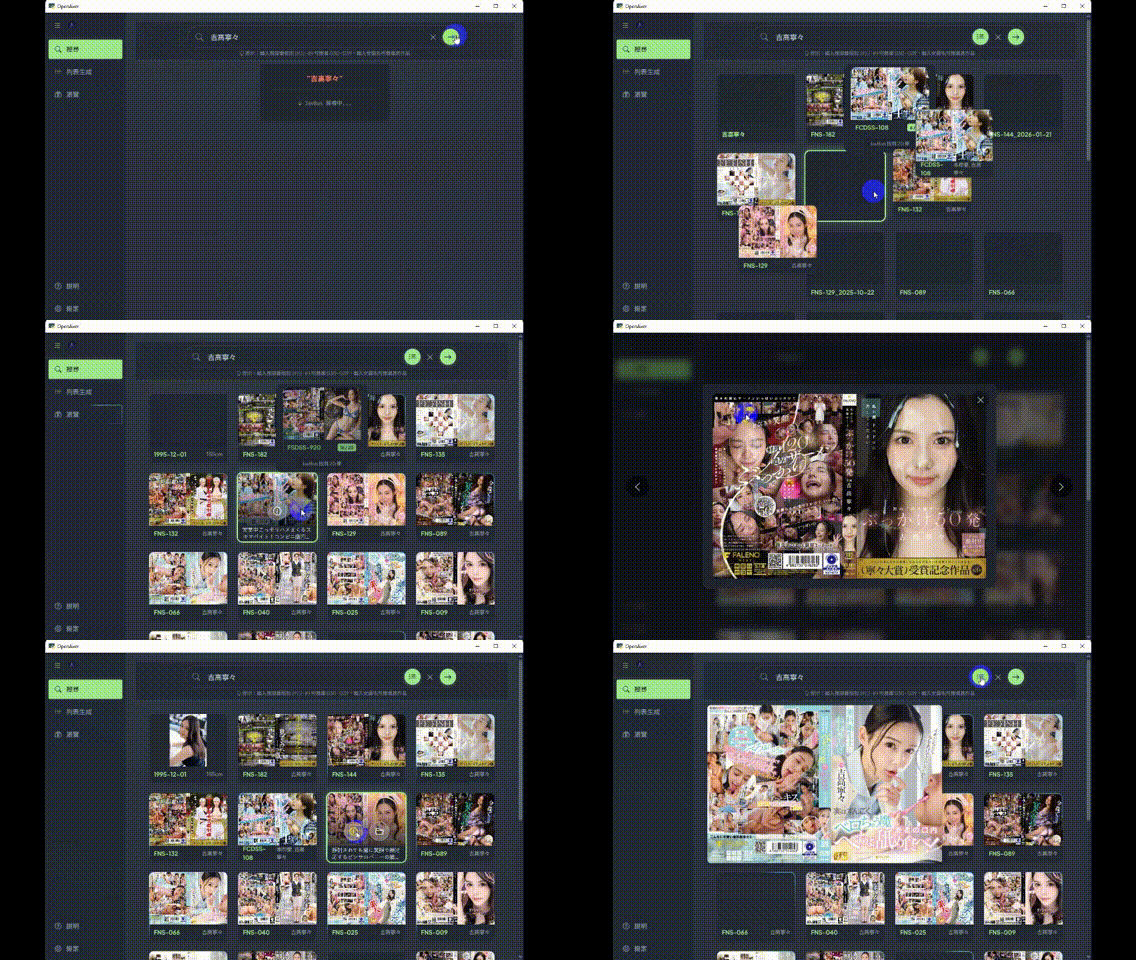
| Search Demo | Actress Gallery |
|-------------|-----------------|
|  |  |
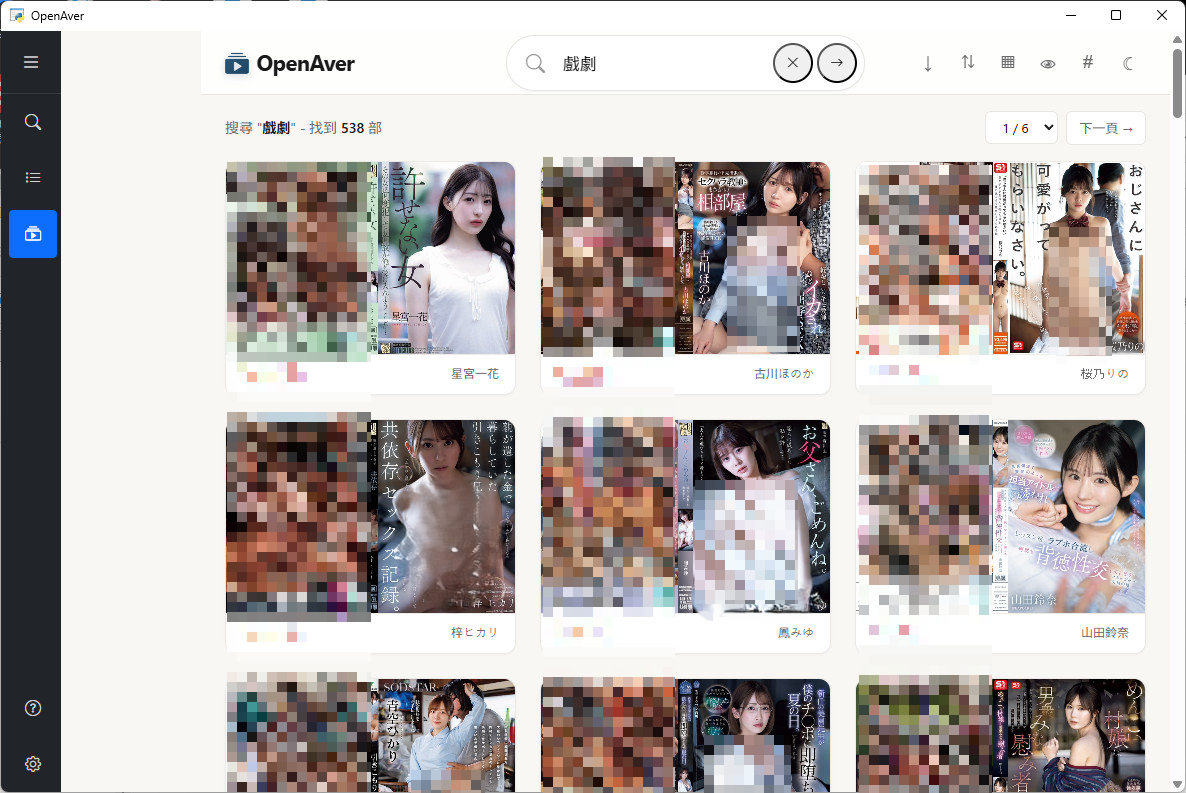
| Showcase Video Mode | Showcase Detail |
|---------------------|-----------------|
|  | 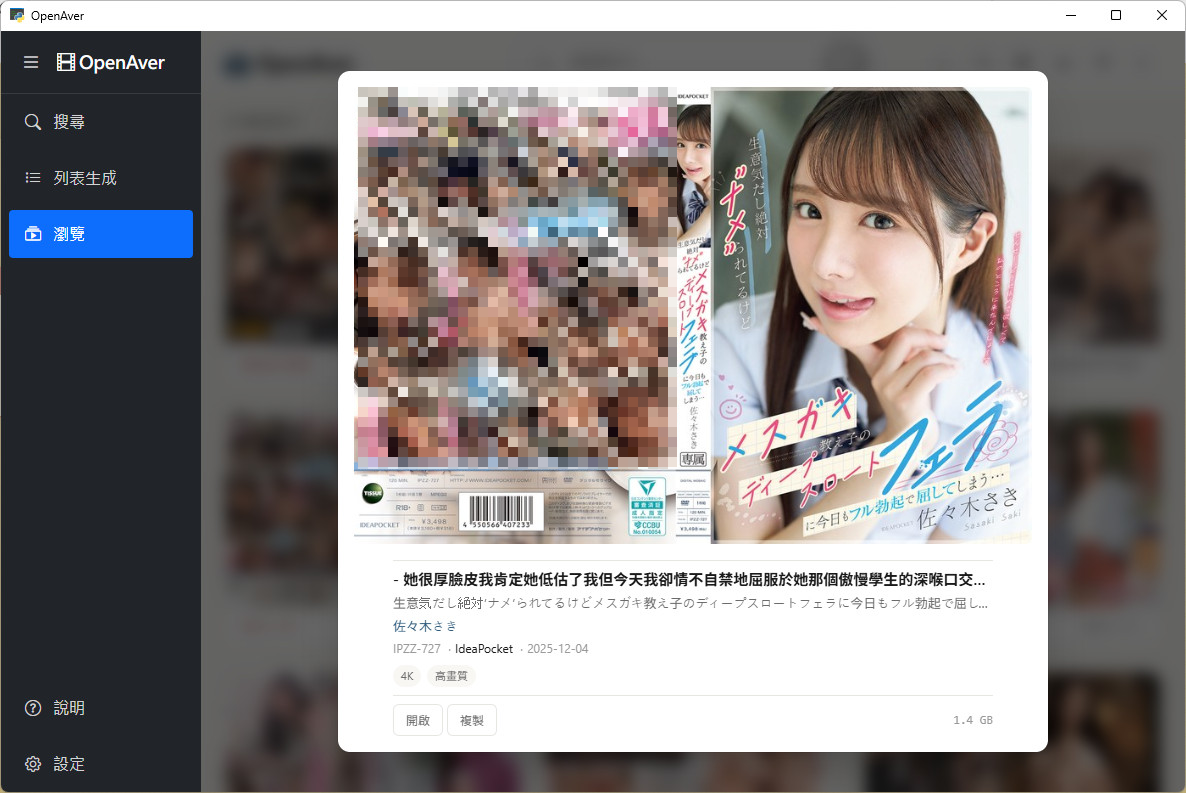 |
---
## Installation
### Recommended: One-Line Install
**macOS**:
```bash
curl -fsSL https://raw.githubusercontent.com/slive777/OpenAver/main/install.sh | bash
```
**Windows** (PowerShell):
```powershell
irm https://raw.githubusercontent.com/slive777/OpenAver/main/install.ps1 | iex
```
> 💡 Don't want to open PowerShell? Download `OpenAver-Windows-Setup.bat` from [Releases](https://github.com/slive777/OpenAver/releases/latest) and double-click — it runs the same installer.
The script automatically:
- Detects your system architecture and downloads the latest release
- Clears platform security restrictions (macOS quarantine / Windows Mark of the Web)
- Creates a desktop shortcut (Windows)
- Preserves your settings and logs on upgrade
### Alternative: Manual ZIP Download
Download from [GitHub Releases](https://github.com/slive777/OpenAver/releases/latest):
| Platform | File |
|----------|------|
| **Windows x64** | `OpenAver-vX.X.X-Windows-x64.zip` |
| **macOS arm64** | `OpenAver-vX.X.X-macOS-arm64.zip` |
> ⚠️ Manual ZIP install requires extra steps to clear security restrictions — see the Troubleshooting document included in the ZIP.
> ℹ️ macOS builds target Apple Silicon (M1/M2/M3/M4) only.
On first launch, a built-in setup wizard walks you through folder configuration and basic settings — no docs required.
---
## Features
### 🎬 Showcase (Interactive Collection Browser)
**A media server navigates by title and folder. OpenAver navigates by cover, tag, and actress — because that's actually how this genre gets browsed.**
- **Cover wall + Lightbox**: Browse your collection cover-first; click any cover to open a detail Lightbox with stills, tags, and actress info. Uncensored covers auto-center on the face, so faces don't get cropped off.
- **Tag-based filtering and sorting**: Cover wall uses tag chips as navigation (Chinese/Japanese/English synonyms auto-expand); sort by date / ID / actress / maker / file size and more.
- **Actress browsing mode**: Actresses are a first-class browsing axis — a cover wall of your favorited actresses plus a profile Lightbox (height, cup size, measurements, age, alias history), sortable by cup size / age / height / video count. Cross-language aliases collapse all of one person's stage names and post-retirement names into a single card.
- **Similar exploration**: Tap the wand in the Lightbox → titles with a similar style orbit the main cover; tap any to "dive in" and keep exploring. Uses **tag IDF** weighting mixed with series, maker, and cast overlap to find like-minded titles via local computation — rule-based, not a behavioral recommendation algorithm. Offline, instant, no GPU, no model download required.
- **Instant appearance after organizing**: Organize a title on the Search page and, if the target path is within your scanned folder, it's written to SQLite immediately and the cover flies into Showcase — no manual rescan needed.
- **Browse on phone or tablet**: In Settings, flip to "Server" mode — any phone or tablet on the same Wi-Fi can open the URL in a browser and browse the same collection. Instant, no restart, nothing to install. Flip back to "Single-machine" to close external access. The entire UI is redesigned for touch and portrait screens, with left/right swipe to move between titles.
### 🔍 Search (Scraping & Lookup)
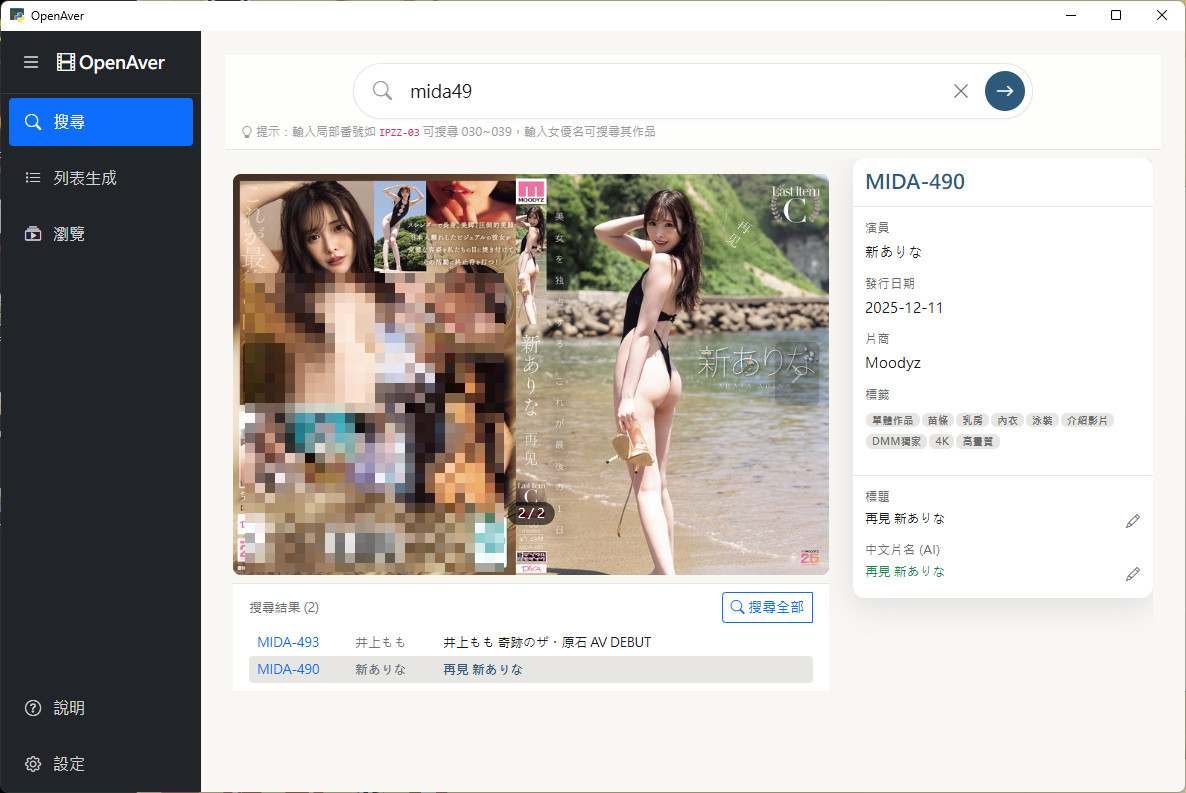
- **8-source unified search**: One query simultaneously hits JavBus, Jav321, JavDB, DMM, D2Pass, HEYZO, FC2, and AVSOX; results are automatically matched against your local library and flagged if already in your collection.
- **Full detail view**: Cover, stills, cast, and tags in one place — no tab-hopping.
- **Smart search**: Search by ID, actress name, series, or maker.
- **Version detection**: Automatically identifies UC / LEAK / 4K variants — no manual renaming needed when organizing.
- **Local batch search**: Drag in video files or a folder — IDs are extracted automatically and batch-searched for metadata, covers, and stills.
- **Advanced re-scrape**: When an ID won't resolve or you want a different source, change the ID and re-fetch from a specific source, then preview the result card before deciding whether to overwrite.
### 📋 Scanner (Library Building & Metadata Management)
- **Scan & build library**: Scans your local video folders, builds a SQLite metadata database, and automatically imports any existing NFO files and covers.
- **NFO / cover completion**: Detects missing NFO fields or files and fills them in from the web with one click — **new NFO / cover files are written next to the video** (in-place), the video itself is never touched. (NFO = an XML file placed beside your video that stores title, cast, tags, and cover for Jellyfin / Emby / Kodi to read.)
- **Actress & tag alias management**: Add and edit aliases live through the GUI — no config files or XML editing. Search automatically expands Chinese/Japanese/English synonyms (e.g. "Maid=メイド=女僕") and all stage names and post-retirement names for the same person.
- **Scrape-source management**: Toggle each source on/off and drag to reorder by preference (want a particular site's covers? move it to the top) — changes take effect instantly. One click switches to "uncensored mode" to use only uncensored sources.
- **Subtitle & VR tag preservation**: When relocating videos, subtitle files in the same directory are detected and moved along. VR videos preserve the original filename's projection/stereo tags (e.g. `_180_LR`, `mkx200`) so VR players like Skybox / DeoVR / HereSphere detect the format correctly.
### 📀 Read-only sources → generated library + `.strm` streaming
Want to plug a NAS, a cloud mount, or any "don't let a tool touch it" original collection into your living-room media center — without copying terabytes of originals? Mark the source **read-only**:
- **Not a single byte touched**: A scan source marked "read-only" is never moved, modified, or written to — OpenAver only reads its metadata. The scraped NFO + cover + extrafanart are all written to a **local** output folder you choose, one folder per title.
- **`.strm` feeds the media center directly**: Instead of duplicating the originals, OpenAver generates `.strm` files pointing at the source's original location, so **Emby / Jellyfin / Kodi** stream them directly on scan. It turns OpenAver into a "metadata-only, no-files" scraping front end — picking up where the now-unmaintained MDCX left off.
- **Cross-machine path mapping**: When the path OpenAver sees differs from what the media server sees (different mount points / WSL / UNC), set a replacement rule that rewrites it into the `.strm`; change the rule later and existing `.strm` files are rewritten to match.
### 🌐 AI Translation
- Translate Japanese titles into your UI locale (Traditional Chinese, Simplified Chinese, English) in one click — Japanese locale skips translation since titles are already in Japanese.
- Supports **Ollama** (local GPU, free & unlimited), **Gemini Flash** (free tier available), and **OpenAI API Compatible** (OpenRouter, any compatible endpoint).
### ⚙️ Settings
- **Multi-language UI**: Traditional Chinese, Simplified Chinese, Japanese, English — instant switch.
- **Path & naming rules**: Flexible output path configuration with `{suffix}` variable support.
- **Favorites folders**: Save the **video folder paths** you use most often (not actress favorites) — one-click load and auto-search.
- **External media manager mode (optional)**: Choose Jellyfin / Emby / Kodi, and scraping auto-generates correctly-named poster + fanart plus a compatible NFO — plug it into your living-room media center and it displays correctly right away. (Poster + NFO work on all three; `{stem}-fanart` is read by Jellyfin/Kodi only — Emby does not recognize this fanart filename.)
- **Static HTML export**: Generates a standalone HTML index file you can browse offline without any server.
### 🔌 Scrape-Source Expansion: Metatube Federation (Advanced, Optional)
The 8 built-in sources work out of the box — no extra deployment needed. If you want more sources, or an extra layer of insurance for your library:
- **30+ additional sources**: In advanced settings, connect your self-hosted [Metatube](https://github.com/metatube-community/metatube-sdk-go) server to expand from 8 built-ins to **30+ community-maintained providers** — uncensored titles and niche makers covered in one step.
- **A decoupled fallback layer**: Metatube is an actively maintained open-source scrape layer. Once connected, it acts independently, so even if a built-in source temporarily breaks, your enrichment pipeline keeps running through Metatube.
- **Advanced and optional — doesn't touch the main path**: Metatube requires self-hosting (Docker or binary) and is aimed at advanced users. Leaving it disabled has zero impact on the default "no Docker, works out of the box" experience.
### 🤖 AI-Ready API
OpenAver ships a capabilities manifest — your AI agent reads it once and knows every endpoint. It doesn't just look things up; it chains multiple steps to handle the tedious work you'd never bother doing by hand.
**One sentence, full automated workflow:**
- **"Add my top 20 actresses by video count to favorites, skip ones already saved."**
SQL stats → dedup check → batch favorite → download photos
- **"橋本ありな and 新ありな are the same person and she's retired — tag them."**
Create alias link → find all videos under both names → batch-tag "retired"
- **"Turn the video IDs in this article into an HTML page with covers."**
Parse IDs → batch search → download covers → generate gallery HTML
No SDK. No docs to read. One curl, and your AI learns every endpoint:
```bash
curl http://localhost:/api/capabilities
```
> The port and full URL are shown on the Settings page under "AI API".
Supported AI tools · Advanced usage · Power-user easter egg
Works with any function-calling compatible AI tool:
| Method | Tools | Notes |
|--------|-------|-------|
| **CLI** | Claude Code, Codex CLI, Gemini CLI, Aider, etc. | Just `curl` from the terminal — all CLI agents supported |
| **IDE** | Cursor, GitHub Copilot in VS Code, Windsurf, Trae, etc. | Agent mode calling the local REST API |
| **Desktop App** | Codex App, Google Antigravity 2.0, Claude Cowork, OpenClaw | No dev environment needed, works out of the box |
> 💡 Want covers to show up in the chat? **Codex App (inline chat)** or **Google Antigravity 2.0 (artifact panel)** both display covers directly in your conversation flow. Easy to install, works out of the box.
> ⚡ **Small-model friendly**: The capabilities manifest is optimized for lightweight models — Gemini Flash / GPT mini / Claude Haiku can all operate every endpoint correctly.
> 💻 **Want your AI to pre-read the repo, or extend endpoints yourself?** Every endpoint is defined in [`web/routers/capabilities.py`](web/routers/capabilities.py) — AI agents cloning the repo will read this file first and learn every tool without even starting the server.
> 🪄 **Power-user easter egg: auto-identify actresses in FC2 videos.** FC2 videos almost never have actress tags, but many feature familiar faces who later debuted in censored productions (Shirakami Sakura is a classic case). SQL pulls titles with an empty actress field → DeepFace (RetinaFace + ArcFace) matches against the Gfriends library → `POST /api/user-tags` writes the tags back. 50 lines of Python runs your whole library over a weekend; manually favorite the ones you like, and unidentified amateurs get auto-clustered into groups via DBSCAN for direct matching next time.
---
## FAQ
**How is OpenAver different from Jellyfin / Emby / Kodi?**
They serve different roles. Jellyfin / Emby / Kodi are media servers for putting your videos on the living-room TV — organized by title and folder, one movie at a time. OpenAver is your personal ID collection room: browse by cover wall, branch out sideways by tag, dig deep by actress, search, organize, and explore similar titles, all in one place. They complement each other: once you want to throw a title onto the living-room media center, one click exports NFO + cover art for Jellyfin / Emby / Kodi.
**Does OpenAver need Docker?**
No. OpenAver is a desktop app installed with a single command on Windows / macOS — no Docker, no CLI. Once installed, everything runs in the GUI.
**Does OpenAver work on Mac?**
Yes. Windows 10/11 and macOS (Apple Silicon M1–M4) both supported.
**Will OpenAver move, rename, or delete my files?**
The default mode is read-only — searching and browsing never touch your files, and scanning only reads. Files are moved or renamed **only** when you actively press "Organize," following the rules you've set. **OpenAver never deletes files.** If there's already a file at the target location with the same name, you'll be prompted before anything is overwritten. NFO and cover files are **added** next to the video (written in-place) — the video itself is never touched.
**Can OpenAver keep running after I close its window on Windows?**
Yes. Clicking X lets you choose to exit or minimize to the system tray, with a "don't ask again" option to remember your choice. Single- or double-click the OpenAver icon in the tray to reopen. You can also change this behavior later under Settings → System → On window close.
**What if a built-in scraper source breaks?**
The 8 built-in sources fall back on each other — if one is temporarily down you can still fill in from the others. Advanced users can additionally connect a self-hosted Metatube server for 30+ more sources, giving your library an independent fallback pipeline.
**Why can't JavLibrary be used for AI batch scraping?**
Because OpenAver respects JavLibrary's site-wide Cloudflare human verification. Desktop users are real humans — when verification is needed or has expired, a real JavLibrary browser window pops up, you click through it once, and the app automatically retries and fills in the result. This is why JavLibrary (BETA) only supports manual, exact-ID lookup in the desktop app; it doesn't participate in batch or automated search, and it's not exposed to AI agents. The upside: long-tail IDs and community tags that even Metatube's 30+ sources don't cover become accessible — in a way that respects the site.
**Can AI tools operate OpenAver?**
Yes. The built-in REST API + capabilities manifest means one `curl` teaches your AI every endpoint, and it can run multi-step workflows from a single prompt (see AI-Ready API above).
**Does OpenAver collect data or upload my local files?**
No. 100% local — no data collection, no file uploads. Network requests are only used to scrape publicly available metadata.
---
## Developer Guide
Tech stack · Run from source · Directory structure · Building
### Tech Stack
| Layer | Technology |
|-------|-----------|
| **Backend** | FastAPI (Python 3.12) |
| **Frontend** | Jinja2 + DaisyUI + Tailwind CSS + Alpine.js 3.x + Fluent Design 2 |
| **Animation** | GSAP 3.14+ + Motion Adapter (reduced-motion support) |
| **Desktop Shell** | PyWebView (Windows / macOS) |
| **Database** | SQLite (WAL mode) |
| **Testing** | Pytest (5,000+ tests) |
### Run from Source
**Prerequisites**: Python 3.12 (matches the packaged build), Chrome/Edge, [WebView2 Runtime](https://go.microsoft.com/fwlink/p/?LinkId=2124703) (Windows 10/VM)
```bash
git clone https://github.com/slive777/OpenAver.git
cd OpenAver
python3 -m venv venv
source venv/bin/activate # Windows: venv\Scripts\activate
pip install -r requirements.txt
# Development mode (hot reload)
uvicorn web.app:app --reload --host 0.0.0.0 --port 8000
# Desktop mode (Windows)
python windows/launcher.py
```
### Running Tests
```bash
source venv/bin/activate
pytest
```
### Directory Structure
```
OpenAver/
├── web/ # Web GUI (FastAPI)
│ ├── routers/
│ │ ├── capabilities.py # 🌟 AI Manifest — self-describing definitions of every endpoint (single file)
│ │ └── ... # Other business endpoints (search / scanner / scraper / actress / ...)
│ ├── templates/ # HTML templates (DaisyUI + Fluent Design 2)
│ └── static/ # CSS/JS assets (modular JS, theme CSS)
├── core/ # Core logic
│ ├── scrapers/ # Modular scrapers (JavBus/JavDB/Jav321/FC2/AVSOX/DMM/D2Pass/HEYZO)
│ ├── database.py # SQLite data layer (WAL mode)
│ ├── organizer.py # File organizer + null-value fallback guards
│ ├── path_utils.py # Cross-platform path handling (file:// URI)
│ ├── i18n.py # i18n core (t() / fallback chain)
│ └── translate_service.py # AI translation (Ollama/Gemini/OpenAI Compatible)
├── locales/ # 4-locale JSON (zh_TW/zh_CN/ja/en)
├── tests/ # Test suite (Pytest)
└── windows/ # Windows launcher (PyWebView)
```
### Building Packages
```bash
source venv/bin/activate
python build.py # Windows
python build_macos.py # macOS
```
---
## Troubleshooting
> 💡 See the Troubleshooting document included in the ZIP, or check the [GitHub Wiki](https://github.com/slive777/OpenAver/wiki).
---
## Community & Reporting Issues
Join the [Telegram group](https://t.me/+J-U2l96gv0FjZTBl) to discuss with other users!
| Channel | Best For |
|---------|----------|
| [GitHub Issues](https://github.com/slive777/OpenAver/issues) | Bug reports, feature requests, dev discussions |
| [Telegram group](https://t.me/+J-U2l96gv0FjZTBl) | Privacy-sensitive issues, direct screenshot/video uploads |
**When reporting**: include a description, steps to reproduce, OS version, and log file (run the Debug startup script to generate one).
---
## Acknowledgements
OpenAver is built on these excellent open-source projects:
- **[FastAPI](https://fastapi.tiangolo.com/)** — Modern, high-performance Python web framework
- **[PyWebView](https://pywebview.flowrl.com/)** — Lightweight cross-platform desktop shell
- **[GSAP](https://gsap.com/)** — Professional-grade JavaScript animation engine
- **[DaisyUI](https://daisyui.com/)** — Component library for Tailwind CSS
- **[Tailwind CSS](https://tailwindcss.com/)** — Utility-first CSS framework
- **[Alpine.js](https://alpinejs.dev/)** — Lightweight reactive JavaScript framework
## License
MIT License
---
⚠️ Disclaimer
This project is intended for personal, non-commercial use only. By using OpenAver, you agree to:
- Respect the terms of service of any website you scrape
- Use reasonable request rates to avoid overloading external services
- Not use this software for commercial purposes
You assume full responsibility for any consequences arising from your use of this project.